instrument panel CADILLAC XT5 2018 Owner's Guide
[x] Cancel search | Manufacturer: CADILLAC, Model Year: 2018, Model line: XT5, Model: CADILLAC XT5 2018Pages: 380, PDF Size: 6.21 MB
Page 184 of 380
Cadillac XT5 Owner Manual (GMNA-Localizing-U.S./Canada/Mexico-
11349110) - 2018 - CRC - 9/28/17
DRIVING AND OPERATING 183
.Turn on Traction Control. See
Traction Control/Electronic Stability
Control 0205.
. Antilock Brake System (ABS)
improves vehicle stability during
hard stops, but the brakes should
be applied sooner than when on
dry pavement. See Antilock Brake
System (ABS) 0202.
. Allow greater following distance
and watch for slippery spots. Icy
patches can occur on otherwise
clear roads in shaded areas. The
surface of a curve or an overpass
can remain icy when the
surrounding roads are clear. Avoid
sudden steering maneuvers and
braking while on ice.
. Turn off cruise control.
. Select All-Wheel Drive (AWD)
mode. See Driver Mode Control
0 207 and All-Wheel Drive 0201.
Blizzard Conditions
Stop the vehicle in a safe place and
signal for help. Stay with the vehicle
unless there is help nearby. If possible, use Roadside Assistance. See
Roadside
Service 0347. To get help and keep
everyone in the vehicle safe:
. Turn on the hazard warning
flashers.
. Tie a red cloth to an outside
mirror.
{Warning
Snow can trap engine exhaust
under the vehicle. This may cause
exhaust gases to get inside. Engine
exhaust contains carbon monoxide
(CO), which cannot be seen or
smelled. It can cause
unconsciousness and even death.
If the vehicle is stuck in snow:
. Clear snow from the base of
the vehicle, especially any
blocking the exhaust pipe.
. Open a window about 5 cm
(2 in) on the vehicle side that
is away from the wind, to
bring in fresh air.
(Continued)
Warning (Continued)
.Fully open the air outlets on
or under the instrument
panel.
. Adjust the climate control
system to circulate the air
inside the vehicle and set the
fan speed to the highest
setting. See “Climate Control
Systems.”
For more information about CO, see
Engine Exhaust 0195.
To save fuel, run the engine for short
periods to warm the vehicle and then
shut the engine off and partially close
the window. Moving about to keep
warm also helps.
If it takes time for help to arrive,
when running the engine, push the
accelerator pedal slightly so the
engine runs faster than the idle speed.
This keeps the battery charged to
restart the vehicle and to signal for
help with the headlamps. Do this as
little as possible, to save fuel.
Page 214 of 380
Cadillac XT5 Owner Manual (GMNA-Localizing-U.S./Canada/Mexico-
11349110) - 2018 - CRC - 9/28/17
DRIVING AND OPERATING 213
ACC can also be set while the vehicle
is stopped if ACC is on and the brake
pedal is applied.
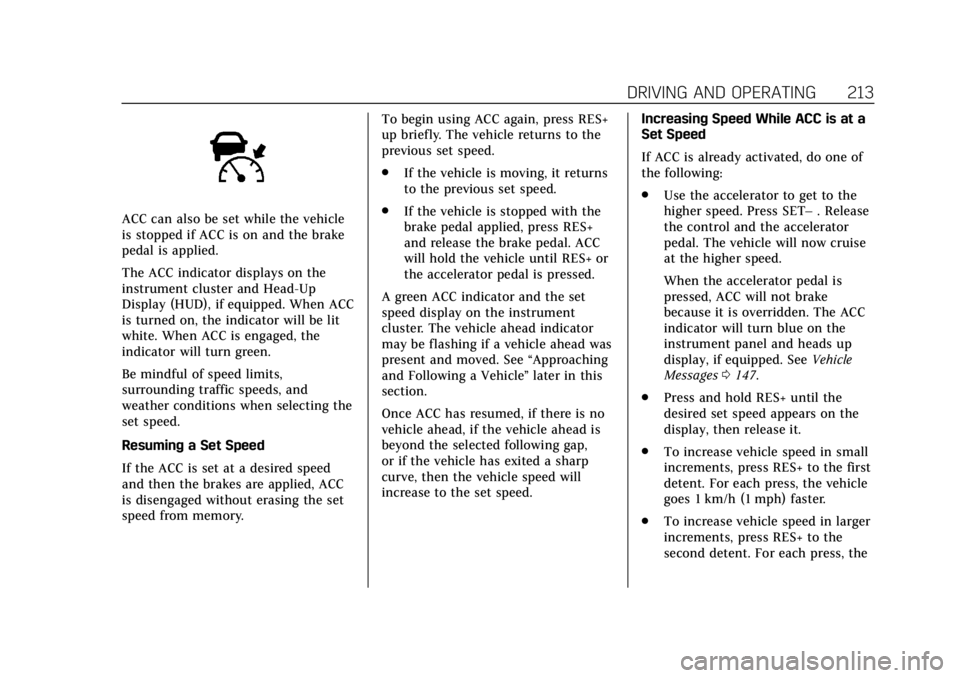
The ACC indicator displays on the
instrument cluster and Head-Up
Display (HUD), if equipped. When ACC
is turned on, the indicator will be lit
white. When ACC is engaged, the
indicator will turn green.
Be mindful of speed limits,
surrounding traffic speeds, and
weather conditions when selecting the
set speed.
Resuming a Set Speed
If the ACC is set at a desired speed
and then the brakes are applied, ACC
is disengaged without erasing the set
speed from memory.To begin using ACC again, press RES+
up briefly. The vehicle returns to the
previous set speed.
.
If the vehicle is moving, it returns
to the previous set speed.
. If the vehicle is stopped with the
brake pedal applied, press RES+
and release the brake pedal. ACC
will hold the vehicle until RES+ or
the accelerator pedal is pressed.
A green ACC indicator and the set
speed display on the instrument
cluster. The vehicle ahead indicator
may be flashing if a vehicle ahead was
present and moved. See “Approaching
and Following a Vehicle ”later in this
section.
Once ACC has resumed, if there is no
vehicle ahead, if the vehicle ahead is
beyond the selected following gap,
or if the vehicle has exited a sharp
curve, then the vehicle speed will
increase to the set speed. Increasing Speed While ACC is at a
Set Speed
If ACC is already activated, do one of
the following:
.
Use the accelerator to get to the
higher speed. Press SET– . Release
the control and the accelerator
pedal. The vehicle will now cruise
at the higher speed.
When the accelerator pedal is
pressed, ACC will not brake
because it is overridden. The ACC
indicator will turn blue on the
instrument panel and heads up
display, if equipped. See Vehicle
Messages 0147.
. Press and hold RES+ until the
desired set speed appears on the
display, then release it.
. To increase vehicle speed in small
increments, press RES+ to the first
detent. For each press, the vehicle
goes 1 km/h (1 mph) faster.
. To increase vehicle speed in larger
increments, press RES+ to the
second detent. For each press, the
Page 242 of 380
Cadillac XT5 Owner Manual (GMNA-Localizing-U.S./Canada/Mexico-
11349110) - 2018 - CRC - 9/28/17
DRIVING AND OPERATING 241
{Warning
When towing a trailer, exhaust
gases may collect at the rear of the
vehicle and enter if the liftgate,
trunk/hatch, or rear-most window
is open.
When towing a trailer:. Do not drive with the liftgate,
trunk/hatch, or rear-most
window open.
. Fully open the air outlets on
or under the instrument
panel.
. Also adjust the climate
control system to a setting
that brings in only outside air.
See “Climate Control Systems ”
in the Index.
For information about carbon
monoxide, see Engine Exhaust
0 195.
Towing a trailer requires a certain
amount of experience. The
combination you are driving is longer and not as responsive as the vehicle
itself. Get acquainted with the
handling and braking of the rig before
setting out for the open road.
Before starting, check all trailer hitch
parts and attachments, safety chains,
electrical connectors, lamps, tires, and
mirrors. If the trailer has electric
brakes, start the combination moving
and then apply the trailer brake
controller by hand to be sure the
brakes work.
During the trip, check occasionally to
be sure that the load is secure and the
lamps and any trailer brakes
still work.
Towing with a Stability Control
System
When towing, the sound of the
stability control system might be
heard. The system is reacting to the
vehicle movement caused by the
trailer, which mainly occurs during
cornering. This is normal when towing
heavier trailers.
Following Distance
Stay at least twice as far behind the
vehicle ahead as you would when
driving the vehicle without a trailer.
This can help to avoid situations that
require heavy braking and sudden
turns.
Passing
More passing distance is needed when
towing a trailer. Because the rig is
longer, it is necessary to go farther
beyond the passed vehicle before
returning to the lane.
Backing Up
Hold the bottom of the steering wheel
with one hand. To move the trailer to
the left, move your hand to the left.
To move the trailer to the right, move
your hand to the right. Always back
up slowly and, if possible, have
someone guide you.
Page 248 of 380
Cadillac XT5 Owner Manual (GMNA-Localizing-U.S./Canada/Mexico-
11349110) - 2018 - CRC - 9/28/17
DRIVING AND OPERATING 247
Electric Trailer Brake Control Wiring
Provisions
These wiring provisions for an electric
trailer brake controller are included
with the vehicle as part of the trailer
wiring package. The instrument panel
contains blunt cut wires above the
parking brake assembly for the electric
trailer brake controller. The harness
contains the following wires:
.Blue: To Trailer
. Red/Black or Red/Blue:
Battery Feed
. White/Blue: Brake Apply Signal
. Black: Ground
The electric trailer brake controller
should be installed by your dealer or a
qualified service center.Trailer Sway Control (TSC)
Vehicles with StabiliTrak have a
Trailer Sway Control (TSC) feature.
Trailer sway is unintended side-to-side
motion of a trailer while being towed.
If the vehicle is towing a trailer and
the TSC detects that sway is
increasing, the vehicle brakes are
selectively applied at each wheel, to
help reduce excessive trailer sway.
If the vehicle is equipped with the
Integrated Trailer Brake Control
(ITBC) system, and the trailer has the
electric actuated brake system,
StabiliTrak may also apply the trailer
brakes.
If TSC is enabled, the Traction Control
System (TCS)/StabiliTrak warning
light will flash on the instrument
cluster. Vehicle speed must be
reduced. If trailer sway continues,
StabiliTrak can reduce engine torque
to help slow the vehicle. See Traction
Control/Electronic Stability Control
0 205.{Warning
Even if the vehicle is equipped with
TSC, trailer sway could result in
loss of control and the vehicle could
crash. If excessive trailer sway is
detected, slow down to a safe speed.
Check the trailer and vehicle to help
correct possible causes. These could
include an improperly or overloaded
trailer, unrestrained cargo, improper
trailer hitch configuration, excessive
vehicle-trailer speed, or improperly
inflated or incorrect vehicle or
trailer tires. See Towing Equipment
0 245 for trailer ratings and hitch
setup recommendations.
Adding non-dealer accessories can
affect the vehicle performance. See
Accessories and Modifications 0251.
Page 250 of 380
Cadillac XT5 Owner Manual (GMNA-Localizing-U.S./Canada/Mexico-
11349110) - 2018 - CRC - 9/28/17
VEHICLE CARE 249
Vehicle Care
General Information
General Information . . . . . . . . . . . . . 250
California Proposition65 Warning . . . . . . . . . . . . . . . . . . . . . 250
California Perchlorate Materials Requirements . . . . . . . . . . . . . . . . . . . 251
Accessories and Modifications . . . . . . . . . . . . . . . . . . . 251
Vehicle Checks
Doing Your OwnService Work . . . . . . . . . . . . . . . . . . . . 251
Hood . . . . . . . . . . . . . . . . . . . . . . . . . . . . . . 252
Engine Compartment Overview . . . . . . . . . . . . . . . . . . . . . . . . . 253
Engine Oil . . . . . . . . . . . . . . . . . . . . . . . . . 254
Engine Oil Life System . . . . . . . . . . . 256
Automatic Transmission Fluid . . . . . . . . . . . . . . . . . . . . . . . . . . . . . 257
Engine Air Cleaner/Filter . . . . . . . . . 257
Cooling System . . . . . . . . . . . . . . . . . . . 258
Engine Overheating . . . . . . . . . . . . . . 261
Washer Fluid . . . . . . . . . . . . . . . . . . . . . 263
Brakes . . . . . . . . . . . . . . . . . . . . . . . . . . . . . 263
Brake Fluid . . . . . . . . . . . . . . . . . . . . . . . 264
Battery - North America . . . . . . . . . 265
All-Wheel Drive . . . . . . . . . . . . . . . . . . 266 Starter Switch Check . . . . . . . . . . . . . 266
Park Brake and P (Park)
Mechanism Check . . . . . . . . . . . . . . 266
Wiper Blade Replacement . . . . . . . 267
Windshield Replacement . . . . . . . . 268
Gas Strut(s) . . . . . . . . . . . . . . . . . . . . . . . 268
Headlamp Aiming
Headlamp Aiming . . . . . . . . . . . . . . . . 269
Bulb Replacement
Bulb Replacement . . . . . . . . . . . . . . . . 270
Halogen Bulbs . . . . . . . . . . . . . . . . . . . . 270
LED Lighting . . . . . . . . . . . . . . . . . . . . . 270
Headlamps and Front Turn Signal . . . . . . . . . . . . . . . . . . . . . . . . . . . . 270
Back-Up Lamps . . . . . . . . . . . . . . . . . . . 271
Electrical System
Electrical System Overload . . . . . . 271
Fuses and Circuit Breakers . . . . . . 272
Engine Compartment Fuse Block . . . . . . . . . . . . . . . . . . . . . . . . . . . . 272
Instrument Panel Fuse Block . . . . 275
Rear Compartment Fuse Block . . . . . . . . . . . . . . . . . . . . . . . . . . . . 277
Wheels and Tires
Tires . . . . . . . . . . . . . . . . . . . . . . . . . . . . . . . 279
All-Season Tires . . . . . . . . . . . . . . . . . . 280
Winter Tires . . . . . . . . . . . . . . . . . . . . . . 280
Summer Tires . . . . . . . . . . . . . . . . . . . . 281 Tire Sidewall Labeling . . . . . . . . . . . 281
Tire Designations . . . . . . . . . . . . . . . . . 283
Tire Terminology and
Definitions . . . . . . . . . . . . . . . . . . . . . . 284
Tire Pressure . . . . . . . . . . . . . . . . . . . . . . 286
Tire Pressure for High-Speed
Operation . . . . . . . . . . . . . . . . . . . . . . . . 288
Tire Pressure Monitor System . . . 288
Tire Pressure Monitor Operation . . . . . . . . . . . . . . . . . . . . . . . . 289
Tire Inspection . . . . . . . . . . . . . . . . . . . 293
Tire Rotation . . . . . . . . . . . . . . . . . . . . . 293
When It Is Time for New Tires . . . . . . . . . . . . . . . . . . . . . . . . . . . . . 294
Buying New Tires . . . . . . . . . . . . . . . . 295
Different Size Tires and Wheels . . . . . . . . . . . . . . . . . . . . . . . . . . 296
Uniform Tire Quality Grading . . . 297
Wheel Alignment and Tire Balance . . . . . . . . . . . . . . . . . . . . . . . . . . 298
Wheel Replacement . . . . . . . . . . . . . . 298
Tire Chains . . . . . . . . . . . . . . . . . . . . . . . 299
If a Tire Goes Flat . . . . . . . . . . . . . . . . 300
Tire Sealant and Compressor Kit . . . . . . . . . . . . . . . . . 301
Storing the Tire Sealant and Compressor Kit . . . . . . . . . . . . . . . . . 307
Tire Changing . . . . . . . . . . . . . . . . . . . . . 308
Compact Spare Tire . . . . . . . . . . . . . . 313
Page 253 of 380
Cadillac XT5 Owner Manual (GMNA-Localizing-U.S./Canada/Mexico-
11349110) - 2018 - CRC - 9/28/17
252 VEHICLE CARE
Keep a record with all parts receipts
and list the mileage and the date of
any service work performed. See
Maintenance Records0339.
Caution
Even small amounts of
contamination can cause damage to
vehicle systems. Do not allow
contaminants to contact the fluids,
reservoir caps, or dipsticks.
Hood
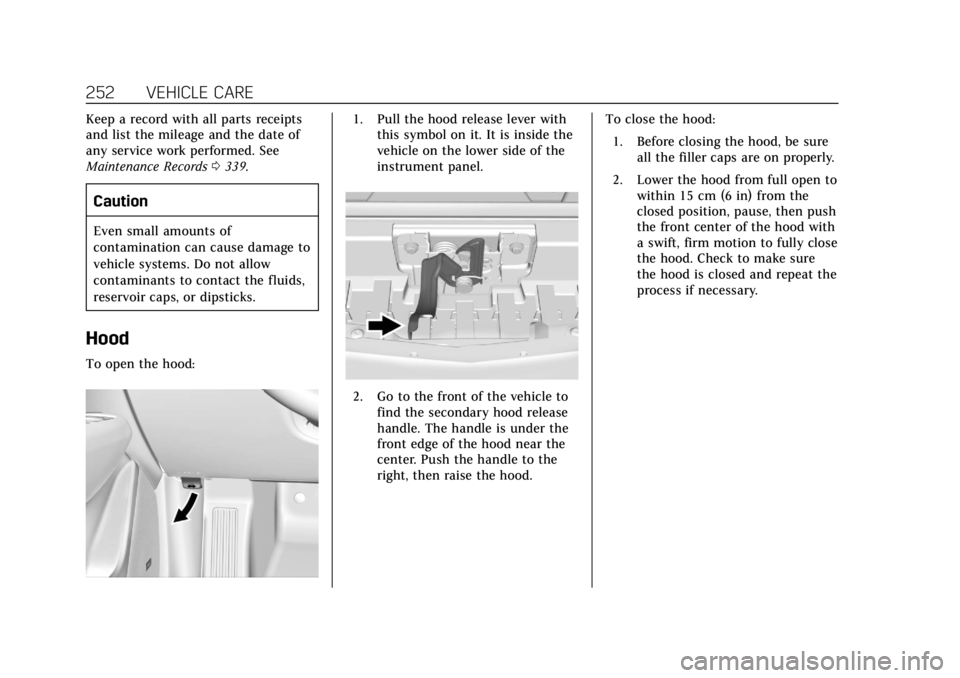
To open the hood:
1. Pull the hood release lever with
this symbol on it. It is inside the
vehicle on the lower side of the
instrument panel.
2. Go to the front of the vehicle to
find the secondary hood release
handle. The handle is under the
front edge of the hood near the
center. Push the handle to the
right, then raise the hood. To close the hood:
1. Before closing the hood, be sure all the filler caps are on properly.
2. Lower the hood from full open to within 15 cm (6 in) from the
closed position, pause, then push
the front center of the hood with
a swift, firm motion to fully close
the hood. Check to make sure
the hood is closed and repeat the
process if necessary.
Page 276 of 380
Cadillac XT5 Owner Manual (GMNA-Localizing-U.S./Canada/Mexico-
11349110) - 2018 - CRC - 9/28/17
VEHICLE CARE 275
FusesUsage
F66 Engine control module powertrain 2
F67 Powertrain TRCM
F68 –
F69 –
F70 –
F71 –
F72 –
F73 –
F74 –
F75 –
F76 –
F77 –
Relays Usage
K1 Starter 1
K2 Run/Crank
K3 Starter 3
K4 LED/Automatic headlamps
K5 – Relays
Usage
K6 Coolant pump
K7 Engine control module
K8 Air conditioning
K9 –
K10 Starter 2
Instrument Panel Fuse
Block
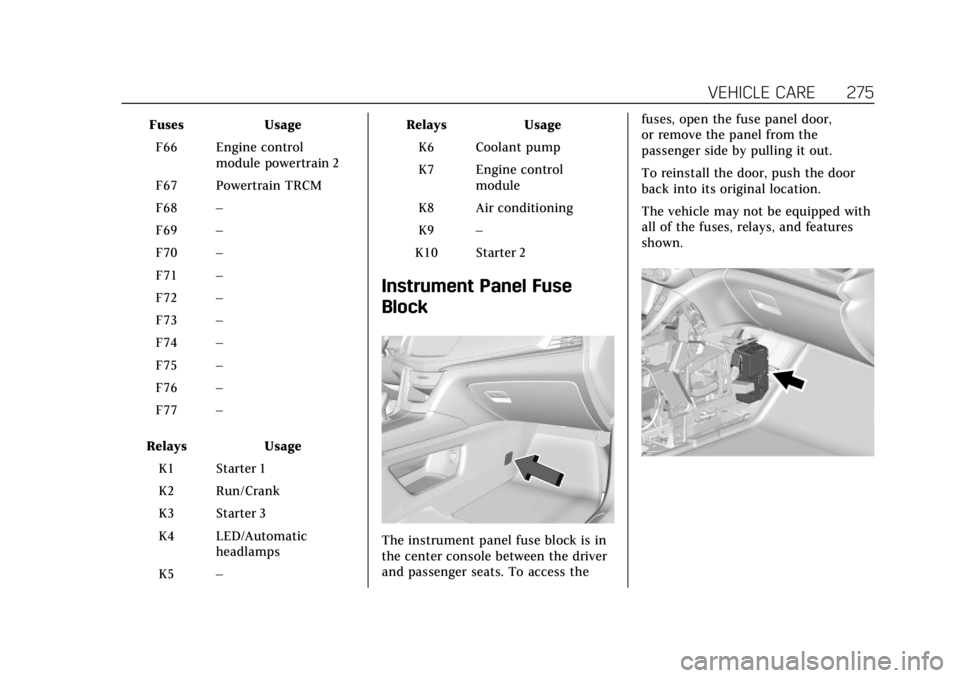
The instrument panel fuse block is in
the center console between the driver
and passenger seats. To access the fuses, open the fuse panel door,
or remove the panel from the
passenger side by pulling it out.
To reinstall the door, push the door
back into its original location.
The vehicle may not be equipped with
all of the fuses, relays, and features
shown.
Page 277 of 380
Cadillac XT5 Owner Manual (GMNA-Localizing-U.S./Canada/Mexico-
11349110) - 2018 - CRC - 9/28/17
276 VEHICLE CARE
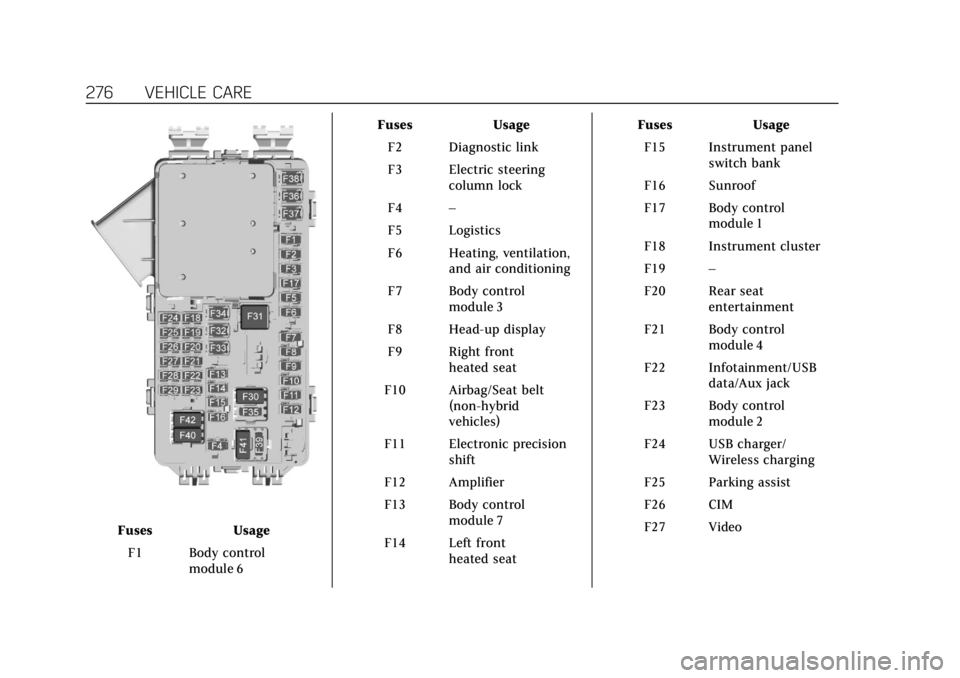
FusesUsage
F1 Body control module 6 Fuses
Usage
F2 Diagnostic link
F3 Electric steering column lock
F4 –
F5 Logistics
F6 Heating, ventilation, and air conditioning
F7 Body control module 3
F8 Head-up display
F9 Right front heated seat
F10 Airbag/Seat belt (non-hybrid
vehicles)
F11 Electronic precision shift
F12 Amplifier
F13 Body control module 7
F14 Left front heated seat Fuses
Usage
F15 Instrument panel switch bank
F16 Sunroof
F17 Body control module 1
F18 Instrument cluster
F19 –
F20 Rear seat entertainment
F21 Body control module 4
F22 Infotainment/USB data/Aux jack
F23 Body control module 2
F24 USB charger/ Wireless charging
F25 Parking assist
F26 CIM
F27 Video
Page 326 of 380
Cadillac XT5 Owner Manual (GMNA-Localizing-U.S./Canada/Mexico-
11349110) - 2018 - CRC - 9/28/17
VEHICLE CARE 325
.For solid soils, remove as much as
possible prior to vacuuming.
To clean: 1. Saturate a clean, lint-free colorfast cloth with water.
Microfiber cloth is recommended
to prevent lint transfer to the
fabric or carpet.
2. Remove excess moisture by gently wringing until water does
not drip from the cleaning cloth.
3. Start on the outside edge of the soil and gently rub toward the
center. Fold the cleaning cloth to
a clean area frequently to
prevent forcing the soil in to the
fabric.
4. Continue gently rubbing the soiled area until there is no
longer any color transfer from
the soil to the cleaning cloth.
5. If the soil is not completely removed, use a mild soap
solution followed only by plain
water. If the soil is not completely removed,
it may be necessary to use a
commercial upholstery cleaner or spot
lifter. Test a small hidden area for
colorfastness before using a
commercial upholstery cleaner or spot
lifter. If ring formation occurs, clean
the entire fabric or carpet.
After cleaning, use a paper towel to
blot excess moisture.
Cleaning High Gloss Surfaces
and Vehicle Information and
Radio Displays
Use a microfiber cloth on high gloss
surfaces or vehicle displays. First, use
a soft bristle brush to remove dirt that
can scratch the surface. Then gently
clean by rubbing with a microfiber
cloth. Never use window cleaners or
solvents. Periodically hand wash the
microfiber cloth separately, using mild
soap. Do not use bleach or fabric
softener. Rinse thoroughly and air dry
before next use.
Caution
Do not attach a device with a
suction cup to the display. This may
cause damage and would not be
covered by the vehicle warranty.
Instrument Panel, Leather, Vinyl,
Other Plastic Surfaces, Low
Gloss Paint Surfaces, and
Natural Open Pore Wood
Surfaces
Use a soft microfiber cloth dampened
with water to remove dust and loose
dirt. For a more thorough cleaning,
use a soft microfiber cloth dampened
with a mild soap solution.
Caution
Soaking or saturating leather,
especially perforated leather, as well
as other interior surfaces, may
cause permanent damage. Wipe
excess moisture from these surfaces
after cleaning and allow them to
(Continued)
Page 327 of 380
Cadillac XT5 Owner Manual (GMNA-Localizing-U.S./Canada/Mexico-
11349110) - 2018 - CRC - 9/28/17
326 VEHICLE CARE
Caution (Continued)
dry naturally. Never use heat,
steam, or spot removers. Do not use
cleaners that contain silicone or
wax-based products. Cleaners
containing these solvents can
permanently change the appearance
and feel of leather or soft trim, and
are not recommended.
Do not use cleaners that increase
gloss, especially on the instrument
panel. Reflected glare can decrease
visibility through the windshield
under certain conditions.
Caution
Use of air fresheners may cause
permanent damage to plastics and
painted surfaces. If an air freshener
comes in contact with any plastic
or painted surface in the vehicle,
blot immediately and clean with a
soft cloth dampened with a mild (Continued)
Caution (Continued)
soap solution. Damage caused by
air fresheners would not be covered
by the vehicle warranty.
Cargo Cover and
Convenience Net
Wash with warm water and mild
detergent. Do not use chlorine bleach.
Rinse with cold water, and then dry
completely.
Care of Seat Belts
Keep belts clean and dry.
{Warning
Do not bleach or dye seat belt
webbing. It may severely weaken
the webbing. In a crash, they might
not be able to provide adequate
protection. Clean and rinse seat belt
webbing only with mild soap and
lukewarm water. Allow the webbing
to dry.
Floor Mats
{Warning
If a floor mat is the wrong size or is
not properly installed, it can
interfere with the pedals.
Interference with the pedals can
cause unintended acceleration and/
or increased stopping distance
which can cause a crash and injury.
Make sure the floor mat does not
interfere with the pedals.
Use the following guidelines for
proper floor mat usage.
. The original equipment floor mats
were designed for your vehicle.
If the floor mats need replacing, it
is recommended that certified
floor mats be purchased.
Non-certified floor mats may not
fit properly and may interfere with
the pedals. Always check that the
floor mats do not interfere with
the pedals.