Remote windows CADILLAC XT5 2019 User Guide
[x] Cancel search | Manufacturer: CADILLAC, Model Year: 2019, Model line: XT5, Model: CADILLAC XT5 2019Pages: 388, PDF Size: 6.29 MB
Page 37 of 388
Cadillac XT5 Owner Manual (GMNA-Localizing-U.S./Canada/Mexico-
12146119) - 2019 - crc - 7/27/18
36 KEYS, DOORS, AND WINDOWS
.Pull once on the door handle to
unlock the door and again to open
the door.
. On the rear doors, push down on
the door lock knob to lock the
door manually.
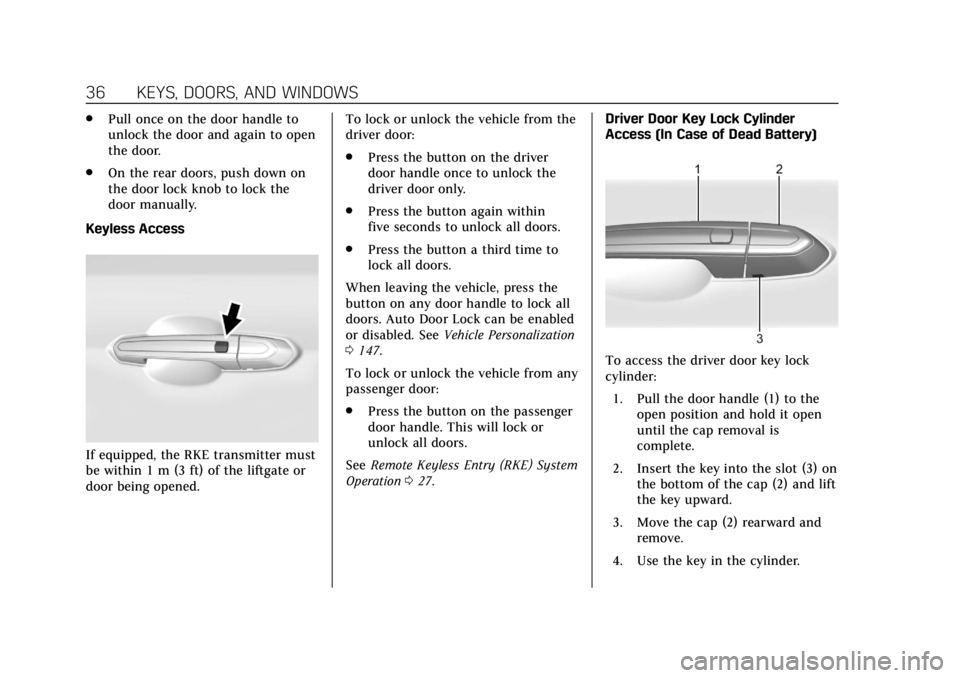
Keyless Access
If equipped, the RKE transmitter must
be within 1 m (3 ft) of the liftgate or
door being opened. To lock or unlock the vehicle from the
driver door:
.
Press the button on the driver
door handle once to unlock the
driver door only.
. Press the button again within
five seconds to unlock all doors.
. Press the button a third time to
lock all doors.
When leaving the vehicle, press the
button on any door handle to lock all
doors. Auto Door Lock can be enabled
or disabled. See Vehicle Personalization
0 147.
To lock or unlock the vehicle from any
passenger door:
. Press the button on the passenger
door handle. This will lock or
unlock all doors.
See Remote Keyless Entry (RKE) System
Operation 027. Driver Door Key Lock Cylinder
Access (In Case of Dead Battery)
To access the driver door key lock
cylinder:
1. Pull the door handle (1) to the open position and hold it open
until the cap removal is
complete.
2. Insert the key into the slot (3) on the bottom of the cap (2) and lift
the key upward.
3. Move the cap (2) rearward and remove.
4. Use the key in the cylinder.
Page 40 of 388
Cadillac XT5 Owner Manual (GMNA-Localizing-U.S./Canada/Mexico-
12146119) - 2019 - crc - 7/27/18
KEYS, DOORS, AND WINDOWS 39
Lockout Protection can be manually
overridden with the driver door open
by pressing and holding
Qon the
power door lock switch.
Unlocked Door Anti-Lockout
If Unlocked Door Anti-Lockout is
turned on and the vehicle is off, the
driver door is open, and locking is
requested, all the doors will lock and
the driver door will remain open.
Press the button again to lock the
driver door. The Unlocked Door
Anti-Lockout feature can be turned on
or off. See Vehicle Personalization
0 147.
Safety Locks
The rear door safety locks prevent
passengers from opening the rear
doors from inside the vehicle.
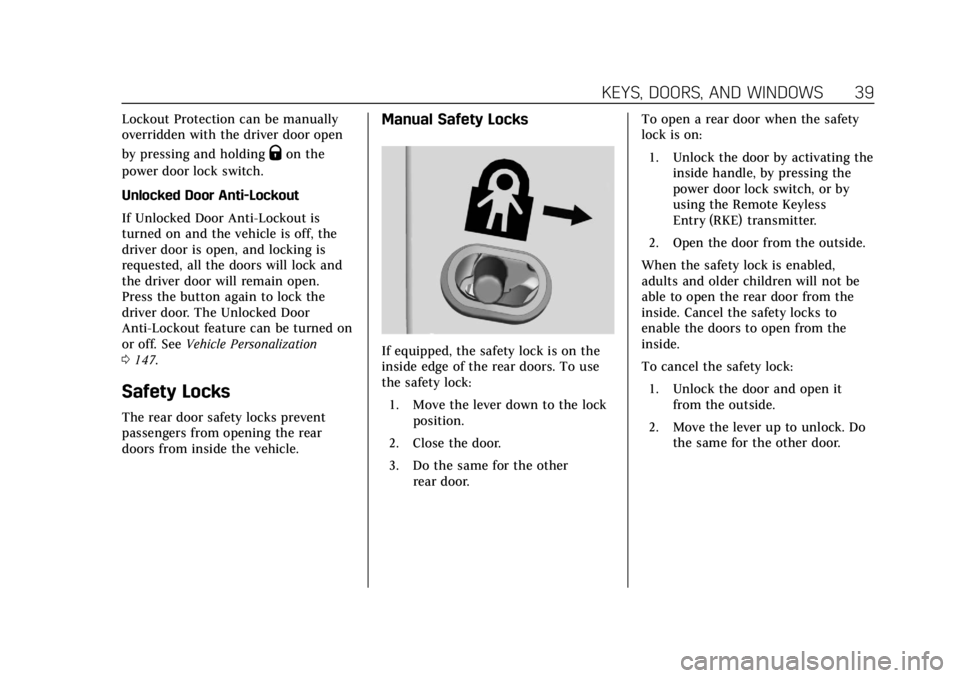
Manual Safety Locks
If equipped, the safety lock is on the
inside edge of the rear doors. To use
the safety lock:
1. Move the lever down to the lock position.
2. Close the door.
3. Do the same for the other rear door. To open a rear door when the safety
lock is on:
1. Unlock the door by activating the inside handle, by pressing the
power door lock switch, or by
using the Remote Keyless
Entry (RKE) transmitter.
2. Open the door from the outside.
When the safety lock is enabled,
adults and older children will not be
able to open the rear door from the
inside. Cancel the safety locks to
enable the doors to open from the
inside.
To cancel the safety lock:
1. Unlock the door and open it from the outside.
2. Move the lever up to unlock. Do the same for the other door.
Page 44 of 388
Cadillac XT5 Owner Manual (GMNA-Localizing-U.S./Canada/Mexico-
12146119) - 2019 - crc - 7/27/18
KEYS, DOORS, AND WINDOWS 43
Manual Operation
Select OFF to manually operate the
liftgate.
Caution
Attempting to move the liftgate too
quickly and with excessive force
may result in damage to the
vehicle.
Operate the liftgate manually with a
smooth motion and moderate speed.
The system includes a feature which
limits the manual closing speed to
protect the components.
To unlock the liftgate, press
Kon the
power door lock switch or press
Kon
the Remote Keyless Entry (RKE)
transmitter twice within five seconds.
See Remote Keyless Entry (RKE) System
Operation 027.
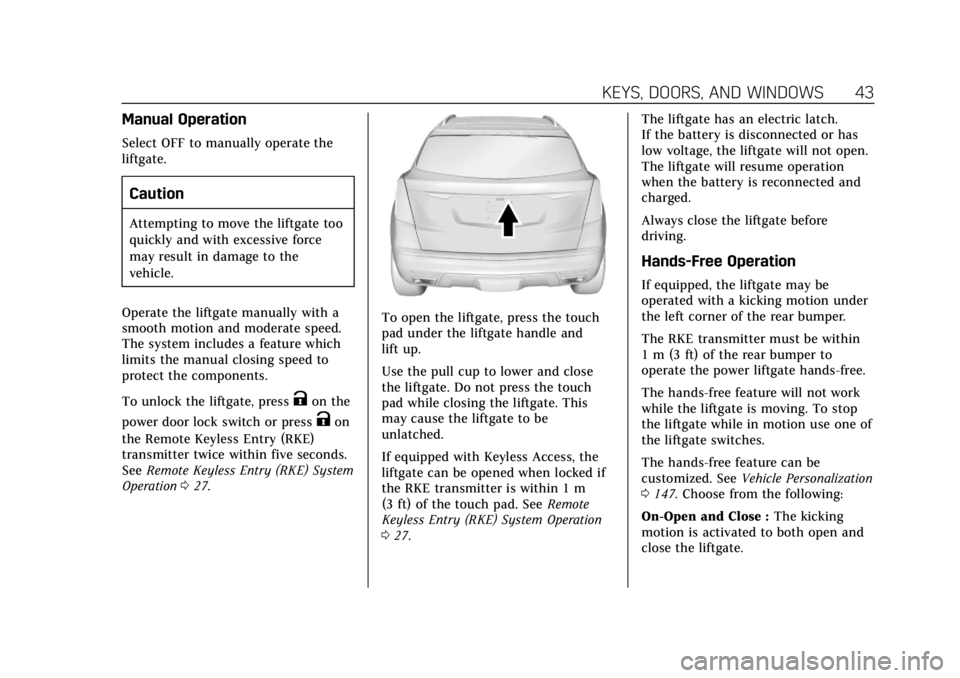
To open the liftgate, press the touch
pad under the liftgate handle and
lift up.
Use the pull cup to lower and close
the liftgate. Do not press the touch
pad while closing the liftgate. This
may cause the liftgate to be
unlatched.
If equipped with Keyless Access, the
liftgate can be opened when locked if
the RKE transmitter is within 1 m
(3 ft) of the touch pad. See Remote
Keyless Entry (RKE) System Operation
0 27. The liftgate has an electric latch.
If the battery is disconnected or has
low voltage, the liftgate will not open.
The liftgate will resume operation
when the battery is reconnected and
charged.
Always close the liftgate before
driving.
Hands-Free Operation
If equipped, the liftgate may be
operated with a kicking motion under
the left corner of the rear bumper.
The RKE transmitter must be within
1 m (3 ft) of the rear bumper to
operate the power liftgate hands-free.
The hands-free feature will not work
while the liftgate is moving. To stop
the liftgate while in motion use one of
the liftgate switches.
The hands-free feature can be
customized. See
Vehicle Personalization
0 147. Choose from the following:
On-Open and Close : The kicking
motion is activated to both open and
close the liftgate.
Page 48 of 388
Cadillac XT5 Owner Manual (GMNA-Localizing-U.S./Canada/Mexico-
12146119) - 2019 - crc - 7/27/18
KEYS, DOORS, AND WINDOWS 47
Immobilizer Operation
This vehicle has a passive
theft-deterrent system.
The system does not have to be
manually armed or disarmed.
The vehicle is automatically
immobilized when the vehicle is
turned off.
The immobilization system is
disarmed when the ignition is on or in
ACC/ACCESSORY and a valid
transmitter is present in the vehicle.
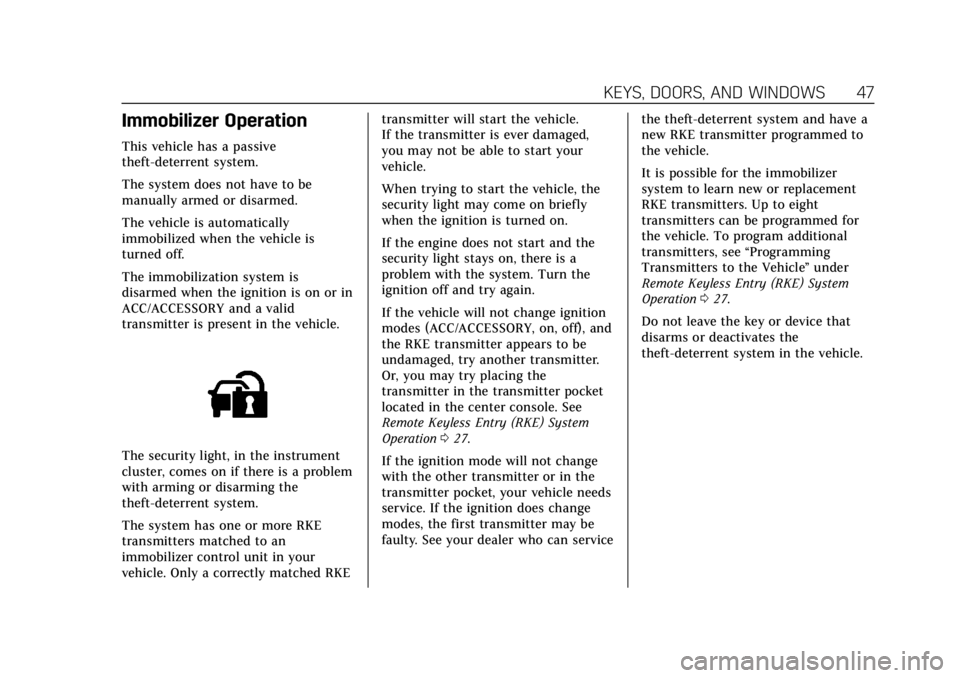
The security light, in the instrument
cluster, comes on if there is a problem
with arming or disarming the
theft-deterrent system.
The system has one or more RKE
transmitters matched to an
immobilizer control unit in your
vehicle. Only a correctly matched RKEtransmitter will start the vehicle.
If the transmitter is ever damaged,
you may not be able to start your
vehicle.
When trying to start the vehicle, the
security light may come on briefly
when the ignition is turned on.
If the engine does not start and the
security light stays on, there is a
problem with the system. Turn the
ignition off and try again.
If the vehicle will not change ignition
modes (ACC/ACCESSORY, on, off), and
the RKE transmitter appears to be
undamaged, try another transmitter.
Or, you may try placing the
transmitter in the transmitter pocket
located in the center console. See
Remote Keyless Entry (RKE) System
Operation
027.
If the ignition mode will not change
with the other transmitter or in the
transmitter pocket, your vehicle needs
service. If the ignition does change
modes, the first transmitter may be
faulty. See your dealer who can service the theft-deterrent system and have a
new RKE transmitter programmed to
the vehicle.
It is possible for the immobilizer
system to learn new or replacement
RKE transmitters. Up to eight
transmitters can be programmed for
the vehicle. To program additional
transmitters, see
“Programming
Transmitters to the Vehicle ”under
Remote Keyless Entry (RKE) System
Operation 027.
Do not leave the key or device that
disarms or deactivates the
theft-deterrent system in the vehicle.
Page 50 of 388
Cadillac XT5 Owner Manual (GMNA-Localizing-U.S./Canada/Mexico-
12146119) - 2019 - crc - 7/27/18
KEYS, DOORS, AND WINDOWS 49
Resetting the Power Folding
Mirrors
Reset the power folding mirrors if:
.The mirrors are accidentally
obstructed while folding.
. They are accidentally manually
folded/unfolded.
. The mirrors do not stay in the
unfolded position.
. The mirrors vibrate at normal
driving speeds.
Fold and unfold the mirrors one time
using the mirror controls to reset
them to their normal position. A noise
may be heard during the resetting of
the power folding mirrors. This sound
is normal after a manual folding
operation.
Auto Mirror Folding
If equipped, press and holdQon the
RKE transmitter for approximately
one second to automatically fold the
exterior mirrors. Press and hold
Kon
the RKE transmitter for approximately one second to unfold. See
Remote
Keyless Entry (RKE) System Operation
0 27.
This feature is turned on or off
through vehicle personalization. See
Vehicle Personalization 0147.
Heated Mirrors
K
:Press to heat the mirrors.
See “Rear Window Defogger” under
Dual Automatic Climate Control System
0 167.
Automatic Dimming Mirror
If the vehicle has the automatic
dimming mirror, the driver outside
mirror automatically adjusts for the
glare of headlamps behind you.
Reverse Tilt Mirrors
If equipped with memory seats, the
passenger and/or driver mirror tilts to
a preselected position when the
vehicle is in R (Reverse). This allows
the curb to be seen when parallel
parking. The mirror(s) return to the original
position when:
.
The vehicle is shifted out of
R (Reverse), or remains in
R (Reverse) for about 30 seconds.
. The ignition is turned off.
. The vehicle is driven in
R (Reverse) above a set speed.
To turn this feature on or off, see
Vehicle Personalization 0147.
Page 53 of 388
Cadillac XT5 Owner Manual (GMNA-Localizing-U.S./Canada/Mexico-
12146119) - 2019 - crc - 7/27/18
52 KEYS, DOORS, AND WINDOWS
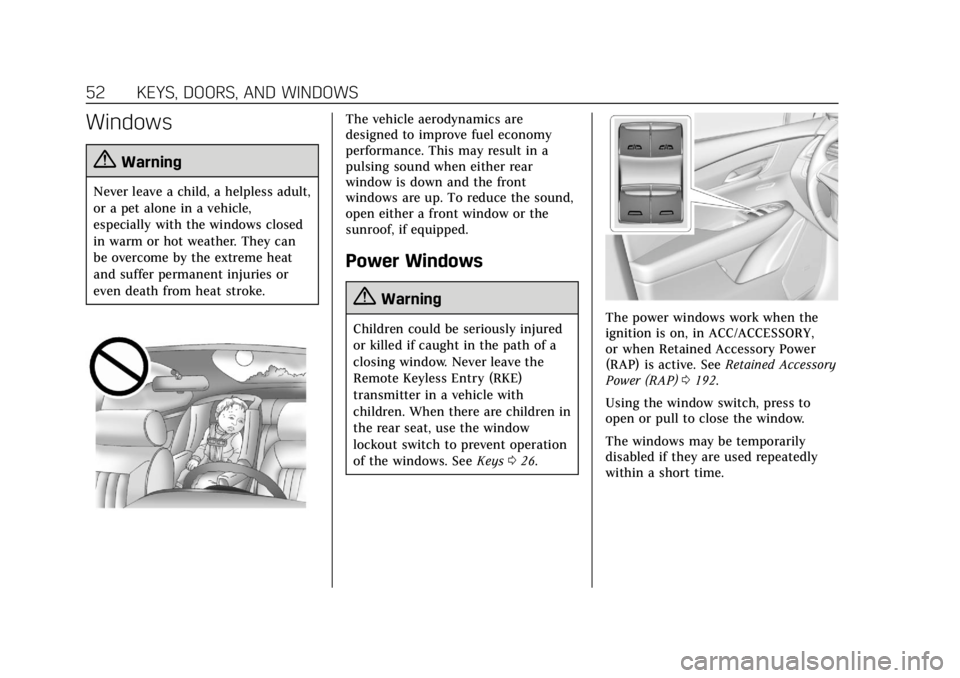
Windows
{Warning
Never leave a child, a helpless adult,
or a pet alone in a vehicle,
especially with the windows closed
in warm or hot weather. They can
be overcome by the extreme heat
and suffer permanent injuries or
even death from heat stroke.
The vehicle aerodynamics are
designed to improve fuel economy
performance. This may result in a
pulsing sound when either rear
window is down and the front
windows are up. To reduce the sound,
open either a front window or the
sunroof, if equipped.
Power Windows
{Warning
Children could be seriously injured
or killed if caught in the path of a
closing window. Never leave the
Remote Keyless Entry (RKE)
transmitter in a vehicle with
children. When there are children in
the rear seat, use the window
lockout switch to prevent operation
of the windows. SeeKeys026.The power windows work when the
ignition is on, in ACC/ACCESSORY,
or when Retained Accessory Power
(RAP) is active. See Retained Accessory
Power (RAP) 0192.
Using the window switch, press to
open or pull to close the window.
The windows may be temporarily
disabled if they are used repeatedly
within a short time.
Page 55 of 388
Cadillac XT5 Owner Manual (GMNA-Localizing-U.S./Canada/Mexico-
12146119) - 2019 - crc - 7/27/18
54 KEYS, DOORS, AND WINDOWS
4. Open the window and continueto press the switch briefly after
the window has fully opened.
Remote Window Operation
If equipped, this feature allows all
windows to be opened remotely.
If enabled in vehicle personalization,
press and hold
Kon the RKE
transmitter. See Vehicle Personalization
0 147.
Sun Visors
Pull the sun visor down to block glare.
Detach the sun visor from the center
mount to pivot to the side window
and, if equipped, extend along the rod.
Roof
Sunroof
If equipped, the ignition must be on
or in ACC/ACCESSORY, or Retained
Accessory Power (RAP) must be active
to operate the sunroof.
See Ignition Positions 0187 and
Retained Accessory Power (RAP) 0192.
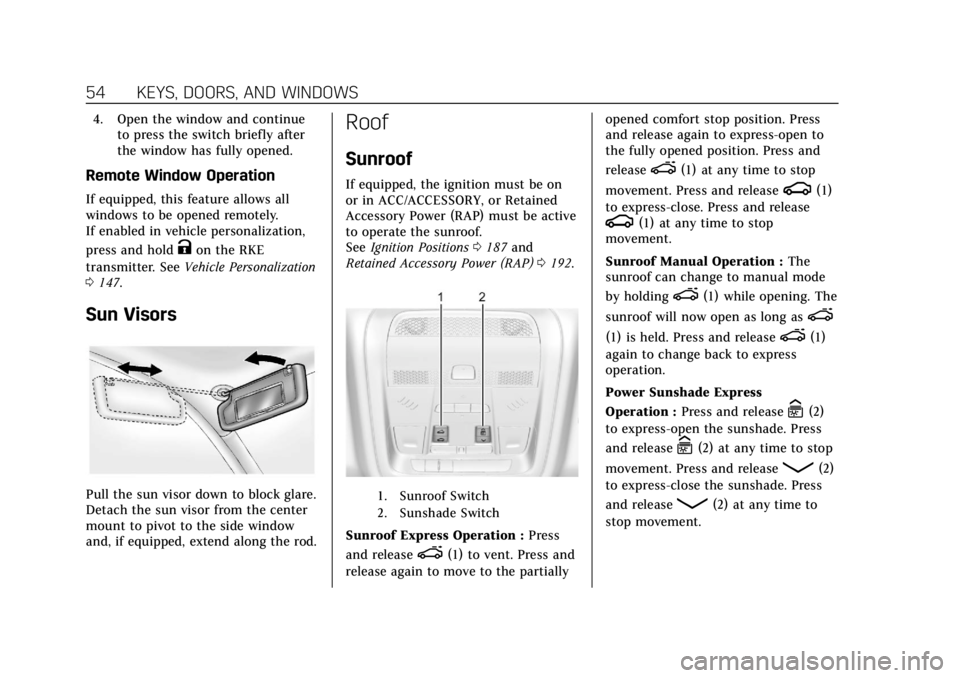
1. Sunroof Switch
2. Sunshade Switch
Sunroof Express Operation : Press
and release
e(1) to vent. Press and
release again to move to the partially opened comfort stop position. Press
and release again to express-open to
the fully opened position. Press and
release
e(1) at any time to stop
movement. Press and release
g(1)
to express-close. Press and release
g(1) at any time to stop
movement.
Sunroof Manual Operation : The
sunroof can change to manual mode
by holding
e(1) while opening. The
sunroof will now open as long as
e
(1) is held. Press and releasee(1)
again to change back to express
operation.
Power Sunshade Express
Operation : Press and release
C(2)
to express-open the sunshade. Press
and release
C(2) at any time to stop
movement. Press and release
Q(2)
to express-close the sunshade. Press
and release
Q(2) at any time to
stop movement.
Page 154 of 388
Cadillac XT5 Owner Manual (GMNA-Localizing-U.S./Canada/Mexico-
12146119) - 2019 - crc - 7/27/18
INSTRUMENTS AND CONTROLS 153
Remote Start Auto Heat Seats
If equipped and turned on, this
feature will turn the heated seats on
when using remote start on cold days.
If equipped with Auto Heated Steering
Wheel, this feature will turn on when
the Remote Start Auto Heated Seats
turn on.
Select Off or On.
Remote Window Operation
If equipped, this feature enables the
remote operation of all windows from
the RKE transmitter. See“Remote
Window Operation ”in Power Windows
0 52.
Select Off or On.
Passive Door Unlock
This allows the selection of what
doors will unlock when using the
button on the driver door to unlock
the vehicle.
Select All Doors or Driver Door. Passive Door Lock
This allows passive locking to be
turned on or off and selects feedback.
See
Remote Keyless Entry (RKE) System
Operation 027.
Select Off, On with Horn Chirp, or On.
Remote Left in Vehicle Alert
This feature sounds an alert when the
RKE transmitter is left in the vehicle.
This menu also enables Remote No
Longer In Vehicle Alert.
Select Off or On.
Bluetooth
Select and the following may display:
. Pair New Device
. Device Management
. Ringtones
. Voice Mail Numbers
. Text Message Alerts
Pair New Device
Select to pair a new device. See
“Pairing” in“Infotainment Controls ”
under “Bluetooth ”in the infotainment
manual. Device Management
Select to connect to a different phone
source, disconnect a phone, or delete
a phone.
Ringtones
Select to change the ring tone for the
specific phone. The phone does not
need to be connected to change the
ring tone.
Voice Mail Numbers
This feature displays the voice mail
number for all connected phones. To
change the voice mail number, select
EDIT. Type a new number, then
select SAVE.
Text Message Alerts
This feature allows text messages to
be received. See
“Text Messaging”
under “Phone ”in the infotainment
manual.
Select Off or On.
Apple CarPlay
Select and the following may display:
. Apple CarPlay
Page 384 of 388

Cadillac XT5 Owner Manual (GMNA-Localizing-U.S./Canada/Mexico-
12146119) - 2019 - crc - 7/27/18
INDEX 383
Power (cont'd)Protection, Battery . . . . . . . . . . . . . . . . 165
Retained Accessory (RAP) . . . . . . . . 192
Windows . . . . . . . . . . . . . . . . . . . . . . . . . . . . 52
Pregnancy, Using Seat Belts . . . . . . . . . 74
Privacy Vehicle Data Recording . . . . . . . . . . 361
Program Courtesy Transportation . . . . . . . . . 356
Prohibited Fuels . . . . . . . . . . . . . . . . . . . . 237
Proposition 65 Warning,
California . . . . . . . . . . . . . . .254, 269, 319, Back Cover
Publication Ordering Information . . . . . . . . . . . . . . . . . . . . . . . . 359
R
Radio Frequency Statement . . . . . . . . 359
Reading Lamps . . . . . . . . . . . . . . . . . . . . . 164
Rear Camera Mirror . . . . . . . . . . . . . . . . . 50
Rear Climate Control System . . . . . . 172
Rear Seat Armrest . . . . . . . . . . . . . . . . . . . 67
Rear Seats . . . . . . . . . . . . . . . . . . . . . . . . . . . . 65Heated . . . . . . . . . . . . . . . . . . . . . . . . . . . . . . . 68
Rear Storage . . . . . . . . . . . . . . . . . . . . . . . . 107
Rear Vision Camera (RVC) . . . . . . . . . 220
Rear Window Washer/Wiper . . . . . . . 116 Rearview Mirrors . . . . . . . . . . . . . . . . . . . . 50
Automatic Dimming . . . . . . . . . . . . . . . . 50
Reclining Seatbacks . . . . . . . . . . . . . . . . . 60
Recommended Fuel . . . . . . . . . . . . . . . . . . . . . . . . . . . . . . . . 237
Recommended Fluids and Lubricants . . . . . . . . . . . . . . . . . . . . . . . . . 343
Records Maintenance . . . . . . . . . . . . . . . . . . . . . . 345
Recreational Vehicle Towing . . . . . . . 322
Reimbursement Program, GM Mobility . . . . . . . . . . . . . . . . . . . . . . . . . . . . 353
Remote Keyless Entry (RKE) System . . . . . . . . . . . . . . . . . . . . . . . . . . . . . . 27
Remote Vehicle Start . . . . . . . . . . . . . . . . 33
Replacement Parts Airbags . . . . . . . . . . . . . . . . . . . . . . . . . . . . . . 88
Maintenance . . . . . . . . . . . . . . . . . . . . . . 344
Replacing Airbag System . . . . . . . . . . . . 88
Replacing LATCH System Parts after a Crash . . . . . . . . . . . . . . . . . . . . . . . 100
Replacing Seat Belt System Parts after a Crash . . . . . . . . . . . . . . . . . 76
Reporting Safety Defects Canadian Government . . . . . . . . . . . . 360
General Motors . . . . . . . . . . . . . . . . . . . 361
U.S. Government . . . . . . . . . . . . . . . . . . 360 Restraints
Where to Put . . . . . . . . . . . . . . . . . . . . . . . . 94
Retained Accessory Power (RAP) . . . . . . . . . . . . . . . . . . . . . . . 192
Reverse Tilt Mirrors . . . . . . . . . . . . . . . . . 49
Roads Driving, Wet . . . . . . . . . . . . . . . . . . . . . . . 180
Roadside Service . . . . . . . . . . . . . . . . . . . . 354
Roof Sunroof . . . . . . . . . . . . . . . . . . . . . . . . . . . . . . 54
Roof Rack System . . . . . . . . . . . . . . . . . . 111
Rotation, Tires . . . . . . . . . . . . . . . . . . . . . . 298
Routing, Engine Drive Belt . . . . . . . . . 349
Running the Vehicle While
Parked . . . . . . . . . . . . . . . . . . . . . . . . . . . . . 195
S
Safety Defects ReportingCanadian Government . . . . . . . . . . . . 360
General Motors . . . . . . . . . . . . . . . . . . . 361
U.S. Government . . . . . . . . . . . . . . . . . . 360
Safety Locks . . . . . . . . . . . . . . . . . . . . . . . . . . 39
Safety System Check . . . . . . . . . . . . . . . . 75
Scheduling Appointments . . . . . . . . . . 356
Sealant Kit, Tire . . . . . . . . . . . . . . . . . . . . . 306
Seat Belts . . . . . . . . . . . . . . . . . . . . . . . . . . . . . 68 Care . . . . . . . . . . . . . . . . . . . . . . . . . . . . . . . . . . 75
Extender . . . . . . . . . . . . . . . . . . . . . . . . . . . . . 75