windshield washer CADILLAC XT5 2019 Owner's Manual
[x] Cancel search | Manufacturer: CADILLAC, Model Year: 2019, Model line: XT5, Model: CADILLAC XT5 2019Pages: 388, PDF Size: 6.29 MB
Page 6 of 388
Cadillac XT5 Owner Manual (GMNA-Localizing-U.S./Canada/Mexico-
12146119) - 2019 - crc - 7/27/18
IN BRIEF 5
In Brief
Instrument Panel
Instrument Panel Overview . . . . . . . . . 6
Initial Drive Information
Initial Drive Information . . . . . . . . . . . 8
Stop/Start System . . . . . . . . . . . . . . . . . . . 8
Remote Keyless Entry (RKE)System . . . . . . . . . . . . . . . . . . . . . . . . . . . . . 8
Remote Vehicle Start . . . . . . . . . . . . . . . 8
Door Locks . . . . . . . . . . . . . . . . . . . . . . . . . . 9
Liftgate . . . . . . . . . . . . . . . . . . . . . . . . . . . . . 10
Windows . . . . . . . . . . . . . . . . . . . . . . . . . . . 10
Seat Adjustment . . . . . . . . . . . . . . . . . . . 10
Memory Features . . . . . . . . . . . . . . . . . . 11
Second Row Seats . . . . . . . . . . . . . . . . . 12
Heated and Ventilated Seats . . . . . . 12
Head Restraint Adjustment . . . . . . . 12
Seat Belts . . . . . . . . . . . . . . . . . . . . . . . . . . . 13
Passenger Sensing System . . . . . . . . 13
Mirror Adjustment . . . . . . . . . . . . . . . . 13
Steering Wheel Adjustment . . . . . . . 14
Interior Lighting . . . . . . . . . . . . . . . . . . . 14
Exterior Lighting . . . . . . . . . . . . . . . . . . . 15
Windshield Wiper/Washer . . . . . . . . 16
Climate Controls . . . . . . . . . . . . . . . . . . . 17
Transmission . . . . . . . . . . . . . . . . . . . . . . . 18
Vehicle Features
Infotainment System . . . . . . . . . . . . . . 18
Steering Wheel Controls . . . . . . . . . . 18
Cruise Control . . . . . . . . . . . . . . . . . . . . . 18
Driver Information Center (DIC) . . . . . . . . . . . . . . . . . . . . . . 19
Forward Collision Alert (FCA) System . . . . . . . . . . . . . . . . . . . . . . . . . . . . 19
Forward Automatic Braking (FAB) . . . . . . . . . . . . . . . . . . . . 19
Front Pedestrian Braking (FPB) System . . . . . . . . . . . . . . . . . . . . . . . . . . . . 20
Lane Keep Assist (LKA) . . . . . . . . . . . 20
Lane Change Alert (LCA) . . . . . . . . . . 20
Surround Vision . . . . . . . . . . . . . . . . . . . 20
Rear Vision Camera (RVC) . . . . . . . . 20
Rear Cross Traffic Alert (RCTA) System . . . . . . . . . . . . . . . . . . . . . . . . . . . . 21
Park Assist . . . . . . . . . . . . . . . . . . . . . . . . . 21
Automatic Parking Assist (APA) . . . . . . . . . . . . . . . . . . . . . . 21
Reverse Automatic Braking (RAB) . . . . . . . . . . . . . . . . . . . . 21
Power Outlets . . . . . . . . . . . . . . . . . . . . . . 21
Universal Remote System . . . . . . . . . 22
Sunroof . . . . . . . . . . . . . . . . . . . . . . . . . . . . . 22
Performance and Maintenance
Traction Control/Electronic Stability Control . . . . . . . . . . . . . . . . . . 23
Tire Pressure Monitor . . . . . . . . . . . . . 23
Fuel . . . . . . . . . . . . . . . . . . . . . . . . . . . . . . . . . 24
E85 or FlexFuel . . . . . . . . . . . . . . . . . . . . 24
Engine Oil Life System . . . . . . . . . . . . 24
Driving for Better Fuel Economy . . . . . . . . . . . . . . . . . . . . . . . . . . 25
Roadside Service . . . . . . . . . . . . . . . . . . . 25
Page 8 of 388

Cadillac XT5 Owner Manual (GMNA-Localizing-U.S./Canada/Mexico-
12146119) - 2019 - crc - 7/27/18
IN BRIEF 7
1.Air Vents 0174.
2. Exterior Lamp Controls 0159.
Turn Signal Lever. See Turn and
Lane-Change Signals 0162.
IntelliBeam System Button (If
Equipped). See Exterior Lamp
Controls 0159.
3. Tap Shift Controls. See Manual
Mode 0199.
4. Instrument Cluster (Uplevel
Cluster) 0124 orInstrument
Cluster (Base Level Cluster) 0122.
Driver Information Center (DIC)
Display. See Driver Information
Center (DIC) 0140.
5. Windshield Wiper/Washer 0113.
Rear Window Wiper/Washer
0 116.
6. ENGINE START/STOP Button. See Ignition Positions 0187.
7. Park Assist Button. See Assistance Systems for Parking or
Backing 0220. Automatic Parking Assist (APA)
Button. See
Assistance Systems
for Parking or Backing 0220.
8. Light Sensor. See Automatic
Headlamp System 0161.
9. Hazard Warning Flashers 0162.
10. Infotainment 0166.
11. Heated and Ventilated Front Seats
063 (If Equipped).
12. Dual Automatic Climate Control
System 0167.
13. MODE Switch. See Driver Mode
Control 0207.
Traction Control/Electronic
Stability Control 0205.
All-Wheel Drive 0201 (If
Equipped).
14. Shift Lever. See Automatic
Transmission 0195.
15. Steering Wheel Controls 0113.
Driver Information Center (DIC)
Controls. See Driver Information
Center (DIC) 0140.
16. Steering Wheel Controls 0113. 17.
Horn 0113.
18. Forward Collision Alert (FCA)
System 0226 (If Equipped).
Lane Keep Assist (LKA) 0235 (If
Equipped).
Heated Steering Wheel 0113 (If
Equipped).
19. Cruise Control 0208.
Adaptive Cruise Control 0210 (If
Equipped).
Phone Button. See Steering Wheel
Controls 0113.
20. Steering Wheel Adjustment 0113
(Out of View).
21. Head-Up Display (HUD) 0143 (If
Equipped).
22. Hood Release. See Hood0256.
Data Link Connector (DLC) (Out
of View). See Malfunction
Indicator Lamp (Check Engine
Light) 0132.
23. Instrument Panel Illumination
Control 0163.
24. Electric Parking Brake 0202.
Page 17 of 388
Cadillac XT5 Owner Manual (GMNA-Localizing-U.S./Canada/Mexico-
12146119) - 2019 - crc - 7/27/18
16 IN BRIEF
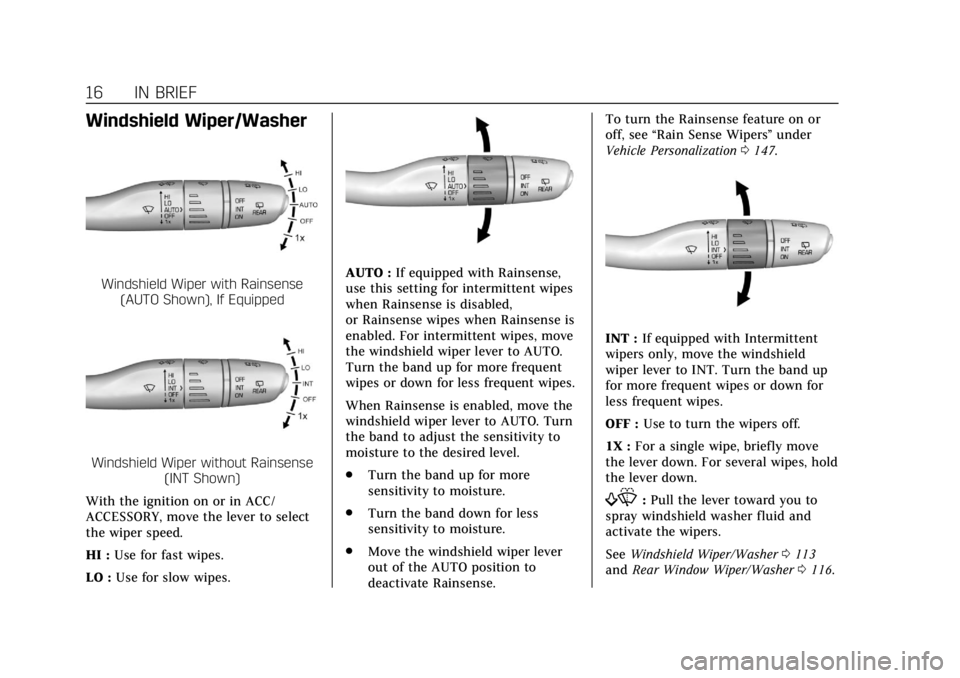
Windshield Wiper/Washer
Windshield Wiper with Rainsense(AUTO Shown), If Equipped
Windshield Wiper without Rainsense (INT Shown)
With the ignition on or in ACC/
ACCESSORY, move the lever to select
the wiper speed.
HI : Use for fast wipes.
LO : Use for slow wipes.
AUTO : If equipped with Rainsense,
use this setting for intermittent wipes
when Rainsense is disabled,
or Rainsense wipes when Rainsense is
enabled. For intermittent wipes, move
the windshield wiper lever to AUTO.
Turn the band up for more frequent
wipes or down for less frequent wipes.
When Rainsense is enabled, move the
windshield wiper lever to AUTO. Turn
the band to adjust the sensitivity to
moisture to the desired level.
. Turn the band up for more
sensitivity to moisture.
. Turn the band down for less
sensitivity to moisture.
. Move the windshield wiper lever
out of the AUTO position to
deactivate Rainsense. To turn the Rainsense feature on or
off, see
“Rain Sense Wipers ”under
Vehicle Personalization 0147.
INT : If equipped with Intermittent
wipers only, move the windshield
wiper lever to INT. Turn the band up
for more frequent wipes or down for
less frequent wipes.
OFF : Use to turn the wipers off.
1X : For a single wipe, briefly move
the lever down. For several wipes, hold
the lever down.
f: Pull the lever toward you to
spray windshield washer fluid and
activate the wipers.
See Windshield Wiper/Washer 0113
and Rear Window Wiper/Washer 0116.
Page 113 of 388
Cadillac XT5 Owner Manual (GMNA-Localizing-U.S./Canada/Mexico-
12146119) - 2019 - crc - 7/27/18
112 INSTRUMENTS AND CONTROLS
Instruments and
Controls
Controls
Steering Wheel Adjustment . . . . . 113
Steering Wheel Controls . . . . . . . . . 113
Heated Steering Wheel . . . . . . . . . . 113
Horn . . . . . . . . . . . . . . . . . . . . . . . . . . . . . . . 113
Windshield Wiper/Washer . . . . . . . 113
Rear Window Wiper/Washer . . . . 116
Compass . . . . . . . . . . . . . . . . . . . . . . . . . . 116
Clock . . . . . . . . . . . . . . . . . . . . . . . . . . . . . . 117
Power Outlets . . . . . . . . . . . . . . . . . . . . . 118
Wireless Charging . . . . . . . . . . . . . . . . 118
Cigarette Lighter . . . . . . . . . . . . . . . . . . 120
Ashtrays . . . . . . . . . . . . . . . . . . . . . . . . . . 121
Warning Lights, Gauges, and
Indicators
Warning Lights, Gauges, andIndicators . . . . . . . . . . . . . . . . . . . . . . . 121
Instrument Cluster (Base Level Cluster) . . . . . . . . . . . . . . . . . . . . . . . . . . 122
Instrument Cluster (Uplevel Cluster) . . . . . . . . . . . . . . . . . . . . . . . . . . 124
Speedometer . . . . . . . . . . . . . . . . . . . . . . 126
Odometer . . . . . . . . . . . . . . . . . . . . . . . . . 126
Trip Odometer . . . . . . . . . . . . . . . . . . . . 126 Tachometer . . . . . . . . . . . . . . . . . . . . . . . 126
Fuel Gauge . . . . . . . . . . . . . . . . . . . . . . . . 126
Engine Oil Pressure Gauge
(Uplevel Cluster) . . . . . . . . . . . . . . . . 127
Engine Coolant Temperature
Gauge . . . . . . . . . . . . . . . . . . . . . . . . . . . . 128
Voltmeter Gauge (Uplevel Cluster) . . . . . . . . . . . . . . . . . . . . . . . . . . 129
Seat Belt Reminders . . . . . . . . . . . . . . 130
Airbag Readiness Light . . . . . . . . . . 131
Passenger Airbag Status Indicator . . . . . . . . . . . . . . . . . . . . . . . . . 131
Charging System Light . . . . . . . . . . . 132
Malfunction Indicator Lamp (Check Engine Light) . . . . . . . . . . . 132
Brake System Warning Light . . . . 134
Electric Parking Brake Light . . . . . 135
Service Electric Parking Brake Light . . . . . . . . . . . . . . . . . . . . . . . . . . . . . 135
Antilock Brake System (ABS) Warning Light . . . . . . . . . . . . . . . . . . 135
Lane Keep Assist (LKA) Light . . . 136
Vehicle Ahead Indicator . . . . . . . . . 136
Pedestrian Ahead Indicator . . . . . . 136
Traction Off Light . . . . . . . . . . . . . . . . 136
StabiliTrak OFF Light . . . . . . . . . . . . 137
Traction Control System (TCS)/ StabiliTrak Light . . . . . . . . . . . . . . . . 137
Engine Coolant Temperature Warning Light . . . . . . . . . . . . . . . . . . 137 Tire Pressure Light . . . . . . . . . . . . . . . 138
Engine Oil Pressure Light . . . . . . . . 138
Low Fuel Warning Light . . . . . . . . . 139
Security Light . . . . . . . . . . . . . . . . . . . . . 139
High-Beam On Light . . . . . . . . . . . . . 139
Lamps On Reminder . . . . . . . . . . . . . 139
Cruise Control Light . . . . . . . . . . . . . . 140
Door Ajar Light . . . . . . . . . . . . . . . . . . . 140
Information Displays
Driver Information
Center (DIC) . . . . . . . . . . . . . . . . . . . . . 140
Head-Up Display (HUD) . . . . . . . . . 143
Vehicle Messages
Vehicle Messages . . . . . . . . . . . . . . . . . 146
Engine Power Messages . . . . . . . . . . 147
Vehicle Speed Messages . . . . . . . . . 147
Vehicle Personalization
Vehicle Personalization . . . . . . . . . . 147
Universal Remote System
Universal Remote System . . . . . . . . 156
Universal Remote System Programming . . . . . . . . . . . . . . . . . . . 156
Universal Remote System Operation . . . . . . . . . . . . . . . . . . . . . . . . 158
Page 114 of 388
Cadillac XT5 Owner Manual (GMNA-Localizing-U.S./Canada/Mexico-
12146119) - 2019 - crc - 7/27/18
INSTRUMENTS AND CONTROLS 113
Controls
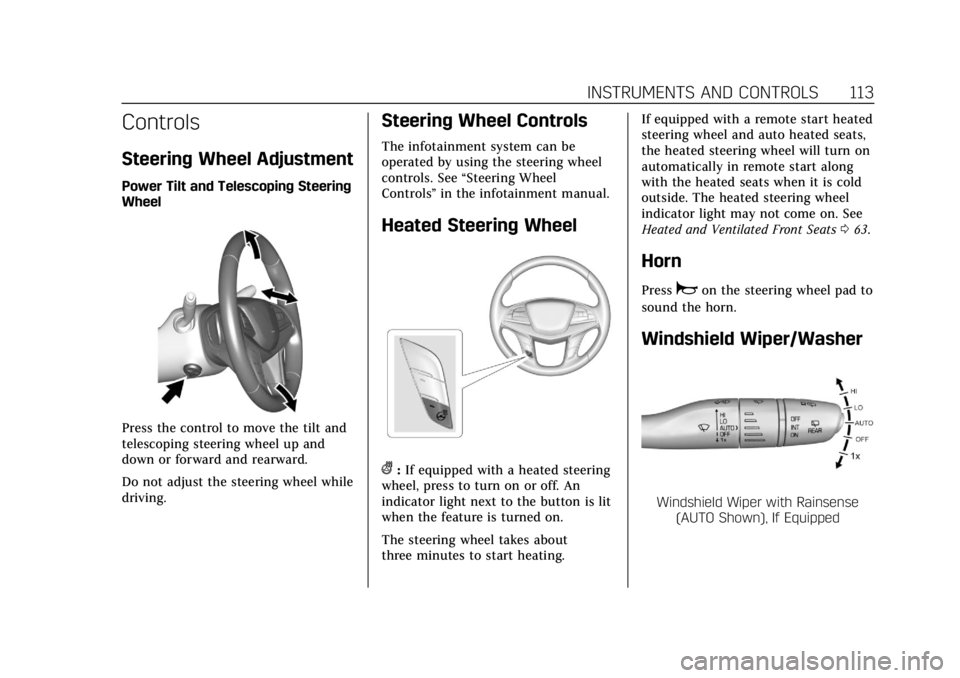
Steering Wheel Adjustment
Power Tilt and Telescoping Steering
Wheel
Press the control to move the tilt and
telescoping steering wheel up and
down or forward and rearward.
Do not adjust the steering wheel while
driving.
Steering Wheel Controls
The infotainment system can be
operated by using the steering wheel
controls. See“Steering Wheel
Controls ”in the infotainment manual.
Heated Steering Wheel
(:If equipped with a heated steering
wheel, press to turn on or off. An
indicator light next to the button is lit
when the feature is turned on.
The steering wheel takes about
three minutes to start heating. If equipped with a remote start heated
steering wheel and auto heated seats,
the heated steering wheel will turn on
automatically in remote start along
with the heated seats when it is cold
outside. The heated steering wheel
indicator light may not come on. See
Heated and Ventilated Front Seats
063.
Horn
Pressaon the steering wheel pad to
sound the horn.
Windshield Wiper/Washer
Windshield Wiper with Rainsense (AUTO Shown), If Equipped
Page 115 of 388
Cadillac XT5 Owner Manual (GMNA-Localizing-U.S./Canada/Mexico-
12146119) - 2019 - crc - 7/27/18
114 INSTRUMENTS AND CONTROLS
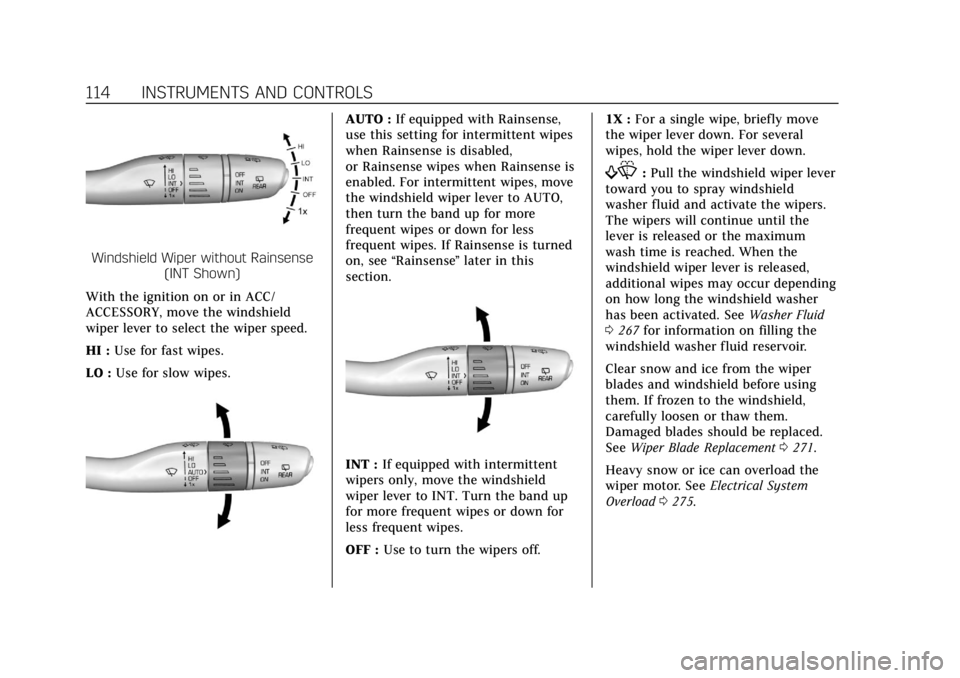
Windshield Wiper without Rainsense(INT Shown)
With the ignition on or in ACC/
ACCESSORY, move the windshield
wiper lever to select the wiper speed.
HI : Use for fast wipes.
LO : Use for slow wipes.
AUTO : If equipped with Rainsense,
use this setting for intermittent wipes
when Rainsense is disabled,
or Rainsense wipes when Rainsense is
enabled. For intermittent wipes, move
the windshield wiper lever to AUTO,
then turn the band up for more
frequent wipes or down for less
frequent wipes. If Rainsense is turned
on, see “Rainsense ”later in this
section.
INT : If equipped with intermittent
wipers only, move the windshield
wiper lever to INT. Turn the band up
for more frequent wipes or down for
less frequent wipes.
OFF : Use to turn the wipers off. 1X :
For a single wipe, briefly move
the wiper lever down. For several
wipes, hold the wiper lever down.
f: Pull the windshield wiper lever
toward you to spray windshield
washer fluid and activate the wipers.
The wipers will continue until the
lever is released or the maximum
wash time is reached. When the
windshield wiper lever is released,
additional wipes may occur depending
on how long the windshield washer
has been activated. See Washer Fluid
0 267 for information on filling the
windshield washer fluid reservoir.
Clear snow and ice from the wiper
blades and windshield before using
them. If frozen to the windshield,
carefully loosen or thaw them.
Damaged blades should be replaced.
See Wiper Blade Replacement 0271.
Heavy snow or ice can overload the
wiper motor. See Electrical System
Overload 0275.
Page 116 of 388
Cadillac XT5 Owner Manual (GMNA-Localizing-U.S./Canada/Mexico-
12146119) - 2019 - crc - 7/27/18
INSTRUMENTS AND CONTROLS 115
Wiper Parking
If the ignition is turned off while the
wipers are on LO, HI, or AUTO with
Rainsense turned off, they will
immediately stop.
If the windshield wiper lever is then
moved to OFF before the driver door is
opened or within 10 minutes, the
wipers will restart and move to the
base of the windshield.
If the ignition is turned off while the
wipers are performing wipes due to
windshield washing or Rainsense, the
wipers continue to run until they
reach the base of the windshield.
Rainsense
If equipped with Rainsense and the
feature is turned on, a sensor near the
top center of the windshield detects
the amount of water on the
windshield and controls the frequency
of the windshield wiper based on the
current sensitivity setting.
Keep this area of the windshield clear
of debris to allow for best system
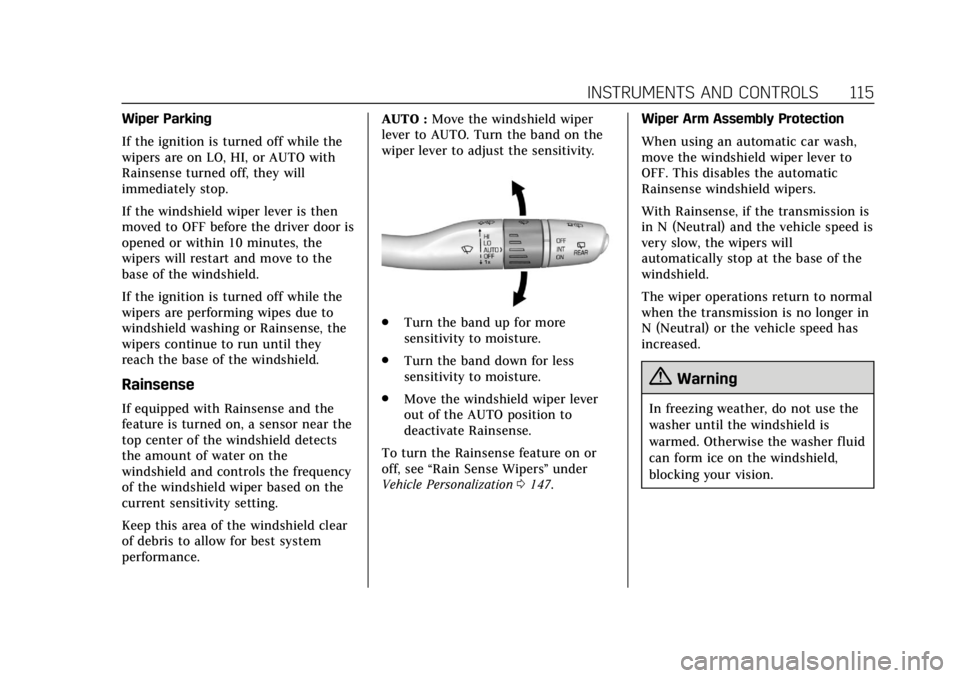
performance.AUTO :
Move the windshield wiper
lever to AUTO. Turn the band on the
wiper lever to adjust the sensitivity.
. Turn the band up for more
sensitivity to moisture.
. Turn the band down for less
sensitivity to moisture.
. Move the windshield wiper lever
out of the AUTO position to
deactivate Rainsense.
To turn the Rainsense feature on or
off, see “Rain Sense Wipers ”under
Vehicle Personalization 0147. Wiper Arm Assembly Protection
When using an automatic car wash,
move the windshield wiper lever to
OFF. This disables the automatic
Rainsense windshield wipers.
With Rainsense, if the transmission is
in N (Neutral) and the vehicle speed is
very slow, the wipers will
automatically stop at the base of the
windshield.
The wiper operations return to normal
when the transmission is no longer in
N (Neutral) or the vehicle speed has
increased.
{Warning
In freezing weather, do not use the
washer until the windshield is
warmed. Otherwise the washer fluid
can form ice on the windshield,
blocking your vision.
Page 117 of 388
Cadillac XT5 Owner Manual (GMNA-Localizing-U.S./Canada/Mexico-
12146119) - 2019 - crc - 7/27/18
116 INSTRUMENTS AND CONTROLS
Rear Window Wiper/
Washer
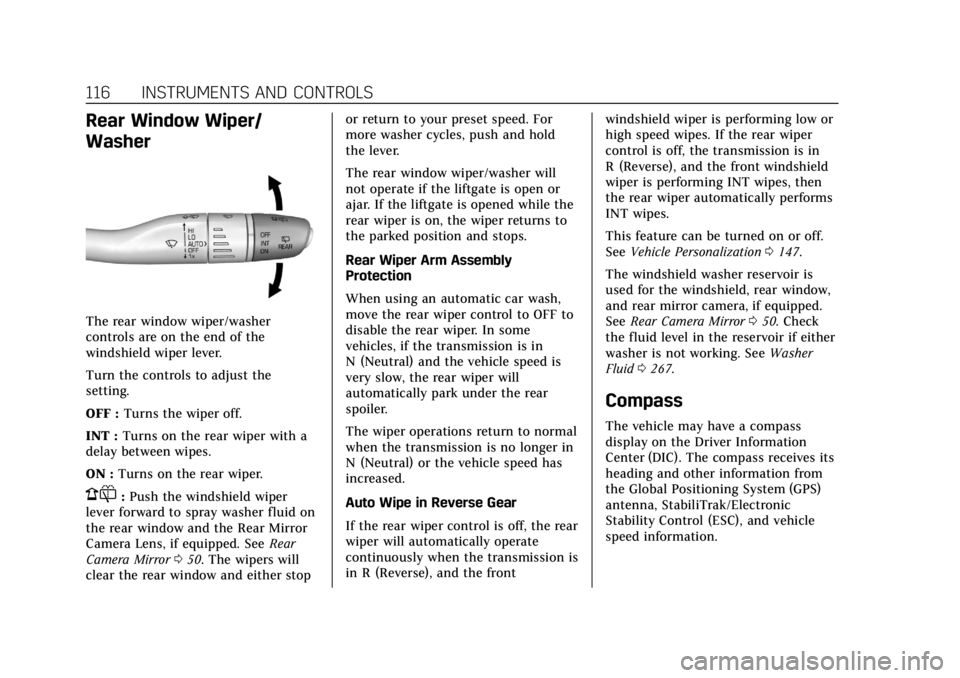
The rear window wiper/washer
controls are on the end of the
windshield wiper lever.
Turn the controls to adjust the
setting.
OFF :Turns the wiper off.
INT : Turns on the rear wiper with a
delay between wipes.
ON : Turns on the rear wiper.
1:Push the windshield wiper
lever forward to spray washer fluid on
the rear window and the Rear Mirror
Camera Lens, if equipped. See Rear
Camera Mirror 050. The wipers will
clear the rear window and either stop or return to your preset speed. For
more washer cycles, push and hold
the lever.
The rear window wiper/washer will
not operate if the liftgate is open or
ajar. If the liftgate is opened while the
rear wiper is on, the wiper returns to
the parked position and stops.
Rear Wiper Arm Assembly
Protection
When using an automatic car wash,
move the rear wiper control to OFF to
disable the rear wiper. In some
vehicles, if the transmission is in
N (Neutral) and the vehicle speed is
very slow, the rear wiper will
automatically park under the rear
spoiler.
The wiper operations return to normal
when the transmission is no longer in
N (Neutral) or the vehicle speed has
increased.
Auto Wipe in Reverse Gear
If the rear wiper control is off, the rear
wiper will automatically operate
continuously when the transmission is
in R (Reverse), and the front
windshield wiper is performing low or
high speed wipes. If the rear wiper
control is off, the transmission is in
R (Reverse), and the front windshield
wiper is performing INT wipes, then
the rear wiper automatically performs
INT wipes.
This feature can be turned on or off.
See
Vehicle Personalization 0147.
The windshield washer reservoir is
used for the windshield, rear window,
and rear mirror camera, if equipped.
See Rear Camera Mirror 050. Check
the fluid level in the reservoir if either
washer is not working. See Washer
Fluid 0267.
Compass
The vehicle may have a compass
display on the Driver Information
Center (DIC). The compass receives its
heading and other information from
the Global Positioning System (GPS)
antenna, StabiliTrak/Electronic
Stability Control (ESC), and vehicle
speed information.
Page 152 of 388

Cadillac XT5 Owner Manual (GMNA-Localizing-U.S./Canada/Mexico-
12146119) - 2019 - crc - 7/27/18
INSTRUMENTS AND CONTROLS 151
Auto Memory Recall
This feature automatically recalls the
current driver’s previously stored 1 or
2 button positions when the ignition
is changed from off to on or ACC/
ACCESSORY. SeeMemory Seats061.
Select Off or On.
Easy Exit Options
This feature automatically recalls the
previously stored Exit button position
when exiting the vehicle. See Memory
Seats 061.
Select Off or On.
Chime Volume
This allows the selection of the chime
volume level.
Touch + or −to adjust the volume.
Hands Free Liftgate Control
The liftgate may be operated with a
kicking motion under the left corner
of the rear bumper. See Liftgate040.
Select Off, On-Open and Close,
or On-Open Only. Reverse Tilt Mirror
When on, both the driver and
passenger, driver, or passenger outside
mirrors will tilt downward when the
vehicle is shifted to R (Reverse) to
improve visibility of the ground near
the rear wheels. They will return to
their previous driving position when
the vehicle is shifted out of
R (Reverse) or the engine is turned off.
See
Reverse Tilt Mirrors 049.
Select Off, On - Driver and Passenger,
On - Driver, or On - Passenger.
Auto Mirror Folding
When on, the outside mirrors will
automatically fold or unfold when the
Remote Keyless Entry (RKE)
transmitter
QorKbutton is pressed
and held. See Remote Keyless Entry
(RKE) System Operation 027.
Select Off or On.
Rainsense Wipers
When on, the normal intermittent
wiper control becomes a Rainsense
sensitivity control. See “Rainsense”in
Windshield Wiper/Washer 0113. Select Off or On.
Auto Wipe in Reverse Gear
When on and the front wiper is on,
the rear wiper will automatically
activate when the vehicle is shifted to
R (Reverse).
Select Off or On.
Extended Hill Start Assist
This allows the duration of the Hill
Start Assist to be changed. See
Hill
Start Assist (HSA) 0204.
Select Extended Hold or
Standard Hold.
Lighting
Select and the following may display:
. Vehicle Locator Lights
. Exit Lighting
Vehicle Locator Lights
This feature will flash the exterior
lamps and allows some of the exterior
lamps and most of the interior lamps
to turn on briefly when
Kon the
Page 182 of 388
Cadillac XT5 Owner Manual (GMNA-Localizing-U.S./Canada/Mexico-
12146119) - 2019 - crc - 7/27/18
DRIVING AND OPERATING 181
and you are going fast enough. When
the vehicle is hydroplaning, it has
little or no contact with the road.
There is no hard and fast rule about
hydroplaning. The best advice is to
slow down when the road is wet.
Other Rainy Weather Tips
Besides slowing down, other wet
weather driving tips include:
.Allow extra following distance.
. Pass with caution.
. Keep windshield wiping equipment
in good shape.
. Keep the windshield washer fluid
reservoir filled.
. Have good tires with proper tread
depth. See Tires0284.
. Turn off cruise control.
Hill and Mountain Roads
Driving on steep hills or through
mountains is different than driving on
flat or rolling terrain. Tips include:
.Keep the vehicle serviced and in
good shape. .
Check all fluid levels and brakes,
tires, cooling system, and
transmission.
. Shift to a lower gear when going
down steep or long hills.
{Warning
Using the brakes to slow the vehicle
on a long downhill slope can cause
brake overheating, can reduce brake
performance, and could result in a
loss of braking. Shift the
transmission to a lower gear to let
the engine assist the brakes on a
steep downhill slope.
{Warning
Coasting downhill in N (Neutral) or
with the ignition off is dangerous.
This can cause overheating of the
brakes and loss of steering assist.
Always have the engine running
and the vehicle in gear. .
Drive at speeds that keep the
vehicle in its own lane. Do not
swing wide or cross the
center line.
. Be alert on top of hills; something
could be in your lane (e.g., stalled
car, crash).
. Pay attention to special road signs
(e.g., falling rocks area, winding
roads, long grades, passing or
no-passing zones) and take
appropriate action.
Winter Driving
Driving on Snow or Ice
Snow or ice between the tires and the
road creates less traction or grip, so
drive carefully. Wet ice can occur at
about 0 °C (32 °F) when freezing rain
begins to fall. Avoid driving on wet ice
or in freezing rain until roads can be
treated.
For Slippery Road Driving:
.Accelerate gently. Accelerating too
quickly causes the wheels to spin
and makes the surface under the
tires slick.