Side mirrors CADILLAC XT5 2020 User Guide
[x] Cancel search | Manufacturer: CADILLAC, Model Year: 2020, Model line: XT5, Model: CADILLAC XT5 2020Pages: 384, PDF Size: 6.52 MB
Page 214 of 384
DRIVING AND OPERATING 213
than 8 km/h (5 mph), and RAB may
automatically brake hard at speeds
between 1–32 km/h (0.5–20 mph).
The Backing Warning System will
beep once from the rear when an
object is first detected, or pulse twice
on both sides of the Safety Alert Seat.
When the system detects a potential
crash, beeps will be heard from the
rear, or five pulses will be felt on both
sides of the Safety Alert Seat. There
may also be a brief, sharp application
of the brakes.
{Warning
The Backing Warning System only
operates at speeds greater than
8 km/h (5 mph). It does not detect
children, pedestrians, bicyclists,
animals, or objects below the
bumper or that are too close or too
far from the vehicle. In some
situations, such as at higher
backing speeds, there may not be
enough time for the short, sharp
application of the vehicle brake(Continued)
Warning (Continued)
system to occur. To prevent injury,
death, or vehicle damage, even with
the Backing Warning System,
always check the area around the
vehicle and check all mirrors before
backing.
When the vehicle is in R (Reverse),
if the system detects the vehicle is
backing too fast to avoid a crash with
a detected object behind your vehicle
in your path, it may automatically
brake hard to a stop to help avoid or
reduce the harm caused by a backing
crash.
{Warning
RAB may not avoid many types of
backing crashes. Do not wait for the
automatic braking to apply. This
system is not designed to replace
driver braking and only works in
R (Reverse) when an object is
detected directly behind the vehicle. (Continued)
Warning (Continued)
It may not brake or stop in time to
avoid a crash. It will not brake for
objects when the vehicle is moving
at very low speeds. It does not
detect children, pedestrians,
bicyclists, animals, or objects below
the bumper or that are too close or
too far from the vehicle. To prevent
injury, death, or vehicle damage,
even with RAB, always check the
area around the vehicle before and
while backing.
Pressing the brake pedal after the
vehicle comes to a stop will release
RAB. If the brake pedal is not pressed
soon after the stop, the Electric
Parking Brake (EPB) may be set. When
it is safe, press the accelerator pedal
firmly at any time to override RAB.
Page 227 of 384
226 DRIVING AND OPERATING
still looks blurry, use a soft wet cloth
to gently clean the sensor camera lens
and dry thoroughly. The sensor is
behind the lower front grille below the
driver side headlamp.
The camera must also be aligned to
work correctly. If the camera needs
adjustment, see your dealer. Do not
attempt to adjust the camera yourself.
Side Blind Zone
Alert (SBZA)
If equipped, the SBZA system is a
lane-changing aid that assists drivers
with avoiding crashes that occur with
moving vehicles in the side blind zone
(or spot) areas. When the vehicle is in
a forward gear, the left or right side
mirror display will light up if a moving
vehicle is detected in that blind zone.
If the turn signal is activated and a
vehicle is also detected on the same
side, the display will flash as an extra
warning not to change lanes. Since
this system is part of the Lane Change
Alert (LCA) system, read the entire
LCA section before using this feature.
Lane Change Alert (LCA)
If equipped, the LCA system is a
lane-changing aid that assists drivers
with avoiding lane change crashes
that occur with moving vehicles in the
side blind zone (or spot) areas or with
vehicles rapidly approaching these
areas from behind. The LCA warning
display will light up in the
corresponding outside side mirror and
will flash if the turn signal is on.
{Warning
LCA does not alert the driver to
vehicles outside of the system
detection zones, pedestrians,
bicyclists, or animals. It may not
provide alerts when changing lanes
under all driving conditions. Failure
to use proper care when changing
lanes may result in injury, death,
or vehicle damage. Before making a
lane change, always check mirrors,
glance over your shoulder, and use
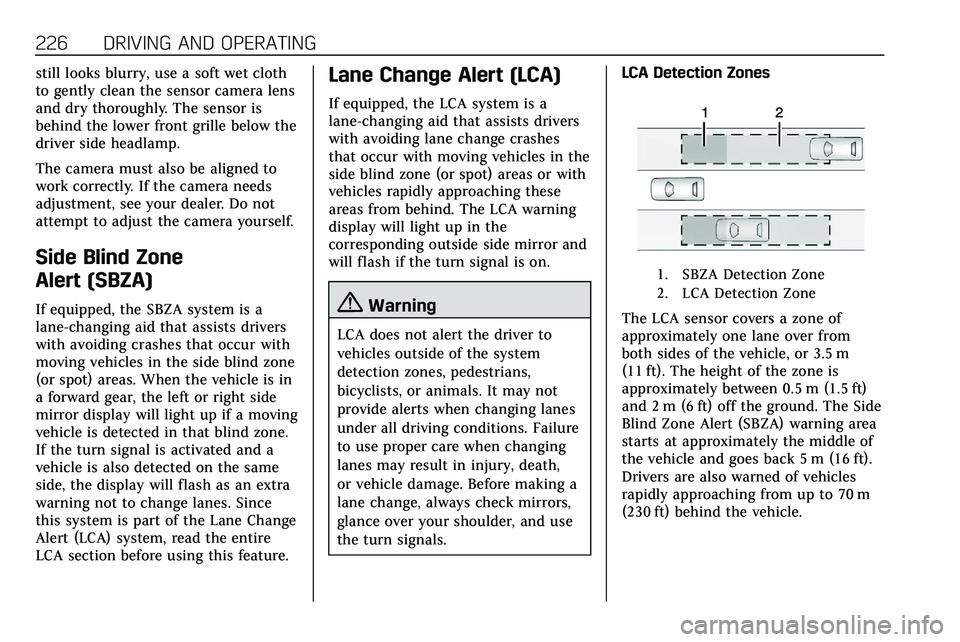
the turn signals.LCA Detection Zones
1. SBZA Detection Zone
2. LCA Detection Zone
The LCA sensor covers a zone of
approximately one lane over from
both sides of the vehicle, or 3.5 m
(11 ft). The height of the zone is
approximately between 0.5 m (1.5 ft)
and 2 m (6 ft) off the ground. The Side
Blind Zone Alert (SBZA) warning area
starts at approximately the middle of
the vehicle and goes back 5 m (16 ft).
Drivers are also warned of vehicles
rapidly approaching from up to 70 m
(230 ft) behind the vehicle.
Page 228 of 384

DRIVING AND OPERATING 227
How the System Works
The LCA symbol lights up in the side
mirrors when the system detects a
moving vehicle in the next lane over
that is in the side blind zone or
rapidly approaching that zone from
behind. A lit LCA symbol indicates it
may be unsafe to change lanes. Before
making a lane change, check the LCA
display, check mirrors, glance over
your shoulder, and use the turn
signals.
Left Side MirrorDisplayRight Side Mirror Display
When the vehicle is started, both
outside mirror LCA displays will
briefly come on to indicate the system
is operating. When the vehicle is in a
forward gear, the left or right side
mirror display will light up if a moving
vehicle is detected in the next lane
over in that blind zone or rapidly
approaching that zone. If the turn signal is activated in the same
direction as a detected vehicle, this
display will flash as an extra warning
not to change lanes.
LCA can be disabled through vehicle
personalization. See
Vehicle
Personalization 0131. If LCA is
disabled by the driver, the LCA mirror
displays will not light up.
When the System Does Not
Seem to Work Properly
The LCA system requires some driving
for the system to calibrate to
maximum performance. This
calibration may occur more quickly if
the vehicle is driving on a straight
highway road with traffic and roadside
objects (e.g., guardrails, barriers).
LCA displays may not come on when
passing a vehicle quickly, for a
stopped vehicle, or when towing a
trailer. The LCA detection zones that
extend back from the side of the
vehicle do not move further back
when a trailer is towed. Use caution
while changing lanes when towing a
trailer. LCA may alert to objects
attached to the vehicle, such as a trailer, bicycle, or object extending out
to either side of the vehicle. Attached
objects may also interfere with the
detection of vehicles. This is normal
system operation; the vehicle does not
need service.
LCA may not always alert the driver to
vehicles in the next lane over,
especially in wet conditions or when
driving on sharp curves. The system
does not need to be serviced. The
system may light up due to guardrails,
signs, trees, shrubs, and other
non-moving objects. This is normal
system operation; the vehicle does not
need service.
LCA may not operate when the LCA
sensors in the left or right corners of
the rear bumper are covered with
mud, dirt, snow, ice, or slush, or in
heavy rainstorms. For cleaning
instructions, see "Washing the
Vehicle" under
Exterior Care0323.
If the DIC still displays the system
unavailable message after cleaning
both sides of the vehicle toward the
rear corners of the vehicle, see your
dealer.
Page 235 of 384
234 DRIVING AND OPERATING
Trailer Towing
General Towing
Information
Only use towing equipment that has
been designed for the vehicle. Contact
your dealer or trailering dealer for
assistance with preparing the vehicle
to tow a trailer. Read the entire
section before towing a trailer.
To tow a disabled vehicle, seeTowing
the Vehicle 0319. To tow the vehicle
behind another vehicle such as a
motor home, see Recreational Vehicle
Towing 0320.
Driving Characteristics and
Towing Tips
{Warning
You can lose control when towing a
trailer if the correct equipment is
not used or the vehicle is not driven
properly. For example, if the trailer
is too heavy or the trailer brakes are
(Continued)
Warning (Continued)
inadequate for the load, the vehicle
may not stop as expected. You and
others could be seriously injured.
The vehicle may also be damaged,
and the repairs would not be
covered by the vehicle warranty.
Pull a trailer only if all the steps in
this section have been followed. Ask
your dealer for advice and
information about towing a trailer
with the vehicle.
Driving with a Trailer
Trailering is different than just driving
the vehicle by itself. Trailering means
changes in handling, acceleration,
braking, durability, and fuel economy.
Successful, safe trailering takes correct
equipment, and it has to be used
properly.
The following information has many
time-tested, important trailering tips
and safety rules. Many of these are
important for your safety and that of
your passengers. Read this section
carefully before pulling a trailer. When towing a trailer:
.
Become familiar with and follow
all state and local laws that apply
to trailer towing. These
requirements vary from state to
state.
. State laws may require the use of
extended side view mirrors. Even if
not required, you should install
extended side view mirrors if your
visibility is limited or restricted
while towing.
. Do not tow a trailer during the
first 800 km (500 mi) of vehicle
use to prevent damage to the
engine, axle, or other parts.
. It is recommended to perform the
first oil change before heavy
towing.
. During the first 800 km (500 mi)
of trailer towing, do not drive over
80 km/h (50 mph) and do not
make starts at full throttle.
. Vehicles can tow in D (Drive).
If the transmission downshifts too
often, a lower gear may be
selected using Manual Mode See
Manual Mode 0188.
Page 236 of 384

DRIVING AND OPERATING 235
If equipped, the following driver
assistance features should be turned
off when towing a trailer:
.Adaptive Cruise Control (ACC)
. Super Cruise Control
. Lane Keep Assist (LKA)
. Park Assist
. Automatic Parking Assist (APA)
. Reverse Automatic Braking (RAB)
If equipped, the following driver
assistance features should be turned
to alert or off when towing a trailer:
. Automatic Emergency
Braking (AEB)
. Intelligent Brake Assist (IBA)
. Front Pedestrian Braking (FPB)
If equipped with Lane Change Alert
(LCA), the LCA detection zones that
extend back from the side of the
vehicle do not move further back
when a trailer is towed. Use caution
while changing lanes when towing a
trailer. If equipped with Rear Cross Traffic
Alert (RCTA), use caution while
backing up when towing a trailer, as
the RCTA detection zones that extend
out from the back of the vehicle do
not move further back when a trailer
is towed.
{Warning
To prevent serious injury or death
from carbon monoxide (CO), when
towing a trailer:
. Do not drive with the liftgate,
trunk/hatch, or rear-most
window open.
. Fully open the air outlets on
or under the instrument
panel.
. Adjust the climate control
system to a setting that
brings in only outside air. See
“Climate Control Systems” in
the Index.
For more information about carbon
monoxide, see Engine Exhaust
0 183. Towing a trailer requires experience.
The combination of the vehicle and
trailer is longer and not as responsive
as the vehicle itself. Get used to the
handling and braking of the
combination by driving on a level road
surface before driving on public roads.
The trailer structure, the tires, and the
brakes must be all be rated to carry
the intended cargo. Inadequate trailer
equipment can cause the combination
to operate in an unexpected or unsafe
manner. Before driving, inspect all
trailer hitch parts and attachments,
safety chains, electrical connectors,
lamps, tires, and mirrors. See
Towing
Equipment 0241. If the trailer has
electric brakes, start the combination
moving and then manually apply the
trailer brake controller to check the
trailer brakes work. During the trip,
occasionally check that the cargo and
trailer are secure and that the lamps
and any trailer brakes are working.
Towing with a Stability Control
System
When towing, the stability control
system might be heard. The system
reacts to vehicle movement caused by
Page 378 of 384
INDEX 377
Infotainment . . . . . . . . . . . . . . . . . . . . . . . . 147
Infotainment System . . . . . . . . . . . . . . . 362
Instrument Cluster . . . . . . . . . . . . . . . . . 108
Instrument Panel Overview . . . . . . . . . . . 5
Interior Rearview Mirrors . . . . . . . . . . . 35
Introduction . . . . . . . . . . . . . . . . . . . . . . . . . . . . 2
J
Jump Starting - North America . . . . 316
K
Keyless EntryRemote (RKE) System . . . . . . . . . . . . . . 10
Keys . . . . . . . . . . . . . . . . . . . . . . . . . . . . . . . . . . . . 9
L
Labeling, Tire Sidewall . . . . . . . . . . . . . 284
Lamps Cornering . . . . . . . . . . . . . . . . . . . . . . . . . . 144
Courtesy . . . . . . . . . . . . . . . . . . . . . . . . . . . 144
Daytime Running (DRL) . . . . . . . . . . 142
Dome . . . . . . . . . . . . . . . . . . . . . . . . . . . . . . 144
Exterior Controls . . . . . . . . . . . . . . . . . . 140
Exterior Lamps Off Reminder . . . . 142
Exterior Lighting BatterySaver . . . . . . . . . . . . . . . . . . . . . . . . . . . . . 146
Malfunction Indicator (Check Engine) . . . . . . . . . . . . . . . . . . . . . . . . . . 115
On Reminder . . . . . . . . . . . . . . . . . . . . . . 123 Lamps (cont'd)
Reading . . . . . . . . . . . . . . . . . . . . . . . . . . . . 145
Lane Change Alert (LCA) . . . . . . . . . . . 226
Lane Keep Assist (LKA) . . . . . . . . . . . . 228
Lane Keep Assist Light . . . . . . . . . . . . . 119
Lap-Shoulder Belt . . . . . . . . . . . . . . . . . . . . 56
LATCH System Replacing Parts after a Crash . . . . . . 86
LATCH, Lower Anchors and Tethers for Children . . . . . . . . . . . . . . . 80
LED Lighting . . . . . . . . . . . . . . . . . . . . . . . . 273
Liftgate . . . . . . . . . . . . . . . . . . . . . . . . . . . . . . . 23
Lighting Entry . . . . . . . . . . . . . . . . . . . . . . . . . . . . . . 145
Exit . . . . . . . . . . . . . . . . . . . . . . . . . . . . . . . . 145
Illumination Control . . . . . . . . . . . . . . 144
LED . . . . . . . . . . . . . . . . . . . . . . . . . . . . . . . . 273
Lights Airbag Readiness . . . . . . . . . . . . . . . . . 114
All-Wheel Drive . . . . . . . . . . . . . . . . . . . 119
Antilock Brake System (ABS)Warning . . . . . . . . . . . . . . . . . . . . . . . . . 118
Brake System Warning . . . . . . . . . . . 117
Charging System . . . . . . . . . . . . . . . . . . 115
Check Engine (Malfunction Indicator) . . . . . . . . . . . . . . . . . . . . . . . . 115
Cruise Control . . . . . . . . . . . . . . . . . . . . . 124
Door Ajar . . . . . . . . . . . . . . . . . . . . . . . . . . 124 Lights (cont'd)
Driver Mode Control . . . . . . . . . . . . . . 121
Electric Parking Brake . . . . . . . . . . . . 118
Engine Coolant Temperature
Warning . . . . . . . . . . . . . . . . . . . . . . . . . 121
Engine Oil Pressure . . . . . . . . . . . . . . . 122
Flash-to-Pass . . . . . . . . . . . . . . . . . . . . . . 142
Gear Shifting . . . . . . . . . . . . . . . . . . . . . . 119
High-Beam On . . . . . . . . . . . . . . . . . . . . 123
High/Low Beam Changer . . . . . . . . . 142
Lane Keep Assist . . . . . . . . . . . . . . . . . . 119
Low Fuel Warning . . . . . . . . . . . . . . . . 123
Seat Belt Reminders . . . . . . . . . . . . . . 113
Security . . . . . . . . . . . . . . . . . . . . . . . . . . . . 123
Service Electric Parking Brake . . . 118
StabiliTrak OFF . . . . . . . . . . . . . . . . . . . 120
Tire Pressure . . . . . . . . . . . . . . . . . . . . . . 122
Traction Control System (TCS)/StabiliTrak . . . . . . . . . . . . . . . . 121
Traction Off . . . . . . . . . . . . . . . . . . . . . . . 120
Lock
Steering Column . . . . . . . . . . . . . . . . . . . . 31
Locks Automatic Door . . . . . . . . . . . . . . . . . . . . . 22
Delayed Locking . . . . . . . . . . . . . . . . . . . . 21
Door . . . . . . . . . . . . . . . . . . . . . . . . . . . . . . . . . 19
Lockout Protection . . . . . . . . . . . . . . . . . 22
Power Door . . . . . . . . . . . . . . . . . . . . . . . . . . 21
Page 380 of 384
INDEX 379
Passenger Compartment AirFilter . . . . . . . . . . . . . . . . . . . . . . . . . . . . . . . 156
Passenger Sensing System . . . . . . . . . . 67
Pedestrian Ahead Indicator . . . . . . . . 120
Perchlorate Materials Requirements, California . . . . . . . . . 249
Personalization
Vehicle . . . . . . . . . . . . . . . . . . . . . . . . . . . . . 131
Power Door Locks . . . . . . . . . . . . . . . . . . . . . . . . . . 21
Mirrors . . . . . . . . . . . . . . . . . . . . . . . . . . . . . . 33
Outlets . . . . . . . . . . . . . . . . . . . . . . . . . . . . . 104
Protection, Battery . . . . . . . . . . . . . . . . 146
Retained Accessory (RAP) . . . . . . . . 180
Windows . . . . . . . . . . . . . . . . . . . . . . . . . . . . 38
Pregnancy, Using Seat Belts . . . . . . . . . 59
Privacy
Vehicle Data Recording . . . . . . . . . . 360
Program Courtesy Transportation . . . . . . . . . 355
Prohibited Fuels . . . . . . . . . . . . . . . . . . . . 231
Proposition
65 Warning,
California . . . . . . . . . . . . . . .248, 268, 316, Back Cover
Publication Ordering Information . . . . . . . . . . . . . . . . . . . . . . . . 358R
Radio Frequency Statement . . . . . . . . 358
Reading Lamps . . . . . . . . . . . . . . . . . . . . . 145
Rear Camera Mirror . . . . . . . . . . . . . . . . . 35
Rear Climate Control System . . . . . . 154
Rear Pedestrian Alert . . . . . . . . . . . . . . . 216
Rear Seat Armrest . . . . . . . . . . . . . . . . . . . 52
Rear Seats . . . . . . . . . . . . . . . . . . . . . . . . . . . . 50Heated . . . . . . . . . . . . . . . . . . . . . . . . . . . . . . . 53
Rear Storage . . . . . . . . . . . . . . . . . . . . . . . . . 93
Rear Vision Camera (RVC) . . . . . . . . . 208
Rear Window Washer/Wiper . . . . . . . 103
Rearview Mirrors . . . . . . . . . . . . . . . . . . . . 35 Automatic Dimming . . . . . . . . . . . . . . . . 35
Reclining Seatbacks . . . . . . . . . . . . . . . . . 45
Recommended Fuel . . . . . . . . . . . . . . . . . . . . . . . . . . . . . . . . 230
Recommended Fluids and Lubricants . . . . . . . . . . . . . . . . . . . . . . . . . 342
Records Maintenance . . . . . . . . . . . . . . . . . . . . . . 344
Recreational Vehicle Towing . . . . . . . 320
Reimbursement Program, GM Mobility . . . . . . . . . . . . . . . . . . . . . . . . . . . . 352
Remote Keyless Entry (RKE) System . . . . . . . . . . . . . . . . . . . . . . . . . . . . . . 10
Remote Vehicle Start . . . . . . . . . . . . . . . . 17 Replacement Parts
Airbags . . . . . . . . . . . . . . . . . . . . . . . . . . . . . . 72
Maintenance . . . . . . . . . . . . . . . . . . . . . . 343
Replacing Airbag System . . . . . . . . . . . . 72
Replacing LATCH System Parts after a Crash . . . . . . . . . . . . . . . . . . . . . . . . 86
Replacing Seat Belt System
Parts after a Crash . . . . . . . . . . . . . . . . . 61
Reporting Safety Defects Canadian Government . . . . . . . . . . . . 359
General Motors . . . . . . . . . . . . . . . . . . . 360
U.S. Government . . . . . . . . . . . . . . . . . . 359
Restraints Where to Put . . . . . . . . . . . . . . . . . . . . . . . . 79
Retained Accessory Power (RAP) . . . . . . . . . . . . . . . . . . . . . . . 180
Reverse Tilt Mirrors . . . . . . . . . . . . . . . . . 35
Roads Driving, Wet . . . . . . . . . . . . . . . . . . . . . . . 167
Roadside Service . . . . . . . . . . . . . . . . . . . . 353
Roof Sunroof . . . . . . . . . . . . . . . . . . . . . . . . . . . . . . 40
Roof Rack System . . . . . . . . . . . . . . . . . . . 98
Rotation, Tires . . . . . . . . . . . . . . . . . . . . . . 296
Routing, Engine Drive Belt . . . . . . . . . 348
Running the Vehicle While Parked . . . . . . . . . . . . . . . . . . . . . . . . . . . . . 183