lane assist CADILLAC XT5 2021 User Guide
[x] Cancel search | Manufacturer: CADILLAC, Model Year: 2021, Model line: XT5, Model: CADILLAC XT5 2021Pages: 426, PDF Size: 8.73 MB
Page 251 of 426

Cadillac XT5 Owner Manual (GMNA-Localizing-U.S./Canada/Mexico-
14590481) - 2021 - CRC - 10/22/20
250 DRIVING AND OPERATING
Alerting the Driver
With Head-Up Display
Without Head-Up Display
If ACC is engaged, driver action may
be required when ACC cannot apply
sufficient braking because of
approaching a vehicle too rapidly.
When this condition occurs, six red
lights or the collision alert symbol on
the HUD, if equipped, will flash on the
windshield. Either eight beeps will
sound from the front, or both sides of
the Safety Alert Seat will pulse five times. See
“Collision/Detection
Systems” underVehicle Personalization
0 123.
See Defensive Driving 0211.
Approaching and Following a
Vehicle
The vehicle ahead indicator is in the
instrument cluster and HUD display,
if equipped.
The vehicle ahead indicator only
displays when a vehicle is detected in
your vehicle’s path moving in the
same direction.
If this symbol is not displaying, ACC
will not respond to or brake to
vehicles ahead.
ACC automatically slows the vehicle
down and adjusts vehicle speed to
follow a detected vehicle ahead at the
selected follow gap. The vehicle speed
increases or decreases to follow a detected vehicle in front of your
vehicle when that vehicle is traveling
slower than your vehicle set speed.
It may apply limited braking,
if necessary. When braking is active,
the brake lamps will come on. The
automatic braking may feel or sound
different than if the brakes were
applied manually. This is normal.
Passing a Vehicle While Using ACC
If the set speed is high enough, and
the left turn signal is used to pass a
vehicle ahead in the selected following
gap, ACC may assist by gradually
accelerating the vehicle prior to the
lane change.
{Warning
When using ACC to pass a vehicle
or perform a lane change, the
following distance to the vehicle
being passed may be reduced. ACC
may not apply sufficient
acceleration or braking when
passing a vehicle or performing a
lane change. Always be ready to
manually accelerate or brake to
complete the pass or lane change.
Page 260 of 426
Cadillac XT5 Owner Manual (GMNA-Localizing-U.S./Canada/Mexico-
14590481) - 2021 - CRC - 10/22/20
DRIVING AND OPERATING 259
to view the rear camera. Touch X to
exit the view or it will be removed
automatically after eight seconds.
{Warning
Use Hitch Guidance only to help
back the vehicle to a trailer hitch
or, when traveling above 12 km/h
(8 mph), to briefly check the status
of your trailer. Do not use for any
other purpose, such as making lane
change decisions. Before making a
lane change, always check the
mirrors and glance over your
shoulder. Improper use could result
in serious injury to you or others.
Park Assist
With Front and Rear Park Assist, as
the vehicle moves at speeds of less
than 8 km/h (5 mph) the sensors on
the bumpers may detect objects up to
1.2 m (4 ft) in front and 2.5 m (8 ft)
behind the vehicle within a zone
25 cm (10 in) high off the ground and
below bumper level. These detection
distances may be shorter during
warmer or humid weather. Blocked
sensors will not detect objects and can also cause false detections. Keep
the sensors clean of mud, dirt, snow,
ice, and slush; and clean sensors after
a car wash in freezing temperatures.{Warning
The Park Assist system does not
detect children, pedestrians,
bicyclists, animals, or objects
located below the bumper or that
are too close or too far from the
vehicle. It is not available at speeds
greater than 8 km/h (5 mph). To
prevent injury, death, or vehicle
damage, even with Park Assist,
always check the area around the
vehicle and check all mirrors before
moving forward or backing.
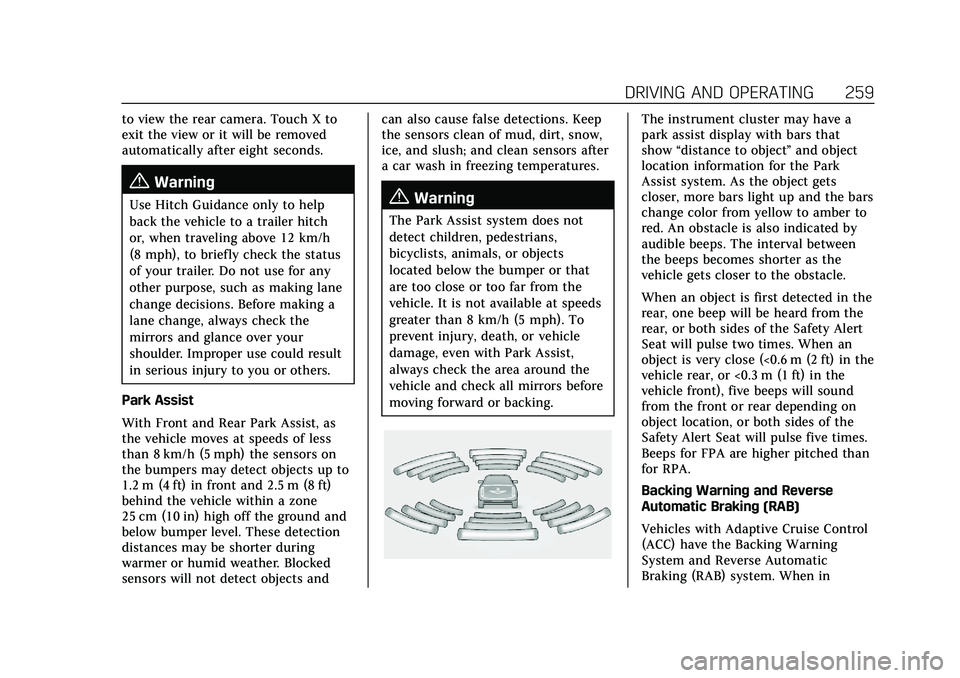
The instrument cluster may have a
park assist display with bars that
show
“distance to object ”and object
location information for the Park
Assist system. As the object gets
closer, more bars light up and the bars
change color from yellow to amber to
red. An obstacle is also indicated by
audible beeps. The interval between
the beeps becomes shorter as the
vehicle gets closer to the obstacle.
When an object is first detected in the
rear, one beep will be heard from the
rear, or both sides of the Safety Alert
Seat will pulse two times. When an
object is very close (<0.6 m (2 ft) in the
vehicle rear, or <0.3 m (1 ft) in the
vehicle front), five beeps will sound
from the front or rear depending on
object location, or both sides of the
Safety Alert Seat will pulse five times.
Beeps for FPA are higher pitched than
for RPA.
Backing Warning and Reverse
Automatic Braking (RAB)
Vehicles with Adaptive Cruise Control
(ACC) have the Backing Warning
System and Reverse Automatic
Braking (RAB) system. When in
Page 265 of 426
Cadillac XT5 Owner Manual (GMNA-Localizing-U.S./Canada/Mexico-
14590481) - 2021 - CRC - 10/22/20
264 DRIVING AND OPERATING
Rear Pedestrian Alert can be set to Off
or Alert. See“Rear Pedestrian
Detection ”in “Collision/Detection
Systems” underVehicle Personalization
0 123. If equipped, alerts can be set to
beeps or seat pulses. See “Alert Type”
in “Collision/Detection Systems” under
Vehicle Personalization 0123.
Assistance Systems for
Driving
If equipped, when driving the vehicle
in a forward gear, Forward Collision
Alert (FCA), Lane Keep Assist (LKA),
Side Blind Zone Alert (SBZA), Lane
Change Alert (LCA), Automatic
Emergency Braking (AEB), Front
Pedestrian Braking (FPB) System, and/
or the Night Vision System can help
to avoid a crash or reduce crash
damage.
Forward Collision Alert
(FCA) System
If equipped, the FCA system may help
to avoid or reduce the harm caused by
front-end crashes. When approaching
a vehicle ahead too quickly, FCA
provides a red flashing alert on the windshield and rapidly beeps or pulses
the driver seat. FCA also lights an
amber visual alert if following another
vehicle too closely.
FCA detects vehicles within a distance
of approximately 60 m (197 ft) and
operates at speeds above 8 km/h
(5 mph). If the vehicle has Adaptive
Cruise Control (ACC), it can detect
vehicles to distances of approximately
110 m (360 ft) and operates at all
speeds. See
Adaptive Cruise Control
(Advanced) 0245.
{Warning
FCA is a warning system and does
not apply the brakes. When
approaching a slower-moving or
stopped vehicle ahead too rapidly,
or when following a vehicle too
closely, FCA may not provide a
warning with enough time to help
avoid a crash. It also may not
provide any warning at all. FCA
does not warn of pedestrians,
animals, signs, guardrails, bridges,
construction barrels, or other
(Continued)
Warning (Continued)
objects. Be ready to take action and
apply the brakes. SeeDefensive
Driving 0211.
FCA can be disabled with either the
FCA steering wheel control or,
if equipped, through vehicle
personalization. See “Collision/
Detection Systems” underVehicle
Personalization 0123.
Detecting the Vehicle Ahead
FCA warnings will not occur unless
the FCA system detects a vehicle
ahead. When a vehicle is detected, the
vehicle ahead indicator will display
green. Vehicles may not be detected
on curves, highway exit ramps,
or hills, due to poor visibility; or if a
vehicle ahead is partially blocked by
Page 267 of 426
Cadillac XT5 Owner Manual (GMNA-Localizing-U.S./Canada/Mexico-
14590481) - 2021 - CRC - 10/22/20
266 DRIVING AND OPERATING
The faster the vehicle speed, the
farther away the alert will occur.
Consider traffic and weather
conditions when selecting the alert
timing. The range of selectable alert
timings may not be appropriate for all
drivers and driving conditions.
If your vehicle is equipped with
Adaptive Cruise Control (ACC),
changing the FCA timing setting
automatically changes the following
gap setting (Far, Medium, or Near).
Following Distance Indicator
The following distance to a moving
vehicle ahead in your path is indicated
in following time in seconds on the
Driver Information Center (DIC). See
Driver Information Center (DIC)0117.
The minimum following time is
0.5 seconds away. If there is no vehicle
detected ahead, or the vehicle ahead is
out of sensor range, dashes will be
displayed.
Unnecessary Alerts
FCA may provide unnecessary alerts
for turning vehicles, vehicles in other
lanes, objects that are not vehicles, or shadows. These alerts are normal
operation and the vehicle does not
need service.
Cleaning the System
If the FCA system does not seem to
operate properly, this may correct the
issue:
.Clean the outside of the windshield
in front of the rearview mirror.
.Clean the entire front of the vehicle.
.Clean the headlamps.
Automatic Emergency
Braking (AEB)
If the vehicle has Forward Collision
Alert (FCA), it also has AEB, which
includes Intelligent Brake Assist (IBA).
When the system detects a vehicle
ahead in your path that is traveling in
the same direction that you may be
about to crash into, it can provide a
boost to braking or automatically
brake the vehicle. This can help avoid
or lessen the severity of crashes when
driving in a forward gear. Depending
on the situation, the vehicle may
automatically brake moderately or
hard. This automatic emergencybraking can only occur if a vehicle is
detected. This is shown by the FCA
vehicle ahead indicator being lit. See
Forward Collision Alert (FCA) System
0
264.
The system works when driving in a
forward gear between 8 km/h (5 mph)
and 80 km/h (50 mph), or on vehicles
with Adaptive Cruise Control (ACC),
above 4 km/h (2 mph). It can detect
vehicles up to approximately 60 m
(197 ft).
{Warning
AEB is an emergency crash
preparation feature and is not
designed to avoid crashes. Do not
rely on AEB to brake the vehicle.
AEB will not brake outside of its
operating speed range and only
responds to detected vehicles.
AEB may not:
.Detect a vehicle ahead on
winding or hilly roads.
.Detect all vehicles, especially
vehicles with a trailer, tractors,
muddy vehicles, etc. (Continued)
Page 273 of 426
Cadillac XT5 Owner Manual (GMNA-Localizing-U.S./Canada/Mexico-
14590481) - 2021 - CRC - 10/22/20
272 DRIVING AND OPERATING
still looks blurry, use a soft wet cloth
to gently clean the sensor camera lens
and dry thoroughly. The sensor is
behind the lower front grille below the
driver side headlamp.
The camera must also be aligned to
work correctly. If the camera needs
adjustment, see your dealer. Do not
attempt to adjust the camera yourself.
Side Blind Zone
Alert (SBZA)
If equipped, the SBZA system is a
lane-changing aid that assists drivers
with avoiding crashes that occur with
moving vehicles in the side blind
zone, or blind spot areas. When the
vehicle is in a forward gear, the left or
right side mirror display will light up
if a moving vehicle is detected in that
blind zone. If the turn signal is
activated and a vehicle is also
detected on the same side, the display
will flash as an extra warning not to
change lanes. Since this system is part
of the Lane Change Alert (LCA)
system, read the entire LCA section
before using this feature.
Lane Change Alert (LCA)
If equipped, the LCA system is a
lane-changing aid that assists drivers
with avoiding lane change crashes
that occur with moving vehicles in the
side blind zone (or spot) areas or with
vehicles rapidly approaching these
areas from behind. The LCA warning
display will light up in the
corresponding outside side mirror and
will flash if the turn signal is on.
{Warning
LCA does not alert the driver to
vehicles outside of the system
detection zones, pedestrians,
bicyclists, or animals. It may not
provide alerts when changing lanes
under all driving conditions. Failure
to use proper care when changing
lanes may result in injury, death,
or vehicle damage. Before making a
lane change, always check mirrors,
glance over your shoulder, and use
the turn signals.LCA Detection Zones
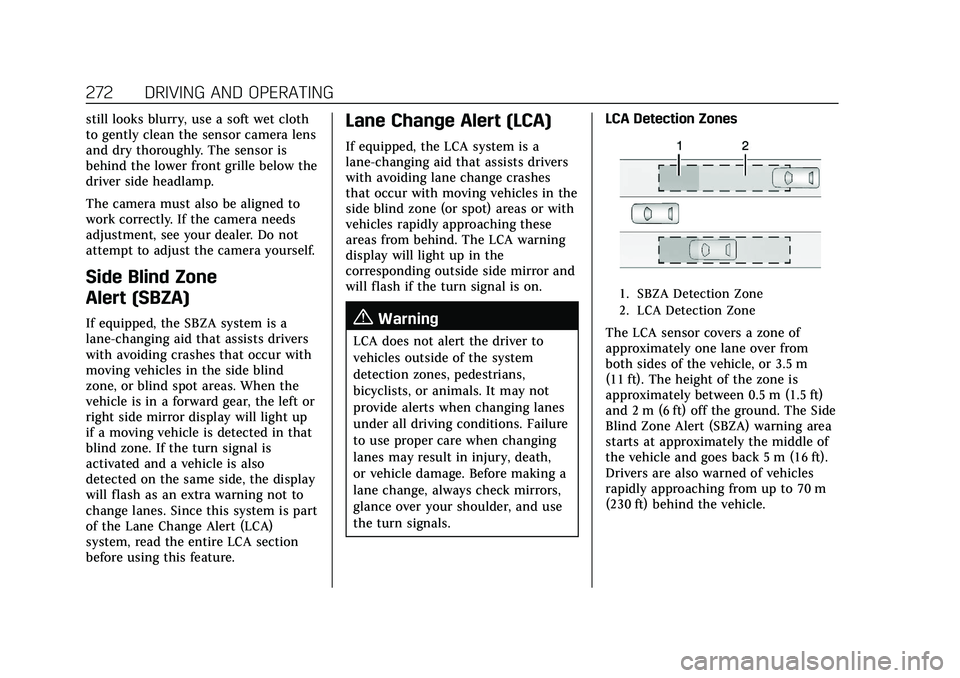
1. SBZA Detection Zone
2. LCA Detection Zone
The LCA sensor covers a zone of
approximately one lane over from
both sides of the vehicle, or 3.5 m
(11 ft). The height of the zone is
approximately between 0.5 m (1.5 ft)
and 2 m (6 ft) off the ground. The Side
Blind Zone Alert (SBZA) warning area
starts at approximately the middle of
the vehicle and goes back 5 m (16 ft).
Drivers are also warned of vehicles
rapidly approaching from up to 70 m
(230 ft) behind the vehicle.
Page 275 of 426

Cadillac XT5 Owner Manual (GMNA-Localizing-U.S./Canada/Mexico-
14590481) - 2021 - CRC - 10/22/20
274 DRIVING AND OPERATING
If the LCA displays do not light up
when moving vehicles are in the side
blind zone or are rapidly approaching
this zone and the system is clean, the
system may need service. Take the
vehicle to your dealer.
Radio Frequency Information
SeeRadio Frequency Statement 0401.
Lane Keep Assist (LKA)
If equipped, LKA may help avoid
crashes due to unintentional lane
departures. This system uses a camera
to detect lane markings between
60 km/h (37 mph) and 180 km/h
(112 mph). It may assist by gently
turning the steering wheel if the
vehicle approaches a detected lane
marking. It may also provide a Lane
Departure Warning (LDW) alert if the
vehicle crosses a detected lane
marking. LKA can be overridden by
turning the steering wheel. This
system is not intended to keep the
vehicle centered in the lane. LKA will
not assist and alert if the turn signal
is active in the direction of lane departure, or if it detects that you are
accelerating, braking, or actively
steering.
{Warning
The LKA system does not
continuously steer the vehicle.
It may not keep the vehicle in the
lane or give a Lane Departure
Warning (LDW) alert, even if a lane
marking is detected.
The LKA and LDW systems
may not:
.Provide an alert or enough
steering assist to avoid a lane
departure or crash.
.Detect lane markings under poor
weather or visibility conditions.
This can occur if the windshield
or headlamps are blocked by dirt,
snow, or ice; if they are not in
proper condition; or if the sun
shines directly into the camera.
.Detect road edges.
.Detect lanes on winding or hilly
roads.
(Continued)
Warning (Continued)
If LKA only detects lane markings
on one side of the road, it will only
assist or provide an LDW alert
when approaching the lane on the
side where it has detected a lane
marking. Even with LKA and LDW,
you must steer the vehicle. Always
keep your attention on the road and
maintain proper vehicle position
within the lane, or vehicle damage,
injury, or death could occur. Always
keep the windshield, headlamps,
and camera sensors clean and in
good repair. Do not use LKA in bad
weather conditions or on roads with
unclear lane markings, such as
construction zones.
{Warning
Using LKA while towing a trailer or
on slippery roads could cause loss
of control of the vehicle and a
crash. Turn the system off.
Page 276 of 426

Cadillac XT5 Owner Manual (GMNA-Localizing-U.S./Canada/Mexico-
14590481) - 2021 - CRC - 10/22/20
DRIVING AND OPERATING 275
How the System Works
LKA uses a camera sensor installed on
the windshield ahead of the rearview
mirror to detect lane markings. It may
provide brief steering assist if it
detects an unintended lane departure.
It may further provide an audible alert
or the driver seat may pulse indicating
that a lane marking has been crossed.
To turn LKA on and off, press
Aon
the steering wheel. If equipped, the
indicator light on the button comes
on when LKA is on and turns off
when LKA is disabled.
When on,
Ais white, if equipped,
indicating that the system is not ready
to assist.
Ais green if LKA is ready
to assist. LKA may assist by gently
turning the steering wheel if the
vehicle approaches a detected lane
marking.
Ais amber when
assisting. It may also provide a Lane
Departure Warning (LDW) alert by
flashing
Aamber if the vehicle
crosses a detected lane marking.
Additionally, there may be three
beeps, or the driver seat may pulse three times, on the right or left,
depending on the lane departure
direction.
Take Steering
The LKA system does not
continuously steer the vehicle. If LKA
does not detect active driver steering,
an alert and chime may be provided.
Steer the vehicle to dismiss. LKA may
become temporarily unavailable after
repeated take steering alerts.
When the System Does Not
Seem to Work Properly
The system performance may be
affected by:
.Close vehicles ahead.
.Sudden lighting changes, such as
when driving through tunnels.
.Banked roads.
.Roads with poor lane markings,
such as two-lane roads.
If the LKA system is not functioning
properly when lane markings are
clearly visible, cleaning the windshield
may help. A camera blocked message may
display if the camera is blocked. Some
driver assistance systems may have
reduced performance or not work at
all. An LKA or LDW unavailable
message may display if the systems
are temporarily unavailable. This
message could be due to a blocked
camera. The LKA system does not
need service. Clean the outside of the
windshield behind the rearview mirror.
LKA assistance and/or LDW alerts
may occur due to tar marks, shadows,
cracks in the road, temporary or
construction lane markings, or other
road imperfections. This is normal
system operation; the vehicle does not
need service. Turn LKA off if these
conditions continue.
Fuel
Top Tier Fuel
GM recommends the use of TOP TIER
Detergent Gasoline to keep the engine
clean, reduce engine deposits, and
maintain optimal vehicle performance.
Look for the TOP TIER Logo or see
Page 281 of 426
Cadillac XT5 Owner Manual (GMNA-Localizing-U.S./Canada/Mexico-
14590481) - 2021 - CRC - 10/22/20
280 DRIVING AND OPERATING
Successful, safe trailering takes correct
equipment, and it has to be used
properly.
The following information has many
time-tested, important trailering tips
and safety rules. Many of these are
important for your safety and that of
your passengers. Read this section
carefully before pulling a trailer.
When towing a trailer:
.Become familiar with and follow all
state and local laws that apply to
trailer towing. These requirements
vary from state to state.
.State laws may require the use of
extended side view mirrors. Even if
not required, you should install
extended side view mirrors if your
visibility is limited or restricted
while towing.
.Do not tow a trailer during the first
800 km (500 mi) of vehicle use to
prevent damage to the engine, axle,
or other parts.
.It is recommended to perform the
first oil change before heavy towing.
.During the first 800 km (500 mi) of
trailer towing, do not drive over
80 km/h (50 mph) and do not make
starts at full throttle.
.Vehicles can tow in D (Drive). If the
transmission downshifts too often, a
lower gear may be selected using
Manual Mode SeeManual Mode
0 236.
If equipped, the following driver
assistance features should be turned
off when towing a trailer:
.Adaptive Cruise Control (ACC)
.Super Cruise Control
.Lane Keep Assist (LKA)
.Park Assist
.Automatic Parking Assist (APA)
.Reverse Automatic Braking (RAB)
If equipped, the following driver
assistance features should be turned
to alert or off when towing a trailer:
.Automatic Emergency
Braking (AEB)
.Intelligent Brake Assist (IBA)
.Front Pedestrian Braking (FPB) If equipped with Lane Change Alert
(LCA), the LCA detection zones that
extend back from the side of the
vehicle do not move further back
when a trailer is towed. Use caution
while changing lanes when towing a
trailer.
If equipped with Rear Cross Traffic
Alert (RCTA), use caution while
backing up when towing a trailer, as
the RCTA detection zones that extend
out from the back of the vehicle do
not move further back when a trailer
is towed.
{Warning
To prevent serious injury or death
from carbon monoxide (CO), when
towing a trailer:
.Do not drive with the liftgate,
trunk/hatch, or rear-most
window open.
.Fully open the air outlets on or
under the instrument panel.
(Continued)
Page 419 of 426
Cadillac XT5 Owner Manual (GMNA-Localizing-U.S./Canada/Mexico-
14590481) - 2021 - CRC - 10/22/20
418 INDEX
Heating . . . . . . . . . . . . . . . . . . . . . . . . .201, 206
High-Beam On Light . . . . . . . . . . . . . . . . 116
High-Speed Operation . . . . . . . . . . . . . . 333
Hill and Mountain Roads . . . . . . . . . . 218
Hill Start Assist (HSA) . . . . . . . . . . . . . 240
Hood . . . . . . . . . . . . . . . . . . . . . . . . . . . . . . . . . 295
Horn . . . . . . . . . . . . . . . . . . . . . . . . . . . . . . . . . . 95
How to Wear Seat Belts Properly . . . 49
HVAC . . . . . . . . . . . . . . . . . . . . . . . . . . .201, 206
I
If the System Needs Service . . . . . . . 168
Ignition Positions . . . . . . . . . . . . . . . . . . . 224
Immobilizer . . . . . . . . . . . . . . . . . . . . . . . . . . 28
IndicatorPedestrian Ahead . . . . . . . . . . . . . . . . . 113
Vehicle Ahead . . . . . . . . . . . . . . . . . . . . . 112
Infants and Young Children, Restraints . . . . . . . . . . . . . . . . . . . . . . . . . . . 68
Information Publication Ordering . . . . . . . . . . . . . 401
Infotainment System . . . . . . . . . . . . . . . 404
Instrument Cluster . . . . . . . . . . . . . . . . . 102
Instrument Panel Overview . . . . . . . . . . . 4
Interior Rearview Mirrors . . . . . . . . . . . 31
Introduction . . . . . . . . . . . . . . . . . . . . . . 1, 139
J
Jump Starting - North America . . . . 359
K
Keyless Entry Remote (RKE) System . . . . . . . . . . . . . . . 7
Keys . . . . . . . . . . . . . . . . . . . . . . . . . . . . . . . . . . . . 6
L
Labeling, Tire Sidewall . . . . . . . . . . . . . 327
Lamps Cornering . . . . . . . . . . . . . . . . . . . . . . . . . . 136
Courtesy . . . . . . . . . . . . . . . . . . . . . . . . . . . 136
Daytime Running (DRL) . . . . . . . . . . 134
Dome . . . . . . . . . . . . . . . . . . . . . . . . . . . . . . 136
Exterior Controls . . . . . . . . . . . . . . . . . . 132
Exterior Lamps Off Reminder . . . . 134
Exterior Lighting BatterySaver . . . . . . . . . . . . . . . . . . . . . . . . . . . . . 138
Malfunction Indicator (Check Engine) . . . . . . . . . . . . . . . . . . . . . . . . . . 108
On Reminder . . . . . . . . . . . . . . . . . . . . . . 116
Reading . . . . . . . . . . . . . . . . . . . . . . . . . . . . 137
Lane Change Alert (LCA) . . . . . . . . . . . 272
Lane Keep Assist (LKA) . . . . . . . . . . . . 274
Lane Keep Assist Light . . . . . . . . . . . . . 112
Lap-Shoulder Belt . . . . . . . . . . . . . . . . . . . . 51
LATCH System Replacing Parts after a Crash . . . . . 80
LATCH, Lower Anchors and Tethers for Children . . . . . . . . . . . . . . . 74 LED Lighting . . . . . . . . . . . . . . . . . . . . . . . . 315
Liftgate . . . . . . . . . . . . . . . . . . . . . . . . . . . . . . . 19
Light
Performance Shifting . . . . . . . . . . . . . 111
Lighting Entry . . . . . . . . . . . . . . . . . . . . . . . . . . . . . . 137
Exit . . . . . . . . . . . . . . . . . . . . . . . . . . . . . . . . 137
Illumination Control . . . . . . . . . . . . . . 136
LED . . . . . . . . . . . . . . . . . . . . . . . . . . . . . . . . 315
Lights Airbag Readiness . . . . . . . . . . . . . . . . . 107
All-Wheel Drive . . . . . . . . . . . . . . . . . . . 112
Antilock Brake System (ABS)
Warning . . . . . . . . . . . . . . . . . . . . . . . . . 111
Brake System Warning . . . . . . . . . . . 110
Charging System . . . . . . . . . . . . . . . . . . 108
Check Engine (Malfunction Indicator) . . . . . . . . . . . . . . . . . . . . . . . . 108
Cruise Control . . . . . . . . . . . . . . . . . . . . . 116
Door Ajar . . . . . . . . . . . . . . . . . . . . . . . . . . 117
Driver Mode Control . . . . . . . . . . . . . . 114
Electric Parking Brake . . . . . . . . . . . . 110
Engine Coolant Temperature Warning . . . . . . . . . . . . . . . . . . . . . . . . . 114
Engine Oil Pressure . . . . . . . . . . . . . . . 115
Flash-to-Pass . . . . . . . . . . . . . . . . . . . . . . 134
High-Beam On . . . . . . . . . . . . . . . . . . . . 116
High/Low Beam Changer . . . . . . . . . 134
Page 420 of 426
Cadillac XT5 Owner Manual (GMNA-Localizing-U.S./Canada/Mexico-
14590481) - 2021 - CRC - 10/22/20
INDEX 419
Lights (cont'd)Lane Keep Assist . . . . . . . . . . . . . . . . . . 112
Low Fuel Warning . . . . . . . . . . . . . . . . 115
Seat Belt Reminders . . . . . . . . . . . . . . 106
Security . . . . . . . . . . . . . . . . . . . . . . . . . . . . 116
Service Electric Parking
Brake . . . . . . . . . . . . . . . . . . . . . . . . . . . . . 111
StabiliTrak OFF . . . . . . . . . . . . . . . . . . . 113
Tire Pressure . . . . . . . . . . . . . . . . . . . . . . 114
Traction Control System (TCS)/StabiliTrak . . . . . . . . . . . . . . . . 113
Traction Off . . . . . . . . . . . . . . . . . . . . . . . 113
Lock Steering Column . . . . . . . . . . . . . . . . . . . 27
Locks Automatic Door . . . . . . . . . . . . . . . . . . . . 18
Delayed Locking . . . . . . . . . . . . . . . . . . . 17
Door . . . . . . . . . . . . . . . . . . . . . . . . . . . . . . . . 15
Lockout Protection . . . . . . . . . . . . . . . . 18
Power Door . . . . . . . . . . . . . . . . . . . . . . . . . 17
Safety . . . . . . . . . . . . . . . . . . . . . . . . . . . . . . . 18
Loss of Control . . . . . . . . . . . . . . . . . . . . . . 213
Low Fuel Warning Light . . . . . . . . . . . 115
Lower Anchors and Tethers for Children (LATCH System) . . . . . . . . . 74
Lumbar Adjustment . . . . . . . . . . . . . . . . . 40
Front Seats . . . . . . . . . . . . . . . . . . . . . . . . . 40M
MaintenanceRecords . . . . . . . . . . . . . . . . . . . . . . . . . . . . 386
Maintenance and Care Additional . . . . . . . . . . . . . . . . . . . . . . . . . 380
Maintenance Schedule . . . . . . . . . . . . . 374 Recommended Fluids andLubricants . . . . . . . . . . . . . . . . . . . . . . . 383
Malfunction Indicator Lamp . . . . . . . 108
Manual Mode . . . . . . . . . . . . . . . . . . . . . . . 236
Map Data Updates . . . . . . . . . . . . . . . . . . 168
Maps . . . . . . . . . . . . . . . . . . . . . . . . . . . . . . . . . 158
Media Avoiding Untrusted Devices . . . . . 150
Memory Seats . . . . . . . . . . . . . . . . . . . . . . . . 41
Messages Engine Power . . . . . . . . . . . . . . . . . . . . . 123
Vehicle . . . . . . . . . . . . . . . . . . . . . . . . . . . . . 123
Vehicle Speed . . . . . . . . . . . . . . . . . . . . . 123
Mirror Rear Camera . . . . . . . . . . . . . . . . . . . . . . . 31
Mirrors Automatic Dimming . . . . . . . . . . . . . . . 30
Automatic Dimming Rearview . . . . 31
Convex . . . . . . . . . . . . . . . . . . . . . . . . . . . . . . 29
Folding . . . . . . . . . . . . . . . . . . . . . . . . . . . . . 29
Heated . . . . . . . . . . . . . . . . . . . . . . . . . . . . . . 30
Manual Rearview . . . . . . . . . . . . . . . . . . 31 Mirrors (cont'd)
Power . . . . . . . . . . . . . . . . . . . . . . . . . . . . . . . 29
Tilt in Reverse . . . . . . . . . . . . . . . . . . . . . 30
Mirrors, Interior Rearview . . . . . . . . . . . 31
Mode . . . . . . . . . . . . . . . . . . . . . . . . . . . . . . . . 242 Driver Control . . . . . . . . . . . . . . . . . . . . . 242
Monitor System, Tire Pressure . . . . . 334
Multi-band Antenna . . . . . . . . . . . . . . . . 150
N
Navigation Connected Services . . . . . . . . . . . . . . . 410
Destination . . . . . . . . . . . . . . . . . . . . . . . . 160
Using the System . . . . . . . . . . . . . . . . . 155
Navigation Symbols . . . . . . . . . . . . . . . . 158
Net, Convenience . . . . . . . . . . . . . . . . . . . . 91
New Vehicle Break-In . . . . . . . . . . . . . . . 224
Night Vision System . . . . . . . . . . . . . . . . 269
O
Odometer . . . . . . . . . . . . . . . . . . . . . . . . . . . . 105 Trip . . . . . . . . . . . . . . . . . . . . . . . . . . . . . . . . 105
Off-Road . . . . . . . . . . . . . . . . . . . . . . . . . . . . . 214 Driving . . . . . . . . . . . . . . . . . . . . . . . . . . . . 214
Recovery . . . . . . . . . . . . . . . . . . . . . . . . . . . 213
Oil Engine . . . . . . . . . . . . . . . . . . . . . . . . . . . . . 299
Engine Oil Life System . . . . . . . . . . . 301