change wheel CADILLAC XT5 2022 User Guide
[x] Cancel search | Manufacturer: CADILLAC, Model Year: 2022, Model line: XT5, Model: CADILLAC XT5 2022Pages: 432, PDF Size: 8.72 MB
Page 180 of 432
Cadillac XT5 Owner Manual (GMNA-Localizing-U.S./Canada/Mexico-
15227431) - 2022 - CRC - 8/11/21
INFOTAINMENT SYSTEM 179
Declining a Call
There are two ways to decline a call:
.Pression the steering wheel
controls.
.Touch Ignore on the infotainment
display.
Call Waiting
Call waiting must be supported on the
Bluetooth cell phone and enabled by
the wireless service carrier to work.
Accepting a Call
Press
gto answer, then touch Switch
on the infotainment display.
Declining a Call
Press
ito decline, then touch
Ignore on the infotainment display
Switching Between Calls (Call
Waiting Calls Only)
To switch between calls, touch Phone
on the Home Page to display Call
View. While in Call View, touch the
call information of the call on hold to
change calls.
Three-Way Calling
Three-way calling must be supported
on the Bluetooth cell phone and
enabled by the wireless service carrier
to work.
To start a three-way call while in a
current call:
1. In the Call View, touch Add Call to add another call.
2. Initiate the second call by selecting from Recents, Contacts, or Keypad.
3. When the second call is active, touch the merge icon to conference
the three-way call together.
Ending a Call
.Pression the steering wheel
controls.
.Touch#on the infotainment
display, next to a call, to end only
that call.
Dual Tone Multi-Frequency
(DTMF) Tones
The in-vehicle Bluetooth system can
send numbers during a call. This is
used when calling a menu-driven
phone system. Use the Keypad to
enter the number.
Apple CarPlay and
Android Auto
If equipped, Android Auto and/or
Apple CarPlay capability may be
available through a compatible
smartphone. If available, the Android
Auto and Apple CarPlay icons will
change from gray to color on the
Home Page of the infotainment
display.
To use Android Auto and/or Apple
CarPlay:
For Wired Phone Projection
1. Download the Android Auto app to your smartphone from the Google
Play store. There is no app required
for Apple CarPlay.
2. Connect your Android phone or Apple iPhone by using the
factory-provided phone USB cable
Page 210 of 432
Cadillac XT5 Owner Manual (GMNA-Localizing-U.S./Canada/Mexico-
15227431) - 2022 - CRC - 8/11/21
DRIVING AND OPERATING 209
Driving and
Operating
Driving Information
Driving for Better FuelEconomy . . . . . . . . . . . . . . . . . . . . . . . . 210
Distracted Driving . . . . . . . . . . . . . . . . 210
Defensive Driving . . . . . . . . . . . . . . . . 211
Impaired Driving . . . . . . . . . . . . . . . . . 211
Control of a Vehicle . . . . . . . . . . . . . . 211
Braking . . . . . . . . . . . . . . . . . . . . . . . . . . . . 211
Steering . . . . . . . . . . . . . . . . . . . . . . . . . . . 212
Off-Road Recovery . . . . . . . . . . . . . . . . 213
Loss of Control . . . . . . . . . . . . . . . . . . . 213
Off-Road Driving . . . . . . . . . . . . . . . . . 214
Driving on Wet Roads . . . . . . . . . . . 217
Hill and Mountain Roads . . . . . . . . 218
Winter Driving . . . . . . . . . . . . . . . . . . . . 219
If the Vehicle Is Stuck . . . . . . . . . . . 220
Vehicle Load Limits . . . . . . . . . . . . . . 220
Starting and Operating
New Vehicle Break-In . . . . . . . . . . . . 224
Ignition Positions . . . . . . . . . . . . . . . . 225
Starting the Engine . . . . . . . . . . . . . . 226
Stop/Start System . . . . . . . . . . . . . . . . 227
Engine Heater . . . . . . . . . . . . . . . . . . . . 228
Retained Accessory Power (RAP) . . . . . . . . . . . . . . . . . . . . 230 Shifting Into Park . . . . . . . . . . . . . . . . 230
Shifting out of Park . . . . . . . . . . . . . . 231
Parking over Things
That Burn . . . . . . . . . . . . . . . . . . . . . . . 231
Active Fuel Management . . . . . . . . 231
Extended Parking . . . . . . . . . . . . . . . . . 232
Engine Exhaust
Engine Exhaust . . . . . . . . . . . . . . . . . . . 232
Running the Vehicle While
Parked . . . . . . . . . . . . . . . . . . . . . . . . . . . 232
Automatic Transmission
Automatic Transmission . . . . . . . . . 233
Manual Mode . . . . . . . . . . . . . . . . . . . . . 237
Drive Systems
All-Wheel Drive . . . . . . . . . . . . . . . . . . 238
Brakes
Electric Brake Boost . . . . . . . . . . . . . . 238
Antilock Brake System (ABS) . . . . 239
Electric Parking Brake . . . . . . . . . . . . 239
Brake Assist . . . . . . . . . . . . . . . . . . . . . . . 241
Hill Start Assist (HSA) . . . . . . . . . . . 241
Ride Control Systems
Traction Control/ElectronicStability Control . . . . . . . . . . . . . . . . 241
Driver Mode Control . . . . . . . . . . . . . 243
Cruise Control
Cruise Control . . . . . . . . . . . . . . . . . . . . 244
Adaptive Cruise Control (Advanced) . . . . . . . . . . . . . . . . . . . . . . 246
Driver Assistance Systems
Driver Assistance Systems . . . . . . . 256
Assistance Systems for Parkingor Backing . . . . . . . . . . . . . . . . . . . . . . . 257
Rear Vision Camera (RVC) . . . . . . . 257
Surround Vision System . . . . . . . . . 258
Park Assist . . . . . . . . . . . . . . . . . . . . . . . . 260
Automatic Parking Assist (APA) . . . . . . . . . . . . . . . . . . . . . 262
Reverse Automatic Braking (RAB) . . . . . . . . . . . . . . . . . . . 264
Rear Pedestrian Alert . . . . . . . . . . . . 265
Rear Cross Traffic Alert (RCTA) System . . . . . . . . . . . . . . . . . . . . . . . . . . 266
Assistance Systems for Driving . . . . . . . . . . . . . . . . . . . . . . . . . . 267
Forward Collision Alert (FCA) System . . . . . . . . . . . . . . . . . . . . . . . . . . 267
Automatic Emergency Braking (AEB) . . . . . . . . . . . . . . . . . . . 269
Front Pedestrian Braking (FPB) System . . . . . . . . . . . . . . . . . . . . . . . . . . 271
Night Vision System . . . . . . . . . . . . . 273
Side Blind Zone Alert (SBZA) . . . . 275
Lane Change Alert (LCA) . . . . . . . . 275
Page 214 of 432
Cadillac XT5 Owner Manual (GMNA-Localizing-U.S./Canada/Mexico-
15227431) - 2022 - CRC - 8/11/21
DRIVING AND OPERATING 213
.Holding both sides of the steering
wheel allows you to turn
180 degrees without removing
a hand.
.The Antilock Brake System (ABS)
allows steering while braking.
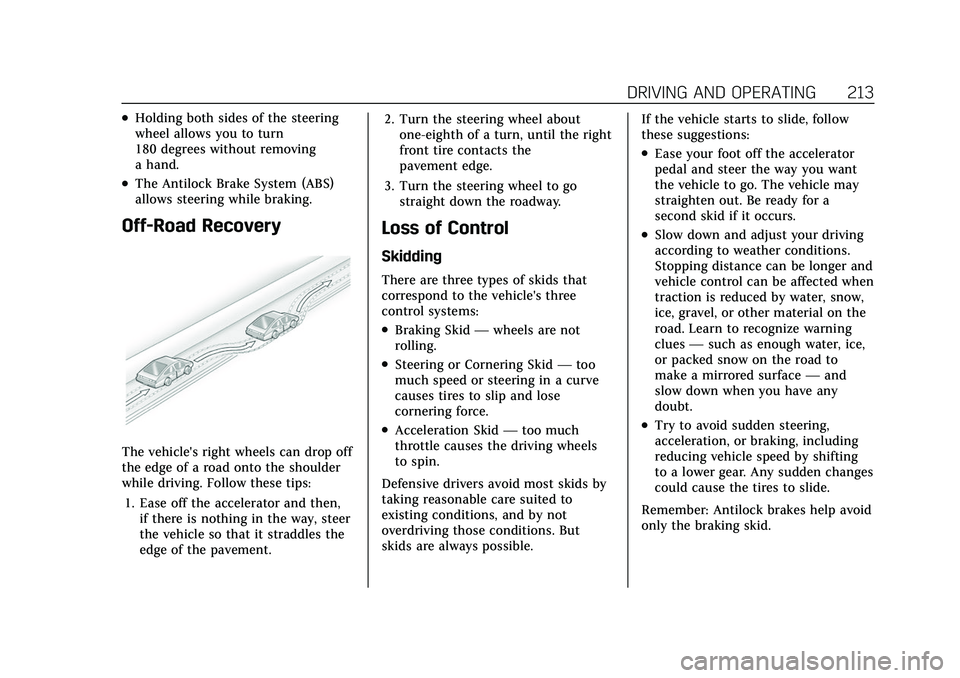
Off-Road Recovery
The vehicle's right wheels can drop off
the edge of a road onto the shoulder
while driving. Follow these tips:1. Ease off the accelerator and then, if there is nothing in the way, steer
the vehicle so that it straddles the
edge of the pavement. 2. Turn the steering wheel about
one-eighth of a turn, until the right
front tire contacts the
pavement edge.
3. Turn the steering wheel to go straight down the roadway.
Loss of Control
Skidding
There are three types of skids that
correspond to the vehicle's three
control systems:
.Braking Skid —wheels are not
rolling.
.Steering or Cornering Skid —too
much speed or steering in a curve
causes tires to slip and lose
cornering force.
.Acceleration Skid —too much
throttle causes the driving wheels
to spin.
Defensive drivers avoid most skids by
taking reasonable care suited to
existing conditions, and by not
overdriving those conditions. But
skids are always possible. If the vehicle starts to slide, follow
these suggestions:
.Ease your foot off the accelerator
pedal and steer the way you want
the vehicle to go. The vehicle may
straighten out. Be ready for a
second skid if it occurs.
.Slow down and adjust your driving
according to weather conditions.
Stopping distance can be longer and
vehicle control can be affected when
traction is reduced by water, snow,
ice, gravel, or other material on the
road. Learn to recognize warning
clues
—such as enough water, ice,
or packed snow on the road to
make a mirrored surface —and
slow down when you have any
doubt.
.Try to avoid sudden steering,
acceleration, or braking, including
reducing vehicle speed by shifting
to a lower gear. Any sudden changes
could cause the tires to slide.
Remember: Antilock brakes help avoid
only the braking skid.
Page 215 of 432

Cadillac XT5 Owner Manual (GMNA-Localizing-U.S./Canada/Mexico-
15227431) - 2022 - CRC - 8/11/21
214 DRIVING AND OPERATING
Off-Road Driving
All-Wheel Drive vehicles can be used
for off-road driving. Vehicles without
All-Wheel Drive and vehicles not
equipped with All Terrain (AT) or
On-Off Road (OOR) tires must not be
driven off-road except on a level, solid
surface. To contact the tire
manufacturer for more information
about the original equipment tires, see
the Limited Warranty and Owner
Assistance Information manual.
Controlling the vehicle is the key to
successful off-road driving. One of the
best ways to control the vehicle is to
control the speed.
{Warning
When driving off-road, bouncing
and quick changes in direction can
easily throw you out of position.
This could cause you to lose control
and crash. You and your passengers
should always wear seat belts.
Before Driving Off-Road
.Have all necessary maintenance and
service work completed.
.Fuel the vehicle, fill fluid levels, and
check inflation pressure in all tires,
including the spare, if equipped.
.Read all the information about
All-Wheel Drive vehicles in this
manual.
.Make sure all underbody shields,
if equipped, are properly attached.
.Know the local laws that apply to
off-road driving.
To gain more ground clearance if
needed, it may be necessary to remove
the front fascia lower air dam.
However, driving without the air dam
reduces fuel economy.
Caution
Operating the vehicle for extended
periods without the front fascia
lower air dam installed can cause
improper airf low to the engine.
Reattach the front fascia air dam
after off-road driving.
Loading the Vehicle for Off-Road
Driving
{Warning
.Unsecured cargo on the load
floor can be tossed about when
driving over rough terrain. You or
your passengers can be struck by
flying objects. Secure the cargo
properly.
.Keep cargo in the cargo area as
far forward and as low as
possible. The heaviest things
should be on the floor, forward
of the rear axle.
.Heavy loads on the roof raise the
vehicle's center of gravity,
making it more likely to roll over.
You can be seriously or fatally
injured if the vehicle rolls over.
Put heavy loads inside the cargo
area, not on the roof.
For more information about loading
the vehicle, see Vehicle Load Limits
0 220.
Page 217 of 432

Cadillac XT5 Owner Manual (GMNA-Localizing-U.S./Canada/Mexico-
15227431) - 2022 - CRC - 8/11/21
216 DRIVING AND OPERATING
2. Shift into P (Park) and then restartthe engine.
.If driving uphill when the
vehicle stalls, shift to
R (Reverse), release the parking
brake, and back straight down.
.Never try to turn the vehicle
around. If the hill is steep
enough to stall the vehicle, it is
steep enough to cause it to
roll over.
.If you cannot make it up the
hill, back straight down the hill.
.Never back down a hill in
N (Neutral) using only the
brake.
.The vehicle can roll backward
quickly and you could lose
control.
.If driving downhill when the
vehicle stalls, shift to a lower
gear, release the parking brake,
and drive straight down the hill.
3. If the vehicle cannot be restarted after stalling, set the parking brake,
shift into P (Park), and turn the
vehicle off. 3.1. Leave the vehicle and
seek help.
3.2. Stay clear of the path the vehicle would take if it rolled
downhill.
.Avoid turns that take the vehicle
across the incline of the hill. A hill
that can be driven straight up or
down might be too steep to drive
across. Driving across an incline
puts more weight on the downhill
wheels which could cause a
downhill slide or a rollover.
.Surface conditions can be a
problem. Loose gravel, muddy spots,
or even wet grass can cause the
tires to slip sideways, downhill.
If the vehicle slips sideways, it can
hit something that will trip it –a
rock, a rut, etc. –and roll over.
.Hidden obstacles can make the
steepness of the incline more
severe. If a rock is driven across
with the uphill wheels, or if the
downhill wheels drop into a rut or
depression, the vehicle can tilt
even more.
.If an incline must be driven across,
and the vehicle starts to slide, turn
downhill. This should help
straighten out the vehicle and
prevent the side slipping.
{Warning
Getting out of the vehicle on the
downhill side when stopped across
an incline is dangerous. If the
vehicle rolls over, you could be
crushed or killed. Always get out on
the uphill side of the vehicle and
stay well clear of the rollover path.
Driving in Mud, Sand, Snow,
or Ice
Use a low gear when driving in mud –
the deeper the mud, the lower the
gear. Keep the vehicle moving to avoid
getting stuck.
Traction changes when driving on
sand. On loose sand, such as on
beaches or sand dunes, the tires tend
to sink into the sand. This affects
steering, accelerating, and braking.
Drive at a reduced speed and avoid
sharp turns or abrupt maneuvers.
Page 239 of 432

Cadillac XT5 Owner Manual (GMNA-Localizing-U.S./Canada/Mexico-
15227431) - 2022 - CRC - 8/11/21
238 DRIVING AND OPERATING
M (Manual Mode) can be exited to
return to D (Drive) at any speed by
pulling the lever rearward from the
center position. It is not necessary to
stop the vehicle or shift to N (Neutral)
or P (Park) prior to shifting back to
D (Drive).
Temporary Tap Shift Mode
To enter Temporary Tap Shift Mode:1. With the transmission in D (Drive) and not in Permanent Tap Shift
Mode, the Tap Shift controls will
activate a Temporary Tap Shift
Mode, allowing the transmission to
be manually shifted.
2. To deactivate, hold the right control briefly. Automatic shifts
return after no manual shifts have
been done for seven to 10 seconds.
While using Tap Shift, the vehicle will
have firmer, quicker shifting. This can
be used for sport driving or when
climbing or descending hills, to stay in
gear longer, or to downshift for more
power or engine braking.
The transmission will only allow
shifting into gears appropriate for the
vehicle speed and engine revolutions per minute (rpm). If shifting is
prevented for any reason, the M or D
will flash in the instrument cluster.
The transmission will not
automatically shift to the next higher
gear if the engine rpm is too high.
It will only automatically shift to the
next lower gear if the engine rpm is
much too low.
Drive Systems
All-Wheel Drive
Vehicles with this feature can operate
in All-Wheel Drive (AWD) Mode. See
Driver Mode Control
0243.
Press MODE to activate AWD. AWD is
active in AWD, Sport, and Off-Road
Modes.
The AWD system delivers power to all
four wheels and the system adjusts as
needed to improve traction.
The AWD Mode will stay selected
until the mode is changed. If the
vehicle is placed in Sport Mode, see
Driver Mode Control 0243.
Sport Mode and Off-Road Mode are
canceled with each ignition cycle. See
Driver Mode Control 0243.
When operated in Tour Mode, the
vehicle will deliver power to the front
wheels only and may provide better
fuel economy.
If Tour Mode is selected see Driver
Mode Control 0243.
Brakes
Electric Brake Boost
Vehicles equipped with electric brake
boost have hydraulic brake circuits
that are electronically controlled when
the brake pedal is applied during
Page 245 of 432

Cadillac XT5 Owner Manual (GMNA-Localizing-U.S./Canada/Mexico-
15227431) - 2022 - CRC - 8/11/21
244 DRIVING AND OPERATING
release of a heavily applied accelerator
pedal. This provides greater engine
braking and enhanced vehicle control.
When PAL is activated, there may be
an additional green gear symbol which
appears in the instrument cluster
display. SeePerformance Shifting Light
0 114.
AWD : AWD Mode provides drive
torque to all four wheels. Select AWD
to improve traction and control on
slippery road surfaces, such as gravel,
sand, wet pavement, snow, and ice.
When in AWD Mode, the AWD Mode
indicator light will be on. For more
information on AWD Mode, see
All-Wheel Drive 0238.
Snow/Ice (FWD Vehicles Only) :
Snow/Ice Mode improves vehicle
acceleration on snow and ice covered
roads.
Off-Road (AWD Vehicles Only) : Use
this mode for off-road recreational
driving. Off-Road Mode should be
used to improve driving at moderate
speeds, on grass, gravel, dirt, unpaved
roads, or snow-covered roads. This mode modifies pedal mapping,
suspension tuning, AWD, ABS, ESC,
and TCS performance.
For more information on off-road
driving, see
Off-Road Driving 0214.
Cruise Control
{
Warning
Cruise control can be dangerous
where you cannot drive safely at a
steady speed. Do not use cruise
control on winding roads or in
heavy traffic.
Cruise control can be dangerous on
slippery roads. On such roads, fast
changes in tire traction can cause
excessive wheel slip, and you could
lose control. Do not use cruise
control on slippery roads.
With cruise control, a speed of about
40 km/h (25 mph) or more can be
maintained without keeping your foot
on the accelerator. Cruise control does
not work at speeds below about
40 km/h (25 mph). If the Traction Control/StabiliTrak/
Electronic Stability Control (ESC)
system begins to limit wheel spin
while using cruise control, the cruise
control automatically disengages. See
Traction Control/Electronic Stability
Control
0241. If a collision alert
occurs when cruise control is
activated, cruise control is disengaged.
See Forward Collision Alert (FCA)
System 0267. When road conditions
allow cruise control to be safely used,
it can be turned back on.
Cruise control will disengage if either
TCS or StabiliTrak/ESC is turned off.
If the brakes are applied, cruise
control disengages.
Page 248 of 432

Cadillac XT5 Owner Manual (GMNA-Localizing-U.S./Canada/Mexico-
15227431) - 2022 - CRC - 8/11/21
DRIVING AND OPERATING 247
vehicle is detected in your path, ACC
works like regular cruise control. ACC
uses camera and radar sensors. See
Radio Frequency Statement0406.
If a vehicle is detected in your path,
ACC can speed up the vehicle or apply
limited, moderate braking to maintain
the selected following gap. To
disengage ACC, apply the brake.
If ACC is controlling your vehicle
speed when the traction control
system (TCS) or StabiliTrak electronic
stability control system activates, ACC
may automatically disengage. See
Traction Control/Electronic Stability
Control 0241. When road conditions
allow ACC to be safely used, ACC can
be turned back on. ACC will not
engage if the TCS or StabiliTrak/ESC is
disabled.
ACC can reduce the need for you to
frequently brake and accelerate,
especially when used on expressways,
freeways, and interstate highways.
When used on other roads, you may
need to take over the control of
braking or acceleration more often.{Warning
ACC has limited braking ability and
may not have time to slow the
vehicle down enough to avoid a
collision with another vehicle you
are following. This can occur when
vehicles suddenly slow or stop
ahead, or enter your lane. Also see
“Alerting the Driver” in this section.
Complete attention is always
required while driving and you
should be ready to take action and
apply the brakes. See Defensive
Driving 0211.
{Warning
ACC will not detect or brake for
children, pedestrians, animals,
or other objects.
Do not use ACC when:
.On winding and hilly roads or
when the sensors are blocked by
snow, ice, or dirt. The system
(Continued)
Warning (Continued)
may not detect a vehicle ahead.
Keep the entire front of the
vehicle clean.
.Visibility is low, such as in fog,
rain, or snow conditions. ACC
performance is limited under
these conditions.
.On slippery roads where fast
changes in tire traction can
cause excessive wheel slip.
5:Press to turn the system on or off.
The indicator turns white on the
instrument cluster when ACC is
turned on.
Page 251 of 432

Cadillac XT5 Owner Manual (GMNA-Localizing-U.S./Canada/Mexico-
15227431) - 2022 - CRC - 8/11/21
250 DRIVING AND OPERATING
.To increase speed in larger
increments, press RES+ to the
second detent. For each press, the
vehicle speed increases to the next
5 km/h (5 mph) mark on the
speedometer.
The set speed can also be increased
while the vehicle is stopped.
.If stopped with the brake applied,
press RES+ until the desired set
speed is displayed.
.If ACC is holding the vehicle at a
stop and there is another vehicle
directly ahead, pressing RES+ will
increase the set speed.
.Pressing RES+ when there is no
longer a vehicle ahead or the vehicle
ahead is pulling away and the brake
is not applied will cause the ACC to
resume.
When it is determined there is no
vehicle ahead or the vehicle ahead is
beyond the selected following gap,
then the vehicle speed will increase to
the set speed. The speedometer reading can be
displayed in either English or metric
units. See
Instrument Cluster 0104.
The increment value used depends on
the units displayed.
Reducing Speed While ACC is at a
Set Speed
If ACC is already activated, do one of
the following:
.Use the brake to get to the desired
lower speed. Release the brake and
press SET–. The vehicle will now
cruise at the lower speed.
.Press and hold SET– until the
desired lower speed is displayed,
then release it.
.To decrease speed in smaller
increments, press SET− to the first
detent. For each press, the vehicle
goes 1 km/h (1 mph) slower.
.To decrease speed in larger
increments, press SET− to the
second detent. For each press, the
vehicle speed decreases to the next
5 km/h (5 mph) mark on the
speedometer.
The set speed can also be decreased
while the vehicle is stopped.
.If stopped with the brake applied,
press or hold SET− until the desired
set speed is displayed.
Selecting the Follow Distance Gap
When a slower moving vehicle is
detected ahead within the selected
following gap, ACC will adjust the
vehicle's speed and attempt to
maintain the follow distance gap
selected.
Press
[on the steering wheel to
adjust the following gap. Each press
cycles the gap button through three
settings: Far, Medium, or Near.
When pressed, the current gap setting
displays briefly on the instrument
cluster and HUD (if equipped).
Subsequent presses cycle the gap
button through three settings: Far,
Medium, or Near. The gap setting will
be maintained until it is changed.
Since each gap setting corresponds to
a following time (Far, Medium,
or Near), the following distance will
vary based on vehicle speed. The
faster the vehicle speed, the further
back your vehicle will follow a vehicle
detected ahead. Consider traffic and
Page 264 of 432

Cadillac XT5 Owner Manual (GMNA-Localizing-U.S./Canada/Mexico-
15227431) - 2022 - CRC - 8/11/21
DRIVING AND OPERATING 263
Warning (Continued)
vehicle. Always be prepared to stop
the vehicle during the parking
maneuver.
How to Activate Automatic Parking
To activate APA, press the soft-touch
button or hard switch
Ofor the
system to begin searching for a
parking space while driving forward at
no greater than 30 km/h (18 mph). By
default, APA searches for parallel
parking spaces to the right of the
vehicle up to the sensors’ range of
1.5 m (5 ft). To search for a parking
space to the left, turn on the left turn
signal or, if available, change the side
selection in the infotainment display.
To switch the parking mode between
parallel and perpendicular press and
hold
Owhile searching for a valid
parking spot or, if available, change
the parking mode in the infotainment
display.
APA cannot park in all empty parking
spots. The parking spot must:
.Be sufficiently large to fit the
vehicle comfortably.
.Have an adjacent vehicle, wall,
or pillar for the system to align to.
After completely passing an eligible
parking spot, a beep sounds and a red
stop symbol is displayed in the driver
information center. Generally, APA
selects the nearest empty parking spot
behind the vehicle, but under some
conditions may select a space that is
further back. Slow down and bring the
vehicle to a complete stop to begin.
Follow the displayed instructions.
When instructed to drive in reverse,
shift to R (Reverse) while holding the
brakes. The steering wheel will vibrate
briefly as a reminder to remove hands
from the steering wheel. After the
vibration stops, check your
surroundings and release the brakes
to begin automatic parking. As the vehicle automatically steers, and
brakes into the parking spot, check
surroundings and continue to apply
acceleration if necessary and shift
gears as needed. Be prepared to stop
to avoid vehicles, pedestrians,
or objects.
A progress arrow displays the status
of the parking maneuver. Once
automatic parking is finished and the
vehicle has come to a full stop, APA
will beep and display a message
indicating parking is complete. Shift
the vehicle to P (Park) and apply the
parking brake
Automatic Parking