seats CADILLAC XT5 2022 Repair Manual
[x] Cancel search | Manufacturer: CADILLAC, Model Year: 2022, Model line: XT5, Model: CADILLAC XT5 2022Pages: 432, PDF Size: 8.72 MB
Page 131 of 432
Cadillac XT5 Owner Manual (GMNA-Localizing-U.S./Canada/Mexico-
15227431) - 2022 - CRC - 8/11/21
130 INSTRUMENTS AND CONTROLS
If equipped with Auto Heated Steering
Wheel, this feature will turn on when
the Remote Start Auto Heated Seats
turn on.
Touch Off or On.
Remote Window Operation
If equipped, this feature enables
remote operation of the windows with
the RKE transmitter. SeeRemote
Keyless Entry (RKE) System Operation
0 7.
Touch Off or On.
Passive Door Unlock
This setting specifies which doors
unlock when using the button on the
driver door handle to unlock the
vehicle.
Touch All Doors or Driver Door Only.
Passive Door Lock
This setting specifies if the vehicle will
automatically lock, or lock and
provide an alert after all the doors are
closed, and you walk away from the
vehicle with the RKE transmitter. See
Remote Keyless Entry (RKE) System
Operation 07. Touch Off, On with Horn Chirp, or On.
Remote Left in Vehicle Alert
This feature sounds an alert when the
RKE transmitter is left in the vehicle.
This menu also enables Remote No
Longer in Vehicle Alert.
Touch Off or On.
Seating Position
Touch and the following may display:
.Seat Entry Memory
.Seat Exit Memory
Seat Entry Memory
This feature automatically recalls the
previously stored 1 or 2 button
positions when the ignition is changed
from off to on or ACC/ACCESSORY.
See Memory Seats 043.
Touch Off or On.
Seat Exit Memory
This feature automatically recalls the
previously stored exit button positions
when the ignition is changed from on
or ACC/ACCESSORY to off if the driver
door is open or opened. See Memory
Seats 043. Touch Off or On.
Teen Driver
See
“Teen Driver” underSettings 0181.
Valet Mode
This will lock the infotainment system
and steering wheel controls. It may
also limit access to vehicle storage
locations, if equipped.
To enable valet mode:
1. Enter a four-digit code on the keypad.
2. Touch Enter to go to the confirmation screen.
3. Re-enter the four-digit code.
Touch Lock or Unlock to lock or
unlock the system. Touch Back to go
back to the previous menu.
Universal Remote
System
See Radio Frequency Statement 0406.
Page 187 of 432
Cadillac XT5 Owner Manual (GMNA-Localizing-U.S./Canada/Mexico-
15227431) - 2022 - CRC - 8/11/21
186 INFOTAINMENT SYSTEM
.About Apps: Touch to view the
versions of the apps software.
Audio
Depending on the current audio
source, different options will be
available.
Touch and the following may display:
.Tone Settings: Touch to adjust
Equalizer, Fade/Balance, or Sound
Mode. See “Infotainment System
Sound Menu ”in AM-FM Radio
0 147.
.Adaptive Volume: This feature
adjusts the volume based on the
vehicle speed.
Touch Off, Low, Medium-Low,
Medium, Medium-High, or High.
.Bose AudioPilot Noise
Compensation Technology (If
Equipped): This feature adjusts the
volume based on the noise in the
vehicle and the speed.
Touch Off or On.
.Manage Favorites: Touch to display
a list of Audio, Mobile Devices, and
Navigation favorites. Favorites can be moved, renamed,
or deleted.
To move, touch and hold the
favorite, and then drag up or down
to rearrange the position.
.Set Number of Audio Favorites:
Touch to select how many favorites
pages can be viewed from the audio
application. The Auto setting will
automatically adjust this number
based on the number of favorites
you have saved. Touch Auto, 5, 10,
15, 20, 25, 30, 35, or 40.
.RDS: This allows the Radio Data
System (RDS) to be turned on or off.
Touch the controls on the
infotainment display to disable or
enable.
.HD Radio: This allows HD Radio
reception to be turned on or off.
Touch the controls on the
infotainment display to disable or
enable.
.Explicit Content Filter: This setting
allows access to explicit content
SiriusXM channels.
Touch Off or On.
.Manage Phones: Select to connect
to a different phone source,
disconnect a phone, or delete a
phone.
.Reset Music Index: This allows the
music index to be reset if you are
having difficulty accessing all of the
media content on your device.
Touch Yes or No.
Climate
Touch and the following may display:
.Auto Fan Speed: This setting
specifies the amount of airflow
when the climate control fan setting
is Auto Fan.
Touch Low, Medium, or High.
.Air Quality Sensor: This setting
switches the system into
Recirculation Mode based on the
quality of the outside air.
Touch Off, Low Sensitivity, or High
Sensitivity.
.Auto Cooled Seats: This setting
automatically turns on and
regulates the ventilated seats when
the cabin temperature is warm.
Page 188 of 432
Cadillac XT5 Owner Manual (GMNA-Localizing-U.S./Canada/Mexico-
15227431) - 2022 - CRC - 8/11/21
INFOTAINMENT SYSTEM 187
Touch the controls on the
infotainment display to disable or
enable.
.Auto Heated Seats: This setting
automatically turns on and
regulates the heated seats when the
cabin temperature is cool. The auto
heated seats can be turned off by
using the heated seat controls on
the center stack.
Touch the controls on the
infotainment display to disable or
enable.
.Auto Defog: This setting
automatically turns the front
defogger on when the vehicle engine
is started.
Touch the controls on the
infotainment display to disable or
enable.
.Auto Rear Defog: This setting
automatically turns the rear
defogger on when the vehicle engine
is started.
Touch the controls on the
infotainment display to disable or
enable.
.Ionizer: This setting purifies the air
in the interior of the vehicle..Touch the controls on the
infotainment display to disable or
enable.
Navigation
Touch and the following may display:
.Destination Card Preferences
.Map Preferences
.Route Preferences
.Navigation Voice Control
.Traffic Preferences
.Alert Preferences
.Fuel Grade Preferences
.Manage History
.Predictive Navigation (if equipped)
.About
See Using the Navigation System 0156.
Phone
Touch and the following may display:
.My Number: Displays the cell phone
number of the Bluetooth connected
device.
.Active Call View: Shows active call
display when answering a call.
Touch the controls on the
infotainment display to disable or
enable.
.Privacy: Only show call alerts in the
instrument cluster.
Touch Off or On.
.Sort Contacts: Touch to sort by first
or last name.
.Re-sync Device Contacts: Allows the
device contacts to re-sync if you are
having difficulty accessing all of the
contacts on your cell phone.
.Delete All Vehicle Contacts: Touch
to delete all vehicle stored contacts.
.OnStar Phone TTY Mode: This
enables OnStar cell phone
TTY mode.
Touch Disable or Enable.
SiriusXM
Touch and the following may display:
.Account Information: Displays the
account information and
subscription information.
.Listener Options: Based on the
current vehicle profile selected.
Touch and the following may
display:
.SiriusXM Favorites: Favorites
shown can be moved or deleted.
Page 202 of 432

Cadillac XT5 Owner Manual (GMNA-Localizing-U.S./Canada/Mexico-
15227431) - 2022 - CRC - 8/11/21
CLIMATE CONTROLS 201
Climate Controls
Climate Control Systems
Dual Automatic Climate ControlSystem . . . . . . . . . . . . . . . . . . . . . . . . . . 201
Rear Climate Control System . . . . 206
Air Vents
Air Vents . . . . . . . . . . . . . . . . . . . . . . . . . . 208
Maintenance
Passenger Compartment Air Filter . . . . . . . . . . . . . . . . . . . . . . . . . . . . . 208
Service . . . . . . . . . . . . . . . . . . . . . . . . . . . . 208
Climate Control Systems
Dual Automatic Climate Control System
The climate control buttons on the center stack and on the climate control
display are used to adjust the heating, cooling, and ventilation.
Center Stack Climate Controls
1. Driver and Passenger Temperature Controls
2. Fan Control
3. Driver and Passenger Heated and Ventilated Seats (If Equipped)
4. Rear Window Defogger
5. Defrost 6. OFF (Fan)
7. Recirculation
8. AUTO (Automatic Operation)
Page 206 of 432

Cadillac XT5 Owner Manual (GMNA-Localizing-U.S./Canada/Mexico-
15227431) - 2022 - CRC - 8/11/21
CLIMATE CONTROLS 205
Caution
Do not try to clear frost or other
material from the inside of the
front windshield and rear window
with a razor blade or anything else
that is sharp. This may damage the
rear window defogger grid and
affect the radio's ability to pick up
stations clearly. The repairs would
not be covered by the vehicle
warranty.
Driver and Passenger Heated and
Ventilated Seats (If Equipped) :
Press
MorLto heat the driver or
passenger seat cushion.
Press
Cor{to ventilate the driver
or passenger seat. See Heated and
Ventilated Front Seats 046.
Auto Heated and Ventilated Seats :
When the vehicle is on, this feature
will automatically activate the heated
or ventilated seats at the level
required by the vehicle's interior
temperature. The active high, medium,
low, or off heated or ventilated seat
level will be indicated by the manual
heated and ventilated seat buttons on the center stack. Use the manual
heated and ventilated seat buttons on
the center stack to turn auto heated
or ventilated seats off. If the
passenger seat is unoccupied, the auto
heated or ventilated seats feature will
not activate that seat. The auto heated
and ventilated seats feature can be
programmed to always be enabled
when the vehicle is on. If equipped
with a heated steering wheel, the auto
heated steering wheel activation will
follow the heated seat auto activation
and the heated wheel indicator will
follow the state of the steering wheel
heat. See
Heated and Ventilated Front
Seats 046 and
Vehicle Personalization 0126.
Remote Start Climate Control
Operation : If equipped with the
remote start feature, the climate
control system may run when the
vehicle is started remotely. The system
uses the driver’s previous settings to
heat or cool the inside of the vehicle.
The rear window defogger may come
on during remote start based on cold
ambient conditions. The rear window
defogger indicator light does not come
on during a remote start. If equipped, the heated seats will turn
on if it is cold outside or the
ventilated seats will turn on if it is hot
outside. The heated and ventilated
seat indicator lights may not come on
during a remote start. If equipped, the
heated steering wheel will come on in
a remote start if it is cold outside. The
heated steering wheel indicator light
may not come on. See
Remote Vehicle
Start 015 and
Heated and Ventilated Front Seats 046.
Sensor
The solar sensor, on top of the
instrument panel near the windshield,
monitors the solar heat.
Page 209 of 432

Cadillac XT5 Owner Manual (GMNA-Localizing-U.S./Canada/Mexico-
15227431) - 2022 - CRC - 8/11/21
208 CLIMATE CONTROLS
Air Vents
Adjustable air vents are in the center
and on the sides of the instrument
panel, and on the rear of the center
console storage.
Move the slider knobs to change the
direction of or to close off the airf low.
Operation Tips
.Clear away any ice, snow, or leaves
from air inlets at the base of the
windshield that could block the
flow of air into the vehicle.
.Clear snow off the hood to improve
visibility and help decrease moisture
drawn into the vehicle.
.Keep the path under the front seats
clear of objects to help circulate the
air inside of the vehicle more
effectively.
.Use of non-GM approved hood
deflectors can adversely affect the
performance of the system. Check
with your dealer before adding
equipment to the outside of the
vehicle.
.Do not attach any devices to the air
vent slats. This restricts airf low and
may cause damage to the air vents.
Maintenance
Passenger Compartment
Air Filter
The filter reduces dust, pollen, and
other airborne irritants from outside
air that is pulled into the vehicle. The
filter should be replaced as part of
routine scheduled maintenance. See
Maintenance Schedule0380.
See your dealer regarding replacement
of the filter.
Service
All vehicles have a label underhood
that identifies the refrigerant used in
the vehicle. The refrigerant system
should only be serviced by trained and
certified technicians. The air
conditioning evaporator should never
be repaired or replaced by one from a
salvage vehicle. It should only be
replaced by a new evaporator to
ensure proper and safe operation.
During service, all refrigerants should
be reclaimed with proper equipment.
Venting refrigerants directly to the
atmosphere is harmful to the
environment and may also create
unsafe conditions based on inhalation,
combustion, frostbite, or other
health-based concerns.
The air conditioning system requires
periodic maintenance. See
Maintenance Schedule 0380.
Page 225 of 432

Cadillac XT5 Owner Manual (GMNA-Localizing-U.S./Canada/Mexico-
15227431) - 2022 - CRC - 8/11/21
224 DRIVING AND OPERATING
{Warning
Things inside the vehicle can
strike and injure people in a
sudden stop or turn, or in a
crash.
.Put things in the cargo area
of the vehicle. In the cargo
area, put them as far forward
as possible. Try to spread the
weight evenly.
.Never stack heavier things,
like suitcases, inside the
vehicle so that some of them
are above the tops of the
seats.
.Do not leave an unsecured
child restraint in the vehicle.
.Secure loose items in the
vehicle.
.Do not leave a seat folded
down unless needed.
Starting and Operating
New Vehicle Break-In
Caution
The vehicle does not need an
elaborate break-in. But it will
perform better in the long run if
you follow these guidelines:
.Do not drive at any one constant
speed, fast or slow, for the first
800 km (500 mi). Do not make
full-throttle starts. Avoid
downshifting to brake or slow the
vehicle.
.Avoid making hard stops for the
first 300 km (200 mi) or so.
During this time the new brake
linings are not yet broken in.
Hard stops with new linings can
mean premature wear and earlier
replacement. Follow this
breaking-in guideline every time
you get new brake linings. (Continued)
Caution (Continued)
.Do not tow a trailer during
break-in. SeeTrailer Towing 0286
for the trailer towing capabilities
of the vehicle and more
information.
Following break-in, engine speed
and load can be gradually
increased.
On new vehicles, the various
mechanical and electrical systems
experience a “break-in”period during
the first 6 400 km (4,000 mi) of
routine driving. As the vehicle is
driven, the mechanical systems adjust
to provide optimal fuel economy and
transmission shift performance.
Electrical systems will adapt and
calibrate during the break-in period.
A one-time occurrence of clicks and
similar vehicle noises is normal during
this process.
Normal driving charges the vehicle’s
battery to achieve the best operation
of the vehicle, including fuel economy
and the Stop/Start System. See Stop/
Start System 0227.
Page 326 of 432

Cadillac XT5 Owner Manual (GMNA-Localizing-U.S./Canada/Mexico-
15227431) - 2022 - CRC - 8/11/21
VEHICLE CARE 325
FusesUsage
F61 O2 Sensor 1/ Aeroshutter/Mass Air
Flow Sensor
F62 Engine Control Module–Odd
F63 O2 Sensor 2
F64 Engine Control Module–Even
F65 Engine Control Module Powertrain 1
F66 Engine Control Module Powertrain 2
F67 Engine Control Module Powertrain 3
F68 –
F69 –
F70 –
F71 –
F72 –
F73 –
F74 –
F75 – Fuses
Usage
F76 –
F77 –
Relays Usage
K1 Starter 1
K2 Run/Crank
K3 Starter 3
K4 LED/Automatic Headlamps
K5 –
K6 –
K7 Engine Control Module
K8 Air Conditioning
K9 –
K10 Starter 2Instrument Panel Fuse
Block
The instrument panel fuse block is in
the center console between the driver
and passenger seats. To access the
fuses, open the fuse panel door,
or remove the panel from the
passenger side by pulling it out or see
your dealer.
To reinstall the door, push the door
back into its original location.
Page 330 of 432

Cadillac XT5 Owner Manual (GMNA-Localizing-U.S./Canada/Mexico-
15227431) - 2022 - CRC - 8/11/21
VEHICLE CARE 329
FusesUsage
F18 Trailer Module/ Accessory Power
Module/Rechargeable
Energy Storage
System Ignition
F19 Ventilated Seats/Left Front Heated Seats
Run Crank
F20 –
F21 Trailer Connector
F22 –
F23 –
F24 Passenger Window Switch
F25 –
F26 Trailer Brake
F27 Driver Ventilated Seat/Lumbar
F28 Passive Entry/Passive Start
F29 –
F30 Canister Vent Fuses
Usage
F31 Rechargeable Energy Storage System
F32 Heated Mirror
F33 –
F34 Liftgate Module
F35 Fuel System Control Module/Fuel Tank
Zone Module
F36 Passenger Ventilated Seat/Lumbar
F37 External Amplifier Hybrid
F38 Window Module
F39 Rear Closure
F40 Memory Seat Module
F41 Automatic Occupancy Sensor
F42 Trailer Battery 2
F43 Blower Console
F44 –
F45 Liftgate Motor
F46 Rear Heated Seats Fuses
Usage
F47 –
F48 Glass Break Sensor
F49 –
F50 –
F51 –
F52 Active Dampening System Module
F53 –
F54 External Object Calculating/Side Blind
Zone Alert
F55 –
F56 Universal Garage Door Opener/Rain
Sensor
F57 Theft Deterrent
Circuit
Breakers Usage
CB1 –
CB2 –
Page 335 of 432
Cadillac XT5 Owner Manual (GMNA-Localizing-U.S./Canada/Mexico-
15227431) - 2022 - CRC - 8/11/21
334 VEHICLE CARE
description. The letter“T”as the
first character in the tire size
means the tire is for temporary
use only.
(7) TPC Spec (Tire Performance
Criteria Specification)
:Original
equipment tires designed to GM's
specific tire performance criteria
have a TPC specification code
molded onto the sidewall. GM's
TPC specifications meet or exceed
all federal safety guidelines.
Tire Designations
Tire Size
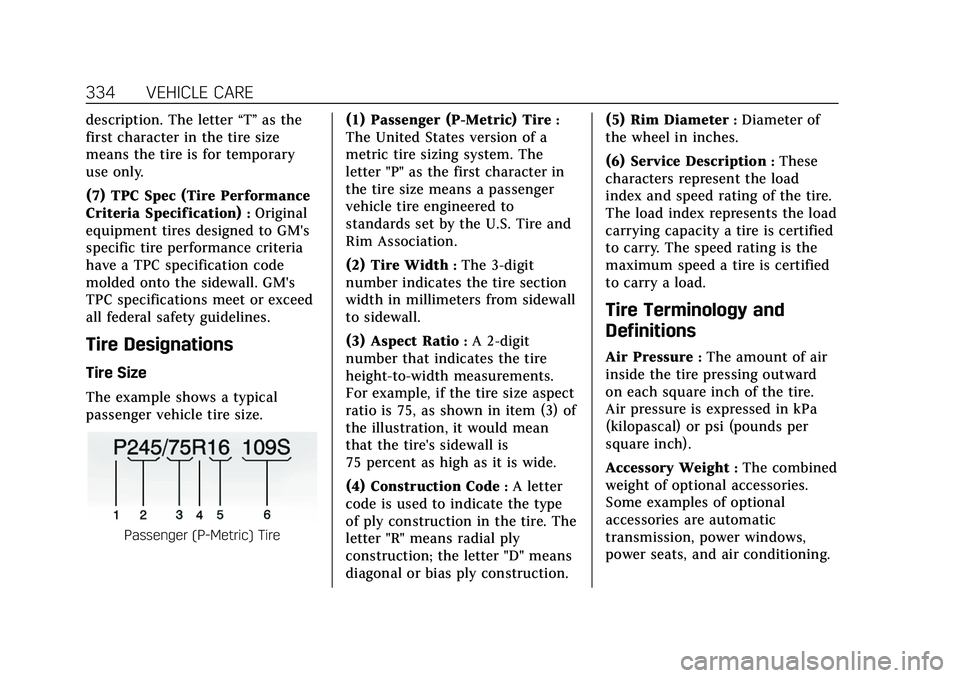
The example shows a typical
passenger vehicle tire size.
Passenger (P-Metric) Tire
(1) Passenger (P-Metric) Tire:
The United States version of a
metric tire sizing system. The
letter "P" as the first character in
the tire size means a passenger
vehicle tire engineered to
standards set by the U.S. Tire and
Rim Association.
(2) Tire Width
:The 3-digit
number indicates the tire section
width in millimeters from sidewall
to sidewall.
(3) Aspect Ratio
:A 2-digit
number that indicates the tire
height-to-width measurements.
For example, if the tire size aspect
ratio is 75, as shown in item (3) of
the illustration, it would mean
that the tire's sidewall is
75 percent as high as it is wide.
(4) Construction Code
:A letter
code is used to indicate the type
of ply construction in the tire. The
letter "R" means radial ply
construction; the letter "D" means
diagonal or bias ply construction. (5) Rim Diameter
:Diameter of
the wheel in inches.
(6) Service Description
:These
characters represent the load
index and speed rating of the tire.
The load index represents the load
carrying capacity a tire is certified
to carry. The speed rating is the
maximum speed a tire is certified
to carry a load.
Tire Terminology and
Definitions
Air Pressure:The amount of air
inside the tire pressing outward
on each square inch of the tire.
Air pressure is expressed in kPa
(kilopascal) or psi (pounds per
square inch).
Accessory Weight
:The combined
weight of optional accessories.
Some examples of optional
accessories are automatic
transmission, power windows,
power seats, and air conditioning.