center console CADILLAC XT5 2023 User Guide
[x] Cancel search | Manufacturer: CADILLAC, Model Year: 2023, Model line: XT5, Model: CADILLAC XT5 2023Pages: 482, PDF Size: 7.1 MB
Page 161 of 482
Cadillac XT5 Owner Manual (GMNA-Localizing-U.S./Canada/Mexico-
16406251) - 2023 - CRC - 3/25/22
160 Infotainment System
features are also available
through the instrument cluster
and steering wheel controls.
Before driving:
.Become familiar with the
operation, center stack
controls, steering wheel
controls, and infotainment
display.
.Set up the audio by
presetting favorite stations,
setting the tone, and
adjusting the speakers.
.Set up phone numbers in
advance so they can be
called easily by pressing a
single control or by using a
single voice command.
See Distracted Driving 0235.
Active Noise
Cancellation (ANC)
If equipped, ANC reduces
engine noise in the vehicle’s
interior. ANC requires the
factory-installed audio system,
radio, speakers, amplifier (if
equipped), induction system,
and exhaust system to work properly. Deactivation is
required by your dealer if
related aftermarket equipment
is installed.
Overview
Infotainment System
The infotainment system is
controlled by using the
infotainment display, controls
on the center console,
steering wheel controls, and
voice recognition.
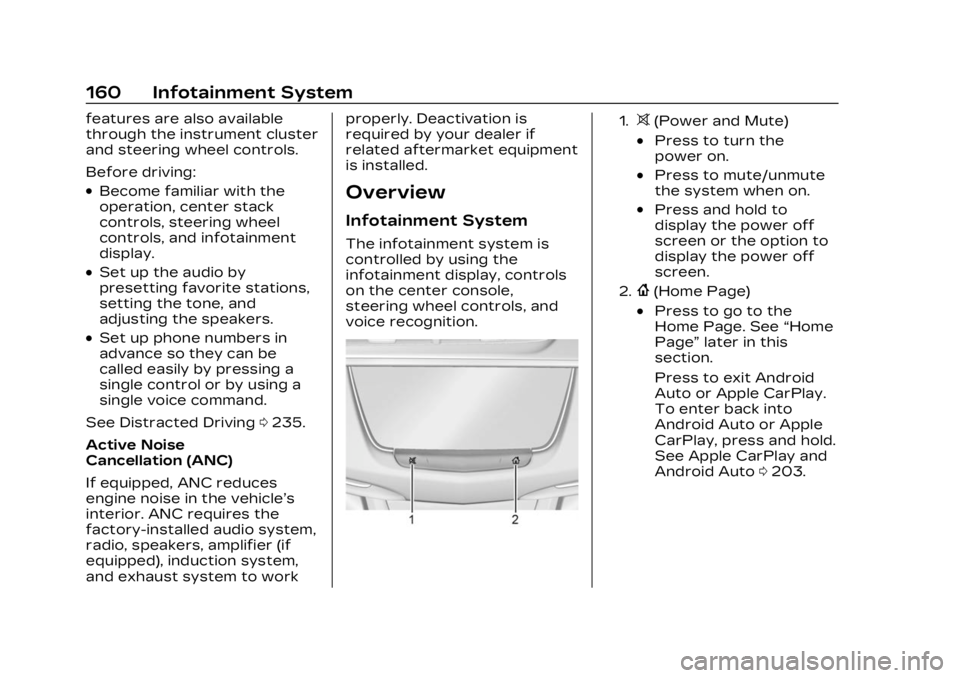
1.>(Power and Mute)
.Press to turn the
power on.
.Press to mute/unmute
the system when on.
.Press and hold to
display the power off
screen or the option to
display the power off
screen.
2.{(Home Page)
.Press to go to the
Home Page. See
“Home
Page” later in this
section.
Press to exit Android
Auto or Apple CarPlay.
To enter back into
Android Auto or Apple
CarPlay, press and hold.
See Apple CarPlay and
Android Auto 0203.
Page 168 of 482
Cadillac XT5 Owner Manual (GMNA-Localizing-U.S./Canada/Mexico-
16406251) - 2023 - CRC - 3/25/22
Infotainment System 167
Infotainment System
Sound Menu
From any of the audio source
main pages, touch Sound to
display the following:
Equalizer :Touch to adjust
Bass, Midrange, Treble, and
Surround (if equipped) using
the options on the
infotainment display.
Fade/Balance : Touch to
adjust by using the controls on
the infotainment display or by
tapping/dragging the
crosshair.
Sound Mode (If Equipped)
.Bose Centerpoint surround
sound systems have four
sound modes:
‐ Normal: Adjusts the audio
to provide the best sound
for all seating positions.
‐ Driver: Adjusts the audio to
provide the best sound for
the driver. ‐
Rear: Adjusts the audio to
provide the best sound for
the rear seat occupants.
‐ Centerpoint: Turns on
Bose Centerpoint
surround technology. This
setting creates a surround
sound from nearly any
audio source: existing
stereo and MP3 players.
For more information on
Bose Centerpoint
surround technology, see
www.boseautomotive.com.
.AKG surround sound
systems have two sound
modes:
‐Normal: Adjusts the audio
to provide the best sound
for all seating positions.
‐ Rear: Adjusts the audio to
provide the best sound for
the rear seat occupants.
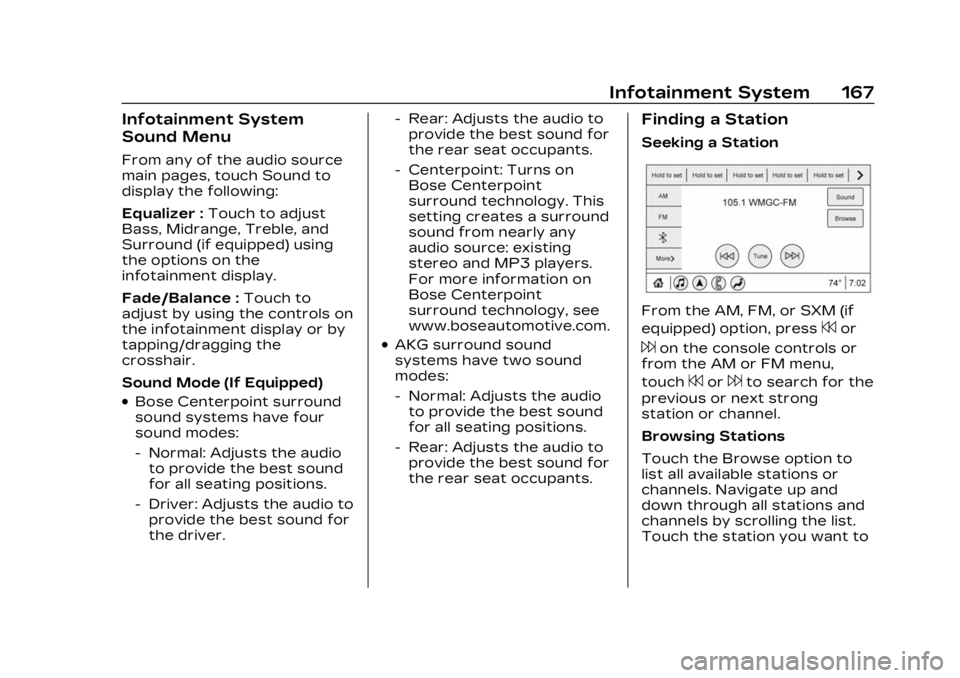
Finding a Station
Seeking a Station
From the AM, FM, or SXM (if
equipped) option, press
7or
6on the console controls or
from the AM or FM menu,
touch
7or6to search for the
previous or next strong
station or channel.
Browsing Stations
Touch the Browse option to
list all available stations or
channels. Navigate up and
down through all stations and
channels by scrolling the list.
Touch the station you want to
Page 172 of 482
Cadillac XT5 Owner Manual (GMNA-Localizing-U.S./Canada/Mexico-
16406251) - 2023 - CRC - 3/25/22
Infotainment System 171
Multi-Band Antenna
The roof antenna may be used
for radio, navigation, and other
communication systems,
depending on the equipped
options. Keep clear of
obstructions for clear
reception. If the vehicle has a
sunroof, and it is open,
reception can also be affected.
Audio Players
Avoiding Untrusted
Media Devices
When using media devices
such as USB and mobile
devices, consider the source.
Untrusted media devices could
contain files that affect
system operation or
performance and should be
avoided.
USB Port
Audio stored on a USB device
may be listened to.Depending on your vehicle, it
may be equipped with two
USB ports in the center
console under the armrest and
another two on the center
stack. These ports are for
data and charging. There may
also be two USB ports at the
rear of the center console and
a USB port on each side of the
third row seats for
charging only.
Caution
To avoid vehicle damage,
unplug all accessories and
disconnect all accessory
cables from the vehicle
when not in use. Accessory
cables left plugged into the
vehicle, unconnected to a
device, could be damaged or
cause an electrical short if
the unconnected end comes
in contact with liquids or
another power source such
as the accessory power
outlet.
Playing from a USB
A USB mass storage device
can be connected to the
USB port.
Audio extensions supported
by the USB may include:
.MP3
.AAC
.OGG
.3GP
My Media Library
MyMedia is only available
when more than one indexed
device is connected. It allows
access to content from all
indexed media sources.
MyMedia will show as an
available source in the
Source page.
USB MP3 Player and USB
Devices
The USB MP3 players and
USB devices connected must
comply with the USB Mass
Storage Class specification
(USB MSC).
Page 230 of 482

Cadillac XT5 Owner Manual (GMNA-Localizing-U.S./Canada/Mexico-
16406251) - 2023 - CRC - 3/25/22
Climate Controls 229
Afterblow Feature
If equipped, under certain
conditions, the fan may stay
on or may turn on and off
several times after you turn
off and lock the vehicle. This is
normal.
Rear Climate Control
System
If equipped, the rear climate
control system is on the rear
of the center console. The
settings can be adjusted with
the rear climate control
buttons on the rear of the
center console and on the rear
climate display.
Rear Climate Controls
1. Rear Seat Passenger Heated Seat Controls
2. Air Delivery Mode Control
3. AUTO (Automatic Operation)
4. Fan Control
5. Rear Seat Passenger Temperature Controls
Rear Climate Display
1. Rear Temperature Display
Page 232 of 482

Cadillac XT5 Owner Manual (GMNA-Localizing-U.S./Canada/Mexico-
16406251) - 2023 - CRC - 3/25/22
Climate Controls 231
Air Vents
Adjustable air vents are in the
center and on the sides of the
instrument panel, and on the
rear of the center console
storage.
Move the slider knobs to
change the direction of or to
close off the airflow.
Operation Tips
.Clear away any ice, snow,
or leaves from air inlets at
the base of the windshield
that could block the flow of
air into the vehicle.
.Clear snow off the hood to
improve visibility and help
decrease moisture drawn
into the vehicle.
.Keep the path under the
front seats clear of objects
to help circulate the air
inside of the vehicle more
effectively.
.Use of non-GM approved
hood deflectors can
adversely affect the
performance of the system.
Check with your dealer
before adding equipment to
the outside of the vehicle.
.Do not attach any devices to
the air vent slats. This
restricts airflow and may
cause damage to the air
vents.
Maintenance
Passenger
Compartment Air
Filter
The filter reduces dust, pollen,
and other airborne irritants
from outside air that is pulled
into the vehicle. The filter
should be replaced as part of
routine scheduled
maintenance. See
Maintenance Schedule0429.
See your dealer regarding
replacement of the filter.
Service
All vehicles have a label
underhood that identifies the
refrigerant used in the vehicle.
The refrigerant system should
only be serviced by trained
and certified technicians. The
air conditioning evaporator
should never be repaired or
replaced by one from a
salvage vehicle. It should only
Page 274 of 482

Cadillac XT5 Owner Manual (GMNA-Localizing-U.S./Canada/Mexico-
16406251) - 2023 - CRC - 3/25/22
Driving and Operating 273
Turning the Systems Off
and On
Caution
Do not repeatedly brake or
accelerate heavily when TCS
is off. The vehicle driveline
could be damaged.
To turn off only TCS, press
and release
g. The Traction
Off light
idisplays in the
instrument cluster and a DIC
message may display. To turn
TCS on again, press and
release
g. The Traction Off light
idisplayed in the
instrument cluster will turn off
and a DIC message may
display.
If TCS is limiting wheel spin
when
gis pressed, the system
will not turn off until the
wheels stop spinning.
To turn off both TCS and
StabiliTrak/ESC, press and
hold
guntil the Traction Off
light
iand StabiliTrak/ESC
Off light
gcome on and stay
on in the instrument cluster.
A DIC message may display.
To turn TCS and StabiliTrak/
ESC on again, press and
release
g. The Traction Off
light
iand StabiliTrak/ESC
Off light
gin the instrument
cluster turn off and a DIC
message may display.
StabiliTrak will automatically
turn on if the vehicle exceeds
56 km/h (36 mph). Traction
control will remain off. Adding accessories can affect
vehicle performance. See
Accessories and Modifications
0
338.
Driver Mode Control
Driver Mode Control allows
the driver to adjust the overall
driving experience by selecting
different modes. If equipped,
the Driver Mode Control has
the following modes: Tour,
Sport, All-Wheel Drive (AWD),
Snow/Ice (in Front-Wheel
Drive vehicles only), and
Off-Road (in AWD vehicles
only). Driver mode availability
and affected vehicle
subsystems are dependent
upon vehicle trim level, region,
and optional features.
Press MODE button on the
center console to make a
mode selection. When
pressed, the mode menu will
display in the instrument
cluster and activate the next
available mode.
Page 372 of 482

Cadillac XT5 Owner Manual (GMNA-Localizing-U.S./Canada/Mexico-
16406251) - 2023 - CRC - 3/28/22
Vehicle Care 371
Fuses UsageF56 SpareF57 Engine Control Module/Ignition
F58 Transmission Control Module/
Ignition
F59 Engine Control Module Battery
F60 –
F61 O2 Sensor 1/ Aeroshutter/
Mass Air Flow
Sensor
F62 Engine Control Module–Odd
F63 O2 Sensor 2
F64 Engine Control Module–Even
F65 Engine Control Module
Powertrain 1
F66 Engine Control Module
Powertrain 2 Fuses Usage
F67 Engine Control Module
Powertrain 3
F68 –
F69 –
F70 –
F71 –
F72 –
F73 –
F74 –
F75 –
F76 –
F77 –
Relays Usage K1 Starter 1
K2 Run/Crank
K3 Starter 3
K4 LED/Automatic Headlamps
K5 – Relays Usage
K6 –
K7 Engine Control Module
K8 Air Conditioning
K9 –
K10 Starter 2
Instrument Panel
Fuse Block
The instrument panel fuse
block is in the center console
between the driver and
passenger seats. To access
Page 470 of 482

Cadillac XT5 Owner Manual (GMNA-Localizing-U.S./Canada/Mexico-
16406251) - 2023 - CRC - 3/25/22
INDEX 469
CameraRear Vision (RVC) . . . . . . . . . . 291
Canadian Vehicle Owners . . . . 2
Capacities and Specifications . . . . . . . . . . . . . . . 438
Carbon Monoxide Engine Exhaust . . . . . . . . . . . . 260
Liftgate . . . . . . . . . . . . . . . . . . . . . . . . . 25
Winter Driving . . . . . . . . . . . . . . 245
Cargo Cover . . . . . . . . . . . . . . . . . . . . . . . . . . 106
Management System . . . . . 108
Tie-Downs . . . . . . . . . . . . . . . . . . . . 107
Caution, Danger, and Warning . . . . . . . . . . . . . . . . . . . . . . . . . . 2
Center Console
Storage . . . . . . . . . . . . . . . . . . . . . . . 106
Chains, Tire . . . . . . . . . . . . . . . . . . . 400
Charging System Light . . . . . . . . . . . . . . . . 128
Wireless . . . . . . . . . . . . . . . . . . . . . . . 118
Check Engine Light (Malfunction Indicator) . . . . 129
Child Restraints Infants and Young
Children . . . . . . . . . . . . . . . . . . . . . . . 83
Lower Anchors and Tethers for Children . . . . . . 90 Child Restraints (cont'd)
Older Children . . . . . . . . . . . . . . . . 82
Securing . . . . . . . . . . . . . . . . . . 97, 99
Systems . . . . . . . . . . . . . . . . . . . . . . . . 86
Child Safety Locks . . . . . . . . . . . . 24
Circuit Breakers . . . . . . . . . . . . . 367
Cleaning Exterior Care . . . . . . . . . . . . . . . . 416
Interior Care . . . . . . . . . . . . . . . . . 421
Climate Control Systems Dual Automatic . . . . . . . . . . . . . 223
Rear . . . . . . . . . . . . . . . . . . . . . . . . . . . 229
Clock . . . . . . . . . . . . . . . . . . . . . . . . . . . . . .118
Cluster, Instrument . . . . . . . . . . 122
Collision Damage Repair . . . . . . . . . . . . . . . . . . . . . . . . . 449
Compact Spare Tire . . . . . . . . 408
Compartments Storage . . . . . . . . . . . . . . . . . . . . . . . 103
Compass . . . . . . . . . . . . . . . . . . . . . . . . . 117
Connected Services Connections . . . . . . . . . . . . . . . . 465
Diagnostics . . . . . . . . . . . . . . . . . . 466
Navigation . . . . . . . . . . . . . . . . . . . 464
Connections Connected Services . . . . . . 465 Control
Traction and
Electronic Stability . . . . . . . 271
Control of a Vehicle . . . . . . . . 236
Controls Steering Wheel . . . . . . . . . . . . . 162
Convenience Net . . . . . . . . . . . . . 109
Convex Mirrors . . . . . . . . . . . . . . . . 37
Coolant
Engine TemperatureGauge . . . . . . . . . . . . . . . . . . . . . . . . 126
Engine Temperature Warning Light . . . . . . . . . . . . . . 135
Cooling . . . . . . . . . . . . . . . . . . . 223, 229
Cooling System . . . . . . . . . . . . . . 352
Cornering Lamps . . . . . . . . . . . . . 155
Courtesy Lamps . . . . . . . . . . . . . . 156
Courtesy Transportation
Program . . . . . . . . . . . . . . . . . . . . . . 448
Cover
Cargo . . . . . . . . . . . . . . . . . . . . . . . . . . 106
Coverage Explanations . . . . . 189
Cruise Control . . . . . . . . . . . . . . . . .275 Adaptive . . . . . . . . . . . . . . . . . . . . . . 277
Light . . . . . . . . . . . . . . . . . . . . . . . . . . . . 138
Cupholders . . . . . . . . . . . . . . . . . . . . . 103
Page 479 of 482

Cadillac XT5 Owner Manual (GMNA-Localizing-U.S./Canada/Mexico-
16406251) - 2023 - CRC - 3/25/22
478 INDEX
Steering (cont'd)Wheel Adjustment . . . . . . . . . . 112
Wheel Controls . . . . . . . . . . . . . 162
Stop/Start System . . . . . . . . . . 255
Storage Armrest . . . . . . . . . . . . . . . . . . . . . . . 104
Center Console . . . . . . . . . . . . . 106
Compartments . . . . . . . . . . . . . . 103
Convenience Net . . . . . . . . . . . 109
Cupholders . . . . . . . . . . . . . . . . . . . 103
Glove Box . . . . . . . . . . . . . . . . . . . . . 103
Rear . . . . . . . . . . . . . . . . . . . . . . . . . . . . 104
Roof Rack System . . . . . . . . . 109
Sunglasses . . . . . . . . . . . . . . . . . . . 104
Storage Areas Cargo Cover . . . . . . . . . . . . . . . . . 106
Cargo Management
System . . . . . . . . . . . . . . . . . . . . . . . 108
Struts Gas . . . . . . . . . . . . . . . . . . . . . . . . . . . . 363
Stuck Vehicle . . . . . . . . . . . . . . . . . 246
Summer Tires . . . . . . . . . . . . . . . . 378
Sun Visors . . . . . . . . . . . . . . . . . . . . . . . 44
Sunglass Storage . . . . . . . . . . . . 104
Sunroof . . . . . . . . . . . . . . . . . . . . . . . . . . . 44
Surround Vision
System . . . . . . . . . . . . . . . . . . . . . . . . 292
Symbols . . . . . . . . . . . . . . . . . . . . . . . . . . . . 3 Symbols (cont'd)
Navigation . . . . . . . . . . . . . . . . . . . . 179
System Airbag . . . . . . . . . . . . . . . . . . . . . . . . . . . 69
Driver Assistance . . . . . . . . . 288
Engine Air Filter Life . . . . . . 349
Forward CollisionAlert (FCA) . . . . . . . . . . . . . . . . . 303
Global Positioning . . . . . . . . . . 187
Infotainment . . . . . . . . . . . . . . . . 456
Night Vision . . . . . . . . . . . . . . . . . . 310
Rear Cross Traffic Alert . . . . . . . . . . . . . . . . . . . . . . . . . 302
Roof Rack . . . . . . . . . . . . . . . . . . . . . 109
Surround Vision . . . . . . . . . . . . 292
T
Tachometer . . . . . . . . . . . . . . . . . . . . 125
Teen Driver . . . . . . . . . . . . . . . . . . . . 209
Text Telephone (TTY) Users . . . . . . . . . . . . . . . . . . . . . . . . . . 444
Theft-Deterrent
Systems . . . . . . . . . . . . . . . . . . . . . . . . 35
Immobilizer . . . . . . . . . . . . . . . . . . . . 35
Time . . . . . . . . . . . . . . . . . . . . . . . . . . . . . . .118
Tires . . . . . . . . . . . . . . . . . . . . . . . . . . . . . 376 All-Season . . . . . . . . . . . . . . . . . . . . 377
Buying New Tires . . . . . . . . . . 395 Tires (cont'd)
Chains . . . . . . . . . . . . . . . . . . . . . . . . 400
Changing . . . . . . . . . . . . . . . . . . . . . 402
Compact Spare . . . . . . . . . . . . 408
Designations . . . . . . . . . . . . . . . . . 381
Different Size . . . . . . . . . . . . . . . 397
If a Tire Goes Flat . . . . . . . . . . 401
Inspection . . . . . . . . . . . . . . . . . . . 392
Pressure . . . . . . . . . . . . . . 384, 386
Pressure Light . . . . . . . . . . . . . . 136
Pressure Monitor
Operation . . . . . . . . . . . . . . . . . . 388
Pressure Monitor System . . . . . . . . . . . . . . . . . . . . . . 387
Rotation . . . . . . . . . . . . . . . . . . . . . . 393
Sidewall Labeling . . . . . . . . . . 378
Terminology and Definitions . . . . . . . . . . . . . . . . . 382
Uniform Tire Quality Grading . . . . . . . . . . . . . . . . . . . . . 397
Wheel Alignment and
Tire Balance . . . . . . . . . . . . . . . 399
Wheel Replacement . . . . . . 399
When It Is Time for New Tires . . . . . . . . . . . . . . . . . . 394
Winter . . . . . . . . . . . . . . . . . . . . . . . . . 377
Top Tier Fuel . . . . . . . . . . . . . . . . . . 317