night vision CADILLAC XT5 2023 Owners Manual
[x] Cancel search | Manufacturer: CADILLAC, Model Year: 2023, Model line: XT5, Model: CADILLAC XT5 2023Pages: 482, PDF Size: 7.1 MB
Page 118 of 482
Cadillac XT5 Owner Manual (GMNA-Localizing-U.S./Canada/Mexico-
16406251) - 2023 - CRC - 3/25/22
Instruments and Controls 117
The wiper operations return
to normal when the shift lever
is no longer in N (Neutral) or
the vehicle speed has
increased.
Auto Wipe in Reverse Gear
If the rear wiper control is off,
the rear wiper will
automatically operate
continuously when the shift
lever is in R (Reverse), and the
front windshield wiper is
performing low or high speed
wipes. If the rear wiper control
is off, the shift lever is in
R (Reverse), and the front
windshield wiper is performing
INT wipes, then the rear wiper
automatically performs INT
wipes.
This feature can be turned on
or off. Go to Settings > Vehicle
> Comfort and Convenience >
Auto Wipe in Reverse Gear >
Select ON or OFF.The windshield washer
reservoir is used for the
windshield, rear window, and
rear mirror camera,
if equipped. See Rear Camera
Mirror
039. Check the fluid
level in the reservoir if either
washer is not working. See
Washer Fluid 0357.
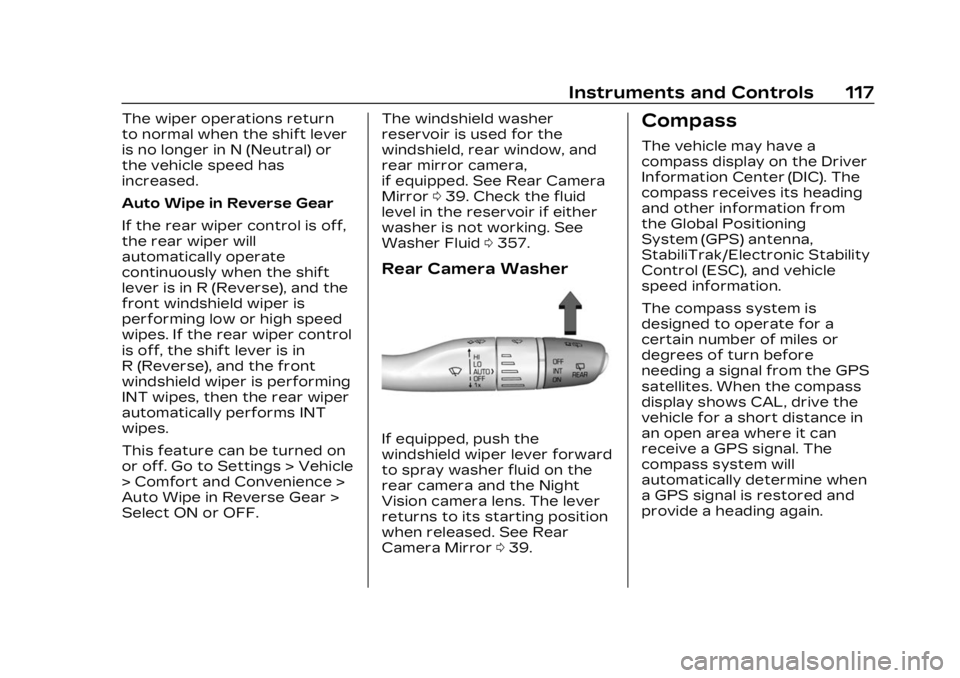
Rear Camera Washer
If equipped, push the
windshield wiper lever forward
to spray washer fluid on the
rear camera and the Night
Vision camera lens. The lever
returns to its starting position
when released. See Rear
Camera Mirror 039.
Compass
The vehicle may have a
compass display on the Driver
Information Center (DIC). The
compass receives its heading
and other information from
the Global Positioning
System (GPS) antenna,
StabiliTrak/Electronic Stability
Control (ESC), and vehicle
speed information.
The compass system is
designed to operate for a
certain number of miles or
degrees of turn before
needing a signal from the GPS
satellites. When the compass
display shows CAL, drive the
vehicle for a short distance in
an open area where it can
receive a GPS signal. The
compass system will
automatically determine when
a GPS signal is restored and
provide a heading again.
Page 125 of 482
Cadillac XT5 Owner Manual (GMNA-Localizing-U.S./Canada/Mexico-
16406251) - 2023 - CRC - 3/25/22
124 Instruments and Controls
.Info App. This is where the
selected Driver Information
Center (DIC) displays can be
viewed. See Driver
Information Center (DIC)
0139.
.Audio
.Navigation
.Phone
.Night Vision
.Options
Audio
In the Audio menu browse for
music, select from the
favorites, or change the audio
source. Use
yorzto change
the station or go to the next
or previous track.
Navigation
If there is an active route,
press SEL to cancel or resume
route guidance, or turn the
voice prompts on or off.
Phone
In the Phone menu, if there is
no active phone call, view
recent calls, or scroll through contacts. If there is an active
call, mute the phone or switch
to handset operation.
Night Vision
If equipped, Provides an
infrared night vision image of
the area beyond the
headlamps that highlights and
provides alerts to detected
pedestrians or large animals.
See Night Vision System
0
310.
Options
Use
yorzto scroll through
items in the Options menu.
Units : Choose US or metric
units by pressing SEL while
the desired item is highlighted.
Info Page Options : Press
SEL to select the items to be
displayed in the Info app. See
Driver Information Center
(DIC) 0139.
Display : Press SEL to enter
the Display menu. Select to
turn on or off the speedometer, time, fuel range,
or, if equipped, compass or
speed sign.
Speed Warning :
The Speed
Warning display allows the
driver to set a warning at a
speed that they do not want
to exceed. To set the Speed
Warning press SEL when
Speed Warning is displayed.
Use the
yorzto adjust the
value and press SEL to set the
speed.
Once the speed is set, this
feature can be turned off by
pressing the SEL while
viewing this page. If the
selected speed limit is
exceeded, a pop-up warning is
displayed with a chime.
Head-Up Display (HUD)
(Uplevel) : If equipped, this
feature allows for adjusting
the angle of the HUD image
and changing or turning off
the Speed Limit Sign.
Page 235 of 482

Cadillac XT5 Owner Manual (GMNA-Localizing-U.S./Canada/Mexico-
16406251) - 2023 - CRC - 3/25/22
234 Driving and Operating
Forward Collision Alert(FCA) System . . . . . . . . . . . . . 303
Automatic Emergency Braking (AEB) . . . . . . . . . . . . . 305
Front Pedestrian Braking
(FPB) System . . . . . . . . . . . . . 307
Night Vision System . . . . . . 310
Side Blind Zone Alert (SBZA) . . . . . . . . . . . . . . . . 312
Lane Change Alert (LCA) . . . . . . . . . . . . . . . . . 313
Lane Keep Assist (LKA) . . . . . . . . . . . . . . . . 315
Fuel
Top Tier Fuel . . . . . . . . . . . . . . . . 317
Recommended Fuel (2.0LL4 Engine) . . . . . . . . . . . . . . . . . . 318
Recommended Fuel (3.6L V6 Engine) . . . . . . . . . . . . . . . . . . 318
Prohibited Fuels . . . . . . . . . . . . 318
Fuels in Foreign Countries . . . . . . . . . . . . . . . . . . . 319
Fuel Additives . . . . . . . . . . . . . . . 319
Filling the Tank . . . . . . . . . . . . . . 319
Filling a Portable Fuel Container . . . . . . . . . . . . . . . . . . . 321
Trailer Towing
General TowingInformation . . . . . . . . . . . . . . . . 322 Driving Characteristics
and Towing Tips . . . . . . . . . . 322
Trailer Towing . . . . . . . . . . . . . . 326
Towing Equipment . . . . . . . . . 331
Trailer Sway Control (TSC) . . . . . . . . . . . . . 334
Conversions and Add-Ons
Add-On ElectricalEquipment . . . . . . . . . . . . . . . . . 336
Driving
Information
Driving for Better
Fuel Economy
Driving habits can affect fuel
mileage. Here are some driving
tips to get the best fuel
economy possible.
.Set the climate controls to
the desired temperature
after the engine is started,
or turn them off when not
required.
.On AWD vehicles, use Tour
Mode when conditions
permit.
.Avoid fast starts and
accelerate smoothly.
.Brake gradually and avoid
abrupt stops.
.Avoid idling the engine for
long periods of time.
.When road and weather
conditions are appropriate,
use cruise control.
Page 302 of 482

Cadillac XT5 Owner Manual (GMNA-Localizing-U.S./Canada/Mexico-
16406251) - 2023 - CRC - 3/25/22
Driving and Operating 301
R (Reverse) below 12 km/h
(8 mph), and detects
pedestrians up to 8 m (26 ft)
away during daytime driving.
During nighttime driving,
feature performance is very
limited.
Rear Pedestrian AlertIndicator
When a pedestrian is detected
within the system’s range
directly behind the vehicle, this
symbol flashes amber on the
infotainment display, along
with five beeps from the rear,
or if equipped, two pulses
from both sides of the driver
seat. When a pedestrian is
detected close to the vehicle,
the symbol flashes red on the
infotainment display, along
with ten beeps from the rear, or if equipped, seven pulses
from both sides of the
driver seat.
{Warning
Rear Pedestrian Alert does
not automatically brake the
vehicle. It also does not
provide an alert unless it
detects a pedestrian, and it
may not detect all
pedestrians if:
.The pedestrian is not
directly behind the vehicle,
fully visible to the Rear
Vision Camera (RVC),
or standing upright.
.The pedestrian is part of a
group.
.The pedestrian is a child.
.Visibility is poor, including
nighttime conditions, fog,
rain, or snow.
.The RVC is blocked by
dirt, snow, or ice.
(Continued)
Warning (Continued)
.The RVC, taillamps,
or back-up lamps are not
cleaned or in proper
working condition.
.The vehicle is not in
R (Reverse).
To help avoid death or injury,
always check for
pedestrians around the
vehicle before backing up.
Be ready to take action and
apply the brakes. See
Defensive Driving 0235.
Keep the RVC, taillamps, and
back-up lamps clean and in
good repair.
Rear Pedestrian Alert can be
set to Off or Alert. To view
available settings from the
infotainment screen, touch
Settings > Vehicle > Collision/
Detection Systems > Rear
Pedestrian Detection.
Page 303 of 482

Cadillac XT5 Owner Manual (GMNA-Localizing-U.S./Canada/Mexico-
16406251) - 2023 - CRC - 3/25/22
302 Driving and Operating
If equipped, alerts can be set
to beeps or seat pulses. To
view available settings from
the infotainment screen, touch
Settings > Vehicle > Collision/
Detection Systems >
Alert Type.
Rear Cross Traffic
Alert (RCTA) System
If equipped, Rear Cross Traffic
Alert (RCTA) displays a red
warning triangle with a left or
right pointing arrow on the
infotainment display to warn
of traffic coming from the left
or right. This system detects
objects coming from up to
20 m (65 ft) from the left or
right side of the vehicle. When
an object is detected, either
three beeps sound from the
left or right or three Safety
Alert Seat pulses occur on the
left or right side, depending on
the direction of the detected
vehicle.Use caution while backing up
when towing a trailer, as the
RCTA detection zones that
extend out from the back of
the vehicle do not move
farther back when a trailer is
attached to the vehicle.
Driving With a Trailer
Use caution while backing up
when towing a trailer. The
RCTA feature is automatically
disabled when a trailer is
attached to the vehicle.
Turning the Features On
or Off
The
Xbutton on the center
stack is used to turn on or off
the Front and Rear Park
Assist, and Backing Warning
and Reverse Automatic
Braking (RAB) systems at the
same time. The indicator light
next to the button comes on
when the features are on and
turns off when the features
have been disabled. RCTA can be turned on or off
using the infotainment system.
To view available settings for
this feature, touch the
Settings icon on the
infotainment home page.
Select
“Vehicle” to display the
list of available options and
select “Collision/Detection
Systems”.
Assistance Systems
for Driving
If equipped, when driving the
vehicle in a forward gear,
Forward Collision Alert (FCA),
Lane Keep Assist (LKA), Side
Blind Zone Alert (SBZA), Lane
Change Alert (LCA), Automatic
Emergency Braking (AEB),
Front Pedestrian Braking
(FPB) System, and/or the
Night Vision System can help
to avoid a crash or reduce
crash damage.
Page 308 of 482

Cadillac XT5 Owner Manual (GMNA-Localizing-U.S./Canada/Mexico-
16406251) - 2023 - CRC - 3/25/22
Driving and Operating 307
{Warning
IBA may increase vehicle
braking in situations when it
may not be necessary. You
could block the flow of
traffic. If this occurs, take
your foot off the brake pedal
and then apply the brakes as
needed.
AEB and IBA can be disabled
through vehicle settings. To
view available settings for this
feature, touch the Settings
icon on the infotainment home
page. Select “Vehicle”to
display the list of available
options and select “Collision/
Detection Systems”.
{Warning
Using AEB or IBA while
towing a trailer could cause
you to lose control of the
vehicle and crash. Turn the
system to Alert or Off when
towing a trailer. A system unavailable message
may display if:
.The front of the vehicle or
windshield is not clean.
.Heavy rain or snow is
interfering with object
detection.
.There is a problem with the
StabiliTrak/Electronic
Stability Control (ESC)
system.
The AEB system does not
need service.
Front Pedestrian
Braking (FPB) System
If equipped, the FPB system
may help avoid or reduce the
harm caused by front-end
crashes with nearby
pedestrians when driving in a
forward gear. FPB displays an
amber indicator,
~, when a
nearby pedestrian is detected
ahead. When approaching a
detected pedestrian too
quickly, FPB provides a red
flashing alert on the windshield and rapidly beeps
or pulses the driver seat. FPB
can provide a boost to braking
or automatically brake the
vehicle. This system includes
Intelligent Brake Assist (IBA),
and the Automatic Emergency
Braking (AEB) system may also
respond to pedestrians. See
Automatic Emergency Braking
(AEB)
0305.
The FPB system can detect
and alert to pedestrians in a
forward gear at speeds
between 8 km/h (5 mph) and
80 km/h (50 mph). During
daytime driving, the system
detects pedestrians up to a
distance of approximately
40 m (131 ft). During nighttime
driving, system performance is
very limited. If the vehicle is
equipped with the Night Vision
system, during night time
driving, the vehicle can detect
and alert pedestrians when
driving in a forward gear.
Page 310 of 482

Cadillac XT5 Owner Manual (GMNA-Localizing-U.S./Canada/Mexico-
16406251) - 2023 - CRC - 3/25/22
Driving and Operating 309
Pedestrian Alert occurs, the
brake system may prepare for
driver braking to occur more
rapidly which can cause a
brief, mild deceleration.
Continue to apply the brake
pedal as needed. Cruise
control may be disengaged
when the Front Pedestrian
Alert occurs.
Automatic Braking
If FPB detects it is about to
crash into a pedestrian
directly ahead, and the brakes
have not been applied, FPB
may automatically brake
moderately or brake hard. This
can help to avoid some very
low speed pedestrian crashes
or reduce pedestrian injury.
FPB can automatically brake
to detected pedestrians
between 8 km/h (5 mph) and
80 km/h (50 mph). Automatic
braking levels may be reduced
under certain conditions, such
as higher speeds.If this happens, Automatic
Braking may engage the
Electric Parking Brake (EPB)
to hold the vehicle at a stop.
Release the EPB. A firm press
of the accelerator pedal will
also release Automatic
Braking and the EPB.
If equipped with the Night
Vision system, pedestrians
detected by the Night Vision
system will not cause
automatic braking to occur.
{Warning
FPB may alert or
automatically brake the
vehicle suddenly in
situations where it is
unexpected and undesired.
It could falsely alert or brake
for objects similar in shape
or size to pedestrians,
including shadows. This is
normal operation and the
vehicle does not need
service. To override
(Continued)
Warning (Continued)
Automatic Braking, firmly
press the accelerator pedal,
if it is safe to do so.
Automatic Braking can be
disabled through vehicle
settings. To view available
settings for this feature, touch
the Settings icon on the
infotainment home page.
Select “Vehicle” to display the
list of available options and
select “Collision/Detection
Systems”.
{Warning
Using the Front Pedestrian
Braking system while towing
a trailer could cause you to
lose control of the vehicle
and crash. Turn the system
to Alert or Off when towing
a trailer.
Page 311 of 482

Cadillac XT5 Owner Manual (GMNA-Localizing-U.S./Canada/Mexico-
16406251) - 2023 - CRC - 3/25/22
310 Driving and Operating
Cleaning the System
If FPB does not seem to
operate properly, cleaning the
outside of the windshield in
front of the rearview mirror
may correct the issue.
Night Vision System
If equipped, this system can
help the driver see and alert
the driver to pedestrians or
large animals ahead of the
vehicle beyond the area lit by
the headlamps. A thermal heat
image of the view ahead is
displayed when it is dark
enough outside. If a pedestrian
or large animal is detected
more than 25 m (82 ft) away,
an amber pedestrian or animal
icon displays and a box
appears around the
pedestrian or animal. When
the system detects that the
vehicle is approaching a
pedestrian ahead too quickly,
the box changes to red.With the Front Pedestrian
Braking system turned on,
Night Vision provides a red
Head-Up Display (HUD) alert
when the system detects that
the vehicle is approaching a
pedestrian ahead too quickly.
In addition, an alert beeps or
the Safety Alert Seat pulses,
if equipped. See Front
Pedestrian Braking (FPB)
System0307.
{Warning
The system does not detect
all objects or the vehicle
distance from objects. The
system may not provide a
warning with enough time to
help avoid a crash.
1. Low-Beam Headlamps
2. High-Beam Headlamps
3. Night Vision System
By selecting a view on the
instrument cluster, the Night
Vision image can be displayed.
See Instrument Cluster 0122.
The Night Vision system can
operate only if:
.The ignition is on.
.The vehicle is in P (Park) or a
forward gear.
.It is dark enough outside.
.The headlamps are on,
except when parked.
Page 312 of 482

Cadillac XT5 Owner Manual (GMNA-Localizing-U.S./Canada/Mexico-
16406251) - 2023 - CRC - 3/25/22
Driving and Operating 311
Adjust the instrument panel
brightness to make the image
no brighter than necessary.
Turn the image off by
selecting another view on the
instrument cluster.
Warm objects, such as
pedestrians, animals, and
other moving vehicles, should
appear whiter on the Night
Vision display. Cold objects,
such as the sky, signs, and
parked vehicles, should appear
darker. Night Vision only
shows objects that are
warmer or colder than the
surroundings. It does not
detect brake lamps, turn
signals, emergency flashers,
traffic lights, or sign
information.
Use this system as an aid by
occasionally glancing at the
image. Do not stare at the
image or use the image under
well-lit conditions.{Warning
Do not stare at the image
while driving as this might
cause important objects
ahead not to be seen. You
could crash, and you or
others could be injured.
When a pedestrian or large
animal is detected, an amber
box displays around the
pedestrian or animal on the
Night Vision display and an
amber pedestrian icon,
~,
or animal icon,
!, displays on
the instrument cluster. This
pedestrian icon is also shown
on the Head-Up Display (HUD).
When the system detects the
vehicle is approaching a
pedestrian too quickly, the
amber pedestrian icon and box
turns red, and a red flashing
icon,
~, displays on the HUD
with rapid beeping or pulsing
of the Safety Alert Seat,
if equipped. System pedestrian icons,
beeps, and (if equipped) Safety
Alert Seat pulses can be set to
Off through vehicle settings
by turning off the Front
Pedestrian Braking system. To
view available settings from
the infotainment screen, touch
Settings > Vehicle > Collision/
Detection Systems > Front
Pedestrian Detection.
{Warning
The Night Vision system
does not automatically brake
the vehicle. It does not
provide alerts unless it
detects a pedestrian or
large animal. The system
may not detect pedestrians,
including children, or animals:
.If they are less than 25 m
(82 ft) away.
.If they are not directly
ahead in the sensor
coverage area, fully visible,
standing upright, or part
of a group.
(Continued)
Page 313 of 482

Cadillac XT5 Owner Manual (GMNA-Localizing-U.S./Canada/Mexico-
16406251) - 2023 - CRC - 3/25/22
312 Driving and Operating
Warning (Continued)
.If the person or animal is
moving too quickly
through the field of view,
such as a bicyclist.
.If the pedestrian is
wearing certain types of
clothing.
.If headlamps are off,
except when parked.
.If the outside temperature
is higher than 30 °C
(86 °F).
.Due to poor visibility,
including in heavy fog, rain,
or snow.
.If the sensor is blocked by
dirt, snow, rain, or ice.
Be ready to take action and
apply the brakes. For more
information, see Defensive
Driving 0235. Keep the
Night Vision sensor clean
and in good repair. Pedestrian detection may not
be available in high outside
temperatures. An amber icon,
*, displays. The system does
not need service.
In rain, snow, or fog the image
may not be clear and the
direction of the road ahead
may not be seen. In more
severe weather conditions,
the image may be unclear and
unusable. The system does
not need service.
Keep the system sensor clean
by activating the rear window
washer when it is dark enough
for the system to operate.
If the Night Vision image still
looks blurry, use a soft wet
cloth to gently clean the
sensor camera lens and dry
thoroughly. The sensor is
behind the lower front grille
below the driver side
headlamp.
The camera must also be
aligned to work correctly.
If the camera needs adjustment, see your dealer.
Do not attempt to adjust the
camera yourself.Side Blind Zone
Alert (SBZA)
If equipped, the SBZA system
is a lane-changing aid that
assists drivers with avoiding
crashes that occur with
moving vehicles in the side
blind zone, or blind spot areas.
When the vehicle is in a
forward gear, the left or right
side mirror display will light up
if a moving vehicle is detected
in that blind zone. If the turn
signal is activated and a
vehicle is also detected on the
same side, the display will flash
as an extra warning not to
change lanes. Since this
system is part of the Lane
Change Alert (LCA) system,
read the entire LCA section
before using this feature.