assist CADILLAC XT6 2020 Owner's Guide
[x] Cancel search | Manufacturer: CADILLAC, Model Year: 2020, Model line: XT6, Model: CADILLAC XT6 2020Pages: 385, PDF Size: 6.63 MB
Page 175 of 385
Cadillac XT6 Owner Manual (GMNA-Localizing-U.S./Canada-12984300) -
2020 - CRC - 3/19/19
174 DRIVING AND OPERATING
and you are going fast enough. When
the vehicle is hydroplaning, it has
little or no contact with the road.
There is no hard and fast rule about
hydroplaning. The best advice is to
slow down when the road is wet.
Other Rainy Weather Tips
Besides slowing down, other wet
weather driving tips include:
.Allow extra following distance.
. Pass with caution.
. Keep windshield wiping equipment
in good shape.
. Keep the windshield washer fluid
reservoir filled.
. Have good tires with proper tread
depth. See Tires0289.
. Turn off cruise control.
Hill and Mountain Roads
Driving on steep hills or through
mountains is different than driving on
flat or rolling terrain. Tips include:
.Keep the vehicle serviced and in
good shape. .
Check all fluid levels and brakes,
tires, cooling system, and
transmission.
. Shift to a lower gear when going
down steep or long hills.
{Warning
Using the brakes to slow the vehicle
on a long downhill slope can cause
brake overheating, can reduce brake
performance, and could result in a
loss of braking. Shift the
transmission to a lower gear to let
the engine assist the brakes on a
steep downhill slope.
{Warning
Coasting downhill in N (Neutral) or
with the ignition off is dangerous.
This can cause overheating of the
brakes and loss of steering assist.
Always have the engine running
and the vehicle in gear. .
Drive at speeds that keep the
vehicle in its own lane. Do not
swing wide or cross the
center line.
. Be alert on top of hills; something
could be in your lane (e.g., stalled
car, crash).
. Pay attention to special road signs
(e.g., falling rocks area, winding
roads, long grades, passing or
no-passing zones) and take
appropriate action.
Winter Driving
Driving on Snow or Ice
Snow or ice between the tires and the
road creates less traction or grip, so
drive carefully. Wet ice can occur at
about 0 °C (32 °F) when freezing rain
begins to fall. Avoid driving on wet ice
or in freezing rain until roads can be
treated.
For Slippery Road Driving:
.Accelerate gently. Accelerating too
quickly causes the wheels to spin
and makes the surface under the
tires slick.
Page 176 of 385
Cadillac XT6 Owner Manual (GMNA-Localizing-U.S./Canada-12984300) -
2020 - CRC - 3/19/19
DRIVING AND OPERATING 175
.Turn on Traction Control. See
Traction Control/Electronic Stability
Control 0200.
. Antilock Brake System (ABS)
improves vehicle stability during
hard stops, but the brakes should
be applied sooner than when on
dry pavement. See Antilock Brake
System (ABS) 0197.
. Allow greater following distance
and watch for slippery spots. Icy
patches can occur on otherwise
clear roads in shaded areas. The
surface of a curve or an overpass
can remain icy when the
surrounding roads are clear. Avoid
sudden steering maneuvers and
braking while on ice.
. Turn off cruise control.
. Select All-Wheel Drive (AWD)
mode. See Driver Mode Control
0 202 and
All-Wheel Drive 0196.
Blizzard Conditions
Stop the vehicle in a safe place and
signal for help. Stay with the vehicle
unless there is help nearby. If possible, use Roadside Assistance. See
Roadside
Service 0353. To get help and keep
everyone in the vehicle safe:
. Turn on the hazard warning
flashers.
. Tie a red cloth to an outside
mirror.
{Warning
Snow can trap engine exhaust
under the vehicle. This may cause
exhaust gases to get inside. Engine
exhaust contains carbon monoxide
(CO), which cannot be seen or
smelled. It can cause
unconsciousness and even death.
If the vehicle is stuck in snow:
. Clear snow from the base of
the vehicle, especially any
blocking the exhaust pipe.
. Open a window about 5 cm
(2 in) on the vehicle side that
is away from the wind, to
bring in fresh air.
(Continued)
Warning (Continued)
.Fully open the air outlets on
or under the instrument
panel.
. Adjust the climate control
system to circulate the air
inside the vehicle and set the
fan speed to the highest
setting. See “Climate Control
Systems.”
For more information about CO, see
Engine Exhaust 0189.
To save fuel, run the engine for short
periods to warm the vehicle and then
shut the engine off and partially close
the window. Moving about to keep
warm also helps.
If it takes time for help to arrive,
when running the engine, push the
accelerator pedal slightly so the
engine runs faster than the idle speed.
This keeps the battery charged to
restart the vehicle and to signal for
help with the headlamps. Do this as
little as possible, to save fuel.
Page 182 of 385
Cadillac XT6 Owner Manual (GMNA-Localizing-U.S./Canada-12984300) -
2020 - CRC - 3/19/19
DRIVING AND OPERATING 181
Information Center (DIC). When the
vehicle is shifted into P (Park), the
ignition will turn off.
{Warning
Turning off the vehicle while
moving may cause loss of power
assist in the brake and steering
systems and disable the airbags.
While driving, only shut the vehicle
off in an emergency.
If the vehicle must be shut off in an
emergency: 1. Brake using a firm and steady pressure. Do not pump the
brakes repeatedly. This may
deplete power assist, requiring
increased brake pedal force.
2. Shift the vehicle to N (Neutral). This can be done while the
vehicle is moving. After shifting
to N (Neutral), firmly apply the
brakes and steer the vehicle to a
safe location.
3. Come to a complete stop and shift to P (Park). 4. Set the parking brake. See
Electric Parking Brake 0198.
Press ENGINE START/STOP to
turn the vehicle off.
If the vehicle cannot be pulled over
and must be shut off while driving,
press and hold ENGINE START/STOP
for longer than two seconds, or press
twice in five seconds.
ACC/ACCESSORY (Amber Indicator
Light) : This mode allows you to use
some electrical accessories when the
engine is off.
With the ignition off, pressing
ENGINE START/STOP once without
the brake pedal applied will place the
ignition system in ACC/ACCESSORY.
The ignition will switch from ACC/
ACCESSORY to OFF after 10 minutes
to prevent battery rundown.
ON/RUN/START (Green Indicator
Light) : This mode is for driving and
starting. With the ignition off and the
brake pedal applied, pressing ENGINE
START/STOP once will place the
ignition system in ON/RUN/START.
Once engine cranking begins, release
the button. Engine cranking will continue until the engine starts, and
the ignition will then remain ON. See
Starting the Engine
0181.
Service Mode
This mode is available to verify the
proper operation of the malfunction
indicator lamp as may be required for
emissions inspection purposes and for
service and diagnostics.
With the vehicle off, and the brake
pedal not applied, pressing and
holding ENGINE START/STOP for
more than five seconds will place the
vehicle in Service Mode. The
instruments and audio systems will
operate as they do in ON/RUN, but
the vehicle will not be able to be
driven. The engine will not start in
Service Mode. Press ENGINE START/
STOP again to turn the vehicle off.
Starting the Engine
Place the transmission in the proper
gear, P (Park) or N (Neutral). To restart
the engine when the vehicle is already
moving, use N (Neutral).
Page 200 of 385

Cadillac XT6 Owner Manual (GMNA-Localizing-U.S./Canada-12984300) -
2020 - CRC - 3/19/19
DRIVING AND OPERATING 199
EPB Release
To release the EPB:1. Turn the ignition on or to ACC/ ACCESSORY.
2. Apply and hold the brake pedal.
3. Press the EPB switch momentarily.
The EPB is released when the
Y,f,
or PARK light is off.
If the
8light is on, release the EPB by
pressing and holding the EPB switch.
Continue to hold the switch until
the
Y,f, or PARK light is off.
If either light stays on after release is
attempted, see your dealer.
Caution
Driving with the parking brake on
can overheat the brake system and
cause premature wear or damage to
brake system parts. Make sure that
the parking brake is fully released
and the brake warning light is off
before driving.
Automatic EPB Release
The EPB will automatically release if
the vehicle is running, placed into
gear, and an attempt is made to drive
away. Avoid rapid acceleration when
the EPB is applied to preserve parking
brake lining life.
If parking on a hill, or if the vehicle is
pulling a trailer, see Driving
Characteristics and Towing Tips 0244.
Brake Assist
Brake Assist detects rapid brake pedal
applies due to emergency braking
situations and provides additional
braking to activate the Antilock Brake
System (ABS) if the brake pedal is not
pushed hard enough to activate ABS
normally. Minor noise, brake pedal
pulsation, and/or pedal movement
during this time may occur. Continue
to apply the brake pedal as the driving
situation dictates. Brake Assist
disengages when the brake pedal is
released.
Hill Start Assist (HSA)
{Warning
Do not rely on the HSA feature.
HSA does not replace the need to
pay attention and drive safely. You
may not hear or feel alerts or
warnings provided by this system.
Failure to use proper care when
driving may result in injury, death,
or vehicle damage. See Defensive
Driving 0166.
When the vehicle is stopped on a
grade, Hill Start Assist (HSA) prevents
the vehicle from rolling in an
unintended direction during the
transition from brake pedal release to
accelerator pedal apply. The brakes
release when the accelerator pedal is
applied. If the accelerator pedal is not
applied within a few minutes, the
Electric Parking Brake will apply. The
brakes may also release under other
conditions. Do not rely on HSA to
hold the vehicle.
Page 201 of 385
Cadillac XT6 Owner Manual (GMNA-Localizing-U.S./Canada-12984300) -
2020 - CRC - 3/19/19
200 DRIVING AND OPERATING
HSA is available when the vehicle is
facing uphill in a forward gear,
or when facing downhill in
R (Reverse). The vehicle must come to
a complete stop on a grade for HSA to
activate.Ride Control Systems
Traction Control/Electronic
Stability Control
System Operation
The vehicle has a Traction Control
System (TCS) and StabiliTrak/
Electronic Stability Control (ESC).
These systems help limit wheel spin
and assist the driver in maintaining
control, especially on slippery road
conditions.
TCS activates if it senses that any of
the drive wheels are spinning or
beginning to lose traction. On an
All-Wheel Drive (AWD) vehicle in
AWD or Sport Mode, the system will
operate if it senses that any of the
wheels are spinning or beginning to
lose traction. When this happens, TCS
applies the brakes to the spinning
wheels and reduces engine power to
limit wheel spin.
StabiliTrak/ESC activates when the
system senses a discrepancy between
the intended path and the direction
the vehicle is actually traveling.StabiliTrak/ESC selectively applies
braking pressure at any one of the
vehicle's brakes to help steer the
vehicle in the direction which you are
steering.
If cruise control is being used and TCS
or StabiliTrak/ESC begins to limit
wheel spin, cruise control will
disengage. Cruise control may be
turned back on when road conditions
allow. TCS and StabiliTrak/ESC will
automatically turn on when cruise
control is set.
Both systems come on automatically
when the vehicle is started and begins
to move. The systems may be heard or
felt while they are operating or while
performing diagnostic checks. This is
normal and does not mean there is a
problem with the vehicle.
It is recommended to leave both
systems on for normal driving
conditions, but it may be necessary to
turn TCS off if the vehicle gets stuck
in sand, mud, ice, or snow. See
If the
Vehicle Is Stuck 0176 and “Turning
the Systems Off and On ”later in this
section.
Page 202 of 385
Cadillac XT6 Owner Manual (GMNA-Localizing-U.S./Canada-12984300) -
2020 - CRC - 3/19/19
DRIVING AND OPERATING 201
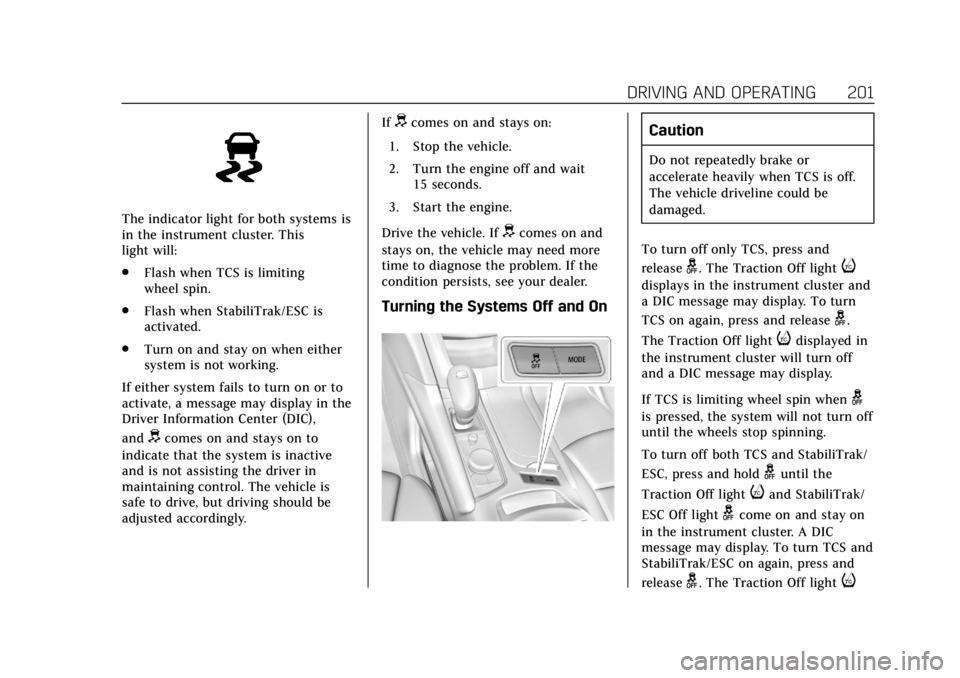
The indicator light for both systems is
in the instrument cluster. This
light will:
.Flash when TCS is limiting
wheel spin.
. Flash when StabiliTrak/ESC is
activated.
. Turn on and stay on when either
system is not working.
If either system fails to turn on or to
activate, a message may display in the
Driver Information Center (DIC),
and
dcomes on and stays on to
indicate that the system is inactive
and is not assisting the driver in
maintaining control. The vehicle is
safe to drive, but driving should be
adjusted accordingly. If
dcomes on and stays on:
1. Stop the vehicle.
2. Turn the engine off and wait 15 seconds.
3. Start the engine.
Drive the vehicle. If
dcomes on and
stays on, the vehicle may need more
time to diagnose the problem. If the
condition persists, see your dealer.
Turning the Systems Off and On
Caution
Do not repeatedly brake or
accelerate heavily when TCS is off.
The vehicle driveline could be
damaged.
To turn off only TCS, press and
release
g. The Traction Off lighti
displays in the instrument cluster and
a DIC message may display. To turn
TCS on again, press and release
g.
The Traction Off light
idisplayed in
the instrument cluster will turn off
and a DIC message may display.
If TCS is limiting wheel spin when
g
is pressed, the system will not turn off
until the wheels stop spinning.
To turn off both TCS and StabiliTrak/
ESC, press and hold
guntil the
Traction Off light
iand StabiliTrak/
ESC Off light
gcome on and stay on
in the instrument cluster. A DIC
message may display. To turn TCS and
StabiliTrak/ESC on again, press and
release
g. The Traction Off lighti
Page 217 of 385

Cadillac XT6 Owner Manual (GMNA-Localizing-U.S./Canada-12984300) -
2020 - CRC - 3/19/19
216 DRIVING AND OPERATING
Driver Assistance
Systems
This vehicle may have features that
work together to help avoid crashes or
reduce crash damage while driving,
backing, and parking. Read this entire
section before using these systems.
{Warning
Do not rely on the Driver
Assistance Systems. These systems
do not replace the need for paying
attention and driving safely. You
may not hear or feel alerts or
warnings provided by these
systems. Failure to use proper care
when driving may result in injury,
death, or vehicle damage. See
Defensive Driving0166.
Under many conditions, these
systems will not: . Detect children, pedestrians,
bicyclists, or animals.
(Continued)
Warning (Continued)
.Detect vehicles or objects
outside the area monitored by
the system.
. Work at all driving speeds.
. Warn you or provide you with
enough time to avoid a crash.
. Work under poor visibility or
bad weather conditions.
. Work if the detection sensor
is not cleaned or is covered
by ice, snow, mud, or dirt.
. Work if the detection sensor
is covered up, such as with a
sticker, magnet, or metal
plate.
. Work if the area surrounding
the detection sensor is
damaged or not properly
repaired.
Complete attention is always
required while driving, and you
should be ready to take action and
apply the brakes and/or steer the
vehicle to avoid crashes. Audible or Safety Alert Seat
Some driver assistance features alert
the driver of obstacles by beeping. To
change the volume of the warning
chime, see
“Comfort and Convenience ”
under Vehicle Personalization 0135.
If equipped with the Safety Alert Seat,
the driver seat cushion may provide a
vibrating pulse alert instead of
beeping. To change this, see
“Collision/Detection Systems” under
Vehicle Personalization 0135.
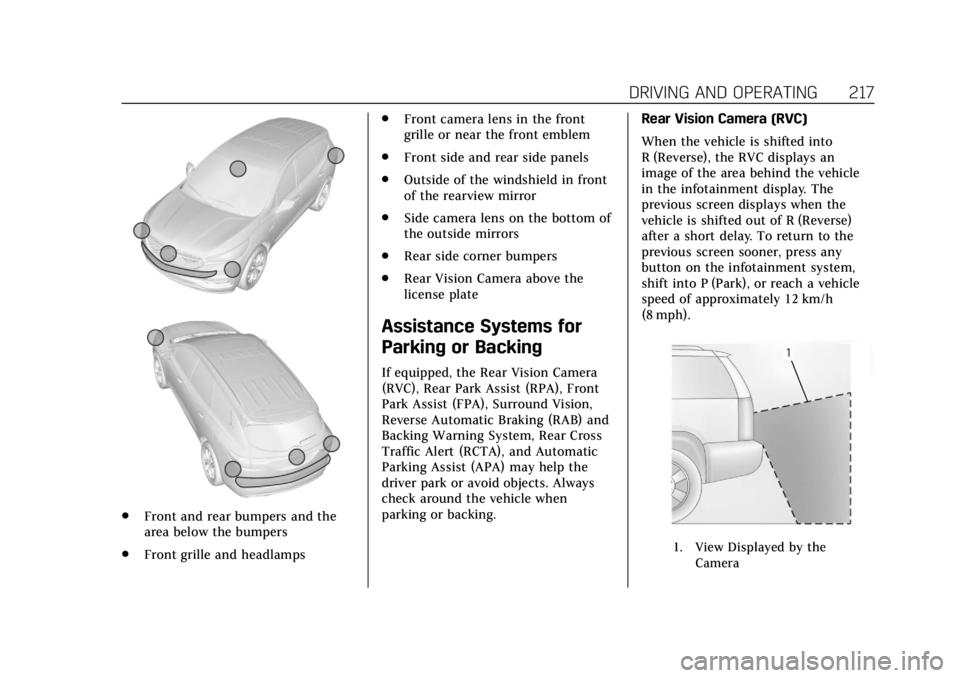
Cleaning
Depending on vehicle options, keep
these areas of the vehicle clean to
ensure the best driver assistance
feature performance. Driver
Information Center (DIC) messages
may display when the systems are
unavailable or blocked.
Page 218 of 385
Cadillac XT6 Owner Manual (GMNA-Localizing-U.S./Canada-12984300) -
2020 - CRC - 3/19/19
DRIVING AND OPERATING 217
.Front and rear bumpers and the
area below the bumpers
. Front grille and headlamps .
Front camera lens in the front
grille or near the front emblem
. Front side and rear side panels
. Outside of the windshield in front
of the rearview mirror
. Side camera lens on the bottom of
the outside mirrors
. Rear side corner bumpers
. Rear Vision Camera above the
license plate
Assistance Systems for
Parking or Backing
If equipped, the Rear Vision Camera
(RVC), Rear Park Assist (RPA), Front
Park Assist (FPA), Surround Vision,
Reverse Automatic Braking (RAB) and
Backing Warning System, Rear Cross
Traffic Alert (RCTA), and Automatic
Parking Assist (APA) may help the
driver park or avoid objects. Always
check around the vehicle when
parking or backing. Rear Vision Camera (RVC)
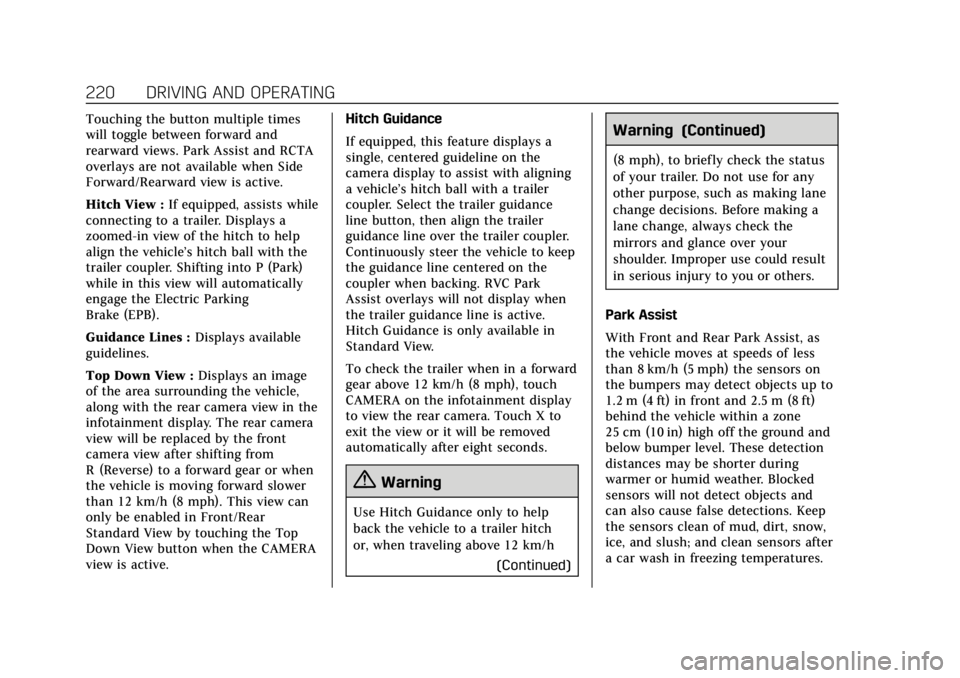
When the vehicle is shifted into
R (Reverse), the RVC displays an
image of the area behind the vehicle
in the infotainment display. The
previous screen displays when the
vehicle is shifted out of R (Reverse)
after a short delay. To return to the
previous screen sooner, press any
button on the infotainment system,
shift into P (Park), or reach a vehicle
speed of approximately 12 km/h
(8 mph).
1. View Displayed by the
Camera
Page 220 of 385
Cadillac XT6 Owner Manual (GMNA-Localizing-U.S./Canada-12984300) -
2020 - CRC - 3/19/19
DRIVING AND OPERATING 219
{Warning
The camera(s) do not display
children, pedestrians, bicyclists,
crossing traffic, animals, or any
other object outside of the cameras’
field of view, below the bumper,
or under the vehicle. Shown
distances may be different from
actual distances. Do not drive or
park the vehicle using only these
camera(s). Always check behind and
around the vehicle before driving.
Failure to use proper care may
result in injury, death, or vehicle
damage.Camera Views
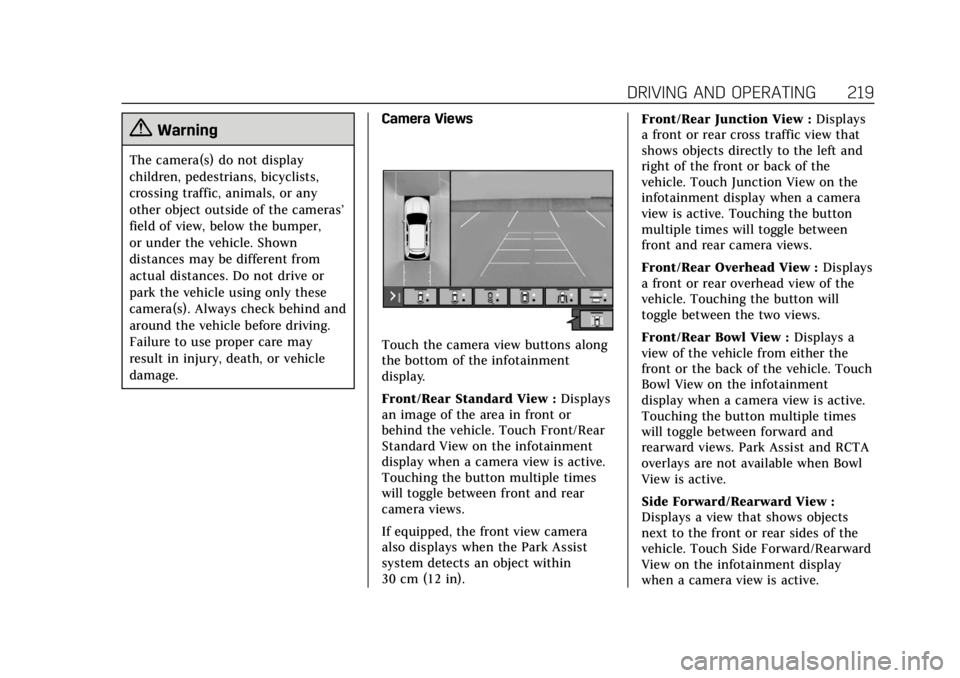
Touch the camera view buttons along
the bottom of the infotainment
display.
Front/Rear Standard View :
Displays
an image of the area in front or
behind the vehicle. Touch Front/Rear
Standard View on the infotainment
display when a camera view is active.
Touching the button multiple times
will toggle between front and rear
camera views.
If equipped, the front view camera
also displays when the Park Assist
system detects an object within
30 cm (12 in). Front/Rear Junction View :
Displays
a front or rear cross traffic view that
shows objects directly to the left and
right of the front or back of the
vehicle. Touch Junction View on the
infotainment display when a camera
view is active. Touching the button
multiple times will toggle between
front and rear camera views.
Front/Rear Overhead View : Displays
a front or rear overhead view of the
vehicle. Touching the button will
toggle between the two views.
Front/Rear Bowl View : Displays a
view of the vehicle from either the
front or the back of the vehicle. Touch
Bowl View on the infotainment
display when a camera view is active.
Touching the button multiple times
will toggle between forward and
rearward views. Park Assist and RCTA
overlays are not available when Bowl
View is active.
Side Forward/Rearward View :
Displays a view that shows objects
next to the front or rear sides of the
vehicle. Touch Side Forward/Rearward
View on the infotainment display
when a camera view is active.
Page 221 of 385
Cadillac XT6 Owner Manual (GMNA-Localizing-U.S./Canada-12984300) -
2020 - CRC - 3/19/19
220 DRIVING AND OPERATING
Touching the button multiple times
will toggle between forward and
rearward views. Park Assist and RCTA
overlays are not available when Side
Forward/Rearward view is active.
Hitch View :If equipped, assists while
connecting to a trailer. Displays a
zoomed-in view of the hitch to help
align the vehicle’s hitch ball with the
trailer coupler. Shifting into P (Park)
while in this view will automatically
engage the Electric Parking
Brake (EPB).
Guidance Lines : Displays available
guidelines.
Top Down View : Displays an image
of the area surrounding the vehicle,
along with the rear camera view in the
infotainment display. The rear camera
view will be replaced by the front
camera view after shifting from
R (Reverse) to a forward gear or when
the vehicle is moving forward slower
than 12 km/h (8 mph). This view can
only be enabled in Front/Rear
Standard View by touching the Top
Down View button when the CAMERA
view is active. Hitch Guidance
If equipped, this feature displays a
single, centered guideline on the
camera display to assist with aligning
a vehicle’s hitch ball with a trailer
coupler. Select the trailer guidance
line button, then align the trailer
guidance line over the trailer coupler.
Continuously steer the vehicle to keep
the guidance line centered on the
coupler when backing. RVC Park
Assist overlays will not display when
the trailer guidance line is active.
Hitch Guidance is only available in
Standard View.
To check the trailer when in a forward
gear above 12 km/h (8 mph), touch
CAMERA on the infotainment display
to view the rear camera. Touch X to
exit the view or it will be removed
automatically after eight seconds.
{Warning
Use Hitch Guidance only to help
back the vehicle to a trailer hitch
or, when traveling above 12 km/h
(Continued)
Warning (Continued)
(8 mph), to briefly check the status
of your trailer. Do not use for any
other purpose, such as making lane
change decisions. Before making a
lane change, always check the
mirrors and glance over your
shoulder. Improper use could result
in serious injury to you or others.
Park Assist
With Front and Rear Park Assist, as
the vehicle moves at speeds of less
than 8 km/h (5 mph) the sensors on
the bumpers may detect objects up to
1.2 m (4 ft) in front and 2.5 m (8 ft)
behind the vehicle within a zone
25 cm (10 in) high off the ground and
below bumper level. These detection
distances may be shorter during
warmer or humid weather. Blocked
sensors will not detect objects and
can also cause false detections. Keep
the sensors clean of mud, dirt, snow,
ice, and slush; and clean sensors after
a car wash in freezing temperatures.