Overhead CADILLAC XT6 2020 Owner's Manual
[x] Cancel search | Manufacturer: CADILLAC, Model Year: 2020, Model line: XT6, Model: CADILLAC XT6 2020Pages: 385, PDF Size: 6.63 MB
Page 23 of 385
Cadillac XT6 Owner Manual (GMNA-Localizing-U.S./Canada-12984300) -
2020 - CRC - 3/19/19
22 KEYS, DOORS, AND WINDOWS
Power Liftgate Operation
{Warning
You or others could be injured if
caught in the path of the power
liftgate. Make sure there is no one
in the way of the liftgate as it is
opening and closing.
Caution
Driving with an open and
unsecured liftgate may result in
damage to the power liftgate
components.
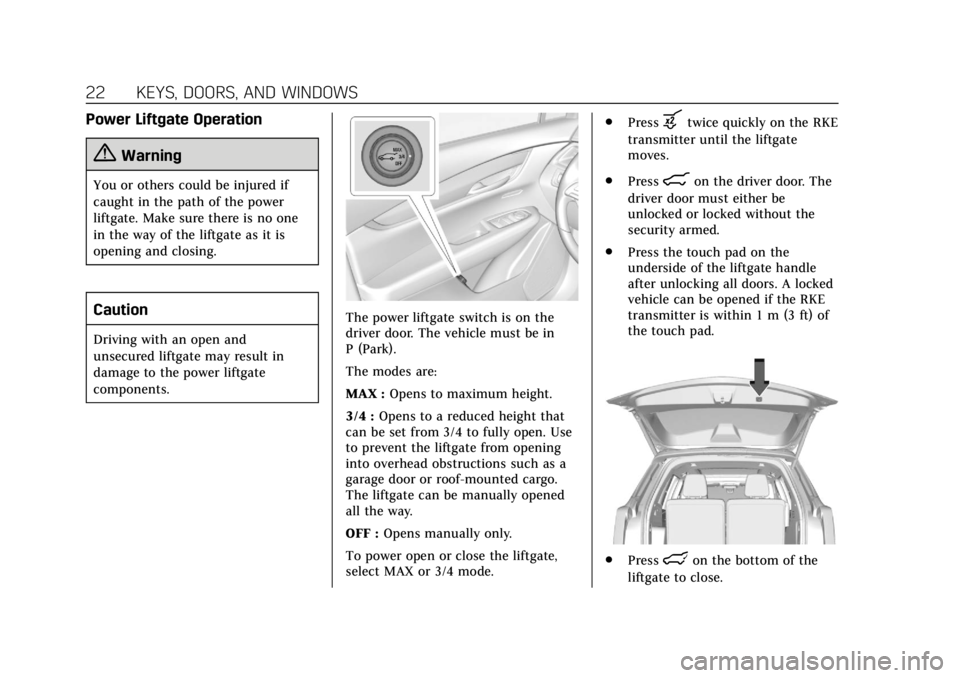
The power liftgate switch is on the
driver door. The vehicle must be in
P (Park).
The modes are:
MAX :Opens to maximum height.
3/4 : Opens to a reduced height that
can be set from 3/4 to fully open. Use
to prevent the liftgate from opening
into overhead obstructions such as a
garage door or roof-mounted cargo.
The liftgate can be manually opened
all the way.
OFF : Opens manually only.
To power open or close the liftgate,
select MAX or 3/4 mode. .
Press
btwice quickly on the RKE
transmitter until the liftgate
moves.
. Press
8on the driver door. The
driver door must either be
unlocked or locked without the
security armed.
. Press the touch pad on the
underside of the liftgate handle
after unlocking all doors. A locked
vehicle can be opened if the RKE
transmitter is within 1 m (3 ft) of
the touch pad.
.Presslon the bottom of the
liftgate to close.
Page 31 of 385
Cadillac XT6 Owner Manual (GMNA-Localizing-U.S./Canada-12984300) -
2020 - CRC - 3/19/19
30 KEYS, DOORS, AND WINDOWS
To avoid setting off the alarm by
accident:
.Lock the vehicle after all
occupants have left the vehicle
and all doors are closed.
. Always unlock a door with the
RKE transmitter or use the Keyless
Access system.
Unlocking the driver door with the key
will not disarm the system or turn off
the alarm.
How to Detect a Tamper
Condition
IfKis pressed and the horn chirps
and the lights flash three times, the
alarm was activated while the alarm
system was armed.
If the alarm system has been
activated, a message will appear on
the DIC.
Power Sounder, Inclination
Sensor, and Intrusion Sensor
In addition to the standard
theft-deterrent system features, this
system may also have an inclination
sensor, an intrusion sensor, and power
sounder.
The power sounder provides an
audible alarm that is different from
the vehicle’s horn. It has its own
power source, and can sound an alarm
when the vehicle’s battery is
compromised.
The inclination sensor can set off the
alarm if it senses movement of the
vehicle, such as a change in vehicle
orientation.
The intrusion sensor monitors the
vehicle interior, and can set off the
alarm if it senses an unauthorized
entry into the vehicle’s interior. Do
not allow passengers or pets to remain
in the vehicle when the intrusion
sensor is activated. Before arming the theft-deterrent
system and activating the intrusion
sensor:
.
Make sure all doors and windows
are completely closed.
. Secure any loose items such as a
sunshades.
. Make sure there are no
obstructions blocking the sensors
in the front overhead console.
Inclination and Intrusion
Sensors Disable Switch
It is recommended that the inclination
and intrusion sensors be deactivated if
pets are left in the vehicle or if the
vehicle is being transported.
With the vehicle turned off, press
o
in the overhead console. The indicator
light will come on momentarily,
indicating that the sensor has been
disabled until the next time the alarm
system is armed.
Page 70 of 385
Cadillac XT6 Owner Manual (GMNA-Localizing-U.S./Canada-12984300) -
2020 - CRC - 3/19/19
SEATS AND RESTRAINTS 69
to normal operation; the doors can be
locked, the interior lamps can be
turned off, and the hazard warning
flashers can be turned off using the
controls for those features. If any of
these systems are damaged in the
crash they may not operate as normal.
{Warning
A crash severe enough to inflate the
airbags may have also damaged
important functions in the vehicle,
such as the fuel system, brake and
steering systems, etc. Even if the
vehicle appears to be drivable after
a moderate crash, there may be
concealed damage that could make
it difficult to safely operate the
vehicle.
Use caution if you should attempt
to restart the engine after a crash
has occurred.
In many crashes severe enough to
inflate the airbag, windshields are
broken by vehicle deformation. Additional windshield breakage may
also occur from the front outboard
passenger airbag.
.
Airbags are designed to inflate
only once. After an airbag inflates,
you will need some new parts for
the airbag system. If you do not
get them, the airbag system will
not be there to help protect you in
another crash. A new system will
include airbag modules and
possibly other parts. The service
manual for the vehicle covers the
need to replace other parts.
. The vehicle has a crash sensing
and diagnostic module which
records information after a crash.
See Vehicle Data Recording and
Privacy 0360 and
Event Data Recorders 0361.
. Let only qualified technicians
work on the airbag systems.
Improper service can mean that
an airbag system will not work
properly. See your dealer for
service.
Passenger Sensing System
The vehicle has a passenger sensing
system for the front outboard
passenger position. The passenger
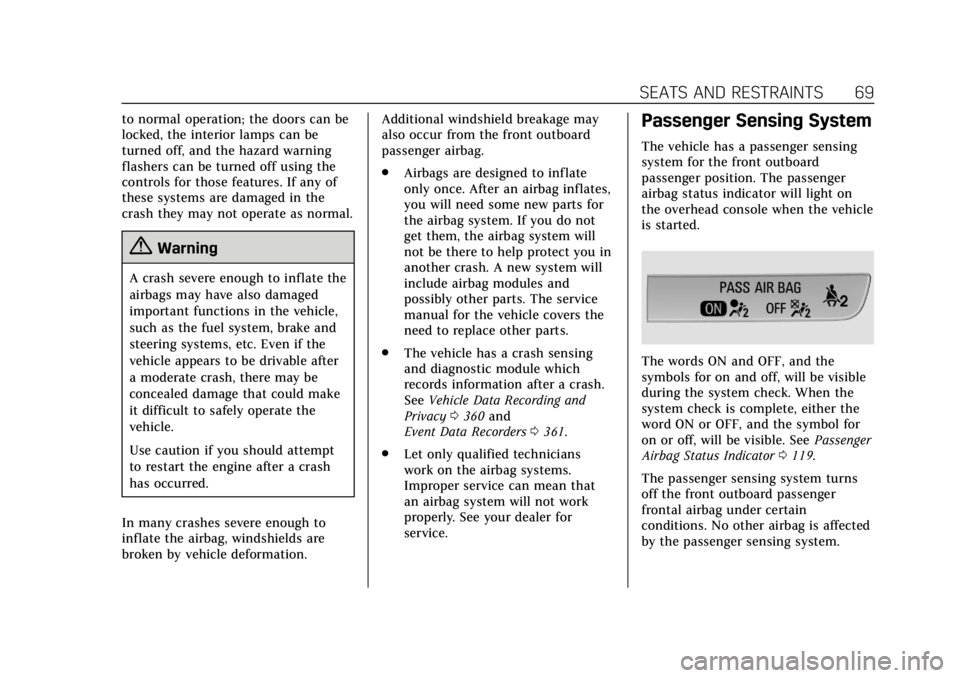
airbag status indicator will light on
the overhead console when the vehicle
is started.
The words ON and OFF, and the
symbols for on and off, will be visible
during the system check. When the
system check is complete, either the
word ON or OFF, and the symbol for
on or off, will be visible. See Passenger
Airbag Status Indicator 0119.
The passenger sensing system turns
off the front outboard passenger
frontal airbag under certain
conditions. No other airbag is affected
by the passenger sensing system.
Page 74 of 385
Cadillac XT6 Owner Manual (GMNA-Localizing-U.S./Canada-12984300) -
2020 - CRC - 3/19/19
SEATS AND RESTRAINTS 73
A thick layer of additional material,
such as a blanket or cushion,
or aftermarket equipment such as seat
covers, seat heaters, and seat
massagers can affect how well the
passenger sensing system operates.
We recommend that you not use seat
covers or other aftermarket equipment
except when approved by GM for your
specific vehicle. SeeAdding Equipment
to the Airbag-Equipped Vehicle 073 for
more information about modifications
that can affect how the system
operates.
The ON indicator may be lit if an
object, such as a briefcase, handbag,
grocery bag, laptop, or other electronic
device, is put on an unoccupied seat.
If this is not desired, remove the
object from the seat.
{Warning
Stowing articles under the
passenger seat or between the
passenger seat cushion and
seatback may interfere with the
proper operation of the passenger
sensing system.
Servicing the
Airbag-Equipped Vehicle
Airbags affect how the vehicle should
be serviced. There are parts of the
airbag system in several places around
the vehicle. Your dealer and the
service manual have information
about servicing the vehicle and the
airbag system. To purchase a service
manual, see Publication Ordering
Information 0358.
{Warning
For up to 10 seconds after the
vehicle is turned off and the battery
is disconnected, an airbag can still
inflate during improper service. You
can be injured if you are close to an
airbag when it inflates. Avoid
yellow connectors. They are
probably part of the airbag system.
Be sure to follow proper service
procedures, and make sure the
person performing work for you is
qualified to do so.
Adding Equipment to the
Airbag-Equipped Vehicle
Adding accessories that change the
vehicle's frame, bumper system,
height, front end, or side sheet metal
may keep the airbag system from
working properly.
The operation of the airbag system
can also be affected by changing,
including improperly repairing or
replacing, any parts of the following:
.
Airbag system, including airbag
modules, front or side impact
sensors, sensing and diagnostic
module, or airbag wiring
. Front seats, including stitching,
seams or zippers
. Seat belts
. Steering wheel, instrument panel,
overhead console, ceiling trim,
or pillar garnish trim
. Inner door seals, including
speakers
Page 120 of 385

Cadillac XT6 Owner Manual (GMNA-Localizing-U.S./Canada-12984300) -
2020 - CRC - 3/19/19
INSTRUMENTS AND CONTROLS 119
Airbag Readiness Light
This light shows if there is an
electrical problem with the airbag
system. The system check includes
the airbag sensor(s), the passenger
sensing system, the pretensioners, the
airbag modules, the wiring, and the
crash sensing and diagnostic module.
For more information on the airbag
system, seeAirbag System 063.
The airbag readiness light comes on
for several seconds when the vehicle is
started. If the light does not come on
then, have it fixed immediately.
{Warning
If the airbag readiness light stays
on after the vehicle is started or
comes on while driving, it means
(Continued)
Warning (Continued)
the airbag system might not be
working properly. The airbags in the
vehicle might not inflate in a crash,
or they could even inflate without a
crash. To help avoid injury, have
the vehicle serviced right away.
If there is a problem with the airbag
system, a Driver Information Center
(DIC) message may also come on.
Passenger Airbag Status
Indicator
The vehicle has a passenger sensing
system. See Passenger Sensing System
0 69. The overhead console has a
passenger airbag status indicator.
When the vehicle is started, the
passenger airbag status indicator will
light ON and OFF, and the symbols for
on and off, for several seconds as a
system check. Then, after several more
seconds, the status indicator will light
either ON or OFF, and the symbol for
on or off, to let you know the status of
the front outboard passenger frontal
airbag.
If the word ON, and the symbol for
on, are lit on the passenger airbag
status indicator, it means that the
front outboard passenger frontal
airbag is allowed to inflate.
If the word OFF, and the symbol for
off, are lit on the passenger airbag
status indicator, it means that the
passenger sensing system has turned
off the front outboard passenger
frontal airbag.
If, after several seconds, both status
indicator lights remain on, or if there
are no lights at all, there may be a
problem with the lights or the
passenger sensing system. See your
dealer for service.
Page 142 of 385
Cadillac XT6 Owner Manual (GMNA-Localizing-U.S./Canada-12984300) -
2020 - CRC - 3/19/19
INSTRUMENTS AND CONTROLS 141
Universal Remote
System
SeeRadio Frequency Statement 0359.
Universal Remote System
Programming
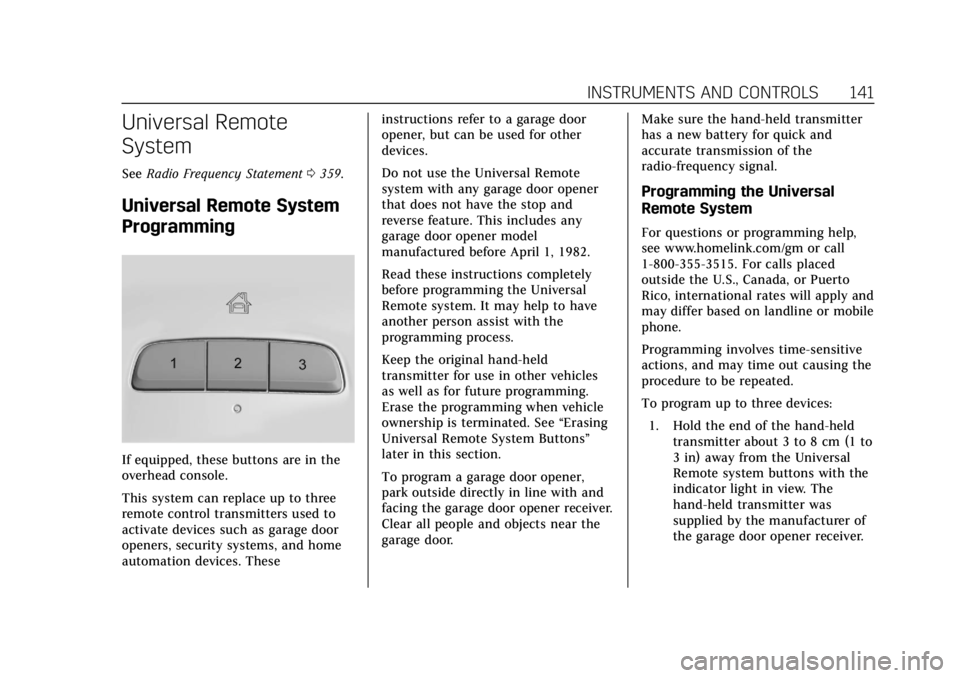
If equipped, these buttons are in the
overhead console.
This system can replace up to three
remote control transmitters used to
activate devices such as garage door
openers, security systems, and home
automation devices. These instructions refer to a garage door
opener, but can be used for other
devices.
Do not use the Universal Remote
system with any garage door opener
that does not have the stop and
reverse feature. This includes any
garage door opener model
manufactured before April 1, 1982.
Read these instructions completely
before programming the Universal
Remote system. It may help to have
another person assist with the
programming process.
Keep the original hand-held
transmitter for use in other vehicles
as well as for future programming.
Erase the programming when vehicle
ownership is terminated. See
“Erasing
Universal Remote System Buttons”
later in this section.
To program a garage door opener,
park outside directly in line with and
facing the garage door opener receiver.
Clear all people and objects near the
garage door. Make sure the hand-held transmitter
has a new battery for quick and
accurate transmission of the
radio-frequency signal.
Programming the Universal
Remote System
For questions or programming help,
see www.homelink.com/gm or call
1-800-355-3515. For calls placed
outside the U.S., Canada, or Puerto
Rico, international rates will apply and
may differ based on landline or mobile
phone.
Programming involves time-sensitive
actions, and may time out causing the
procedure to be repeated.
To program up to three devices:
1. Hold the end of the hand-held transmitter about 3 to 8 cm (1 to
3 in) away from the Universal
Remote system buttons with the
indicator light in view. The
hand-held transmitter was
supplied by the manufacturer of
the garage door opener receiver.
Page 150 of 385
Cadillac XT6 Owner Manual (GMNA-Localizing-U.S./Canada-12984300) -
2020 - CRC - 3/19/19
LIGHTING 149
The turn and lane-change signal can
be turned off manually by moving the
lever back to its original position.
If after signaling a turn or lane
change, the arrow flashes rapidly or
does not come on, a signal bulb may
be burned out.
Cornering Lamps
Cornering lamps automatically come
on when all of the following occur:
.The low-beam headlamps are on.
. The turn signals are activated or
the steering wheel is turned
50 degrees in either directon.
. The vehicle speed is below
40 km/h (25 mph).
Interior Lighting
Instrument Panel
Illumination Control
The brightness of the instrument
panel lighting and steering wheel
controls can be adjusted.
D:Move the thumbwheel up or
down to brighten or dim the lights.
The brightness of the displays
automatically adjusts based on
outdoor lighting. The instrument panel illumination control will set the
lowest level to which the display will
be automatically adjusted.
Courtesy Lamps
The courtesy lamps come on when
any door is opened unless the dome
lamp override is activated. To
deactivate the dome lamp override,
press
jOFF and the indicator
light on the button will turn off.
Dome Lamps
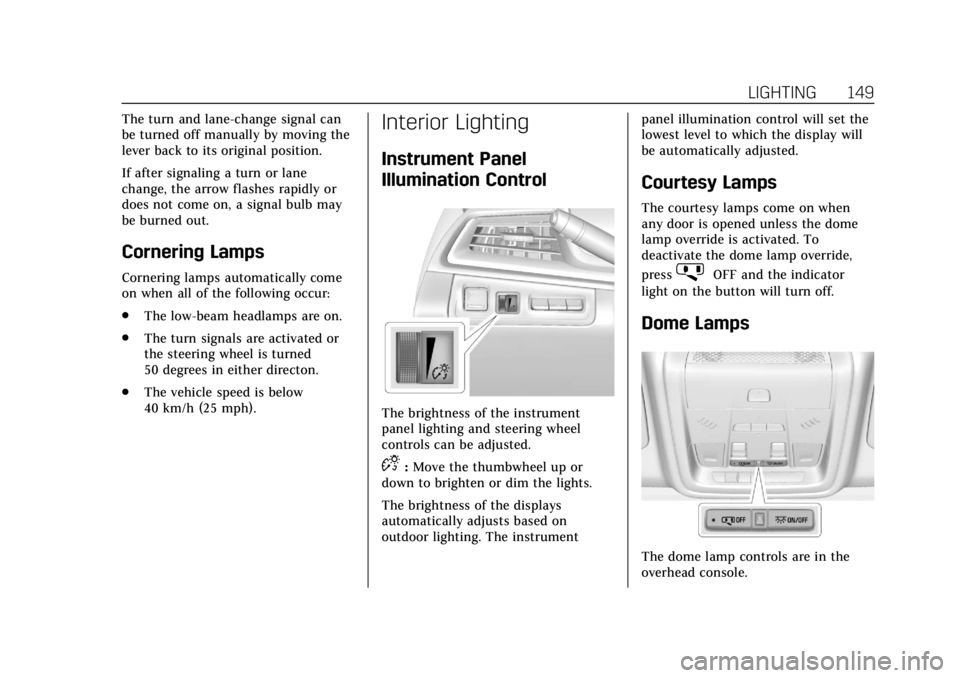
The dome lamp controls are in the
overhead console.
Page 151 of 385

Cadillac XT6 Owner Manual (GMNA-Localizing-U.S./Canada-12984300) -
2020 - CRC - 3/19/19
150 LIGHTING
To operate, press the following
buttons:
jOFF :Press to turn off the dome
lamps when a door is open. An
indicator light on the button will
turn on when the dome lamp override
is activated. Press
jOFF again to
deactivate this feature and the
indicator light will turn off. The dome
lamps will come on when doors are
opened.
+ ON/OFF : Press to turn the dome
lamps on manually.
Reading Lamps
There are front and rear reading
lamps on the overhead console, over
the rear passenger doors and over the
third row passenger windows. These
lamps come on automatically when
any door is opened.
To manually turn the reading lamps
on or off:
Press the lamp lenses on the front
reading lamps.
Press the lamp lenses over the rear
passenger doors.
Press the lamp lenses over the third
row passenger windows.
Page 163 of 385

Cadillac XT6 Owner Manual (GMNA-Localizing-U.S./Canada-12984300) -
2020 - CRC - 3/19/19
162 CLIMATE CONTROLS
If the rear floor air delivery mode is
selected, the rear fan speed indicator
will change when adjusted, but the
airf low amount directed to the floor
will not. This is normal operation for
the system.
To activate the rear floor air delivery
mode, touch
[on the rear climate
display.
Air Vents
Use the slider switch on the air outlets
to change the direction of the airf low,
or to open and close off the airf low.
There are also outlets overhead in the
rear passenger area; adjust as needed.
Keep all outlets open whenever
possible for best system performance.
Operation Tips
. Clear away any ice, snow, or leaves
from the air inlets at the base of
the windshield that can block the
flow of air into the vehicle.
. Clear snow off the hood to
improve visibility and help
decrease moisture drawn into the
vehicle. .
Use of non-GM approved hood
deflectors can adversely affect the
performance of the system.
. Keep the path under all seats clear
of objects to help circulate the air
inside the vehicle more effectively.
. If fogging reoccurs while in vent or
bi-level modes with mild
temperature throughout the
vehicle, turn on the air conditioner
to reduce windshield fogging.
Page 220 of 385
Cadillac XT6 Owner Manual (GMNA-Localizing-U.S./Canada-12984300) -
2020 - CRC - 3/19/19
DRIVING AND OPERATING 219
{Warning
The camera(s) do not display
children, pedestrians, bicyclists,
crossing traffic, animals, or any
other object outside of the cameras’
field of view, below the bumper,
or under the vehicle. Shown
distances may be different from
actual distances. Do not drive or
park the vehicle using only these
camera(s). Always check behind and
around the vehicle before driving.
Failure to use proper care may
result in injury, death, or vehicle
damage.Camera Views
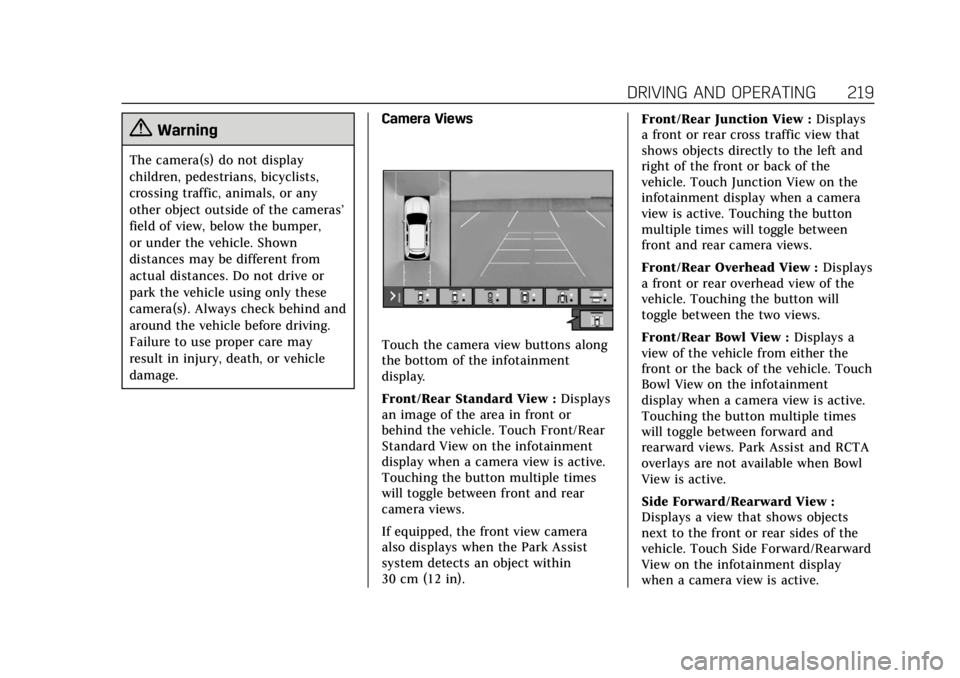
Touch the camera view buttons along
the bottom of the infotainment
display.
Front/Rear Standard View :
Displays
an image of the area in front or
behind the vehicle. Touch Front/Rear
Standard View on the infotainment
display when a camera view is active.
Touching the button multiple times
will toggle between front and rear
camera views.
If equipped, the front view camera
also displays when the Park Assist
system detects an object within
30 cm (12 in). Front/Rear Junction View :
Displays
a front or rear cross traffic view that
shows objects directly to the left and
right of the front or back of the
vehicle. Touch Junction View on the
infotainment display when a camera
view is active. Touching the button
multiple times will toggle between
front and rear camera views.
Front/Rear Overhead View : Displays
a front or rear overhead view of the
vehicle. Touching the button will
toggle between the two views.
Front/Rear Bowl View : Displays a
view of the vehicle from either the
front or the back of the vehicle. Touch
Bowl View on the infotainment
display when a camera view is active.
Touching the button multiple times
will toggle between forward and
rearward views. Park Assist and RCTA
overlays are not available when Bowl
View is active.
Side Forward/Rearward View :
Displays a view that shows objects
next to the front or rear sides of the
vehicle. Touch Side Forward/Rearward
View on the infotainment display
when a camera view is active.