media CADILLAC XT6 2020 Owner's Manual
[x] Cancel search | Manufacturer: CADILLAC, Model Year: 2020, Model line: XT6, Model: CADILLAC XT6 2020Pages: 385, PDF Size: 6.63 MB
Page 10 of 385
Cadillac XT6 Owner Manual (GMNA-Localizing-U.S./Canada-12984300) -
2020 - CRC - 3/19/19
KEYS, DOORS, AND WINDOWS 9
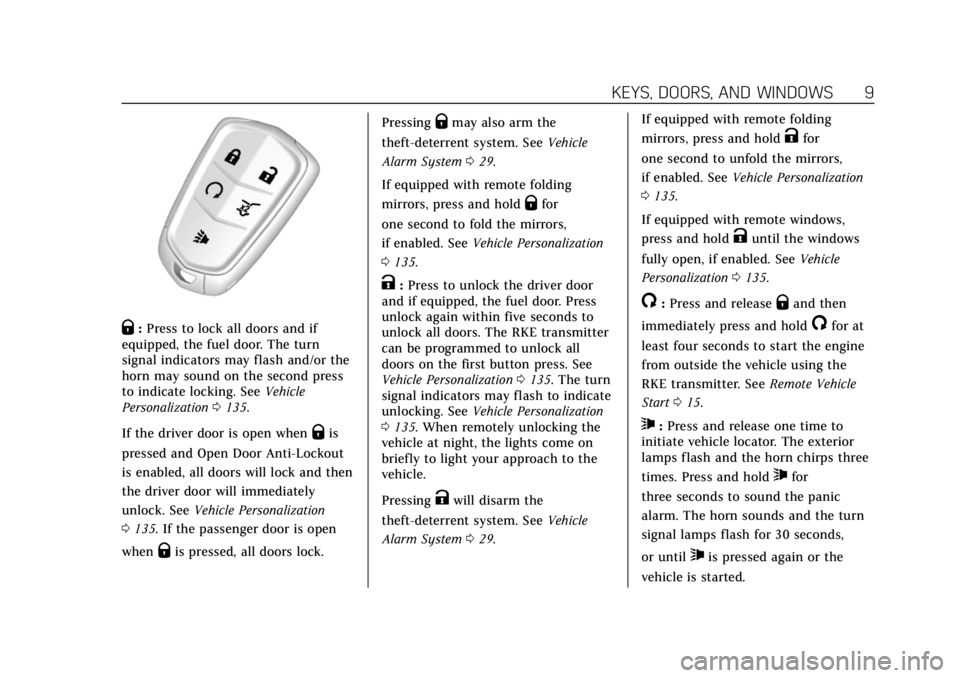
Q:Press to lock all doors and if
equipped, the fuel door. The turn
signal indicators may flash and/or the
horn may sound on the second press
to indicate locking. See Vehicle
Personalization 0135.
If the driver door is open when
Qis
pressed and Open Door Anti-Lockout
is enabled, all doors will lock and then
the driver door will immediately
unlock. See Vehicle Personalization
0 135. If the passenger door is open
when
Qis pressed, all doors lock. Pressing
Qmay also arm the
theft-deterrent system. See Vehicle
Alarm System 029.
If equipped with remote folding
mirrors, press and hold
Qfor
one second to fold the mirrors,
if enabled. See Vehicle Personalization
0 135.
K:Press to unlock the driver door
and if equipped, the fuel door. Press
unlock again within five seconds to
unlock all doors. The RKE transmitter
can be programmed to unlock all
doors on the first button press. See
Vehicle Personalization 0135. The turn
signal indicators may flash to indicate
unlocking. See Vehicle Personalization
0 135. When remotely unlocking the
vehicle at night, the lights come on
briefly to light your approach to the
vehicle.
Pressing
Kwill disarm the
theft-deterrent system. See Vehicle
Alarm System 029. If equipped with remote folding
mirrors, press and hold
Kfor
one second to unfold the mirrors,
if enabled. See Vehicle Personalization
0 135.
If equipped with remote windows,
press and hold
Kuntil the windows
fully open, if enabled. See Vehicle
Personalization 0135.
/:Press and releaseQand then
immediately press and hold
/for at
least four seconds to start the engine
from outside the vehicle using the
RKE transmitter. See Remote Vehicle
Start 015.
7:Press and release one time to
initiate vehicle locator. The exterior
lamps flash and the horn chirps three
times. Press and hold
7for
three seconds to sound the panic
alarm. The horn sounds and the turn
signal lamps flash for 30 seconds,
or until
7is pressed again or the
vehicle is started.
Page 16 of 385
Cadillac XT6 Owner Manual (GMNA-Localizing-U.S./Canada-12984300) -
2020 - CRC - 3/19/19
KEYS, DOORS, AND WINDOWS 15
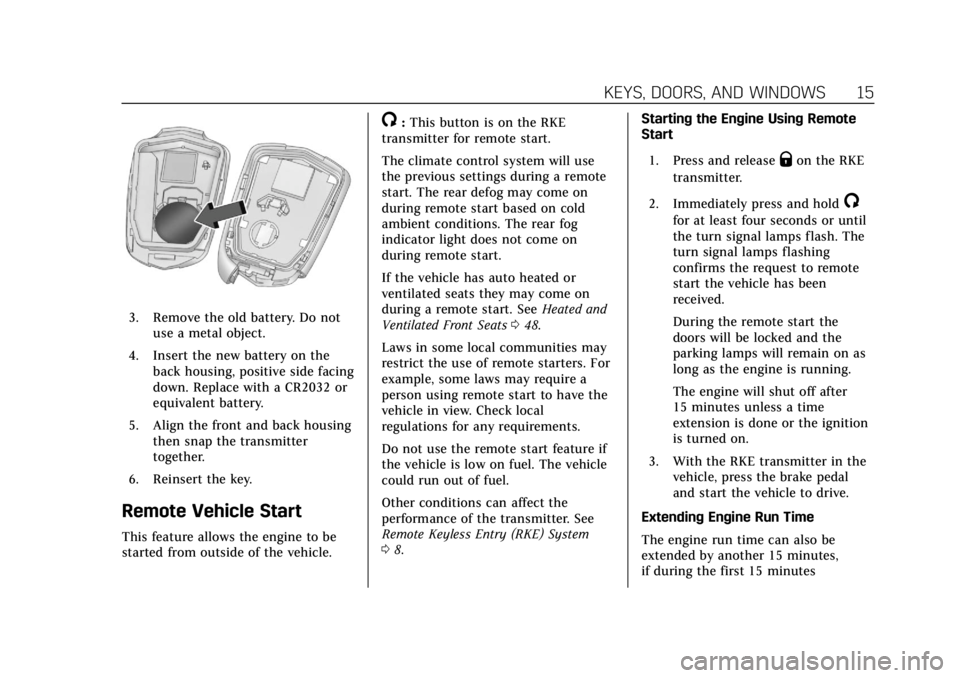
3. Remove the old battery. Do notuse a metal object.
4. Insert the new battery on the back housing, positive side facing
down. Replace with a CR2032 or
equivalent battery.
5. Align the front and back housing then snap the transmitter
together.
6. Reinsert the key.
Remote Vehicle Start
This feature allows the engine to be
started from outside of the vehicle.
/: This button is on the RKE
transmitter for remote start.
The climate control system will use
the previous settings during a remote
start. The rear defog may come on
during remote start based on cold
ambient conditions. The rear fog
indicator light does not come on
during remote start.
If the vehicle has auto heated or
ventilated seats they may come on
during a remote start. See Heated and
Ventilated Front Seats 048.
Laws in some local communities may
restrict the use of remote starters. For
example, some laws may require a
person using remote start to have the
vehicle in view. Check local
regulations for any requirements.
Do not use the remote start feature if
the vehicle is low on fuel. The vehicle
could run out of fuel.
Other conditions can affect the
performance of the transmitter. See
Remote Keyless Entry (RKE) System
0 8. Starting the Engine Using Remote
Start
1. Press and release
Qon the RKE
transmitter.
2. Immediately press and hold
/
for at least four seconds or until
the turn signal lamps flash. The
turn signal lamps flashing
confirms the request to remote
start the vehicle has been
received.
During the remote start the
doors will be locked and the
parking lamps will remain on as
long as the engine is running.
The engine will shut off after
15 minutes unless a time
extension is done or the ignition
is turned on.
3. With the RKE transmitter in the vehicle, press the brake pedal
and start the vehicle to drive.
Extending Engine Run Time
The engine run time can also be
extended by another 15 minutes,
if during the first 15 minutes
Page 20 of 385
Cadillac XT6 Owner Manual (GMNA-Localizing-U.S./Canada-12984300) -
2020 - CRC - 3/19/19
KEYS, DOORS, AND WINDOWS 19
5. Check that the cap is secure.
Free-Turning Locks
The door key lock cylinder turns freely
when either the wrong key is used,
or the correct key is not fully inserted.
The free-turning door lock feature
prevents the lock from being forced
open. To reset the lock, turn it to the
vertical position with the correct key
fully inserted. Remove the key and
insert it again. If this does not reset
the lock, turn the key halfway around
in the cylinder and repeat the reset
procedure.Power Door Locks
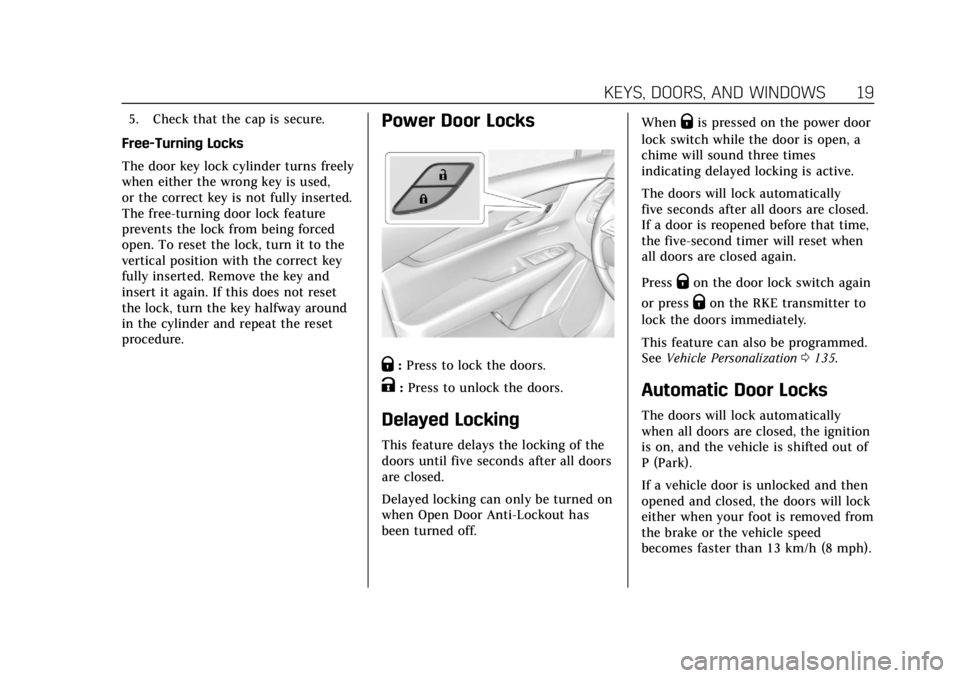
Q: Press to lock the doors.
K:Press to unlock the doors.
Delayed Locking
This feature delays the locking of the
doors until five seconds after all doors
are closed.
Delayed locking can only be turned on
when Open Door Anti-Lockout has
been turned off. When
Qis pressed on the power door
lock switch while the door is open, a
chime will sound three times
indicating delayed locking is active.
The doors will lock automatically
five seconds after all doors are closed.
If a door is reopened before that time,
the five-second timer will reset when
all doors are closed again.
Press
Qon the door lock switch again
or press
Qon the RKE transmitter to
lock the doors immediately.
This feature can also be programmed.
See Vehicle Personalization 0135.
Automatic Door Locks
The doors will lock automatically
when all doors are closed, the ignition
is on, and the vehicle is shifted out of
P (Park).
If a vehicle door is unlocked and then
opened and closed, the doors will lock
either when your foot is removed from
the brake or the vehicle speed
becomes faster than 13 km/h (8 mph).
Page 30 of 385
Cadillac XT6 Owner Manual (GMNA-Localizing-U.S./Canada-12984300) -
2020 - CRC - 3/19/19
KEYS, DOORS, AND WINDOWS 29
Vehicle Security
This vehicle has theft-deterrent
features; however, they do not make
the vehicle impossible to steal.
Vehicle Alarm System
This vehicle has an anti-theft alarm
system.
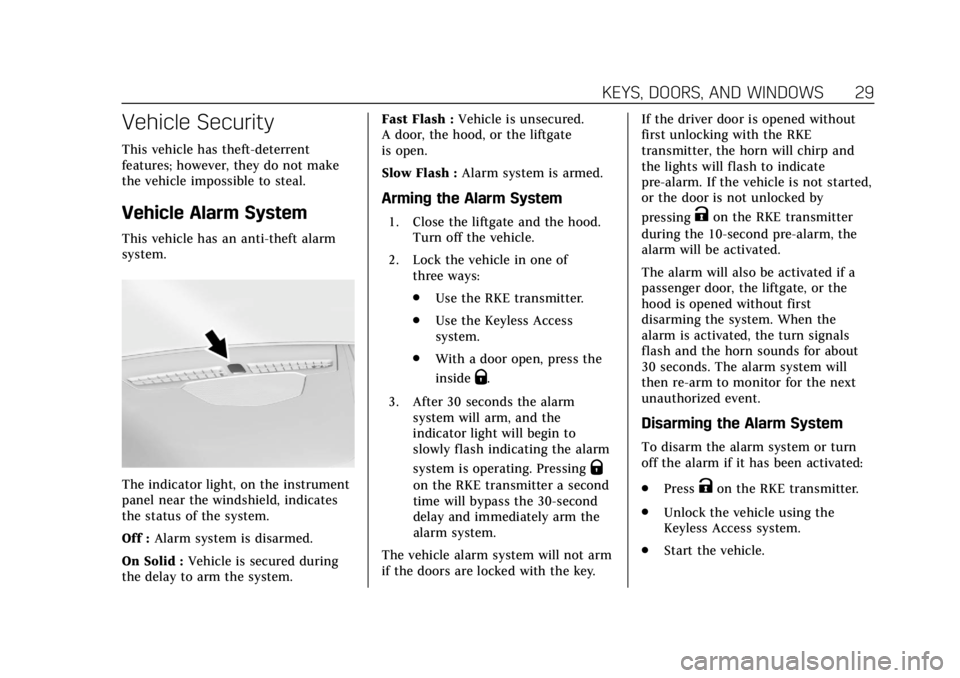
The indicator light, on the instrument
panel near the windshield, indicates
the status of the system.
Off :Alarm system is disarmed.
On Solid : Vehicle is secured during
the delay to arm the system. Fast Flash :
Vehicle is unsecured.
A door, the hood, or the liftgate
is open.
Slow Flash : Alarm system is armed.
Arming the Alarm System
1. Close the liftgate and the hood.
Turn off the vehicle.
2. Lock the vehicle in one of three ways:
.Use the RKE transmitter.
. Use the Keyless Access
system.
. With a door open, press the
inside
Q.
3. After 30 seconds the alarm system will arm, and the
indicator light will begin to
slowly flash indicating the alarm
system is operating. Pressing
Q
on the RKE transmitter a second
time will bypass the 30-second
delay and immediately arm the
alarm system.
The vehicle alarm system will not arm
if the doors are locked with the key. If the driver door is opened without
first unlocking with the RKE
transmitter, the horn will chirp and
the lights will flash to indicate
pre-alarm. If the vehicle is not started,
or the door is not unlocked by
pressing
Kon the RKE transmitter
during the 10-second pre-alarm, the
alarm will be activated.
The alarm will also be activated if a
passenger door, the liftgate, or the
hood is opened without first
disarming the system. When the
alarm is activated, the turn signals
flash and the horn sounds for about
30 seconds. The alarm system will
then re-arm to monitor for the next
unauthorized event.
Disarming the Alarm System
To disarm the alarm system or turn
off the alarm if it has been activated:
. Press
Kon the RKE transmitter.
. Unlock the vehicle using the
Keyless Access system.
. Start the vehicle.
Page 32 of 385
Cadillac XT6 Owner Manual (GMNA-Localizing-U.S./Canada-12984300) -
2020 - CRC - 3/19/19
KEYS, DOORS, AND WINDOWS 31
Steering Column Lock
If equipped, the steering column lock
is a theft-deterrent device. This
feature locks the steering column
when the vehicle is turned off and the
driver door is opened, or when the
driver door is opened and then the
vehicle is turned off. The steering
column unlocks when the vehicle is
turned on.
The Driver Information Center (DIC)
may display one of these messages:
.A message to service the steering
column lock indicates that an
issue has been detected with the
column lock feature and the
vehicle should be serviced.
. A message that the steering
column is locked indicates that
the engine is running, but the
steering column is still locked. It is
normal for the column to be
locked during a remote start, but
the column should unlock after
the brake pedal is pressed and the
vehicle is started. No message will
display during a remote start. .
A message that the steering wheel
must be turned and the vehicle
must be started again indicates
that the column lock mechanism
is bound, the column locking
device was unable to unlock the
steering column, and the vehicle
did not start. If this happens,
immediately turn the steering
wheel from side to side to unbind
the column lock. If this does not
unlock the steering column, turn
the vehicle off and open the driver
door to reset the system. Then
turn the vehicle on and
immediately turn the steering
wheel side to side for about
15 seconds. In some cases, it may
take significant force to unbind
the column.
To keep the steering column from
binding, straighten the front wheels
before turning off the vehicle.
Immobilizer
See Radio Frequency Statement 0359.
Immobilizer Operation
This vehicle has a passive
theft-deterrent system.
The system does not have to be
manually armed or disarmed.
The vehicle is automatically
immobilized when the vehicle is
turned off.
The immobilization system is
disarmed when the ignition is on or in
ACC/ACCESSORY and a valid
transmitter is present in the vehicle.
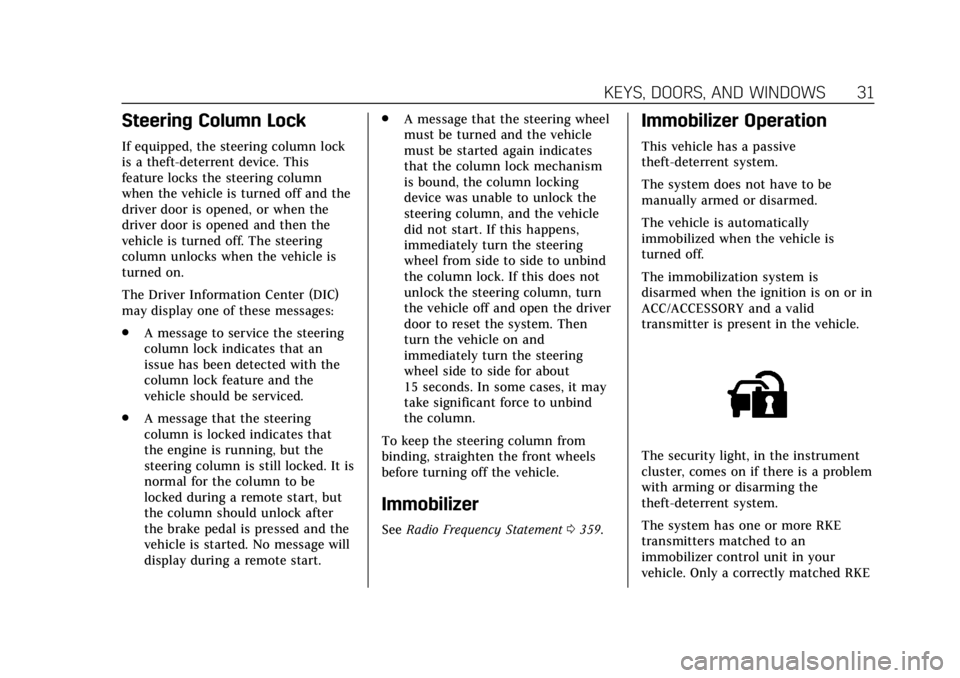
The security light, in the instrument
cluster, comes on if there is a problem
with arming or disarming the
theft-deterrent system.
The system has one or more RKE
transmitters matched to an
immobilizer control unit in your
vehicle. Only a correctly matched RKE
Page 47 of 385
Cadillac XT6 Owner Manual (GMNA-Localizing-U.S./Canada-12984300) -
2020 - CRC - 3/19/19
46 SEATS AND RESTRAINTS
Before saving, adjust all available
memory feature positions. Turn the
vehicle on and then press and release
SET; a beep will sound. Then
immediately press and hold 1, 2,
or
B(Exit) until two beeps sound.
To manually recall these positions,
press and hold 1, 2, or
Buntil the
saved position is reached. Follow the
instructions under “Saving Memory
Positions.”
The vehicle identifies the current
driver’s RKE transmitter number (1–
8). See Remote Keyless Entry (RKE)
System Operation 08. Only RKE
transmitters 1 and 2 can be used for
automatic memory recalls. A Driver
Information Center (DIC) welcome
message indicating the transmitter
number may display for the first few
ignition cycles following a transmitter
change. For Seat Entry Memory to
work properly, save the positions to
the memory button (1 or 2) matching
the RKE transmitter number displayed
in the DIC welcome message. Carry
the linked RKE transmitter when
entering the vehicle. Vehicle Personalization Settings
.
To have the Seat Entry Memory
movement begin when the vehicle
is started, select the Settings
menu, then Vehicle, then Seating
Position, and then Seat Entry
Memory. Select On or Off. See
“Seat Entry Memory” later in this
section.
. To begin Seat Exit Memory
movement when the vehicle is
turned off and the driver door is
opened, or when the vehicle is
turned off with the driver door
already opened, select the Settings
menu, then Vehicle, then Seating
Position, and then Seat Exit
Memory. Select On or Off. See
“Seat Exit Memory” later in this
section.
. See Vehicle Personalization 0135
for additional setting information.
Identifying Driver Number
To identify the driver number: 1. Move your RKE transmitter away from the vehicle. 2. Start the vehicle with another
key or RKE transmitter. The DIC
should display the driver number
for the other RKE transmitter.
Turn the vehicle off and remove
the key or RKE transmitter from
the vehicle.
3. Start the vehicle with the initial key or RKE transmitter. The DIC
should display the driver number
of your RKE transmitter.
Saving Memory Positions
Read these instructions completely
before saving memory positions.
To save preferred driving positions
1 and 2: 1. Turn the vehicle on or to ACC/ ACCESSORY.
A DIC welcome message may
indicate driver number 1 or 2.
2. Adjust all available memory features to the desired driving
position.
3. Press and release SET; a beep will sound.
Page 48 of 385
Cadillac XT6 Owner Manual (GMNA-Localizing-U.S./Canada-12984300) -
2020 - CRC - 3/19/19
SEATS AND RESTRAINTS 47
4. Immediately press and hold the1 or 2 memory button matching
the above DIC welcome message
until two beeps sound.
If too much time passes between
releasing SET and pressing 1, the
memory position will not be
saved and two beeps will not
sound. Repeat Steps 3 and 4.
1 or 2 corresponds to the driver
number. See “Identifying Driver
Number” previously in this
section.
5. Repeat Steps 1–4 for a second driver using 1 or 2.
To save the position for
Band Seat
Exit Memory features, repeat Steps 1–
4 using
B. This saves the position
for getting out of the vehicle.
Save preferred memory feature
positions to both 1 and 2 if you are
the only driver. Manually Recalling Memory
Positions
Press and hold 1, 2, or
Bto recall
the previously saved memory
positions if you are driver 1 or 2
identified in the DIC welcome
message.
To stop Manual Memory recall
movement, release 1, 2, or
Bor press
any of the following controls:
. Power seat
. Memory SET
. Power mirror, with the driver or
passenger side mirror selected
. Power steering wheel, if equipped
Seat Entry Memory
The vehicle identifies the number of
the current driver’s RKE transmitter
(1–8). See Remote Keyless Entry (RKE)
System Operation 08. If the RKE
transmitter is 1 or 2, and Seat Entry
Memory is enabled in vehicle
personalization, the positions saved to
the same memory button number 1 or
2 are automatically recalled when the
vehicle is turned on, or turned from off to ACC/ACCESSORY. RKE
transmitters 3–8 will not provide
automatic memory recalls.
To turn Seat Entry Memory on or off,
see
“Vehicle Personalization Settings”
previously in this section and Vehicle
Personalization 0135.
The shift lever must be in P (Park) to
start Seat Entry Memory. Seat Entry
Memory recall will complete if the
vehicle is shifted out of P (Park) prior
to reaching the saved memory
position.
To stop Seat Entry Memory recall
movement, turn the vehicle off or
press any of the following controls:
. Power seat
. Memory SET, 1, 2, or
B
.Power mirror, with the driver or
passenger side mirror selected
. Power steering wheel, if equipped
If the saved memory seat position
does not automatically recall or recalls
to the wrong positions, the driver’s
RKE transmitter number (1 or 2) may
not match the memory button
Page 63 of 385
Cadillac XT6 Owner Manual (GMNA-Localizing-U.S./Canada-12984300) -
2020 - CRC - 3/19/19
62 SEATS AND RESTRAINTS
The best way to protect the fetus is to
protect the mother. When a seat belt
is worn properly, it is more likely that
the fetus will not be hurt in a crash.
For pregnant women, as for anyone,
the key to making seat belts effective
is wearing them properly.
Seat Belt Extender
If the vehicle's seat belt will fasten
around you, you should use it.
But if a seat belt is not long enough,
your dealer will order you an extender.
When you go in to order it, take the
heaviest coat you will wear, so the
extender will be long enough for you.
To help avoid personal injury, do not
let someone else use it, and use it
only for the seat it is made to fit. The
extender has been designed for adults.
Never use it for securing child
restraints. For more information on
the proper use and fit of seat belt
extenders see the instruction sheet
that comes with the extender.
Safety System Check
Periodically check the seat belt
reminder, seat belts, buckles, latch
plates, retractors, shoulder belt height
adjusters (if equipped), and seat belt
anchorages to make sure they are all
in working order. Look for any other
loose or damaged seat belt system
parts that might keep a seat belt
system from performing properly. See
your dealer to have it repaired. Torn,
frayed, or twisted seat belts may not
protect you in a crash. Torn or frayed
seat belts can rip apart under impact
forces. If a belt is torn or frayed, have
it replaced immediately. If a belt is
twisted, it may be possible to untwist
by reversing the latch plate on the
webbing. If the twist cannot be
corrected, ask your dealer to fix it.
Make sure the seat belt reminder light
is working. SeeSeat Belt Reminders
0 118.
Keep seat belts clean and dry. See Seat
Belt Care 062.
Seat Belt Care
Keep belts clean and dry.
Seat belts should be properly cared for
and maintained.
Seat belt hardware should be kept dry
and free of dust or debris. As
necessary, exterior hard surfaces and
seat belt webbing may be lightly
cleaned with mild soap and water.
Ensure there is not excessive dust or
debris in the mechanism. If dust or
debris exists in the system please see
the dealer. Parts may need to be
replaced to ensure proper
functionality of the system.
{Warning
Do not bleach or dye seat belt
webbing. It may severely weaken
the webbing. In a crash, they might
not be able to provide adequate
protection. Clean and rinse seat belt
webbing only with mild soap and
lukewarm water. Allow the webbing
to dry.
Page 108 of 385
Cadillac XT6 Owner Manual (GMNA-Localizing-U.S./Canada-12984300) -
2020 - CRC - 3/19/19
INSTRUMENTS AND CONTROLS 107
Wiper Parking
If the ignition is turned off while the
wipers are on LO, HI, or AUTO with
Rainsense turned off, they will
immediately stop.
If the windshield wiper lever is then
moved to OFF before the driver door is
opened or within 10 minutes, the
wipers will restart and move to the
base of the windshield.
If the ignition is turned off while the
wipers are performing wipes due to
windshield washing or Rainsense, the
wipers continue to run until they
reach the base of the windshield.
Rainsense
If equipped with Rainsense and the
feature is turned on, a sensor near the
top center of the windshield detects
the amount of water on the
windshield and controls the frequency
of the windshield wiper based on the
current sensitivity setting.
Keep this area of the windshield clear
of debris to allow for best system
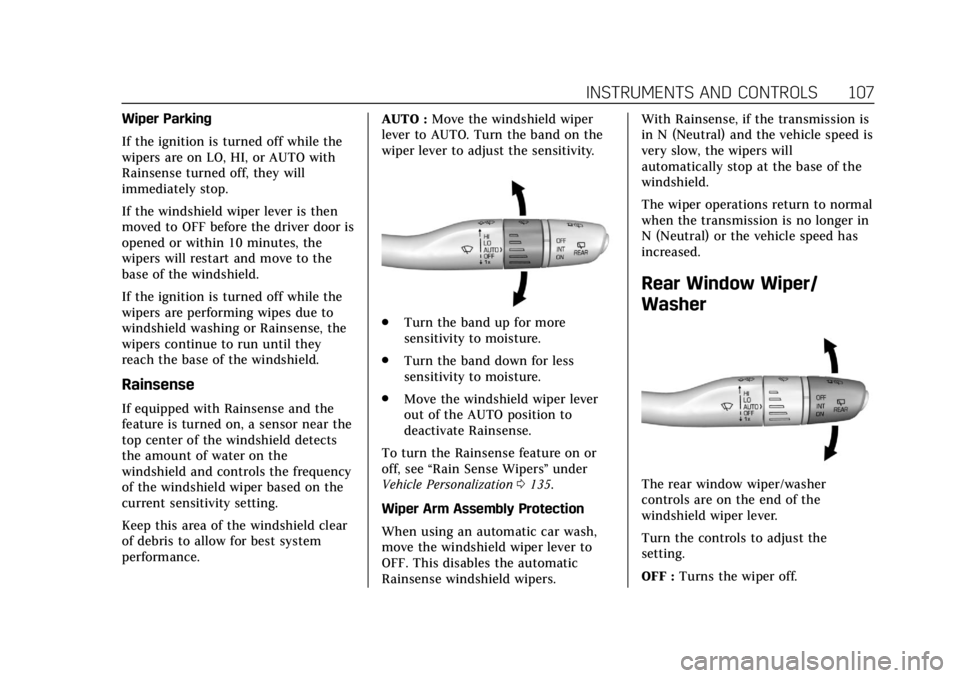
performance.AUTO :
Move the windshield wiper
lever to AUTO. Turn the band on the
wiper lever to adjust the sensitivity.
. Turn the band up for more
sensitivity to moisture.
. Turn the band down for less
sensitivity to moisture.
. Move the windshield wiper lever
out of the AUTO position to
deactivate Rainsense.
To turn the Rainsense feature on or
off, see “Rain Sense Wipers ”under
Vehicle Personalization 0135.
Wiper Arm Assembly Protection
When using an automatic car wash,
move the windshield wiper lever to
OFF. This disables the automatic
Rainsense windshield wipers. With Rainsense, if the transmission is
in N (Neutral) and the vehicle speed is
very slow, the wipers will
automatically stop at the base of the
windshield.
The wiper operations return to normal
when the transmission is no longer in
N (Neutral) or the vehicle speed has
increased.
Rear Window Wiper/
Washer
The rear window wiper/washer
controls are on the end of the
windshield wiper lever.
Turn the controls to adjust the
setting.
OFF :
Turns the wiper off.
Page 112 of 385
Cadillac XT6 Owner Manual (GMNA-Localizing-U.S./Canada-12984300) -
2020 - CRC - 3/19/19
INSTRUMENTS AND CONTROLS 111
To charge a compatible smartphone:1. Remove all objects from the charging pocket. The system may
not charge if there are any
objects between the smartphone
and the charging pocket.
2. With the smartphone screen facing the rear of the vehicle,
slowly insert the smartphone
into the charging pocket until a
green
}appears onVon the
infotainment display. This
indicates that the smartphone is
properly positioned and charging.
If
}turns yellow, ensure that
the charging pocket is clear of
any objects and that the
smartphone is capable of
wireless charging before
repositioning it. If a smartphone
is inserted into the pocket
and
}does not display, remove
the smartphone from the pocket,
turn it 180 degrees, and wait
three seconds before inserting
the smartphone into the pocket
again. The smartphone may become
warm during charging. This is
normal. In warmer temperatures,
the speed of charging may be
reduced.
To maximize the charge rate,
ensure the smartphone is fully
seated and centered in the holder
with nothing under it. A thick
smartphone case may prevent
the wireless charger from
working, or may reduce the
charging performance. See your
dealer for additional information.
Software Acknowledgements
Certain Wireless Charging Module
product from LG Electronics, Inc.
("LGE") contains the open source
software detailed below. Refer to the
indicated open source licenses (as are
included following this notice) for the
terms and conditions of their use. OSS Notice Information
To obtain the source code that is
contained in this product, please visit
http://opensource.lge.com. In addition
to the source code, all referred license
terms, warranty disclaimers and
copyright notices are available for
download. LG Electronics will also
provide open source code to you on
CD-ROM for a charge covering the
cost of performing such distribution
(such as the cost of media, shipping,
and handling) upon email request to
[email protected]. This offer is
valid for three (3) years from the date
on which you purchased the product.