seats CADILLAC XT6 2021 Repair Manual
[x] Cancel search | Manufacturer: CADILLAC, Model Year: 2021, Model line: XT6, Model: CADILLAC XT6 2021Pages: 431, PDF Size: 8.29 MB
Page 92 of 431

Cadillac XT6 Owner Manual (GMNA-Localizing-U.S./Canada-14574701) -
2021 - CRC - 2/8/21
SEATS AND RESTRAINTS 91
5. Pull the shoulder belt all the wayout of the retractor to set the lock.
When the retractor lock is set, the
belt can be tightened but not
pulled out of the retractor.6. To tighten the belt, push down onthe child restraint, pull the
shoulder portion of the belt to
tighten the lap portion of the belt,
and feed the shoulder belt back
into the retractor. When installing
a forward-facing child restraint, it
may be helpful to use your knee to
push down on the child restraint as
you tighten the belt.
Try to pull the belt out of the
retractor to make sure the retractor
is locked. If the retractor is not
locked, repeat Steps 5 and 6. 7. Before placing a child in the child
restraint, make sure it is securely
held in place. To check, grasp the
child restraint at the seat belt path
and attempt to move it side to side
and back and forth. When the child
restraint is properly installed, there
should be no more than
2.5 cm (1 in) of movement.
If the airbag is off, the OFF indicator
in the passenger airbag status
indicator will come on and stay on
when the vehicle is started.
If a child restraint has been installed
and the ON indicator is lit, see “If the
On Indicator Is Lit for a Child
Restraint ”under Passenger Sensing
System 066.
To remove the child restraint,
unbuckle the vehicle seat belt and let
it return to the stowed position.
Page 103 of 431
Cadillac XT6 Owner Manual (GMNA-Localizing-U.S./Canada-14574701) -
2021 - CRC - 2/8/21
102 INSTRUMENTS AND CONTROLS
Automatic Heated Steering Wheel
If equipped with remote start, the
heated steering wheel will turn on
automatically during a remote start
along with the heated seats when it is
cold outside. The heated steering
wheel indicator light may not
come on.
If equipped with auto heated seats,
the heated steering wheel will turn on
when the auto heated seat is
activated. The heated steering wheel
indicator will display the state of the
steering wheel heat.
SeeHeated and Ventilated Front Seats
0 45 and
Vehicle Personalization 0130.
Horn
Pressaon the steering wheel pad to
sound the horn.
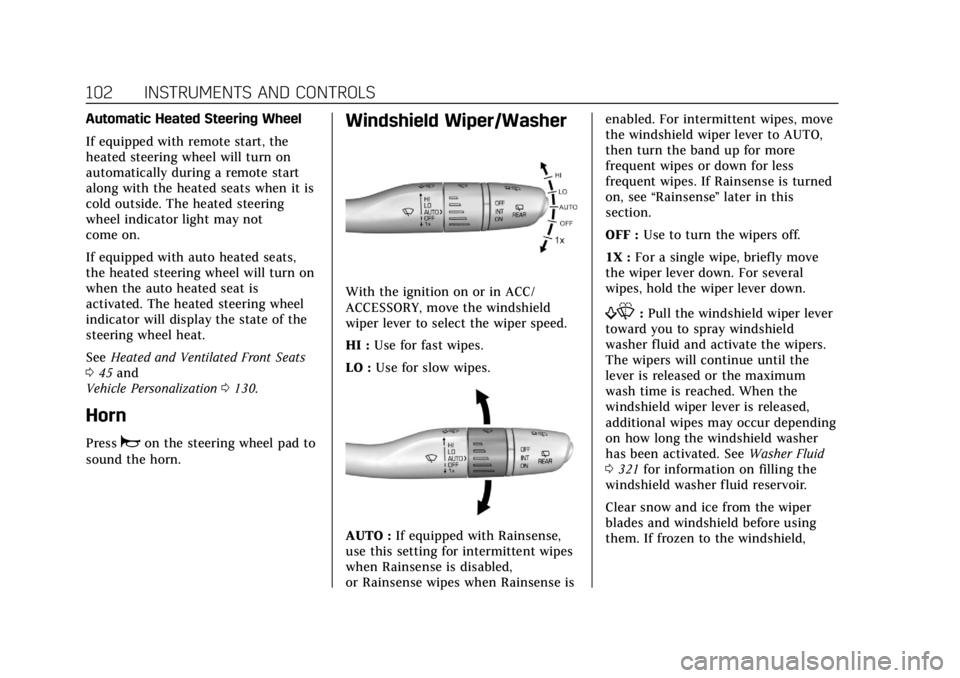
Windshield Wiper/Washer
With the ignition on or in ACC/
ACCESSORY, move the windshield
wiper lever to select the wiper speed.
HI : Use for fast wipes.
LO : Use for slow wipes.
AUTO : If equipped with Rainsense,
use this setting for intermittent wipes
when Rainsense is disabled,
or Rainsense wipes when Rainsense is enabled. For intermittent wipes, move
the windshield wiper lever to AUTO,
then turn the band up for more
frequent wipes or down for less
frequent wipes. If Rainsense is turned
on, see
“Rainsense ”later in this
section.
OFF : Use to turn the wipers off.
1X : For a single wipe, briefly move
the wiper lever down. For several
wipes, hold the wiper lever down.
f: Pull the windshield wiper lever
toward you to spray windshield
washer fluid and activate the wipers.
The wipers will continue until the
lever is released or the maximum
wash time is reached. When the
windshield wiper lever is released,
additional wipes may occur depending
on how long the windshield washer
has been activated. See Washer Fluid
0 321 for information on filling the
windshield washer fluid reservoir.
Clear snow and ice from the wiper
blades and windshield before using
them. If frozen to the windshield,
Page 132 of 431
Cadillac XT6 Owner Manual (GMNA-Localizing-U.S./Canada-14574701) -
2021 - CRC - 2/8/21
INSTRUMENTS AND CONTROLS 131
3. Touch to select the desired featuresetting.
4. Touch
9orRto turn a feature off
or on.
5. Touch
zto go to the top level of
the Settings menu.
The menu may contain the following:
Rear Seat Reminder
This allows for a chime and a message
when the rear door has been opened
before or during operation of the
vehicle.
Touch Off or On.
Climate and Air Quality
Touch and the following may display:
.Auto Fan Speed
.Auto Cooled Seats
.Auto Heated Seats
.Auto Defog
.Auto Rear Defog
.Ionizer Auto Fan Speed
This setting specifies the amount of
airf low when the climate control fan
setting is Auto Fan.
Touch Low, Medium, or High.
Auto Cooled Seats
This setting automatically turns on
and regulates the ventilated seats
when the cabin temperature is warm.
See
Heated and Ventilated Front Seats
0 45.
Touch Off or On.
Auto Heated Seats
This setting automatically turns on
and regulates the heated seats when
the cabin temperature is cool. The
auto heated seats can be turned off by
using the heated seat buttons on the
center stack. See Heated and Ventilated
Front Seats 045.
If equipped with the auto heated
steering wheel, this feature will turn
on when the auto heated seats
turn on.
Touch Off or On. Auto Defog
This setting automatically directs air
to the windshield to assist in
defogging, based on temperature and
humidity conditions.
Touch Off or On.
Auto Rear Defog
This setting automatically turns the
rear defogger on based on temperature
and humidity conditions.
Touch Off or On.
Ionizer
If equipped and on, this feature helps
clean the air inside the vehicle and
remove contaminants such as pollen,
odors, and dust. See
Dual Automatic
Climate Control System 0208.
Touch Off or On.
Collision / Detection Systems
Touch and the following may display:
.Alert Type
.Forward Collision System
.Front Pedestrian Detection
.Rear Pedestrian Detection
.Adaptive Cruise Go Notifier
Page 135 of 431

Cadillac XT6 Owner Manual (GMNA-Localizing-U.S./Canada-14574701) -
2021 - CRC - 2/8/21
134 INSTRUMENTS AND CONTROLS
Auto Door Unlock
This setting specifies which , if any,
doors will automatically unlock when
the vehicle is shifted into P (Park).
Touch Off, All Doors, or Driver Door.
Delayed Door Lock
This will lock the vehicle a short time
after all doors are closed.
Touch Off or On.
Remote Lock, Unlock, and Start
Touch and the following may display:
.Remote Unlock Light Feedback
.Remote Lock Feedback
.Remote Door Unlock
.Remote Start Auto Cool Seats
.Remote Start Auto Heat Seats
.Remote Window Operation
.Passive Door Unlock
.Passive Door Lock
.Remote Left in Vehicle Alert
Remote Unlock Light Feedback
This setting flashes the exterior lamps
when the vehicle is unlocked with the
RKE transmitter. Touch Off or Flash Lights.
Remote Lock Feedback
This setting specifies how the vehicle
responds when the vehicle is locked
with the RKE transmitter.
Touch Off, Lights and Horn, Lights
Only, or Horn Only.
Remote Door Unlock
This setting specifies whether all
doors, or just the driver door, unlock
when pressing
Kon the RKE
transmitter.
Touch All Doors or Driver Door.
Remote Start Auto Cool Seats
This setting automatically turns on
the ventilated seats when using the
remote start function on warm days.
See Heated and Ventilated Front Seats
0 45 and
Remote Vehicle Start 014.
Touch Off or On.
Remote Start Auto Heat Seats
This setting automatically turns on
the heated seats when using the
remote start function on cold days. See
Heated and Ventilated Front Seats
0 45 and
Remote Vehicle Start 014.
If equipped with the auto heated
steering wheel, this feature will turn
on when the remote start auto heated
seats turn on.
Touch Off or On.
Remote Window Operation
If equipped, this feature enables
remote operation of the windows with
the RKE transmitter. See Remote
Keyless Entry (RKE) System Operation
0 7.
Touch Off or On.
Passive Door Unlock
This setting specifies which doors
unlock when using the button on the
driver door handle to unlock the
vehicle.
Touch Off, All Doors, or Driver
Door Only.
Passive Door Lock
This setting specifies if the vehicle will
automatically lock, or lock and
provide an alert after all the doors are
Page 136 of 431
Cadillac XT6 Owner Manual (GMNA-Localizing-U.S./Canada-14574701) -
2021 - CRC - 2/8/21
INSTRUMENTS AND CONTROLS 135
closed, and you walk away from the
vehicle with the RKE transmitter. See
Remote Keyless Entry (RKE) System
Operation07.
Touch Off, On with Horn Chirp, or On.
Remote Left in Vehicle Alert
This feature sounds an alert when the
RKE transmitter is left in the vehicle.
This menu also enables Remote No
Longer in Vehicle Alert.
Touch Off or On.
Seating Position
Touch and the following may display:
.Seat Entry Memory
.Seat Exit Memory
Seat Entry Memory
This feature automatically recalls the
previously stored 1 or 2 button
positions when the ignition is changed
from off to on or ACC/ACCESSORY.
See Memory Seats 043.
Touch Off or On. Seat Exit Memory
This feature automatically recalls the
previously stored exit button positions
when the ignition is changed from on
or ACC/ACCESSORY to off if the driver
door is open or opened. See
Memory
Seats 043.
Touch Off or On.
Teen Driver
See “Teen Driver” underSettings 0188.
Valet Mode
This will lock the infotainment system
and steering wheel controls. It may
also limit access to vehicle storage
locations, if equipped.
To enable valet mode:
1. Enter a four-digit code on the keypad.
2. Touch Enter to go to the confirmation screen.
3. Re-enter the four-digit code.
Touch Lock or Unlock to lock or
unlock the system. Touch Back to go
back to the previous menu.
Universal Remote
System
See Radio Frequency Statement 0406.
Universal Remote System
Programming
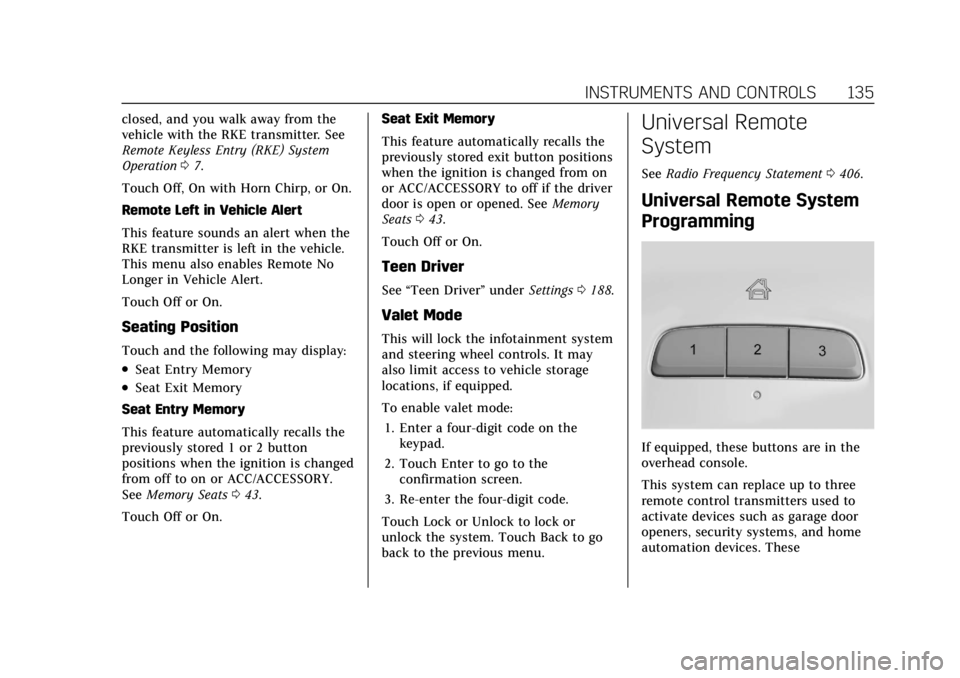
If equipped, these buttons are in the
overhead console.
This system can replace up to three
remote control transmitters used to
activate devices such as garage door
openers, security systems, and home
automation devices. These
Page 158 of 431
Cadillac XT6 Owner Manual (GMNA-Localizing-U.S./Canada-14574701) -
2021 - CRC - 2/8/21
INFOTAINMENT SYSTEM 157
SiriusXM Satellite Radio Service
If equipped, SiriusXM Satellite Radio
Service provides digital radio
reception. Tall buildings or hills can
interfere with satellite radio signals,
causing the sound to fade in and out.
In addition, traveling or standing
under heavy foliage, bridges, garages,
or tunnels may cause loss of the
SiriusXM signal for a period of time.
Some cellular services may interfere
with SXM reception causing loss of
signal.
Mobile Device Usage
Mobile device usage, such as making
or receiving calls, charging, or just
having the mobile device on may
cause static interference in the radio.
Unplug the mobile device or turn it
off if this happens.
Multi-Band Antenna
The roof antenna is for AM, FM,
SiriusXM Satellite Radio, OnStar, and
GPS (Global Positioning System). Keep
clear of obstructions for clearreception. If the vehicle has a sunroof,
and it is open, reception can also be
affected.
Audio Players
Avoiding Untrusted Media
Devices
When using media devices such as SD
cards, USB devices, and mobile
devices, consider the source.
Untrusted media devices could
contain files that affect system
operation or performance. Avoid use if
the content or origin cannot be
trusted.
USB Port
Audio stored on a USB device may be
listened to.
The vehicle may be equipped with two
USB ports in the center console under
the armrest. These ports are for data
and charging. There may also be two
USB ports at the rear of the center
console and a USB port on each side
of the third row seats for
charging only.
Caution
To avoid vehicle damage, unplug all
accessories and disconnect all
accessory cables from the vehicle
when not in use. Accessory cables
left plugged into the vehicle,
unconnected to a device, could be
damaged or cause an electrical
short if the unconnected end comes
in contact with liquids or another
power source such as the accessory
power outlet.
Playing from a USB
A USB mass storage device can be
connected to the USB port.
Audio extensions supported by the
USB may include:
.MP3
.AAC
.OGG
.3GP
Gracenote
When plugging in a USB device,
Gracenote service builds voice tags for
music. Voice tags allow artists, albums
Page 195 of 431
Cadillac XT6 Owner Manual (GMNA-Localizing-U.S./Canada-14574701) -
2021 - CRC - 2/8/21
194 INFOTAINMENT SYSTEM
.Air Quality Sensor: This setting
switches the system into
Recirculation Mode based on the
quality of the outside air.
Touch Off, Low Sensitivity, or High
Sensitivity.
.Auto Cooled Seats: This setting
automatically turns on and
regulates the ventilated seats when
the cabin temperature is warm.
Touch the controls on the
infotainment display to disable or
enable.
.Auto Heated Seats: This setting
automatically turns on and
regulates the heated seats when the
cabin temperature is cool. The auto
heated seats can be turned off by
using the heated seat controls on
the center stack.
Touch the controls on the
infotainment display to disable or
enable.
.Auto Defog: This setting
automatically turns the front
defogger on when the vehicle engine
is started.Touch the controls on the
infotainment display to disable or
enable.
.Auto Rear Defog: This setting
automatically turns the rear
defogger on when the vehicle engine
is started.
Touch the controls on the
infotainment display to disable or
enable.
.Ionizer: This setting purifies the air
in the interior of the vehicle..
Touch the controls on the
infotainment display to disable or
enable.
Navigation
Touch and the following may display:
.Destination Card Preferences
.Map Preferences
.Route Preferences
.Navigation Voice Control
.Traffic Preferences
.Alert Preferences
.Fuel Grade Preferences
.Manage History
.Predictive Navigation (if equipped)
.About See
Using the Navigation System 0162.
Phone
Touch and the following may display:
.My Number: Displays the cell phone
number of the Bluetooth connected
device.
.Active Call View: Shows active call
display when answering a call.
Touch the controls on the
infotainment display to disable or
enable.
.Privacy: Only show call alerts in the
instrument cluster.
Touch Off or On.
.Sort Contacts: Touch to sort by first
or last name.
.Re-sync Device Contacts: Allows the
device contacts to re-sync if you are
having difficulty accessing all of the
contacts on your cell phone.
.Delete All Vehicle Contacts: Touch
to delete all vehicle stored contacts.
.OnStar Phone TTY Mode: This
enables OnStar cell phone
TTY mode.
Touch Disable or Enable.
Page 209 of 431
Cadillac XT6 Owner Manual (GMNA-Localizing-U.S./Canada-14574701) -
2021 - CRC - 2/10/21
208 CLIMATE CONTROLS
Climate Controls
Climate Control Systems
Dual Automatic Climate ControlSystem . . . . . . . . . . . . . . . . . . . . . . . . . . 208
Rear Climate Control System . . . . 213
Air Vents
Air Vents . . . . . . . . . . . . . . . . . . . . . . . . . . 215
Maintenance
Passenger Compartment Air Filter . . . . . . . . . . . . . . . . . . . . . . . . . . . . . 216
Service . . . . . . . . . . . . . . . . . . . . . . . . . . . . 216
Climate Control Systems
Dual Automatic Climate Control System
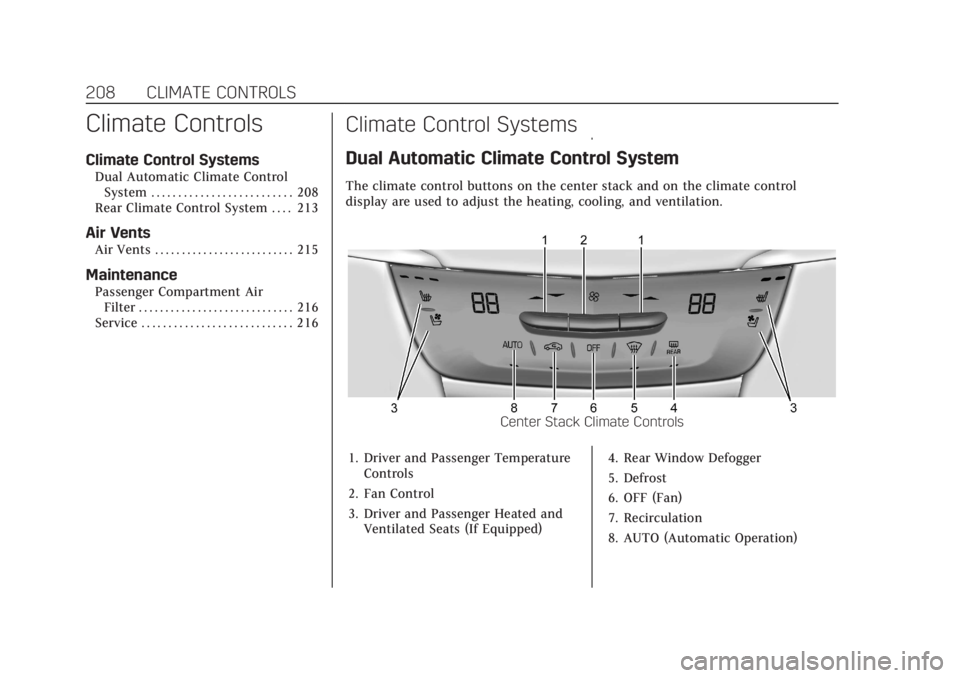
The climate control buttons on the center stack and on the climate control
display are used to adjust the heating, cooling, and ventilation.
Center Stack Climate Controls
1. Driver and Passenger Temperature Controls
2. Fan Control
3. Driver and Passenger Heated and Ventilated Seats (If Equipped) 4. Rear Window Defogger
5. Defrost
6. OFF (Fan)
7. Recirculation
8. AUTO (Automatic Operation)
Page 213 of 431
Cadillac XT6 Owner Manual (GMNA-Localizing-U.S./Canada-14574701) -
2021 - CRC - 2/10/21
212 CLIMATE CONTROLS
Caution
Do not try to clear frost or other
material from the inside of the
front windshield and rear window
with a razor blade or anything else
that is sharp. This may damage the
rear window defogger grid and
affect the radio's ability to pick up
stations clearly. The repairs would
not be covered by the vehicle
warranty.
Driver and Passenger Heated and
Ventilated Seats (If Equipped) :
Press
MorLto heat the driver or
passenger seat cushion.
Press
Cor{to ventilate the driver
or passenger seat. See Heated and
Ventilated Front Seats 045.
Auto Heated and Ventilated Seats :
When the vehicle is on, this feature
will automatically activate the heated
or ventilated seats at the level
required by the vehicle's interior
temperature. The active high, medium,
low, or off heated or ventilated seat
level will be indicated by the manual
heated and ventilated seat buttons on the center stack. Use the manual
heated and ventilated seat buttons on
the center stack to turn auto heated
or ventilated seats off. If the
passenger seat is unoccupied, the auto
heated or ventilated seats feature will
not activate that seat. The auto heated
and ventilated seats feature can be
programmed to always be enabled
when the vehicle is on. If equipped
with a heated steering wheel, the auto
heated steering wheel activation will
follow the heated seat auto activation
and the heated wheel indicator will
follow the state of the steering wheel
heat. See
Heated and Ventilated Front
Seats 045 and
Vehicle Personalization 0130.
Remote Start Climate Control
Operation : If equipped with the
remote start feature, the climate
control system may run when the
vehicle is started remotely. The system
uses the driver’s previous settings to
heat or cool the inside of the vehicle.
The rear defog may come on during
remote start based on cold ambient
conditions. The rear defog indicator
light does not come on during a
remote start. If equipped, the heated seats will turn
on if it is cold outside or the
ventilated seats will turn on if it is hot
outside. The heated and ventilated
seat indicator lights may not come on
during a remote start. If equipped, the
heated steering wheel will come on in
a remote start if it is cold outside. The
heated steering wheel indicator light
may not come on. See
Remote Vehicle
Start 014 and
Heated and Ventilated Front Seats 045.
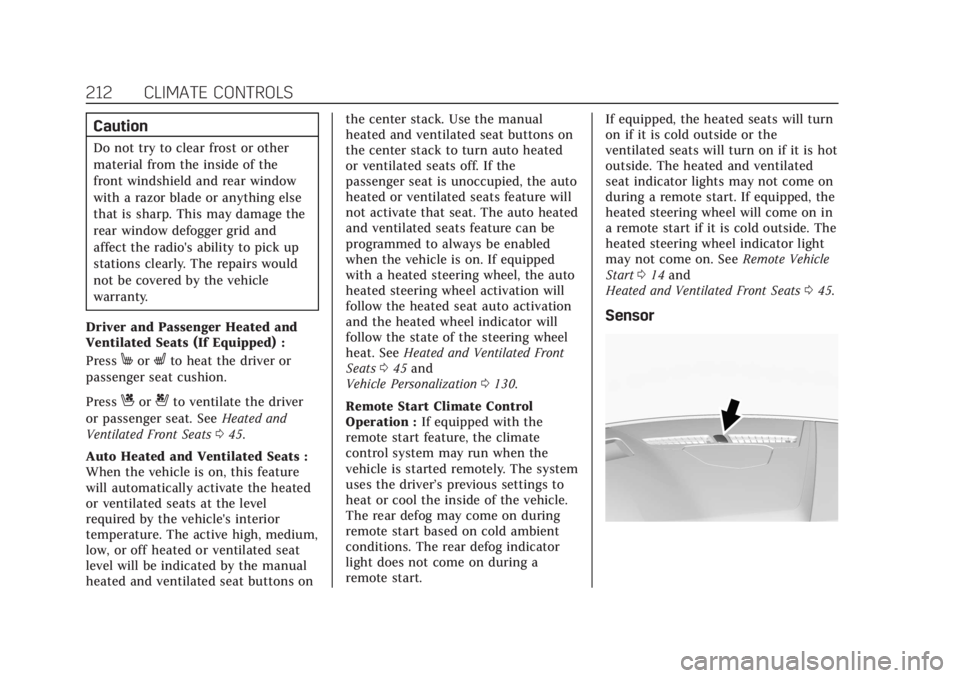
Sensor
Page 214 of 431

Cadillac XT6 Owner Manual (GMNA-Localizing-U.S./Canada-14574701) -
2021 - CRC - 2/10/21
CLIMATE CONTROLS 213
The solar sensor, on top of the
instrument panel near the windshield,
monitors the solar heat.
The climate control system uses the
sensor information to adjust the
temperature, fan speed, recirculation,
and air delivery mode for best
comfort.
If the sensor is covered, the automatic
climate control system may not work
properly.
Afterblow Feature
If equipped, under certain conditions,
the fan may stay on or may turn on
and off several times after you turn
off and lock the vehicle. This is
normal.Rear Climate Control System
If equipped, the rear climate control system is on the rear of the center console.
The settings can be adjusted with the rear climate control buttons on the rear of
the center console and on the rear climate display.
Rear Climate Controls, Equipped with Heated Seats
1. Heated Rear Seat Controls
2. Air Delivery Mode Control
3. AUTO (Automatic Operation) 4. Fan Control
5. Rear Seat Passenger Temperature
Controls