parking CADILLAC XT6 2021 Owner's Manual
[x] Cancel search | Manufacturer: CADILLAC, Model Year: 2021, Model line: XT6, Model: CADILLAC XT6 2021Pages: 431, PDF Size: 8.29 MB
Page 6 of 431

Cadillac XT6 Owner Manual (GMNA-Localizing-U.S./Canada-14574701) -
2021 - CRC - 2/8/21
INTRODUCTION 5
1.Air Vents 0215.
2. Exterior Lamp Controls 0139.
Turn Signal Lever. See Turn and
Lane-Change Signals 0142.
IntelliBeam System Button (If
Equipped). See Exterior Lamp
Controls 0139.
3. Instrument Cluster 0109.
Driver Information Center (DIC)
Display. See Driver Information
Center (DIC) 0124.
4. Windshield Wiper/Washer 0102.
Rear Window Wiper/Washer 0104.
5. ENGINE START/STOP Button. See Ignition Positions 0232.
6. Park Assist Button. See Assistance
Systems for Parking or Backing
0 264.
Automatic Parking Assist (APA)
Button. See Assistance Systems for
Parking or Backing 0264.
7. Auto Stop Disable Switch. See Stop/
Start System 0234.
8. Light Sensor. See Automatic
Headlamp System 0141. 9.
Hazard Warning Flashers 0142.
Lane Keep Assist (LKA) 0282 (If
Equipped).
10. Infotainment Controls. See Overview 0147.
11. Heated and Ventilated Front Seats
045 (If Equipped).
12. Dual Automatic Climate Control
System 0208.
13. MODE Switch. See Driver Mode
Control 0250.
Traction Control/Electronic Stability
Control 0248.
14. Infotainment Controls. See Overview 0147.
15. Shift Lever. See Automatic
Transmission 0240.
16. Steering Wheel Controls 0101.
17. Steering Wheel Controls 0101.
Driver Information Center (DIC)
Controls. See Driver Information
Center (DIC) 0124.
18. Horn 0102.
19. Steering Wheel Adjustment 0101
(Out of View). 20.
Forward Collision Alert (FCA) System
0272 (If Equipped).
Heated Steering Wheel 0101 (If
Equipped).
21. Cruise Control 0251.
Adaptive Cruise Control (Advanced)
0 254 (If Equipped).
Phone Button. See Steering Wheel
Controls 0101.
22. Data Link Connector (DLC) (Out of View). See Malfunction Indicator
Lamp (Check Engine Light) 0115.
23. Hood Release. See Hood0306.
24. Head-Up Display (HUD) 0126 (If
Equipped).
25. Instrument Panel Illumination
Control 0143.
26. Electric Parking Brake 0246.
Page 16 of 431
Cadillac XT6 Owner Manual (GMNA-Localizing-U.S./Canada-14574701) -
2021 - CRC - 2/8/21
KEYS, DOORS, AND WINDOWS 15
2. Immediately press and hold/for
at least four seconds or until the
turn signal lamps flash. The turn
signal lamps flashing confirms the
request to remote start the vehicle
has been received.
During the remote start the doors
will be locked and the parking
lamps will remain on as long as the
engine is running.
The engine will shut off after
15 minutes unless a time extension
is done or the ignition is turned on.
3. With the RKE transmitter in the vehicle, press the brake pedal and
start the vehicle to drive.
Extending Engine Run Time
The engine run time can also be
extended by another 15 minutes,
if during the first 15 minutes
Steps 1 and 2 are repeated while the
engine is still running. An extension
can be requested 30 seconds after
starting. This provides a total of
30 minutes.
The remote start can only be
extended once. When the remote start is extended,
the second 15-minute period is added
on to the first 15 minutes for a total
of 30 minutes.
A maximum of two remote starts, or a
remote start with an extension, are
allowed between ignition cycles.
The ignition must be turned on and
then off before the remote start
procedure can be used again.
Canceling a Remote Start
To cancel a remote start, do any of
the following:
.Press and hold/until the parking
lamps turn off.
.Turn on the hazard warning
flashers.
.Turn the vehicle on and then off.
Conditions in Which Remote Start
Will Not Work
The remote start will not operate if
any of the following occur:
.The RKE transmitter is in the
vehicle.
.The ignition is on.
.The hood is not closed.
.The hazard warning flashers are on.
.There is an emission control system
malfunction.
.The engine coolant temperature is
too high.
.The oil pressure is low.
.Two remote vehicle starts or a start
with an extension have already
been used.
.The vehicle is not in P (Park).
Door Locks
{Warning
Unlocked doors can be dangerous.
.Passengers, especially children,
can easily open the doors and
fall out of a moving vehicle. The
doors can be unlocked and
opened while the vehicle is
moving. The chance of being
thrown out of the vehicle in a
crash is increased if the doors are
not locked. So, all passengers
should wear seat belts properly
and the doors should be locked
whenever the vehicle is driven. (Continued)
Page 33 of 431
Cadillac XT6 Owner Manual (GMNA-Localizing-U.S./Canada-14574701) -
2021 - CRC - 2/8/21
32 KEYS, DOORS, AND WINDOWS
Automatic Dimming Mirror
If the vehicle has the automatic
dimming mirror, the driver outside
mirror automatically adjusts for the
glare of headlamps behind you.
Reverse Tilt Mirrors
If equipped with reverse tilt mirrors
and memory seats, the passenger and/
or driver mirror tilts to a preselected
position when the vehicle is in
R (Reverse). This allows the curb to be
seen when parallel parking.
The mirror(s) may move from their
tilted position when:
.The vehicle is shifted out of
R (Reverse), or remains in
R (Reverse) for about 30 seconds.
.The vehicle is turned off.
.The vehicle is driven in R (Reverse)
above a set speed.
To turn this feature on or off, see
Vehicle Personalization 0130.
Interior Mirrors
Interior Rearview Mirrors
Adjust the rearview mirror for a clear
view of the area behind the vehicle.
Do not spray glass cleaner directly on
the mirror. Use a soft towel dampened
with water.
Automatic Dimming
Rearview Mirror
If equipped, automatic dimming
reduces the glare of headlamps from
behind. The dimming feature comes
on when the vehicle is started.
Rear Camera Mirror
If equipped, this automatic dimming
mirror provides a wide angle camera
view of the area behind the vehicle.
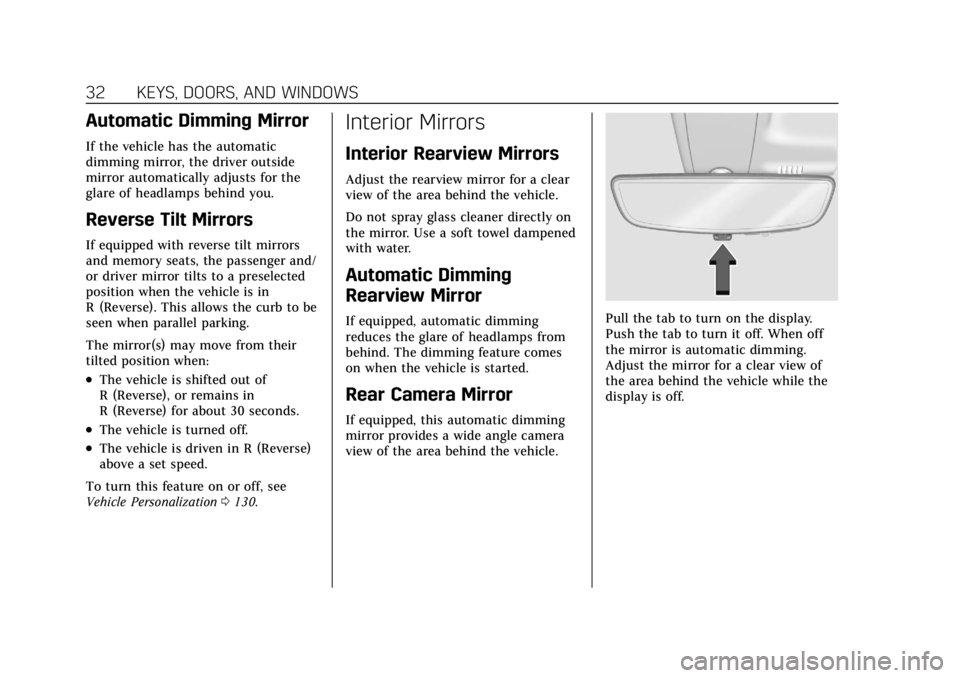
Pull the tab to turn on the display.
Push the tab to turn it off. When off
the mirror is automatic dimming.
Adjust the mirror for a clear view of
the area behind the vehicle while the
display is off.
Page 101 of 431
Cadillac XT6 Owner Manual (GMNA-Localizing-U.S./Canada-14574701) -
2021 - CRC - 2/8/21
100 INSTRUMENTS AND CONTROLS
Instruments and
Controls
Controls
Steering Wheel Adjustment . . . . . 101
Steering Wheel Controls . . . . . . . . . 101
Heated Steering Wheel . . . . . . . . . . 101
Horn . . . . . . . . . . . . . . . . . . . . . . . . . . . . . . . 102
Windshield Wiper/Washer . . . . . . . 102
Rear Window Wiper/Washer . . . . 104
Compass . . . . . . . . . . . . . . . . . . . . . . . . . . 105
Clock . . . . . . . . . . . . . . . . . . . . . . . . . . . . . . 105
Power Outlets . . . . . . . . . . . . . . . . . . . . . 105
Wireless Charging . . . . . . . . . . . . . . . . 106
Warning Lights, Gauges, and
Indicators
Warning Lights, Gauges, andIndicators . . . . . . . . . . . . . . . . . . . . . . . 108
Instrument Cluster . . . . . . . . . . . . . . . 109
Speedometer . . . . . . . . . . . . . . . . . . . . . . 112
Odometer . . . . . . . . . . . . . . . . . . . . . . . . . 112
Trip Odometer . . . . . . . . . . . . . . . . . . . . 112
Tachometer . . . . . . . . . . . . . . . . . . . . . . . 112
Fuel Gauge . . . . . . . . . . . . . . . . . . . . . . . . 112
Engine Coolant Temperature Gauge . . . . . . . . . . . . . . . . . . . . . . . . . . . . 113
Seat Belt Reminders . . . . . . . . . . . . . . 113
Airbag Readiness Light . . . . . . . . . . 114 Passenger Airbag Status
Indicator . . . . . . . . . . . . . . . . . . . . . . . . . 114
Charging System Light . . . . . . . . . . . 115
Malfunction Indicator Lamp (Check Engine Light) . . . . . . . . . . . 115
Brake System Warning Light . . . . 117
Electric Parking Brake Light . . . . . 117
Service Electric Parking Brake Light . . . . . . . . . . . . . . . . . . . . . . . . . . . . . 118
Antilock Brake System (ABS) Warning Light . . . . . . . . . . . . . . . . . . 118
Performance Shifting Light . . . . . . 119
All-Wheel-Drive Light . . . . . . . . . . . . 119
Lane Keep Assist (LKA) Light . . . 119
Vehicle Ahead Indicator . . . . . . . . . 119
Pedestrian Ahead Indicator . . . . . . 120
Traction Off Light . . . . . . . . . . . . . . . . 120
StabiliTrak OFF Light . . . . . . . . . . . . 120
Traction Control System (TCS)/ StabiliTrak Light . . . . . . . . . . . . . . . . 120
Engine Coolant Temperature Warning Light
(Uplevel Only) . . . . . . . . . . . . . . . . . . . 121
Driver Mode Control Light . . . . . . . 121
Tire Pressure Light . . . . . . . . . . . . . . . 121
Engine Oil Pressure Light . . . . . . . . 122
Low Fuel Warning Light . . . . . . . . . 122
Security Light . . . . . . . . . . . . . . . . . . . . . 123
High-Beam On Light . . . . . . . . . . . . . 123
Lamps On Reminder . . . . . . . . . . . . . 123 Cruise Control Light . . . . . . . . . . . . . . 123
Door Ajar Light . . . . . . . . . . . . . . . . . . . 124
Information Displays
Driver Information
Center (DIC) . . . . . . . . . . . . . . . . . . . . . 124
Head-Up Display (HUD) . . . . . . . . . 126
Vehicle Messages
Vehicle Messages . . . . . . . . . . . . . . . . . 129
Engine Power Messages . . . . . . . . . . 130
Vehicle Speed Messages . . . . . . . . . 130
Vehicle Personalization
Vehicle Personalization . . . . . . . . . . 130
Universal Remote System
Universal Remote System . . . . . . . . 135
Universal Remote System Programming . . . . . . . . . . . . . . . . . . . 135
Universal Remote System Operation . . . . . . . . . . . . . . . . . . . . . . . . 137
Page 104 of 431
Cadillac XT6 Owner Manual (GMNA-Localizing-U.S./Canada-14574701) -
2021 - CRC - 2/8/21
INSTRUMENTS AND CONTROLS 103
carefully loosen or thaw them.
Damaged blades should be replaced.
SeeWiper Blade Replacement 0325.
{Warning
In freezing weather, do not use the
washer until the windshield is
warmed. Otherwise the washer fluid
can form ice on the windshield,
blocking your vision.
{Warning
Before driving the vehicle, always
clear snow and ice from the hood,
windshield, washer nozzles, roof,
and rear of the vehicle, including all
lamps and windows. Reduced
visibility from snow and ice buildup
could lead to a crash.
Wiper Parking
If the ignition is turned off while the
wipers are on LO, HI, or AUTO with
Rainsense turned off, they will
immediately stop. If the windshield wiper lever is then
moved to OFF before the driver door is
opened or within 10 minutes, the
wipers will restart and move to the
base of the windshield.
If the ignition is turned off while the
wipers are performing wipes due to
windshield washing or Rainsense, the
wipers continue to run until they
reach the base of the windshield.
Rainsense
If equipped with Rainsense and the
feature is turned on, a sensor near the
top center of the windshield detects
the amount of water on the
windshield and controls the frequency
of the windshield wiper based on the
current sensitivity setting.
Keep this area of the windshield clear
of debris to allow for best system
performance.
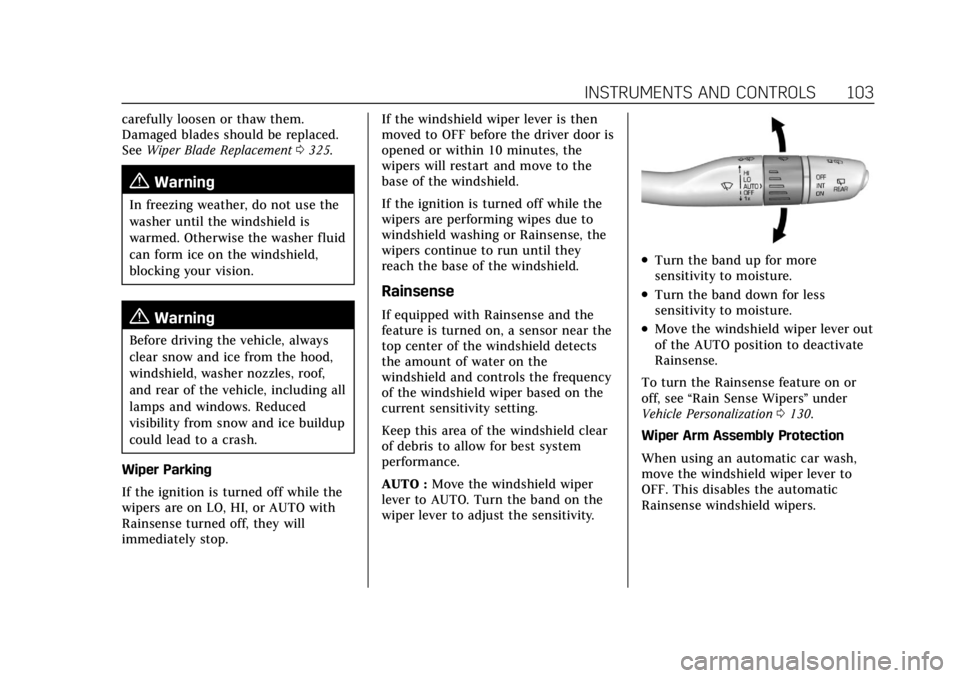
AUTO :
Move the windshield wiper
lever to AUTO. Turn the band on the
wiper lever to adjust the sensitivity.
.Turn the band up for more
sensitivity to moisture.
.Turn the band down for less
sensitivity to moisture.
.Move the windshield wiper lever out
of the AUTO position to deactivate
Rainsense.
To turn the Rainsense feature on or
off, see “Rain Sense Wipers ”under
Vehicle Personalization 0130.
Wiper Arm Assembly Protection
When using an automatic car wash,
move the windshield wiper lever to
OFF. This disables the automatic
Rainsense windshield wipers.
Page 118 of 431
Cadillac XT6 Owner Manual (GMNA-Localizing-U.S./Canada-14574701) -
2021 - CRC - 2/8/21
INSTRUMENTS AND CONTROLS 117
The DLC is under the instrument
panel to the left of the steering wheel.
Connecting devices that are not used
to perform an Emissions Inspection/
Maintenance test or to service the
vehicle may affect vehicle operation.
SeeAdd-On Electrical Equipment 0301.
See your dealer if assistance is needed.
The vehicle may not pass
inspection if:
.The light is on when the engine is
running.
.The light does not come on when
the ignition is in Service Mode.
.Critical emission control systems
have not been completely
diagnosed. If this happens, the
vehicle would not be ready for
inspection and might require
several days of routine driving
before the system is ready for
inspection. This can happen if the
12-volt battery has recently been
replaced or run down, or if the
vehicle has been recently serviced.
See your dealer if the vehicle will not
pass or cannot be made ready for
the test.
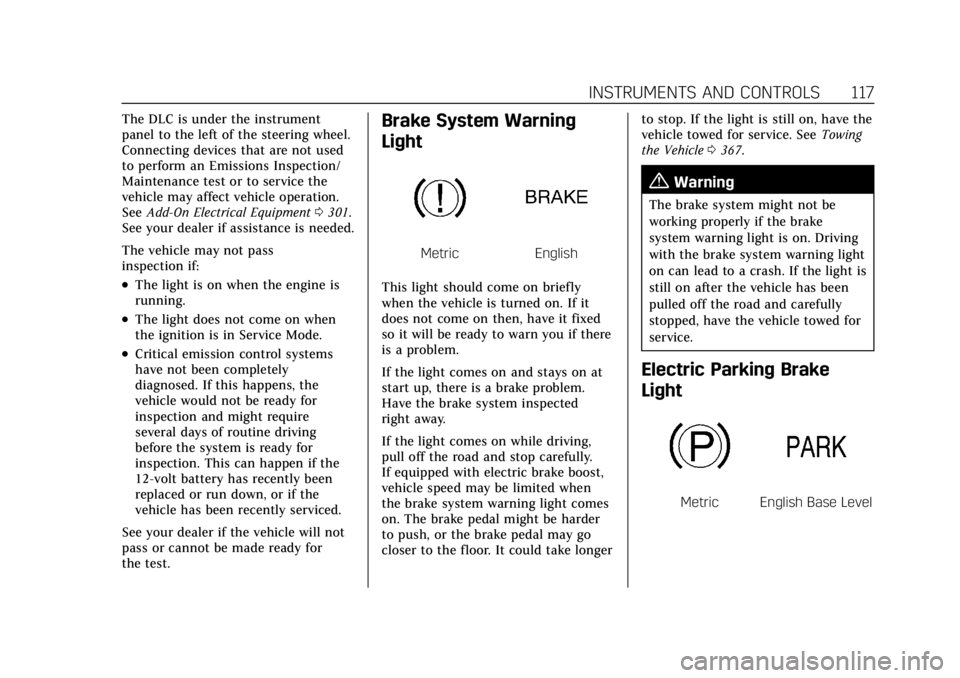
Brake System Warning
Light
MetricEnglish
This light should come on briefly
when the vehicle is turned on. If it
does not come on then, have it fixed
so it will be ready to warn you if there
is a problem.
If the light comes on and stays on at
start up, there is a brake problem.
Have the brake system inspected
right away.
If the light comes on while driving,
pull off the road and stop carefully.
If equipped with electric brake boost,
vehicle speed may be limited when
the brake system warning light comes
on. The brake pedal might be harder
to push, or the brake pedal may go
closer to the floor. It could take longer to stop. If the light is still on, have the
vehicle towed for service. See
Towing
the Vehicle 0367.
{Warning
The brake system might not be
working properly if the brake
system warning light is on. Driving
with the brake system warning light
on can lead to a crash. If the light is
still on after the vehicle has been
pulled off the road and carefully
stopped, have the vehicle towed for
service.
Electric Parking Brake
Light
MetricEnglish Base Level
Page 119 of 431
Cadillac XT6 Owner Manual (GMNA-Localizing-U.S./Canada-14574701) -
2021 - CRC - 2/8/21
118 INSTRUMENTS AND CONTROLS
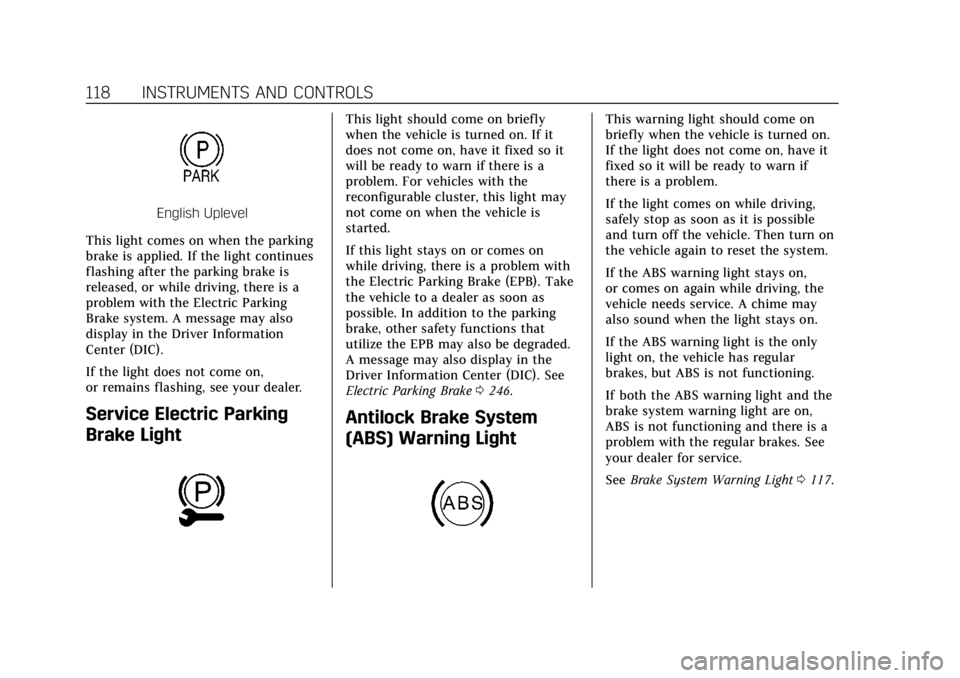
English Uplevel
This light comes on when the parking
brake is applied. If the light continues
flashing after the parking brake is
released, or while driving, there is a
problem with the Electric Parking
Brake system. A message may also
display in the Driver Information
Center (DIC).
If the light does not come on,
or remains flashing, see your dealer.
Service Electric Parking
Brake Light
This light should come on briefly
when the vehicle is turned on. If it
does not come on, have it fixed so it
will be ready to warn if there is a
problem. For vehicles with the
reconfigurable cluster, this light may
not come on when the vehicle is
started.
If this light stays on or comes on
while driving, there is a problem with
the Electric Parking Brake (EPB). Take
the vehicle to a dealer as soon as
possible. In addition to the parking
brake, other safety functions that
utilize the EPB may also be degraded.
A message may also display in the
Driver Information Center (DIC). See
Electric Parking Brake 0246.
Antilock Brake System
(ABS) Warning Light
This warning light should come on
briefly when the vehicle is turned on.
If the light does not come on, have it
fixed so it will be ready to warn if
there is a problem.
If the light comes on while driving,
safely stop as soon as it is possible
and turn off the vehicle. Then turn on
the vehicle again to reset the system.
If the ABS warning light stays on,
or comes on again while driving, the
vehicle needs service. A chime may
also sound when the light stays on.
If the ABS warning light is the only
light on, the vehicle has regular
brakes, but ABS is not functioning.
If both the ABS warning light and the
brake system warning light are on,
ABS is not functioning and there is a
problem with the regular brakes. See
your dealer for service.
See Brake System Warning Light 0117.
Page 128 of 431
Cadillac XT6 Owner Manual (GMNA-Localizing-U.S./Canada-14574701) -
2021 - CRC - 2/8/21
INSTRUMENTS AND CONTROLS 127
instrument panel. The information
appears as an image focused out
toward the front of the vehicle.
Caution
If you try to use the HUD image as
a parking aid, you may misjudge
the distance and damage your
vehicle. Do not use the HUD image
as a parking aid.
The HUD information can be
displayed in various languages. The
speedometer reading and other
numerical values can be displayed in
either English or metric units.
The language selection is changed
through the radio and the units of
measurement is changed through the
instrument cluster. See Settings0188
and “Options” underInstrument Cluster
0 109.
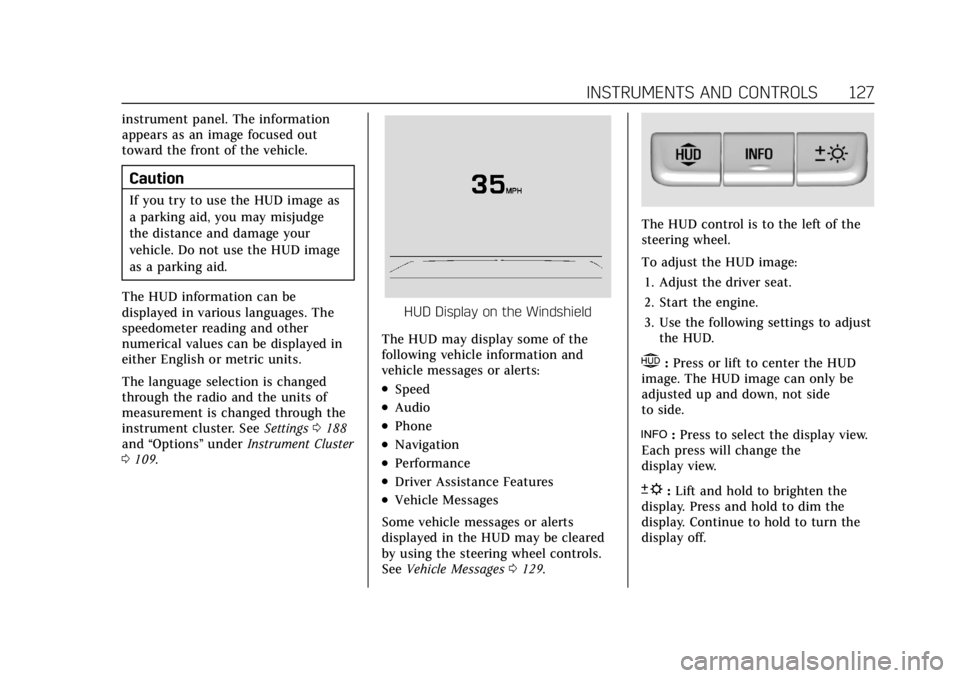
HUD Display on the Windshield
The HUD may display some of the
following vehicle information and
vehicle messages or alerts:
.Speed
.Audio
.Phone
.Navigation
.Performance
.Driver Assistance Features
.Vehicle Messages
Some vehicle messages or alerts
displayed in the HUD may be cleared
by using the steering wheel controls.
See Vehicle Messages 0129.
The HUD control is to the left of the
steering wheel.
To adjust the HUD image:
1. Adjust the driver seat.
2. Start the engine.
3. Use the following settings to adjust the HUD.
$:Press or lift to center the HUD
image. The HUD image can only be
adjusted up and down, not side
to side.
!: Press to select the display view.
Each press will change the
display view.
D: Lift and hold to brighten the
display. Press and hold to dim the
display. Continue to hold to turn the
display off.
Page 133 of 431
Cadillac XT6 Owner Manual (GMNA-Localizing-U.S./Canada-14574701) -
2021 - CRC - 2/8/21
132 INSTRUMENTS AND CONTROLS
.Lane Change Alert
.Rear Camera Park Assist Symbols
.Rear Cross Traffic Alert
Alert Type
This setting specifies the type of alert
provided from driver assistance
systems to help avoid crashes, either
Beeps or Safety Alert Seat vibration
pulses.
Touch Beeps or Safety Alert Seat.
Forward Collision System
This setting can alert of a potential
crash with a detected vehicle ahead
and can apply brakes to help reduce a
collision’s severity.
Touch Off, Alert, or Alert and Brake.
Front Pedestrian Detection
This feature may help avoid or reduce
the harm caused by front-end crashes
with nearby pedestrians.
See Front Pedestrian Braking (FPB)
System 0276.
Select Off, Alert, or Alert and Brake. Rear Pedestrian Detection
This setting specifies if alerts will
display when the vehicle detects
pedestrians behind when in
R (Reverse). See
Rear Pedestrian Alert
0 271.
Touch Off, Alert, or Alert and Brake.
Adaptive Cruise Go Notifier
This setting determines if an alert will
appear when Adaptive Cruise Control
brings the vehicle to a complete stop
and the vehicle ahead of you starts
moving again. See Adaptive Cruise
Control (Advanced) 0254.
Touch Off or On.
Lane Change Alert
This setting specifies if an alert will
display on the outside mirror to help
you avoid crashing into a vehicle in
your blind spot, or rapidly
approaching your blind spot, during a
lane change maneuver. See Lane
Change Alert (LCA) 0281.
Touch Off or On. Rear Camera Park Assist Symbols
This setting enables the Rear Camera
Park Assist Symbols. See
Assistance
Systems for Parking or Backing 0264.
Touch Off or On.
Rear Cross Traffic Alert
This setting specifies if an alert will
display when the vehicle detects
approaching rear cross traffic when in
R (Reverse). See Assistance Systems for
Parking or Backing 0264.
Touch Off or On.
Comfort and Convenience
Touch and the following may display:
.Chime Volume
.Hands Free Liftgate/Trunk Control
.Reverse Tilt Mirror
.Remote Mirror Folding
.Rain Sense Wipers
.Auto Wipe in Reverse Gear
Page 140 of 431
Cadillac XT6 Owner Manual (GMNA-Localizing-U.S./Canada-14574701) -
2021 - CRC - 2/8/21
LIGHTING 139
Lighting
Exterior Lighting
Exterior Lamp Controls . . . . . . . . . . 139
Exterior Lamps Off Reminder . . . 141
Headlamp High/Low-BeamChanger . . . . . . . . . . . . . . . . . . . . . . . . . . 141
Flash-to-Pass . . . . . . . . . . . . . . . . . . . . . 141
Daytime Running Lamps (DRL) . . . . . . . . . . . . . . . . . . . . 141
Automatic Headlamp System . . . 141
Hazard Warning Flashers . . . . . . . . 142
Turn and Lane-Change Signals . . . . . . . . . . . . . . . . . . . . . . . . . . . 142
Cornering Lamps . . . . . . . . . . . . . . . . . 143
Interior Lighting
Instrument Panel Illumination Control . . . . . . . . . . . . . . . . . . . . . . . . . . 143
Courtesy Lamps . . . . . . . . . . . . . . . . . . 143
Dome Lamps . . . . . . . . . . . . . . . . . . . . . 143
Reading Lamps . . . . . . . . . . . . . . . . . . . 144
Lighting Features
Entry Lighting . . . . . . . . . . . . . . . . . . . . 144
Exit Lighting . . . . . . . . . . . . . . . . . . . . . . 145
Battery Power Protection . . . . . . . . 145
Exterior Lighting Battery Saver . . . . . . . . . . . . . . . . . . . . . . . . . . . . . 145
Exterior Lighting
Exterior Lamp Controls
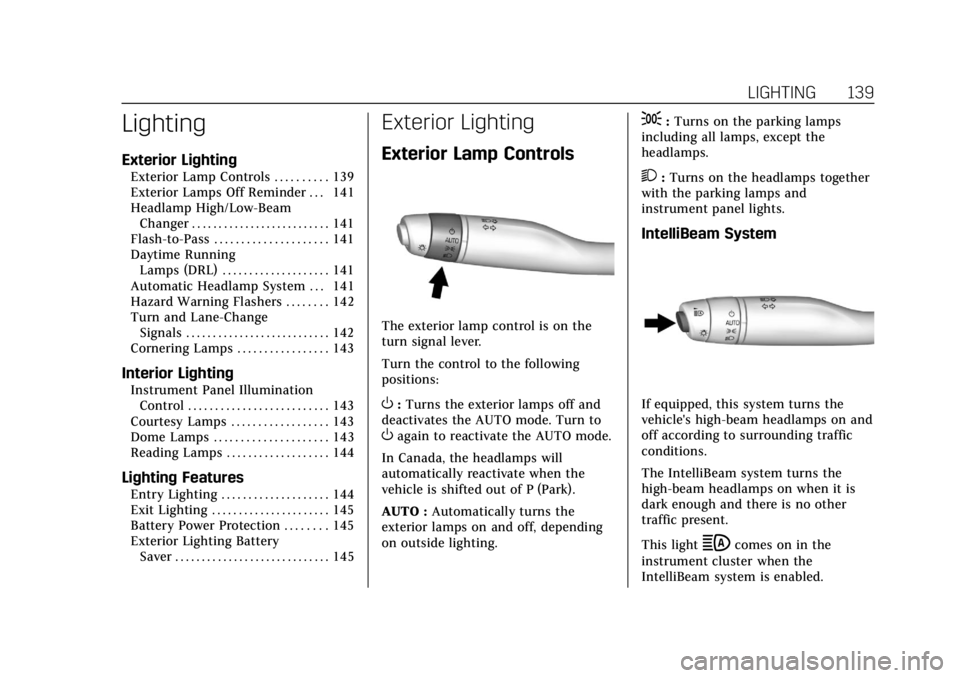
The exterior lamp control is on the
turn signal lever.
Turn the control to the following
positions:
O:Turns the exterior lamps off and
deactivates the AUTO mode. Turn to
Oagain to reactivate the AUTO mode.
In Canada, the headlamps will
automatically reactivate when the
vehicle is shifted out of P (Park).
AUTO : Automatically turns the
exterior lamps on and off, depending
on outside lighting.
;: Turns on the parking lamps
including all lamps, except the
headlamps.
2: Turns on the headlamps together
with the parking lamps and
instrument panel lights.
IntelliBeam System
If equipped, this system turns the
vehicle's high-beam headlamps on and
off according to surrounding traffic
conditions.
The IntelliBeam system turns the
high-beam headlamps on when it is
dark enough and there is no other
traffic present.
This light
bcomes on in the
instrument cluster when the
IntelliBeam system is enabled.