steering CADILLAC XT6 2023 User Guide
[x] Cancel search | Manufacturer: CADILLAC, Model Year: 2023, Model line: XT6, Model: CADILLAC XT6 2023Pages: 507, PDF Size: 6.49 MB
Page 118 of 507
Cadillac XT6 Owner Manual (GMNA-Localizing-U.S./Canada-16405819) -
2023 - CRC - 3/22/22
Instruments and Controls 117
Universal Remote SystemProgramming . . . . . . . . . . . . . . 152
Universal Remote System Operation . . . . . . . . . . . . . . . . . . . 155Controls
Steering Wheel
Adjustment
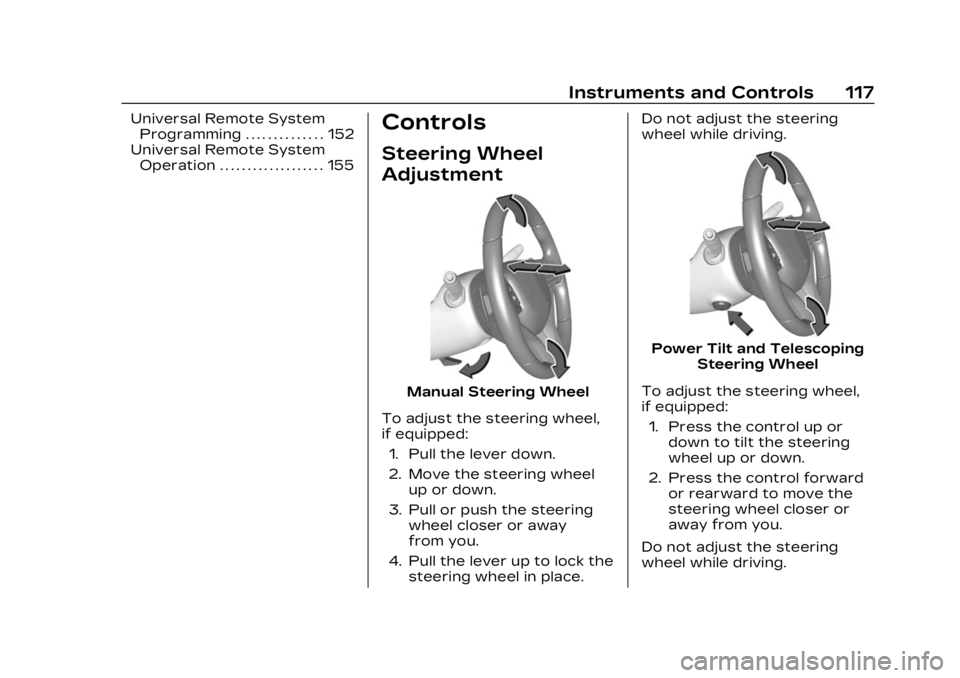
Manual Steering Wheel
To adjust the steering wheel,
if equipped: 1. Pull the lever down.
2. Move the steering wheel up or down.
3. Pull or push the steering wheel closer or away
from you.
4. Pull the lever up to lock the steering wheel in place. Do not adjust the steering
wheel while driving.
Power Tilt and Telescoping
Steering Wheel
To adjust the steering wheel,
if equipped: 1. Press the control up or down to tilt the steering
wheel up or down.
2. Press the control forward or rearward to move the
steering wheel closer or
away from you.
Do not adjust the steering
wheel while driving.
Page 119 of 507

Cadillac XT6 Owner Manual (GMNA-Localizing-U.S./Canada-16405819) -
2023 - CRC - 3/22/22
118 Instruments and Controls
Heated Steering
Wheel
(:If equipped, press to turn
on or off. A light near the
button displays when the
feature is turned on.
The steering wheel takes
about three minutes to start
heating.
Automatic Heated Steering
Wheel
If equipped with remote start,
the heated steering wheel will
turn on automatically during a
remote start along with the heated seats when it is cold
outside. The heated steering
wheel indicator light may not
come on.
If equipped with auto heated
seats, the heated steering
wheel will turn on when the
auto heated seat is activated.
The heated steering wheel
indicator will display the state
of the steering wheel heat.
See Heated and Ventilated
Front Seats
054.
To turn this feature on or off,
select Settings > Vehicle >
Comfort and Convenience >
Heated Steering Wheel >
Select ON or OFF.
Horn
Pressaon the steering
wheel pad to sound the horn.
Windshield Wiper/
Washer
With the ignition on or in
accessory mode, move the
windshield wiper lever to
select the wiper speed.
HI : Use for fast wipes.
LO : Use for slow wipes.
Page 129 of 507

Cadillac XT6 Owner Manual (GMNA-Localizing-U.S./Canada-16405819) -
2023 - CRC - 3/22/22
128 Instruments and Controls
English Uplevel Shown, Metric Similar
1. Tachometer0130
2. Driver Information Center (DIC) 0144
3. Speedometer 0130
4. Engine Coolant Temperature Gauge 0131
5. Fuel Gauge 0130Cluster Menu
There is an interactive display
area in the center of the
instrument cluster.
Use the right steering wheel
control to open and scroll
through the different items
and displays.
Press
SorTto access the
cluster applications. Use the
thumbwheel to scroll through
the list of available features
within the applications. Not all
applications or features will be
available on all vehicles.
.Info App. This is where the
selected Driver Information
Center (DIC) displays can be
viewed. See Driver
Information Center (DIC)
0 144.
Page 137 of 507

Cadillac XT6 Owner Manual (GMNA-Localizing-U.S./Canada-16405819) -
2023 - CRC - 3/22/22
136 Instruments and Controls
The DLC is under the
instrument panel to the left of
the steering wheel.
Connecting devices that are
not used to perform an
Emissions Inspection/
Maintenance test or to service
the vehicle may affect vehicle
operation. See Add-On
Electrical Equipment0360.
See your dealer if assistance
is needed.
The vehicle may not pass
inspection if:
.The light is on when the
engine is running.
.The light does not come on
when the ignition is in
Service Mode.
.Critical emission control
systems have not been
completely diagnosed. If this happens, the vehicle would
not be ready for inspection
and might require
several days of routine
driving before the system is
ready for inspection. This
can happen if the 12-volt
battery has recently been
replaced or run down, or if
the vehicle has been
recently serviced.
See your dealer if the vehicle
will not pass or cannot be
made ready for the test.
Brake System
Warning Light
MetricEnglish
This light comes on briefly
when the vehicle is turned on
to show that the light is
working. If it does not come on then, have it fixed so it will be
ready to warn you if there is a
problem.
If the light comes on and stays
on, there is a brake problem.
Have the brake system
inspected right away. This
light may come on if the brake
fluid is low. See Brake Fluid
0
384.
If the light comes on while
driving, pull off the road and
stop carefully. If equipped with
electric brake boost, vehicle
speed may be limited when the
brake system warning light
comes on. The brake pedal
might be harder to push,
or the brake pedal may go
closer to the floor. It could
take longer to stop. If the light
is still on, have the vehicle
towed for service. See
Transporting a Disabled
Vehicle 0437.
Page 140 of 507

Cadillac XT6 Owner Manual (GMNA-Localizing-U.S./Canada-16405819) -
2023 - CRC - 3/22/22
Instruments and Controls 139
If the light turns amber, there
may be a malfunction. See
your dealer.
Lane Keep Assist
(LKA) Light
Base LevelUplevel
If equipped, the Lane Keep
Assist Light may display the
following colors:
.Blank: LKA is disabled.
.White: Appears when the
vehicle starts. A steady
white light indicates that
LKA is not ready to assist.
.Green: Appears when LKA is
turned on and ready to
assist. LKA will gently turn
the steering wheel if the
vehicle approaches a
detected lane marking.
.Amber: Appears when LKA is
active. The light flashes
amber as a Lane Departure
Warning (LDW) alert to
indicate that the lane
marking has been
unintentionally crossed.
If the system detects you
are steering intentionally (to
pass or change lanes), the
LDW alert may not display.
LKA will not assist or alert if
the turn signal is active in the
direction of lane departure,
or if LKA detects that you are
accelerating, braking,
or actively steering. See Lane
Keep Assist (LKA) 0338.
Vehicle Ahead
Indicator
If equipped, this indicator will
display green when a vehicle is
detected ahead and amber
when you are following a
vehicle ahead much too
closely.
See Forward Collision Alert
(FCA) System 0326.
Pedestrian Ahead
Indicator
If equipped, this indicator will
display amber when a nearby
pedestrian is detected in front
of the vehicle.
See Front Pedestrian Braking
(FPB) System 0330.
Page 146 of 507

Cadillac XT6 Owner Manual (GMNA-Localizing-U.S./Canada-16405819) -
2023 - CRC - 3/22/22
Instruments and Controls 145
Info Page Options
The info displays on the DIC
can be turned on or off
through the Options menu.1. Press
Tto scroll to the
Options menu. Use the
thumbwheel to scroll to
Info Pages and press the
thumbwheel to select.
2. Scroll
yorzto move
through the list of possible
info displays.
3. Press the thumbwheel while an item is highlighted
to select or deselect
that item.
The info pages can also be
turned on or off through the
DIC page Info Page Options.
DIC Information Displays
The following is the list of all
possible DIC information
displays. Some of the
information displays may not
be available for your particular
vehicle. While in the Info Page Options
menu, the info pages can be
restored to the default factory
settings by pressing and
holding
Ron the left steering
wheel controls and the
thumbwheel on the right
steering wheel controls at the
same time.
Speed : Shows the vehicle
speed in either kilometers per
hour (km/h) or miles per
hour (mph).
Trip 1 or Trip 2 and Average
Fuel Economy : The Trip
display shows the current
distance traveled, in either
kilometers (km) or miles (mi),
since the trip odometer was
last reset. The trip odometer
can be reset by pressing
V
and selecting yes or no while
this display is active.
Shows the approximate
average liters per
100 kilometers (L/100 km),
kilometers per liter (km/L),
or miles per gallon (mpg). This
number is calculated based on the number of L/100 km (mpg)
or km/L recorded since the
last time this menu item was
reset. This number reflects
only the approximate average
fuel economy that the vehicle
has right now, and will change
as driving conditions change.
The Average Fuel Economy
can be reset by pressing
V
and selecting yes or no while
this display is active.
Fuel Range :
Shows the
approximate distance the
vehicle can be driven without
refueling. LOW will be
displayed when the vehicle is
low on fuel. The fuel range
estimate is based on an
average of the vehicle's fuel
economy over recent driving
history and the amount of fuel
remaining in the fuel tank.
Oil Life : Shows an estimate of
the oil's remaining useful life.
If REMAINING OIL LIFE 99% is
displayed, that means 99% of
the current oil life remains.
Page 149 of 507

Cadillac XT6 Owner Manual (GMNA-Localizing-U.S./Canada-16405819) -
2023 - CRC - 3/22/22
148 Instruments and Controls
information appears as an
image focused out toward the
front of the vehicle.
Caution
If you try to use the HUD
image as a parking aid, you
may misjudge the distance
and damage your vehicle. Do
not use the HUD image as a
parking aid.
The HUD information can be
displayed in various languages.
The speedometer reading and
other numerical values can be
displayed in either English or
metric units.
The language selection is
changed through the radio
and the units of measurement
are changed through the
instrument cluster. See
Settings 0210 and “Options”
under Instrument Cluster
0 127.
HUD Display on the
Windshield
The HUD may display some of
the following vehicle
information and vehicle
messages or alerts:
.Speed
.Audio
.Phone
.Navigation
.Performance
.Driver Assistance Features
.Vehicle Messages Some vehicle messages or
alerts displayed in the HUD
may be cleared by using the
steering wheel controls. See
Vehicle Messages
0151.
The HUD control is to the left
of the steering wheel.
To adjust the HUD image:
1. Adjust the driver seat.
2. Start the engine.
3. Use the following settings to adjust the HUD.
$:Press or lift to center the
HUD image. The HUD image
can only be adjusted up and
down, not side to side.
!: Press to select the
display view. Each press will
change the display view.
Page 151 of 507
Cadillac XT6 Owner Manual (GMNA-Localizing-U.S./Canada-16405819) -
2023 - CRC - 3/22/22
150 Instruments and Controls
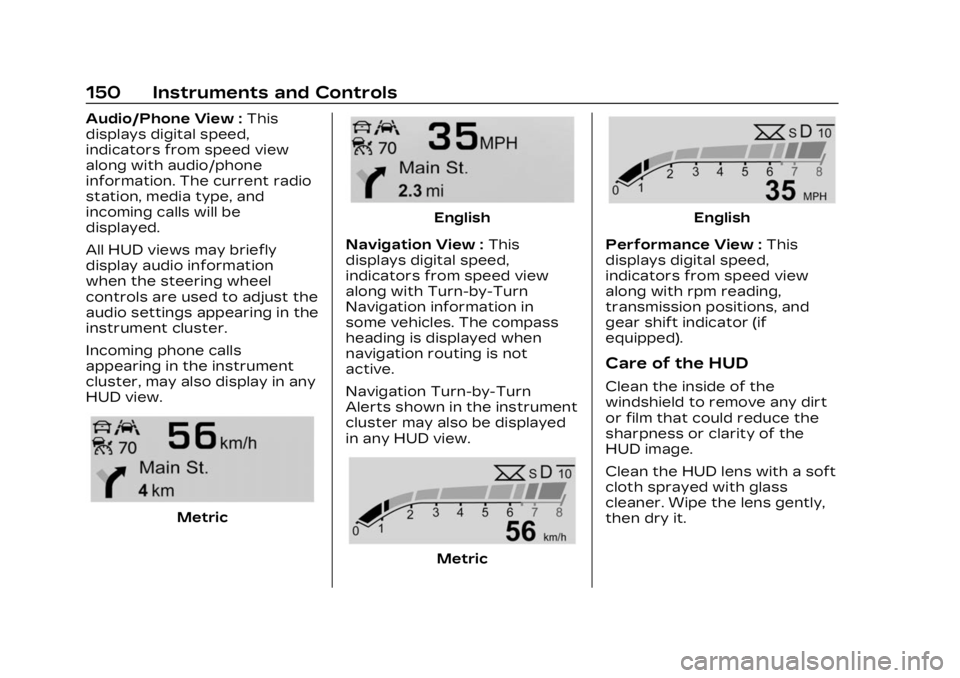
Audio/Phone View :This
displays digital speed,
indicators from speed view
along with audio/phone
information. The current radio
station, media type, and
incoming calls will be
displayed.
All HUD views may briefly
display audio information
when the steering wheel
controls are used to adjust the
audio settings appearing in the
instrument cluster.
Incoming phone calls
appearing in the instrument
cluster, may also display in any
HUD view.
Metric
English
Navigation View : This
displays digital speed,
indicators from speed view
along with Turn-by-Turn
Navigation information in
some vehicles. The compass
heading is displayed when
navigation routing is not
active.
Navigation Turn-by-Turn
Alerts shown in the instrument
cluster may also be displayed
in any HUD view.
Metric
English
Performance View : This
displays digital speed,
indicators from speed view
along with rpm reading,
transmission positions, and
gear shift indicator (if
equipped).
Care of the HUD
Clean the inside of the
windshield to remove any dirt
or film that could reduce the
sharpness or clarity of the
HUD image.
Clean the HUD lens with a soft
cloth sprayed with glass
cleaner. Wipe the lens gently,
then dry it.
Page 152 of 507
Cadillac XT6 Owner Manual (GMNA-Localizing-U.S./Canada-16405819) -
2023 - CRC - 3/22/22
Instruments and Controls 151
HUD Troubleshooting
If you cannot see the HUD
image when the ignition is on,
check that:
.Nothing is covering the
HUD lens.
.The HUD brightness setting
is not too dim or too bright.
.The HUD is adjusted to the
proper height.
.Polarized sunglasses are
not worn.
.The windshield and HUD lens
are clean.
If the HUD image is not
correct, contact your dealer.
The windshield is part of the
HUD system. See Windshield
Replacement 0388.
Vehicle Messages
Messages displayed on the
DIC indicate the status of the
vehicle or some action that
may be needed to correct a
condition. Multiple messages
may appear one after another. The messages that do not
require immediate action can
be acknowledged and cleared
by pressing
V. The messages
that require immediate action
cannot be cleared until that
action is performed.
All messages should be taken
seriously; clearing the
message does not correct the
problem.
If a SERVICE message
appears, see your dealer.
Follow the instructions given
in the messages. The system
displays messages regarding
the following topics:
.Service Messages
.Fluid Levels
.Vehicle Security
.Brakes
.Steering
.Ride Control Systems
.Driver Assistance Systems
.Cruise Control
.Lighting and Bulb
Replacement
.Wiper/Washer Systems
.Doors and Windows
.Seat Belts
.Airbag Systems
.Engine and Transmission
.Tire Pressure
.Battery
Engine Power
Messages
ENGINE POWER IS
REDUCED
This message displays when
the vehicle's propulsion power
is reduced. A reduction in
propulsion power can affect
the vehicle's ability to
accelerate. If this message is
on, but there is no observed
reduction in performance,
proceed to your destination.
Under certain conditions the
performance may be reduced
the next time the vehicle is
driven. The vehicle may be
driven while this message is
on, but maximum acceleration
and speed may be reduced.
Page 162 of 507
Cadillac XT6 Owner Manual (GMNA-Localizing-U.S./Canada-16405819) -
2023 - CRC - 3/22/22
Lighting 161
If after signaling a turn or lane
change, the arrow flashes
rapidly or does not come on, a
signal bulb may be burned out.
Cornering Lamps
Cornering lamps automatically
come on when all of the
following occur:
.The low-beam headlamps
are on.
.The turn signals are
activated or the steering
wheel is turned 50 degrees
in either directon.
.The vehicle speed is below
40 km/h (25 mph).
Interior Lighting
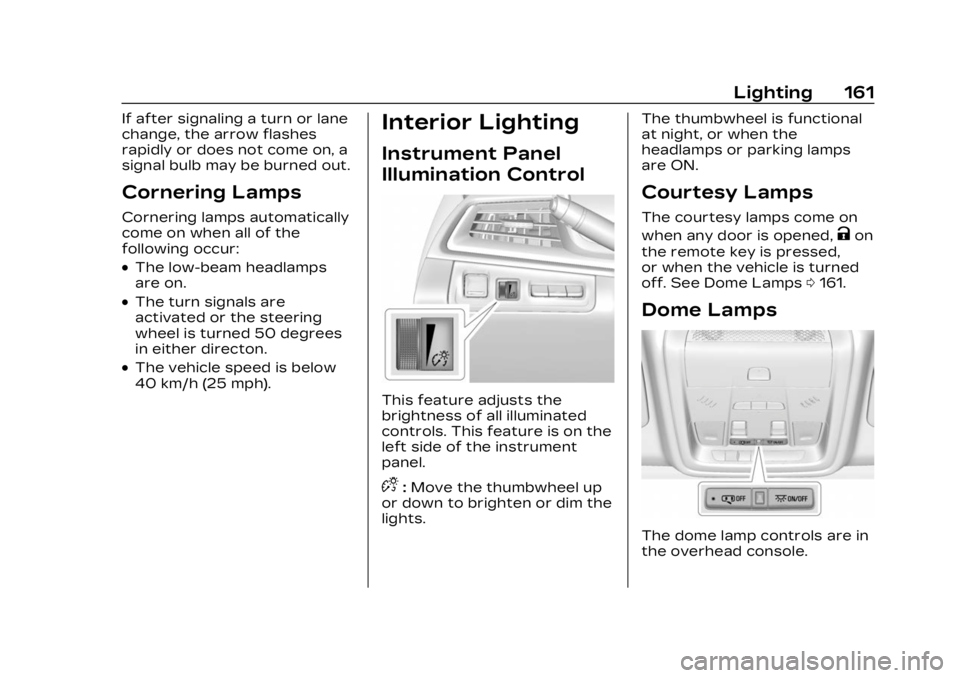
Instrument Panel
Illumination Control
This feature adjusts the
brightness of all illuminated
controls. This feature is on the
left side of the instrument
panel.
D:Move the thumbwheel up
or down to brighten or dim the
lights. The thumbwheel is functional
at night, or when the
headlamps or parking lamps
are ON.
Courtesy Lamps
The courtesy lamps come on
when any door is opened,
Kon
the remote key is pressed,
or when the vehicle is turned
off. See Dome Lamps 0161.
Dome Lamps
The dome lamp controls are in
the overhead console.