change wheel CADILLAC XT6 2023 Owner's Manual
[x] Cancel search | Manufacturer: CADILLAC, Model Year: 2023, Model line: XT6, Model: CADILLAC XT6 2023Pages: 507, PDF Size: 6.49 MB
Page 300 of 507

Cadillac XT6 Owner Manual (GMNA-Localizing-U.S./Canada-16405819) -
2023 - CRC - 3/22/22
Driving and Operating 299
{Warning
To help prevent crashes
before making a lane
change:
.Always check mirrors.
.Glance over your shoulder.
.Use the turn signals.
Take Over Alert
{Warning
Super Cruise will not
maintain the vehicle’s speed
while the steering wheel
light bar is flashing red.
If the steering wheel light
bar flashes red, immediately
resume manual steering to
prevent serious injury or
death. If you do not resume
manual steering, the vehicle
will begin to slow in the
same lane and eventually
come to a complete stop on
the road. To begin steering manually,
hold the steering wheel firmly
(with both hands) using the
highlighted regions as shown
in the picture below.
Any time the steering wheel
light bar flashes red, resume
manual steering immediately.
The instrument cluster light
^, will also turn red and a
message will display in the
Driver Information Center
(DIC). In addition, beeps will
sound, or the Safety Alert
Seat will vibrate. To view
available settings from the
infotainment screen, touch Settings > Vehicle > Collision/
Detection Systems. After you
begin steering manually, then
Super Cruise will disengage.
The red flashing steering
wheel light bar could occur
under any of the following
conditions:
.Lane markings are poor or
visibility is limited.
.The Driver Attention System
(DAS) does not detect that
the driver's head and eyes
are directed toward
the road.
.ACC is canceled.
.The vehicle is on a tight
curve, or the lanes are too
wide, or the vehicle goes into
a curve too fast.
.The compatible road ends.
.The vehicle is approaching
an intersection controlled by
a traffic light, stop sign,
or other traffic control
device.
.A Super Cruise system fault
occurs.
Page 301 of 507
Cadillac XT6 Owner Manual (GMNA-Localizing-U.S./Canada-16405819) -
2023 - CRC - 3/22/22
300 Driving and Operating
Attention to the Road
{Warning
Super Cruise is a driver
assistance system and
cannot accurately detect or
predict all situations. Super
Cruise is not a crash
avoidance system. To
prevent serious injury or
death, you must supervise
the driving task and monitor
the road conditions. You
may need to respond to
traffic events by steering,
braking, or accelerating. See
Defensive Driving0240.
Super Cruise also cannot
determine whether you are
awake, asleep, impaired,
or properly focused on safe
driving. The vehicle could
crash into other vehicles,
drive out of the lane, or drive
off the road. Complete
attention is always required
while driving, even while
(Continued)
Warning (Continued)
using Super Cruise. Be
prepared to take over
steering or apply the brakes
at any time.
{Warning
To prevent serious injury or
death, be alert and pay
special attention when
passing highway exits,
entrances, and crossings
with Super Cruise, and be
ready to take control of the
vehicle when necessary.
Changes in lane markings
around exits and entrances
can momentarily cause
Super Cruise to not detect
the correct lane. If this
occurs, Super Cruise may
attempt steering inputs to
bring the vehicle back into
the correct lane and, in rare
circumstances, could(Continued)
Warning (Continued)
over-correct and cause the
vehicle to momentarily cross
into a lane next to your
vehicle unless you manually
steer to maintain your lane
position.
The Driver Attention System
(DAS) on the steering column
continually monitors driver
head and eye position to
estimate driver attention to
the road. The camera does not
record or share pictures,
audio, or video.
Sunglasses, hats, or other
types of clothing that change
the shape of the head may
interfere with camera
performance. To improve
camera performance, raise or
lower the steering wheel,
or change the seat position.
Page 322 of 507

Cadillac XT6 Owner Manual (GMNA-Localizing-U.S./Canada-16405819) -
2023 - CRC - 3/22/22
Driving and Operating 321
parking spot or, if available,
change the parking mode in
the infotainment display.
APA cannot park in all empty
parking spots. The parking
spot must:
.Be sufficiently large to fit the
vehicle comfortably.
.Have an adjacent vehicle,
wall, or pillar for the system
to align to.
After completely passing an
eligible parking spot, a beep
sounds and a red stop symbol
is displayed in the driver
information center. Generally,
APA selects the nearest
empty parking spot behind the
vehicle, but under some
conditions may select a spacethat is further back. Slow
down and bring the vehicle to
a complete stop to begin.
Follow the displayed
instructions. When instructed
to drive in reverse, shift to
R (Reverse) while holding the
brakes. The steering wheel will
vibrate briefly as a reminder to
remove hands from the
steering wheel. After the
vibration stops, check your
surroundings and release the
brakes to begin automatic
parking. As the vehicle
automatically steers, and
brakes into the parking spot,
check surroundings and
continue to apply acceleration
if necessary and shift gears as
needed. Be prepared to stop
to avoid vehicles, pedestrians,
or objects.
A progress arrow displays the
status of the parking
maneuver. Once automatic
parking is finished and the
vehicle has come to a full stop,
APA will beep and display a
message indicating parking is
complete. Shift the vehicle to
P (Park) and apply the parking
brake
Automatic Parking
Automatic Unparking
Page 329 of 507

Cadillac XT6 Owner Manual (GMNA-Localizing-U.S./Canada-16405819) -
2023 - CRC - 3/22/22
328 Driving and Operating
Selecting the Alert Timing
The Collision Alert control is
on the steering wheel. Press
[to set the FCA timing to
Far, Medium, or Near. The first
button press shows the
current setting on the DIC.
Additional button presses will
change this setting. The
chosen setting will remain until
it is changed and will affect
the timing of both the Collision
Alert and the Tailgating Alert
features. The timing of both
alerts will vary based on
vehicle speed. The faster the
vehicle speed, the farther
away the alert will occur.
Consider traffic and weather
conditions when selecting the
alert timing. The range of selectable alert timings may
not be appropriate for all
drivers and driving conditions.
If your vehicle is equipped with
Adaptive Cruise Control (ACC),
changing the FCA timing
setting automatically changes
the following gap setting (Far,
Medium, or Near).Following Distance
Indicator
The following distance to a
moving vehicle ahead in your
path is indicated in following
time in seconds on the Driver
Information Center (DIC). See
Driver Information Center
(DIC)
0144. The minimum
following time is 0.5 seconds
away. If there is no vehicle
detected ahead, or the vehicle
ahead is out of sensor range,
dashes will be displayed.
Unnecessary Alerts
FCA may provide unnecessary
alerts for turning vehicles,
vehicles in other lanes, objects
that are not vehicles, or shadows. These alerts are
normal operation and the
vehicle does not need service.
Cleaning the System
If the FCA system does not
seem to operate properly, this
may correct the issue:
.Clean the outside of the
windshield in front of the
rearview mirror.
.Clean the entire front of the
vehicle.
.Clean the headlamps.
Automatic Emergency
Braking (AEB)
The AEB system may help
avoid or reduce the harm
caused by front-end crashes.
AEB also includes Intelligent
Brake Assist (IBA). When the
system detects a vehicle
ahead in your path that is
traveling in the same direction
that you may be about to
crash into, it can provide a
boost to braking or
automatically brake the
Page 341 of 507

Cadillac XT6 Owner Manual (GMNA-Localizing-U.S./Canada-16405819) -
2023 - CRC - 3/22/22
340 Driving and Operating
departure. It may further
provide an audible alert or the
driver seat may pulse
indicating that a lane marking
has been crossed. The system
does not provide a Lane
Departure Warning (LDW)
when intentionally steering
across a lane marker.
To turn LKA on and off, press
Aon the center stack.
If equipped, the indicator light
on the button comes on when
LKA is on and turns off when
LKA is disabled. In some
vehicles a long press of over
three seconds is required to
turn LKA off.
When on,
Ais white,
if equipped, indicating that the
system is not ready to assist.
Ais green if LKA is ready to
assist. LKA may assist by
gently turning the steering
wheel if the vehicle
approaches a detected lane
marking.
Ais amber when
assisting. It may also provide a
Lane Departure Warning (LDW) alert by flashing
A
amber if the vehicle crosses a
detected lane marking.
Additionally, there may be
three beeps, or the driver seat
may pulse three times, on the
right or left, depending on the
lane departure direction.
Take Steering
The LKA system does not
continuously steer the vehicle.
If LKA does not detect active
driver steering, an alert and
chime may be provided. Steer
the vehicle to dismiss. LKA
may become temporarily
unavailable after repeated
take steering alerts.
When the System Does
Not Seem to Work
Properly
The system performance may
be affected by:
.Close vehicles ahead.
.Sudden lighting changes,
such as when driving
through tunnels.
.Banked roads.
.Roads with poor lane
markings, such as two-lane
roads.
If the LKA system is not
functioning properly when lane
markings are clearly visible,
cleaning the windshield
may help.
A camera blocked message
may display if the camera is
blocked. Some driver
assistance systems may have
reduced performance or not
work at all. An LKA or LDW
unavailable message may
display if the systems are
temporarily unavailable. This
message could be due to a
blocked camera. The LKA
system does not need service.
Clean the outside of the
windshield behind the
rearview mirror.
LKA assistance and/or LDW
alerts may occur due to tar
marks, shadows, cracks in the
road, temporary or
construction lane markings,
Page 374 of 507

Cadillac XT6 Owner Manual (GMNA-Localizing-U.S./Canada-16405819) -
2023 - CRC - 3/22/22
Vehicle Care 373
Engine Oil Life
System
When to Change
Engine Oil
This vehicle has a computer
system that indicates when to
change the engine oil and
filter. This is based on a
combination of factors which
include engine revolutions,
engine temperature, and miles
driven. Based on driving
conditions, the mileage at
which an oil change is
indicated can vary
considerably. For the oil life
system to work properly, the
system must be reset every
time the oil is changed.
When the system has
calculated that oil life has been
diminished, it indicates that an
oil change is necessary.
A CHANGE ENGINE OIL
SOON message comes on.
Change the oil as soon as
possible within the next
1 000 km (600 mi). It ispossible that, if driving under
the best conditions, the oil life
system might indicate that an
oil change is not necessary for
up to a year. The engine oil
and filter must be changed at
least once a year and at this
time the system must be
reset. Your dealer has trained
service people who will
perform this work and reset
the system. It is also important
to check the oil regularly over
the course of an oil drain
interval and keep it at the
proper level.
If the system is ever reset
accidentally, the oil must be
changed at 5 000 km
(3,000 mi) since the last oil
change. Remember to reset
the oil life system whenever
the oil is changed.
How to Reset the Engine
Oil Life System
Reset the system whenever
the engine oil is changed so
that the system can calculate
the next engine oil change. To
reset the system:
1. Using the DIC controls on the right side of the
steering wheel, display
REMAINING OIL LIFE on
the DIC. See Driver
Information Center (DIC)
0144. When remaining oil
life is low, the CHANGE
ENGINE OIL SOON
message will appear on the
display.
2. Press the thumbwheel on the DIC controls and hold
down for a few seconds to
clear the CHANGE ENGINE
OIL SOON message and
reset the oil life at 100%.
Be careful not to reset the
oil life display accidentally
at any time other than
after the oil is changed.
Page 384 of 507

Cadillac XT6 Owner Manual (GMNA-Localizing-U.S./Canada-16405819) -
2023 - CRC - 3/22/22
Vehicle Care 383
Caution (Continued)
.Fill the washer fluid tank
only three-quarters full
when it is very cold. This
allows for fluid expansion
if freezing occurs, which
could damage the tank if it
is completely full.
Brakes
Disc brake linings have built-in
wear indicators that make a
high-pitched warning sound
when the brake linings are
worn and new linings are
needed. The sound can come
and go or can be heard all the
time when the vehicle is
moving, except when applying
the brake pedal firmly.
{Warning
The brake wear warning
sound means that soon the
brakes will not work well.
That could lead to a crash.(Continued)
Warning (Continued)
When the brake wear
warning sound is heard,
have the vehicle serviced.
Caution
Continuing to drive with
worn-out brake linings could
result in costly brake repairs.
Some driving conditions or
climates can cause a brake
squeal when the brakes are
first applied, clearing up
following several applications.
This does not mean something
is wrong with the brakes.
Properly torqued wheel nuts
are necessary to help prevent
brake pulsation. When tires
are rotated, inspect brake
linings for wear and evenly
tighten wheel nuts in the
proper sequence to torque
specifications. See Capacities
and Specifications 0463. Brake pads should be replaced
as complete axle sets.
Brake Pedal Travel
See your dealer if the brake
pedal does not return to
normal height, or if there is a
rapid increase in pedal travel.
This could be a sign that brake
service may be required.
Replacing Brake System
Parts
Always replace brake system
parts with new, approved
replacement parts. If this is
not done, the brakes may not
work properly. The braking
performance can change in
many ways if the wrong brake
parts are installed or if parts
are improperly installed.
Page 403 of 507

Cadillac XT6 Owner Manual (GMNA-Localizing-U.S./Canada-16405819) -
2023 - CRC - 3/22/22
402 Vehicle Care
a TPC specification code
molded onto the sidewall.
Original equipment all-season
tires can be identified by the
last two characters of this
TPC code, which will be“MS.”
Consider installing winter tires
on the vehicle if frequent
driving on snow or ice-covered
roads is expected. All-season
tires provide adequate
performance for most winter
driving conditions, but they
may not offer the same level
of traction or performance as
winter tires on snow or
ice-covered roads. See Winter
Tires 0402.
Winter Tires
This vehicle was not originally
equipped with winter tires.
Winter tires are designed for
increased traction on snow
and ice-covered roads.
Consider installing winter tires
on the vehicle if frequent
driving on ice or snow covered
roads is expected. See your
dealer for details regarding winter tire availability and
proper tire selection. Also, see
Buying New Tires
0419.
With winter tires, there may
be decreased dry road
traction, increased road noise,
and shorter tread life. After
changing to winter tires, be
alert for changes in vehicle
handling and braking.
If using winter tires:
.Use tires of the same brand
and tread type on all four
wheel positions.
.Use only radial ply tires of
the same size, load range,
and speed rating as the
original equipment tires.
Winter tires with the same
speed rating as the original
equipment tires may not be
available for H, V, W, Y, and ZR
speed rated tires. If winter
tires with a lower speed rating
are chosen, never exceed the
tire's maximum speed
capability.
Tire Sidewall Labeling
Useful information about a
tire is molded into its
sidewall. The examples
show a typical passenger
vehicle tire and a compact
spare tire sidewall.
Passenger Tire Example
(1) Tire Size:The tire size
is a combination of letters
and numbers used to
define a particular tire's
width, height, aspect ratio,
construction type, and
Page 419 of 507
Cadillac XT6 Owner Manual (GMNA-Localizing-U.S./Canada-16405819) -
2023 - CRC - 3/22/22
418 Vehicle Care
{Warning
Rust or dirt on a wheel,
or on the parts to which it
is fastened, can cause
wheel nuts to become
loose over time. The
wheel could come off and
cause a crash. When
changing a wheel, remove
any rust or dirt from
places where the wheel
attaches to the vehicle. In
an emergency, a cloth or
paper towel can be used;
however, use a scraper
or wire brush later to
remove all rust or dirt.
Lightly coat the inner
diameter of the wheel hub
opening with wheel bearing
grease after a wheel
change or tire rotation to
prevent corrosion or rust
buildup.{Warning
Do not apply grease to
the wheel mounting
surface, wheel conical
seats, or the wheel nuts
or bolts. Grease applied
to these areas could
cause a wheel to become
loose or come off,
resulting in a crash.
When It Is Time for
New Tires
Factors, such as maintenance,
temperatures, driving speeds,
vehicle loading, and road
conditions affect the wear
rate of the tires.
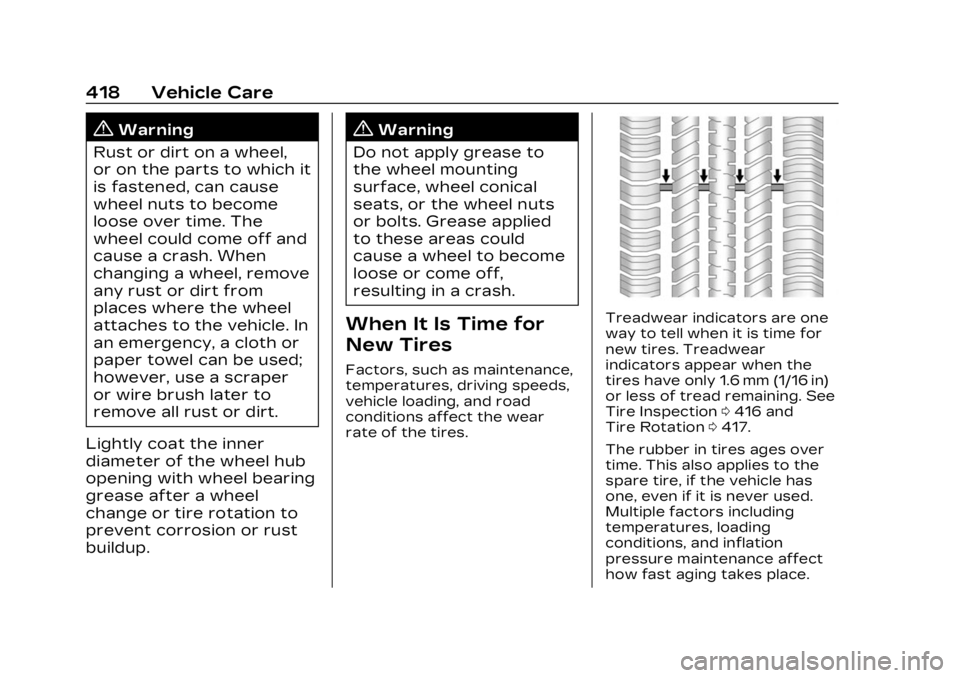
Treadwear indicators are one
way to tell when it is time for
new tires. Treadwear
indicators appear when the
tires have only 1.6 mm (1/16 in)
or less of tread remaining. See
Tire Inspection 0416 and
Tire Rotation 0417.
The rubber in tires ages over
time. This also applies to the
spare tire, if the vehicle has
one, even if it is never used.
Multiple factors including
temperatures, loading
conditions, and inflation
pressure maintenance affect
how fast aging takes place.
Page 427 of 507

Cadillac XT6 Owner Manual (GMNA-Localizing-U.S./Canada-16405819) -
2023 - CRC - 3/22/22
426 Vehicle Care
{Warning
Changing a tire can be
dangerous. The vehicle can
slip off the jack and roll over
or fall causing injury or
death. Find a level place to
change the tire. To help
prevent the vehicle from
moving:1. Set the parking brake firmly.
2. Put the vehicle in P (Park).
3. Turn the vehicle off and do not restart the vehicle
while it is raised.
4. Do not allow passengers to remain in the vehicle.
5. Place wheel blocks, if equipped, on both sides
of the tire at the
opposite corner of the
tire being changed. When the vehicle has a flat
tire (2), use the following
example as a guide to assist in
the placement of the wheel
blocks (1), if equipped.
1. Wheel Block (If Equipped)
2. Flat Tire
The following information
explains how to repair or
change a tire.
Tire Changing
Performance Brake
Package RPO J56
The original spare tire/wheel
will not fit onto the front axle if
equipped with the
performance brake package RPO J56. If there is a flat tire
on the front axle, a tire/wheel
from the rear axle must be
used to make the repair. The
spare tire will then replace the
tire/wheel that is removed
from the rear axle.
If equipped with the
performance brake package
RPO J56, and the flat tire is on
the front axle, stop after
performing all steps in
Removing the Spare Tire and
Tools and do the following.
Otherwise, continue with the
procedure: