ECU CADILLAC XT6 2023 Owners Manual
[x] Cancel search | Manufacturer: CADILLAC, Model Year: 2023, Model line: XT6, Model: CADILLAC XT6 2023Pages: 507, PDF Size: 6.49 MB
Page 9 of 507
Cadillac XT6 Owner Manual (GMNA-Localizing-U.S./Canada-16405819) -
2023 - CRC - 3/23/22
8 Keys, Doors, and Windows
Keys, Doors, and
Windows
Keys and Locks
Keys . . . . . . . . . . . . . . . . . . . . . . . . . . . . . . . 8
Remote Key . . . . . . . . . . . . . . . . . . . . . 9
Remote Key Operation . . . . . . 9
Remote Vehicle Start . . . . . . . 19
Door Locks . . . . . . . . . . . . . . . . . . . . 20
Power Door Locks . . . . . . . . . . 23
Delayed Locking . . . . . . . . . . . . . 23
Automatic Door Locks . . . . . 23
Lockout Protection . . . . . . . . . 24
Safety Locks . . . . . . . . . . . . . . . . . 24
Doors
Liftgate . . . . . . . . . . . . . . . . . . . . . . . . . 25
Vehicle Security
Vehicle Security . . . . . . . . . . . . . 33
Vehicle Alarm System . . . . . . 33
Steering Column Lock . . . . . 35
Immobilizer . . . . . . . . . . . . . . . . . . . . 35
Immobilizer Operation . . . . . 35
Exterior Mirrors
Convex Mirrors . . . . . . . . . . . . . . 37
Power Mirrors . . . . . . . . . . . . . . . . 37
Folding Mirrors . . . . . . . . . . . . . . . 37
Heated Mirrors . . . . . . . . . . . . . . 38Automatic Dimming
Mirror . . . . . . . . . . . . . . . . . . . . . . . . . 38
Reverse Tilt Mirrors . . . . . . . . 38
Interior Mirrors
Interior Rearview Mirrors . . . . . . . . . . . . . . . . . . . . . . . . 39
Automatic Dimming Rearview Mirror . . . . . . . . . . . . 39
Rear Camera Mirror . . . . . . . . 39
Windows
Windows . . . . . . . . . . . . . . . . . . . . . . . 41
Power Windows . . . . . . . . . . . . . 42
Sun Visors . . . . . . . . . . . . . . . . . . . . . 44
Roof
Sunroof . . . . . . . . . . . . . . . . . . . . . . . . 44
Keys and Locks
Keys
{Warning
Leaving children in a vehicle
with a remote key is
dangerous and children or
others could be seriously
injured or killed. They could
operate the power windows
or other controls or make
the vehicle move. The
windows will function with
the remote key in the
vehicle, and children or
others could be caught in
the path of a closing
window. Do not leave
children in a vehicle with a
remote key.
Page 17 of 507

Cadillac XT6 Owner Manual (GMNA-Localizing-U.S./Canada-16405819) -
2023 - CRC - 3/23/22
16 Keys, Doors, and Windows
4. Place the new remote keyinto the remote key
pocket. The remote key
pocket is inside the center
console storage area
between the driver and
front passenger seats. The
storage area will need to
be opened and the storage
tray lifted up to access the
remote key pocket.
5. Press ENGINE START/ STOP. When the remote
key is learned the DIC
display will show that it is
ready to program the next
remote key. 6. Remove the remote key
from the remote key
pocket and press the
remote key
KorQbutton.
To program additional
remote keys, repeat
Steps 4–6.
When all additional remote
keys are programmed,
press and hold ENGINE
START/STOP for
12 seconds to exit
programming mode.
7. Return the key back into the remote key.
8. Replace the key lock cylinder cap. See Door
Locks 020.
Starting the Vehicle with a
Low Remote Key Battery
When the vehicle is started,
if the remote key battery is
depleted, there is signal
interference, or the remote
key has been idle for a while,
the DIC may display NO
REMOTE DETECTED or NO
REMOTE KEY WAS DETECTED PLACE KEY IN
TRANSMITTER POCKET
THEN START YOUR VEHICLE.
For improved vehicle security,
the remote key is equipped
with a motion sensor. First,
move the remote key slightly
and try starting the vehicle.
If the vehicle still does not
start, and the DIC displays the
same warnings above, follow
the steps shown below.
To start the vehicle:
1. Open the center console storage area and the
storage tray.
Page 23 of 507

Cadillac XT6 Owner Manual (GMNA-Localizing-U.S./Canada-16405819) -
2023 - CRC - 3/23/22
22 Keys, Doors, and Windows
2. Insert the key into theslot (3) on the bottom of
the cap (2) and lift the key
upward.
3. Move the cap (2) rearward and remove.
4. Use the key in the cylinder.
To replace the cap: 1. Pull the door handle (1) to the open position and hold
it open until the cap
installation is complete.
2. Insert the two tabs (6) atthe back of the cap
between the seal (5) and
the metal base (4).3. Slide the cap forward andpress the forward edge to
install the cap in place.
4. Release the door handle. 5. Check that the cap is
secure.
Free-Turning Locks
The door key lock cylinder
turns freely when either the
wrong key is used, or the
correct key is not fully
inserted. The free-turning
door lock feature prevents the
lock cylinder from being forced
open. To reset the lock
cylinder, ensure the correct
key is fully inserted into the
lock cylinder. Rotate the key
until you feel the lock cylinder
click back into place. Remove
the key and reinsert fully,
rotate the key to unlock the
vehicle.
Page 27 of 507
Cadillac XT6 Owner Manual (GMNA-Localizing-U.S./Canada-16405819) -
2023 - CRC - 3/23/22
26 Keys, Doors, and Windows
Power Liftgate Operation
{Warning
You or others could be
injured if caught in the path
of the power liftgate. Make
sure there is no one in the
way of the liftgate as it is
opening and closing.
Caution
Driving with an open and
unsecured liftgate may
result in damage to the
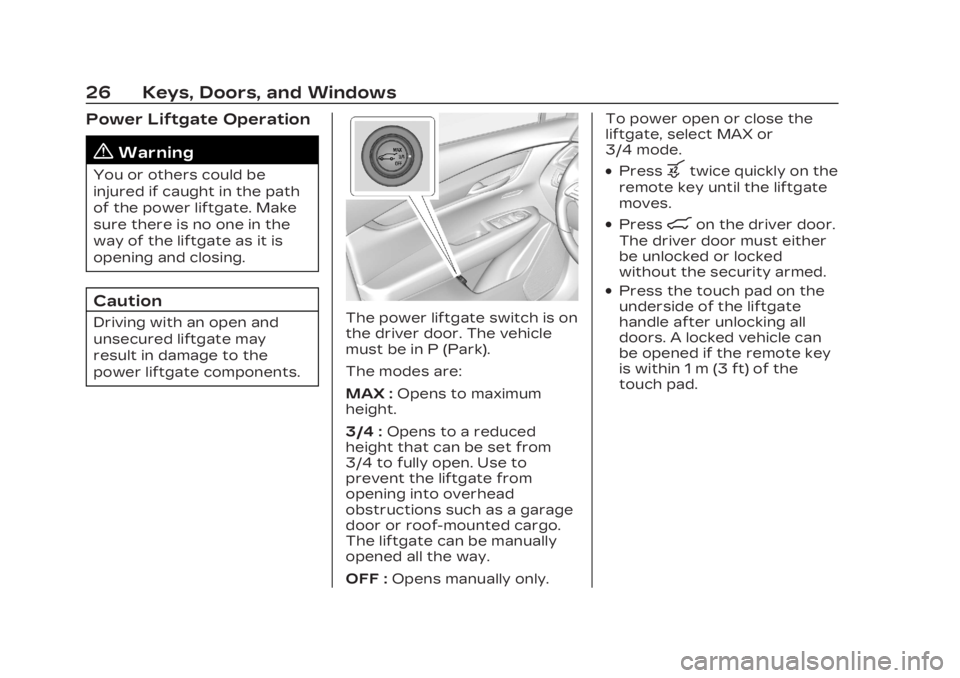
power liftgate components.The power liftgate switch is on
the driver door. The vehicle
must be in P (Park).
The modes are:
MAX :Opens to maximum
height.
3/4 : Opens to a reduced
height that can be set from
3/4 to fully open. Use to
prevent the liftgate from
opening into overhead
obstructions such as a garage
door or roof-mounted cargo.
The liftgate can be manually
opened all the way.
OFF : Opens manually only. To power open or close the
liftgate, select MAX or
3/4 mode.
.Pressbtwice quickly on the
remote key until the liftgate
moves.
.Press8on the driver door.
The driver door must either
be unlocked or locked
without the security armed.
.Press the touch pad on the
underside of the liftgate
handle after unlocking all
doors. A locked vehicle can
be opened if the remote key
is within 1 m (3 ft) of the
touch pad.
Page 34 of 507

Cadillac XT6 Owner Manual (GMNA-Localizing-U.S./Canada-16405819) -
2023 - CRC - 3/23/22
Keys, Doors, and Windows 33
Vehicle Security
This vehicle has
theft-deterrent features;
however, they do not make
the vehicle impossible to steal.
Vehicle Alarm System
This vehicle has an anti-theft
alarm system.
The indicator light, on the
instrument panel near the
windshield, indicates the
status of the system.
Off :Alarm system is
disarmed. On Solid :
Vehicle is secured
during the delay to arm the
system.
Fast Flash : Vehicle is
unsecured. A door, the hood,
or the liftgate is open.
Slow Flash : Alarm system is
armed.
Arming the Alarm System
1. Close the liftgate and the hood. Turn off the vehicle.
2. Lock the vehicle in one of three ways:
.Use the remote key.
.Use the Keyless Access
system.
.With a door open, press
the inside
Q.
3. After 30 seconds the alarm system will arm, and
the indicator light will begin
to slowly flash indicating
the alarm system is
operating. Pressing
Qon
the remote key a second
time will bypass the 30-second delay and
immediately arm the alarm
system.
The vehicle alarm system will
not arm if the doors are locked
with the key.
If the driver door is opened
without first unlocking with
the remote key, the horn will
chirp and the lights will flash
to indicate pre-alarm. If the
vehicle is not started, or the
door is not unlocked by
pressing
Kon the remote key
during the 10-second
pre-alarm, the alarm will be
activated.
The alarm will also be
activated if a passenger door,
the liftgate, or the hood is
opened without first disarming
the system. When the alarm is
activated, the turn signals
flash and the horn sounds for
about 30 seconds. The alarm
system will then re-arm to
monitor for the next
unauthorized event.
Page 35 of 507

Cadillac XT6 Owner Manual (GMNA-Localizing-U.S./Canada-16405819) -
2023 - CRC - 3/23/22
34 Keys, Doors, and Windows
Disarming the Alarm
System
To disarm the alarm system or
turn off the alarm if it has
been activated:
.PressKon the remote key.
.Unlock the vehicle using the
Keyless Access system.
.Start the vehicle.
To avoid setting off the alarm
by accident:
.Lock the vehicle after all
occupants have left the
vehicle and all doors are
closed.
.Always unlock a door with
the remote key or use the
Keyless Access system.
Unlocking the driver door with
the key will not disarm the
system or turn off the alarm.
How to Detect a Tamper
Condition
IfKis pressed and the horn
chirps and the lights flash
three times, the alarm was
activated while the alarm
system was armed.
If the alarm system has been
activated, a message will
appear on the DIC.
Power Sounder,
Inclination Sensor, and
Intrusion Sensor
In addition to the standard
theft-deterrent system
features, this system may also
have an inclination sensor, an
intrusion sensor, and power
sounder.
The power sounder provides
an audible alarm that is
different from the vehicle’s
horn. It has its own power
source, and can sound an
alarm when the vehicle’s
battery is compromised. The inclination sensor can set
off the alarm if it senses
movement of the vehicle, such
as a change in vehicle
orientation.
The intrusion sensor monitors
the vehicle interior, and can
set off the alarm if it senses
an unauthorized entry into the
vehicle’s interior. Do not allow
passengers or pets to remain
in the vehicle when the
intrusion sensor is activated.
Before arming the
theft-deterrent system and
activating the intrusion sensor:
.Make sure all doors and
windows are completely
closed.
.Secure any loose items such
as a sunshades.
.Make sure there are no
obstructions blocking the
sensors in the front
overhead console.
Page 37 of 507
Cadillac XT6 Owner Manual (GMNA-Localizing-U.S./Canada-16405819) -
2023 - CRC - 3/23/22
36 Keys, Doors, and Windows
The system does not have to
be manually armed or
disarmed.
The vehicle is automatically
immobilized when the vehicle
is turned off.
The immobilization system is
disarmed when the ignition is
on or in accessory mode and a
valid remote key is present in
the vehicle.
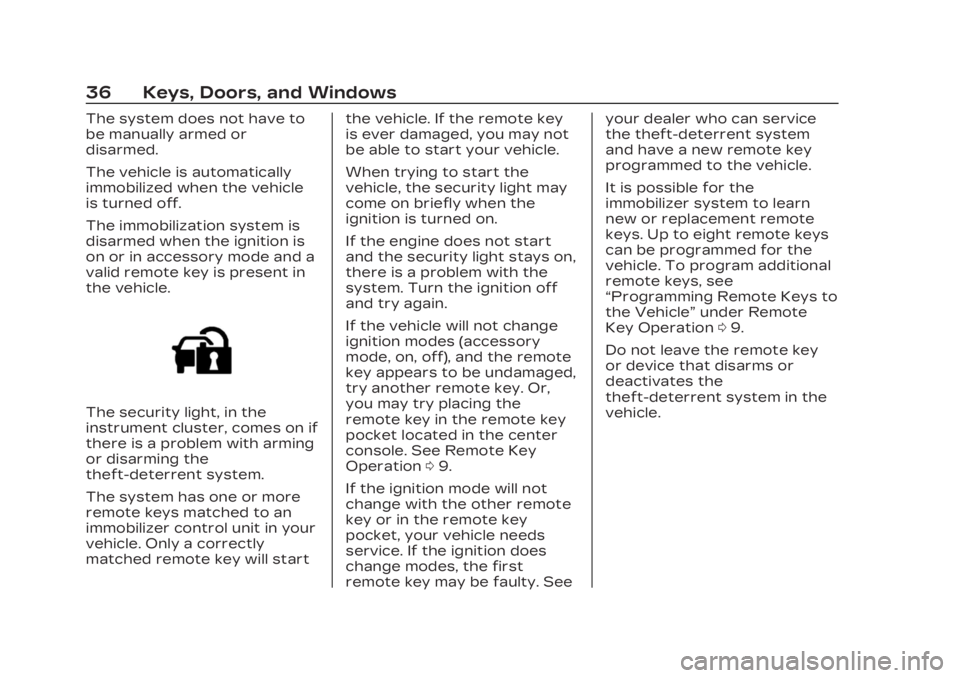
The security light, in the
instrument cluster, comes on if
there is a problem with arming
or disarming the
theft-deterrent system.
The system has one or more
remote keys matched to an
immobilizer control unit in your
vehicle. Only a correctly
matched remote key will startthe vehicle. If the remote key
is ever damaged, you may not
be able to start your vehicle.
When trying to start the
vehicle, the security light may
come on briefly when the
ignition is turned on.
If the engine does not start
and the security light stays on,
there is a problem with the
system. Turn the ignition off
and try again.
If the vehicle will not change
ignition modes (accessory
mode, on, off), and the remote
key appears to be undamaged,
try another remote key. Or,
you may try placing the
remote key in the remote key
pocket located in the center
console. See Remote Key
Operation
09.
If the ignition mode will not
change with the other remote
key or in the remote key
pocket, your vehicle needs
service. If the ignition does
change modes, the first
remote key may be faulty. See your dealer who can service
the theft-deterrent system
and have a new remote key
programmed to the vehicle.
It is possible for the
immobilizer system to learn
new or replacement remote
keys. Up to eight remote keys
can be programmed for the
vehicle. To program additional
remote keys, see
“Programming Remote Keys to
the Vehicle”
under Remote
Key Operation 09.
Do not leave the remote key
or device that disarms or
deactivates the
theft-deterrent system in the
vehicle.
Page 47 of 507
Cadillac XT6 Owner Manual (GMNA-Localizing-U.S./Canada-16405819) -
2023 - CRC - 3/22/22
46 Seats and Restraints
Seats and
Restraints
Head Restraints
Head Restraints . . . . . . . . . . . . . 47
Front Seats
Power Seat Adjustment . . . 49
Reclining Seatbacks . . . . . . . . 49
Lumbar Adjustment . . . . . . . . 50
Memory Seats . . . . . . . . . . . . . . . 50
Heated and VentilatedFront Seats . . . . . . . . . . . . . . . . . 54
Rear Seats
Rear Seats . . . . . . . . . . . . . . . . . . . . 55
Heated Rear Seats . . . . . . . . . 58
Third Row Seats . . . . . . . . . . . . . 59
Seat Belts
Seat Belts . . . . . . . . . . . . . . . . . . . . . 62
How to Wear Seat BeltsProperly . . . . . . . . . . . . . . . . . . . . . . 63
Lap-Shoulder Belt . . . . . . . . . . 66
Seat Belt Use During Pregnancy . . . . . . . . . . . . . . . . . . . 69
Seat Belt Extender . . . . . . . . . 70
Safety System Check . . . . . . 70
Seat Belt Care . . . . . . . . . . . . . . . 70 Replacing Seat Belt
System Parts after a
Crash . . . . . . . . . . . . . . . . . . . . . . . . . . 71
Airbag System
Airbag System . . . . . . . . . . . . . . . . 71
Where Are theAirbags? . . . . . . . . . . . . . . . . . . . . . . 73
When Should an Airbag Inflate? . . . . . . . . . . . . . . . . . . . . . . . . 75
What Makes an Airbag Inflate? . . . . . . . . . . . . . . . . . . . . . . . . 76
How Does an Airbag Restrain? . . . . . . . . . . . . . . . . . . . . . 76
What Will You See after an Airbag Inflates? . . . . . . . . . . . . 76
Passenger Sensing
System . . . . . . . . . . . . . . . . . . . . . . . . 78
Servicing the Airbag-Equipped
Vehicle . . . . . . . . . . . . . . . . . . . . . . . . 82
Adding Equipment to the Airbag-Equipped
Vehicle . . . . . . . . . . . . . . . . . . . . . . . . 83
Airbag System Check . . . . . . 84
Replacing Airbag System Parts after a Crash . . . . . . . 84
Child Restraints
Older Children . . . . . . . . . . . . . . . . 85 Infants and Young
Children . . . . . . . . . . . . . . . . . . . . . . 86
Child Restraint Systems . . . . . . . . . . . . . . . . . . . . . . 89
Where to Put the
Restraint . . . . . . . . . . . . . . . . . . . . . . 91
Lower Anchors and Tethers for Children
(LATCH System) . . . . . . . . . . . 92
Replacing LATCH System Parts After a Crash . . . . . . 101
Securing Child Restraints (With the Seat Belt in
the Rear Seat) . . . . . . . . . . . . 102
Securing Child Restraints (With the Seat Belt in
the Front Seat) . . . . . . . . . . . 104
Page 68 of 507
Cadillac XT6 Owner Manual (GMNA-Localizing-U.S./Canada-16405819) -
2023 - CRC - 3/22/22
Seats and Restraints 67
3. Push the latch plate intothe buckle until it clicks.
Pull up on the latch plate
to make sure it is secure.
If the belt is not long
enough, see Seat Belt
Extender 070.
Position the release button
on the buckle so that the
seat belt could be quickly
unbuckled if necessary.
4. If equipped with a shoulder belt height adjuster, move
it to the height that is right
for you. See “Shoulder Belt
Height Adjuster” later in
this section for
instructions on use and
important safety
information.
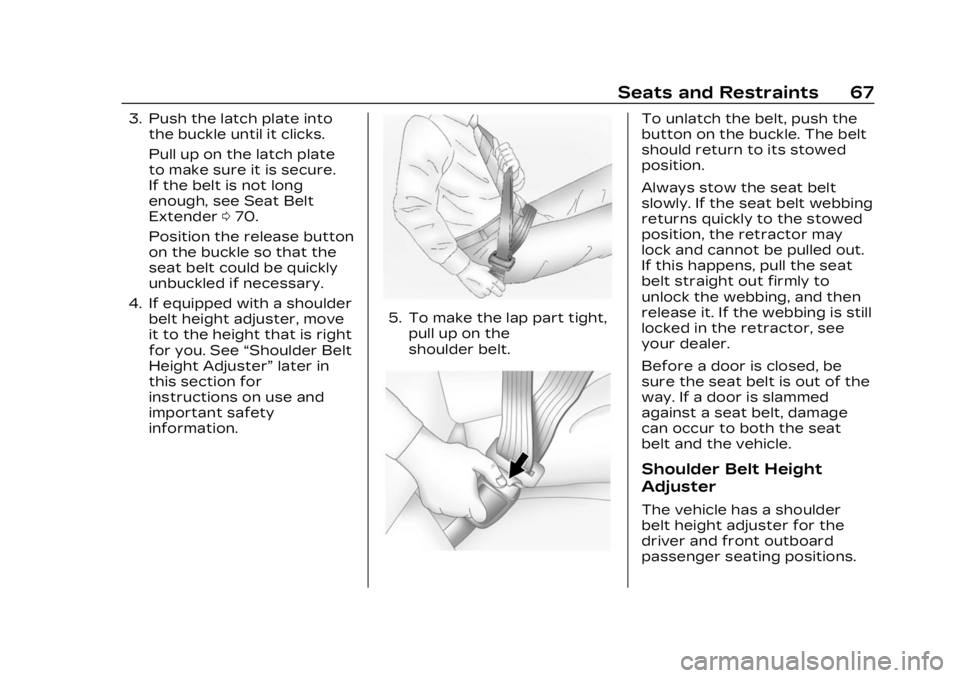
5. To make the lap part tight, pull up on the
shoulder belt.
To unlatch the belt, push the
button on the buckle. The belt
should return to its stowed
position.
Always stow the seat belt
slowly. If the seat belt webbing
returns quickly to the stowed
position, the retractor may
lock and cannot be pulled out.
If this happens, pull the seat
belt straight out firmly to
unlock the webbing, and then
release it. If the webbing is still
locked in the retractor, see
your dealer.
Before a door is closed, be
sure the seat belt is out of the
way. If a door is slammed
against a seat belt, damage
can occur to both the seat
belt and the vehicle.
Shoulder Belt Height
Adjuster
The vehicle has a shoulder
belt height adjuster for the
driver and front outboard
passenger seating positions.
Page 71 of 507
Cadillac XT6 Owner Manual (GMNA-Localizing-U.S./Canada-16405819) -
2023 - CRC - 3/22/22
70 Seats and Restraints
Seat Belt Extender
If the vehicle's seat belt will
fasten around you, you should
use it.
But if a seat belt is not long
enough, your dealer will order
you an extender. Only a GM
dealer issued extender should
be used. When you go in to
order it, take the heaviest coat
you will wear, so the extender
will be long enough for you. To
help avoid personal injury, do
not let someone else use it,
and use it only for the seat it is
made to fit. The extender has
been designed for adults.
Never use it for securing child
restraints. For more
information on the proper use
and fit of seat belt extenders
see the instruction sheet that
comes with the extender.
Safety System Check
Periodically check the seat
belt reminder, seat belts,
buckles, latch plates,
retractors, shoulder beltheight adjusters (if equipped),
and seat belt anchorages to
make sure they are all in
working order. Look for any
other loose or damaged seat
belt system parts that might
keep a seat belt system from
performing properly. See your
dealer to have it repaired.
Torn, frayed, or twisted seat
belts may not protect you in a
crash. Torn or frayed seat
belts can rip apart under
impact forces. If a belt is torn
or frayed, have it replaced
immediately. If a belt is
twisted, it may be possible to
untwist by reversing the latch
plate on the webbing. If the
twist cannot be corrected, ask
your dealer to fix it.
Make sure the seat belt
reminder light is working. See
Seat Belt Reminders
0132.
Keep seat belts clean and dry.
See Seat Belt Care 070.
Seat Belt Care
Keep belts clean and dry. Seat belts should be properly
cared for and maintained.
Seat belt hardware should be
kept dry and free of dust or
debris. As necessary, exterior
hard surfaces and seat belt
webbing may be lightly
cleaned with mild soap and
water. Ensure there is not
excessive dust or debris in the
mechanism. If dust or debris
exists in the system please
see the dealer. Parts may
need to be replaced to ensure
proper functionality of the
system.
{Warning
Do not bleach or dye seat
belt webbing. It may severely
weaken the webbing. In a
crash, they might not be
able to provide adequate
protection. Clean and rinse
seat belt webbing only with
mild soap and lukewarm
water. Allow the webbing
to dry.