steering CADILLAC XT6 2023 Repair Manual
[x] Cancel search | Manufacturer: CADILLAC, Model Year: 2023, Model line: XT6, Model: CADILLAC XT6 2023Pages: 507, PDF Size: 6.49 MB
Page 304 of 507
Cadillac XT6 Owner Manual (GMNA-Localizing-U.S./Canada-16405819) -
2023 - CRC - 3/22/22
Driving and Operating 303
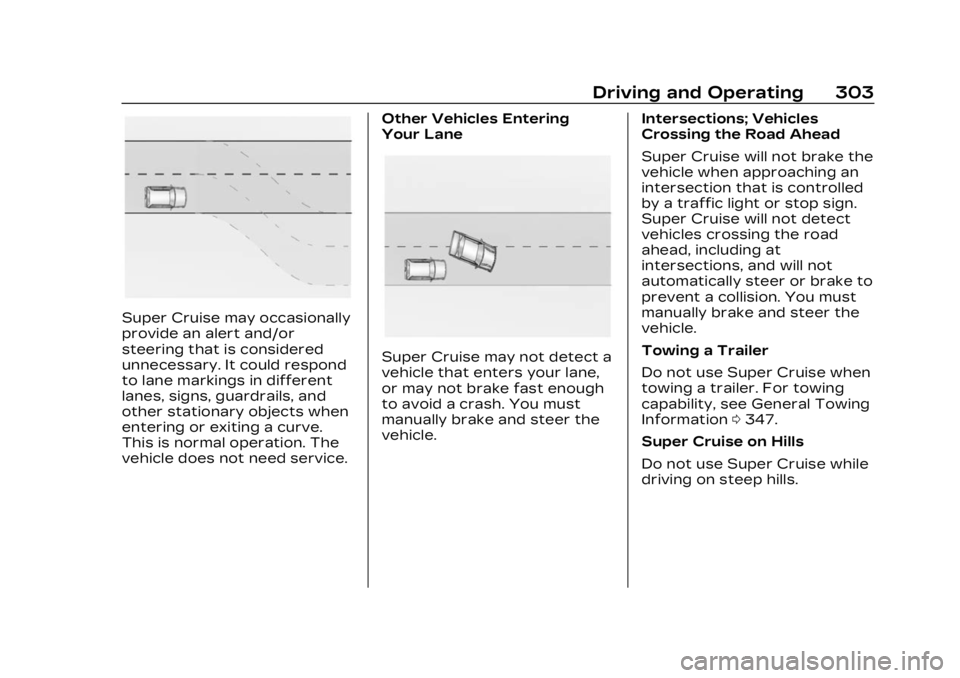
Super Cruise may occasionally
provide an alert and/or
steering that is considered
unnecessary. It could respond
to lane markings in different
lanes, signs, guardrails, and
other stationary objects when
entering or exiting a curve.
This is normal operation. The
vehicle does not need service.Other Vehicles Entering
Your Lane
Super Cruise may not detect a
vehicle that enters your lane,
or may not brake fast enough
to avoid a crash. You must
manually brake and steer the
vehicle.
Intersections; Vehicles
Crossing the Road Ahead
Super Cruise will not brake the
vehicle when approaching an
intersection that is controlled
by a traffic light or stop sign.
Super Cruise will not detect
vehicles crossing the road
ahead, including at
intersections, and will not
automatically steer or brake to
prevent a collision. You must
manually brake and steer the
vehicle.
Towing a Trailer
Do not use Super Cruise when
towing a trailer. For towing
capability, see General Towing
Information
0347.
Super Cruise on Hills
Do not use Super Cruise while
driving on steep hills.
Page 305 of 507
Cadillac XT6 Owner Manual (GMNA-Localizing-U.S./Canada-16405819) -
2023 - CRC - 3/22/22
304 Driving and Operating
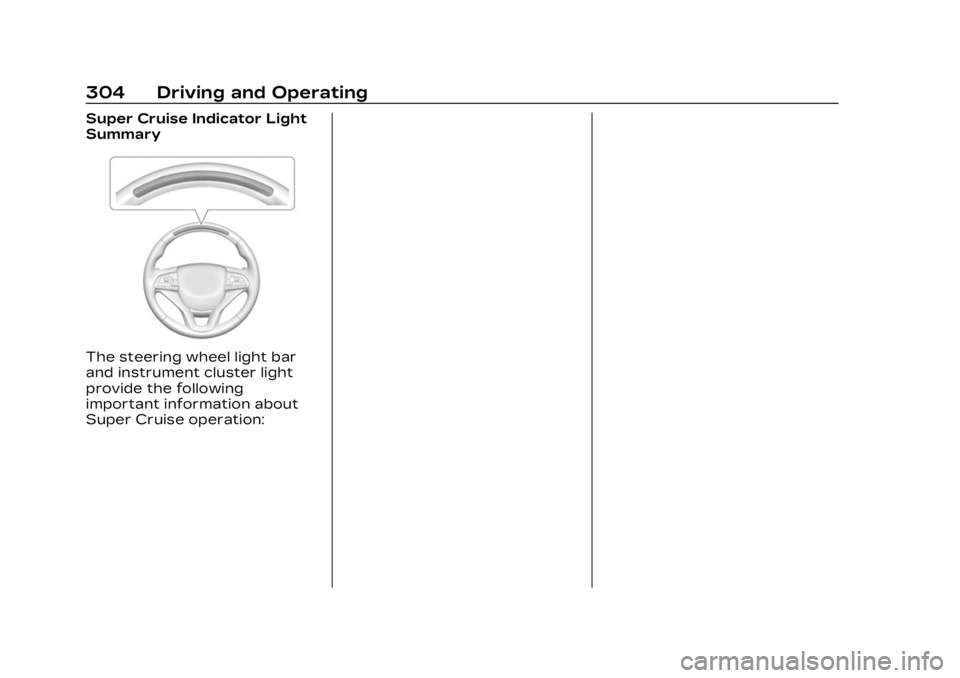
Super Cruise Indicator Light
Summary
The steering wheel light bar
and instrument cluster light
provide the following
important information about
Super Cruise operation:
Page 306 of 507
Cadillac XT6 Owner Manual (GMNA-Localizing-U.S./Canada-16405819) -
2023 - CRC - 3/22/22
Driving and Operating 305
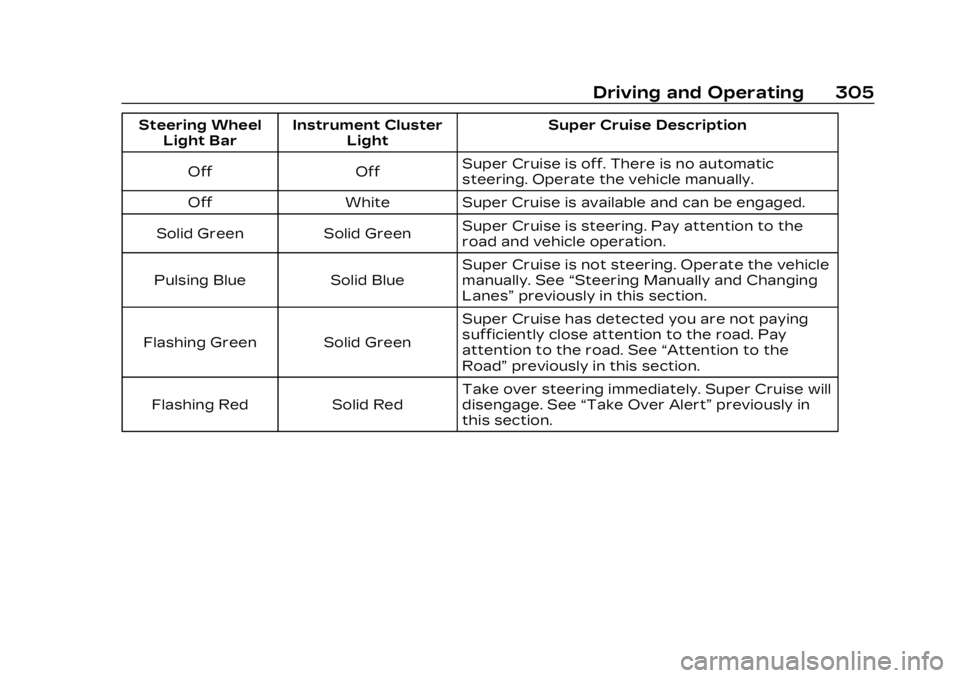
Steering WheelLight Bar Instrument Cluster
Light Super Cruise Description
Off Off Super Cruise is off. There is no automatic
steering. Operate the vehicle manually.
Off White Super Cruise is available and can be engaged.
Solid Green Solid Green Super Cruise is steering. Pay attention to the
road and vehicle operation.
Pulsing Blue Solid Blue Super Cruise is not steering. Operate the vehicle
manually. See
“Steering Manually and Changing
Lanes” previously in this section.
Flashing Green Solid Green Super Cruise has detected you are not paying
sufficiently close attention to the road. Pay
attention to the road. See
“Attention to the
Road” previously in this section.
Flashing Red Solid Red Take over steering immediately. Super Cruise will
disengage. See
“Take Over Alert” previously in
this section.
Page 307 of 507
![CADILLAC XT6 2023 Repair Manual Cadillac XT6 Owner Manual (GMNA-Localizing-U.S./Canada-16405819) -
2023 - CRC - 3/22/22
306 Driving and Operating
Disengaging Super Cruise
There are two ways to
disengage Super Cruise:
.Press]while yo](/img/23/58694/w960_58694-306.png "CADILLAC XT6 2023 Repair Manual Cadillac XT6 Owner Manual (GMNA-Localizing-U.S./Canada-16405819) -
2023 - CRC - 3/22/22
306 Driving and Operating
Disengaging Super Cruise
There are two ways to
disengage Super Cruise:
.Press]while yo")
Cadillac XT6 Owner Manual (GMNA-Localizing-U.S./Canada-16405819) -
2023 - CRC - 3/22/22
306 Driving and Operating
Disengaging Super Cruise
There are two ways to
disengage Super Cruise:
.Press]while your hands
are on the steering wheel.
The Super Cruise steering
will disengage.
.Press the brake pedal while
your hands are on the
steering wheel. Both Super
Cruise steering and Adaptive
Cruise Control will
disengage. Super Cruise Messages
If
^does not appear,]can
be pressed to display a DIC
message as to why the system
is unavailable.
Immediately after a
disengagement, pressing the
]within 10 seconds will
display a DIC message with
the reason for Super Cruise
disengagement.
Page 310 of 507

Cadillac XT6 Owner Manual (GMNA-Localizing-U.S./Canada-16405819) -
2023 - CRC - 3/22/22
Driving and Operating 309
Super Cruise Message Summary (cont'd)
Unavailable Sensor Can’t See Face Clearly.Sun is shining into the Driver Attention
System (DAS) camera.
.Dawn or dusk sun glare is on the
driver’s face.
.Cups, food, hands, or other objects are
obscuring the DAS view of the driver’s face.
.The steering column is pointed too high or
low for the DAS to see the driver. Adjust the
steering column or the seat if the message
occurs frequently.
Unavailable Looking Away From Road for
Too Long The DAS system detects that the driver is not
looking at the road.
Unavailable Center Vehicle In Lane The Super Cruise system has determined that the vehicle is not centered in the lane lines.
Once the vehicle has been centered in the lane
lines, the white
^will display in the instrument
cluster indicating that Super Cruise is available.
Unavailable Driving Too Fast The vehicle is traveling faster than 137 km/h (85 mph).
The maximum Super Cruise speed in curves will
vary based on how sharp the curve is. The
vehicle will automatically decrease speed if
needed.
Unavailable Driving in Exit Lane The Super Cruise system has detected that the vehicle is in an exit lane.
Page 312 of 507
Cadillac XT6 Owner Manual (GMNA-Localizing-U.S./Canada-16405819) -
2023 - CRC - 3/22/22
Driving and Operating 311
Map Updates
Super Cruise map information
must be periodically updated
at least once every seven
months to determine whether
Super Cruise is available on
certain roads. Turn on the
vehicle’s built-in Wi-Fi hotspot
to receive automatic updates
via OnStar, or see your dealer.
See the following
region-based websites for
Super Cruise map open source
compliance documentation,
including the license
information:
Disabling the vehicle's Wi-Fi or
Location Services will disable
automatic map updates. Super
Cruise will stop functioning
after seven months or less,
depending on the time of the
last map update.
https://oss.veoneer.com/
Data Download
Super Cruise uses the Wi-Fi
hotspot in the vehicle to
download map updates andGPS enhancement data to the
vehicle. If a mobile device with
its own Wi-Fi hotspot is
brought into the vehicle and
its Service Set Identifier (SSID)
and password are the same as
the OnStar Wi-Fi hotspot,
then the vehicle may connect
to the mobile device’s Wi-Fi
hotspot to download the data.
See your dealer for details.
To prevent usage of a mobile
device data plan, do one of the
following:
.Do not use the same SSID
and password for the
OnStar Wi-Fi hotspot and a
mobile device.
.Disable the personal mobile
device Wi-Fi hotspot when
inside the vehicle.
If the vehicle is equipped with
OnStar and has an active
service plan, additional data
may be collected through the
OnStar system. This includes
information about: the
vehicle’s operation; a crash
involving the vehicle; the use of the vehicle and its features;
and, in certain situations, the
location and approximate GPS
speed of the vehicle. Refer to
the OnStar Terms and
Conditions and Privacy
Statement on the OnStar
website.
Location Services
This setting enables or
disables sharing of vehicle
location outside the vehicle for
certain purposes. Even if the
Location Services setting is
disabled, vehicle location
information will continue to be
shared for emergency
services and Super Cruise,
if equipped.
System Care
The camera on the steering
column has a lens cover that
may become dirty over time
and affect camera
performance. Clean the lens
cover with a soft cloth
sprayed with glass cleaner.
Wipe the lens gently, then dry
it. Never use abrasive cloths/
Page 321 of 507

Cadillac XT6 Owner Manual (GMNA-Localizing-U.S./Canada-16405819) -
2023 - CRC - 3/22/22
320 Driving and Operating
a very large truck, are
affecting system
performance.
Automatic Parking
Assist (APA)
Automatic Parking Assist
(APA) with Braking
If equipped, under certain
conditions APA with Braking
can use sensors based on
sonar technology along the
vehicle’s front, rear and sides
to detect a parking spot, and
automatically park the vehicle
with some driver assistance.
The vehicle will automatically
maneuver into a detected spot
moving at or near idle speed.
It does this by automatically
steering and braking while the
driver is responsible for
acceleration and gear shifting
as needed. The driver must
always be prepared to apply
braking or additional
acceleration, as needed.A display and audible beeps
help to guide the parking
maneuvers.
{Warning
APA may not always detect
objects in the parking space,
objects that are not rigid
(e.g. shrubs and chain-link
fences), objects below the
bumper, objects high off the
ground (e.g. flatbed trucks),
hanging objects, objects
below ground level (e.g. large
potholes), or moving objects
(e.g. pedestrians, cyclists,
vehicles). Always verify that
the parking space is
appropriate for parking a
vehicle. APA may not
respond to changes in the
parking space, such as
movement of an adjacent
vehicle, or a person or
object entering the parking
space. APA does not detect
or avoid traffic that is
(Continued)
Warning (Continued)
behind or alongside of the
vehicle. Always be prepared
to stop the vehicle during
the parking maneuver.
How to Activate Automatic
Parking
To activate APA, press the
soft-touch button or hard
switch
Ofor the system to
begin searching for a parking
space while driving forward at
no greater than
30 km/h (18 mph). By default,
APA searches for parallel
parking spaces to the right of
the vehicle up to the sensors’
range of 1.5 m (5 ft). To search
for a parking space to the left,
turn on the left turn signal or,
if available, change the side
selection in the infotainment
display. To switch the parking
mode between parallel and
perpendicular press and hold
Owhile searching for a valid
Page 322 of 507

Cadillac XT6 Owner Manual (GMNA-Localizing-U.S./Canada-16405819) -
2023 - CRC - 3/22/22
Driving and Operating 321
parking spot or, if available,
change the parking mode in
the infotainment display.
APA cannot park in all empty
parking spots. The parking
spot must:
.Be sufficiently large to fit the
vehicle comfortably.
.Have an adjacent vehicle,
wall, or pillar for the system
to align to.
After completely passing an
eligible parking spot, a beep
sounds and a red stop symbol
is displayed in the driver
information center. Generally,
APA selects the nearest
empty parking spot behind the
vehicle, but under some
conditions may select a spacethat is further back. Slow
down and bring the vehicle to
a complete stop to begin.
Follow the displayed
instructions. When instructed
to drive in reverse, shift to
R (Reverse) while holding the
brakes. The steering wheel will
vibrate briefly as a reminder to
remove hands from the
steering wheel. After the
vibration stops, check your
surroundings and release the
brakes to begin automatic
parking. As the vehicle
automatically steers, and
brakes into the parking spot,
check surroundings and
continue to apply acceleration
if necessary and shift gears as
needed. Be prepared to stop
to avoid vehicles, pedestrians,
or objects.
A progress arrow displays the
status of the parking
maneuver. Once automatic
parking is finished and the
vehicle has come to a full stop,
APA will beep and display a
message indicating parking is
complete. Shift the vehicle to
P (Park) and apply the parking
brake
Automatic Parking
Automatic Unparking
Page 329 of 507

Cadillac XT6 Owner Manual (GMNA-Localizing-U.S./Canada-16405819) -
2023 - CRC - 3/22/22
328 Driving and Operating
Selecting the Alert Timing
The Collision Alert control is
on the steering wheel. Press
[to set the FCA timing to
Far, Medium, or Near. The first
button press shows the
current setting on the DIC.
Additional button presses will
change this setting. The
chosen setting will remain until
it is changed and will affect
the timing of both the Collision
Alert and the Tailgating Alert
features. The timing of both
alerts will vary based on
vehicle speed. The faster the
vehicle speed, the farther
away the alert will occur.
Consider traffic and weather
conditions when selecting the
alert timing. The range of selectable alert timings may
not be appropriate for all
drivers and driving conditions.
If your vehicle is equipped with
Adaptive Cruise Control (ACC),
changing the FCA timing
setting automatically changes
the following gap setting (Far,
Medium, or Near).Following Distance
Indicator
The following distance to a
moving vehicle ahead in your
path is indicated in following
time in seconds on the Driver
Information Center (DIC). See
Driver Information Center
(DIC)
0144. The minimum
following time is 0.5 seconds
away. If there is no vehicle
detected ahead, or the vehicle
ahead is out of sensor range,
dashes will be displayed.
Unnecessary Alerts
FCA may provide unnecessary
alerts for turning vehicles,
vehicles in other lanes, objects
that are not vehicles, or shadows. These alerts are
normal operation and the
vehicle does not need service.
Cleaning the System
If the FCA system does not
seem to operate properly, this
may correct the issue:
.Clean the outside of the
windshield in front of the
rearview mirror.
.Clean the entire front of the
vehicle.
.Clean the headlamps.
Automatic Emergency
Braking (AEB)
The AEB system may help
avoid or reduce the harm
caused by front-end crashes.
AEB also includes Intelligent
Brake Assist (IBA). When the
system detects a vehicle
ahead in your path that is
traveling in the same direction
that you may be about to
crash into, it can provide a
boost to braking or
automatically brake the
Page 339 of 507

Cadillac XT6 Owner Manual (GMNA-Localizing-U.S./Canada-16405819) -
2023 - CRC - 3/22/22
338 Driving and Operating
as a trailer, bicycle, or object
extending out to either side of
the vehicle. Attached objects
may also interfere with the
detection of vehicles. This is
normal system operation; the
vehicle does not need service.
LCA may not always alert the
driver to vehicles in the next
lane over, especially in wet
conditions or when driving on
sharp curves. The system
does not need to be serviced.
The system may light up due
to guardrails, signs, trees,
shrubs, and other non-moving
objects. This is normal system
operation; the vehicle does not
need service.
LCA may not operate when
the LCA sensors in the left or
right corners of the rear
bumper are covered with mud,
dirt, snow, ice, or slush, or in
heavy rainstorms. For cleaning
instructions, see "Washing the
Vehicle" under Exterior Care
0440. If the DIC still displays
the system unavailable message after cleaning both
sides of the vehicle toward the
rear corners of the vehicle,
see your dealer.
If the LCA displays do not light
up when moving vehicles are
in the side blind zone or are
rapidly approaching this zone
and the system is clean, the
system may need service.
Take the vehicle to your
dealer.
Radio Frequency
Information
See Radio Frequency
Statement
0477.
Lane Keep
Assist (LKA)
If equipped, LKA may help
avoid crashes due to
unintentional lane departures.
This system uses a camera to
detect lane markings. The LKA
can be ready to assist at
speeds between 60 km/h
(37 mph) and 180 km/h
(112 mph). On some vehicles, the system will instead
operate above 50 km/h
(31 mph). LKA may assist by
gently turning the steering
wheel if the vehicle
approaches a detected lane
marking. It may also provide a
Lane Departure Warning
(LDW) alert if the vehicle
crosses a detected lane
marking. This system is not
intended to keep the vehicle
centered in the lane. LKA will
not assist and alert if the turn
signal is active in the direction
of lane departure, or if it
detects that you are
accelerating, braking or
actively steering. LKA can be
overridden by turning the
steering wheel. If the system
detects you are steering
intentionally across a lane
marker, the LDW may not be
given. Do not expect the LDW
to occur when you are
intentionally crossing a lane
marker.