automatic transmission CADILLAC XT6 2023 Owners Manual
[x] Cancel search | Manufacturer: CADILLAC, Model Year: 2023, Model line: XT6, Model: CADILLAC XT6 2023Pages: 507, PDF Size: 6.49 MB
Page 7 of 507

Cadillac XT6 Owner Manual (GMNA-Localizing-U.S./Canada-16405819) -
2023 - CRC - 3/22/22
6 Introduction
1. Air Vents0236.
2. Exterior Lamp Controls 0156.
Turn Signal Lever. See
Turn and Lane-Change
Signals 0160.
IntelliBeam System Button
(If Equipped). See Exterior
Lamp Controls 0156.
3. Instrument Cluster 0127.
Driver Information Center
(DIC) Display. See Driver
Information Center (DIC)
0 144.
4. Windshield Wiper/Washer 0118.
Rear Window Wiper/
Washer 0120.
5. ENGINE START/STOP Button. See Ignition
Positions 0257.
6. Park Assist Button. See Park Assist 0318.
Automatic Parking Assist
(APA) Button. See Park
Assist 0318. 7. Stop/Start Disable Switch.
See Stop/Start System
0259.
8. Light Sensor. See Automatic Headlamp
System 0159.
9. Hazard Warning Flashers 0160.
Lane Keep Assist (LKA)
0 338 (If Equipped).
10. Infotainment Controls. See Overview 0165.
11. Heated and Ventilated Front Seats 054 (If
Equipped).
12. Dual Automatic Climate Control System 0228.
13. MODE Switch. See Driver Mode Control 0278.
Traction Control/
Electronic Stability Control
0 276.
14. Infotainment Controls. See Overview 0165.
15. Shift Lever. See Automatic Transmission 0266. 16. Steering Wheel Controls
0167.
17. Steering Wheel Controls 0167.
Driver Information Center
(DIC) Controls. See Driver
Information Center (DIC)
0 144.
18. Horn 0118.
19. Steering Wheel Adjustment 0117 (Out
of View).
20. Forward Collision Alert (FCA) System 0326 (If
Equipped).
Heated Steering Wheel
0 118 (If Equipped).
21. Cruise Control 0280.
Adaptive Cruise Control
(Advanced) 0283 (If
Equipped).
Phone Button. See
Steering Wheel Controls
0 167.
Page 24 of 507
Cadillac XT6 Owner Manual (GMNA-Localizing-U.S./Canada-16405819) -
2023 - CRC - 3/23/22
Keys, Doors, and Windows 23
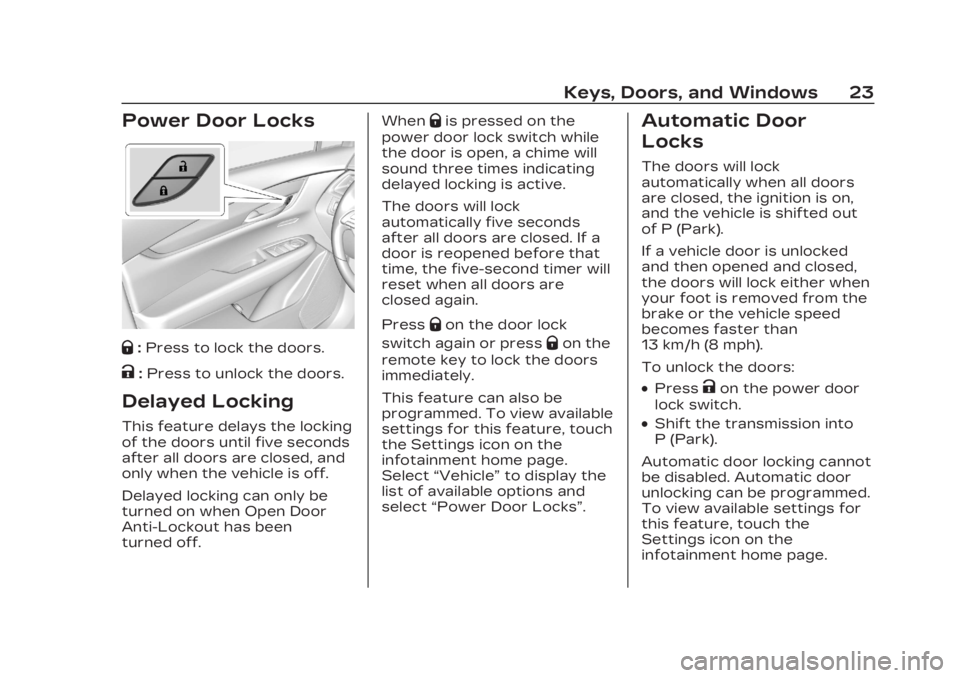
Power Door Locks
Q:Press to lock the doors.
K:Press to unlock the doors.
Delayed Locking
This feature delays the locking
of the doors until five seconds
after all doors are closed, and
only when the vehicle is off.
Delayed locking can only be
turned on when Open Door
Anti-Lockout has been
turned off. When
Qis pressed on the
power door lock switch while
the door is open, a chime will
sound three times indicating
delayed locking is active.
The doors will lock
automatically five seconds
after all doors are closed. If a
door is reopened before that
time, the five-second timer will
reset when all doors are
closed again.
Press
Qon the door lock
switch again or press
Qon the
remote key to lock the doors
immediately.
This feature can also be
programmed. To view available
settings for this feature, touch
the Settings icon on the
infotainment home page.
Select “Vehicle” to display the
list of available options and
select “Power Door Locks”.
Automatic Door
Locks
The doors will lock
automatically when all doors
are closed, the ignition is on,
and the vehicle is shifted out
of P (Park).
If a vehicle door is unlocked
and then opened and closed,
the doors will lock either when
your foot is removed from the
brake or the vehicle speed
becomes faster than
13 km/h (8 mph).
To unlock the doors:
.PressKon the power door
lock switch.
.Shift the transmission into
P (Park).
Automatic door locking cannot
be disabled. Automatic door
unlocking can be programmed.
To view available settings for
this feature, touch the
Settings icon on the
infotainment home page.
Page 121 of 507
Cadillac XT6 Owner Manual (GMNA-Localizing-U.S./Canada-16405819) -
2023 - CRC - 3/22/22
120 Instruments and Controls
Rainsense, the wipers
continue to run until they
reach the base of the
windshield.
Rainsense
If equipped with Rainsense
and the feature is turned on, a
sensor near the top center of
the windshield detects the
amount of water on the
windshield and controls the
frequency of the windshield
wiper based on the current
sensitivity setting.
Keep this area of the
windshield clear of debris to
allow for best system
performance.
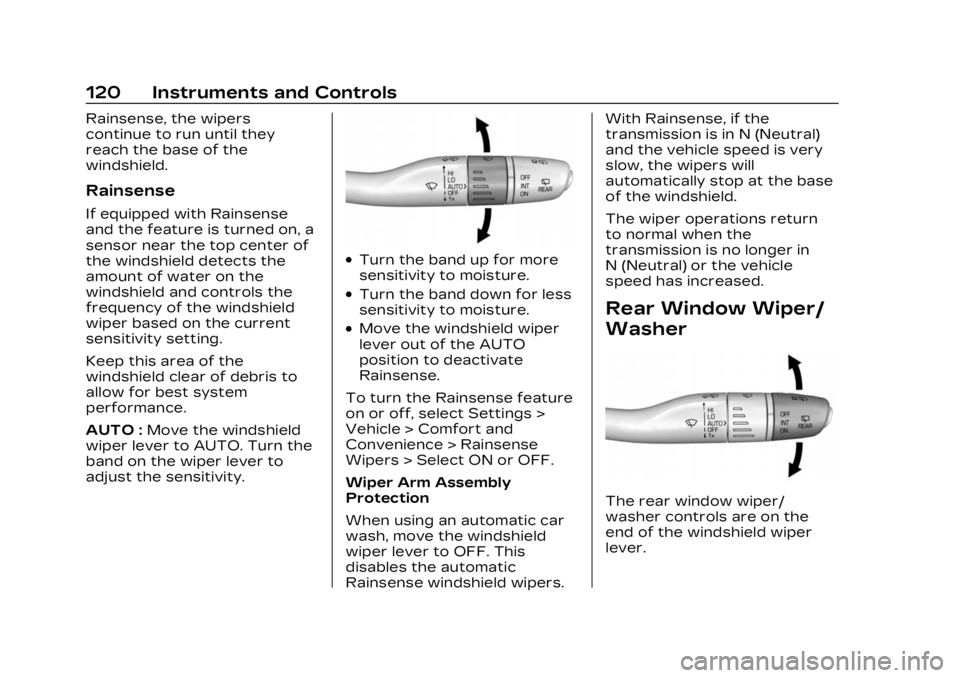
AUTO :Move the windshield
wiper lever to AUTO. Turn the
band on the wiper lever to
adjust the sensitivity.
.Turn the band up for more
sensitivity to moisture.
.Turn the band down for less
sensitivity to moisture.
.Move the windshield wiper
lever out of the AUTO
position to deactivate
Rainsense.
To turn the Rainsense feature
on or off, select Settings >
Vehicle > Comfort and
Convenience > Rainsense
Wipers > Select ON or OFF.
Wiper Arm Assembly
Protection
When using an automatic car
wash, move the windshield
wiper lever to OFF. This
disables the automatic
Rainsense windshield wipers. With Rainsense, if the
transmission is in N (Neutral)
and the vehicle speed is very
slow, the wipers will
automatically stop at the base
of the windshield.
The wiper operations return
to normal when the
transmission is no longer in
N (Neutral) or the vehicle
speed has increased.
Rear Window Wiper/
Washer
The rear window wiper/
washer controls are on the
end of the windshield wiper
lever.
Page 122 of 507
Cadillac XT6 Owner Manual (GMNA-Localizing-U.S./Canada-16405819) -
2023 - CRC - 3/22/22
Instruments and Controls 121
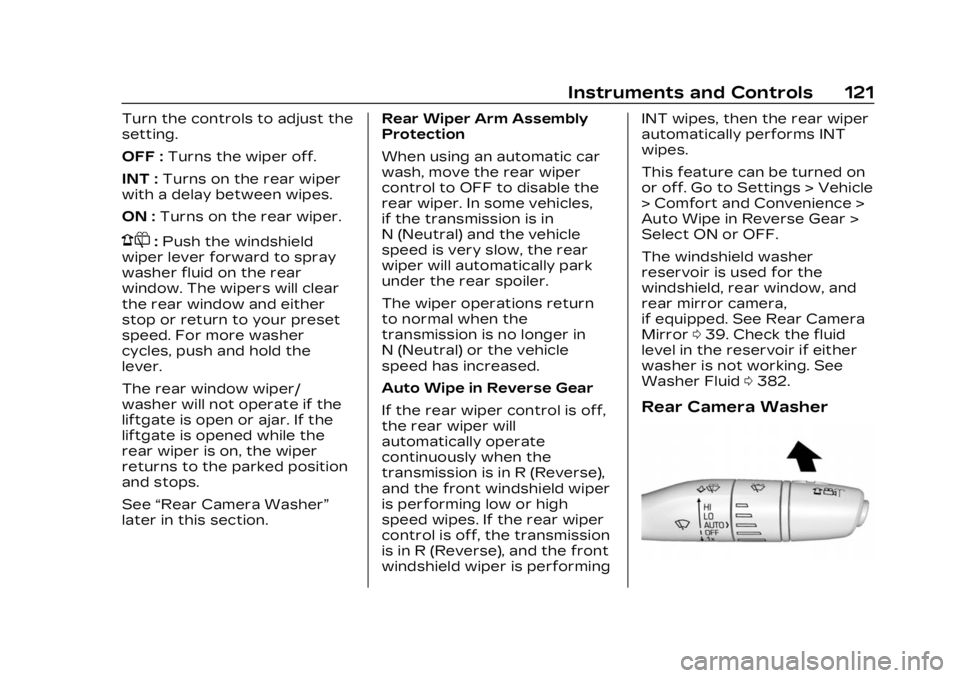
Turn the controls to adjust the
setting.
OFF :Turns the wiper off.
INT : Turns on the rear wiper
with a delay between wipes.
ON : Turns on the rear wiper.
1:Push the windshield
wiper lever forward to spray
washer fluid on the rear
window. The wipers will clear
the rear window and either
stop or return to your preset
speed. For more washer
cycles, push and hold the
lever.
The rear window wiper/
washer will not operate if the
liftgate is open or ajar. If the
liftgate is opened while the
rear wiper is on, the wiper
returns to the parked position
and stops.
See “Rear Camera Washer”
later in this section. Rear Wiper Arm Assembly
Protection
When using an automatic car
wash, move the rear wiper
control to OFF to disable the
rear wiper. In some vehicles,
if the transmission is in
N (Neutral) and the vehicle
speed is very slow, the rear
wiper will automatically park
under the rear spoiler.
The wiper operations return
to normal when the
transmission is no longer in
N (Neutral) or the vehicle
speed has increased.
Auto Wipe in Reverse Gear
If the rear wiper control is off,
the rear wiper will
automatically operate
continuously when the
transmission is in R (Reverse),
and the front windshield wiper
is performing low or high
speed wipes. If the rear wiper
control is off, the transmission
is in R (Reverse), and the front
windshield wiper is performingINT wipes, then the rear wiper
automatically performs INT
wipes.
This feature can be turned on
or off. Go to Settings > Vehicle
> Comfort and Convenience >
Auto Wipe in Reverse Gear >
Select ON or OFF.
The windshield washer
reservoir is used for the
windshield, rear window, and
rear mirror camera,
if equipped. See Rear Camera
Mirror
039. Check the fluid
level in the reservoir if either
washer is not working. See
Washer Fluid 0382.
Rear Camera Washer
Page 148 of 507
Cadillac XT6 Owner Manual (GMNA-Localizing-U.S./Canada-16405819) -
2023 - CRC - 3/22/22
Instruments and Controls 147
of time that has passed since
the timer was last reset. To
stop the timer, press the
thumbwheel briefly while this
display is active and the timer
is running.
Press the thumbwheel while
this display is active to reset
the timer.
Follow Distance/Gap
Setting :When Adaptive
Cruise Control (ACC) is not
engaged, the current follow
time to the vehicle ahead is
displayed as a time value on
this page. When ACC has been
engaged, the display switches
to the gap setting page. This
page shows the current gap
setting along with the vehicle
ahead indicator.
Driver Assistance :
If equipped, shows information
for Lane Keep Assist (LKA)
and Forward Collision
Alert (FCA).
Battery Voltage : Shows the
current battery voltage. Coolant Temperature :
Shows the engine coolant
temperature in either degrees
Celsius (°C) or degrees
Fahrenheit (°F).
Oil Temperature :
Shows the
engine oil temperature in
either degrees Celsius (°C) or
degrees Fahrenheit (°F).
Engine Boost : If equipped,
displays engine manifold
pressure relative to ambient
air pressure. It will display
boost pressure generated by
the turbocharging system.
Transmission Fluid
Temperature : Shows the
temperature of the automatic
transmission fluid in either
degrees Celsius (°C) or
degrees Fahrenheit (°F).
Off Road : Displays vehicle
pitch and roll information, road
wheel angle, and four-wheel
drive (4WD) status. Info Page Options :
Scroll to
choose which info pages
appear on the DIC. Press the
thumbwheel to select or
deselect.
Blank Page : Allows for no
information to be displayed in
the cluster info display areas.
Head-Up
Display (HUD)
{Warning
If the HUD image is too
bright or too high in your
field of view, it may take you
more time to see things you
need to see when it is dark
outside. Be sure to keep the
HUD image dim and placed
low in your field of view.
If equipped with HUD, some
information concerning the
operation of the vehicle is
projected onto the windshield.
The image is projected
through the HUD lens on top
of the instrument panel. The
Page 161 of 507
Cadillac XT6 Owner Manual (GMNA-Localizing-U.S./Canada-16405819) -
2023 - CRC - 3/22/22
160 Lighting
For vehicles sold in Canada,
this control only works when
the transmission is in P (Park).
Lights On with Wipers
If the windshield wipers are
activated in daylight with the
engine on, and the exterior
lamp control is in AUTO, the
headlamps, parking lamps, and
other exterior lamps come on.
The transition time for the
lamps coming on varies based
on wiper speed. When the
wipers are not operating,
these lamps turn off. Move the
exterior lamp control to
Oor
;to disable this feature.
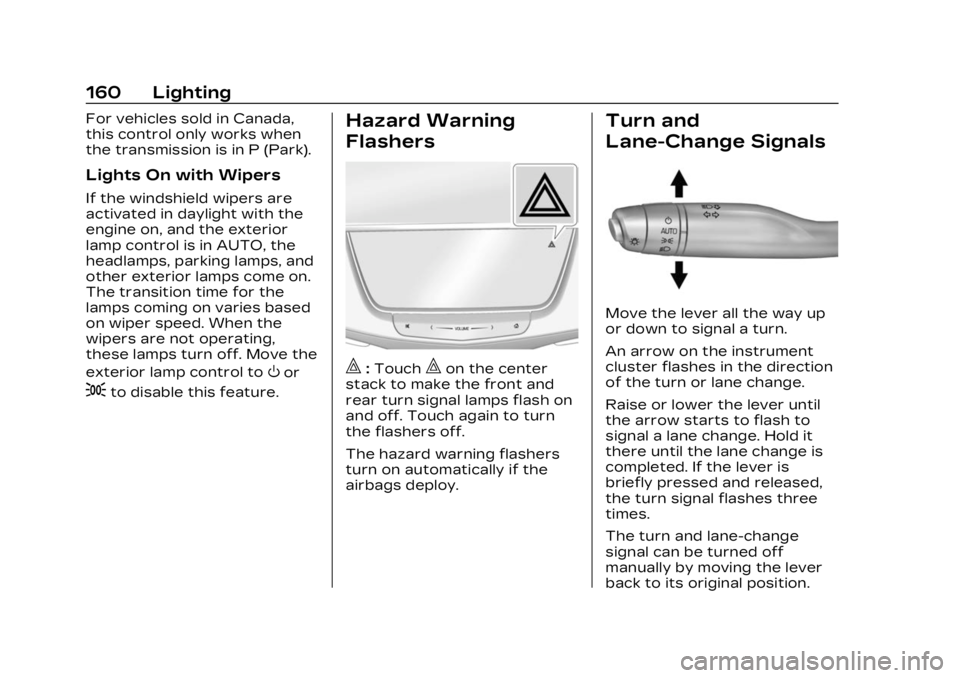
Hazard Warning
Flashers
|:Touch|on the center
stack to make the front and
rear turn signal lamps flash on
and off. Touch again to turn
the flashers off.
The hazard warning flashers
turn on automatically if the
airbags deploy.
Turn and
Lane-Change Signals
Move the lever all the way up
or down to signal a turn.
An arrow on the instrument
cluster flashes in the direction
of the turn or lane change.
Raise or lower the lever until
the arrow starts to flash to
signal a lane change. Hold it
there until the lane change is
completed. If the lever is
briefly pressed and released,
the turn signal flashes three
times.
The turn and lane-change
signal can be turned off
manually by moving the lever
back to its original position.
Page 216 of 507

Cadillac XT6 Owner Manual (GMNA-Localizing-U.S./Canada-16405819) -
2023 - CRC - 3/22/22
Infotainment System 215
To access:1. Touch Settings on the Home Page, then touch
Vehicle, and then Teen
Driver.
2. Create a Personal Identification Number (PIN)
by choosing a four-digit
PIN. Re-enter the PIN to
confirm. To change the
PIN, touch Change PIN.
The PIN is required to:
.Set up/Add or remove keys.
.Change Teen Driver
settings.
.Change or clear the Teen
Driver PIN.
.Access or delete Report
Card data.
Set up/Add keys to activate
Teen Driver and assign
restrictions to the key:
Any vehicle key can be
registered, up to a maximum
of eight keys. Label the key to
tell it apart from the
other keys. For a pushbutton start
system:
1. Start the vehicle.
2. For automatic transmissions, the vehicle
must be in P (Park). For
manual transmissions, the
vehicle must be stopped
with the parking brake set.
3. From the Settings menu, touch Vehicle and then
Teen Driver.
4. Enter the PIN.
5. Place the remote key you wish to register in the
transmitter pocket. The
key does not need to be
the one that started the
vehicle. See Remote Key
Operation 09 for
transmitter pocket
location. 6. From the Teen Driver
menu, touch Setup Keys or
Add/Remove Teen
Driver Keys.
.If the remote key has
not previously been
registered, the option to
add the key displays.
Touch Add and a
confirmation message
displays. Teen Driver
restrictions will be
applied whenever this
remote key is used to
operate the vehicle.
.If the remote key has
already been registered,
the option to remove
the key displays.
If Remove is touched,
the remote key is no
longer registered.
A confirmation message
displays, and Teen
Driver restrictions will
not be applied if this
remote key is used to
operate the vehicle.
Page 217 of 507

Cadillac XT6 Owner Manual (GMNA-Localizing-U.S./Canada-16405819) -
2023 - CRC - 3/22/22
216 Infotainment System
In vehicles with a pushbutton
start system, if a Teen Driver
and a non-Teen Driver key are
both present at start up, the
vehicle will recognize the
non-Teen Driver key to start
the vehicle. The Teen Driver
settings will not be active.
For a keyed ignition system:1. Start the vehicle.
2. For automatic transmissions, the vehicle
must be in P (Park). For
manual transmissions, the
vehicle must be stopped
with the parking brake set.
3. From the Settings menu, touch Vehicle and then
Teen Driver.
4. Enter the PIN.
5. Touch Setup Keys or Add/ Remove Teen Driver Keys.
The system displays
instructions for registering
or unregistering a key.
A confirmation message
displays. Manage Settings or Teen
Driver Settings
Depending on the options of
your vehicle, the following
menu items may be displayed:
Buckle to Drive :
When turned
ON, Buckle to Drive prevents
the driver from shifting out of
P (Park) for a period of time
after the brake pedal is
pressed if the driver, or on
some vehicles the detected
passenger, has not buckled
their seat belt. On some
vehicles, Buckle to Drive is
always ON when Teen Driver
is active and is not
configurable.
Audio Volume Limit : Allows a
maximum audio volume to be
set. Turn the audio volume
limit on or off. Use the arrows
to choose the maximum
allowable level for the audio
volume. On some infotainment
systems, touch Set Audio
Volume Limit to choose the
maximum allowable audio
volume level. Set Audio Volume Limit :
Use
the arrows to choose the
maximum allowable level for
the audio volume.
Teen Driver Speed Limiter :
Limits the maximum speed of
the vehicle. When the speed
limiter is turned on and the
vehicle is started with a Teen
Driver key, the DIC displays a
message that the top speed is
limited.
On certain vehicles, when the
Speed Limiter is turned ON,
the vehicle’s maximum
acceleration will be limited.
The DIC will display a message
that the acceleration is limited.
Teen Driver Speed Warning :
Displays a warning in the DIC
when exceeding a selectable
speed. Turn the speed
warning on or off and choose
the desired speed warning
level. The speed warning does
not limit the speed of the
vehicle. On some infotainment
Page 239 of 507

Cadillac XT6 Owner Manual (GMNA-Localizing-U.S./Canada-16405819) -
2023 - CRC - 3/22/22
238 Driving and Operating
Driving and
Operating
Driving Information
Driving for Better FuelEconomy . . . . . . . . . . . . . . . . . . . 239
Distracted Driving . . . . . . . . . 240
Defensive Driving . . . . . . . . . 240
Impaired Driving . . . . . . . . . . . . 241
Control of a Vehicle . . . . . . . 241
Braking . . . . . . . . . . . . . . . . . . . . . . . . 241
Steering . . . . . . . . . . . . . . . . . . . . . . 242
Off-Road Recovery . . . . . . . 243
Loss of Control . . . . . . . . . . . . 243
Off-Road Driving . . . . . . . . . . . 244
Driving on Wet Roads . . . . 248
Hill and Mountain Roads . . . . . . . . . . . . . . . . . . . . . . . 249
Winter Driving . . . . . . . . . . . . . . 250
If the Vehicle Is Stuck . . . . . 251
Vehicle Load Limits . . . . . . . 252
Starting and Operating
New Vehicle Break-In . . . . 256
Ignition Positions . . . . . . . . . . 257
Starting the Engine . . . . . . . 258
Stop/Start System . . . . . . . . 259
Engine Heater . . . . . . . . . . . . . . . 261 Retained Accessory
Power (RAP) . . . . . . . . . . . . . . . 263
Shifting Into Park . . . . . . . . . . 263
Shifting out of Park . . . . . . . 264
Parking over Things That Burn . . . . . . . . . . . . . . . . . . 264
Active Fuel Management . . . . . . . . . . . . . . 264
Extended Parking . . . . . . . . . 265
Engine Exhaust
Engine Exhaust . . . . . . . . . . . . 265
Running the Vehicle While Parked . . . . . . . . . . . . . . 266
Automatic Transmission
AutomaticTransmission . . . . . . . . . . . . . . 266
Manual Mode . . . . . . . . . . . . . . . . 271
Drive Systems
All-Wheel Drive . . . . . . . . . . . . . 273
Brakes
Electric Brake Boost . . . . . . 273
Antilock Brake System (ABS) . . . . . . . . . . . . . 273
Electric Parking Brake . . . 274
Brake Assist . . . . . . . . . . . . . . . . . 276
Hill Start Assist (HSA) . . . . 276
Ride Control Systems
Traction Control/ Electronic Stability
Control . . . . . . . . . . . . . . . . . . . . . . 276
Driver Mode Control . . . . . . 278
Cruise Control
Cruise Control . . . . . . . . . . . . . 280
Adaptive Cruise Control (Advanced) . . . . . . . . . . . . . . . . . 283
Super Cruise . . . . . . . . . . . . . . . . 294
Driver Assistance
Systems
Driver Assistance Systems . . . . . . . . . . . . . . . . . . . . . 312
Assistance Systems for Parking or Backing . . . . . . . 314
Rear Vision Camera (RVC) . . . . . . . . . . . . . 314
Surround Vision System . . . . . . . . . . . . . . . . . . . . . . 315
Park Assist . . . . . . . . . . . . . . . . . . . 318
Automatic Parking Assist (APA) . . . . . . . . . . . . . . . 320
Reverse Automatic Braking (RAB) . . . . . . . . . . . . . 322
Rear Pedestrian Alert . . . . 324
Rear Cross Traffic Alert (RCTA) System . . . . . . . . . . . 325
Page 260 of 507

Cadillac XT6 Owner Manual (GMNA-Localizing-U.S./Canada-16405819) -
2023 - CRC - 3/22/22
Driving and Operating 259
Caution (Continued)
operates. Any resulting
damage would not be
covered by the vehicle
warranty. See Add-On
Electrical Equipment0360.
To start the vehicle: 1. With the Keyless Access system, the remote key
must be in the vehicle.
Press ENGINE START/
STOP with the brake pedal
applied. When the engine
begins cranking, let go of
the button. The idle speed
will go down as the engine
warms up. Do not race the
engine immediately after
starting it.
If the remote key is not in
the vehicle, if there is
interference, or if the
remote key is low, a Driver
Information Center (DIC)
message will display. See
Remote Key Operation 09.
Caution
Cranking the engine for long
periods of time, by pressing
ENGINE START/STOP
immediately after cranking
has ended, can overheat and
damage the cranking motor,
and drain the battery. Wait
at least 15 seconds between
each try, to let the cranking
motor cool down.
2. If the engine does not start after five to 10 seconds,
especially in very cold
weather (below −18 °C or
0 °F), it could be flooded
with too much gasoline.
Try pushing the
accelerator pedal all the
way to the floor and hold it
there, then press ENGINE
START/STOP for up to a
maximum of 15 seconds.
Wait at least 15 seconds
between each try, to allow
the cranking motor to cool
down. When the engine
starts, let go of the button and the accelerator. If the
vehicle starts briefly but
then stops again, do the
same thing. This clears the
extra gasoline from the
engine. Do not race the
engine immediately after
starting it. Operate the
engine and transmission
gently until the oil warms
up and lubricates all
moving parts.
Stop/Start System
This vehicle has a Stop/Start
system to shut off the engine
to help conserve fuel. It has
components designed for the
increased number of starts.
{Warning
The automatic engine Stop/
Start feature causes the
engine to shut off while the
vehicle is still on. Do not exit
the vehicle before shifting to
P (Park). The vehicle may
restart and move
(Continued)