power steering CADILLAC XT6 2023 Owners Manual
[x] Cancel search | Manufacturer: CADILLAC, Model Year: 2023, Model line: XT6, Model: CADILLAC XT6 2023Pages: 507, PDF Size: 6.49 MB
Page 9 of 507
Cadillac XT6 Owner Manual (GMNA-Localizing-U.S./Canada-16405819) -
2023 - CRC - 3/23/22
8 Keys, Doors, and Windows
Keys, Doors, and
Windows
Keys and Locks
Keys . . . . . . . . . . . . . . . . . . . . . . . . . . . . . . . 8
Remote Key . . . . . . . . . . . . . . . . . . . . . 9
Remote Key Operation . . . . . . 9
Remote Vehicle Start . . . . . . . 19
Door Locks . . . . . . . . . . . . . . . . . . . . 20
Power Door Locks . . . . . . . . . . 23
Delayed Locking . . . . . . . . . . . . . 23
Automatic Door Locks . . . . . 23
Lockout Protection . . . . . . . . . 24
Safety Locks . . . . . . . . . . . . . . . . . 24
Doors
Liftgate . . . . . . . . . . . . . . . . . . . . . . . . . 25
Vehicle Security
Vehicle Security . . . . . . . . . . . . . 33
Vehicle Alarm System . . . . . . 33
Steering Column Lock . . . . . 35
Immobilizer . . . . . . . . . . . . . . . . . . . . 35
Immobilizer Operation . . . . . 35
Exterior Mirrors
Convex Mirrors . . . . . . . . . . . . . . 37
Power Mirrors . . . . . . . . . . . . . . . . 37
Folding Mirrors . . . . . . . . . . . . . . . 37
Heated Mirrors . . . . . . . . . . . . . . 38Automatic Dimming
Mirror . . . . . . . . . . . . . . . . . . . . . . . . . 38
Reverse Tilt Mirrors . . . . . . . . 38
Interior Mirrors
Interior Rearview Mirrors . . . . . . . . . . . . . . . . . . . . . . . . 39
Automatic Dimming Rearview Mirror . . . . . . . . . . . . 39
Rear Camera Mirror . . . . . . . . 39
Windows
Windows . . . . . . . . . . . . . . . . . . . . . . . 41
Power Windows . . . . . . . . . . . . . 42
Sun Visors . . . . . . . . . . . . . . . . . . . . . 44
Roof
Sunroof . . . . . . . . . . . . . . . . . . . . . . . . 44
Keys and Locks
Keys
{Warning
Leaving children in a vehicle
with a remote key is
dangerous and children or
others could be seriously
injured or killed. They could
operate the power windows
or other controls or make
the vehicle move. The
windows will function with
the remote key in the
vehicle, and children or
others could be caught in
the path of a closing
window. Do not leave
children in a vehicle with a
remote key.
Page 117 of 507
Cadillac XT6 Owner Manual (GMNA-Localizing-U.S./Canada-16405819) -
2023 - CRC - 3/22/22
116 Instruments and Controls
Instruments and
Controls
Controls
Steering WheelAdjustment . . . . . . . . . . . . . . . . . . 117
Heated Steering Wheel . . . 118
Horn . . . . . . . . . . . . . . . . . . . . . . . . . . . . 118
Windshield Wiper/ Washer . . . . . . . . . . . . . . . . . . . . . . 118
Rear Window Wiper/ Washer . . . . . . . . . . . . . . . . . . . . . . 120
Compass . . . . . . . . . . . . . . . . . . . . . . 122
Clock . . . . . . . . . . . . . . . . . . . . . . . . . . . 122
Power Outlets . . . . . . . . . . . . . . 122
Wireless Charging . . . . . . . . . 123
Warning Lights, Gauges,
and Indicators
Warning Lights, Gauges, and Indicators . . . . . . . . . . . . . 126
Instrument Cluster . . . . . . . . . 127
Speedometer . . . . . . . . . . . . . . . 130
Odometer . . . . . . . . . . . . . . . . . . . . 130
Trip Odometer . . . . . . . . . . . . . . 130
Tachometer . . . . . . . . . . . . . . . . . 130
Fuel Gauge . . . . . . . . . . . . . . . . . . 130
Engine Coolant Temperature Gauge . . . . . 131 Seat Belt Reminders . . . . . . 132
Airbag Readiness
Light . . . . . . . . . . . . . . . . . . . . . . . . . . 132
Passenger Airbag Status Indicator . . . . . . . . . . . . . . . . . . . . 133
Charging System Light . . . 134
Malfunction Indicator Lamp (Check Engine
Light) . . . . . . . . . . . . . . . . . . . . . . . . . 134
Brake System Warning Light . . . . . . . . . . . . . . . . . . . . . . . . . 136
Electric Parking Brake Light . . . . . . . . . . . . . . . . . . . . . . . . . . 137
Service Electric Parking Brake Light . . . . . . . . . . . . . . . . . 137
Antilock Brake System (ABS) Warning Light . . . . . 138
Performance Shifting Light . . . . . . . . . . . . . . . . . . . . . . . . . 138
All-Wheel-Drive Light . . . . . 138
Lane Keep Assist (LKA) Light . . . . . . . . . . . . . . . . . . . . . . . . . 139
Vehicle Ahead Indicator . . . . . . . . . . . . . . . . . . . . 139
Pedestrian Ahead Indicator . . . . . . . . . . . . . . . . . . . . 139
Traction Off Light . . . . . . . . . 140
StabiliTrak OFF Light . . . . . 140 Traction Control System
(TCS)/StabiliTrak
Light . . . . . . . . . . . . . . . . . . . . . . . . . 140
Driver Mode Control Light . . . . . . . . . . . . . . . . . . . . . . . . . . 141
Tire Pressure Light . . . . . . . . 141
Engine Oil Pressure Light . . . . . . . . . . . . . . . . . . . . . . . . . . 142
Low Fuel Warning Light . . . . . . . . . . . . . . . . . . . . . . . . . . 142
Security Light . . . . . . . . . . . . . . . 142
High-Beam On Light . . . . . . 143
Lamps On Reminder . . . . . . 143
Cruise Control Light . . . . . . 143
Door Ajar Light . . . . . . . . . . . . . 144
Information Displays
Driver Information Center (DIC) . . . . . . . . . . . . . . . . 144
Head-Up Display (HUD) . . . 147
Vehicle Messages
Vehicle Messages . . . . . . . . . . 151
Engine Power Messages . . . . . . . . . . . . . . . . . . . 151
Vehicle Speed Messages . . . . . . . . . . . . . . . . . . . 152
Universal Remote System
Universal RemoteSystem . . . . . . . . . . . . . . . . . . . . . . 152
Page 118 of 507
Cadillac XT6 Owner Manual (GMNA-Localizing-U.S./Canada-16405819) -
2023 - CRC - 3/22/22
Instruments and Controls 117
Universal Remote SystemProgramming . . . . . . . . . . . . . . 152
Universal Remote System Operation . . . . . . . . . . . . . . . . . . . 155Controls
Steering Wheel
Adjustment
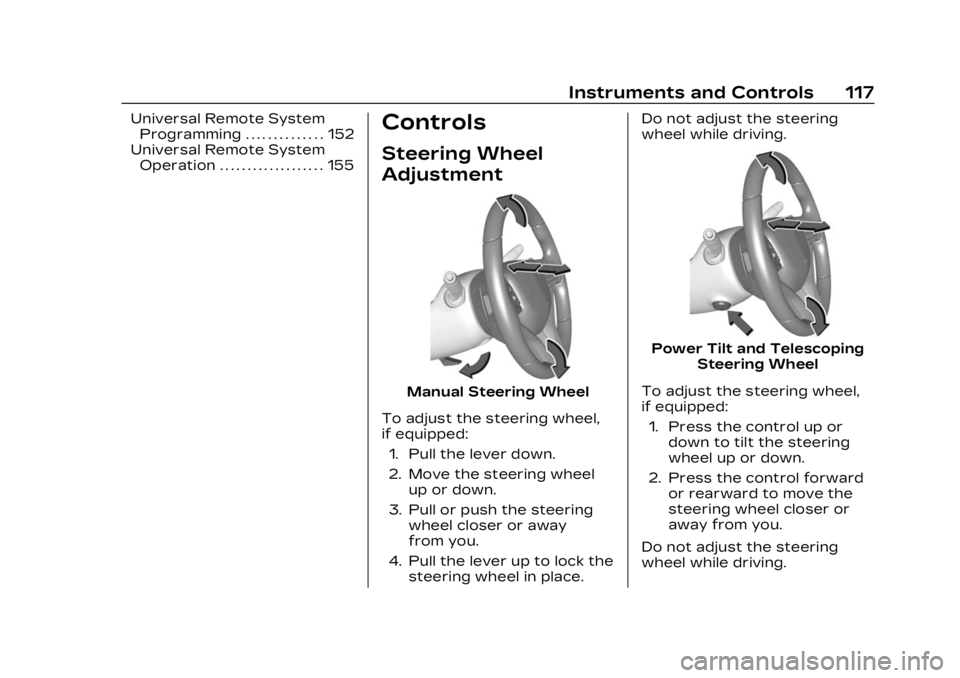
Manual Steering Wheel
To adjust the steering wheel,
if equipped: 1. Pull the lever down.
2. Move the steering wheel up or down.
3. Pull or push the steering wheel closer or away
from you.
4. Pull the lever up to lock the steering wheel in place. Do not adjust the steering
wheel while driving.
Power Tilt and Telescoping
Steering Wheel
To adjust the steering wheel,
if equipped: 1. Press the control up or down to tilt the steering
wheel up or down.
2. Press the control forward or rearward to move the
steering wheel closer or
away from you.
Do not adjust the steering
wheel while driving.
Page 152 of 507
Cadillac XT6 Owner Manual (GMNA-Localizing-U.S./Canada-16405819) -
2023 - CRC - 3/22/22
Instruments and Controls 151
HUD Troubleshooting
If you cannot see the HUD
image when the ignition is on,
check that:
.Nothing is covering the
HUD lens.
.The HUD brightness setting
is not too dim or too bright.
.The HUD is adjusted to the
proper height.
.Polarized sunglasses are
not worn.
.The windshield and HUD lens
are clean.
If the HUD image is not
correct, contact your dealer.
The windshield is part of the
HUD system. See Windshield
Replacement 0388.
Vehicle Messages
Messages displayed on the
DIC indicate the status of the
vehicle or some action that
may be needed to correct a
condition. Multiple messages
may appear one after another. The messages that do not
require immediate action can
be acknowledged and cleared
by pressing
V. The messages
that require immediate action
cannot be cleared until that
action is performed.
All messages should be taken
seriously; clearing the
message does not correct the
problem.
If a SERVICE message
appears, see your dealer.
Follow the instructions given
in the messages. The system
displays messages regarding
the following topics:
.Service Messages
.Fluid Levels
.Vehicle Security
.Brakes
.Steering
.Ride Control Systems
.Driver Assistance Systems
.Cruise Control
.Lighting and Bulb
Replacement
.Wiper/Washer Systems
.Doors and Windows
.Seat Belts
.Airbag Systems
.Engine and Transmission
.Tire Pressure
.Battery
Engine Power
Messages
ENGINE POWER IS
REDUCED
This message displays when
the vehicle's propulsion power
is reduced. A reduction in
propulsion power can affect
the vehicle's ability to
accelerate. If this message is
on, but there is no observed
reduction in performance,
proceed to your destination.
Under certain conditions the
performance may be reduced
the next time the vehicle is
driven. The vehicle may be
driven while this message is
on, but maximum acceleration
and speed may be reduced.
Page 166 of 507
Cadillac XT6 Owner Manual (GMNA-Localizing-U.S./Canada-16405819) -
2023 - CRC - 3/22/22
Infotainment System 165
features are also available
through the instrument cluster
and steering wheel controls.
Before driving:
.Become familiar with the
operation, center stack
controls, steering wheel
controls, and infotainment
display.
.Set up the audio by
presetting favorite stations,
setting the tone, and
adjusting the speakers.
.Set up phone numbers in
advance so they can be
called easily by pressing a
single control or by using a
single voice command.
See Distracted Driving 0240.
Active Noise
Cancellation (ANC)
If equipped, ANC reduces
engine noise in the vehicle’s
interior. ANC requires the
factory-installed audio system,
radio, speakers, amplifier (if
equipped), induction system,
and exhaust system to work properly. Deactivation is
required by your dealer if
related aftermarket equipment
is installed.
Overview
Infotainment System
The infotainment system is
controlled by using the
infotainment display, controls
on the center console,
steering wheel controls, and
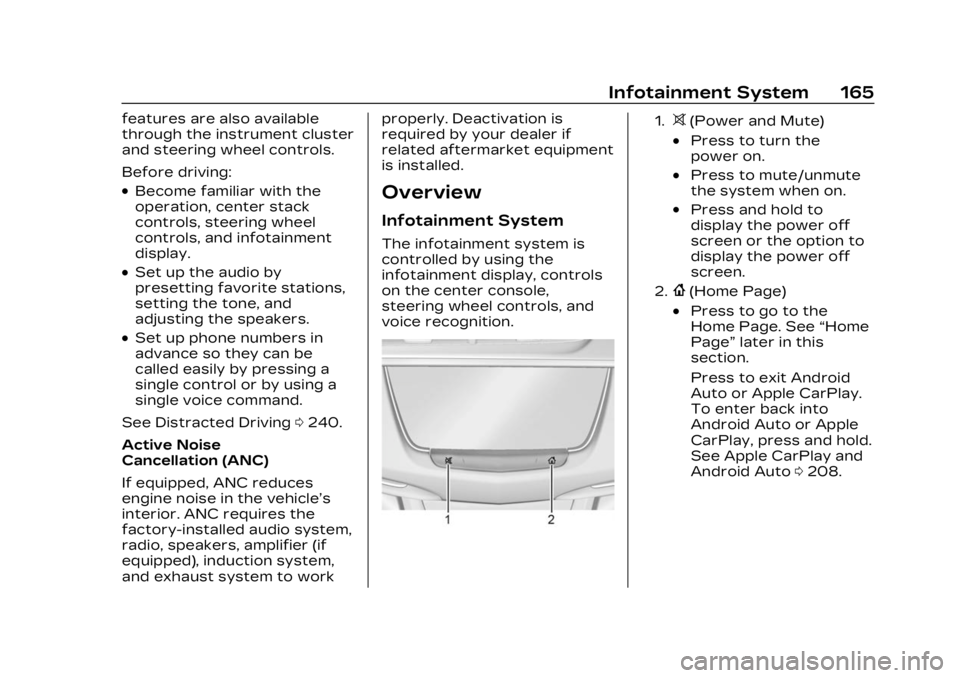
voice recognition.
1.>(Power and Mute)
.Press to turn the
power on.
.Press to mute/unmute
the system when on.
.Press and hold to
display the power off
screen or the option to
display the power off
screen.
2.{(Home Page)
.Press to go to the
Home Page. See
“Home
Page” later in this
section.
Press to exit Android
Auto or Apple CarPlay.
To enter back into
Android Auto or Apple
CarPlay, press and hold.
See Apple CarPlay and
Android Auto 0208.
Page 180 of 507
Cadillac XT6 Owner Manual (GMNA-Localizing-U.S./Canada-16405819) -
2023 - CRC - 3/22/22
Infotainment System 179
Albums :TouchHnext to any
album to store the album as a
favorite. Touch a saved
favorite to recall a favorite
album. The first song in the
album list begins to play.
Genres : Touch
Hnext to any
genre to store the genre as a
favorite. Touch a saved
favorite to recall a favorite
genre. The first song of the
genre begins to play.
Podcasts : Touch
Hnext to
any podcast to store the
podcast as a favorite. Touch a
saved favorite to recall a
favorite podcast. The podcast
begins to play.
Audiobooks : Touch
Hnext
to any audiobook to store the
audiobook as a favorite. Touch
a saved favorite to recall a
favorite audiobook. The first
chapter in the audiobook
begins to play.
Media Playback and Mute
USB playback will be paused if
the system is muted. If the
steering wheel mute control is
pressed again, playback will
resume.
If the source is changed while
in mute, playback resumes and
audio will unmute.
Bluetooth Audio
Music may be played from a
paired Bluetooth device. See
Bluetooth (Overview) 0202 or
Bluetooth (Pairing and Using a
Phone) 0203 for help pairing a
device.
Volume and song selection
may be controlled by using the
infotainment controls or the
mobile device. If Bluetooth is
selected and no volume is
present, check the volume
setting on the infotainment
system.
Music can be launched by
touching Bluetooth from the
recent sources list on the left of the display or by touching
the More option and then
touching the Bluetooth device.
To play music via Bluetooth:
1. Power on the device, and pair to connect the device.
2. Once paired, touch Audio from the Home Page, then
touch Bluetooth from the
recent sources list on the
left of the display.
Bluetooth Sound Menu
See “Infotainment System
Sound Menu” under AM-FM
Radio 0171.
Manage Bluetooth Devices
From the Home Page: 1. Touch Audio.
2. Touch Devices to add or delete devices.
When touching Bluetooth, the
radio may not be able to
launch the audio player on the
connected device to start
playing. When the vehicle is
not moving, use the mobile
device to begin playback.
Page 214 of 507

Cadillac XT6 Owner Manual (GMNA-Localizing-U.S./Canada-16405819) -
2023 - CRC - 3/22/22
Infotainment System 213
Audio
Adjusts different audio
settings.
Climate
Adjusts different climate
settings.
Navigation
Adjusts different navigation
settings.
See Using the Navigation
System0180.
Phone
Adjusts different phone
settings.
SiriusXM
Adjusts different features.
Vehicle
The menu may contain the
following: Rear Seat Reminder
Allows for a chime and a
message when the rear door
has been opened before or
during operation of the
vehicle.
Climate and Air Quality
Adjusts different climate
settings.
Collision/Detection Systems
Adjusts different driver
assistance system settings.
Comfort and Convenience
Adjusts different comfort and
convenience settings.
Lighting
Adjusts different lighting
settings.
Power Door Locks
Adjusts different door lock
settings.
Remote Lock, Unlock, and
Start
Adjusts different remote lock
settings.Seating Position
Adjusts different seat
settings.
Teen Driver
See Teen Driver
0214.
Valet Mode
This will lock the infotainment
system and steering wheel
controls. It may also limit
access to vehicle storage
locations, if equipped.
To enable valet mode: 1. Enter a four-digit code on the keypad.
2. Select Enter to go to the confirmation screen.
3. Re-enter the four-digit code.
Touch Lock or Unlock to lock
or unlock the system. Touch
Back to go back to the
previous menu.
Page 239 of 507

Cadillac XT6 Owner Manual (GMNA-Localizing-U.S./Canada-16405819) -
2023 - CRC - 3/22/22
238 Driving and Operating
Driving and
Operating
Driving Information
Driving for Better FuelEconomy . . . . . . . . . . . . . . . . . . . 239
Distracted Driving . . . . . . . . . 240
Defensive Driving . . . . . . . . . 240
Impaired Driving . . . . . . . . . . . . 241
Control of a Vehicle . . . . . . . 241
Braking . . . . . . . . . . . . . . . . . . . . . . . . 241
Steering . . . . . . . . . . . . . . . . . . . . . . 242
Off-Road Recovery . . . . . . . 243
Loss of Control . . . . . . . . . . . . 243
Off-Road Driving . . . . . . . . . . . 244
Driving on Wet Roads . . . . 248
Hill and Mountain Roads . . . . . . . . . . . . . . . . . . . . . . . 249
Winter Driving . . . . . . . . . . . . . . 250
If the Vehicle Is Stuck . . . . . 251
Vehicle Load Limits . . . . . . . 252
Starting and Operating
New Vehicle Break-In . . . . 256
Ignition Positions . . . . . . . . . . 257
Starting the Engine . . . . . . . 258
Stop/Start System . . . . . . . . 259
Engine Heater . . . . . . . . . . . . . . . 261 Retained Accessory
Power (RAP) . . . . . . . . . . . . . . . 263
Shifting Into Park . . . . . . . . . . 263
Shifting out of Park . . . . . . . 264
Parking over Things That Burn . . . . . . . . . . . . . . . . . . 264
Active Fuel Management . . . . . . . . . . . . . . 264
Extended Parking . . . . . . . . . 265
Engine Exhaust
Engine Exhaust . . . . . . . . . . . . 265
Running the Vehicle While Parked . . . . . . . . . . . . . . 266
Automatic Transmission
AutomaticTransmission . . . . . . . . . . . . . . 266
Manual Mode . . . . . . . . . . . . . . . . 271
Drive Systems
All-Wheel Drive . . . . . . . . . . . . . 273
Brakes
Electric Brake Boost . . . . . . 273
Antilock Brake System (ABS) . . . . . . . . . . . . . 273
Electric Parking Brake . . . 274
Brake Assist . . . . . . . . . . . . . . . . . 276
Hill Start Assist (HSA) . . . . 276
Ride Control Systems
Traction Control/ Electronic Stability
Control . . . . . . . . . . . . . . . . . . . . . . 276
Driver Mode Control . . . . . . 278
Cruise Control
Cruise Control . . . . . . . . . . . . . 280
Adaptive Cruise Control (Advanced) . . . . . . . . . . . . . . . . . 283
Super Cruise . . . . . . . . . . . . . . . . 294
Driver Assistance
Systems
Driver Assistance Systems . . . . . . . . . . . . . . . . . . . . . 312
Assistance Systems for Parking or Backing . . . . . . . 314
Rear Vision Camera (RVC) . . . . . . . . . . . . . 314
Surround Vision System . . . . . . . . . . . . . . . . . . . . . . 315
Park Assist . . . . . . . . . . . . . . . . . . . 318
Automatic Parking Assist (APA) . . . . . . . . . . . . . . . 320
Reverse Automatic Braking (RAB) . . . . . . . . . . . . . 322
Rear Pedestrian Alert . . . . 324
Rear Cross Traffic Alert (RCTA) System . . . . . . . . . . . 325
Page 242 of 507

Cadillac XT6 Owner Manual (GMNA-Localizing-U.S./Canada-16405819) -
2023 - CRC - 3/22/22
Driving and Operating 241
driving defensively is to wear
the seat belt. See Seat Belts
062.
.Assume that other road
users (pedestrians,
bicyclists, and other drivers)
are going to be careless and
make mistakes. Anticipate
what they may do and be
ready.
.Allow enough following
distance between you and
the driver in front of you.
.Focus on the task of driving.
Impaired Driving
Death and injury associated
with impaired driving is a
global tragedy.
{Warning
Drinking alcohol or taking
drugs and then driving is
very dangerous. Your
reflexes, perceptions,
attentiveness, and judgment
can be affected by even a
(Continued)
Warning (Continued)
small amount of alcohol or
drugs. You can have a
serious—or even fatal —
collision if you drive after
drinking or taking drugs.
Do not drive while under the
influence of alcohol or drugs,
or ride with a driver who has
been drinking or is impaired
by drugs. Find alternate
transportation home; or if
you are with a group,
designate a driver who will
remain sober.
Control of a Vehicle
Braking, steering, and
accelerating are important
factors in helping to control a
vehicle while driving.
Braking
Braking action involves
perception time and reaction
time. Deciding to push the brake pedal is perception time.
Actually doing it is
reaction time.
Average driver reaction time is
about three-quarters of a
second. In that time, a vehicle
moving at 100 km/h (60 mph)
travels 20 m (66 ft), which
could be a lot of distance in an
emergency.
Helpful braking tips to keep in
mind include:
.Keep enough distance
between you and the vehicle
in front of you.
.Avoid needless heavy
braking.
.Keep pace with traffic.
If the engine ever stops while
the vehicle is being driven,
brake normally but do not
pump the brakes. Doing so
could make the pedal harder
to push down. If the engine
stops, there will be some
power brake assist but it will
be used when the brake is
applied. Once the power assist
Page 243 of 507

Cadillac XT6 Owner Manual (GMNA-Localizing-U.S./Canada-16405819) -
2023 - CRC - 3/22/22
242 Driving and Operating
is used up, it can take longer
to stop and the brake pedal
will be harder to push.
Steering
Caution
To avoid damage to the
steering system, do not
drive over curbs, parking
barriers, or similar objects at
speeds greater than 3 km/h
(1 mph). Use care when
driving over other objects
such as lane dividers and
speed bumps. Damage
caused by misuse of the
vehicle is not covered by the
vehicle warranty.
Electric Power Steering
The vehicle is equipped with
an electric power steering
system, which reduces the
amount of effort needed to
steer the vehicle. It does not
have power steering fluid.
Regular maintenance is not
required.
If the vehicle experiences a
system malfunction and loses
power steering, greater
steering effort may be
required. Power steering
assist also may be reduced if
you turn the steering wheel asfar as it can turn and hold it
there with force for an
extended period of time.
See your dealer if there is a
problem.
Curve Tips
.Take curves at a reasonable
speed.
.Reduce speed before
entering a curve.
.Maintain a reasonable
steady speed through the
curve.
.Wait until the vehicle is out
of the curve before
accelerating gently into the
straightaway.
Steering in Emergencies
.There are some situations
when steering around a
problem may be more
effective than braking.
.Holding both sides of the
steering wheel allows you to
turn 180 degrees without
removing a hand.