buttons CADILLAC XTS 2013 1.G User Guide
[x] Cancel search | Manufacturer: CADILLAC, Model Year: 2013, Model line: XTS, Model: CADILLAC XTS 2013 1.GPages: 438, PDF Size: 7.4 MB
Page 172 of 438
Black plate (52,1)Cadillac XTS Owner Manual - 2013 - 1st - 4/13/12
5-52 Instruments and Controls
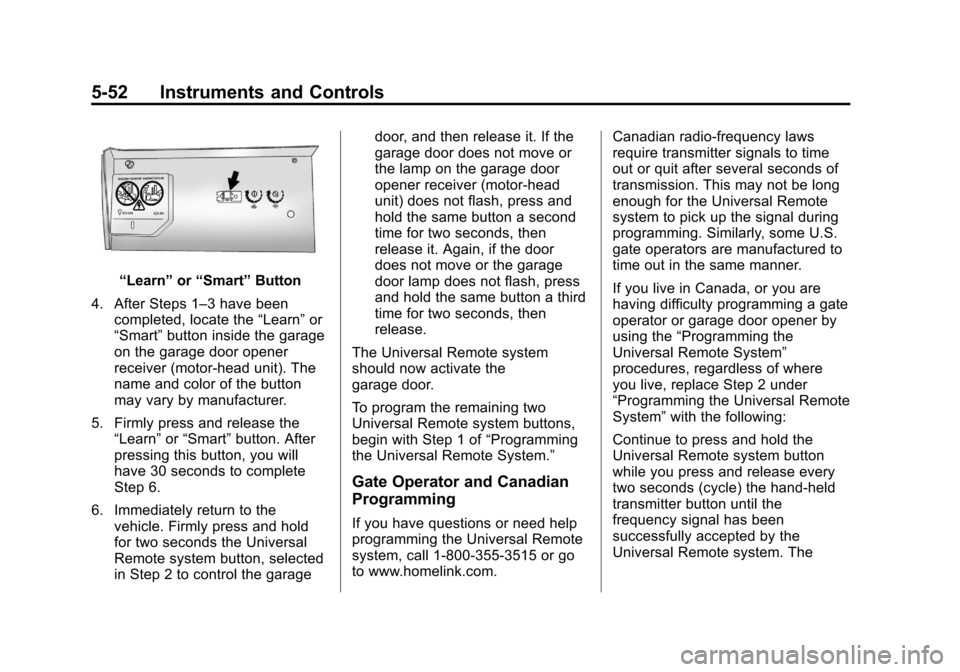
“Learn”or“Smart” Button
4. After Steps 1–3 have been completed, locate the “Learn”or
“Smart” button inside the garage
on the garage door opener
receiver (motor-head unit). The
name and color of the button
may vary by manufacturer.
5. Firmly press and release the “Learn” or“Smart” button. After
pressing this button, you will
have 30 seconds to complete
Step 6.
6. Immediately return to the vehicle. Firmly press and hold
for two seconds the Universal
Remote system button, selected
in Step 2 to control the garage door, and then release it. If the
garage door does not move or
the lamp on the garage door
opener receiver (motor-head
unit) does not flash, press and
hold the same button a second
time for two seconds, then
release it. Again, if the door
does not move or the garage
door lamp does not flash, press
and hold the same button a third
time for two seconds, then
release.
The Universal Remote system
should now activate the
garage door.
To program the remaining two
Universal Remote system buttons,
begin with Step 1 of “Programming
the Universal Remote System.”
Gate Operator and Canadian
Programming
If you have questions or need help
programming the Universal Remote
system, call 1-800-355-3515 or go
to www.homelink.com. Canadian radio-frequency laws
require transmitter signals to time
out or quit after several seconds of
transmission. This may not be long
enough for the Universal Remote
system to pick up the signal during
programming. Similarly, some U.S.
gate operators are manufactured to
time out in the same manner.
If you live in Canada, or you are
having difficulty programming a gate
operator or garage door opener by
using the
“Programming the
Universal Remote System”
procedures, regardless of where
you live, replace Step 2 under
“Programming the Universal Remote
System” with the following:
Continue to press and hold the
Universal Remote system button
while you press and release every
two seconds (cycle) the hand-held
transmitter button until the
frequency signal has been
successfully accepted by the
Universal Remote system. The
Page 173 of 438
Black plate (53,1)Cadillac XTS Owner Manual - 2013 - 1st - 4/13/12
Instruments and Controls 5-53
Universal Remote system indicator
light will flash slowly at first and then
rapidly. Proceed with Step 3 under
“Programming the Universal Remote
System”to complete.
Universal Remote System
Operation
Using the Universal Remote
System
Press and hold the appropriate
Universal Remote system button for
at least half of a second. The
indicator light will come on while the
signal is being transmitted.
Erasing Universal Remote
System Buttons
All programmed buttons should be
erased when the vehicle is sold or
the lease ends.
To erase all programmed buttons on
the Universal Remote system
device:
1. Press and hold down the two
outside buttons until the
indicator light begins to flash.
This should take about
10 seconds.
2. Release both buttons.
Reprogramming a Single
Universal Remote System
Button
To reprogram any of the three
Universal Remote system buttons:
1. Press and hold the desired Universal Remote system
button. Do not release the
button.
2. The indicator light will begin to flash after 20 seconds. Without
releasing the button, proceed
with Step 1 under “Programming
the Universal Remote System.”
If you have questions or need help
programming the Universal Remote
system, call 1-800-355-3515 or go
to www.homelink.com. You may
also call the customer assistance
phone number under Customer
Assistance Offices on page 13‑3.
Page 184 of 438
Black plate (2,1)Cadillac XTS Owner Manual - 2013 - 1st - 4/13/12
7-2 Infotainment System
driving. A grayed-out function is not
available when the vehicle is
moving. All functions are available
when the vehicle is parked.
Before driving:
.Become familiar with the
infotainment system operation
and buttons on the faceplate.
.Set up the audio by presetting
favorite stations, setting the
tone, and adjusting the
speakers.
.Set up phone numbers in
advance so they can be called
easily by pressing a single
button or by using a single voice
command for vehicles equipped
with phone capability.
See Defensive Driving on page 9‑3.
This vehicle’s infotainment system
may be equipped with a noise
reduction system which can work
improperly if the audio amplifier,
engine calibrations, exhaust system,
microphones, radio, or speakers are modified or replaced. This could
result in more noticeable engine
noise at certain speeds.
The vehicle has Retained
Accessory Power (RAP). With RAP,
the audio system can be played
even after the ignition is turned off.
See
Retained Accessory Power
(RAP) on page 9‑19.
The base radio is included in this
manual. See the separate CUE
infotainment manual for information
on the CUE radio, audio players,
phone, navigation system, and
voice or speech recognition. There
is also information on settings and
downloadable applications (if
equipped).
Theft-Deterrent Feature
TheftLock® is designed to
discourage theft of the vehicle's
radio by learning a portion of the
Vehicle Identification Number (VIN).
The radio does not operate if it is
stolen or moved to a different
vehicle.
Page 185 of 438
Black plate (3,1)Cadillac XTS Owner Manual - 2013 - 1st - 4/13/12
Infotainment System 7-3
Overview
Infotainment System Overview
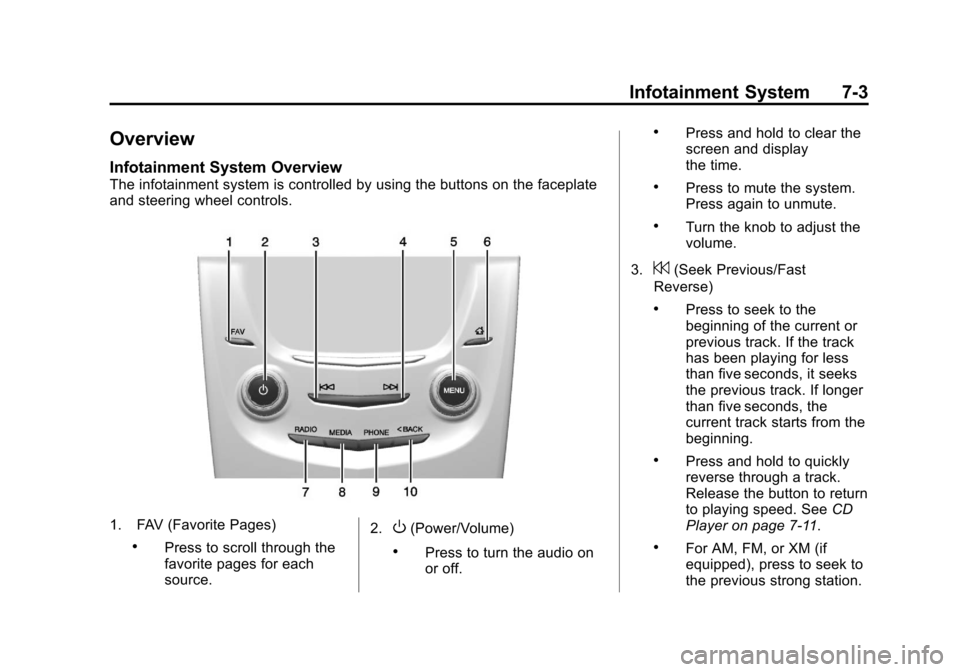
The infotainment system is controlled by using the buttons on the faceplate
and steering wheel controls.
1. FAV (Favorite Pages)
.Press to scroll through the
favorite pages for each
source.2.
O(Power/Volume)
.Press to turn the audio on
or off.
.Press and hold to clear the
screen and display
the time.
.Press to mute the system.
Press again to unmute.
.Turn the knob to adjust the
volume.
3.
7(Seek Previous/Fast
Reverse)
.Press to seek to the
beginning of the current or
previous track. If the track
has been playing for less
than five seconds, it seeks
the previous track. If longer
than five seconds, the
current track starts from the
beginning.
.Press and hold to quickly
reverse through a track.
Release the button to return
to playing speed. See CD
Player on page 7‑11.
.For AM, FM, or XM (if
equipped), press to seek to
the previous strong station.
Page 191 of 438
Black plate (9,1)Cadillac XTS Owner Manual - 2013 - 1st - 4/13/12
Infotainment System 7-9
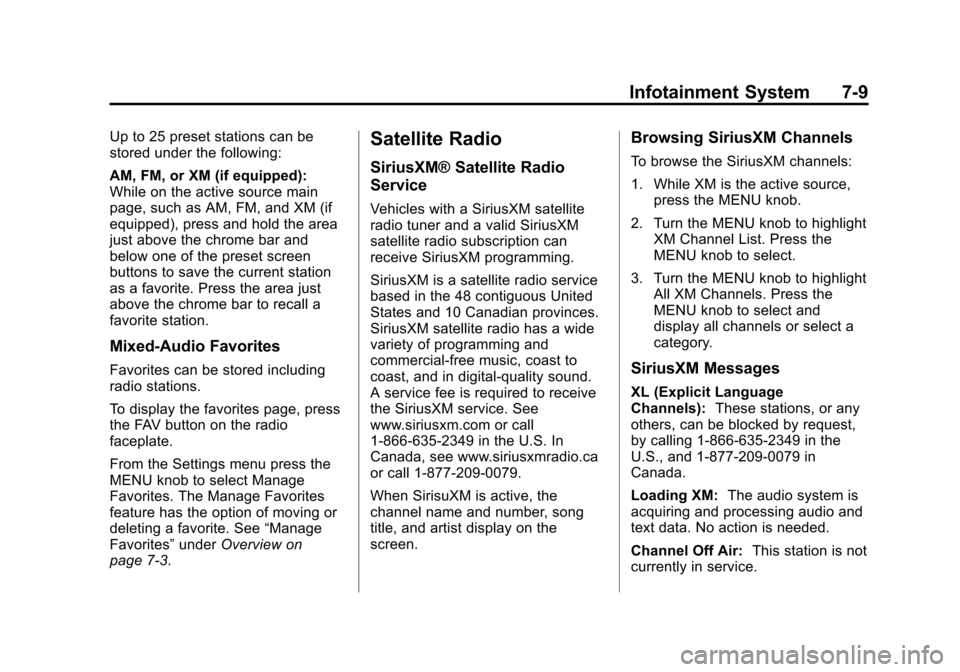
Up to 25 preset stations can be
stored under the following:
AM, FM, or XM (if equipped):
While on the active source main
page, such as AM, FM, and XM (if
equipped), press and hold the area
just above the chrome bar and
below one of the preset screen
buttons to save the current station
as a favorite. Press the area just
above the chrome bar to recall a
favorite station.
Mixed-Audio Favorites
Favorites can be stored including
radio stations.
To display the favorites page, press
the FAV button on the radio
faceplate.
From the Settings menu press the
MENU knob to select Manage
Favorites. The Manage Favorites
feature has the option of moving or
deleting a favorite. See“Manage
Favorites” underOverview on
page 7‑3.
Satellite Radio
SiriusXM® Satellite Radio
Service
Vehicles with a SiriusXM satellite
radio tuner and a valid SiriusXM
satellite radio subscription can
receive SiriusXM programming.
SiriusXM is a satellite radio service
based in the 48 contiguous United
States and 10 Canadian provinces.
SiriusXM satellite radio has a wide
variety of programming and
commercial-free music, coast to
coast, and in digital-quality sound.
A service fee is required to receive
the SiriusXM service. See
www.siriusxm.com or call
1-866-635-2349 in the U.S. In
Canada, see www.siriusxmradio.ca
or call 1-877-209-0079.
When SirisuXM is active, the
channel name and number, song
title, and artist display on the
screen.
Browsing SiriusXM Channels
To browse the SiriusXM channels:
1. While XM is the active source, press the MENU knob.
2. Turn the MENU knob to highlight XM Channel List. Press the
MENU knob to select.
3. Turn the MENU knob to highlight All XM Channels. Press the
MENU knob to select and
display all channels or select a
category.
SiriusXM Messages
XL (Explicit Language
Channels): These stations, or any
others, can be blocked by request,
by calling 1-866-635-2349 in the
U.S., and 1-877-209-0079 in
Canada.
Loading XM: The audio system is
acquiring and processing audio and
text data. No action is needed.
Channel Off Air: This station is not
currently in service.
Page 201 of 438
Black plate (19,1)Cadillac XTS Owner Manual - 2013 - 1st - 4/13/12
Infotainment System 7-19
WARNING (CONTINUED)
(navigation) system. Taking your
eyes off the road too long or too
often could cause a crash
resulting in injury or death. Focus
your attention on driving.
Vehicles with a Bluetooth system
can use a Bluetooth-capable cell
phone with a Hands-Free Profile to
make and receive phone calls. The
infotainment system and voice
recognition are used to control the
system. The system can be used
while in ON/RUN or ACC/
ACCESSORY. The range of the
Bluetooth system can be up to 9.1 m
(30 ft). Not all phones support all
functions and not all phones work
with the Bluetooth system. See
www.gm.com/bluetooth for more
information about compatible
phones.
Bluetooth Controls
Use the buttons on the faceplate
and the steering wheel to operate
the Bluetooth system.
Steering Wheel Controls
g(Push to Talk): Press to answer
incoming calls, confirm system
information, and start voice
recognition.
i(End Call): Press to end a call,
reject a call, or cancel an operation.
Press to mute or unmute the
infotainment system.
Infotainment System Controls
For information about how to
navigate the menu system using the
infotainment controls, see Overview
on page 7‑3.
MENU: Turn to scroll through a list.
Press to select the highlighted list
option.
{(Home Page): Press to go to the
Home Page. See Home Page on
page 7‑4. PHONE:
Press to enter the phone
main menu. See Bluetooth
(Infotainment Controls) on
page 7‑20 orBluetooth (Voice
Recognition) on page 7‑24 or
Bluetooth (Overview) on page 7‑18.
Voice Recognition
The voice recognition system uses
commands to control the system
and dial phone numbers.
Noise: The system may not
recognize voice commands if there
is too much background noise.
When to Speak: A tone sounds to
indicate that the system is ready for
a voice command. Wait for the tone
and then speak.
How to Speak: Speak clearly in a
calm and natural voice.
Audio System
When using the Bluetooth system,
sound comes through the vehicle's
front audio system speakers and
overrides the audio system. Use the
volume bar during a call to change
Page 215 of 438
Black plate (1,1)Cadillac XTS Owner Manual - 2013 - 1st - 4/13/12
Climate Controls 8-1
Climate Controls
Climate Control Systems
Dual Automatic Climate ControlSystem (Uplevel) . . . . . . . . . . . . 8-1
Dual Automatic Climate Control System (Base) . . . . . . . . . . . . . . . 8-6
Rear Climate Control System . . . . . . . . . . . . . . . . . . . . . . 8-9
Air Vents
Air Vents . . . . . . . . . . . . . . . . . . . . . 8-11
Maintenance
Passenger Compartment AirFilter . . . . . . . . . . . . . . . . . . . . . . . 8-12
Service . . . . . . . . . . . . . . . . . . . . . . 8-14
Climate Control Systems
Dual Automatic Climate Control System (Uplevel)
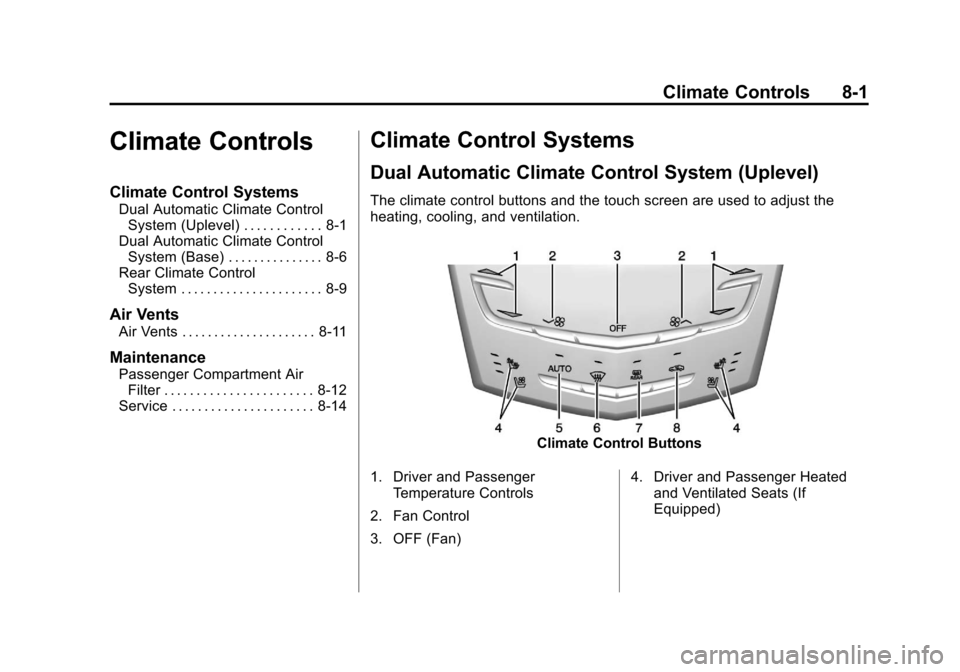
The climate control buttons and the touch screen are used to adjust the
heating, cooling, and ventilation.
Climate Control Buttons
1. Driver and Passenger Temperature Controls
2. Fan Control
3. OFF (Fan) 4. Driver and Passenger Heated
and Ventilated Seats (If
Equipped)
Page 216 of 438
Black plate (2,1)Cadillac XTS Owner Manual - 2013 - 1st - 4/13/12
8-2 Climate Controls
5. AUTO (Automatic Operation)
6. Defrost
7. Rear Window Defogger
8. Recirculation
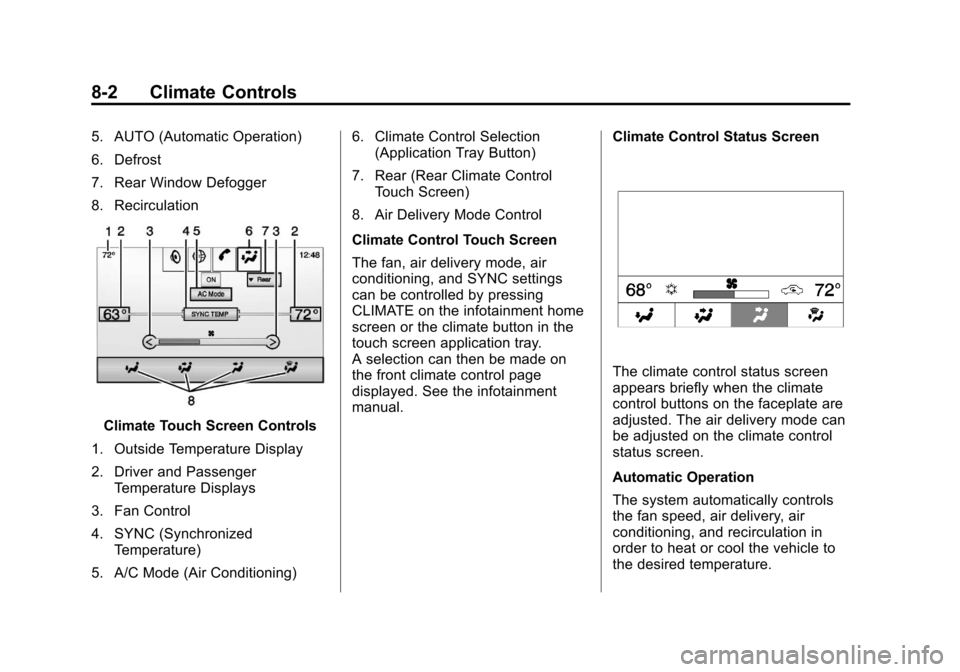
Climate Touch Screen Controls
1. Outside Temperature Display
2. Driver and Passenger Temperature Displays
3. Fan Control
4. SYNC (Synchronized Temperature)
5. A/C Mode (Air Conditioning) 6. Climate Control Selection
(Application Tray Button)
7. Rear (Rear Climate Control Touch Screen)
8. Air Delivery Mode Control
Climate Control Touch Screen
The fan, air delivery mode, air
conditioning, and SYNC settings
can be controlled by pressing
CLIMATE on the infotainment home
screen or the climate button in the
touch screen application tray.
A selection can then be made on
the front climate control page
displayed. See the infotainment
manual. Climate Control Status Screen
The climate control status screen
appears briefly when the climate
control buttons on the faceplate are
adjusted. The air delivery mode can
be adjusted on the climate control
status screen.
Automatic Operation
The system automatically controls
the fan speed, air delivery, air
conditioning, and recirculation in
order to heat or cool the vehicle to
the desired temperature.
Page 217 of 438
Black plate (3,1)Cadillac XTS Owner Manual - 2013 - 1st - 4/13/12
Climate Controls 8-3
When the indicator light is on or
AUTO is displayed on the touch
screen, the system is in full
automatic operation. If the air
delivery mode or fan setting is
manually adjusted, the auto
indicator turns off and the display
will show the selected settings. Auto
operation can be turned off
individually for climate settings.
For automatic operation:
1. Press AUTO.
2. Set the temperature. Allow thesystem time to stabilize. Then
adjust the temperature as
needed for best comfort.
To improve fuel efficiency and to
cool the vehicle faster, recirculation
may be automatically selected in
warm weather. The recirculation
light will not come on. Press
@to
select recirculation; press it again to
select outside air. OFF (Fan):
Press to turn the fan on
or off. The temperature control and
air delivery mode can still be
adjusted.
w/x(Driver and Passenger
Temperature Controls): The
temperature can be adjusted
separately for the driver and the
passenger. Press to increase or
decrease the temperature. Press
and hold to rapidly increase or
decrease the temperature.
SYNC (Synchronized
Temperature): Press SYNC on the
touch screen to link all climate zone
settings to the driver settings. Adjust
the driver side temperature control
to change the linked temperature.
When the passenger settings are
adjusted, the SYNC button is
displayed when the temperatures
are unlinked.
Rear (If Equipped): Press this
button on the front climate control
touch screen to open the rear
climate control screen. The rear climate control settings can now be
adjusted from the front
passenger area.
Manual Operationz 9 y(Fan Control):
Press the
fan control buttons or the touch
screen fan control, to increase or
decrease the fan speed. Press and
hold the buttons or the touch screen
control to adjust speed more
quickly. The fan speed setting
displays. Pressing either button
cancels automatic fan control and
the fan can be controlled manually.
Press AUTO to return to automatic
operation. To turn off the fan and
climate control system, press and
hold the fan down button or touch
screen fan control until it is off.
Page 218 of 438

Black plate (4,1)Cadillac XTS Owner Manual - 2013 - 1st - 4/13/12
8-4 Climate Controls
Air Delivery Mode Control:When
the climate information is displayed,
press the desired air delivery mode
on the touch screen to change the
direction of the airflow. The selected
air delivery mode button is lit.
Pressing any of the air delivery
buttons cancels automatic air
delivery control and the direction of
the airflow can be controlled
manually. Press AUTO to return to
automatic operation.
To change the current mode, select
one of the following:
Y(Vent): Air is directed to the
instrument panel outlets.
\(Bi-Level): Air is divided
between the instrument panel
outlets and the floor outlets.
[(Floor): Air is directed to the
floor outlets.
-(Defog): Clears the windows of
fog or moisture. Air is directed to the
windshield and floor outlets.
0(Defrost): Clears the
windshield of fog or frost more
quickly. Air is directed to the
windshield. Press the
0button to
turn on or off. Changing the air
delivery mode also turns the
defrost off.
#(Air Conditioning): Press the
AC Mode touch screen control to
turn the automatic air conditioning
on or off. If the fan is turned off or
the outside temperature falls below
freezing, the air conditioner will
not run.
Press AUTO to return to automatic
operation and the air conditioner
runs as needed.
Automatic Air Recirculation:
When the AUTO indicator light is
on, the air is automatically
recirculated as needed to help
quickly cool the inside of the
vehicle.
The climate control system may
have a sensor to detect air pollution.
When using automatic air recirculation, the air quality control
system may operate. To adjust the
sensitivity of the air quality sensor,
see
“Climate and Air Quality” under
Vehicle Personalization on
page 5‑44.
@(Recirculation): Press to
alternate between recirculating air
inside the vehicle or pulling in
outside air. The indicator light on the
button is lit when recirculation mode
is active. This helps to quickly cool
the air inside the vehicle or prevent
outside air and odors from entering.
Pressing this button cancels
automatic recirculation. Press AUTO
to return to automatic operation;
recirculation runs automatically as
needed.
Manual recirculation mode is not
available when in Defrost or Defog
modes.
Auto Defog: The climate control
system may have a sensor to
automatically detect high humidity
inside the vehicle. When high
humidity is detected, the climate