center console CADILLAC XTS 2013 1.G User Guide
[x] Cancel search | Manufacturer: CADILLAC, Model Year: 2013, Model line: XTS, Model: CADILLAC XTS 2013 1.GPages: 438, PDF Size: 7.4 MB
Page 119 of 438
Black plate (3,1)Cadillac XTS Owner Manual - 2013 - 1st - 4/13/12
Storage 4-3
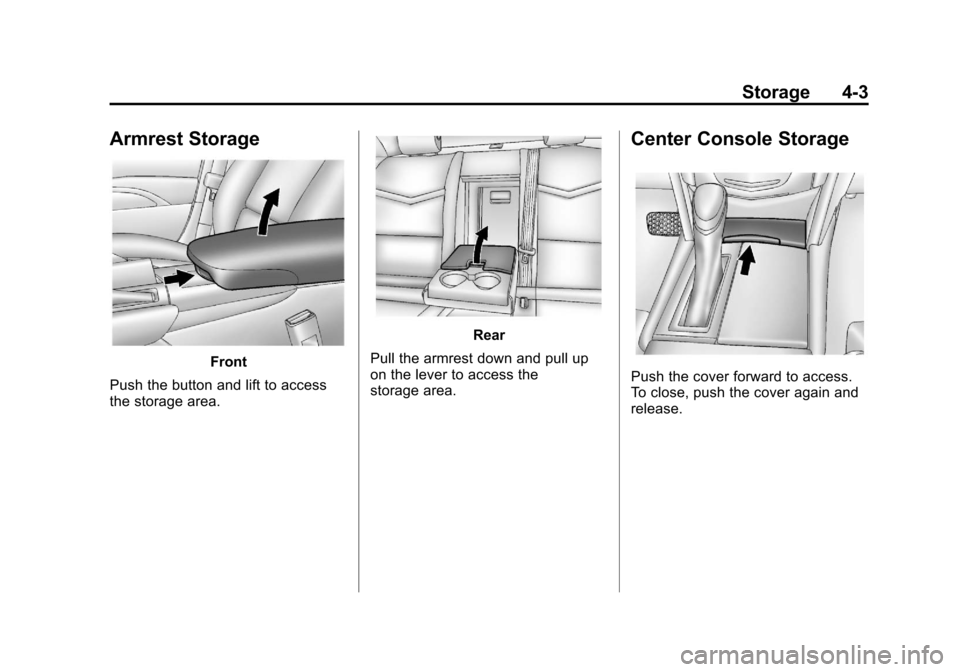
Armrest Storage
Front
Push the button and lift to access
the storage area.
Rear
Pull the armrest down and pull up
on the lever to access the
storage area.
Center Console Storage
Push the cover forward to access.
To close, push the cover again and
release.
Page 120 of 438
Black plate (4,1)Cadillac XTS Owner Manual - 2013 - 1st - 4/13/12
4-4 Storage
There is storage in the rear of the
center console; lift the cover to
access.
The center console has a storage
area in the rear of the console.
Press and release the door to
access. Push the door to close.
There is a power outlet inside the
storage areas. SeePower Outlets
on page 5‑6.Additional Storage
Features
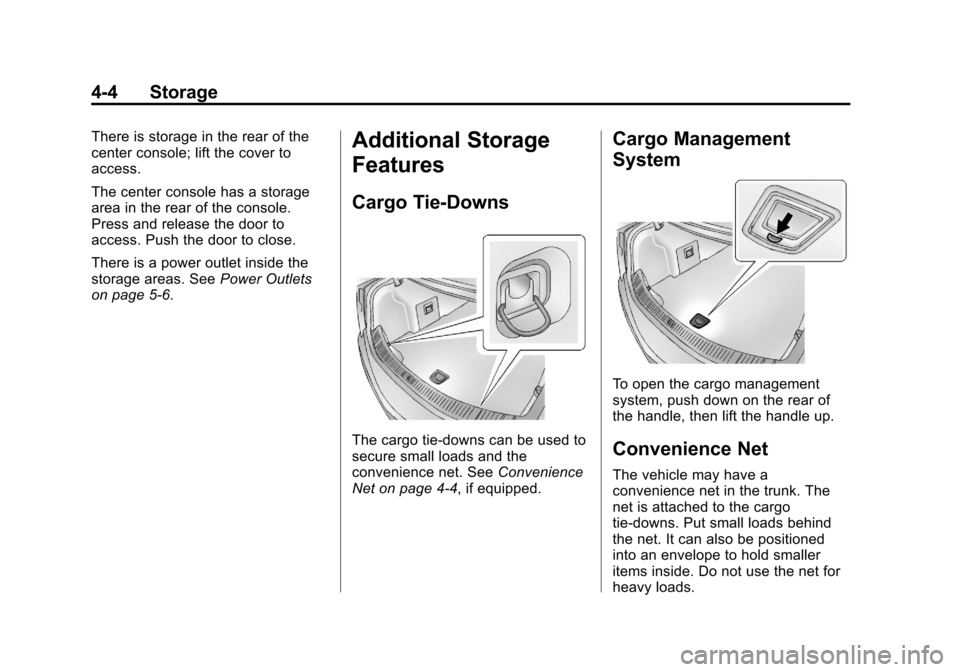
Cargo Tie-Downs
The cargo tie-downs can be used to
secure small loads and the
convenience net. See Convenience
Net on page 4‑4, if equipped.
Cargo Management
System
To open the cargo management
system, push down on the rear of
the handle, then lift the handle up.
Convenience Net
The vehicle may have a
convenience net in the trunk. The
net is attached to the cargo
tie-downs. Put small loads behind
the net. It can also be positioned
into an envelope to hold smaller
items inside. Do not use the net for
heavy loads.
Page 126 of 438
Black plate (6,1)Cadillac XTS Owner Manual - 2013 - 1st - 4/13/12
5-6 Instruments and Controls
To set the date:
1. Press the SETTINGS screenbutton and press Time and Date.
2. Press Set Date and press + or −
to increase or decrease month,
day, or year.
3. Press
}to go back to the
previous menu.
To set the clock display:
1. Press the SETTINGS screen button and press Time and Date.
2. Press Clock Display and press OFF or ON to turn the clock
display off or on.
3. Press
}to go back to the
previous menu.
Power Outlets
The accessory power outlets can be
used to plug in electrical equipment,
such as a cell phone or MP3 player. The vehicle has three accessory
power outlets:
.Inside the front storage area
below the climate control
system.
.Inside the center console.
.On the rear of the center
console.
Lift the cover to access the
accessory power outlet.
Certain accessory power plugs may
not be compatible with the
accessory power outlet and could
overload vehicle or adapter fuses.
If a problem is experienced, see
your dealer.
When adding electrical equipment,
be sure to follow the proper
installation instructions included with
the equipment. See Add-On
Electrical Equipment on page 9‑65.
Notice: Hanging heavy
equipment from the power outlet
can cause damage not covered
by the vehicle warranty. The power outlets are designed for
accessory power plugs only, such
as cell phone charge cords.
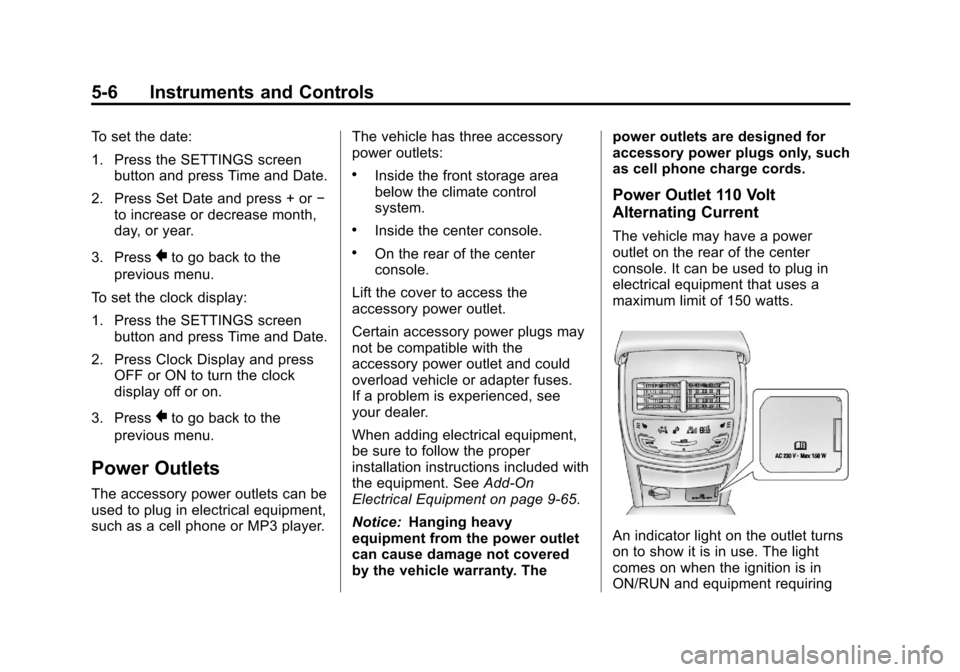
Power Outlet 110 Volt
Alternating Current
The vehicle may have a power
outlet on the rear of the center
console. It can be used to plug in
electrical equipment that uses a
maximum limit of 150 watts.
An indicator light on the outlet turns
on to show it is in use. The light
comes on when the ignition is in
ON/RUN and equipment requiring
Page 127 of 438
Black plate (7,1)Cadillac XTS Owner Manual - 2013 - 1st - 4/13/12
Instruments and Controls 5-7
less than 150 watts is plugged into
the outlet, and no system fault is
detected.
The indicator light does not come on
when the ignition is in LOCK/OFF or
if the equipment is not fully seated
into the outlet.
If equipment is connected using
more than 150 watts or a system
fault is detected, a protection circuit
shuts off the power supply and the
indicator light turns off. To reset the
circuit, unplug the item and plug it
back in or turn the Retained
Accessory Power (RAP) off and
then back on. SeeRetained
Accessory Power (RAP) on
page 9‑19. The power restarts when
equipment using 150 watts or less is
plugged into the outlet and a system
fault is not detected. The power outlet is not designed for
and may not work properly, if the
following are plugged in:
.Equipment with high initial peak
wattage such as:
compressor-driven refrigerators
and electric power tools.
.Other equipment requiring an
extremely stable power supply
such as:
microcomputer-controlled
electric blankets, touch sensor
lamps, etc.
Cigarette Lighter
For vehicles with cigarette lighters,
they are located under the climate
control system inside the storage
area and on the rear of the center
console.
To activate the cigarette lighter,
push it into the heating element and
let go. The lighter pops out when it
is ready to be used.
Notice:
Holding a cigarette lighter
in while it is heating does not let
the lighter back away from the
heating element when it is hot.
Damage from overheating can
occur to the lighter or heating
element, or a fuse could be
blown. Do not hold a cigarette
lighter in while it is heating.
Page 137 of 438
Black plate (17,1)Cadillac XTS Owner Manual - 2013 - 1st - 4/13/12
Instruments and Controls 5-17
WARNING (CONTINUED)
without a crash. To help avoid
injury, have the vehicle serviced
right away.
If there is a problem with the airbag
system, a Driver Information Center
(DIC) message may also come on.
See Airbag System Messages on
page 5‑42.
Passenger Airbag Status
Indicator
The vehicle has a passenger
sensing system. See Passenger
Sensing System on page 3‑34 for
important safety information. The
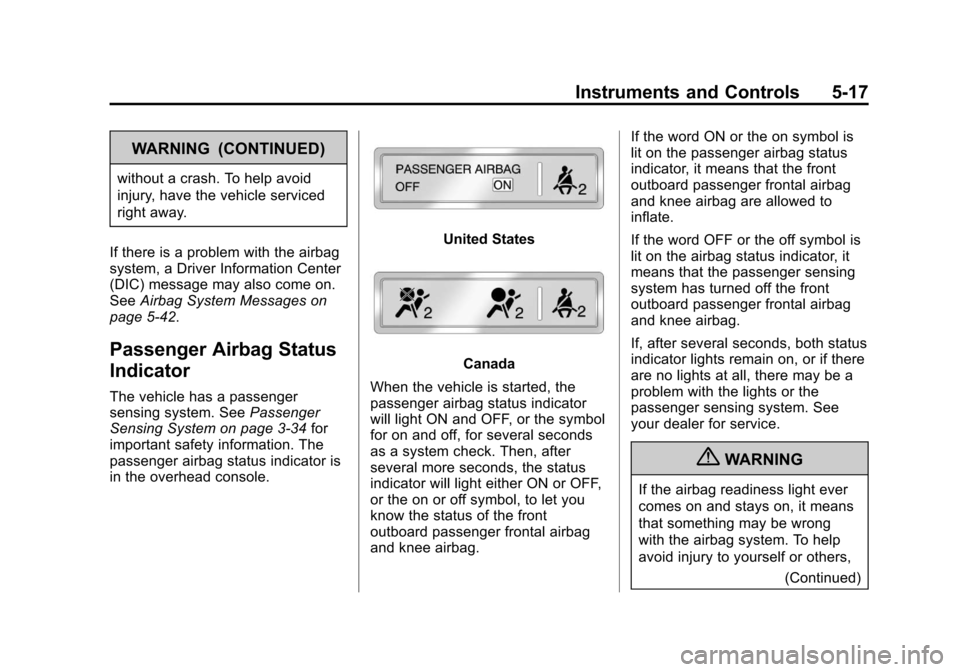
passenger airbag status indicator is
in the overhead console.
United States
Canada
When the vehicle is started, the
passenger airbag status indicator
will light ON and OFF, or the symbol
for on and off, for several seconds
as a system check. Then, after
several more seconds, the status
indicator will light either ON or OFF,
or the on or off symbol, to let you
know the status of the front
outboard passenger frontal airbag
and knee airbag. If the word ON or the on symbol is
lit on the passenger airbag status
indicator, it means that the front
outboard passenger frontal airbag
and knee airbag are allowed to
inflate.
If the word OFF or the off symbol is
lit on the airbag status indicator, it
means that the passenger sensing
system has turned off the front
outboard passenger frontal airbag
and knee airbag.
If, after several seconds, both status
indicator lights remain on, or if there
are no lights at all, there may be a
problem with the lights or the
passenger sensing system. See
your dealer for service.
{WARNING
If the airbag readiness light ever
comes on and stays on, it means
that something may be wrong
with the airbag system. To help
avoid injury to yourself or others,
(Continued)
Page 181 of 438
Black plate (7,1)Cadillac XTS Owner Manual - 2013 - 1st - 4/13/12
Lighting 6-7
To change the dome lamp settings,
press:
OFF:Turns the lamp off, even
when a door is open.
DOOR: The lamp comes on when
a door is opened.
ON: Turns the lamp on.
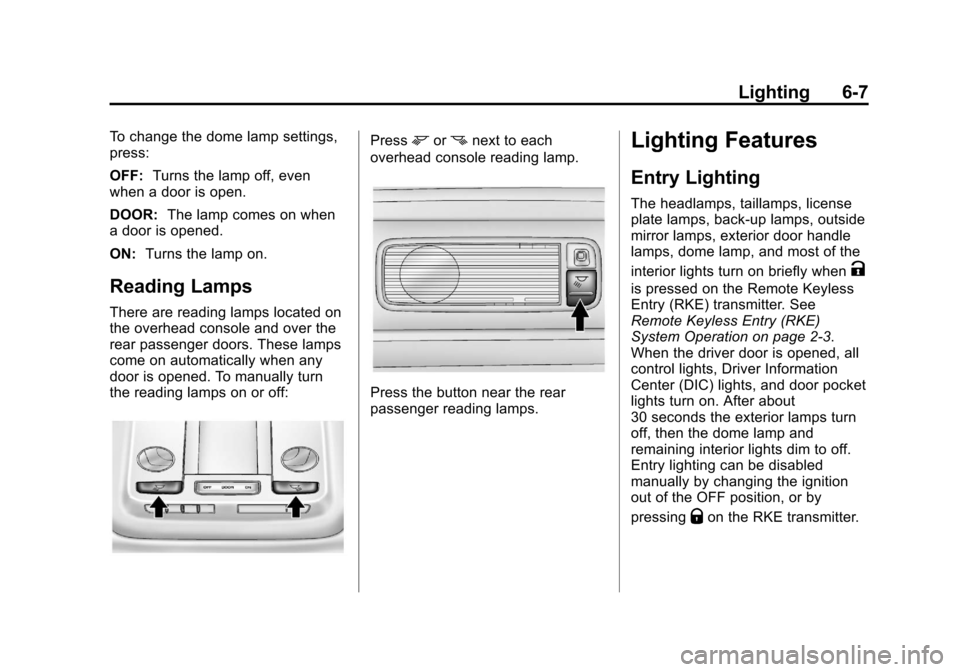
Reading Lamps
There are reading lamps located on
the overhead console and over the
rear passenger doors. These lamps
come on automatically when any
door is opened. To manually turn
the reading lamps on or off:
Pressmornnext to each
overhead console reading lamp.
Press the button near the rear
passenger reading lamps.
Lighting Features
Entry Lighting
The headlamps, taillamps, license
plate lamps, back-up lamps, outside
mirror lamps, exterior door handle
lamps, dome lamp, and most of the
interior lights turn on briefly when
K
is pressed on the Remote Keyless
Entry (RKE) transmitter. See
Remote Keyless Entry (RKE)
System Operation on page 2‑3.
When the driver door is opened, all
control lights, Driver Information
Center (DIC) lights, and door pocket
lights turn on. After about
30 seconds the exterior lamps turn
off, then the dome lamp and
remaining interior lights dim to off.
Entry lighting can be disabled
manually by changing the ignition
out of the OFF position, or by
pressing
Qon the RKE transmitter.
Page 196 of 438
Black plate (14,1)Cadillac XTS Owner Manual - 2013 - 1st - 4/13/12
7-14 Infotainment System
Playing an MP3 CD
To play an MP3 CD, follow the same
instructions as“Playing an
Audio CD.”
The following guidelines must be
met when creating an MP3 disc,
otherwise the CD might not play:
.Sampling rate: 16 kHz,
22.05 kHz, 24 kHz, 32 kHz,
44.1 kHz, and 48 kHz.
.Bit rates supported: 8, 16, 24,
32, 40, 48, 56, 64, 80, 96, 112,
128, 144, 160, 192, 224, 256,
and 320 kbps.
.Maximum number of folders:
eight folders with 255 files per
folder.
.Maximum of 1,000 files on
a disc.
.Recorded on a CD-R or CD-RW. Root Directory
The root directory is treated as a
folder. All files contained directly
under the root directory are
accessed prior to any root directory
folders.
Empty Folders
If a root directory or folder is empty
or contains only folders, the player
advances to the next folder in the
file structure that contains a
compressed audio file. The empty
folder(s) are not displayed or
numbered.
No Folder
When the CD only contains
compressed audio files without any
folders or playlists, all files are
under the root folder.
USB Port
Playing from a USB
A USB mass storage device or
Media Transfer Protocol (MTP)
device can be connected to the
USB port.
The USB ports are in the center
console under the armrest and in
the center stack storage bin.
USB MP3 Player and USB Drives
.The USB MP3 players and USB
drives connected must comply
with the USB Mass Storage
Class specification (USB MSC).
.Hard disk drives are not
supported.
To play a USB device:
.Connect the USB.
.Press the MEDIA button on the
faceplate until the connected
device is shown.
Page 197 of 438
Black plate (15,1)Cadillac XTS Owner Manual - 2013 - 1st - 4/13/12
Infotainment System 7-15
While the USB source is active, use
the icons on the screen to operate
USB function:
.t(Seek Previous/Fast
Reverse)
.u(Seek Next/Fast Forward)
.j/r(Play/Pause)
.Z(Shuffle)
For information on how to use the
screen icons, see “Playing an
Audio CD.”
USB Menu
Press the MENU knob to display the
USB menu and the following may
display:
Browse: Select to display the files
on the USB device.
Tone Settings: Select to adjust
Bass, Midrange, Treble, Balance,
Fade, and EQ (Equalizer). See
“Tone Settings” under“Playing an
Audio CD.” Auto Volume:
If equipped, see
“Playing an Audio CD.”
Bose AudioPilot: If equipped, see
“Playing an Audio CD.”
Playing from an iPod®
This feature supports the following
iPod models:
.iPod nano® (1st, 2nd, 3rd, and
4th generation)
.iPod with video (5.0 and 5.5
generation). Video is not shown;
only audio is supported.
.iPod classic® (6th generation)
.iPod touch® (1st and 2nd
generation)
There may be problems with
operation and function in the
following situations:
.When connecting an iPod on
which a more recent version of
the firmware is installed than is
supported by the infotainment
system.
.When connecting an iPod on
which firmware from other
providers is installed.
To connect and control an iPod:
1. Connect one end of the standard iPod USB cable to the iPod's
dock connector.
2. Connect the other end to a USB port in the center console or in
the center stack storage bin.
3. Press the MEDIA button to select the source.
iPod music information displays on
the radio’s display and begins
playing through the vehicle’s audio
system.
The iPod battery recharges
automatically while the vehicle is on.
When the vehicle is off while an
iPod is connected using the iPod
USB cable, the iPod battery stops
charging and the iPod automatically
turns off.
Page 199 of 438
Black plate (17,1)Cadillac XTS Owner Manual - 2013 - 1st - 4/13/12
Infotainment System 7-17
5. Turn the MENU knob to highlightand press to select the song
from the list to begin playback.
Songs:
1. Turn the MENU knob to highlight and press to view a list of all
songs stored on the iPod.
2. Turn the MENU knob to highlight and press to select the song
from the list to begin playback.
Playing from an iPhone®
or iPad®
This feature supports iPhone 3G,
iPhone 3GS, iPhone 4, and iPad.
Follow the same instructions as
stated earlier for using an iPod.
SD Card Reader
This vehicle has an SD card port in
the center console.
Set up any SD card while the
vehicle is in P (Park).
1. Plug the SD card into the port. 2. Press the MEDIA button to
select the SD device.
If an SD card has already been
connected, but a different source is
currently active, press the MEDIA
screen button repeatedly to cycle
through all of the available audio
source screens, until the SD card
screen is selected.
Playing Music from the SD Card
An SD card is played the same way
a USB device is played. See USB
Port on page 7‑14.
Auxiliary Jack
This vehicle has an AUX port in the
center console under the armrest
and in the center stack storage bin.
Possible auxiliary audio sources
include:
.Laptop computer
.Audio music player
This jack is not an audio output. Do
not plug headphones into the
auxiliary input jack. Drivers are encouraged to set up any auxiliary
device while the vehicle is in
P (Park).
Connect a 3.5 mm (1/8 in) cable
from the auxiliary device to the
auxiliary input jack.
If an auxiliary device has already
been connected, but a different
source is currently active, press the
Now Playing screen button on the
Home Page, then press the MEDIA
faceplate button repeatedly to scroll
through all of the available audio
source screens, until the AUX
source screen is selected.
Playing from the AUX Port
An auxiliary device is played the
same way a USB device is played.
See
USB Port on page 7‑14.
Page 426 of 438

Black plate (2,1)Cadillac XTS Owner Manual - 2013 - 1st - 4/13/12
i-2 INDEX
AutomaticDoor Locks . . . . . . . . . . . . . . . . . . . 2-12
Headlamp System . . . . . . . . . . . . . 6-4
Level Control . . . . . . . . . . . . . . . . . 9-31
Transmission . . . . . . . . . . . . . . . . . 9-22
Transmission Fluid . . . . . . . . . 10-10
Automatic Transmission
Manual Mode . . . . . . . . . . . . . . . . . 9-24
Shift Lock ControlFunction Check . . . . . . . . . . . 10-21
Auxiliary Jack . . . . . . . . . . . . . . . . . . 7-17
B
Battery . . . . . . . . . . . . . . . . . . . . . . . 10-20
Exterior Lighting BatterySaver . . . . . . . . . . . . . . . . . . . . . . . . 6-8
Jump Starting . . . . . . . . . . . . . . . 10-71
Power Protection . . . . . . . . . . . . . . 6-8
Voltage and Charging Messages . . . . . . . . . . . . . . . . . . . 5-34
Blade Replacement, Wiper . . . 10-22
Bluetooth . . . . . . . . . . 7-18, 7-20, 7-24 Brake
Parking, Electric . . . . . . . . . . . . . . 9-26
System Warning Light . . . . . . . . 5-20
Brakes . . . . . . . . . . . . . . . . . . . . . . . . 10-18 Antilock . . . . . . . . . . . . . . . . . . . . . . . 9-25
Assist . . . . . . . . . . . . . . . . . . . . . . . . . 9-27
Fluid . . . . . . . . . . . . . . . . . . . . . . . . 10-19
System Messages . . . . . . . . . . . . 5-35
Braking . . . . . . . . . . . . . . . . . . . . . . . . . 9-3
Braking System Active Emergency . . . . . . . . . . . . 1-20
Break-In, New Vehicle . . . . . . . . . 9-14
Bulb Replacement . . . . . . . . . . . . 10-25 Back-up Lamps . . . . . . . . . . . . . 10-23
Headlamp Aiming . . . . . . . . . . . 10-23
Headlamps . . . . . . . . . . . . . . . . . 10-23
High Intensity Discharge(HID) Lighting . . . . . . . . . . . . . 10-23
License Plate Lamps . . . . . . . 10-24
Buying New Tires . . . . . . . . . . . . . 10-50
C
Calibration . . . . . . . . . . . . . . . . . . . . . . 5-5
California Fuel Requirements . . . . . . . . . . . 9-56
Perchlorate MaterialsRequirements . . . . . . . . . . . . . . . 10-3
Warning . . . . . . . . . . . . . . . . . . . . . . 10-2
Canadian Vehicle Owners . . . . . . . . iii
Capacities and Specifications . . . . . . . . . . . . . . . . 12-2
Carbon Monoxide
Engine Exhaust . . . . . . . . . . . . . . . 9-21
Trunk . . . . . . . . . . . . . . . . . . . . . . . . . 2-14
Winter Driving . . . . . . . . . . . . . . . . . 9-7
Card Reader SD . . . . . . . . . . . . . . . . . . . . . . . . . . . . 7-17
Cargo Management System . . . . . . . . . . 4-4
Tie-Downs . . . . . . . . . . . . . . . . . . . . . 4-4
Cautions, Danger, and
Warnings . . . . . . . . . . . . . . . . . . . . . . . . iv
CD Player . . . . . . . . . . . . . . . . . . . . . 7-11
Center Console Storage . . . . . . . . 4-3
Chains, Tire . . . . . . . . . . . . . . . . . . 10-55
Charging System Light . . . . . . . . 5-18