change wheel CADILLAC XTS 2013 1.G User Guide
[x] Cancel search | Manufacturer: CADILLAC, Model Year: 2013, Model line: XTS, Model: CADILLAC XTS 2013 1.GPages: 438, PDF Size: 7.4 MB
Page 179 of 438
Black plate (5,1)Cadillac XTS Owner Manual - 2013 - 1st - 4/13/12
Lighting 6-5
or;to disable this feature.
Adaptive Forward
Lighting (AFL)
For vehicles with uplevel
headlamps, the AFL system adjusts
the headlamps to provide greater
road illumination in various driving
conditions.
To enable AFL, set the exterior lamp
control to the AUTO position.
Moving the control out of the AUTO
position will deactivate the system.
AFL will operate when the vehicle
speed is greater than 3 km/h
(2 mph). AFL will not operate when
the transmission is in R (Reverse).
AFL is not immediately operable
after starting the vehicle; driving a
short distance is required to
calibrate the AFL. SeeExterior
Lamp Controls on page 6‑1.
Curve Lighting
The light beam pivots based on the
steering wheel position and vehicle
speed of at least 10 km/h (6 mph). The headlamps shine at an angle of
up to 15 degrees to the right or left
of the direction of travel.
Headlamp Leveling
Control
Automatic Headlamp Leveling
For vehicles with headlamp leveling,
the range of the headlamps is
adjusted automatically based on
vehicle load.
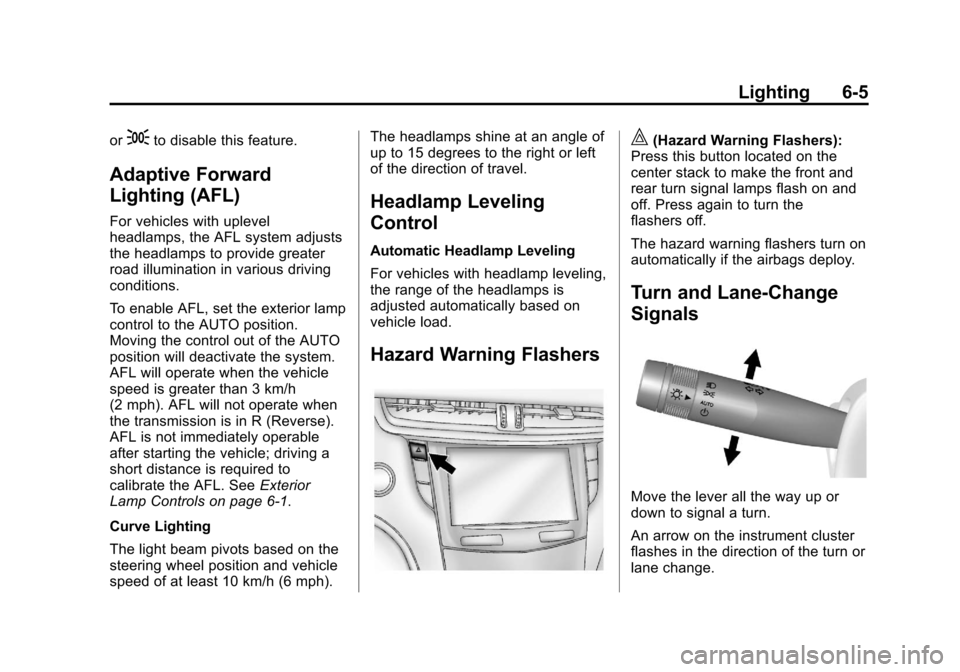
Hazard Warning Flashers
|(Hazard Warning Flashers):
Press this button located on the
center stack to make the front and
rear turn signal lamps flash on and
off. Press again to turn the
flashers off.
The hazard warning flashers turn on
automatically if the airbags deploy.
Turn and Lane-Change
Signals
Move the lever all the way up or
down to signal a turn.
An arrow on the instrument cluster
flashes in the direction of the turn or
lane change.
Page 180 of 438
Black plate (6,1)Cadillac XTS Owner Manual - 2013 - 1st - 4/13/12
6-6 Lighting
Raise or lower the lever until the
arrow starts to flash to signal a lane
change. Hold it there until the lane
change is completed. If the lever is
briefly pressed and released, the
turn signal flashes three times.
The turn and lane-change signal
can be turned off manually by
moving the lever back to its original
position.
If after signaling a turn or lane
change, the arrow flashes rapidly or
does not come on, a signal bulb
might be burned out.
Replace any burned out bulbs. If a
bulb is not burned out, check the
fuse. SeeFuses and Circuit
Breakers on page 10‑26.Interior Lighting
Instrument Panel
Illumination Control
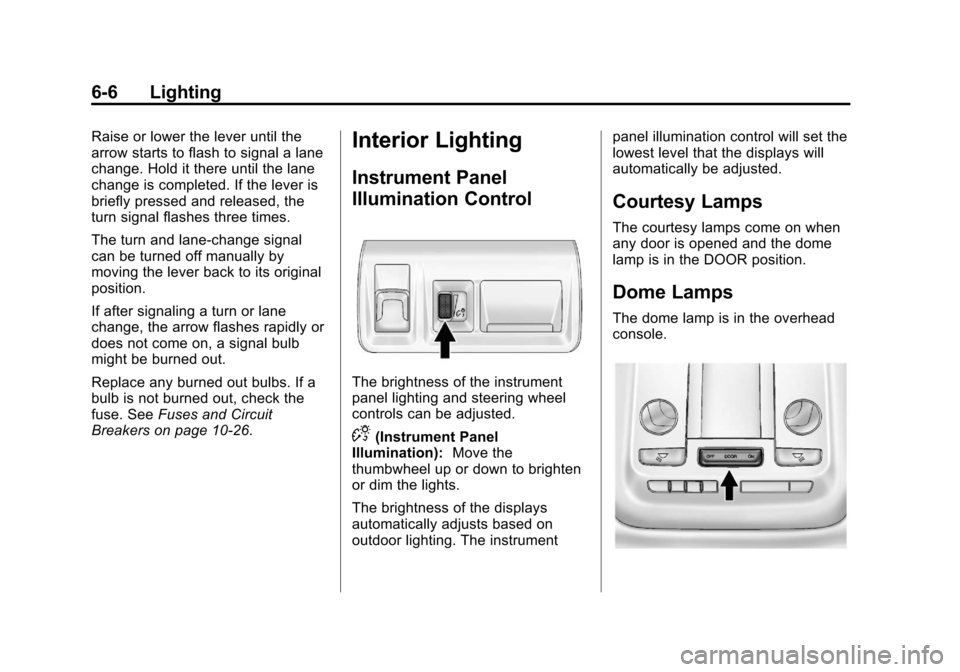
The brightness of the instrument
panel lighting and steering wheel
controls can be adjusted.
D(Instrument Panel
Illumination): Move the
thumbwheel up or down to brighten
or dim the lights.
The brightness of the displays
automatically adjusts based on
outdoor lighting. The instrument panel illumination control will set the
lowest level that the displays will
automatically be adjusted.
Courtesy Lamps
The courtesy lamps come on when
any door is opened and the dome
lamp is in the DOOR position.
Dome Lamps
The dome lamp is in the overhead
console.
Page 189 of 438
Black plate (7,1)Cadillac XTS Owner Manual - 2013 - 1st - 4/13/12
Infotainment System 7-7
all personalized radio settings will
be restored back to the factory
settings. Select Cancel or Confirm.
Select
SBACK to go back to the
last menu.
English and Metric Unit
Conversion
To change the display units between
English and metric units, see
Instrument Cluster on page 5‑9.
Software Updates
See the following websites for
information:
Cadillac
In the U.S., see www.cadillac.com.
In Canada, see www.cadillac.ca.
Radio
AM-FM Radio
Playing the Radio
While on the audio main page,
press the RADIO or MEDIA button
repeatedly to display and scroll
through the available sources (AM,
FM, and XM (if equipped), CD, USB,
SD, and AUX).
The steering wheel controls can
also be used to adjust the volume.
See Steering Wheel Controls on
page 5‑2.
AM, FM, XM (If Equipped)
To select AM, FM, XM (if equipped):
1. Press
{.
2. Turn the MENU knob to highlight the AUDIO screen icon.
3. Press the MENU knob to select. 4. Turn the MENU knob to highlight
either AM, FM, or XM (if
equipped) and press the MENU
to select.
Pressing the RADIO faceplate
button is another way to change
from a different source, to AM, FM,
or XM (if equipped).
Press the RADIO faceplate button
to display the active radio source.
Press the MENU knob and the
following radio settings may display:
Tone Settings:
.Bass, Midrange, and Treble:
Turn the MENU knob and
highlight. Press the MENU knob
to select. Turn the MENU knob
to adjust.
.Balance: Turn the MENU knob
to highlight. Press the MENU
knob to select. Turn the MENU
knob left for more sound from
the left speakers or right for
more sound from the right
Page 201 of 438
Black plate (19,1)Cadillac XTS Owner Manual - 2013 - 1st - 4/13/12
Infotainment System 7-19
WARNING (CONTINUED)
(navigation) system. Taking your
eyes off the road too long or too
often could cause a crash
resulting in injury or death. Focus
your attention on driving.
Vehicles with a Bluetooth system
can use a Bluetooth-capable cell
phone with a Hands-Free Profile to
make and receive phone calls. The
infotainment system and voice
recognition are used to control the
system. The system can be used
while in ON/RUN or ACC/
ACCESSORY. The range of the
Bluetooth system can be up to 9.1 m
(30 ft). Not all phones support all
functions and not all phones work
with the Bluetooth system. See
www.gm.com/bluetooth for more
information about compatible
phones.
Bluetooth Controls
Use the buttons on the faceplate
and the steering wheel to operate
the Bluetooth system.
Steering Wheel Controls
g(Push to Talk): Press to answer
incoming calls, confirm system
information, and start voice
recognition.
i(End Call): Press to end a call,
reject a call, or cancel an operation.
Press to mute or unmute the
infotainment system.
Infotainment System Controls
For information about how to
navigate the menu system using the
infotainment controls, see Overview
on page 7‑3.
MENU: Turn to scroll through a list.
Press to select the highlighted list
option.
{(Home Page): Press to go to the
Home Page. See Home Page on
page 7‑4. PHONE:
Press to enter the phone
main menu. See Bluetooth
(Infotainment Controls) on
page 7‑20 orBluetooth (Voice
Recognition) on page 7‑24 or
Bluetooth (Overview) on page 7‑18.
Voice Recognition
The voice recognition system uses
commands to control the system
and dial phone numbers.
Noise: The system may not
recognize voice commands if there
is too much background noise.
When to Speak: A tone sounds to
indicate that the system is ready for
a voice command. Wait for the tone
and then speak.
How to Speak: Speak clearly in a
calm and natural voice.
Audio System
When using the Bluetooth system,
sound comes through the vehicle's
front audio system speakers and
overrides the audio system. Use the
volume bar during a call to change
Page 206 of 438
Black plate (24,1)Cadillac XTS Owner Manual - 2013 - 1st - 4/13/12
7-24 Infotainment System
Bluetooth (Voice
Recognition)
Using Voice Recognition
To use voice recognition, pressg
on the steering wheel. Use the
commands below for the various
voice features. For additional
information, say“Help”while you
are in a voice recognition menu.
Pairing
A Bluetooth-enabled cell phone
must be paired to the Bluetooth
system and then connected to the
vehicle before it can be used. See
your cell phone manufacturer's user
guide for Bluetooth functions before
pairing the cell phone. If a Bluetooth
phone is not connected, calls can
be made using OnStar Hands-Free
Calling, if available. See OnStar
Overview on page 14‑1.
Pairing Information
.Up to five cell phones can be
paired to the Bluetooth system.
.The pairing process is disabled
when the vehicle is moving.
.Pairing only needs to be
completed once, unless the
pairing information on the cell
phone changes or the cell phone
is deleted from the system.
.Only one paired cell phone can
be connected to the Bluetooth
system at a time.
.If multiple paired cell phones are
within range of the system, the
system connects to the first
available paired cell phone in the
order that they were first paired
to the system. To link to a
different paired phone, see
“Connecting to a Different
Phone” later in this section.
Pairing a Phone
1. Press
g. The system responds
“Ready,” followed by a tone.
2. Say “Bluetooth.” 3. Say
“Pair.”The system responds
with instructions and a four-digit
Personal Identification Number
(PIN). The PIN is used in Step 5.
4. Start the pairing process on the cell phone that you want to pair.
For help with this process, see
your cell phone manufacturer's
user guide.
5. Locate the device named “Your
Vehicle” in the list on the cell
phone. Follow the instructions
on the cell phone to enter the
PIN provided in Step 3. After the
PIN is successfully entered, the
system prompts you to provide a
name for the paired cell phone.
This name will be used to
indicate which phones are
paired and connected to the
vehicle. The system responds
with “
successfully paired” after the
pairing process is complete.
6. Repeat Steps 1−5 to pair additional phones.
Page 225 of 438
Black plate (11,1)Cadillac XTS Owner Manual - 2013 - 1st - 4/13/12
Climate Controls 8-11
SYNC:Press SYNC on the touch
screen to match the rear climate
control temperature to the front
climate control driver temperature.
The SYNC indicator light turns on.
Adjusting the rear temperature
controls will unlink the set driver and
rear temperatures. The SYNC
indicator turns off.
Rear Control Lockout: Press to
lock or unlock control of the rear
climate control system from the rear
seat passengers. When locked, the
rear climate control can only be
adjusted from the front seat.
Automatic Operation
Rear AUTO: Press to turn on or off.
The air delivery and fan speed are
controlled automatically. The AUTO
indicator appears on the display.
If any of the climate control settings
are manually adjusted, this cancels
full automatic operation. Manual Operation
S
A T(Fan Control): Press or
press and hold the rear climate
control buttons or touch screen to
increase or decrease the airflow.
Pressing
T Awhen the system is
off will turn the system on. The air
delivery mode remains in its
previous setting.
+/− (Temperature Control): Press
or press and hold the rear
temperature control buttons or touch
screen to adjust the rear passenger
temperature. Press + for warmer air
and press −for cooler air.
Y/\/Y(Air Delivery Mode
Control): Press the desired mode
button on the touch screen or the
MODE button on the rear faceplate
to change the direction of the airflow
in the rear seating area.
MorL(Heated Rear Seats, If
Equipped): Press
MorLto heat
the left or right outboard seat
cushion and seatback. See Heated
Rear Seats on page 3‑12.
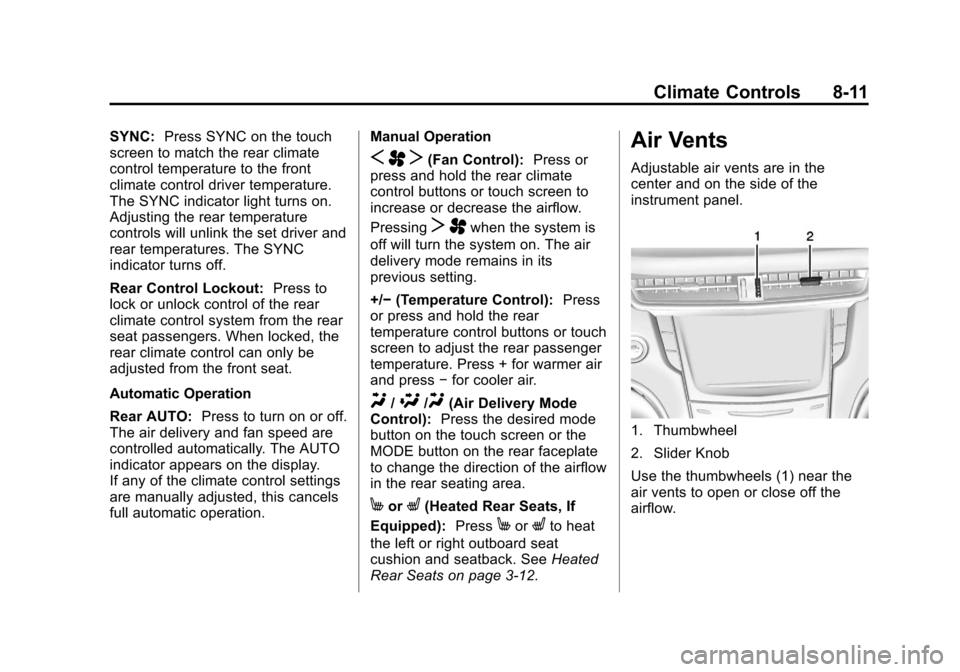
Air Vents
Adjustable air vents are in the
center and on the side of the
instrument panel.
1. Thumbwheel
2. Slider Knob
Use the thumbwheels (1) near the
air vents to open or close off the
airflow.
Page 233 of 438
Black plate (5,1)Cadillac XTS Owner Manual - 2013 - 1st - 4/13/12
Driving and Operating 9-5
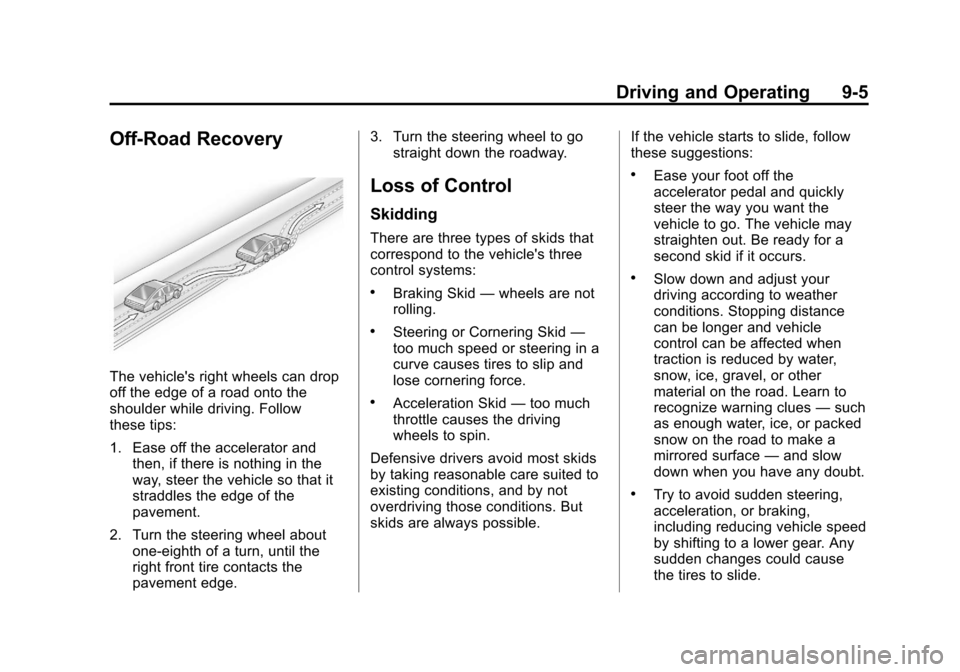
Off-Road Recovery
The vehicle's right wheels can drop
off the edge of a road onto the
shoulder while driving. Follow
these tips:
1. Ease off the accelerator andthen, if there is nothing in the
way, steer the vehicle so that it
straddles the edge of the
pavement.
2. Turn the steering wheel about one-eighth of a turn, until the
right front tire contacts the
pavement edge. 3. Turn the steering wheel to go
straight down the roadway.
Loss of Control
Skidding
There are three types of skids that
correspond to the vehicle's three
control systems:
.Braking Skid —wheels are not
rolling.
.Steering or Cornering Skid —
too much speed or steering in a
curve causes tires to slip and
lose cornering force.
.Acceleration Skid —too much
throttle causes the driving
wheels to spin.
Defensive drivers avoid most skids
by taking reasonable care suited to
existing conditions, and by not
overdriving those conditions. But
skids are always possible. If the vehicle starts to slide, follow
these suggestions:
.Ease your foot off the
accelerator pedal and quickly
steer the way you want the
vehicle to go. The vehicle may
straighten out. Be ready for a
second skid if it occurs.
.Slow down and adjust your
driving according to weather
conditions. Stopping distance
can be longer and vehicle
control can be affected when
traction is reduced by water,
snow, ice, gravel, or other
material on the road. Learn to
recognize warning clues
—such
as enough water, ice, or packed
snow on the road to make a
mirrored surface —and slow
down when you have any doubt.
.Try to avoid sudden steering,
acceleration, or braking,
including reducing vehicle speed
by shifting to a lower gear. Any
sudden changes could cause
the tires to slide.
Page 253 of 438
Black plate (25,1)Cadillac XTS Owner Manual - 2013 - 1st - 4/13/12
Driving and Operating 9-25
Brakes
Antilock Brake
System (ABS)
This vehicle has the Antilock Brake
System (ABS), an advanced
electronic braking system that helps
prevent a braking skid.
When the engine is started and the
vehicle begins to drive away, ABS
checks itself. A momentary motor or
clicking noise might be heard while
this test is going on, and it might
even be noticed that the brake
pedal moves a little. This is normal.
If there is a problem with ABS, this
warning light stays on. SeeAntilock
Brake System (ABS) Warning Light
on page 5‑22. If driving safely on a wet road and it
becomes necessary to slam on the
brakes and continue braking to
avoid a sudden obstacle, a
computer senses that the wheels
are slowing down. If one of the
wheels is about to stop rolling, the
computer will separately work the
brakes at each wheel.
ABS can change the brake pressure
to each wheel, as required, faster
than any driver could. This can help
the driver steer around the obstacle
while braking hard.
As the brakes are applied, the
computer keeps receiving updates
on wheel speed and controls
braking pressure accordingly.
Remember: ABS does not change
the time needed to get a foot up to
the brake pedal or always decrease
stopping distance. If you get too
close to the vehicle in front of you,
there will not be enough time to
apply the brakes if that vehicle
suddenly slows or stops. Always
leave enough room up ahead to
stop, even with ABS.
Using ABS
Do not pump the brakes. Just hold
the brake pedal down firmly and let
ABS work. You might hear the ABS
pump or motor operating and feel
the brake pedal pulsate, but this is
normal.
Braking in Emergencies
ABS allows the driver to steer and
brake at the same time. In many
emergencies, steering can help
more than even the very best
braking.
Page 259 of 438
Black plate (31,1)Cadillac XTS Owner Manual - 2013 - 1st - 4/13/12
Driving and Operating 9-31
Automatic Level Control
The automatic level control rear
suspension is available on some
vehicles.
This type of level control is fully
automatic and will provide a better
leveled riding position as well as
better handling under a variety of
passenger and loading conditions.
An air compressor connected to the
rear shocks will raise or lower the
rear of the vehicle to maintain
proper vehicle height. The system is
activated when the engine is
running and will automatically adjust
vehicle height thereafter. The
system may exhaust (lower vehicle
height) for up to 10 minutes after the
engine has been turned off. You
may hear the air compressor
operating when the height is being
adjusted; this is normal.
If the compressor runs often for
longer than one minute within the
same trip and the vehicle remains
low in the rear, see your dealer for
service.If the vehicle is not used for several
weeks, the rear of the vehicle may
look low. When the engine is
started, the vehicle will return to the
proper height.
If a weight-distributing hitch is being
used, it is recommended to allow
the shocks to inflate, thereby
leveling the vehicle prior to adjusting
the hitch.
Cruise Control
{WARNING
Cruise control can be dangerous
where you cannot drive safely at
a steady speed. So, do not use
the cruise control on winding
roads or in heavy traffic.
Cruise control can be dangerous
on slippery roads. On such roads,
fast changes in tire traction can
cause excessive wheel slip, and
you could lose control. Do not use
cruise control on slippery roads.
With cruise control, a speed of
about 40 km/h (25 mph) or more can
be maintained without keeping your
foot on the accelerator. Cruise
control does not work at speeds
below about 40 km/h (25 mph).
If the brakes are applied, the cruise
control disengages.
Page 263 of 438
Black plate (35,1)Cadillac XTS Owner Manual - 2013 - 1st - 4/13/12
Driving and Operating 9-35
WARNING (CONTINUED)
Do not use Adaptive Cruise
Control when:
.On winding and hilly roads or
when the sensors are
blocked by snow, ice, or dirt.
The system may not detect a
vehicle ahead. Keep the
entire front of the vehicle
clean.
.Visibility is low, such as in
fog, rain, or snow conditions.
Adaptive Cruise Control
performance is limited under
these conditions.
.On slippery roads where fast
changes in tire traction can
cause excessive wheel slip.
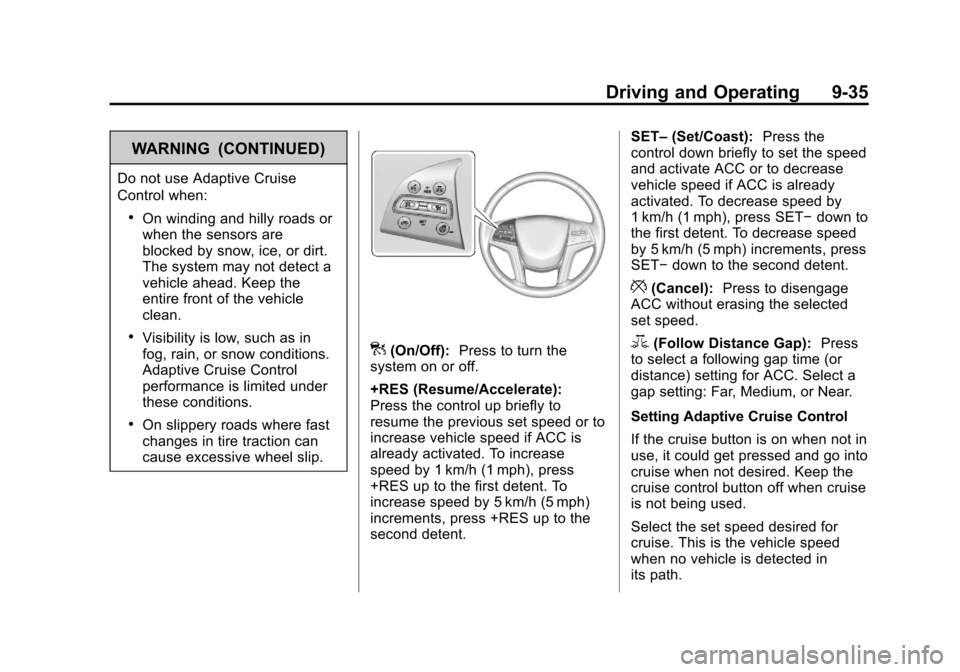
](On/Off):Press to turn the
system on or off.
+RES (Resume/Accelerate):
Press the control up briefly to
resume the previous set speed or to
increase vehicle speed if ACC is
already activated. To increase
speed by 1 km/h (1 mph), press
+RES up to the first detent. To
increase speed by 5 km/h (5 mph)
increments, press +RES up to the
second detent. SET–
(Set/Coast): Press the
control down briefly to set the speed
and activate ACC or to decrease
vehicle speed if ACC is already
activated. To decrease speed by
1 km/h (1 mph), press SET− down to
the first detent. To decrease speed
by 5 km/h (5 mph) increments, press
SET− down to the second detent.
*(Cancel): Press to disengage
ACC without erasing the selected
set speed.
3(Follow Distance Gap): Press
to select a following gap time (or
distance) setting for ACC. Select a
gap setting: Far, Medium, or Near.
Setting Adaptive Cruise Control
If the cruise button is on when not in
use, it could get pressed and go into
cruise when not desired. Keep the
cruise control button off when cruise
is not being used.
Select the set speed desired for
cruise. This is the vehicle speed
when no vehicle is detected in
its path.