lock CADILLAC XTS 2013 1.G Repair Manual
[x] Cancel search | Manufacturer: CADILLAC, Model Year: 2013, Model line: XTS, Model: CADILLAC XTS 2013 1.GPages: 438, PDF Size: 7.4 MB
Page 184 of 438
Black plate (2,1)Cadillac XTS Owner Manual - 2013 - 1st - 4/13/12
7-2 Infotainment System
driving. A grayed-out function is not
available when the vehicle is
moving. All functions are available
when the vehicle is parked.
Before driving:
.Become familiar with the
infotainment system operation
and buttons on the faceplate.
.Set up the audio by presetting
favorite stations, setting the
tone, and adjusting the
speakers.
.Set up phone numbers in
advance so they can be called
easily by pressing a single
button or by using a single voice
command for vehicles equipped
with phone capability.
See Defensive Driving on page 9‑3.
This vehicle’s infotainment system
may be equipped with a noise
reduction system which can work
improperly if the audio amplifier,
engine calibrations, exhaust system,
microphones, radio, or speakers are modified or replaced. This could
result in more noticeable engine
noise at certain speeds.
The vehicle has Retained
Accessory Power (RAP). With RAP,
the audio system can be played
even after the ignition is turned off.
See
Retained Accessory Power
(RAP) on page 9‑19.
The base radio is included in this
manual. See the separate CUE
infotainment manual for information
on the CUE radio, audio players,
phone, navigation system, and
voice or speech recognition. There
is also information on settings and
downloadable applications (if
equipped).
Theft-Deterrent Feature
TheftLock® is designed to
discourage theft of the vehicle's
radio by learning a portion of the
Vehicle Identification Number (VIN).
The radio does not operate if it is
stolen or moved to a different
vehicle.
Page 187 of 438
Black plate (5,1)Cadillac XTS Owner Manual - 2013 - 1st - 4/13/12
Infotainment System 7-5
SETTINGS:Select the SETTINGS
screen icon to display the Settings
main page. See “Setting Radio
Preferences” in this section.
Setting Radio Preferences
Select the SETTINGS screen icon
to display the Settings menu and
the following may display:
Time:SeeClock on page 5‑5.
Language (Current Language):
This will set the display language in
the radio, instrument cluster, and
voice recognition. Select to display
a list of languages. Select
SBACK
to go back to the previous menu.
Valet Mode:
1. Type a four-digit code on the circular numeric keypad. Turn
the MENU knob to highlight a
number.
2. Press the MENU knob to select it. Do this for each one of the
four digits. Select Enter to go to
the confirmation screen. 3. Re-enter the four-digit code.
Select LOCK to lock the system.
This will also lock the vehicle
storage locations, if equipped.
4. Type the four-digit code to unlock the system. Select
S
BACK to go back to the
previous menu.
Radio: See“Radio Setup” later in
this section.
Vehicle: SeeVehicle
Personalization on page 5‑44.
Display: Press the MENU knob to
turn the display on or off.
Return to Factory Settings: See
“Return to Factory Settings” later in
this section.
Software Information: Press the
MENU knob to select Save Vehicle
Info to USB. Press the MENU knob
again to start downloading the
vehicle information to the USB. Radio Setup
From the RADIO screen icon, the
following may be displayed:
Manage Favorites:
.Select to highlight a favorite.
.Select Delete to delete a
favorite.
.While a station is highlighted,
press the MOVE screen button.
The screen button will change
to DROP.
.Press the MENU knob to grab
the station tab. Turn the MENU
knob and the station tab will
follow the path to the desired
location. Press the area just
above the chrome bar and below
the DROP screen button to
relocate the station.
Number of Favorites Shown: To
set the number of favorites for
display, select Auto to automatically
show all the favorites, or select a
number from 5–25 to show that
Page 191 of 438
Black plate (9,1)Cadillac XTS Owner Manual - 2013 - 1st - 4/13/12
Infotainment System 7-9
Up to 25 preset stations can be
stored under the following:
AM, FM, or XM (if equipped):
While on the active source main
page, such as AM, FM, and XM (if
equipped), press and hold the area
just above the chrome bar and
below one of the preset screen
buttons to save the current station
as a favorite. Press the area just
above the chrome bar to recall a
favorite station.
Mixed-Audio Favorites
Favorites can be stored including
radio stations.
To display the favorites page, press
the FAV button on the radio
faceplate.
From the Settings menu press the
MENU knob to select Manage
Favorites. The Manage Favorites
feature has the option of moving or
deleting a favorite. See“Manage
Favorites” underOverview on
page 7‑3.
Satellite Radio
SiriusXM® Satellite Radio
Service
Vehicles with a SiriusXM satellite
radio tuner and a valid SiriusXM
satellite radio subscription can
receive SiriusXM programming.
SiriusXM is a satellite radio service
based in the 48 contiguous United
States and 10 Canadian provinces.
SiriusXM satellite radio has a wide
variety of programming and
commercial-free music, coast to
coast, and in digital-quality sound.
A service fee is required to receive
the SiriusXM service. See
www.siriusxm.com or call
1-866-635-2349 in the U.S. In
Canada, see www.siriusxmradio.ca
or call 1-877-209-0079.
When SirisuXM is active, the
channel name and number, song
title, and artist display on the
screen.
Browsing SiriusXM Channels
To browse the SiriusXM channels:
1. While XM is the active source, press the MENU knob.
2. Turn the MENU knob to highlight XM Channel List. Press the
MENU knob to select.
3. Turn the MENU knob to highlight All XM Channels. Press the
MENU knob to select and
display all channels or select a
category.
SiriusXM Messages
XL (Explicit Language
Channels): These stations, or any
others, can be blocked by request,
by calling 1-866-635-2349 in the
U.S., and 1-877-209-0079 in
Canada.
Loading XM: The audio system is
acquiring and processing audio and
text data. No action is needed.
Channel Off Air: This station is not
currently in service.
Page 192 of 438
Black plate (10,1)Cadillac XTS Owner Manual - 2013 - 1st - 4/13/12
7-10 Infotainment System
Channel Unauth:This station is
blocked or cannot be received.
Channel Not Available: This
previously assigned station is no
longer assigned.
No XM Signal/Reception May Be
Blocked: The vehicle may be in a
location where the XM signal is
being blocked. When the vehicle is
moved into an open area, the signal
should return.
XM Radio ID: If tuned to station 0,
this message displays with the XM
radio eight-digit radio ID label. This
label is needed to activate the
service.
Check Antenna: If this message
does not clear within a short period
of time, the receiver could have a
fault. Consult with your dealer.Radio Reception
Frequency interference and static
can occur during normal radio
reception if items such as phone
chargers, vehicle convenience
accessories, and external electronic
devices are plugged into the
accessory power outlet. If there is
interference or static, unplug the
item from the accessory power
outlet.
FM
FM signals only reach about 16 to
65 km (10 to 40 mi). Although the
radio has a built-in electronic circuit
that automatically works to reduce
interference, some static can occur,
especially around tall buildings or
hills, causing the sound to fade in
and out.
AM
The range for most AM stations is
greater than for FM, especially at
night. The longer range can cause
station frequencies to interfere with
each other. Static can also occur when things like storms and power
lines interfere with radio reception.
When this happens, try reducing the
treble on the radio.
SiriusXM® Satellite Radio
Service
SiriusXM Satellite Radio Service
provides digital radio reception. Tall
buildings or hills can interfere with
satellite radio signals, causing the
sound to fade in and out. In
addition, traveling or standing under
heavy foliage, bridges, garages,
or tunnels may cause loss of the
SiriusXM signal for a period of time.
Cell Phone Usage
Cell phone usage, such as making
or receiving phone calls, charging,
or just having the phone on may
cause static interference in the
radio. Unplug the phone or turn it off
if this happens.
Page 212 of 438
Black plate (30,1)Cadillac XTS Owner Manual - 2013 - 1st - 4/13/12
7-30 Infotainment System
Explicit Language Notice: Channels
with frequent explicit language are
indicated with an“XL”preceding the
channel name. Channel blocking is
available for SiriusXM Satellite
Radio receivers by notifying
SiriusXM:
.USA Customers —Visit
www.siriusxm.com or call
1-866-635-2349.
.Canadian Customers —Visit
www.xmradio.ca or call
1-877-209-0079.
It is prohibited to copy, decompile,
disassemble, reverse engineer,
hack, manipulate, or otherwise
make available any technology or
software incorporated in receivers
compatible with the SiriusXM®
Satellite Radio System or that
support the SiriusXM website, the
Online Service or any of its content.
Furthermore, the AMBER voice
compression software included in
this product is protected by
intellectual property rights including patent rights, copyrights, and trade
secrets of Digital Voice
Systems, Inc.
General Requirements:
1. A License Agreement from
SiriusXM is required for any
product that incorporates
SiriusXM Technology and/or for
use of any of the SiriusXM
marks to be manufactured,
distributed, or marketed in the
SiriusXM service Area.
2. For products to be distributed, marketed, and/or sold in
Canada, a separate agreement
is required with Canadian
Satellite Radio Inc. (operating as
SiriusXM Canada).
Schedule I: Gracenote EULA
Gracenote Terms of Use
This application or device contains
software from Gracenote, Inc. of
Emeryville, California
(“Gracenote”). The software from
Gracenote (the “Gracenote
Software") enables this application to do disc or file identification and
obtain music-related information,
including name, artist, track, and
title information (“Gracenote Data”)
from online servers or embedded
databases (collectively,
”Gracenote
Servers") and to perform other
functions. You may use Gracenote
Data only by means of the intended
End-User functions of this
application or device.
This application or device may
contain content belonging to
Gracenote’s providers. If so, all of
the restrictions set forth herein with
respect to Gracenote Data shall
also apply to such content and such
content providers shall be entitled to
all of the benefits and protections
set forth herein that are available to
Gracenote. You agree that you will
use Gracenote Data, the Gracenote
Software, and Gracenote Servers
for your own personal
non-commercial use only. You agree
not to assign, copy, transfer,
or transmit the Gracenote Software
or any Gracenote Data to any third
Page 224 of 438
Black plate (10,1)Cadillac XTS Owner Manual - 2013 - 1st - 4/13/12
8-10 Climate Controls
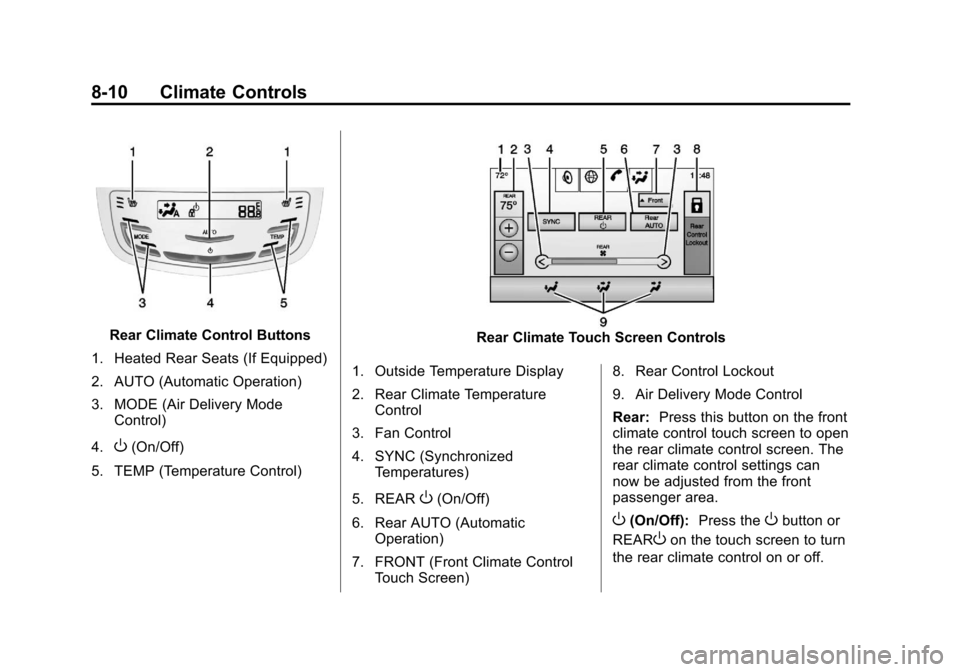
Rear Climate Control Buttons
1. Heated Rear Seats (If Equipped)
2. AUTO (Automatic Operation)
3. MODE (Air Delivery Mode Control)
4.
O(On/Off)
5. TEMP (Temperature Control)
Rear Climate Touch Screen Controls
1. Outside Temperature Display
2. Rear Climate Temperature Control
3. Fan Control
4. SYNC (Synchronized Temperatures)
5. REAR
O(On/Off)
6. Rear AUTO (Automatic Operation)
7. FRONT (Front Climate Control Touch Screen) 8. Rear Control Lockout
9. Air Delivery Mode Control
Rear:
Press this button on the front
climate control touch screen to open
the rear climate control screen. The
rear climate control settings can
now be adjusted from the front
passenger area.
O(On/Off): Press theObutton or
REAR
Oon the touch screen to turn
the rear climate control on or off.
Page 225 of 438
Black plate (11,1)Cadillac XTS Owner Manual - 2013 - 1st - 4/13/12
Climate Controls 8-11
SYNC:Press SYNC on the touch
screen to match the rear climate
control temperature to the front
climate control driver temperature.
The SYNC indicator light turns on.
Adjusting the rear temperature
controls will unlink the set driver and
rear temperatures. The SYNC
indicator turns off.
Rear Control Lockout: Press to
lock or unlock control of the rear
climate control system from the rear
seat passengers. When locked, the
rear climate control can only be
adjusted from the front seat.
Automatic Operation
Rear AUTO: Press to turn on or off.
The air delivery and fan speed are
controlled automatically. The AUTO
indicator appears on the display.
If any of the climate control settings
are manually adjusted, this cancels
full automatic operation. Manual Operation
S
A T(Fan Control): Press or
press and hold the rear climate
control buttons or touch screen to
increase or decrease the airflow.
Pressing
T Awhen the system is
off will turn the system on. The air
delivery mode remains in its
previous setting.
+/− (Temperature Control): Press
or press and hold the rear
temperature control buttons or touch
screen to adjust the rear passenger
temperature. Press + for warmer air
and press −for cooler air.
Y/\/Y(Air Delivery Mode
Control): Press the desired mode
button on the touch screen or the
MODE button on the rear faceplate
to change the direction of the airflow
in the rear seating area.
MorL(Heated Rear Seats, If
Equipped): Press
MorLto heat
the left or right outboard seat
cushion and seatback. See Heated
Rear Seats on page 3‑12.
Air Vents
Adjustable air vents are in the
center and on the side of the
instrument panel.
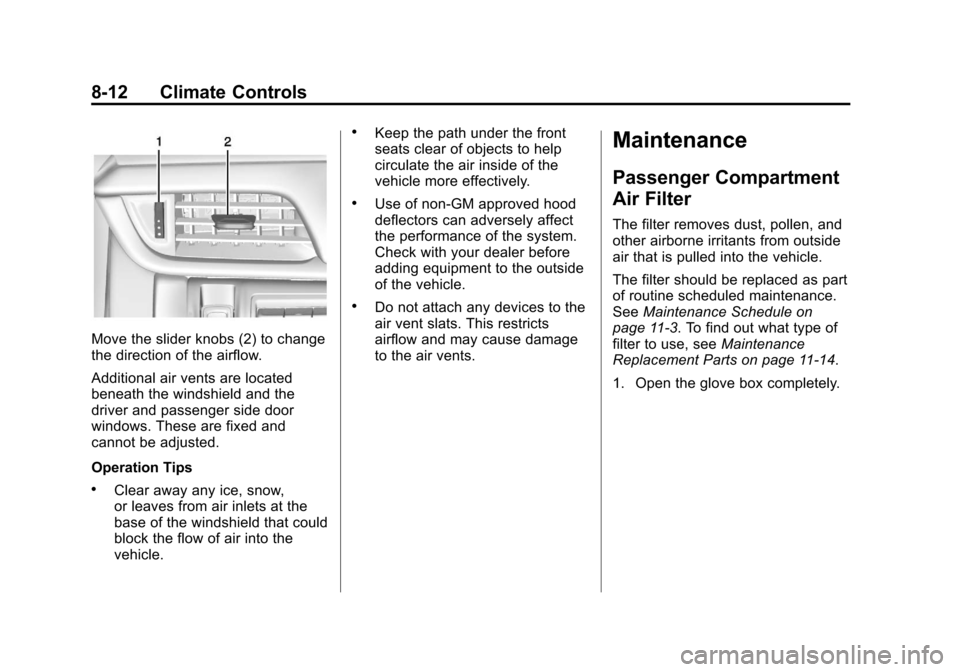
1. Thumbwheel
2. Slider Knob
Use the thumbwheels (1) near the
air vents to open or close off the
airflow.
Page 226 of 438
Black plate (12,1)Cadillac XTS Owner Manual - 2013 - 1st - 4/13/12
8-12 Climate Controls
Move the slider knobs (2) to change
the direction of the airflow.
Additional air vents are located
beneath the windshield and the
driver and passenger side door
windows. These are fixed and
cannot be adjusted.
Operation Tips
.Clear away any ice, snow,
or leaves from air inlets at the
base of the windshield that could
block the flow of air into the
vehicle.
.Keep the path under the front
seats clear of objects to help
circulate the air inside of the
vehicle more effectively.
.Use of non-GM approved hood
deflectors can adversely affect
the performance of the system.
Check with your dealer before
adding equipment to the outside
of the vehicle.
.Do not attach any devices to the
air vent slats. This restricts
airflow and may cause damage
to the air vents.
Maintenance
Passenger Compartment
Air Filter
The filter removes dust, pollen, and
other airborne irritants from outside
air that is pulled into the vehicle.
The filter should be replaced as part
of routine scheduled maintenance.
SeeMaintenance Schedule on
page 11‑3. To find out what type of
filter to use, see Maintenance
Replacement Parts on page 11‑14.
1. Open the glove box completely.
Page 229 of 438
Black plate (1,1)Cadillac XTS Owner Manual - 2013 - 1st - 4/13/12
Driving and Operating 9-1
Driving and
Operating
Driving Information
Distracted Driving . . . . . . . . . . . . . 9-2
Defensive Driving . . . . . . . . . . . . . 9-3
Drunk Driving . . . . . . . . . . . . . . . . . 9-3
Control of a Vehicle . . . . . . . . . . . 9-3
Braking . . . . . . . . . . . . . . . . . . . . . . . 9-3
Steering . . . . . . . . . . . . . . . . . . . . . . . 9-4
Off-Road Recovery . . . . . . . . . . . . 9-5
Loss of Control . . . . . . . . . . . . . . . . 9-5
Driving on Wet Roads . . . . . . . . . 9-6
Highway Hypnosis . . . . . . . . . . . . 9-6
Hill and Mountain Roads . . . . . . 9-7
Winter Driving . . . . . . . . . . . . . . . . . 9-7
If the Vehicle Is Stuck . . . . . . . . . 9-9
Vehicle Load Limits . . . . . . . . . . 9-10
Starting and Operating
New Vehicle Break-In . . . . . . . . 9-14
Ignition Positions . . . . . . . . . . . . 9-15
Starting the Engine . . . . . . . . . . 9-17
Engine Heater . . . . . . . . . . . . . . . 9-18
Retained AccessoryPower (RAP) . . . . . . . . . . . . . . . 9-19 Shifting Into Park . . . . . . . . . . . . 9-19
Shifting out of Park . . . . . . . . . . 9-20
Parking over Things
That Burn . . . . . . . . . . . . . . . . . . 9-21
Engine Exhaust
Engine Exhaust . . . . . . . . . . . . . . 9-21
Running the Vehicle WhileParked . . . . . . . . . . . . . . . . . . . . . 9-22
Automatic Transmission
Automatic Transmission . . . . . 9-22
Manual Mode . . . . . . . . . . . . . . . . 9-24
Drive Systems
All-Wheel Drive . . . . . . . . . . . . . . 9-24
Brakes
Antilock BrakeSystem (ABS) . . . . . . . . . . . . . . 9-25
Electric Parking Brake . . . . . . . 9-26
Brake Assist . . . . . . . . . . . . . . . . . 9-27
Hill Start Assist (HSA) . . . . . . . 9-28
Ride Control Systems
Traction Control System (TCS) . . . . . . . . . . . . . . 9-28
StabiliTrak
®System . . . . . . . . . 9-29
Magnetic Ride Control . . . . . . . 9-30
Automatic Level Control . . . . . 9-31
Cruise Control
Cruise Control . . . . . . . . . . . . . . . 9-31
Adaptive Cruise Control . . . . . 9-34
Driver Assistance Systems
Driver Assistance Systems . . . . . . . . . . . . . . . . . . . . 9-42
Assistance Systems for Parking or Backing . . . . . . . . . 9-43
Assistance Systems for Driving . . . . . . . . . . . . . . . . . . . . . 9-46
Forward Collision Alert (FCA) System . . . . . . . . . . . . . . . . . . . . . 9-47
Active Emergency Braking System . . . . . . . . . . . . . . . . . . . . . 9-49
Side Blind Zone Alert (SBZA) . . . . . . . . . . . . . . . 9-51
Lane Departure
Warning (LDW) . . . . . . . . . . . . . 9-53
Fuel
Fuel . . . . . . . . . . . . . . . . . . . . . . . . . 9-55
Recommended Fuel . . . . . . . . . 9-55
Gasoline Specifications . . . . . . 9-56
California FuelRequirements . . . . . . . . . . . . . . 9-56
Fuels in Foreign Countries . . . 9-56
Page 232 of 438
Black plate (4,1)Cadillac XTS Owner Manual - 2013 - 1st - 4/13/12
9-4 Driving and Operating
If the engine ever stops while the
vehicle is being driven, brake
normally but do not pump the
brakes. Doing so could make the
pedal harder to push down. If the
engine stops, there will be some
power brake assist but it will be
used when the brake is applied.
Once the power assist is used up, it
can take longer to stop and the
brake pedal will be harder to push.
Steering
Variable Effort Steering
Some vehicles have a steering
system that varies the amount of
effort required to steer the vehicle in
relation to the speed of the vehicle.
The amount of steering effort
required is less at slower speeds to
make the vehicle more
maneuverable and easier to park. At
faster speeds, the steering effort
increases to provide a sport-like feel
to the steering. This provides
maximum control and stability.If the vehicle seems harder to steer
than normal when parking or driving
slowly, there may be a problem with
the system. You will still have power
steering, but steering will be stiffer
than normal at slow speeds. See
your dealer for service.
Hydraulic Power Steering
If your vehicle has hydraulic power
steering, it may require
maintenance. See
Power Steering
Fluid on page 10‑16.
If power steering assist is lost
because the engine stops, or there
is a system malfunction, the vehicle
can be steered but may require
increased effort. See your dealer if
there is a problem.
Curve Tips
.Take curves at a reasonable
speed.
.Reduce speed before entering a
curve.
.Maintain a reasonable steady
speed through the curve.
.Wait until the vehicle is out of
the curve before accelerating
gently into the straightaway.
Steering in Emergencies
.There are some situations when
steering around a problem may
be more effective than braking.
.Holding both sides of the
steering wheel allows you to turn
180 degrees without removing
a hand.
.Antilock Brake System (ABS)
allows steering while braking.