Camera CADILLAC XTS 2014 User Guide
[x] Cancel search | Manufacturer: CADILLAC, Model Year: 2014, Model line: XTS, Model: CADILLAC XTS 2014Pages: 412, PDF Size: 4.65 MB
Page 234 of 412
Black plate (44,1)Cadillac XTS Owner Manual (GMNA-Localizing-U.S./Canada-6006999) -
2014 - CRC - 9/11/13
9-44 Driving and Operating
Warning (Continued)
Under many conditions, these
systems will not:
.Detect children, pedestrians,
bicyclists, or animals.
.Detect vehicles or objects
outside the area monitored by
the system.
.Work at all driving speeds.
.Warn you or provide you with
enough time to avoid a crash.
.Work under poor visibility or
bad weather conditions.
.Work if the detection sensor
is not cleaned or is covered
by ice, snow, mud, or dirt.
Complete attention is always
required while driving, and you
should be ready to take action
and apply the brakes and/or steer
the vehicle to avoid crashes. Audible or Safety Alert Seat
Some driver assistance features
alert the driver of obstacles by
beeping. To change the volume of
the warning chime, see
“Comfort
and Convenience” underVehicle
Personalization on page 5-48.
If equipped with the Safety Alert
Seat, the driver seat cushion may
provide a vibrating pulse alert
instead of beeping. To change this,
see “Collision/Detection Systems”
under Vehicle Personalization on
page 5-48.
Assistance Systems for
Parking or Backing
When the vehicle is in R (Reverse),
the Rear Vision Camera (RVC) and
Rear Parking Assist may help the
driver to avoid a crash or to reduce
crash damage. Some models may
also have the Rear Automatic
Braking and Backing Warning
System, Rear Cross Traffic Alert
(RCTA), Automatic Parking Assist
(APA), and/or Front Parking Assist. When the vehicle is shifted into
R (Reverse), the RVC displays an
image of the area behind the vehicle
in the center stack display. The
previous screen displays when the
vehicle is shifted out of R (Reverse)
after a short delay. To return to the
previous screen sooner, press a
button on the infotainment system,
shift into P (Park), or reach a vehicle
speed of 8 km/h (5 mph).
{Warning
The RVC system does not display
children, pedestrians, bicyclists,
animals, or any other object
located outside the camera's field
of view, below the bumper,
or under the vehicle. Perceived
distances may be different from
actual distances. Do not back the
vehicle using only the RVC
screen, during longer, higher
speed backing maneuvers,
or where there could be cross
(Continued)
Page 235 of 412
Black plate (45,1)Cadillac XTS Owner Manual (GMNA-Localizing-U.S./Canada-6006999) -
2014 - CRC - 9/11/13
Driving and Operating 9-45
Warning (Continued)
traffic. Failure to use proper care
before backing may result in
injury, death, or vehicle damage.
Always check behind and around
the vehicle before backing.
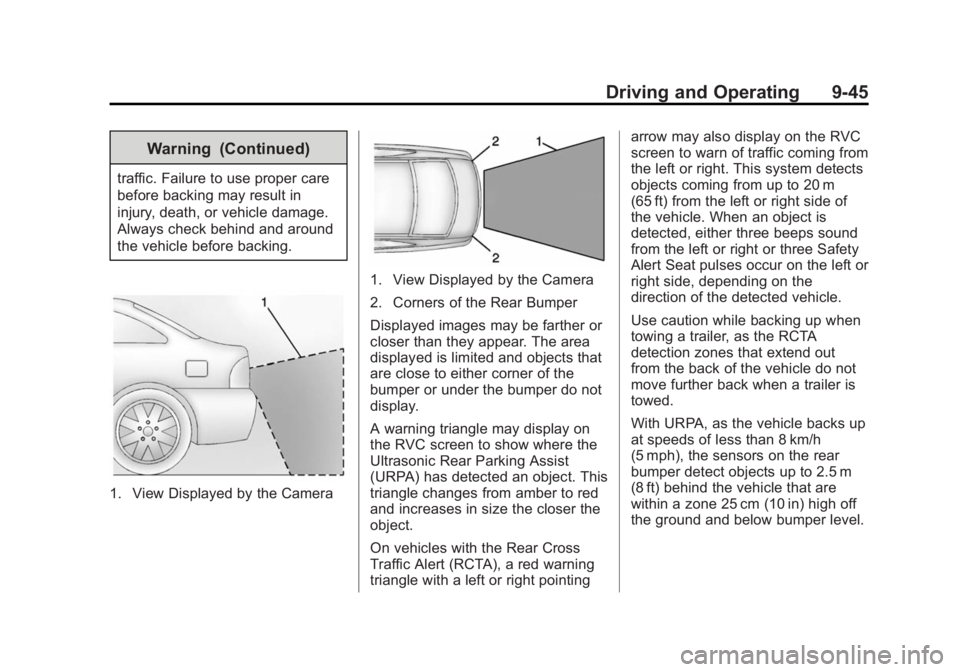
1. View Displayed by the Camera
1. View Displayed by the Camera
2. Corners of the Rear Bumper
Displayed images may be farther or
closer than they appear. The area
displayed is limited and objects that
are close to either corner of the
bumper or under the bumper do not
display.
A warning triangle may display on
the RVC screen to show where the
Ultrasonic Rear Parking Assist
(URPA) has detected an object. This
triangle changes from amber to red
and increases in size the closer the
object.
On vehicles with the Rear Cross
Traffic Alert (RCTA), a red warning
triangle with a left or right pointingarrow may also display on the RVC
screen to warn of traffic coming from
the left or right. This system detects
objects coming from up to 20 m
(65 ft) from the left or right side of
the vehicle. When an object is
detected, either three beeps sound
from the left or right or three Safety
Alert Seat pulses occur on the left or
right side, depending on the
direction of the detected vehicle.
Use caution while backing up when
towing a trailer, as the RCTA
detection zones that extend out
from the back of the vehicle do not
move further back when a trailer is
towed.
With URPA, as the vehicle backs up
at speeds of less than 8 km/h
(5 mph), the sensors on the rear
bumper detect objects up to 2.5 m
(8 ft) behind the vehicle that are
within a zone 25 cm (10 in) high off
the ground and below bumper level.
Page 238 of 412
Black plate (48,1)Cadillac XTS Owner Manual (GMNA-Localizing-U.S./Canada-6006999) -
2014 - CRC - 9/11/13
9-48 Driving and Operating
Turning the Features On or Off
TheXbutton on the center stack
is used to turn on or off the Front
and Rear Parking Assist, Rear
Automatic Braking, and Backing
Warning System at the same time.
The indicator light next to the button
comes on when the features are on
and turns off when the features
have been disabled.
Turn off parking assist and Rear
Automatic Braking when towing a
trailer. To turn the Rear Vision Camera
(RVC) system, symbols, guidance
lines, or Rear Cross Traffic Alert
(RCTA) on or off:
1. On the infotainment system,
press the Settings screen
button, or turn the MENU knob
to highlight Settings and
press MENU.
2. Select Rear Camera.
3. Press Rear Camera Display, Park Assist Symbols, Guidance
Lines, or Rear Cross Traffic Alert
and then select OFF or ON.
Automatic Parking
Assist (APA)
If equipped, Automatic Parking
Assist (APA) searches for and
steers the vehicle into parallel
parking spots. When using APA,
you must still shift gears, and
control the brakes and accelerator.
The Driver information Center (DIC)
and audible beeps help to guide
parking maneuvers.
{Warning
APA does not apply the brakes.
APA may not detect objects in the
parking space, objects that are
soft or narrow, objects high off the
ground such as flatbed trucks,
or objects below ground level
such as large potholes. Always
verify that the parking space is
appropriate for parking a vehicle.
APA does not respond to changes
in the parking space, such as
movement of an adjacent vehicle,
or a person or object entering the
parking space. APA does not
detect or avoid traffic that is
behind or alongside of the
vehicle. Always be prepared to
stop the vehicle during the
parking maneuver.
The system is available when the
vehicle speed is below
30 km/h (18 mph). Press the APA
button,
O, to enable the system to
Page 242 of 412
Black plate (52,1)Cadillac XTS Owner Manual (GMNA-Localizing-U.S./Canada-6006999) -
2014 - CRC - 9/11/13
9-52 Driving and Operating
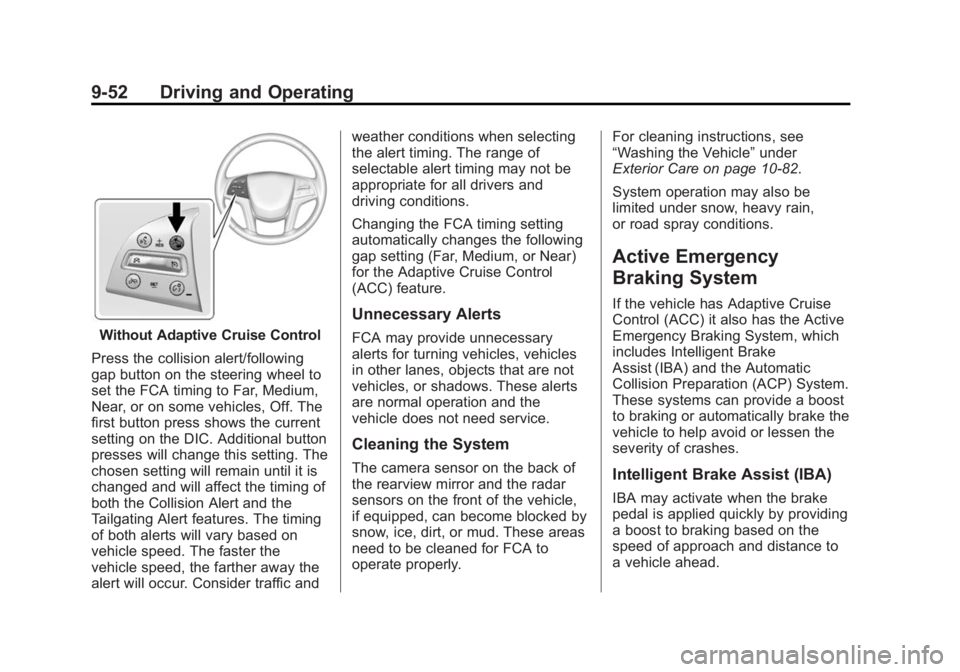
Without Adaptive Cruise Control
Press the collision alert/following
gap button on the steering wheel to
set the FCA timing to Far, Medium,
Near, or on some vehicles, Off. The
first button press shows the current
setting on the DIC. Additional button
presses will change this setting. The
chosen setting will remain until it is
changed and will affect the timing of
both the Collision Alert and the
Tailgating Alert features. The timing
of both alerts will vary based on
vehicle speed. The faster the
vehicle speed, the farther away the
alert will occur. Consider traffic and weather conditions when selecting
the alert timing. The range of
selectable alert timing may not be
appropriate for all drivers and
driving conditions.
Changing the FCA timing setting
automatically changes the following
gap setting (Far, Medium, or Near)
for the Adaptive Cruise Control
(ACC) feature.
Unnecessary Alerts
FCA may provide unnecessary
alerts for turning vehicles, vehicles
in other lanes, objects that are not
vehicles, or shadows. These alerts
are normal operation and the
vehicle does not need service.
Cleaning the System
The camera sensor on the back of
the rearview mirror and the radar
sensors on the front of the vehicle,
if equipped, can become blocked by
snow, ice, dirt, or mud. These areas
need to be cleaned for FCA to
operate properly.
For cleaning instructions, see
“Washing the Vehicle”
under
Exterior Care on page 10-82.
System operation may also be
limited under snow, heavy rain,
or road spray conditions.
Active Emergency
Braking System
If the vehicle has Adaptive Cruise
Control (ACC) it also has the Active
Emergency Braking System, which
includes Intelligent Brake
Assist (IBA) and the Automatic
Collision Preparation (ACP) System.
These systems can provide a boost
to braking or automatically brake the
vehicle to help avoid or lessen the
severity of crashes.
Intelligent Brake Assist (IBA)
IBA may activate when the brake
pedal is applied quickly by providing
a boost to braking based on the
speed of approach and distance to
a vehicle ahead.
Page 246 of 412
Black plate (56,1)Cadillac XTS Owner Manual (GMNA-Localizing-U.S./Canada-6006999) -
2014 - CRC - 9/11/13
9-56 Driving and Operating
The system does not need to be
serviced. The system may light up
due to guardrails, signs, trees,
shrubs, and other non-moving
objects. This is normal system
operation; the vehicle does not need
service.
SBZA may not operate when the
SBZA sensors in the left or right
corners of the rear bumper are
covered with mud, dirt, snow, ice,
or slush, or in heavy rainstorms. For
cleaning instructions, see "Washing
the Vehicle" underExterior Care on
page 10-82. If the DIC still displays
the system unavailable message
after cleaning both sides of the
vehicle toward the rear corners of
the vehicle, see your dealer.
If the SBZA displays do not light up
when vehicles are in the blind zone
and the system is clean, the system
may need service. Take the vehicle
to your dealer. When SBZA is disabled for any
reason other than the driver turning
it off, the Side Blind Zone Alert On
option will not be available on the
personalization menu.
FCC Information
See
Radio Frequency Statement on
page 13-15.
Lane Departure
Warning (LDW)
If equipped, LDW may help avoid
crashes due to unintentional lane
departures. It may provide a
warning if the vehicle is crossing a
detected lane marker without using
a turn signal in the lane departure
direction. LDW uses a camera
sensor to detect the lane markings.
It only operates at speeds of
56 km/h (35 mph) or greater.
When the vehicle crosses a
detected lane marking, the LDW
indicator will flash and either three
beeps will be sounded from the left
or right side, or three Safety Alert Seat pulses will occur on the left or
right side of the seat, depending on
the lane departure direction. LDW
will not warn if the turn signal is on
in the departure direction, or if a
sharp maneuver is made.
{Warning
The LDW system is an aid to help
the vehicle stay in the driving
lane. It does not steer the vehicle.
The LDW system may not:
.Provide enough time to avoid
a crash.
.Detect lane markings under
bad weather conditions or if
the windshield is dirty.
.Detect lane markings and will
not detect road edges.
.Warn that the vehicle is
crossing a lane marking if the
system does not detect the
lane marking.
(Continued)
Page 247 of 412
Black plate (57,1)Cadillac XTS Owner Manual (GMNA-Localizing-U.S./Canada-6006999) -
2014 - CRC - 9/11/13
Driving and Operating 9-57
Warning (Continued)
If LDW only detects lane
markings on one side of the road,
it will only warn you when
departing the lane on the side
where it has detected a lane
marker. Even with LDW, always
keep your attention on the road
and maintain proper vehicle
position within the lane, or vehicle
damage, injury, or death could
occur. Always keep the
windshield clean and do not use
LDW in bad weather conditions.
How the System Works
The LDW camera sensor is on the
windshield ahead of the rearview
mirror.
To turn LDW on and off, press
@on
the center stack to the left of the
infotainment screen. The control
indicator will light when LDW is on.
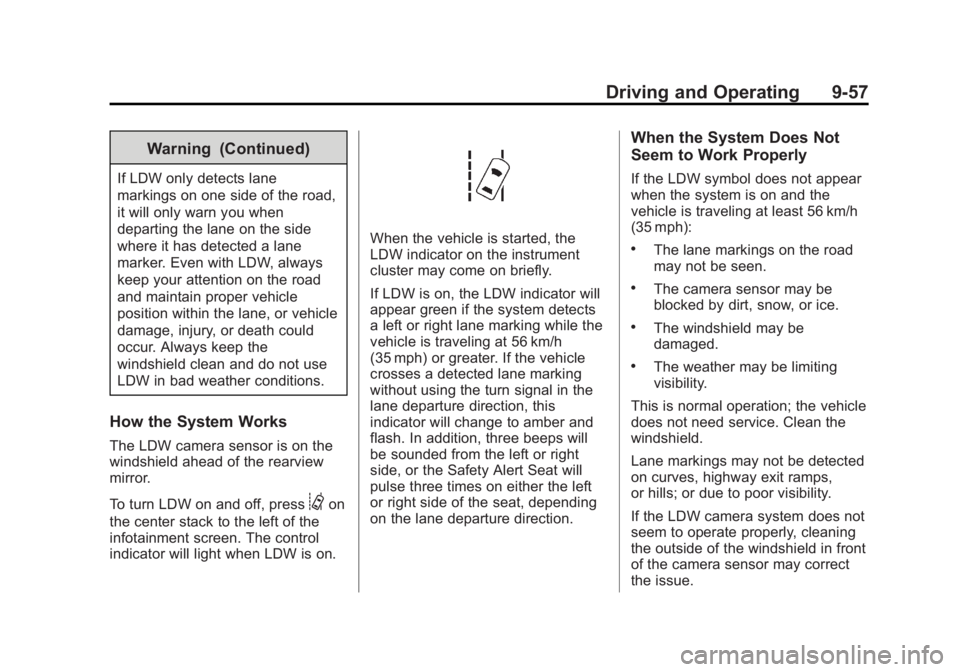
When the vehicle is started, the
LDW indicator on the instrument
cluster may come on briefly.
If LDW is on, the LDW indicator will
appear green if the system detects
a left or right lane marking while the
vehicle is traveling at 56 km/h
(35 mph) or greater. If the vehicle
crosses a detected lane marking
without using the turn signal in the
lane departure direction, this
indicator will change to amber and
flash. In addition, three beeps will
be sounded from the left or right
side, or the Safety Alert Seat will
pulse three times on either the left
or right side of the seat, depending
on the lane departure direction.
When the System Does Not
Seem to Work Properly
If the LDW symbol does not appear
when the system is on and the
vehicle is traveling at least 56 km/h
(35 mph):
.The lane markings on the road
may not be seen.
.The camera sensor may be
blocked by dirt, snow, or ice.
.The windshield may be
damaged.
.The weather may be limiting
visibility.
This is normal operation; the vehicle
does not need service. Clean the
windshield.
Lane markings may not be detected
on curves, highway exit ramps,
or hills; or due to poor visibility.
If the LDW camera system does not
seem to operate properly, cleaning
the outside of the windshield in front
of the camera sensor may correct
the issue.
Page 248 of 412
Black plate (58,1)Cadillac XTS Owner Manual (GMNA-Localizing-U.S./Canada-6006999) -
2014 - CRC - 9/11/13
9-58 Driving and Operating
{Warning
LDW does not provide a warning
to help avoid a crash, unless it
detects the lane markings. LDW
may not detect the lane markings
if the camera sensor is blocked
by dirt, snow, or ice, or if the
windshield is damaged. It may
also not detect a lane on winding
or hilly roads, or in conditions that
can limit visibility such as fog,
rain, or snow, or if the headlamps
or windshield are not cleaned or
in proper condition. Keep the
windshield, headlamps, and
camera sensors clean and in
good repair.
LDW warnings may occur due to tar
marks, shadows, cracks in the road,
or other road imperfections. This is
normal system operation; the
vehicle does not need service.
Fuel
Use of the recommended fuel is an
important part of the proper
maintenance of this vehicle. When
driving in the U.S., to help keep the
engine clean and maintain optimum
vehicle performance, we
recommend using TOP TIER
Detergent Gasolines. See
www.toptiergas.com for a list of TOP
TIER Detergent Gasolines.
If the vehicle has the 3.6L V6 LFX
engine (VIN Code 3), use regular
unleaded gasoline with a posted octane rating of 87 or higher. If the
octane rating is less than 87, an
audible knocking noise, commonly
referred to as spark knock, might be
heard when driving. If this occurs,
use a gasoline rated at 87 octane or
higher as soon as possible. If heavy
knocking is heard when using
gasoline rated at 87 octane or
higher, the engine needs service.
If the vehicle has the 3.6L V6 LF3
twin turbo engine (VIN Code 8), use
premium unleaded gasoline with a
posted octane rating of 91 or higher.
If the octane is less than 91, you
could damage the engine and may
void your vehicle warranty. If heavy
knocking is heard when using
gasoline rated at 91 octane or
higher, the engine needs service.
Use of Seasonal Fuels
Use summer and winter fuels in the
appropriate season. Driving or
starting could be affected if the
incorrect fuel is used. Drive the
Page 291 of 412
Black plate (33,1)Cadillac XTS Owner Manual (GMNA-Localizing-U.S./Canada-6006999) -
2014 - CRC - 9/11/13
Vehicle Care 10-33
Mini Fuses Usage30 All-Wheel Drive Module
31 Left Front Heated Seat
32 Body Control Module 6
33 Right Front Heated Seat
34 Antilock Brake System Valves
35 Amplifier
37 Right High Beam
38 Left High Beam
46 Cooling Fan Relay
47 Six Cylinder Engine: Pre Catalytic
Converter Oxygen
Sensor Heater,
Canister Purge
Solenoid Mini Fuses Usage
49 Right High Intensity Discharge
Headlamp
50 Left High Intensity Discharge
Headlamp
51 Horn
52 Cluster Run/Crank
53 Run/Crank for Inside Rearview Mirror,
Rear Vision Camera
54 Run/Crank for Heating, Ventilation,
and Air Conditioning
55 Outside Rearview Mirror, Universal
Garage Door
Opener, Front
Window Switches
56 Windshield Washer
57 Steering Column Lock Mini Fuses Usage
60 Heated Mirror
62 Not Used
64 Adaptive Forward Lighting (AFL)
Module–Battery
66 Trunk Release
67 Fuel System Control Module
69 Regulated Voltage Control Sensor
70 Vent Canister Solenoid
71 Memory Module
Mini Relays Usage 7 Engine Control Module
9 Cooling Fan
13 Cooling Fan
Page 295 of 412
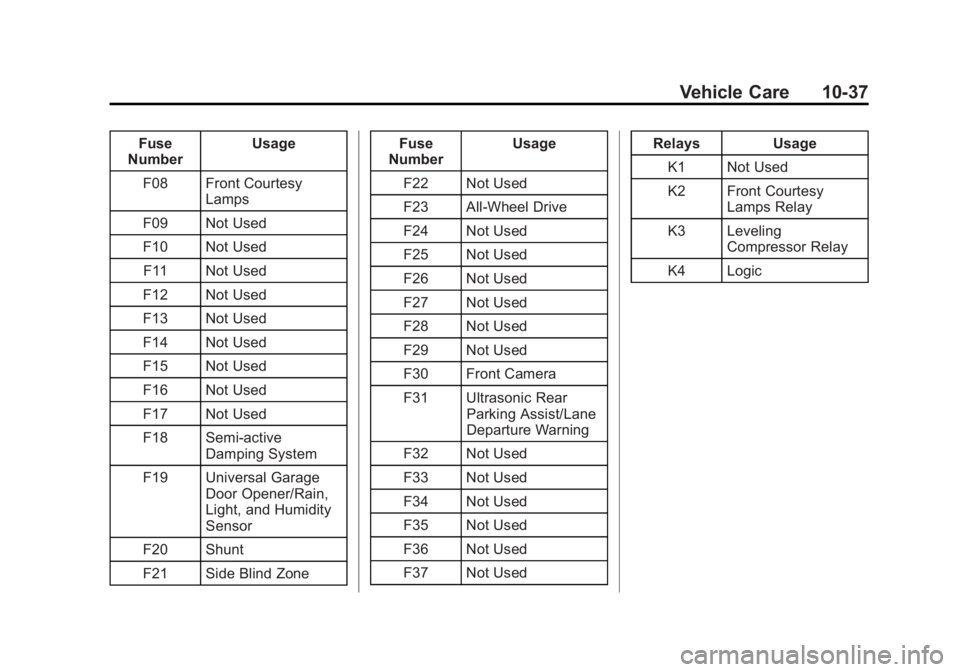
Black plate (37,1)Cadillac XTS Owner Manual (GMNA-Localizing-U.S./Canada-6006999) -
2014 - CRC - 9/11/13
Vehicle Care 10-37
Fuse
Number Usage
F08 Front Courtesy Lamps
F09 Not Used
F10 Not Used F11 Not Used
F12 Not Used
F13 Not Used
F14 Not Used
F15 Not Used
F16 Not Used
F17 Not Used
F18 Semi-active Damping System
F19 Universal Garage Door Opener/Rain,
Light, and Humidity
Sensor
F20 Shunt
F21 Side Blind Zone Fuse
Number Usage
F22 Not Used
F23 All-Wheel Drive
F24 Not Used
F25 Not Used
F26 Not Used
F27 Not Used
F28 Not Used
F29 Not Used
F30 Front Camera
F31 Ultrasonic Rear Parking Assist/Lane
Departure Warning
F32 Not Used
F33 Not Used
F34 Not Used
F35 Not Used
F36 Not Used
F37 Not Used Relays Usage
K1 Not Used
K2 Front Courtesy Lamps Relay
K3 Leveling Compressor Relay
K4 Logic