turn signal CADILLAC XTS 2014 Owner's Manual
[x] Cancel search | Manufacturer: CADILLAC, Model Year: 2014, Model line: XTS, Model: CADILLAC XTS 2014Pages: 412, PDF Size: 4.65 MB
Page 9 of 412
Black plate (3,1)Cadillac XTS Owner Manual (GMNA-Localizing-U.S./Canada-6006999) -
2014 - CRC - 9/11/13
In Brief 1-3
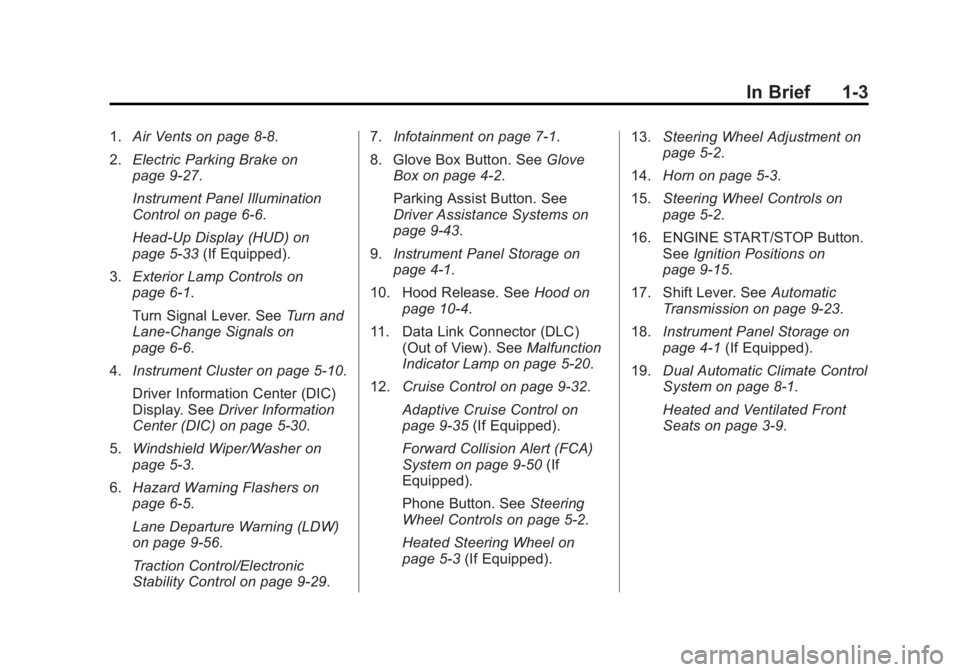
1.Air Vents on page 8-8.
2. Electric Parking Brake on
page 9-27.
Instrument Panel Illumination
Control on page 6-6.
Head-Up Display (HUD) on
page 5-33 (If Equipped).
3. Exterior Lamp Controls on
page 6-1.
Turn Signal Lever. See Turn and
Lane-Change Signals on
page 6-6.
4. Instrument Cluster on page 5-10.
Driver Information Center (DIC)
Display. See Driver Information
Center (DIC) on page 5-30.
5. Windshield Wiper/Washer on
page 5-3.
6. Hazard Warning Flashers on
page 6-5.
Lane Departure Warning (LDW)
on page 9-56.
Traction Control/Electronic
Stability Control on page 9-29. 7.
Infotainment on page 7-1.
8. Glove Box Button. See Glove
Box on page 4-2.
Parking Assist Button. See
Driver Assistance Systems on
page 9-43.
9. Instrument Panel Storage on
page 4-1.
10. Hood Release. See Hood on
page 10-4.
11. Data Link Connector (DLC) (Out of View). See Malfunction
Indicator Lamp on page 5-20.
12. Cruise Control on page 9-32.
Adaptive Cruise Control on
page 9-35 (If Equipped).
Forward Collision Alert (FCA)
System on page 9-50 (If
Equipped).
Phone Button. See Steering
Wheel Controls on page 5-2.
Heated Steering Wheel on
page 5-3 (If Equipped). 13.
Steering Wheel Adjustment on
page 5-2.
14. Horn on page 5-3.
15. Steering Wheel Controls on
page 5-2.
16. ENGINE START/STOP Button. SeeIgnition Positions on
page 9-15.
17. Shift Lever. See Automatic
Transmission on page 9-23.
18. Instrument Panel Storage on
page 4-1 (If Equipped).
19. Dual Automatic Climate Control
System on page 8-1.
Heated and Ventilated Front
Seats on page 3-9.
Page 10 of 412
Black plate (4,1)Cadillac XTS Owner Manual (GMNA-Localizing-U.S./Canada-6006999) -
2014 - CRC - 9/11/13
1-4 In Brief
Initial Drive
Information
This section provides a brief
overview about some of the
important features that may or may
not be on your specific vehicle.
For more detailed information, refer
to each of the features which can be
found later in this owner manual.
Remote Keyless Entry
(RKE) System
The Remote Keyless Entry (RKE)
transmitter may be used to lock and
unlock the doors from up to 60 m
(197 ft) away from the vehicle.
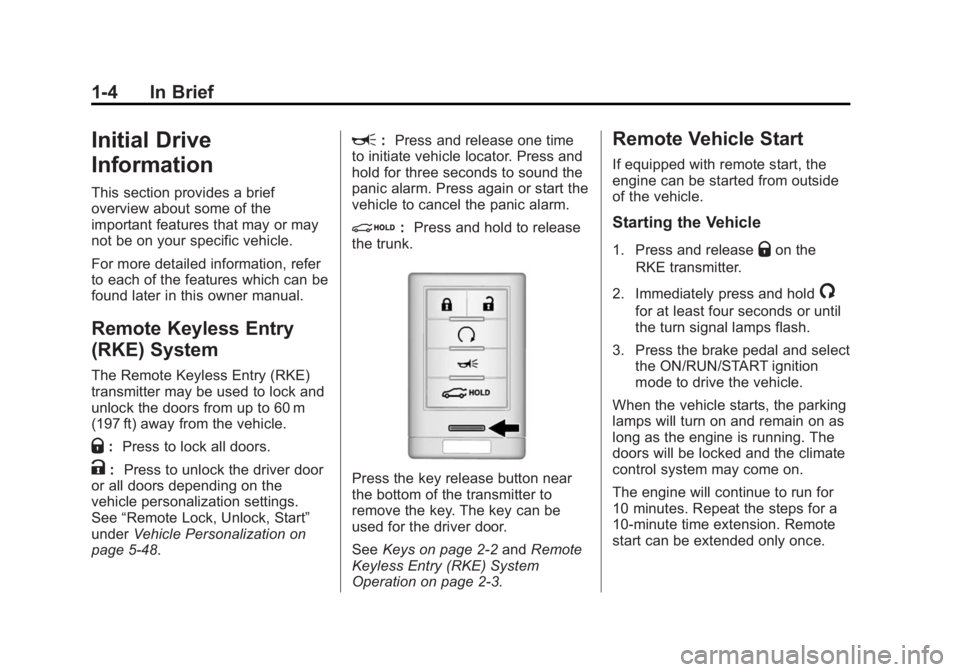
Q:Press to lock all doors.
K: Press to unlock the driver door
or all doors depending on the
vehicle personalization settings.
See “Remote Lock, Unlock, Start”
under Vehicle Personalization on
page 5-48.
L: Press and release one time
to initiate vehicle locator. Press and
hold for three seconds to sound the
panic alarm. Press again or start the
vehicle to cancel the panic alarm.
i: Press and hold to release
the trunk.
Press the key release button near
the bottom of the transmitter to
remove the key. The key can be
used for the driver door.
See Keys on page 2-2 andRemote
Keyless Entry (RKE) System
Operation on page 2-3.
Remote Vehicle Start
If equipped with remote start, the
engine can be started from outside
of the vehicle.
Starting the Vehicle
1. Press and releaseQon the
RKE transmitter.
2. Immediately press and hold
/
for at least four seconds or until
the turn signal lamps flash.
3. Press the brake pedal and select the ON/RUN/START ignition
mode to drive the vehicle.
When the vehicle starts, the parking
lamps will turn on and remain on as
long as the engine is running. The
doors will be locked and the climate
control system may come on.
The engine will continue to run for
10 minutes. Repeat the steps for a
10-minute time extension. Remote
start can be extended only once.
Page 17 of 412
Black plate (11,1)Cadillac XTS Owner Manual (GMNA-Localizing-U.S./Canada-6006999) -
2014 - CRC - 9/11/13
In Brief 1-11
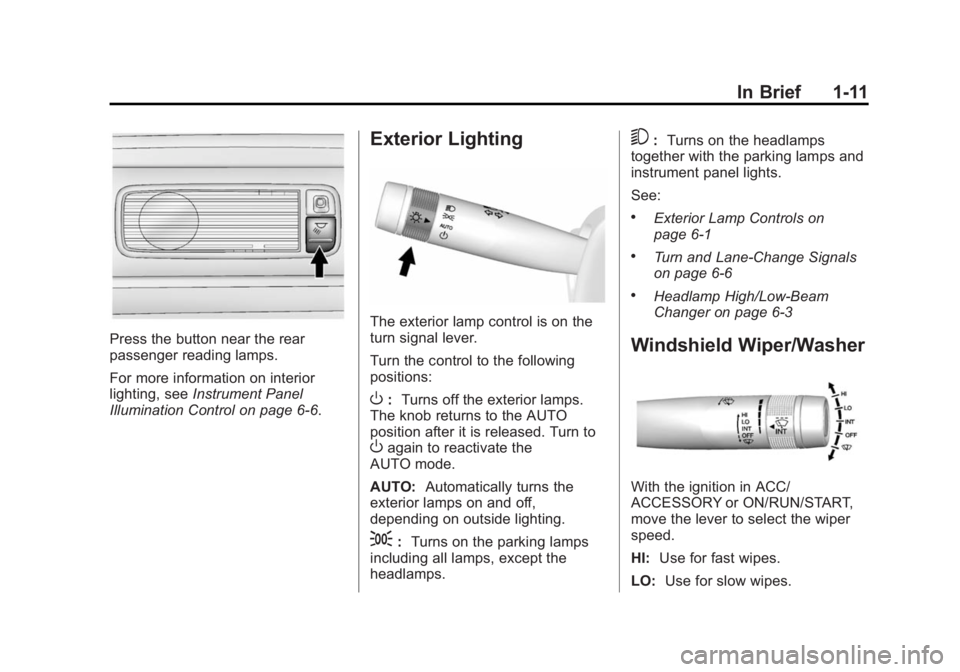
Press the button near the rear
passenger reading lamps.
For more information on interior
lighting, seeInstrument Panel
Illumination Control on page 6-6.
Exterior Lighting
The exterior lamp control is on the
turn signal lever.
Turn the control to the following
positions:
O: Turns off the exterior lamps.
The knob returns to the AUTO
position after it is released. Turn to
Oagain to reactivate the
AUTO mode.
AUTO: Automatically turns the
exterior lamps on and off,
depending on outside lighting.
;: Turns on the parking lamps
including all lamps, except the
headlamps.
5: Turns on the headlamps
together with the parking lamps and
instrument panel lights.
See:
.Exterior Lamp Controls on
page 6-1
.Turn and Lane-Change Signals
on page 6-6
.Headlamp High/Low-Beam
Changer on page 6-3
Windshield Wiper/Washer
With the ignition in ACC/
ACCESSORY or ON/RUN/START,
move the lever to select the wiper
speed.
HI: Use for fast wipes.
LO: Use for slow wipes.
Page 22 of 412
Black plate (16,1)Cadillac XTS Owner Manual (GMNA-Localizing-U.S./Canada-6006999) -
2014 - CRC - 9/11/13
1-16 In Brief
SorT:Press to move between
the interactive display zones in the
cluster. Press
Sto go back to the
previous menu.
SEL: Press to open a menu or
select a menu item. Press and hold
to reset values on certain screens.
See Driver Information Center (DIC)
on page 5-30.
Forward Collision Alert
(FCA) System
If equipped, FCA may help avoid or
reduce the harm caused by
front-end crashes. FCA provides a
green indicator when a vehicle is
detected ahead. This indicator
displays amber if you follow a
vehicle much too closely. When
approaching a vehicle ahead too
quickly, FCA provides a flashing red
alert on the windshield and rapidly
beeps or pulses the driver seat.
See Forward Collision Alert (FCA)
System on page 9-50.
Lane Departure
Warning (LDW)
If equipped, LDW is intended to help
avoid unintentional lane departures
at speeds of 56 km/h (35 mph) or
greater. LDW uses a camera sensor
to detect the lane markings. The
LDW indicator,
@, appears green if
a lane marking is detected. If the
vehicle departs the lane, the
indicator will change to amber and
flash. In addition, beeps will sound,
or the driver seat will pulse.
See Lane Departure Warning (LDW)
on page 9-56.
Side Blind Zone
Alert (SBZA)
If equipped, SBZA will detect
vehicles in the next lane over in the
vehicle's side blind zone area.
When this happens, the SBZA
display will light up in the
corresponding outside side mirror
and will flash if the turn signal is on. See
Side Blind Zone Alert (SBZA)
on page 9-54.
Rear Vision
Camera (RVC)
If equipped, RVC displays a view of
the area behind the vehicle, on the
center stack display, when the
vehicle is shifted into R (Reverse).
See Assistance Systems for Parking
or Backing on page 9-44.
Ultrasonic Parking Assist
If equipped, Ultrasonic Rear Parking
Assist (URPA) uses sensors on the
rear bumper to assist with parking
and avoiding objects while in
R (Reverse). It operates at speeds
less than 8 km/h (5 mph). URPA
may display a warning triangle on
the Rear Vision Camera screen and
a graphic on the instrument cluster
to provide the object distance. In
addition, multiple beeps or seat
pulses may occur if very close to an
object.
Page 31 of 412
Black plate (3,1)Cadillac XTS Owner Manual (GMNA-Localizing-U.S./Canada-6006999) -
2014 - CRC - 9/11/13
Keys, Doors, and Windows 2-3
With an active OnStar subscription,
an OnStar Advisor may remotely
unlock the vehicle. SeeOnStar
Overview on page 14-1.
Remote Keyless Entry
(RKE) System
See Radio Frequency Statement on
page 13-15.
If there is a decrease in the RKE
operating range:
.Check the distance. The
transmitter may be too far from
the vehicle.
.Check the location. Other
vehicles or objects may be
blocking the signal.
.Check the transmitter's battery.
See “Battery Replacement” later
in this section.
.If the transmitter is still not
working correctly, see your
dealer or a qualified technician
for service.
Remote Keyless Entry
(RKE) System Operation
The Keyless Access system allows
for vehicle entry when the
transmitter is within range. See
“Keyless Access Operation”
following.
The RKE transmitter functions may
work up to 60 m (197 ft) away from
the vehicle.
Other conditions, such as those
previously stated, can impact the
performance of the transmitter.
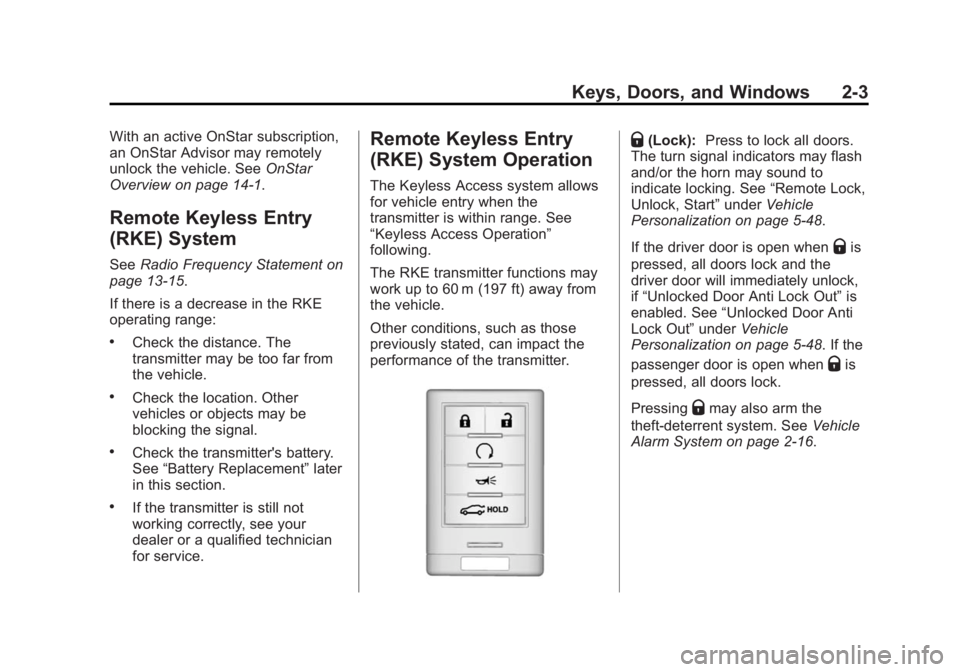
Q(Lock): Press to lock all doors.
The turn signal indicators may flash
and/or the horn may sound to
indicate locking. See “Remote Lock,
Unlock, Start” underVehicle
Personalization on page 5-48.
If the driver door is open when
Qis
pressed, all doors lock and the
driver door will immediately unlock,
if “Unlocked Door Anti Lock Out” is
enabled. See “Unlocked Door Anti
Lock Out” underVehicle
Personalization on page 5-48. If the
passenger door is open when
Qis
pressed, all doors lock.
Pressing
Qmay also arm the
theft-deterrent system. See Vehicle
Alarm System on page 2-16.
Page 32 of 412
Black plate (4,1)Cadillac XTS Owner Manual (GMNA-Localizing-U.S./Canada-6006999) -
2014 - CRC - 9/11/13
2-4 Keys, Doors, and Windows
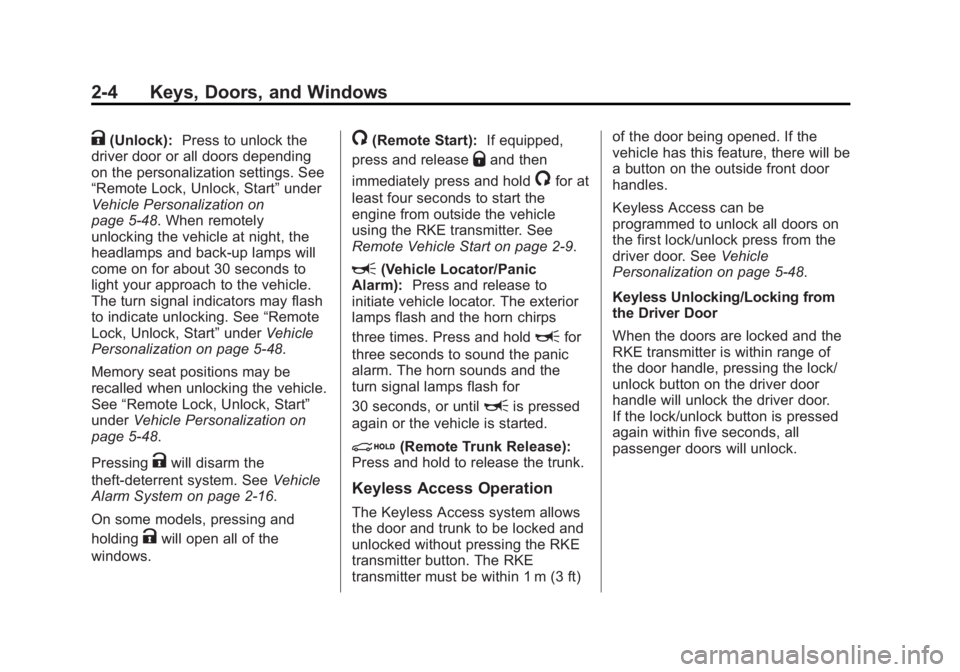
K(Unlock):Press to unlock the
driver door or all doors depending
on the personalization settings. See
“Remote Lock, Unlock, Start” under
Vehicle Personalization on
page 5-48. When remotely
unlocking the vehicle at night, the
headlamps and back-up lamps will
come on for about 30 seconds to
light your approach to the vehicle.
The turn signal indicators may flash
to indicate unlocking. See “Remote
Lock, Unlock, Start” underVehicle
Personalization on page 5-48.
Memory seat positions may be
recalled when unlocking the vehicle.
See “Remote Lock, Unlock, Start”
under Vehicle Personalization on
page 5-48.
Pressing
Kwill disarm the
theft-deterrent system. See Vehicle
Alarm System on page 2-16.
On some models, pressing and
holding
Kwill open all of the
windows.
/(Remote Start): If equipped,
press and release
Qand then
immediately press and hold
/for at
least four seconds to start the
engine from outside the vehicle
using the RKE transmitter. See
Remote Vehicle Start on page 2-9.
L(Vehicle Locator/Panic
Alarm): Press and release to
initiate vehicle locator. The exterior
lamps flash and the horn chirps
three times. Press and hold
Lfor
three seconds to sound the panic
alarm. The horn sounds and the
turn signal lamps flash for
30 seconds, or until
Lis pressed
again or the vehicle is started.
i(Remote Trunk Release):
Press and hold to release the trunk.
Keyless Access Operation
The Keyless Access system allows
the door and trunk to be locked and
unlocked without pressing the RKE
transmitter button. The RKE
transmitter must be within 1 m (3 ft) of the door being opened. If the
vehicle has this feature, there will be
a button on the outside front door
handles.
Keyless Access can be
programmed to unlock all doors on
the first lock/unlock press from the
driver door. See
Vehicle
Personalization on page 5-48.
Keyless Unlocking/Locking from
the Driver Door
When the doors are locked and the
RKE transmitter is within range of
the door handle, pressing the lock/
unlock button on the driver door
handle will unlock the driver door.
If the lock/unlock button is pressed
again within five seconds, all
passenger doors will unlock.
Page 37 of 412
Black plate (9,1)Cadillac XTS Owner Manual (GMNA-Localizing-U.S./Canada-6006999) -
2014 - CRC - 9/11/13
Keys, Doors, and Windows 2-9
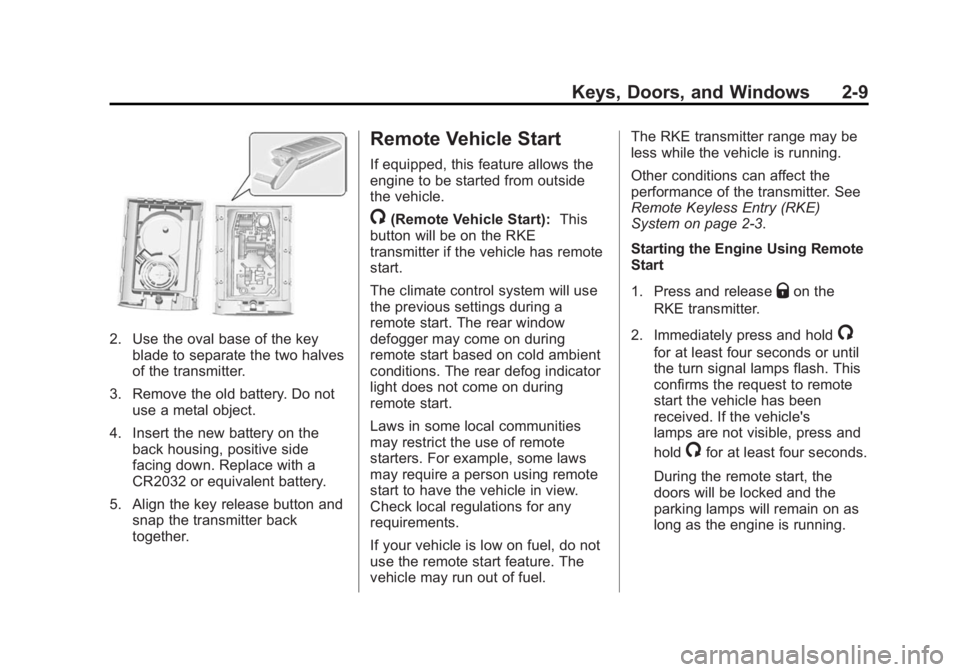
2. Use the oval base of the keyblade to separate the two halves
of the transmitter.
3. Remove the old battery. Do not use a metal object.
4. Insert the new battery on the back housing, positive side
facing down. Replace with a
CR2032 or equivalent battery.
5. Align the key release button and snap the transmitter back
together.
Remote Vehicle Start
If equipped, this feature allows the
engine to be started from outside
the vehicle.
/(Remote Vehicle Start): This
button will be on the RKE
transmitter if the vehicle has remote
start.
The climate control system will use
the previous settings during a
remote start. The rear window
defogger may come on during
remote start based on cold ambient
conditions. The rear defog indicator
light does not come on during
remote start.
Laws in some local communities
may restrict the use of remote
starters. For example, some laws
may require a person using remote
start to have the vehicle in view.
Check local regulations for any
requirements.
If your vehicle is low on fuel, do not
use the remote start feature. The
vehicle may run out of fuel. The RKE transmitter range may be
less while the vehicle is running.
Other conditions can affect the
performance of the transmitter. See
Remote Keyless Entry (RKE)
System on page 2-3.
Starting the Engine Using Remote
Start
1. Press and release
Qon the
RKE transmitter.
2. Immediately press and hold
/
for at least four seconds or until
the turn signal lamps flash. This
confirms the request to remote
start the vehicle has been
received. If the vehicle's
lamps are not visible, press and
hold
/for at least four seconds.
During the remote start, the
doors will be locked and the
parking lamps will remain on as
long as the engine is running.
Page 45 of 412
Black plate (17,1)Cadillac XTS Owner Manual (GMNA-Localizing-U.S./Canada-6006999) -
2014 - CRC - 9/11/13
Keys, Doors, and Windows 2-17
Fast Flash:Vehicle is unsecured.
A door, the hood, or the trunk
is open.
Slow Flash: Alarm system is
armed.
Arming the Alarm System
1. Close the trunk and the hood. Turn off the vehicle.
2. Lock the vehicle in one of three ways:
.Use the RKE transmitter.
.Use the Keyless Access
system.
.With a door open, pressQ
on the interior of the door.
3. After 30 seconds the alarm system will arm, and the
indicator light will begin to slowly
flash indicating the alarm system
is operating. Pressing
Qon the
RKE transmitter a second time
will bypass the 30-second delay
and immediately arm the alarm
system. The vehicle alarm system will not
arm if the doors are locked with
the key.
If the driver door is opened without
first unlocking with the RKE
transmitter, the horn will chirp and
the lights will flash to indicate
pre-alarm. If the vehicle is not
started, or the door is not unlocked
by pressing
Kon the RKE
transmitter during the 10–second
pre-alarm, the alarm will be
activated.
The alarm will also be activated if a
passenger door, the trunk, or the
hood is opened without first
disarming the system. When the
alarm is activated, the turn signals
flash and the horn sounds for about
30 seconds. The alarm system will
then re-arm to monitor for the next
unauthorized event.
Disarming the Alarm System
To disarm the alarm system or turn
off the alarm if it has been activated:
.PressKon the RKE transmitter.
.Unlock the vehicle using the
Keyless Access system.
.Start the vehicle.
To avoid setting off the alarm by
accident:
.Lock the vehicle after all
occupants have left the vehicle
and all doors are closed.
.Always unlock a door with the
RKE transmitter or use the
Keyless Access system.
Unlocking the driver door with the
key will not disarm the system or
turn off the alarm.
Page 48 of 412
Black plate (20,1)Cadillac XTS Owner Manual (GMNA-Localizing-U.S./Canada-6006999) -
2014 - CRC - 9/11/13
2-20 Keys, Doors, and Windows
Exterior Automatic Dimming
Mirror
The vehicle may have a driver
exterior automatic dimming mirror
that will automatically adjust for the
glare of headlamps behind.
Memory Mirrors
The vehicle may have memory
mirrors. SeeMemory Seats on
page 3-7.
Side Blind Zone Alert (SBZA)
The vehicle may have SBZA. See
Side Blind Zone Alert (SBZA) on
page 9-54.
Turn Signal Indicator
The vehicle has a turn signal
indicator on the mirror housings.
The indicator will flash when a turn
signal or the hazard warning
flashers are used. Puddle Light
The vehicle has a puddle light on
the mirror housings. The light will
illuminate the ground when the door
is opened.
Folding Mirrors
Manual Folding Mirrors
The mirrors can be folded inward
toward the vehicle to prevent
damage when going through an
automatic car wash. Push the mirror
outward to return it to the original
position.
Heated Mirrors
=
(Rear Window Defogger):
Press to heat the mirrors.
See Dual Automatic Climate Control
System on page 8-1.
Interior Mirrors
Interior Rearview Mirrors
Adjust the rearview mirror for a clear
view of the area behind your
vehicle.
If equipped with OnStar, the vehicle
may have three control buttons at
the bottom of the mirror. See your
dealer for more information about
OnStar and how to subscribe to it.
See OnStar Overview on page 14-1.
Do not spray glass cleaner directly
on the mirror. Use a soft towel
dampened with water.
Automatic Dimming
Rearview Mirror
The vehicle has an automatic
dimming rearview mirror. The mirror
will automatically reduce the glare
from the headlamps from behind.
The dimming feature comes on
when the vehicle is started.
Page 117 of 412
Black plate (5,1)Cadillac XTS Owner Manual (GMNA-Localizing-U.S./Canada-6006999) -
2014 - CRC - 9/11/13
Instruments and Controls 5-5
Wiper Arm Assembly Protection
When using an automatic car wash,
move the windshield wiper lever to
OFF. This disables the automatic
Rainsense windshield wipers.
With Rainsense, if the transmission
is in N (Neutral) and the vehicle
speed is very slow, the wipers will
automatically stop at the base of the
windshield.
The wiper operations return to
normal when the transmission is no
longer in N (Neutral) or the vehicle
speed has increased.
nL(Windshield Washer): Pull
the windshield wiper lever toward
you to spray windshield washer fluid
and activate the wipers. The wipers
will continue until the lever is
released or the maximum wash time
is reached. When the windshield
wiper lever is released, additional
wipes may occur depending on how long the windshield washer had
been activated. See
Washer Fluid
on page 10-22 for information on
filling the windshield washer fluid
reservoir.
{Warning
In freezing weather, do not use
the washer until the windshield is
warmed. Otherwise the washer
fluid can form ice on the
windshield, blocking your vision.
Compass
The vehicle may have a compass
display on the Driver Information
Center (DIC). The compass receives
its heading and other information
from the Global Positioning
System (GPS) antenna,
StabiliTrak
®, and vehicle speed
information. The compass system is designed to
operate for a certain number of
miles or degrees of turn before
needing a signal from the GPS
satellites. When the compass
display shows CAL, drive the
vehicle for a short distance in an
open area where it can receive a
GPS signal. The compass system
will automatically determine when a
GPS signal is restored and provide
a heading again. See
Compass
Messages on page 5-38 for the
messages that may be displayed for
the compass.
Clock
The infotainment system controls
are used to access the time and
date settings through the menu
system. See “Home Page” in the
infotainment manual for information
about how to use the menu system.