instrument panel CADILLAC XTS 2016 1.G Owner's Manual
[x] Cancel search | Manufacturer: CADILLAC, Model Year: 2016, Model line: XTS, Model: CADILLAC XTS 2016 1.GPages: 320, PDF Size: 2.07 MB
Page 166 of 320
Cadillac XTS Owner Manual (GMNA-Localizing-MidEast-9369806) - 2016 -
crc - 6/24/15
Climate Controls 165
The heated outside rearview mirrors
turn on when the rear window
defogger button is on and help to
clear fog or frost from the surface of
the mirrors.
Caution
Do not try to clear frost or other
material from the inside of the
front windshield and rear window
with a razor blade or anything
else that is sharp. This may
damage the rear window
defogger grid and affect the
radio's ability to pick up stations
clearly. The repairs would not be
covered by the vehicle warranty.
Driver and Passenger Heated and
Ventilated Seats (If Equipped) :
Press
Jorzto heat the driver or
passenger seat cushion and
seatback.
Press
Cor{to ventilate the driver
or passenger seat. See Heated and
Ventilated Front Seats 057. The vehicle also has auto heated
seats that turn on when the vehicle
is on. The seats will activate at the
level required by the vehicle’s
interior temperature. To turn off,
press
Jorz. The auto heated
seats can be turned on or off. See
Vehicle Personalization 0145 and
Heated and Ventilated Seats 013.
Remote Start Climate Control
Operation : If equipped with the
remote start feature, the climate
control system may run when the
vehicle is started remotely. The
system uses the driver ’s previous
settings to heat or cool the inside of
the vehicle. The rear defog may
come on during remote start based
on cold ambient conditions. The
rear defog indicator light does not
come on during a remote start.
If equipped with heated or ventilated
seats, they may come on during a
remote start. See Remote Vehicle
Start 031 and Heated and
Ventilated Front Seats 057.
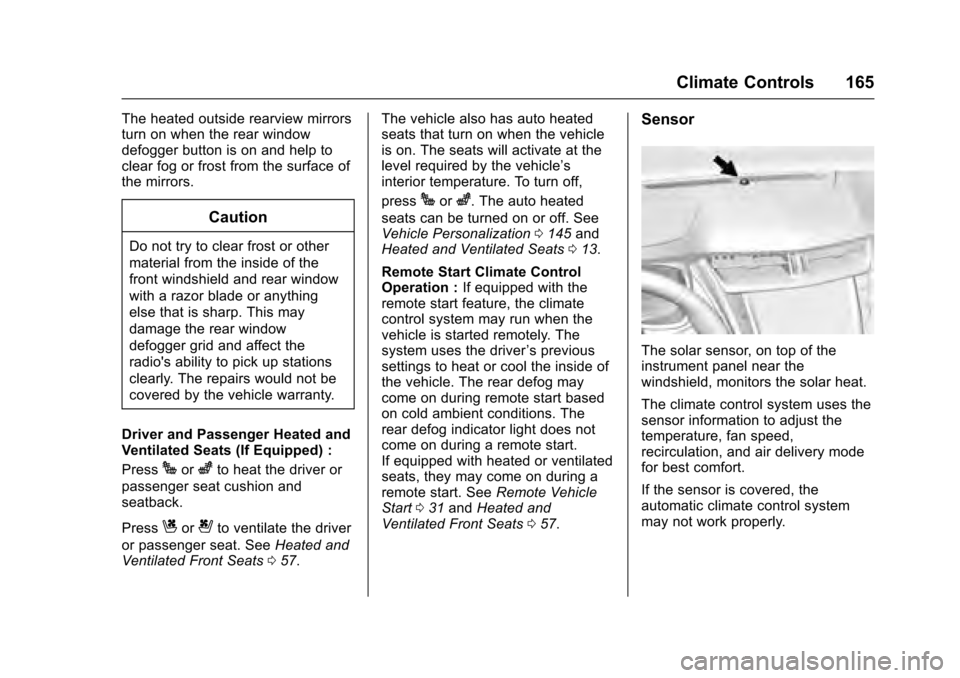
Sensor
The solar sensor, on top of the
instrument panel near the
windshield, monitors the solar heat.
The climate control system uses the
sensor information to adjust the
temperature, fan speed,
recirculation, and air delivery mode
for best comfort.
If the sensor is covered, the
automatic climate control system
may not work properly.
Page 168 of 320
Cadillac XTS Owner Manual (GMNA-Localizing-MidEast-9369806) - 2016 -
crc - 6/24/15
Climate Controls 167
Rear Control Lockout :Press to
lock or unlock control of the rear
climate control system from the rear
seat passengers. When locked, the
rear climate control can only be
adjusted from the front seat.
Automatic Operation
Rear AUTO : Press to turn on or off.
The air delivery is controlled
automatically. The AUTO indicator
appears on the display. If the MODE
setting is manually adjusted, this
cancels full automatic operation.
Manual Operation
S A T(Fan Control) : Press or
press and hold the front climate
control buttons or touch screen to
increase or decrease the rear
climate airflow.
+/− (Temperature Control) : Press
or press and hold the rear
temperature control buttons or touch
screen to adjust the rear passenger
temperature. Press + for warmer air
and press −for cooler air.
Y/\/Y(Air Delivery Mode
Control) : Press the desired mode
button on the touch screen or the MODE button on the rear faceplate
to change the direction of the airflow
in the rear seating area.
MorL(Heated Rear Seats, If
Equipped) : Press
MorLto heat
the left or right outboard seat
cushion and seatback. See Heated
Rear Seats 061.
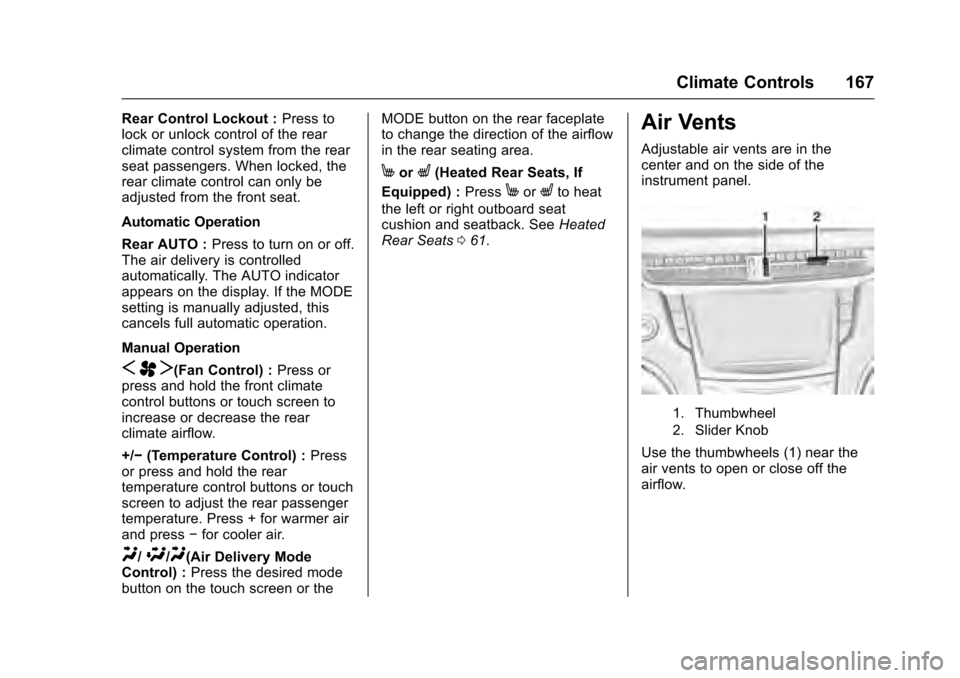
Air Vents
Adjustable air vents are in the
center and on the side of the
instrument panel.
1. Thumbwheel
2. Slider Knob
Use the thumbwheels (1) near the
air vents to open or close off the
airflow.
Page 177 of 320
Cadillac XTS Owner Manual (GMNA-Localizing-MidEast-9369806) - 2016 -
crc - 6/24/15
176 Driving and Operating
.Antilock Brake System (ABS)
improves vehicle stability during
hard stops, but the brakes
should be applied sooner than
when on dry pavement. See
Antilock Brake System (ABS)
0189.
. Allow greater following distance
and watch for slippery spots. Icy
patches can occur on otherwise
clear roads in shaded areas.
The surface of a curve or an
overpass can remain icy when
the surrounding roads are clear.
Avoid sudden steering
maneuvers and braking while
on ice.
. Turn off cruise control.
Blizzard Conditions
Stay with the vehicle unless there is
help nearby. To get help and keep
everyone in the vehicle safe:
.Turn on the hazard warning
flashers.
. Tie a red cloth to an outside
mirror.
{Warning
Snow can trap engine exhaust
under the vehicle. This may
cause exhaust gases to get
inside. Engine exhaust contains
carbon monoxide (CO), which
cannot be seen or smelled. It can
cause unconsciousness and even
death.
If the vehicle is stuck in snow:
. Clear snow from the base of
the vehicle, especially any
blocking the exhaust pipe.
. Open a window about 5 cm
(2 in) on the vehicle side
that is away from the wind,
to bring in fresh air.
. Fully open the air outlets on
or under the instrument
panel.
. Adjust the climate control
system to circulate the air
inside the vehicle and set
(Continued)
Warning (Continued)
the fan speed to the highest
setting. See“Climate
Control Systems.”
For more information about CO,
see Engine Exhaust 0186 in the
index.
To save fuel, run the engine for
short periods to warm the vehicle
and then shut the engine off and
partially close the window. Moving
about to keep warm also helps.
If it takes time for help to arrive,
when running the engine, push the
accelerator pedal slightly so the
engine runs faster than the idle
speed. This keeps the battery
charged to restart the vehicle and to
signal for help with the headlamps.
Do this as little as possible, to
save fuel.
If the Vehicle Is Stuck
Slowly and cautiously spin the
wheels to free the vehicle when
stuck in sand, mud, ice, or snow.
Page 191 of 320
Cadillac XTS Owner Manual (GMNA-Localizing-MidEast-9369806) - 2016 -
crc - 6/24/15
190 Driving and Operating
avoid a sudden obstacle, a
computer senses the wheels are
slowing down. If one of the wheels
is about to stop rolling, the computer
will separately work the brakes at
each wheel.
ABS can change the brake pressure
to each wheel, as required, faster
than any driver could. This can help
you steer around the obstacle while
braking hard.
As the brakes are applied, the
computer keeps receiving updates
on wheel speed and controls
braking pressure accordingly.
Remember: ABS does not change
the time needed to get a foot up to
the brake pedal or always decrease
stopping distance. If you get too
close to the vehicle in front of you,
there will not be enough time to
apply the brakes if that vehicle
suddenly slows or stops. Always
leave enough room up ahead to
stop, even with ABS.Using ABS
Do not pump the brakes. Just hold
the brake pedal down firmly and let
ABS work. You may hear the ABS
pump or motor operating and feel
the brake pedal pulsate. This is
normal.
Braking in Emergencies
ABS allows you to steer and brake
at the same time. In many
emergencies, steering can help
more than even the very best
braking.
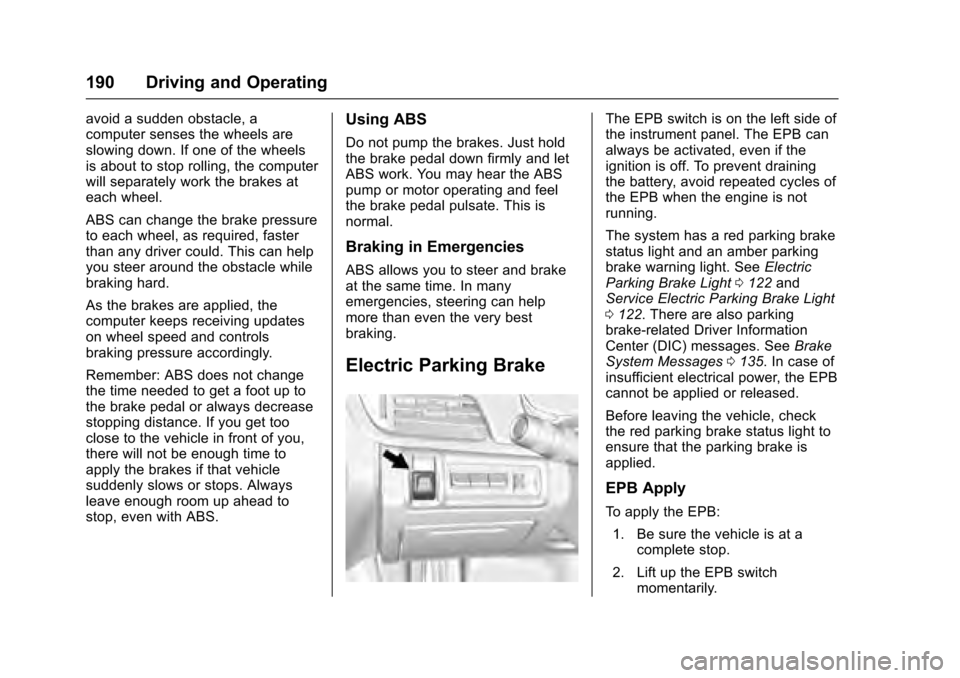
Electric Parking Brake
The EPB switch is on the left side of
the instrument panel. The EPB can
always be activated, even if the
ignition is off. To prevent draining
the battery, avoid repeated cycles of
the EPB when the engine is not
running.
The system has a red parking brake
status light and an amber parking
brake warning light. SeeElectric
Parking Brake Light 0122 and
Service Electric Parking Brake Light
0 122. There are also parking
brake-related Driver Information
Center (DIC) messages. See Brake
System Messages 0135. In case of
insufficient electrical power, the EPB
cannot be applied or released.
Before leaving the vehicle, check
the red parking brake status light to
ensure that the parking brake is
applied.
EPB Apply
To apply the EPB:
1. Be sure the vehicle is at a complete stop.
2. Lift up the EPB switch momentarily.
Page 222 of 320
Cadillac XTS Owner Manual (GMNA-Localizing-MidEast-9369806) - 2016 -
crc - 6/24/15
Driving and Operating 221
Trailer Towing
General Towing
Information
Only use towing equipment that has
been designed for the vehicle.
Contact your dealer or trailering
dealer for assistance with preparing
the vehicle for towing a trailer. Read
the entire section before towing a
trailer.
For towing a disabled vehicle, see
Towing the Vehicle0284. For
towing the vehicle behind another
vehicle such as a motor home, see
Recreational Vehicle Towing 0284.
Driving Characteristics
and Towing Tips
Driving with a Trailer
When towing a trailer:
.
Become familiar with the state
and local laws that apply
specifically to trailer towing. .
Do not tow a trailer during the
first 800 km (500 mi), to prevent
damage to the engine, axle,
or other parts.
. Then, during the first 800 km
(500 mi) of trailer towing, do not
drive over 80 km/h (50 mph) and
do not make starts at full throttle.
. The vehicle can tow in D (Drive).
Use a lower gear if the
transmission shifts too often.
. Do not use Adaptive Cruise
Control when towing.
. The Front Automatic Braking
System should be set to Off
when towing. See Front
Automatic Braking (FAB) System
0 213.
. Turn off Parking Assist when
towing.
{Warning
When towing a trailer, exhaust
gases may collect at the rear of
the vehicle and enter if the
liftgate, trunk/hatch, or rear-most
window is open.
When towing a trailer:
. Do not drive with the
liftgate, trunk/hatch,
or rear-most window open.
. Fully open the air outlets on
or under the instrument
panel.
. Also adjust the Climate
Control system to a setting
that brings in only outside
air. See “Climate Control
Systems” in the Index.
For information about carbon
monoxide, see Engine Exhaust
0 186.
Towing a trailer requires a certain
amount of experience. The
combination you are driving is
longer and not as responsive as the
Page 228 of 320
Cadillac XTS Owner Manual (GMNA-Localizing-MidEast-9369806) - 2016 -
crc - 6/24/15
Vehicle Care 227
Vehicle Care
General Information
General Information . . . . . . . . . . 228
Accessories andModifications . . . . . . . . . . . . . . . . 228
Vehicle Checks
Doing Your OwnService Work . . . . . . . . . . . . . . . 229
Hood . . . . . . . . . . . . . . . . . . . . . . . . . 229
Engine Compartment Overview . . . . . . . . . . . . . . . . . . . . 230
Engine Cover . . . . . . . . . . . . . . . . . 233
Engine Oil . . . . . . . . . . . . . . . . . . . . 234
Engine Oil Life System . . . . . . . 236
Automatic Transmission Fluid . . . . . . . . . . . . . . . . . . . . . . . . 237
Engine Air Cleaner/Filter . . . . . . 237
Cooling System . . . . . . . . . . . . . . 239
Engine Coolant . . . . . . . . . . . . . . . 240
Engine Overheating . . . . . . . . . . 243
Overheated Engine Protection Operating Mode . . . . . . . . . . . . . 244
Power Steering Fluid (LFX with FWD) . . . . . . . . . . . . . . . . . . 244
Power Steering Fluid (LF3 and LFX with AWD) . . . . . . . . . . . . . 244
Washer Fluid . . . . . . . . . . . . . . . . . 245
Brakes . . . . . . . . . . . . . . . . . . . . . . . 246 Brake Fluid . . . . . . . . . . . . . . . . . . . 247
Battery . . . . . . . . . . . . . . . . . . . . . . . . 248
All-Wheel Drive . . . . . . . . . . . . . . . 249
Starter Switch Check . . . . . . . . . 249
Automatic Transmission Shift
Lock Control Function
Check . . . . . . . . . . . . . . . . . . . . . . . 249
Park Brake and P (Park) Mechanism Check . . . . . . . . . . 249
Wiper Blade Replacement . . . . 250
Windshield Replacement . . . . . 251
Headlamp Aiming
Headlamp Aiming . . . . . . . . . . . . 251
Bulb Replacement
Bulb Replacement . . . . . . . . . . . . 251
High Intensity Discharge (HID) Lighting . . . . . . . . . . . . . . . . . . . . . 251
LED Lighting . . . . . . . . . . . . . . . . . 252
Back-Up Lamps . . . . . . . . . . . . . . 252
License Plate Lamp . . . . . . . . . . 252
Replacement Bulbs . . . . . . . . . . . 253
Electrical System
Electrical System Overload . . . 253
Fuses and Circuit Breakers . . . 254
Engine Compartment Fuse Block . . . . . . . . . . . . . . . . . . . . . . . . 254
Instrument Panel Fuse Block . . . . . . . . . . . . . . . . . . . . . . . . 257 Rear Compartment Fuse
Block . . . . . . . . . . . . . . . . . . . . . . . . 259
Wheels and Tires
Tires . . . . . . . . . . . . . . . . . . . . . . . . . . 261
All-Season Tires . . . . . . . . . . . . . . 262
Winter Tires . . . . . . . . . . . . . . . . . . 262
Summer Tires . . . . . . . . . . . . . . . . 262
Tire Pressure . . . . . . . . . . . . . . . . . 263
Tire Pressure for High-SpeedOperation . . . . . . . . . . . . . . . . . . . 264
Tire Pressure Monitor System . . . . . . . . . . . . . . . . . . . . . . 265
Tire Pressure Monitor Operation . . . . . . . . . . . . . . . . . . . 266
Tire Inspection . . . . . . . . . . . . . . . . 268
Tire Rotation . . . . . . . . . . . . . . . . . 269
When It Is Time for New Tires . . . . . . . . . . . . . . . . . . . . . . . . 270
Buying New Tires . . . . . . . . . . . . . 271
Different Size Tires and Wheels . . . . . . . . . . . . . . . . . . . . . . 272
Wheel Alignment and Tire Balance . . . . . . . . . . . . . . . . . . . . . 272
Wheel Replacement . . . . . . . . . . 273
Tire Chains . . . . . . . . . . . . . . . . . . . 273
If a Tire Goes Flat . . . . . . . . . . . . 274
Tire Changing . . . . . . . . . . . . . . . . 275
Compact Spare Tire . . . . . . . . . . 280
Page 230 of 320
Cadillac XTS Owner Manual (GMNA-Localizing-MidEast-9369806) - 2016 -
crc - 6/24/15
Vehicle Care 229
Vehicle Checks
Doing Your Own
Service Work
{Warning
It can be dangerous to work on
your vehicle if you do not have
the proper knowledge, service
manual, tools, or parts. Always
follow owner manual procedures
and consult the service manual
for your vehicle before doing any
service work.
If doing some of your own service
work, use the proper service
manual. It tells you much more
about how to service the vehicle
than this manual can.
This vehicle has an airbag system.
Before attempting to do your own
service work, see Airbag System
Check 079.
Keep a record with all parts receipts
and list the mileage and the date of
any service work performed.
Caution
Even small amounts of
contamination can cause damage
to vehicle systems. Do not allow
contaminants to contact the fluids,
reservoir caps, or dipsticks.
Hood
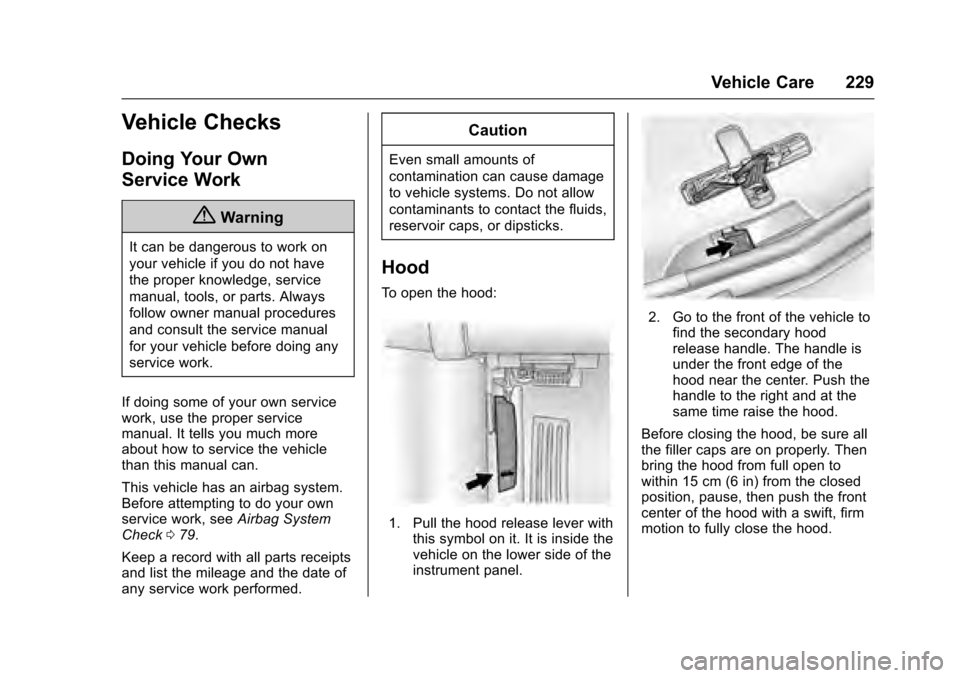
To open the hood:
1. Pull the hood release lever with this symbol on it. It is inside the
vehicle on the lower side of the
instrument panel.
2. Go to the front of the vehicle tofind the secondary hood
release handle. The handle is
under the front edge of the
hood near the center. Push the
handle to the right and at the
same time raise the hood.
Before closing the hood, be sure all
the filler caps are on properly. Then
bring the hood from full open to
within 15 cm (6 in) from the closed
position, pause, then push the front
center of the hood with a swift, firm
motion to fully close the hood.
Page 255 of 320
Cadillac XTS Owner Manual (GMNA-Localizing-MidEast-9369806) - 2016 -
crc - 6/24/15
254 Vehicle Care
Fuses and Circuit
Breakers
The wiring circuits in the vehicle are
protected from short circuits by a
combination of fuses and circuit
breakers. This greatly reduces the
chance of damage caused by
electrical problems.
To check a fuse, look at the
silver-colored band inside the fuse.
If the band is broken or melted,
replace the fuse. Be sure to replace
a bad fuse with a new one of the
identical size and rating.
Fuses of the same amperage can
be temporarily borrowed from
another fuse location, if a fuse goes
out. Replace the fuse as soon as
possible.
To identify and check fuses, circuit
breakers, and relays, seeEngine
Compartment Fuse Block 0254,
Instrument Panel Fuse Block 0257,
and Rear Compartment Fuse Block
0 259.
Engine Compartment
Fuse Block
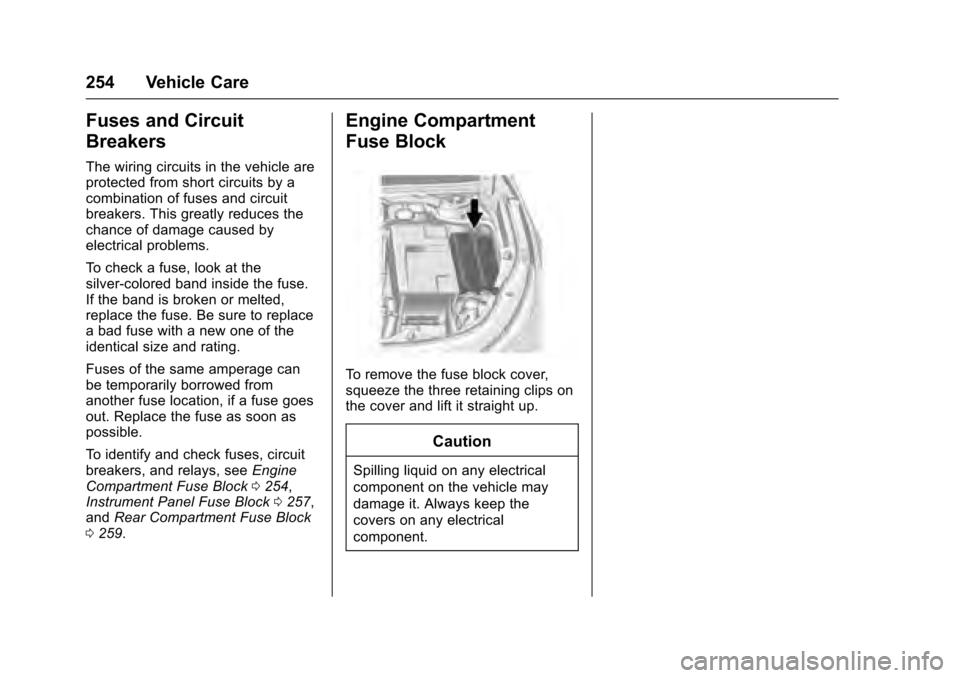
To remove the fuse block cover,
squeeze the three retaining clips on
the cover and lift it straight up.
Caution
Spilling liquid on any electrical
component on the vehicle may
damage it. Always keep the
covers on any electrical
component.
Page 258 of 320
Cadillac XTS Owner Manual (GMNA-Localizing-MidEast-9369806) - 2016 -
crc - 6/24/15
Vehicle Care 257
Mini Fuses Usage55 Outside Rearview Mirror, Front Window
Switches
56 Windshield Washer
57 Steering Column Lock
60 Heated Mirror
62 Massage Memory Bolster
64 Adaptive Forward Lighting (AFL)
Module–Battery
66 Trunk Release
67 Chassis Control Module
69 Regulated Voltage Control Sensor
70 Vent Canister Solenoid
71 Memory Module Mini Relays Usage
7 Engine Control Module
9 Cooling Fan
13 Cooling Fan
15 Run/Crank
17 Rear Window Defogger
Micro
Relays Usage
1 Air Conditioning Compressor Clutch
2 Starter
4 Wiper Speed
5 Wiper Control
8 Not Used
10 Cooling Fan
11 Headlamp Washer
14 Headlamp Low BeamInstrument Panel Fuse
Block
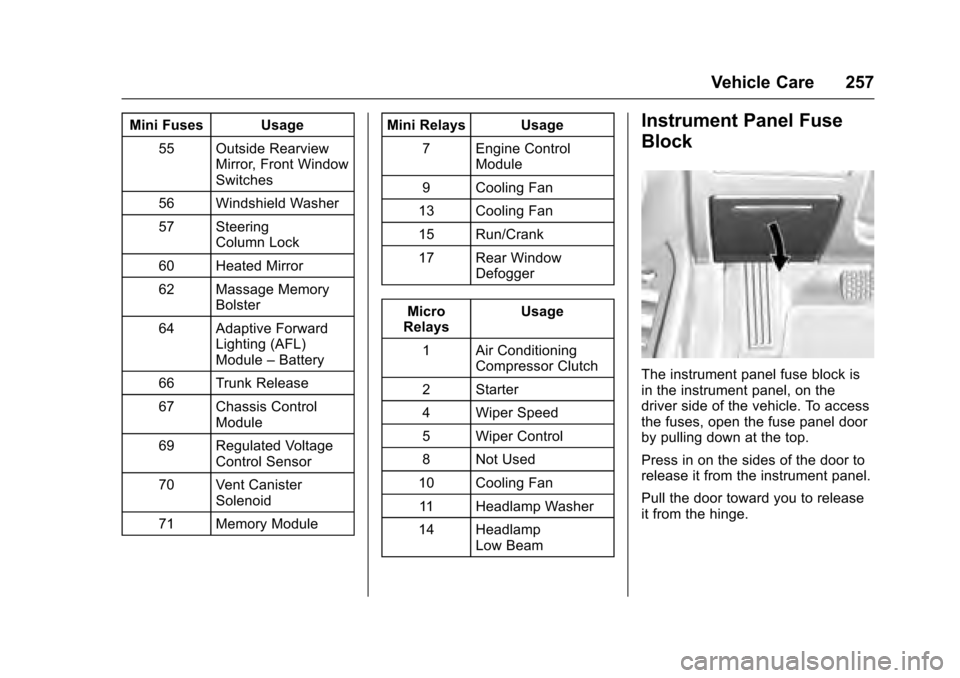
The instrument panel fuse block is
in the instrument panel, on the
driver side of the vehicle. To access
the fuses, open the fuse panel door
by pulling down at the top.
Press in on the sides of the door to
release it from the instrument panel.
Pull the door toward you to release
it from the hinge.
Page 294 of 320
Cadillac XTS Owner Manual (GMNA-Localizing-MidEast-9369806) - 2016 -
crc - 6/24/15
Vehicle Care 293
Cleaning High Gloss Surfaces
and Vehicle Information and
Radio Displays
Use a microfiber cloth on high gloss
surfaces or vehicle displays. First,
use a soft bristle brush to remove
dirt that can scratch the surface.
Then gently clean by rubbing with a
microfiber cloth. Never use window
cleaners or solvents. Periodically
hand wash the microfiber cloth
separately, using mild soap. Do not
use bleach or fabric softener. Rinse
thoroughly and air dry before
next use.
Caution
Do not attach a device with a
suction cup to the display. This
may cause damage and would
not be covered by the vehicle
warranty.
Instrument Panel, Leather,
Vinyl, Other Plastic Surfaces,
Low Gloss Paint Surfaces, and
Natural Open Pore Wood
Surfaces
Use a soft microfiber cloth
dampened with water to remove
dust and loose dirt. For a more
thorough cleaning, use a soft
microfiber cloth dampened with a
mild soap solution.
Caution
Soaking or saturating leather,
especially perforated leather, as
well as other interior surfaces,
may cause permanent damage.
Wipe excess moisture from these
surfaces after cleaning and allow
them to dry naturally. Never use
heat, steam, or spot removers. Do
not use cleaners that contain
silicone or wax-based products.
Cleaners containing these
solvents can permanently change(Continued)
Caution (Continued)
the appearance and feel of
leather or soft trim, and are not
recommended.
Do not use cleaners that increase
gloss, especially on the instrument
panel. Reflected glare can decrease
visibility through the windshield
under certain conditions.
Caution
Use of air fresheners may cause
permanent damage to plastics
and painted surfaces. If an air
freshener comes in contact with
any plastic or painted surface in
the vehicle, blot immediately and
clean with a soft cloth dampened
with a mild soap solution.
Damage caused by air fresheners
would not be covered by the
vehicle warranty.