light CADILLAC XTS 2016 1.G Owners Manual
[x] Cancel search | Manufacturer: CADILLAC, Model Year: 2016, Model line: XTS, Model: CADILLAC XTS 2016 1.GPages: 320, PDF Size: 2.07 MB
Page 2 of 320

Cadillac XTS Owner Manual (GMNA-Localizing-MidEast-9369806) - 2016 -
crc - 6/24/15
ContentsIntroduction . . . . . . . . . . . . . . . . . . . . . . 2
In Brief . . . . . . . . . . . . . . . . . . . . . . . . . . . 5
Keys, Doors, and Windows . . . . . 26
Seats and Restraints . . . . . . . . . . . 49
Storage . . . . . . . . . . . . . . . . . . . . . . . . . 98
Instruments and Controls . . . . . . 102
Lighting . . . . . . . . . . . . . . . . . . . . . . . 152
Infotainment System . . . . . . . . . . 160
Climate Controls . . . . . . . . . . . . . . 161
Driving and Operating . . . . . . . . . 170
Vehicle Care . . . . . . . . . . . . . . . . . . 227
Service and Maintenance . . . . . 296
Technical Data . . . . . . . . . . . . . . . . 304
Customer Information . . . . . . . . . 308
Index . . . . . . . . . . . . . . . . . . . . 310
Page 4 of 320
Cadillac XTS Owner Manual (GMNA-Localizing-MidEast-9369806) - 2016 -
crc - 6/24/15
Introduction 3
M:Shown when the owner
manual has additional instructions
or information.
*: Shown when the service
manual has additional instructions
or information.
0: Shown when there is more
information on another page —
“see page.”
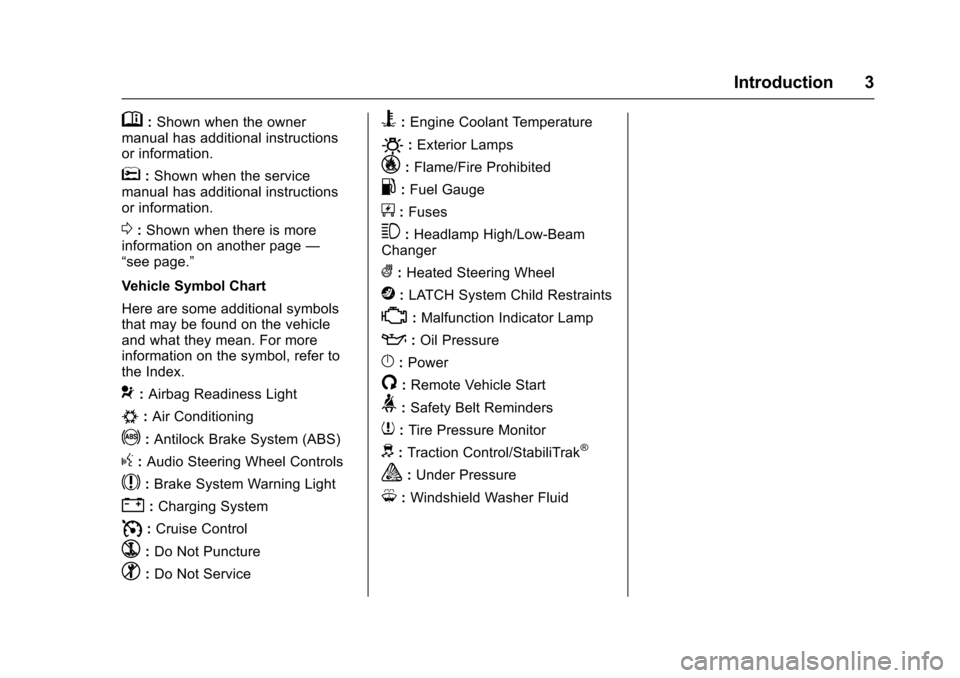
Vehicle Symbol Chart
Here are some additional symbols
that may be found on the vehicle
and what they mean. For more
information on the symbol, refer to
the Index.
9: Airbag Readiness Light
#:Air Conditioning
!:Antilock Brake System (ABS)
g: Audio Steering Wheel Controls
$:Brake System Warning Light
":Charging System
I: Cruise Control
`:Do Not Puncture
^:Do Not Service
B:Engine Coolant Temperature
O:Exterior Lamps
_: Flame/Fire Prohibited
.:Fuel Gauge
+: Fuses
3:Headlamp High/Low-Beam
Changer
(: Heated Steering Wheel
j:LATCH System Child Restraints
*:Malfunction Indicator Lamp
::Oil Pressure
}:Power
/:Remote Vehicle Start
>: Safety Belt Reminders
7:Tire Pressure Monitor
d:Traction Control/StabiliTrak®
a:Under Pressure
M: Windshield Washer Fluid
Page 6 of 320
Cadillac XTS Owner Manual (GMNA-Localizing-MidEast-9369806) - 2016 -
crc - 6/24/15
In Brief 5
In Brief
Instrument Panel
Instrument Panel Overview . . . . . . 6
Initial Drive Information
Initial Drive Information . . . . . . . . . . 8
Remote Keyless Entry (RKE)System . . . . . . . . . . . . . . . . . . . . . . . . 8
Remote Vehicle Start . . . . . . . . . . . 8
Door Locks . . . . . . . . . . . . . . . . . . . . . 9
Trunk . . . . . . . . . . . . . . . . . . . . . . . . . . . 9
Windows . . . . . . . . . . . . . . . . . . . . . . . . 9
Seat Adjustment . . . . . . . . . . . . . . . 10
Memory Features . . . . . . . . . . . . . . 12
Second Row Seats . . . . . . . . . . . . 13
Heated and Ventilated Seats . . . 13
Head Restraint Adjustment . . . . 13
Safety Belts . . . . . . . . . . . . . . . . . . . . 14
Passenger Sensing System . . . 14
Mirror Adjustment . . . . . . . . . . . . . . 14
Steering Wheel Adjustment . . . . 15
Interior Lighting . . . . . . . . . . . . . . . . 15
Exterior Lighting . . . . . . . . . . . . . . . 16
Windshield Wiper/Washer . . . . . . 17
Climate Controls . . . . . . . . . . . . . . . 18
Transmission . . . . . . . . . . . . . . . . . . 19
Vehicle Features
Infotainment System . . . . . . . . . . . 19 Steering Wheel Controls . . . . . . . 19
Cruise Control . . . . . . . . . . . . . . . . . 20
Driver Information
Center (DIC) . . . . . . . . . . . . . . . . . 20
Forward Collision Alert (FCA)
System . . . . . . . . . . . . . . . . . . . . . . . 21
Front Automatic Braking (FAB) System . . . . . . . . . . . . . . . . . . . . . . . 21
Lane Departure Warning (LDW) . . . . . . . . . . . . . . . 21
Side Blind Zone Alert (SBZA) . . . . . . . . . . . . . . . . . . 21
Surround Vision . . . . . . . . . . . . . . . 21
Rear Vision Camera (RVC) . . . . 22
Rear Cross Traffic Alert (RCTA) System . . . . . . . . . . . . . . . . . . . . . . . 22
Parking Assist . . . . . . . . . . . . . . . . . 22
Rear Automatic Braking (RAB) System . . . . . . . . . . . . . . . . . . . . . . . 22
Power Outlets . . . . . . . . . . . . . . . . . 22
Sunroof . . . . . . . . . . . . . . . . . . . . . . . . 22
Performance and Maintenance
Traction Control/Electronic Stability Control . . . . . . . . . . . . . . 23
Tire Pressure Monitor . . . . . . . . . . 24
Engine Oil Life System . . . . . . . . 24
Driving for Better Fuel Economy . . . . . . . . . . . . . . . . . . . . . 25
Page 8 of 320

Cadillac XTS Owner Manual (GMNA-Localizing-MidEast-9369806) - 2016 -
crc - 6/24/15
In Brief 7
1.Air Vents 0167.
2. Electric Parking Brake 0190.
Instrument Panel Illumination
Control 0157.
Head-Up Display (HUD) 0131
(If Equipped).
3. Exterior Lamp Controls 0152.
Turn Signal Lever. See Turn
and Lane-Change Signals
0 156.
4. Instrument Cluster 0111.
Driver Information Center (DIC)
Display. See Driver Information
Center (DIC) 0128.
5. Windshield Wiper/Washer
0104.
6. Hazard Warning Flashers
0156.
Lane Departure Warning
(LDW) 0216.
Traction Control/Electronic
Stability Control 0192.
7. Infotainment 0160.
8. Glove Box Button. See Glove
Box 099. Parking Assist Button. See
Assistance Systems for
Parking or Backing
0206.
9. Dual Automatic Climate Control
System 0161.
Heated and Ventilated Front
Seats 057 (If Equipped).
10. Instrument Panel Storage 098
(If Equipped).
Wireless Charging Pad (If
Equipped) (Out of View). See
Wireless Charging 0108.
11. Shift Lever. See Automatic
Transmission 0187.
12. ENGINE START/STOP Button. SeeIgnition Positions 0181.
13. Steering Wheel Controls 0103.
14. Horn 0104.
15. Steering Wheel Adjustment
0103.
16. Cruise Control 0195.
Adaptive Cruise Control 0198
(If Equipped).
Forward Collision Alert (FCA)
System 0211 (If Equipped). Phone Button. See
“Steering
Wheel Controls” in the
infotainment manual.
Heated Steering Wheel 0103
(If Equipped).
17. Data Link Connector (DLC) (Out of View). See Malfunction
Indicator Lamp (Check Engine
Light) 0119.
18. Hood Release. See Hood
0 229.
19. Instrument Panel Storage 098.
Page 14 of 320
Cadillac XTS Owner Manual (GMNA-Localizing-MidEast-9369806) - 2016 -
crc - 6/24/15
In Brief 13
memory buttons 1 and 2 are
recalled when the ignition is
changed from OFF to ON/RUN or
ACC/ACCESSORY.
When Easy Exit Options is enabled
in the personalization menu, the
seats will move rearward when the
ignition is changed to OFF and
driver door is opened within a
short time.
SeeMemory Seats 056 and
Vehicle Personalization 0145.
Second Row Seats
On some vehicles, either side of the
seatback can be folded for more
cargo space.
See Rear Seats 059.
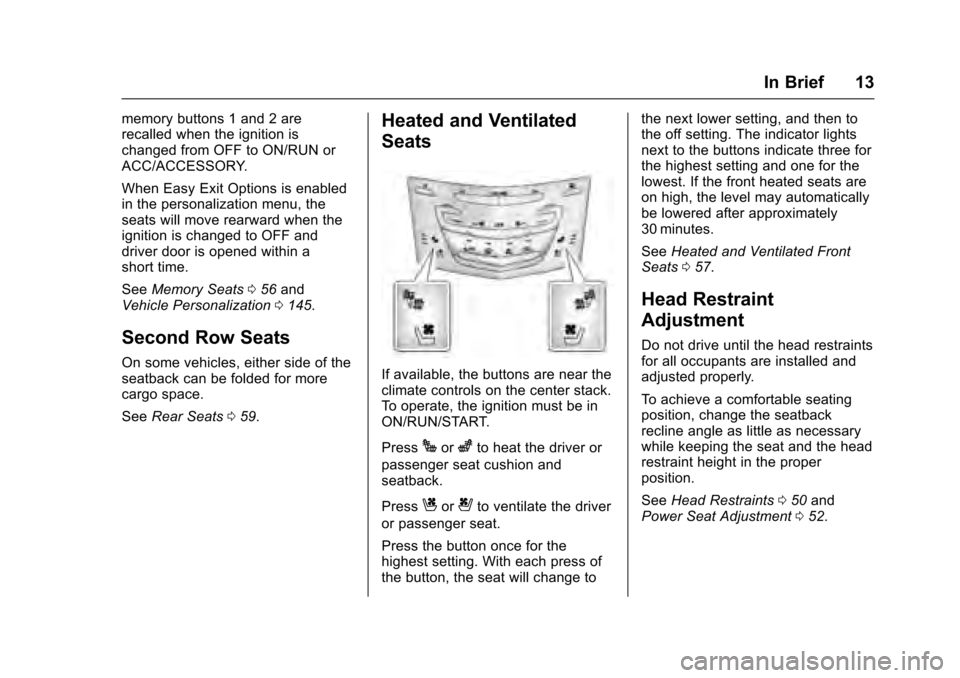
Heated and Ventilated
Seats
If available, the buttons are near the
climate controls on the center stack.
To operate, the ignition must be in
ON/RUN/START.
Press
Jorzto heat the driver or
passenger seat cushion and
seatback.
Press
Cor{to ventilate the driver
or passenger seat.
Press the button once for the
highest setting. With each press of
the button, the seat will change to the next lower setting, and then to
the off setting. The indicator lights
next to the buttons indicate three for
the highest setting and one for the
lowest. If the front heated seats are
on high, the level may automatically
be lowered after approximately
30 minutes.
See
Heated and Ventilated Front
Seats 057.
Head Restraint
Adjustment
Do not drive until the head restraints
for all occupants are installed and
adjusted properly.
To achieve a comfortable seating
position, change the seatback
recline angle as little as necessary
while keeping the seat and the head
restraint height in the proper
position.
See Head Restraints 050 and
Power Seat Adjustment 052.
Page 15 of 320
Cadillac XTS Owner Manual (GMNA-Localizing-MidEast-9369806) - 2016 -
crc - 6/24/15
14 In Brief
Safety Belts
Refer to the following sections for
important information on how to use
safety belts properly:
.Safety Belts 062.
. How to Wear Safety Belts
Properly 063.
. Lap-Shoulder Belt 064.
. Lower Anchors and Tethers for
Children (LATCH System) 086.
Passenger Sensing
System
The passenger sensing system will
turn off the front outboard
passenger frontal airbag and knee
airbag under certain conditions. No
other airbag is affected by the
passenger sensing system. See
Passenger Sensing System 074.
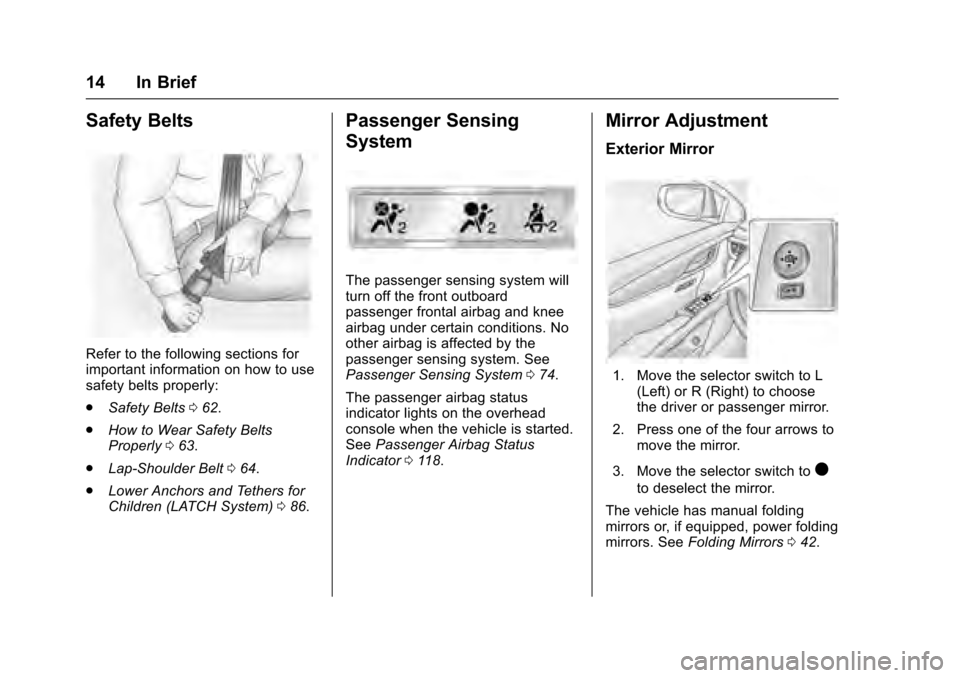
The passenger airbag status
indicator lights on the overhead
console when the vehicle is started.
See Passenger Airbag Status
Indicator 0118.
Mirror Adjustment
Exterior Mirror
1. Move the selector switch to L
(Left) or R (Right) to choose
the driver or passenger mirror.
2. Press one of the four arrows to move the mirror.
3. Move the selector switch to
)
to deselect the mirror.
The vehicle has manual folding
mirrors or, if equipped, power folding
mirrors. See Folding Mirrors 042.
Page 16 of 320
Cadillac XTS Owner Manual (GMNA-Localizing-MidEast-9369806) - 2016 -
crc - 6/24/15
In Brief 15
Interior Mirror
Adjustment
Hold the rearview mirror in the
center and move it to view the area
behind the vehicle.
Automatic Dimming Rearview
Mirror
The vehicle has an automatic
dimming rearview mirror. The mirror
will automatically reduce the glare
from the headlamps from behind.
The dimming feature comes on
when the vehicle is started. See
Automatic Dimming Rearview Mirror
043.
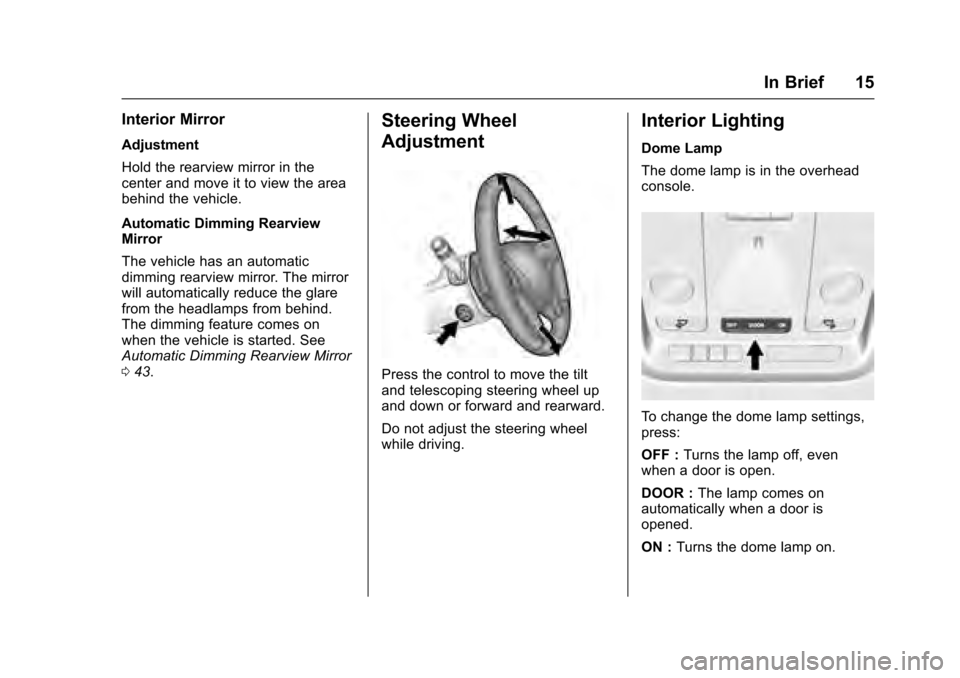
Steering Wheel
Adjustment
Press the control to move the tilt
and telescoping steering wheel up
and down or forward and rearward.
Do not adjust the steering wheel
while driving.
Interior Lighting
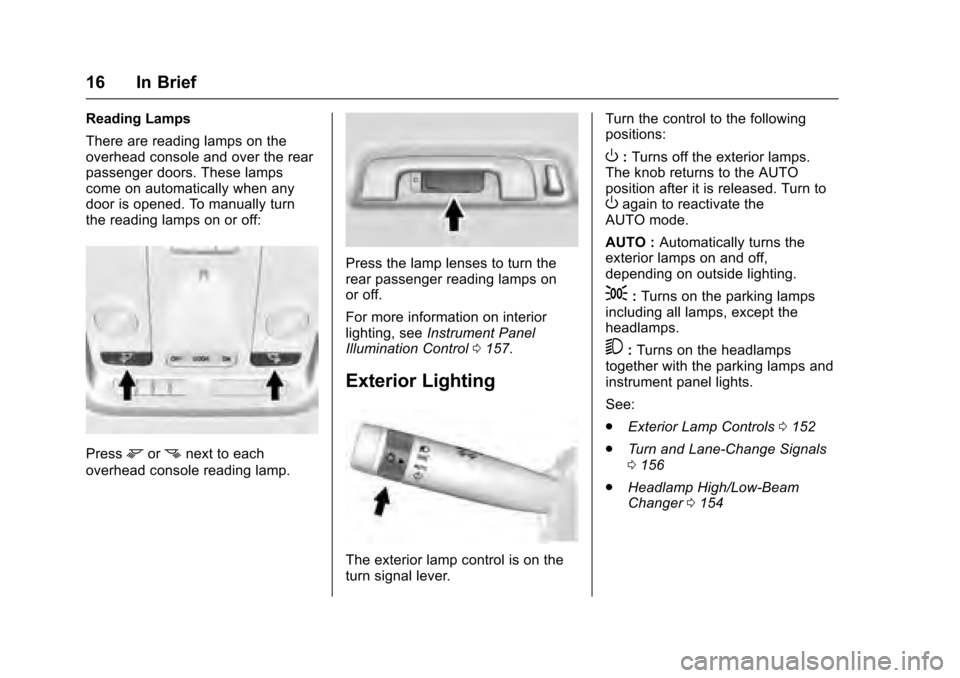
Dome Lamp
The dome lamp is in the overhead
console.
To change the dome lamp settings,
press:
OFF : Turns the lamp off, even
when a door is open.
DOOR : The lamp comes on
automatically when a door is
opened.
ON : Turns the dome lamp on.
Page 17 of 320
Cadillac XTS Owner Manual (GMNA-Localizing-MidEast-9369806) - 2016 -
crc - 6/24/15
16 In Brief
Reading Lamps
There are reading lamps on the
overhead console and over the rear
passenger doors. These lamps
come on automatically when any
door is opened. To manually turn
the reading lamps on or off:
Pressmornnext to each
overhead console reading lamp.
Press the lamp lenses to turn the
rear passenger reading lamps on
or off.
For more information on interior
lighting, see Instrument Panel
Illumination Control 0157.
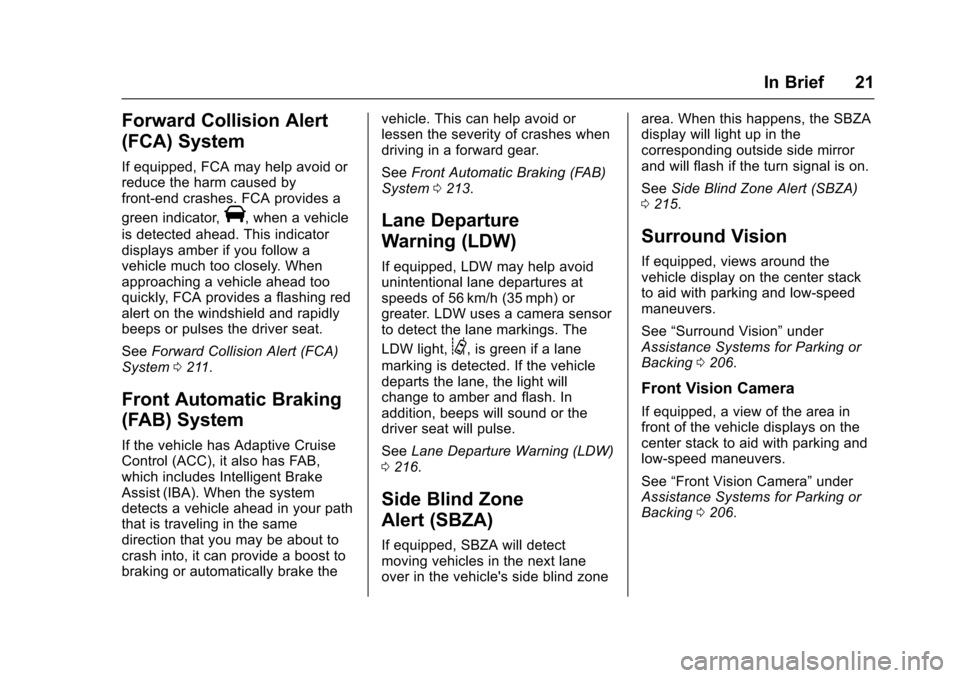
Exterior Lighting
The exterior lamp control is on the
turn signal lever. Turn the control to the following
positions:
O:
Turns off the exterior lamps.
The knob returns to the AUTO
position after it is released. Turn to
Oagain to reactivate the
AUTO mode.
AUTO : Automatically turns the
exterior lamps on and off,
depending on outside lighting.
;: Turns on the parking lamps
including all lamps, except the
headlamps.
5: Turns on the headlamps
together with the parking lamps and
instrument panel lights.
See:
. Exterior Lamp Controls 0152
. Turn and Lane-Change Signals
0156
. Headlamp High/Low-Beam
Changer 0154
Page 22 of 320
Cadillac XTS Owner Manual (GMNA-Localizing-MidEast-9369806) - 2016 -
crc - 6/24/15
In Brief 21
Forward Collision Alert
(FCA) System
If equipped, FCA may help avoid or
reduce the harm caused by
front-end crashes. FCA provides a
green indicator,
V, when a vehicle
is detected ahead. This indicator
displays amber if you follow a
vehicle much too closely. When
approaching a vehicle ahead too
quickly, FCA provides a flashing red
alert on the windshield and rapidly
beeps or pulses the driver seat.
See Forward Collision Alert (FCA)
System 0211.
Front Automatic Braking
(FAB) System
If the vehicle has Adaptive Cruise
Control (ACC), it also has FAB,
which includes Intelligent Brake
Assist (IBA). When the system
detects a vehicle ahead in your path
that is traveling in the same
direction that you may be about to
crash into, it can provide a boost to
braking or automatically brake the vehicle. This can help avoid or
lessen the severity of crashes when
driving in a forward gear.
See
Front Automatic Braking (FAB)
System 0213.
Lane Departure
Warning (LDW)
If equipped, LDW may help avoid
unintentional lane departures at
speeds of 56 km/h (35 mph) or
greater. LDW uses a camera sensor
to detect the lane markings. The
LDW light,
@, is green if a lane
marking is detected. If the vehicle
departs the lane, the light will
change to amber and flash. In
addition, beeps will sound or the
driver seat will pulse.
See Lane Departure Warning (LDW)
0 216.
Side Blind Zone
Alert (SBZA)
If equipped, SBZA will detect
moving vehicles in the next lane
over in the vehicle's side blind zone area. When this happens, the SBZA
display will light up in the
corresponding outside side mirror
and will flash if the turn signal is on.
See
Side Blind Zone Alert (SBZA)
0 215.
Surround Vision
If equipped, views around the
vehicle display on the center stack
to aid with parking and low-speed
maneuvers.
See “Surround Vision” under
Assistance Systems for Parking or
Backing 0206.
Front Vision Camera
If equipped, a view of the area in
front of the vehicle displays on the
center stack to aid with parking and
low-speed maneuvers.
See “Front Vision Camera” under
Assistance Systems for Parking or
Backing 0206.
Page 25 of 320
Cadillac XTS Owner Manual (GMNA-Localizing-MidEast-9369806) - 2016 -
crc - 6/24/15
24 In Brief
instrument cluster and the
appropriate DIC message is
displayed. SeeRide Control
System Messages 0141.
. Press and release the
gbutton
again to turn on both systems.
See Traction Control/Electronic
Stability Control 0192.
Tire Pressure Monitor
This vehicle may have a Tire
Pressure Monitor System (TPMS).
The low tire pressure warning light
alerts to a significant loss in
pressure of one of the vehicle's
tires. If the warning light comes on,
stop as soon as possible and inflate
the tires to the recommended
pressure shown on the Tire and Loading Information label. See
Vehicle Load Limits
0177. The
warning light will remain on until the
tire pressure is corrected.
The low tire pressure warning light
may come on in cool weather when
the vehicle is first started, and then
turn off as the vehicle is driven. This
may be an early indicator that the
tire pressures are getting low and
the tires need to be inflated to the
proper pressure.
The TPMS does not replace normal
monthly tire maintenance. Maintain
the correct tire pressures.
See Tire Pressure Monitor System
0 265.
Engine Oil Life System
The engine oil life system calculates
engine oil life based on vehicle use
and displays the CHANGE ENGINE
OIL SOON message when it is time
to change the engine oil and filter.
The oil life system should be reset
to 100% only following an oil
change. Resetting the Oil Life System
1. Using the DIC controls on the right side of the steering wheel,
display REMAINING OIL LIFE
on the DIC. See Driver
Information Center (DIC) 0128.
When remaining oil life is low,
the CHANGE ENGINE OIL
SOON message will appear on
the display. See Engine Oil
Messages 0137.
2. Press SEL on the DIC controls and hold SEL down for a few
seconds to clear the CHANGE
ENGINE OIL SOON message
and reset the oil life at 100%.
Be careful not to reset the oil
life display accidentally at any
time other than after the oil is
changed. It cannot be reset
accurately until the next oil
change.
The oil life system can also be reset
as follows:
1. Turn the ignition on with the engine off.