ignition CADILLAC XTS 2017 1.G Owners Manual
[x] Cancel search | Manufacturer: CADILLAC, Model Year: 2017, Model line: XTS, Model: CADILLAC XTS 2017 1.GPages: 314, PDF Size: 3.71 MB
Page 8 of 314

Cadillac XTS Owner Manual (GMNA-Localizing-MidEast-10292881) - 2017 -
crc - 7/1/16
IN BRIEF 7
1.Air Vents 0165.
2. Electric Parking Brake 0186.
Instrument Panel Illumination
Control 0155.
Head-Up Display (HUD) 0131 (If
Equipped).
3. Exterior Lamp Controls 0151.
Turn Signal Lever. See Turn and
Lane-Change Signals 0154.
4. Instrument Cluster 0112.
Driver Information Center (DIC)
Display. See Driver Information
Center (DIC) 0128.
5. Windshield Wiper/Washer 0105.
6. Hazard Warning Flashers 0154.
Lane Departure Warning
(LDW) 0211.
Traction Control/Electronic
Stability Control 0188.
7. Infotainment 0158.
8. Glove Box Button. See Glove
Box 0100.
Parking Assist Button. See
Assistance Systems for Parking or
Backing 0202. 9.
Dual Automatic Climate Control
System 0159.
Heated and Ventilated Front Seats
0 58 (If Equipped).
10. Instrument Panel Storage 099 (If
Equipped).
Wireless Charging Pad (If
Equipped) (Out of View). See
Wireless Charging 0108.
11. Shift Lever. See Automatic
Transmission 0183.
12. ENGINE START/STOP Button. SeeIgnition Positions 0177.
13. Steering Wheel Controls 0104.
14. Horn 0104.
15. Steering Wheel Adjustment 0104.
16. Cruise Control 0191.
Adaptive Cruise Control 0194 (If
Equipped).
Forward Collision Alert (FCA)
System 0206 (If Equipped).
Phone Button. See “Steering
Wheel Controls ”in the
infotainment manual. Heated Steering Wheel
0104 (If
Equipped).
17. Data Link Connector (DLC) (Out of View). See Malfunction
Indicator Lamp (Check Engine
Light) 0120.
18. Hood Release. See Hood0223.
19. Instrument Panel Storage 099.
Page 10 of 314
Cadillac XTS Owner Manual (GMNA-Localizing-MidEast-10292881) - 2017 -
crc - 7/1/16
IN BRIEF 9
Door Locks
To lock or unlock a door manually:
.Use the key in the driver door. The
key cylinder is covered by a cap.
See Door Locks 033.
. From the inside, to lock a door
push down on the door lock knob
on top of the door. To unlock a
door, pull once on the door handle
to unlock it, and again to open it.
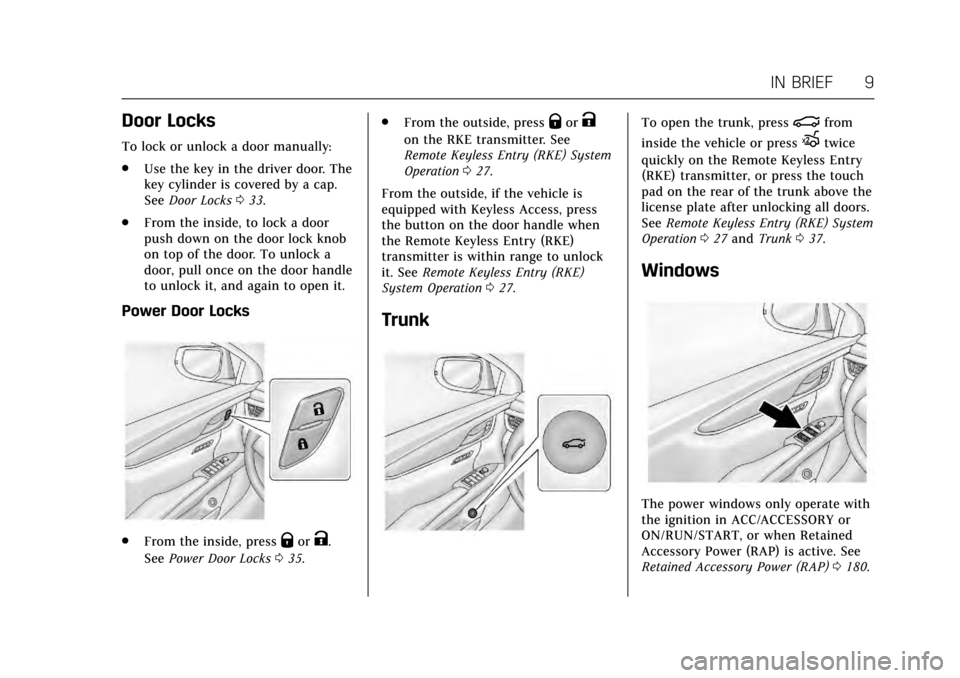
Power Door Locks
.From the inside, pressQorK.
See Power Door Locks 035. .
From the outside, press
QorK
on the RKE transmitter. See
Remote Keyless Entry (RKE) System
Operation 027.
From the outside, if the vehicle is
equipped with Keyless Access, press
the button on the door handle when
the Remote Keyless Entry (RKE)
transmitter is within range to unlock
it. See Remote Keyless Entry (RKE)
System Operation 027.
Trunk
To open the trunk, press|from
inside the vehicle or press
Xtwice
quickly on the Remote Keyless Entry
(RKE) transmitter, or press the touch
pad on the rear of the trunk above the
license plate after unlocking all doors.
See Remote Keyless Entry (RKE) System
Operation 027 and Trunk 037.
Windows
The power windows only operate with
the ignition in ACC/ACCESSORY or
ON/RUN/START, or when Retained
Accessory Power (RAP) is active. See
Retained Accessory Power (RAP) 0180.
Page 11 of 314
Cadillac XTS Owner Manual (GMNA-Localizing-MidEast-10292881) - 2017 -
crc - 7/1/16
10 IN BRIEF
The power window switches on the
driver door control all the windows.
Each passenger door has a switch that
controls only that window.
Press the switch to lower the window.
Pull the switch up to raise it.
SeePower Windows 043.
Seat Adjustment
Uplevel Seat Adjustment
If equipped, the ignition must be on
to use all uplevel seat features.
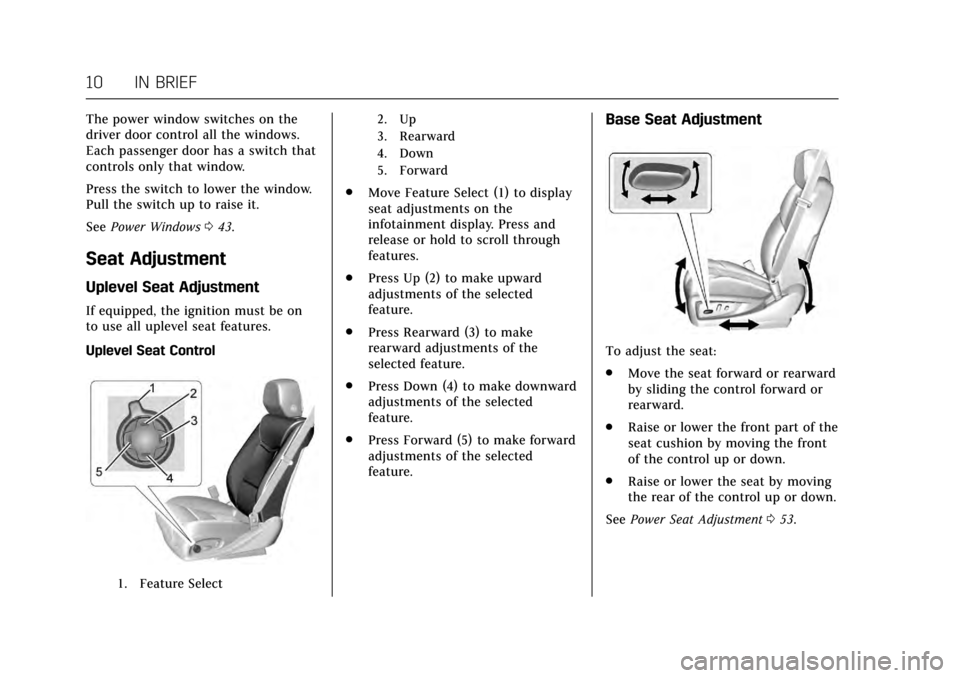
Uplevel Seat Control
1. Feature Select 2. Up
3. Rearward
4. Down
5. Forward
.
Move Feature Select (1) to display
seat adjustments on the
infotainment display. Press and
release or hold to scroll through
features.
. Press Up (2) to make upward
adjustments of the selected
feature.
. Press Rearward (3) to make
rearward adjustments of the
selected feature.
. Press Down (4) to make downward
adjustments of the selected
feature.
. Press Forward (5) to make forward
adjustments of the selected
feature.
Base Seat Adjustment
To adjust the seat:
.
Move the seat forward or rearward
by sliding the control forward or
rearward.
. Raise or lower the front part of the
seat cushion by moving the front
of the control up or down.
. Raise or lower the seat by moving
the rear of the control up or down.
See Power Seat Adjustment 053.
Page 12 of 314
Cadillac XTS Owner Manual (GMNA-Localizing-MidEast-10292881) - 2017 -
crc - 7/1/16
IN BRIEF 11
Lumbar and Bolster Support
Uplevel Seat Adjustment
If equipped, the ignition must be on
to use all uplevel seat features.
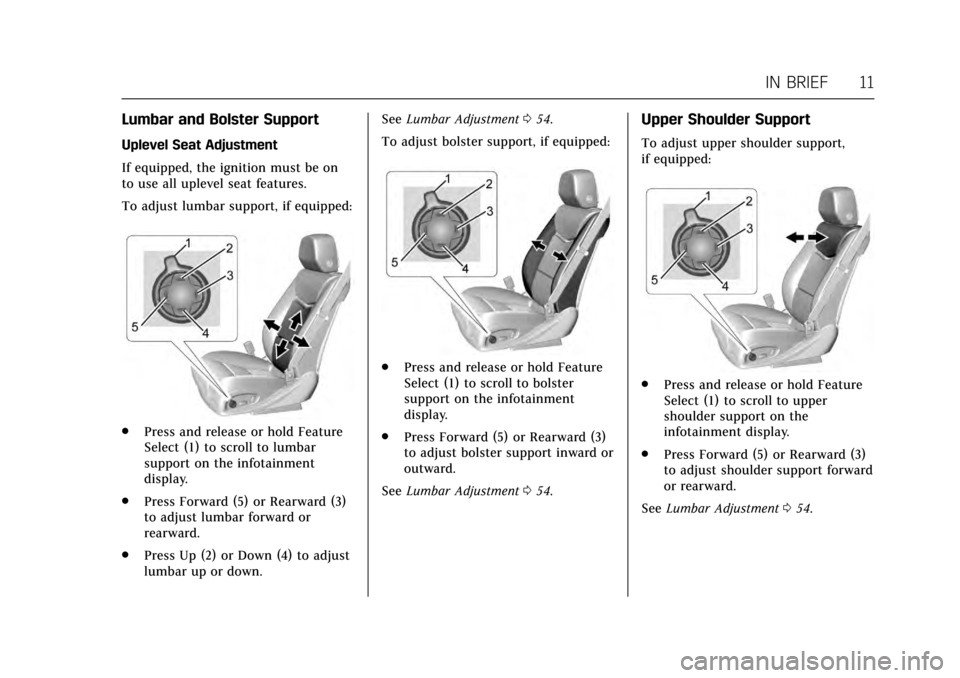
To adjust lumbar support, if equipped:
.Press and release or hold Feature
Select (1) to scroll to lumbar
support on the infotainment
display.
. Press Forward (5) or Rearward (3)
to adjust lumbar forward or
rearward.
. Press Up (2) or Down (4) to adjust
lumbar up or down. See
Lumbar Adjustment 054.
To adjust bolster support, if equipped:
. Press and release or hold Feature
Select (1) to scroll to bolster
support on the infotainment
display.
. Press Forward (5) or Rearward (3)
to adjust bolster support inward or
outward.
See Lumbar Adjustment 054.
Upper Shoulder Support
To adjust upper shoulder support,
if equipped:
.
Press and release or hold Feature
Select (1) to scroll to upper
shoulder support on the
infotainment display.
. Press Forward (5) or Rearward (3)
to adjust shoulder support forward
or rearward.
See Lumbar Adjustment 054.
Page 13 of 314
Cadillac XTS Owner Manual (GMNA-Localizing-MidEast-10292881) - 2017 -
crc - 7/1/16
12 IN BRIEF
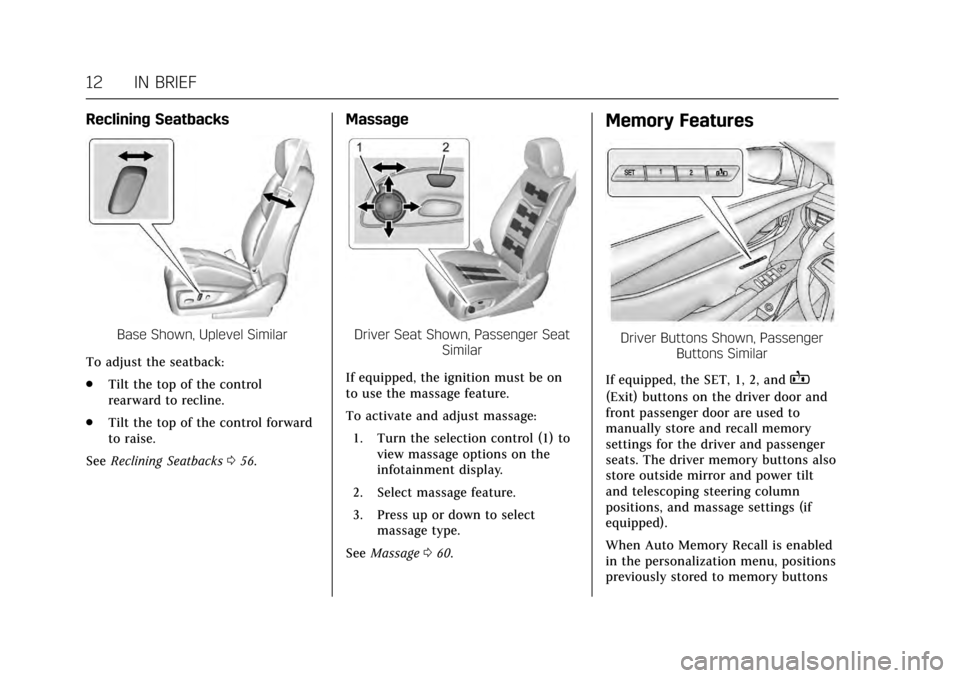
Reclining Seatbacks
Base Shown, Uplevel Similar
To adjust the seatback:
. Tilt the top of the control
rearward to recline.
. Tilt the top of the control forward
to raise.
See Reclining Seatbacks 056.
Massage
Driver Seat Shown, Passenger Seat
Similar
If equipped, the ignition must be on
to use the massage feature.
To activate and adjust massage: 1. Turn the selection control (1) to view massage options on the
infotainment display.
2. Select massage feature.
3. Press up or down to select massage type.
See Massage 060.
Memory Features
Driver Buttons Shown, Passenger
Buttons Similar
If equipped, the SET, 1, 2, and
B
(Exit) buttons on the driver door and
front passenger door are used to
manually store and recall memory
settings for the driver and passenger
seats. The driver memory buttons also
store outside mirror and power tilt
and telescoping steering column
positions, and massage settings (if
equipped).
When Auto Memory Recall is enabled
in the personalization menu, positions
previously stored to memory buttons
Page 14 of 314
Cadillac XTS Owner Manual (GMNA-Localizing-MidEast-10292881) - 2017 -
crc - 7/1/16
IN BRIEF 13
1 and 2 are recalled when the ignition
is changed from OFF to ON/RUN or
ACC/ACCESSORY.
If programmed on in the vehicle
personalization menu, the easy exit
feature automatically recalls the
previously stored exit positions when
leaving the vehicle.
SeeMemory Seats 057 and Vehicle
Personalization 0144.
Second Row Seats
On some vehicles, either side of the
seatback can be folded for more cargo
space.
See Rear Seats 060.
Heated and Ventilated
Seats
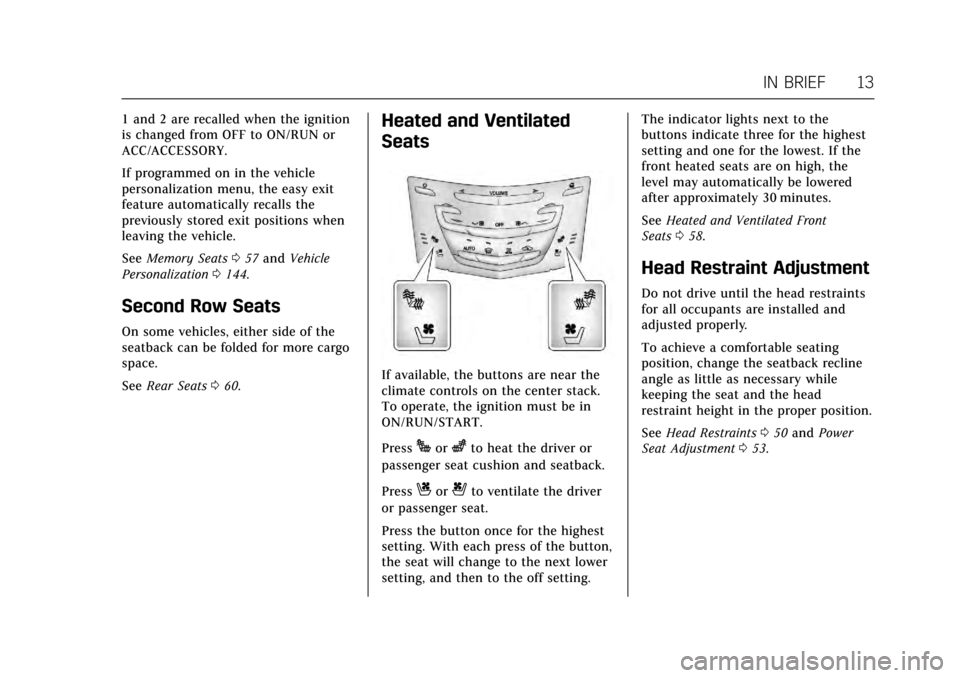
If available, the buttons are near the
climate controls on the center stack.
To operate, the ignition must be in
ON/RUN/START.
Press
Jorzto heat the driver or
passenger seat cushion and seatback.
Press
Cor{to ventilate the driver
or passenger seat.
Press the button once for the highest
setting. With each press of the button,
the seat will change to the next lower
setting, and then to the off setting. The indicator lights next to the
buttons indicate three for the highest
setting and one for the lowest. If the
front heated seats are on high, the
level may automatically be lowered
after approximately 30 minutes.
See
Heated and Ventilated Front
Seats 058.
Head Restraint Adjustment
Do not drive until the head restraints
for all occupants are installed and
adjusted properly.
To achieve a comfortable seating
position, change the seatback recline
angle as little as necessary while
keeping the seat and the head
restraint height in the proper position.
See Head Restraints 050 and Power
Seat Adjustment 053.
Page 17 of 314
Cadillac XTS Owner Manual (GMNA-Localizing-MidEast-10292881) - 2017 -
crc - 7/1/16
16 IN BRIEF
Press the lamp lenses to turn the rear
passenger reading lamps on or off.
For more information on interior
lighting, seeInstrument Panel
Illumination Control 0155.
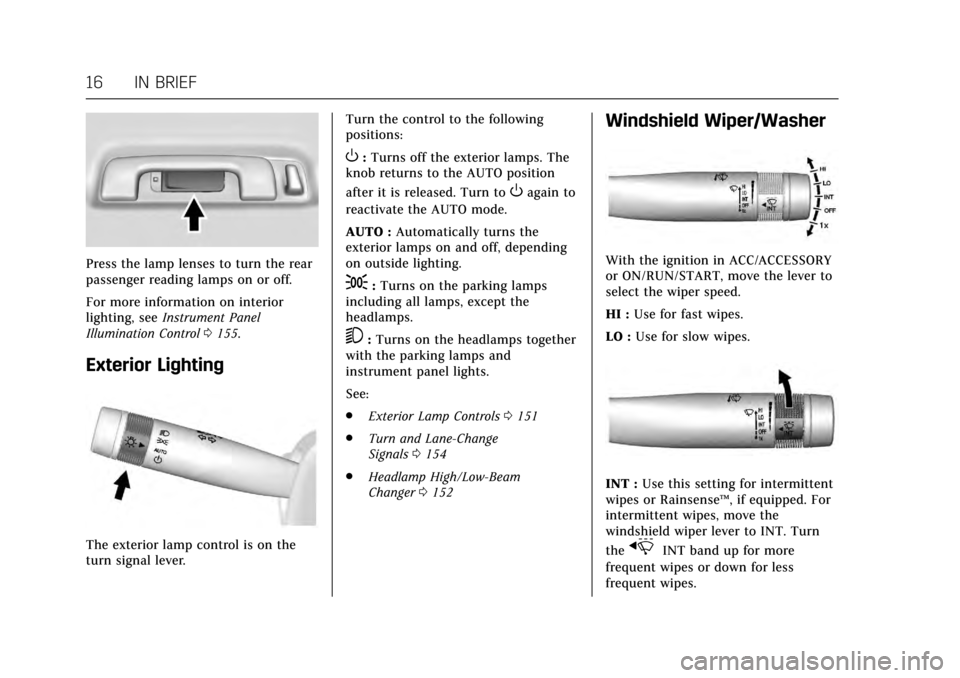
Exterior Lighting
The exterior lamp control is on the
turn signal lever. Turn the control to the following
positions:
O:
Turns off the exterior lamps. The
knob returns to the AUTO position
after it is released. Turn to
Oagain to
reactivate the AUTO mode.
AUTO : Automatically turns the
exterior lamps on and off, depending
on outside lighting.
;: Turns on the parking lamps
including all lamps, except the
headlamps.
5: Turns on the headlamps together
with the parking lamps and
instrument panel lights.
See:
. Exterior Lamp Controls 0151
. Turn and Lane-Change
Signals 0154
. Headlamp High/Low-Beam
Changer 0152
Windshield Wiper/Washer
With the ignition in ACC/ACCESSORY
or ON/RUN/START, move the lever to
select the wiper speed.
HI : Use for fast wipes.
LO : Use for slow wipes.
INT : Use this setting for intermittent
wipes or Rainsense ™, if equipped. For
intermittent wipes, move the
windshield wiper lever to INT. Turn
the
xINT band up for more
frequent wipes or down for less
frequent wipes.
Page 23 of 314
Cadillac XTS Owner Manual (GMNA-Localizing-MidEast-10292881) - 2017 -
crc - 7/1/16
22 IN BRIEF
Power Outlets
Power Outlets 12 Volt Direct
Current
The accessory power outlet can be
used to plug in electrical equipment,
such as a cell phone or MP3 player.
The vehicle has one accessory power
outlet inside the center console.
Lift the cover to access the accessory
power outlet.
SeePower Outlets 0107.
Sunroof
For vehicles equipped with a sunroof,
the ignition must be in ON/RUN or
ACC/ACCESSORY, or in Retained
Accessory Power (RAP) to operate the
sunroof and power sunshade. See
Ignition Positions 0177 and Retained
Accessory Power (RAP) 0180.
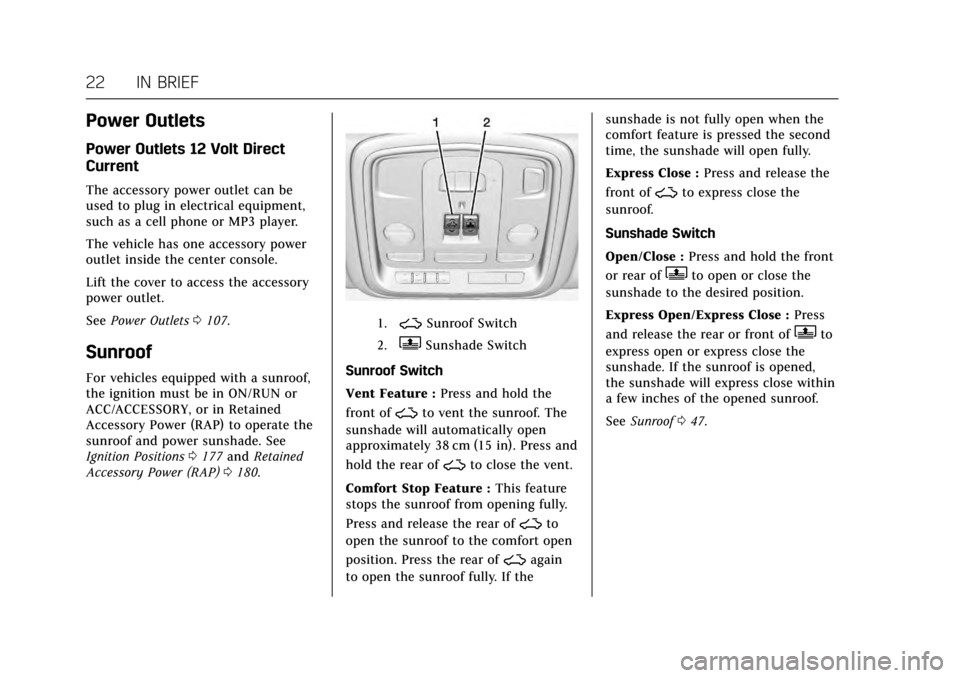
1.~Sunroof Switch
2.QSunshade Switch
Sunroof Switch
Vent Feature : Press and hold the
front of
~to vent the sunroof. The
sunshade will automatically open
approximately 38 cm (15 in). Press and
hold the rear of
~to close the vent.
Comfort Stop Feature : This feature
stops the sunroof from opening fully.
Press and release the rear of
~to
open the sunroof to the comfort open
position. Press the rear of
~again
to open the sunroof fully. If the sunshade is not fully open when the
comfort feature is pressed the second
time, the sunshade will open fully.
Express Close :
Press and release the
front of
~to express close the
sunroof.
Sunshade Switch
Open/Close : Press and hold the front
or rear of
Qto open or close the
sunshade to the desired position.
Express Open/Express Close : Press
and release the rear or front of
Qto
express open or express close the
sunshade. If the sunroof is opened,
the sunshade will express close within
a few inches of the opened sunroof.
See Sunroof 047.
Page 25 of 314
Cadillac XTS Owner Manual (GMNA-Localizing-MidEast-10292881) - 2017 -
crc - 7/1/16
24 IN BRIEF
Fuel (LF3 3.6L V6 Twin
Turbo Engine)
Premium Required Fuel
Use 95 RON or higher octane
unleaded gasoline in your vehicle. Do
not use petrol with an octane rating
lower as it may result in vehicle
damage and lower fuel economy. See
Fuel0212.
Engine Oil Life System
The engine oil life system calculates
engine oil life based on vehicle use
and displays the CHANGE ENGINE
OIL SOON message when it is time to
change the engine oil and filter. The
oil life system should be reset to 100%
only following an oil change. Resetting the Oil Life System
1. Using the DIC controls on the right side of the steering wheel,
display REMAINING OIL LIFE on
the DIC. See Driver Information
Center (DIC) 0128. When
remaining oil life is low, the
CHANGE ENGINE OIL SOON
message will appear on the
display. See Engine Oil
Messages 0137.
2. Press and hold SEL to clear the CHANGE ENGINE OIL SOON
message and reset the oil life
at 100%.
Be careful not to reset the oil life
display accidentally at any time
other than after the oil is
changed. It cannot be reset
accurately until the next oil
change.
The oil life system can also be reset as
follows: 1. Turn the ignition on with the engine off.
2. Fully press and release the accelerator pedal three times
within five seconds. If the CHANGE ENGINE OIL
SOON message is not on, the
system is reset.
See Engine Oil Life System 0230.
Driving for Better Fuel
Economy
Driving habits can affect fuel mileage.
Here are some driving tips to get the
best fuel economy possible.
.
Avoid fast starts and accelerate
smoothly.
. Brake gradually and avoid abrupt
stops.
. Avoid idling the engine for long
periods of time.
. When road and weather
conditions are appropriate, use
cruise control.
. Always follow posted speed limits
or drive more slowly when
conditions require.
. Keep vehicle tires properly
inflated.
. Combine several trips into a
single trip.
Page 33 of 314
Cadillac XTS Owner Manual (GMNA-Localizing-MidEast-10292881) - 2017 -
crc - 7/1/16
32 KEYS, DOORS, AND WINDOWS
If equipped, heated and ventilated
front seats may also come on if
enabled in vehicle personalization. See
Heated and Ventilated Front Seats058
and Vehicle Personalization 0144
The climate control system will use
the previous settings during a remote
start. The rear window defogger may
come on during remote start based on
cold ambient conditions. The rear
defog indicator light does not come on
during remote start.
Laws in some local communities may
restrict the use of remote starters. For
example, some laws may require a
person using remote start to have the
vehicle in view. Check local
regulations for any requirements.
If your vehicle is low on fuel, do not
use the remote start feature. The
vehicle may run out of fuel.
The RKE transmitter range may be
less while the vehicle is running.
Other conditions can affect the
performance of the transmitter. See
Remote Keyless Entry (RKE)
System 027. Starting the Engine Using Remote
Start
1. Press and release
Qon the RKE
transmitter.
2. Immediately press and hold
/
for at least four seconds or until
the turn signal lamps flash. This
confirms the request to remote
start the vehicle has been
received.
During the remote start, the
doors will be locked and the
parking lamps will remain on as
long as the engine is running.
The engine will shut off after
10 minutes unless a time
extension is done or the ignition
is put in ON/RUN/START.
3. Press the brake pedal and select the ON/RUN/START ignition
mode to drive the vehicle.
Extending Engine Run Time
The engine run time can also be
extended by another 10 minutes,
if during the first 10 minutes Steps 1–
2 are repeated while the engine is still running. An extension can be
requested, 30 seconds after starting.
This provides a total of 20 minutes.
The remote start can only be
extended once.
A maximum of two remote starts, or a
remote start with an extension, are
allowed between ignition cycles.
The vehicle's ignition must be
changed to ON/RUN/START and then
back to OFF before the remote start
procedure can be used again.
Canceling a Remote Start
To cancel a remote start, do any of
the following:
.
Press and hold
/until the
parking lamps turn off.
. Turn on the hazard warning
flashers.
. Turn the vehicle on and then
back off.