Safety lock CADILLAC XTS 2018 User Guide
[x] Cancel search | Manufacturer: CADILLAC, Model Year: 2018, Model line: XTS, Model: CADILLAC XTS 2018Pages: 370, PDF Size: 6.45 MB
Page 231 of 370

Cadillac XTS Owner Manual (GMNA-Localizing-U.S./Canada-11354412) -
2018 - crc - 11/16/17
230 DRIVING AND OPERATING
.The rear bumper on the vehicle is
not intended for hitches. Do not
attach rental hitches or other
bumper-type hitches to it. Use
only a frame-mounted hitch that
does not attach to the bumper.
. Will any holes be made in the
body of the vehicle when the
trailer hitch is installed? If so, seal
the holes when the hitch is
removed. If the holes are not
sealed, dirt, water, and deadly
carbon monoxide (CO) from the
exhaust can get into the vehicle.
See Engine Exhaust 0187.
Safety Chains
Always attach chains between the
vehicle and the trailer. Cross the safety
chains under the tongue of the trailer
to help prevent the tongue from
contacting the road if it becomes
separated from the hitch. Leave
enough slack so the rig can turn.
Never allow safety chains to drag on
the ground.
Trailer Brakes
Does the trailer have its own brakes?
State and local regulations may
require the trailer to have its own
braking system if loaded above a
certain threshold. Trailer brake
requirements vary from state to state.
Be sure to read and follow the
instructions for the trailer brakes so
they are installed, adjusted, and
maintained properly.
Because the vehicle has antilock
brakes, do not tap into the vehicle's
brake system. If this is done, both
brake systems will not work well or
at all
Conversions and
Add-Ons
Add-On Electrical
Equipment
{Warning
The Data Link Connector (DLC) is
used for vehicle service and
Emission Inspection/Maintenance
testing. See Malfunction Indicator
Lamp (Check Engine Light) 0128.
A device connected to the DLC —
such as an aftermarket fleet or
driver-behavior tracking device —
may interfere with vehicle systems.
This could affect vehicle operation
and cause a crash. Such devices
may also access information stored
in the vehicle’s systems.
Page 235 of 370
Cadillac XTS Owner Manual (GMNA-Localizing-U.S./Canada-11354412) -
2018 - crc - 11/16/17
234 VEHICLE CARE
California Perchlorate
Materials Requirements
Certain types of automotive
applications, such as airbag initiators,
seat belt pretensioners, and lithium
batteries contained in Remote Keyless
Entry transmitters, may contain
perchlorate materials. Special
handling may be necessary. For
additional information, see
www.dtsc.ca.gov/hazardouswaste/
perchlorate.
Accessories and
Modifications
Adding non-dealer accessories or
making modifications to the vehicle
can affect vehicle performance and
safety, including such things as
airbags, braking, stability, ride and
handling, emissions systems,
aerodynamics, durability, and
electronic systems like antilock
brakes, traction control, and stability
control. These accessories or
modifications could even cause
malfunction or damage not covered by
the vehicle warranty.Damage to suspension components
caused by modifying vehicle height
outside of factory settings will not be
covered by the vehicle warranty.
Damage to vehicle components
resulting from modifications or the
installation or use of non-GM certified
parts, including control module or
software modifications, is not covered
under the terms of the vehicle
warranty and may affect remaining
warranty coverage for affected parts.
GM Accessories are designed to
complement and function with other
systems on the vehicle. See your
dealer to accessorize the vehicle using
genuine GM Accessories installed by a
dealer technician.
Also, see
Adding Equipment to the
Airbag-Equipped Vehicle 085.
Vehicle Checks
Doing Your Own
Service Work
{Warning
It can be dangerous to work on
your vehicle if you do not have the
proper knowledge, service manual,
tools, or parts. Always follow
owner’s manual procedures and
consult the service manual for your
vehicle before doing any
service work.
If doing some of your own service
work, use the proper service manual.
It tells you much more about how to
service the vehicle than this manual
can. To order the proper service
manual, see Service Publications
Ordering Information 0343.
This vehicle has an airbag system.
Before attempting to do your own
service work, see Servicing the
Airbag-Equipped Vehicle 085.
Page 284 of 370
Cadillac XTS Owner Manual (GMNA-Localizing-U.S./Canada-11354412) -
2018 - crc - 11/16/17
VEHICLE CARE 283
W, Y and ZR speed rated tires.
Never exceed the winter tires’
maximum speed capability when
using winter tires with a lower
speed rating.
{Warning
Tires could explode during
improper service. Attempting to
mount or dismount a tire could
cause injury or death. Only your
dealer or authorized tire service
center should mount or
dismount the tires.
{Warning
Mixing tires of different sizes,
brands, or types may cause loss
of control of the vehicle,
resulting in a crash or other
vehicle damage. Use the correct
size, brand, and type of tires on
all wheels.
{Warning
Using bias-ply tires on the
vehicle may cause the wheel rim
flanges to develop cracks after
many miles of driving. A tire
and/or wheel could fail suddenly
and cause a crash. Use only
radial-ply tires with the wheels
on the vehicle.
If the vehicle tires must be
replaced with a tire that does not
have a TPC Spec number, make
sure they are the same size, load
range, speed rating, and
construction (radial) as the
original tires.
Vehicles that have a tire pressure
monitoring system could give an
inaccurate low-pressure warning if
non-TPC Spec rated tires are
installed. See Tire Pressure Monitor
System 0276. The Tire and Loading Information
label indicates the original
equipment tires on the vehicle.
See
Vehicle Load Limits 0176.
Different Size Tires and
Wheels
If wheels or tires are installed that are
a different size than the original
equipment wheels and tires, vehicle
performance, including its braking,
ride and handling characteristics,
stability, and resistance to rollover
may be affected. If the vehicle has
electronic systems such as antilock
brakes, rollover airbags, traction
control, electronic stability control,
or All-Wheel Drive, the performance
of these systems can also be affected.
{Warning
If different sized wheels are used,
there may not be an acceptable
level of performance and safety if
tires not recommended for those
wheels are selected. This increases
(Continued)
Page 288 of 370
Cadillac XTS Owner Manual (GMNA-Localizing-U.S./Canada-11354412) -
2018 - crc - 11/16/17
VEHICLE CARE 287
If a front tire fails, the flat tire creates
a drag that pulls the vehicle toward
that side. Take your foot off the
accelerator pedal and grip the steering
wheel firmly. Steer to maintain lane
position, and then gently brake to a
stop, well off the road, if possible.
A rear blowout, particularly on a
curve, acts much like a skid and may
require the same correction as used in
a skid. Stop pressing the accelerator
pedal and steer to straighten the
vehicle. It may be very bumpy and
noisy. Gently brake to a stop, well off
the road, if possible.
{Warning
Driving on a flat tire will cause
permanent damage to the tire.
Re-inflating a tire after it has been
driven on while severely
underinflated or flat may cause a
blowout and a serious crash. Never
attempt to re-inflate a tire that has
been driven on while severely
underinflated or flat. Have your(Continued)
Warning (Continued)
dealer or an authorized tire service
center repair or replace the flat tire
as soon as possible.
{Warning
Lifting a vehicle and getting under
it to do maintenance or repairs is
dangerous without the appropriate
safety equipment and training. If a
jack is provided with the vehicle, it
is designed only for changing a flat
tire. If it is used for anything else,
you or others could be badly injured
or killed if the vehicle slips off the
jack. If a jack is provided with the
vehicle, only use it for changing a
flat tire.
If a tire goes flat, avoid further tire
and wheel damage by driving slowly
to a level place, well off the road,
if possible. Turn on the hazard
warning flashers. See Hazard Warning
Flashers 0155.
{Warning
Changing a tire can be dangerous.
The vehicle can slip off the jack and
roll over or fall causing injury or
death. Find a level place to change
the tire. To help prevent the vehicle
from moving:
1. Set the parking brake firmly.
2. Put an automatictransmission in P (Park) or a
manual transmission in
1 (First) or R (Reverse).
3. Turn off the engine and do not restart while the vehicle
is raised.
4. Do not allow passengers to remain in the vehicle.
5. Place wheel blocks, if equipped, on both sides of
the tire at the opposite corner
of the tire being changed.
This vehicle may come with a jack
and spare tire or a tire sealant and
compressor kit. To use the jacking
Page 294 of 370
Cadillac XTS Owner Manual (GMNA-Localizing-U.S./Canada-11354412) -
2018 - crc - 11/16/17
VEHICLE CARE 293
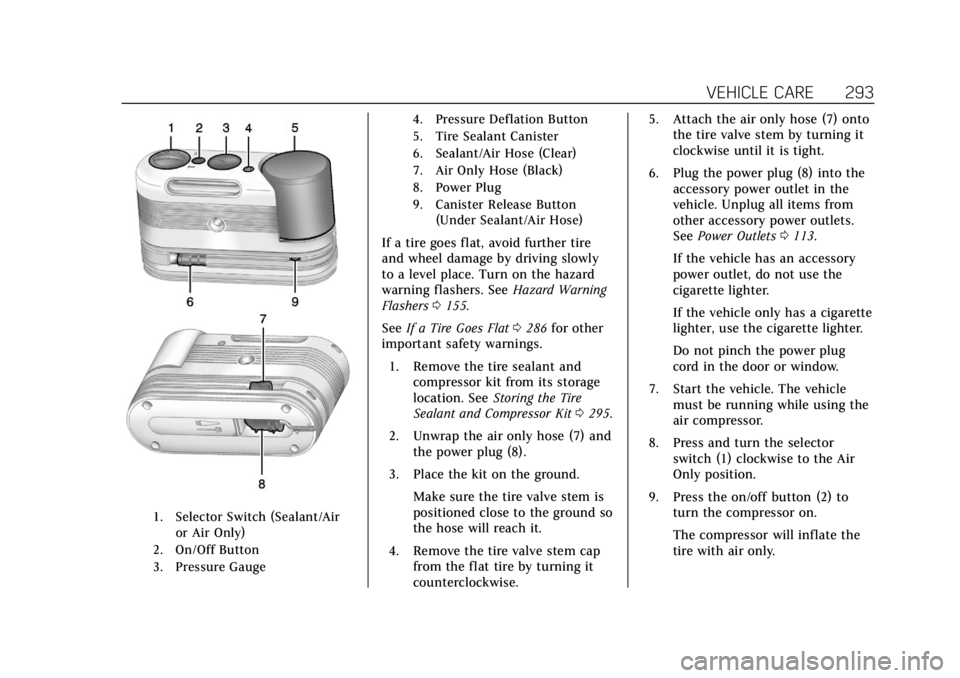
1. Selector Switch (Sealant/Airor Air Only)
2. On/Off Button
3. Pressure Gauge 4. Pressure Deflation Button
5. Tire Sealant Canister
6. Sealant/Air Hose (Clear)
7. Air Only Hose (Black)
8. Power Plug
9. Canister Release Button
(Under Sealant/Air Hose)
If a tire goes flat, avoid further tire
and wheel damage by driving slowly
to a level place. Turn on the hazard
warning flashers. See Hazard Warning
Flashers 0155.
See If a Tire Goes Flat 0286 for other
important safety warnings.
1. Remove the tire sealant and compressor kit from its storage
location. See Storing the Tire
Sealant and Compressor Kit 0295.
2. Unwrap the air only hose (7) and the power plug (8).
3. Place the kit on the ground. Make sure the tire valve stem is
positioned close to the ground so
the hose will reach it.
4. Remove the tire valve stem cap from the flat tire by turning it
counterclockwise. 5. Attach the air only hose (7) onto
the tire valve stem by turning it
clockwise until it is tight.
6. Plug the power plug (8) into the accessory power outlet in the
vehicle. Unplug all items from
other accessory power outlets.
See Power Outlets 0113.
If the vehicle has an accessory
power outlet, do not use the
cigarette lighter.
If the vehicle only has a cigarette
lighter, use the cigarette lighter.
Do not pinch the power plug
cord in the door or window.
7. Start the vehicle. The vehicle must be running while using the
air compressor.
8. Press and turn the selector switch (1) clockwise to the Air
Only position.
9. Press the on/off button (2) to turn the compressor on.
The compressor will inflate the
tire with air only.
Page 297 of 370
Cadillac XTS Owner Manual (GMNA-Localizing-U.S./Canada-11354412) -
2018 - crc - 11/16/17
296 VEHICLE CARE
Removing the Flat Tire and
Installing the Spare Tire
1. Do a safety check beforeproceeding. See If a Tire Goes Flat
0 286.
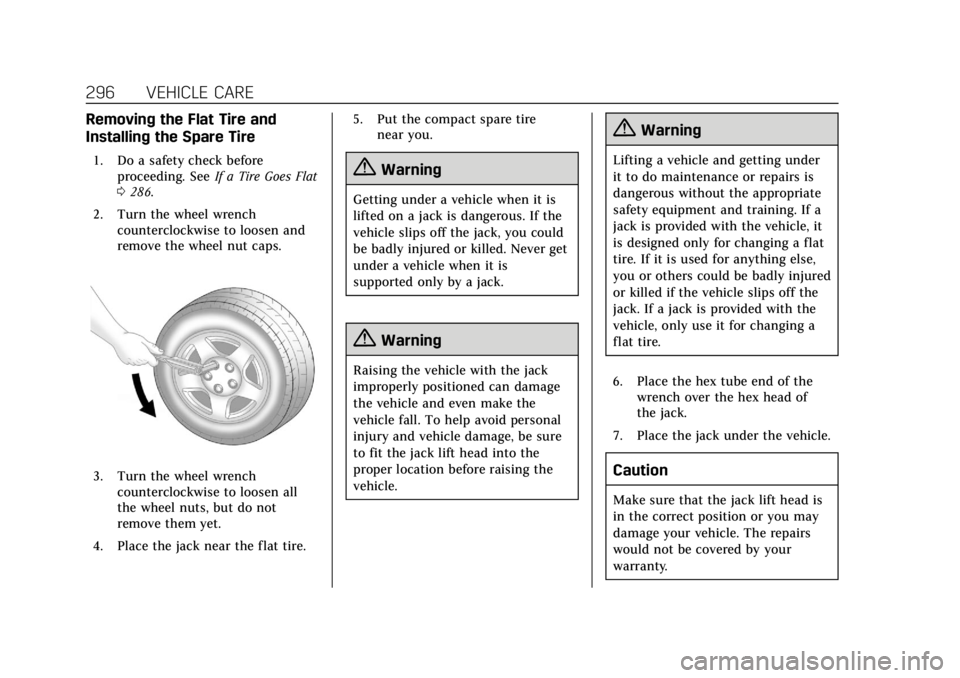
2. Turn the wheel wrench counterclockwise to loosen and
remove the wheel nut caps.
3. Turn the wheel wrenchcounterclockwise to loosen all
the wheel nuts, but do not
remove them yet.
4. Place the jack near the flat tire. 5. Put the compact spare tire
near you.
{Warning
Getting under a vehicle when it is
lifted on a jack is dangerous. If the
vehicle slips off the jack, you could
be badly injured or killed. Never get
under a vehicle when it is
supported only by a jack.
{Warning
Raising the vehicle with the jack
improperly positioned can damage
the vehicle and even make the
vehicle fall. To help avoid personal
injury and vehicle damage, be sure
to fit the jack lift head into the
proper location before raising the
vehicle.
{Warning
Lifting a vehicle and getting under
it to do maintenance or repairs is
dangerous without the appropriate
safety equipment and training. If a
jack is provided with the vehicle, it
is designed only for changing a flat
tire. If it is used for anything else,
you or others could be badly injured
or killed if the vehicle slips off the
jack. If a jack is provided with the
vehicle, only use it for changing a
flat tire.
6. Place the hex tube end of the wrench over the hex head of
the jack.
7. Place the jack under the vehicle.
Caution
Make sure that the jack lift head is
in the correct position or you may
damage your vehicle. The repairs
would not be covered by your
warranty.
Page 308 of 370
Cadillac XTS Owner Manual (GMNA-Localizing-U.S./Canada-11354412) -
2018 - crc - 11/16/17
VEHICLE CARE 307
Appearance Care
Exterior Care
Locks
Locks are lubricated at the factory.
Use a de-icing agent only when
absolutely necessary, and have the
locks greased after using. See
Recommended Fluids and Lubricants
0326.
Washing the Vehicle
To preserve the vehicle's finish, wash
it often and out of direct sunlight.
Caution
Do not use petroleum-based, acidic,
or abrasive cleaning agents as they
can damage the vehicle's paint,
metal, or plastic parts. If damage
occurs, it would not be covered by
the vehicle warranty. Approved
cleaning products can be obtained
from your dealer. Follow all
manufacturer directions regarding
(Continued)
Caution (Continued)
correct product usage, necessary
safety precautions, and appropriate
disposal of any vehicle care
product.
Caution
Avoid using high-pressure washes
closer than 30 cm (12 in) to the
surface of the vehicle. Use of power
washers exceeding 8,274 kPa
(1,200 psi) can result in damage or
removal of paint and decals.
Caution
Do not power wash any component
under the hood that has this
e
symbol.
This could cause damage that
would not be covered by the vehicle
warranty. If using an automatic car wash, follow
the car wash instructions. The
windshield wiper and rear window
wiper, if equipped, must be off.
Remove any accessories that may be
damaged or interfere with the car
wash equipment.
Rinse the vehicle well, before washing
and after, to remove all cleaning
agents completely. If they are allowed
to dry on the surface, they could stain.
Dry the finish with a soft, clean
chamois or an all-cotton towel to
avoid surface scratches and water
spotting.
Finish Care
Application of aftermarket clearcoat
sealant/wax materials is not
recommended. If painted surfaces are
damaged, see your dealer to have the
damage assessed and repaired. Foreign
materials such as calcium chloride
and other salts, ice melting agents,
road oil and tar, tree sap, bird
droppings, chemicals from industrial
chimneys, etc., can damage the
vehicle's finish if they remain on
painted surfaces. Wash the vehicle as
Page 319 of 370

Cadillac XTS Owner Manual (GMNA-Localizing-U.S./Canada-11354412) -
2018 - crc - 11/16/17
318 SERVICE AND MAINTENANCE
.Check tire inflation pressures. See
Tire Pressure 0274.
. Inspect tire wear. See Tire
Inspection 0280.
. Visually check for fluid leaks.
. Inspect engine air cleaner filter.
See Engine Air Cleaner/Filter 0243.
. Inspect brake system. See Exterior
Care 0307.
. Visually inspect steering,
suspension, and chassis
components for damaged, loose,
or missing parts or signs of wear.
See Exterior Care 0307.
. Check restraint system
components. See Safety System
Check 073.
. Visually inspect fuel system for
damage or leaks.
. Visually inspect exhaust system
and nearby heat shields for loose
or damaged parts.
. Lubricate body components. See
Exterior Care 0307.
. Check starter switch. See Starter
Switch Check 0254. .
Check automatic transmission
shift lock control function. See
Automatic Transmission Shift Lock
Control Function Check 0255.
. Check parking brake and
automatic transmission park
mechanism. See Park Brake and
P (Park) Mechanism Check 0255.
. Check accelerator pedal for
damage, high effort, or binding.
Replace if needed.
. Visually inspect gas strut for signs
of wear, cracks, or other damage.
Check the hold open ability of the
strut. If the hold open ability is
low, service the gas strut. See Gas
Strut(s) 0256.
. Check tire sealant expiration date,
if equipped. See Tire Sealant and
Compressor Kit 0288.
. Inspect sunroof track and seal,
if equipped. See Sunroof050.
Page 346 of 370
Cadillac XTS Owner Manual (GMNA-Localizing-U.S./Canada-11354412) -
2018 - crc - 11/16/17
CUSTOMER INFORMATION 345
or write to:
Transport Canada
Motor Vehicle Safety Directorate
Defect Investigations and Recalls
Division
80 Noel Street
Gatineau
,QC J8Z 0A1
Reporting Safety Defects
to General Motors
In addition to notifying NHTSA (or
Transport Canada) in a situation like
this, notify General Motors.
Call 1-800-458-8006, or write:
Cadillac Customer Assistance Center
Cadillac Motor Car Division
P.O. Box 33169
Detroit, MI 48232-5169
In Canada, call 1-888-446-2000,
or write:
Canadian Cadillac Customer Care
Centre, Mail Code: CA1-163-005
General Motors of Canada Company
1908 Colonel Sam Drive
Oshawa, Ontario L1H 8P7
Vehicle Data Recording
and Privacy
The vehicle has a number of
computers that record information
about the vehicle’s performance and
how it is driven. For example, the
vehicle uses computer modules to
monitor and control engine and
transmission performance, to monitor
the conditions for airbag deployment
and deploy them in a crash, and,
if equipped, to provide antilock
braking to help the driver control the
vehicle. These modules may store data
to help the dealer technician service
the vehicle. Some modules may also
store data about how the vehicle is
operated, such as rate of fuel
consumption or average speed. These
modules may retain personal
preferences, such as radio presets, seat
positions, and temperature settings.
Event Data Recorders
This vehicle is equipped with an event
data recorder (EDR). The main
purpose of an EDR is to record, in
certain crash or near crash-likesituations, such as an air bag
deployment or hitting a road obstacle,
data that will assist in understanding
how a vehicle’s systems performed.
The EDR is designed to record data
related to vehicle dynamics and safety
systems for a short period of time,
typically 30 seconds or less. The EDR
in this vehicle is designed to record
such data as:
.
How various systems in your
vehicle were operating;
. Whether or not the driver and
passenger safety belts were
buckled/fastened;
. How far (if at all) the driver was
depressing the accelerator and/or
brake pedal; and,
. How fast the vehicle was traveling.
These data can help provide a better
understanding of the circumstances in
which crashes and injuries occur.
Note
EDR data are recorded by your vehicle
only if a non-trivial crash situation
occurs; no data are recorded by the
EDR under normal driving conditions
Page 356 of 370
Cadillac XTS Owner Manual (GMNA-Localizing-U.S./Canada-11354412) -
2018 - crc - 11/16/17
ONSTAR 355
However, OnStar could have
difficulty identifying the exact
location.
. In emergency situations, OnStar
can use the last stored GPS
location to send to emergency
responders.
A temporary loss of GPS can cause
loss of the ability to send a
Turn-by-Turn Navigation route. The
Advisor may give a verbal route or
may ask for a call back after the
vehicle is driven into an open area.
Cellular and GPS Antennas
Cellular reception is required for
OnStar to send remote signals to the
vehicle. Do not place items over or
near the antenna to prevent blocking
cellular and GPS signal reception.
Unable to Connect to OnStar
Message
If there is limited cellular coverage or
the cellular network has reached
maximum capacity, this message may
come on. Press
Qto try the call again
or try again after driving a few miles
into another cellular area.
Vehicle and Power Issues
OnStar services require a vehicle
electrical system, wireless service, and
GPS satellite technologies to be
available and operating for features to
function properly. These systems may
not operate if the battery is
discharged or disconnected.
Add-on Electrical Equipment
The OnStar system is integrated into
the electrical architecture of the
vehicle. Do not add any electrical
equipment. See Add-On Electrical
Equipment 0230. Added electrical
equipment may interfere with the
operation of the OnStar system and
cause it to not operate.
Vehicle Software Updates
OnStar or GM may remotely deliver
software updates or changes to the
vehicle without further notice or
consent. These updates or changes
may enhance or maintain safety,
security, or the operation of the
vehicle or the vehicle systems.
Software updates or changes may
affect or erase data or settings that are stored in the vehicle, such as
OnStar Hands-Free Calling name tags,
saved navigation destinations,
or pre-set radio stations. Neither
OnStar nor GM is responsible for any
affected or erased data or settings.
These updates or changes may also
collect personal information. Such
collection is described in the OnStar
privacy statement or separately
disclosed at the time of installation.
These updates or changes may also
cause a system to automatically
communicate with GM servers to
collect information about vehicle
system status, identify whether
updates or changes are available,
or deliver updates or changes. An
active OnStar agreement constitutes
consent to these software updates or
changes and agreement that either
OnStar or GM may remotely deliver
them to the vehicle.
Privacy
The complete OnStar Privacy
Statement may be found at
www.onstar.com (U.S.),
or www.onstar.ca (Canada). We
recommend that you review it. If you