center console CADILLAC XTS 2019 User Guide
[x] Cancel search | Manufacturer: CADILLAC, Model Year: 2019, Model line: XTS, Model: CADILLAC XTS 2019Pages: 376, PDF Size: 6.71 MB
Page 116 of 376
Cadillac XTS Owner Manual (GMNA-Localizing-U.S./Canada-12032610) -
2019 - crc - 8/22/18
INSTRUMENTS AND CONTROLS 115
Wiper Arm Assembly Protection
When using an automatic car wash,
move the windshield wiper lever to
OFF. This disables the automatic
Rainsense windshield wipers.
With Rainsense, if the transmission is
in N (Neutral) and the vehicle speed is
very slow, the wipers will
automatically stop at the base of the
windshield.
The wiper operations return to normal
when the transmission is no longer in
N (Neutral) or the vehicle speed has
increased.
nL: Pull the windshield wiper lever
toward you to spray windshield
washer fluid and activate the wipers.
The wipers will continue until the
lever is released or the maximum
wash time is reached. When the
windshield wiper lever is released,
additional wipes may occur depending
on how long the windshield washer
had been activated. See Washer Fluid
0 256 for information on filling the
windshield washer fluid reservoir.
{Warning
In freezing weather, do not use the
washer until the windshield is
warmed. Otherwise the washer fluid
can form ice on the windshield,
blocking your vision.
Compass
The vehicle may have a compass
display on the Driver Information
Center (DIC). The compass receives its
heading and other information from
the Global Positioning System (GPS)
antenna, StabiliTrak/Electronic
Stability Control (ESC), and vehicle
speed information.
The compass system is designed to
operate for a certain number of miles
or degrees of turn before needing a
signal from the GPS satellites. When
the compass display shows CAL, drive
the vehicle for a short distance in an
open area where it can receive a GPS
signal. The compass system will
automatically determine when a GPS
signal is restored and provide a
heading again.
Clock
The time and date for the clock can be
set using the infotainment system. See
“Time/Date ”in “System ”under
“Settings ”in the infotainment manual.
Power Outlets
Power Outlets 12-Volt Direct
Current
The accessory power outlets can be
used to plug in electrical equipment,
such as a cell phone or MP3 player.
The vehicle has two accessory power
outlets:
.
Inside the front storage area below
the climate control system.
. Inside the center console.
Lift the cover to access the accessory
power outlet.
The vehicle has two charging only
USB ports on the rear of the center
storage console.
Page 117 of 376
Cadillac XTS Owner Manual (GMNA-Localizing-U.S./Canada-12032610) -
2019 - crc - 8/22/18
116 INSTRUMENTS AND CONTROLS
Certain accessory power plugs may
not be compatible with the accessory
power outlet and could overload
vehicle or adapter fuses. If a problem
is experienced, see your dealer.
When adding electrical equipment, be
sure to follow the proper installation
instructions included with the
equipment. SeeAdd-On Electrical
Equipment 0235.
Caution
Hanging heavy equipment from the
power outlet can cause damage not
covered by the vehicle warranty.
The power outlets are designed for
accessory power plugs only, such as
cell phone charge cords.
Always unplug electrical equipment
when not in use and do not plug in
equipment that exceeds the maximum
20 amps rating.
Power Outlet 110/120-Volt
Alternating Current
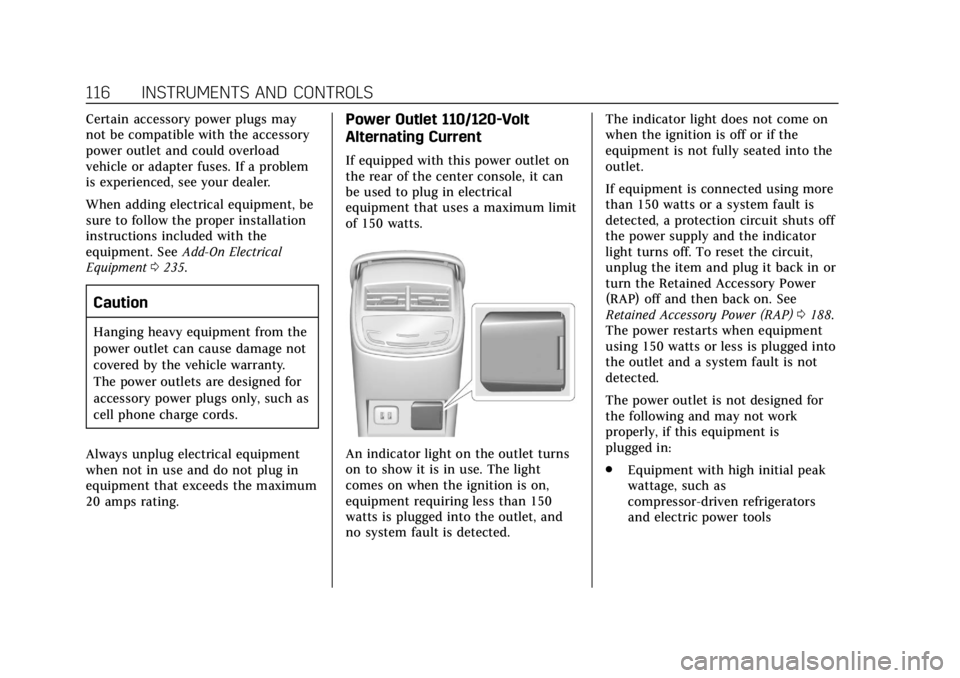
If equipped with this power outlet on
the rear of the center console, it can
be used to plug in electrical
equipment that uses a maximum limit
of 150 watts.
An indicator light on the outlet turns
on to show it is in use. The light
comes on when the ignition is on,
equipment requiring less than 150
watts is plugged into the outlet, and
no system fault is detected. The indicator light does not come on
when the ignition is off or if the
equipment is not fully seated into the
outlet.
If equipment is connected using more
than 150 watts or a system fault is
detected, a protection circuit shuts off
the power supply and the indicator
light turns off. To reset the circuit,
unplug the item and plug it back in or
turn the Retained Accessory Power
(RAP) off and then back on. See
Retained Accessory Power (RAP)
0188.
The power restarts when equipment
using 150 watts or less is plugged into
the outlet and a system fault is not
detected.
The power outlet is not designed for
the following and may not work
properly, if this equipment is
plugged in:
. Equipment with high initial peak
wattage, such as
compressor-driven refrigerators
and electric power tools
Page 120 of 376
Cadillac XTS Owner Manual (GMNA-Localizing-U.S./Canada-12032610) -
2019 - crc - 8/22/18
INSTRUMENTS AND CONTROLS 119
[email protected]. This offer is
valid for three (3) years from the date
on which you purchased the product.
Freescale-WCT library
Copyright (c) 2012-2014 Freescale
Semiconductor, Inc.. All rights
reserved.1. Redistributions of source code must retain the above copyright
notice, this list of conditions and
the following disclaimer.
2. Redistributions in binary form must reproduce the above
copyright notice, this list of
conditions and the following
disclaimer in the documentation
and/or other materials provided
with the distribution.
3. Neither the name of the copyright holder nor the names
of its contributors may be used
to endorse or promote products
derived from this software
without specific prior written
permission. THIS SOFTWARE IS PROVIDED BY
THE COPYRIGHT HOLDERS AND
CONTRIBUTORS "AS IS" AND ANY
EXPRESS OR IMPLIED WARRANTIES,
INCLUDING, BUT NOT LIMITED TO,
THE IMPLIED WARRANTIES OF
MERCHANTABILITY AND FITNESS
FOR A PARTICULAR PURPOSE ARE
DISCLAIMED. IN NO EVENT SHALL
THE COPYRIGHT HOLDER OR
CONTRIBUTORS BE LIABLE FOR ANY
DIRECT, INDIRECT, INCIDENTAL,
SPECIAL, EXEMPLARY, OR
CONSEQUENTIAL DAMAGES
(INCLUDING, BUT NOT LIMITED TO,
PROCUREMENT OF SUBSTITUTE
GOODS OR SERVICES; LOSS OF USE,
DATA, OR PROFITS; OR BUSINESS
INTERRUPTION) HOWEVER CAUSED
AND ON ANY THEORY OF LIABILITY,
WHETHER IN CONTRACT, STRICT
LIABILITY, OR TORT (INCLUDING
NEGLIGENCE OR OTHERWISE)
ARISING IN ANY WAY OUT OF THE
USE OF THIS SOFTWARE, EVEN IF
ADVISED OF THE POSSIBILITY OF
SUCH DAMAGE.Cigarette Lighter
If equipped with cigarette lighters,
they are under the climate control
system inside the storage area and on
the rear of the center console.
To activate the cigarette lighter, push
it into the heating element and let go.
The lighter pops out when it is ready
to be used.
Caution
Holding a cigarette lighter in while
it is heating does not let the lighter
back away from the heating
element when it is hot. Damage
from overheating can occur to the
lighter or heating element, or a fuse
could be blown. Do not hold a
cigarette lighter in while it is
heating.
Page 131 of 376
Cadillac XTS Owner Manual (GMNA-Localizing-U.S./Canada-12032610) -
2019 - crc - 8/22/18
130 INSTRUMENTS AND CONTROLS
Warning (Continued)
the airbag system might not be
working properly. The airbags in the
vehicle might not inflate in a crash,
or they could even inflate without a
crash. To help avoid injury, have
the vehicle serviced right away.
If there is a problem with the airbag
system, a Driver Information Center
(DIC) message may also come on.
Passenger Airbag Status
Indicator
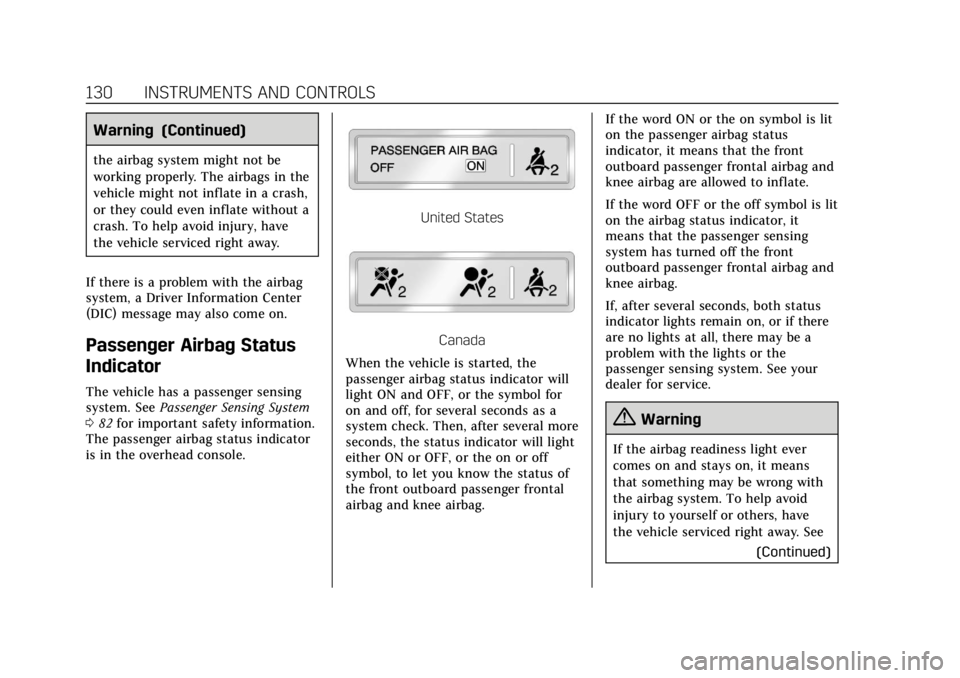
The vehicle has a passenger sensing
system. See Passenger Sensing System
0 82 for important safety information.
The passenger airbag status indicator
is in the overhead console.
United States
Canada
When the vehicle is started, the
passenger airbag status indicator will
light ON and OFF, or the symbol for
on and off, for several seconds as a
system check. Then, after several more
seconds, the status indicator will light
either ON or OFF, or the on or off
symbol, to let you know the status of
the front outboard passenger frontal
airbag and knee airbag. If the word ON or the on symbol is lit
on the passenger airbag status
indicator, it means that the front
outboard passenger frontal airbag and
knee airbag are allowed to inflate.
If the word OFF or the off symbol is lit
on the airbag status indicator, it
means that the passenger sensing
system has turned off the front
outboard passenger frontal airbag and
knee airbag.
If, after several seconds, both status
indicator lights remain on, or if there
are no lights at all, there may be a
problem with the lights or the
passenger sensing system. See your
dealer for service.
{Warning
If the airbag readiness light ever
comes on and stays on, it means
that something may be wrong with
the airbag system. To help avoid
injury to yourself or others, have
the vehicle serviced right away. See
(Continued)
Page 161 of 376
Cadillac XTS Owner Manual (GMNA-Localizing-U.S./Canada-12032610) -
2019 - crc - 8/22/18
160 LIGHTING
ON :Turns the lamp on.
Reading Lamps
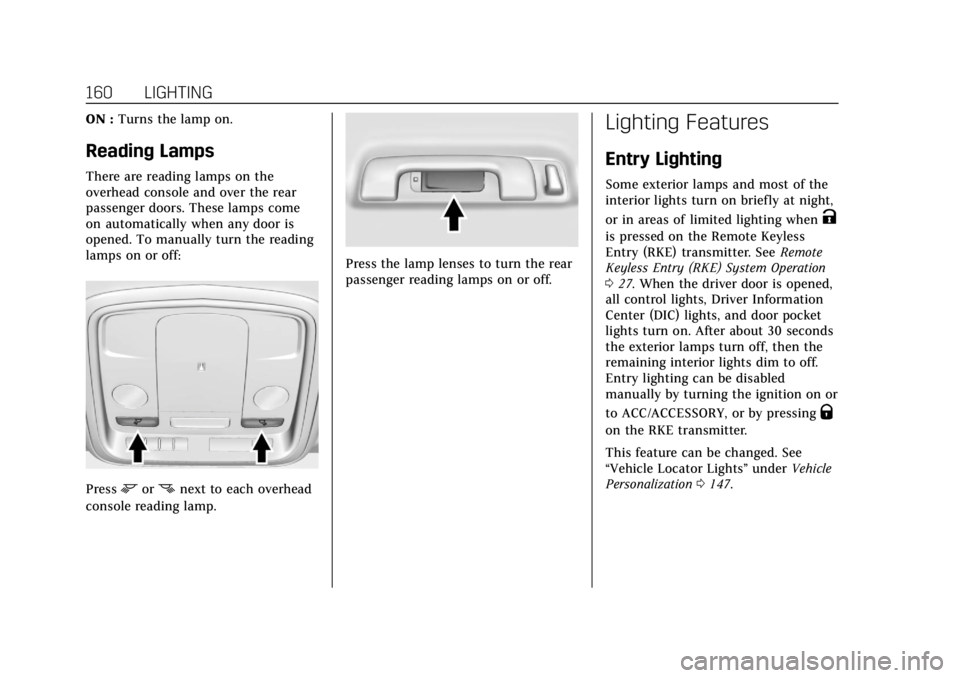
There are reading lamps on the
overhead console and over the rear
passenger doors. These lamps come
on automatically when any door is
opened. To manually turn the reading
lamps on or off:
Pressmornnext to each overhead
console reading lamp.
Press the lamp lenses to turn the rear
passenger reading lamps on or off.
Lighting Features
Entry Lighting
Some exterior lamps and most of the
interior lights turn on briefly at night,
or in areas of limited lighting when
K
is pressed on the Remote Keyless
Entry (RKE) transmitter. See Remote
Keyless Entry (RKE) System Operation
0 27. When the driver door is opened,
all control lights, Driver Information
Center (DIC) lights, and door pocket
lights turn on. After about 30 seconds
the exterior lamps turn off, then the
remaining interior lights dim to off.
Entry lighting can be disabled
manually by turning the ignition on or
to ACC/ACCESSORY, or by pressing
Q
on the RKE transmitter.
This feature can be changed. See
“Vehicle Locator Lights” underVehicle
Personalization 0147.
Page 169 of 376
Cadillac XTS Owner Manual (GMNA-Localizing-U.S./Canada-12032610) -
2019 - crc - 8/22/18
168 CLIMATE CONTROLS
Rear Climate Control
System
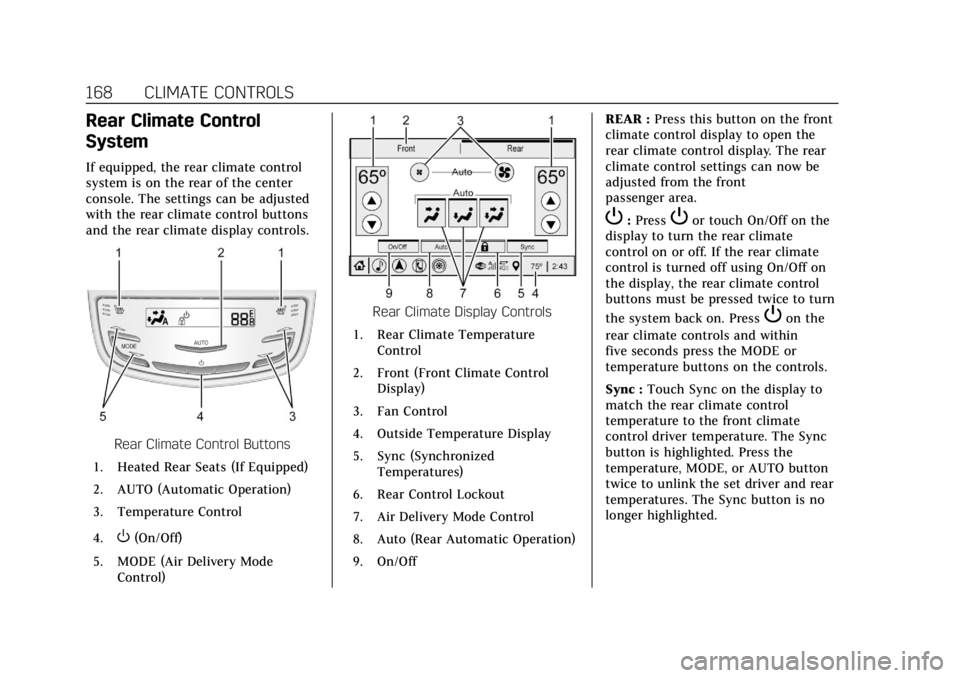
If equipped, the rear climate control
system is on the rear of the center
console. The settings can be adjusted
with the rear climate control buttons
and the rear climate display controls.
Rear Climate Control Buttons
1. Heated Rear Seats (If Equipped)
2. AUTO (Automatic Operation)
3. Temperature Control
4.
O(On/Off)
5. MODE (Air Delivery Mode Control)
Rear Climate Display Controls
1. Rear Climate Temperature Control
2. Front (Front Climate Control Display)
3. Fan Control
4. Outside Temperature Display
5. Sync (Synchronized Temperatures)
6. Rear Control Lockout
7. Air Delivery Mode Control
8. Auto (Rear Automatic Operation)
9. On/Off REAR :
Press this button on the front
climate control display to open the
rear climate control display. The rear
climate control settings can now be
adjusted from the front
passenger area.
P: PressPor touch On/Off on the
display to turn the rear climate
control on or off. If the rear climate
control is turned off using On/Off on
the display, the rear climate control
buttons must be pressed twice to turn
the system back on. Press
Pon the
rear climate controls and within
five seconds press the MODE or
temperature buttons on the controls.
Sync : Touch Sync on the display to
match the rear climate control
temperature to the front climate
control driver temperature. The Sync
button is highlighted. Press the
temperature, MODE, or AUTO button
twice to unlink the set driver and rear
temperatures. The Sync button is no
longer highlighted.
Page 366 of 376

Cadillac XTS Owner Manual (GMNA-Localizing-U.S./Canada-12032610) -
2019 - crc - 8/22/18
INDEX 365
Automatic (cont'd)Door Locks . . . . . . . . . . . . . . . . . . . . . . . . . . 38
Forward Braking . . . . . . . . . . . . . . . . . . 219
Headlamp System . . . . . . . . . . . . . . . . 157
Level Control . . . . . . . . . . . . . . . . . . . . . . 199
Transmission . . . . . . . . . . . . . . . . . . . . . . 191
Transmission Fluid . . . . . . . . . . . . . . . 247
Automatic Transmission Manual Mode . . . . . . . . . . . . . . . . . . . . . 193
Shift Lock Control Function
Check . . . . . . . . . . . . . . . . . . . . . . . . . . . . 259
B
BatteryExterior Lighting BatterySaver . . . . . . . . . . . . . . . . . . . . . . . . . . . . . 161
Power Protection . . . . . . . . . . . . . . . . . . 161
Battery - North America . . . . . .258, 306
Blade Replacement, Wiper . . . . . . . . . 260
Boost Gauge . . . . . . . . . . . . . . . . . . . . . . . . . 126
Brake Parking, Electric . . . . . . . . . . . . . . . . . . 194
System Warning Light . . . . . . . . . . . . 133
Brakes . . . . . . . . . . . . . . . . . . . . . . . . . . . . . . . 256
Antilock . . . . . . . . . . . . . . . . . . . . . . . . . . . 194
Assist . . . . . . . . . . . . . . . . . . . . . . . . . . . . . . 196
Fluid . . . . . . . . . . . . . . . . . . . . . . . . . . . . . . . 257
Braking . . . . . . . . . . . . . . . . . . . . . . . . . . . . . . 174 Braking (cont'd)
Automatic Forward . . . . . . . . . . . . . . . 219
Break-In, New Vehicle . . . . . . . . . . . . . . 183
Bulb Replacement Back-up Lamps . . . . . . . . . . . . . . . . . . . 263
Headlamp Aiming . . . . . . . . . . . . . . . . 262
Headlamps . . . . . . . . . . . . . . . . . . . . . . . . 263
License Plate Lamps . . . . . . . . . . . . . . 264
Buying New Tires . . . . . . . . . . . . . . . . . . . 287
C
Calibration . . . . . . . . . . . . . . . . . . . . . . . . . . 115
California Perchlorate Materials
Requirements . . . . . . . . . . . . . . . . . . . 238
California Proposition 65 Warning . . . . . . . . . . . . .237, 258, 306, Back Cover
Canadian Vehicle Owners . . . . . . . . . . . . . 2
Capacities and Specifications . . . . . . 337
Carbon Monoxide
Engine Exhaust . . . . . . . . . . . . . . . . . . . 190
Trunk . . . . . . . . . . . . . . . . . . . . . . . . . . . . . . . . 39
Winter Driving . . . . . . . . . . . . . . . . . . . . 178
Cargo Management System . . . . . . . . . . . . . 111
Tie-Downs . . . . . . . . . . . . . . . . . . . . . . . . . 110
Caution, Danger, and Warning . . . . . . . . 2 Center Console Storage . . . . . . . . . . . . . 109
Chains, Tire . . . . . . . . . . . . . . . . . . . . . . . . . 291
Charging
Wireless . . . . . . . . . . . . . . . . . . . . . . . . . . . 117
Charging System Light . . . . . . . . . . . . . 131
Check Engine Light (Malfunction
Indicator) . . . . . . . . . . . . . . . . . . . . . . . . 131
Child Restraints Infants and Young Children . . . . . . . . 90
Lower Anchors and Tethers forChildren . . . . . . . . . . . . . . . . . . . . . . . . . . . 95
Older Children . . . . . . . . . . . . . . . . . . . . . . 89
Securing . . . . . . . . . . . . . . . . . . . . . . 102, 104
Systems . . . . . . . . . . . . . . . . . . . . . . . . . . . . . 93
Cigarette Lighter . . . . . . . . . . . . . . . . . . . . 119
Circuit Breakers . . . . . . . . . . . . . . . . . . . . . 265
Cleaning
Exterior Care . . . . . . . . . . . . . . . . . . . . . . 312
Interior Care . . . . . . . . . . . . . . . . . . . . . . 316
Climate Control Systems
Dual Automatic . . . . . . . . . . . . . . . . . . . 163
Rear . . . . . . . . . . . . . . . . . . . . . . . . . . . . . . . . 168
Clock . . . . . . . . . . . . . . . . . . . . . . . . . . . . . . . . . 115
Cluster, Instrument . . . . . . . . . . . . . . . . . 121
Collision Damage Repair . . . . . . . . . . . 346
Compact Spare Tire . . . . . . . . . . . . . . . . . 305
Page 373 of 376

Cadillac XTS Owner Manual (GMNA-Localizing-U.S./Canada-12032610) -
2019 - crc - 8/22/18
372 INDEX
Safety Defects Reporting (cont'd)U.S. Government . . . . . . . . . . . . . . . . . . 349
Safety Locks . . . . . . . . . . . . . . . . . . . . . . . . . . 38
Safety System Check . . . . . . . . . . . . . . . . 75
Scheduling Appointments . . . . . . . . . . 345
Sealant Kit, Tire . . . . . . . . . . . . . . . . . . . . . 293
Seat Belts . . . . . . . . . . . . . . . . . . . . . . . . . . . . . 68 Care . . . . . . . . . . . . . . . . . . . . . . . . . . . . . . . . . . 75
Extender . . . . . . . . . . . . . . . . . . . . . . . . . . . . . 74
How to Wear Seat BeltsProperly . . . . . . . . . . . . . . . . . . . . . . . . . . . . 69
Lap-Shoulder Belt . . . . . . . . . . . . . . . . . . . 71
Reminders . . . . . . . . . . . . . . . . . . . . . . . . . 128
Replacing after a Crash . . . . . . . . . . . . . 75
Use During Pregnancy . . . . . . . . . . . . . . 74
Seats Head Restraints . . . . . . . . . . . . . . . . . . . . . 53
Heated and Ventilated Front . . . . . . . 63
Heated, Rear . . . . . . . . . . . . . . . . . . . . . . . . 67
Lumbar Adjustment, Front . . . . . . . . . 57
Memory . . . . . . . . . . . . . . . . . . . . . . . . . . . . . 60
Power Adjustment, Front . . . . . . . . . . 56
Rear . . . . . . . . . . . . . . . . . . . . . . . . . . . . . . . . . . 65
Reclining Seatbacks . . . . . . . . . . . . . . . . 59
Securing Child Restraints . . . . .102, 104
Security Light . . . . . . . . . . . . . . . . . . . . . . . . . . . . . . . 138
OnStar . . . . . . . . . . . . . . . . . . . . . . . . . . . . . 354 Security (cont'd)
Vehicle . . . . . . . . . . . . . . . . . . . . . . . . . . . . . . . 41
Vehicle Alarm . . . . . . . . . . . . . . . . . . . . . . . 41
Service . . . . . . . . . . . . . . . . . . . . . . . . . . . . . . . 170
Accessories andModifications . . . . . . . . . . . . . . . . . . . . 238
Doing Your Own Work . . . . . . . . . . . 238
Maintenance Records . . . . . . . . . . . . 335
Maintenance, General Information . . . . . . . . . . . . . . . . . . . . . . 321
Parts Identification Label . . . . . . . . 336
Scheduling Appointments . . . . . . . . 345
Service Electric Parking Brake Light . . . . . . . . . . . . . . . . . . . . . . . . . . . . . . . 134
Services Special Application . . . . . . . . . . . . . . . 328
Servicing the Airbag . . . . . . . . . . . . . . . . . 87
Shift Lock Control Function Check, Automatic
Transmission . . . . . . . . . . . . . . . . . . . . . . 259
Shifting Into Park . . . . . . . . . . . . . . . . . . . . . . . . . . 188
Out of Park . . . . . . . . . . . . . . . . . . . . . . . . 189
Side Blind Zone Alert (SBZA) . . . . . . 221
Signals, Turn and Lane-Change . . . . 158
Spare Tire Compact . . . . . . . . . . . . . . . . . . . . . . . . . . . 305
Special Application Services . . . . . . . 328 Specifications and Capacities . . . . . . 337
Speedometer . . . . . . . . . . . . . . . . . . . . . . . . 125
StabiliTrak
OFF Light . . . . . . . . . . . . . . . . . . . . . . . . . . 136
Start Assist, Hill . . . . . . . . . . . . . . . . . . . . 196
Start Vehicle, Remote . . . . . . . . . . . . . . . 34
Starter Switch Check . . . . . . . . . . . . . . . 259
Starting the Engine . . . . . . . . . . . . . . . . . 185
Steering . . . . . . . . . . . . . . . . . . . . . . . . . . . . . . 174 Fluid, Power . . . . . . . . . . . . . . . . . . . . . . . 255
Heated Wheel . . . . . . . . . . . . . . . . . . . . . 113
Wheel Adjustment . . . . . . . . . . . . . . . . 113
Wheel Controls . . . . . . . . . . . . . . . . . . . 113
Storage Areas Armrest . . . . . . . . . . . . . . . . . . . . . . . . . . . . 109
Cargo Management System . . . . . . 111
Center Console . . . . . . . . . . . . . . . . . . . . 109
Convenience Net . . . . . . . . . . . . . . . . . . 111
Glove Box . . . . . . . . . . . . . . . . . . . . . . . . . 109
Instrument Panel . . . . . . . . . . . . . . . . . 108
Storage Compartments . . . . . . . . . . . . . 108
Storing the Tire Sealant and
Compressor Kit . . . . . . . . . . . . . . . . . . . . 300
Struts Gas . . . . . . . . . . . . . . . . . . . . . . . . . . . . . . . . . 261
Stuck Vehicle . . . . . . . . . . . . . . . . . . . . . . . 179
Summer Tires . . . . . . . . . . . . . . . . . . . . . . . 273
Sun Visors . . . . . . . . . . . . . . . . . . . . . . . . . . . . 48