climate control CADILLAC XTS 2019 User Guide
[x] Cancel search | Manufacturer: CADILLAC, Model Year: 2019, Model line: XTS, Model: CADILLAC XTS 2019Pages: 376, PDF Size: 6.71 MB
Page 41 of 376
Cadillac XTS Owner Manual (GMNA-Localizing-U.S./Canada-12032610) -
2019 - crc - 8/22/18
40 KEYS, DOORS, AND WINDOWS
Warning (Continued)
set the fan speed to the
highest setting. See“Climate
Control Systems” in the Index.
. If the vehicle is equipped with
a power liftgate, disable the
power liftgate function.
See Engine Exhaust 0190.
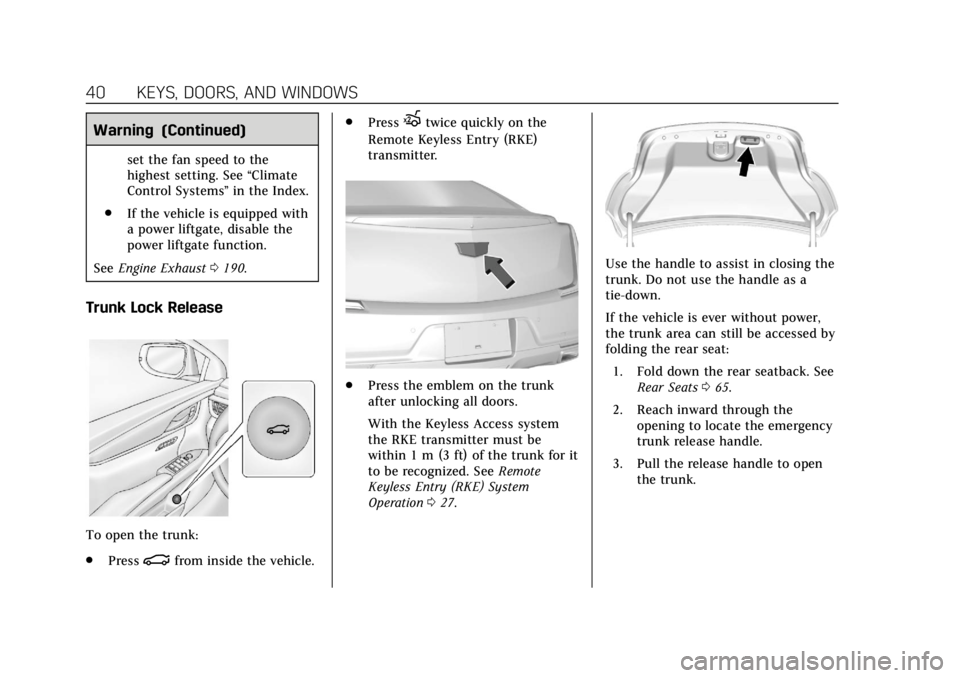
Trunk Lock Release
To open the trunk:
.
Press
|from inside the vehicle. .
Press
Xtwice quickly on the
Remote Keyless Entry (RKE)
transmitter.
. Press the emblem on the trunk
after unlocking all doors.
With the Keyless Access system
the RKE transmitter must be
within 1 m (3 ft) of the trunk for it
to be recognized. See Remote
Keyless Entry (RKE) System
Operation 027.
Use the handle to assist in closing the
trunk. Do not use the handle as a
tie-down.
If the vehicle is ever without power,
the trunk area can still be accessed by
folding the rear seat:
1. Fold down the rear seatback. See Rear Seats 065.
2. Reach inward through the opening to locate the emergency
trunk release handle.
3. Pull the release handle to open the trunk.
Page 46 of 376
Cadillac XTS Owner Manual (GMNA-Localizing-U.S./Canada-12032610) -
2019 - crc - 8/22/18
KEYS, DOORS, AND WINDOWS 45
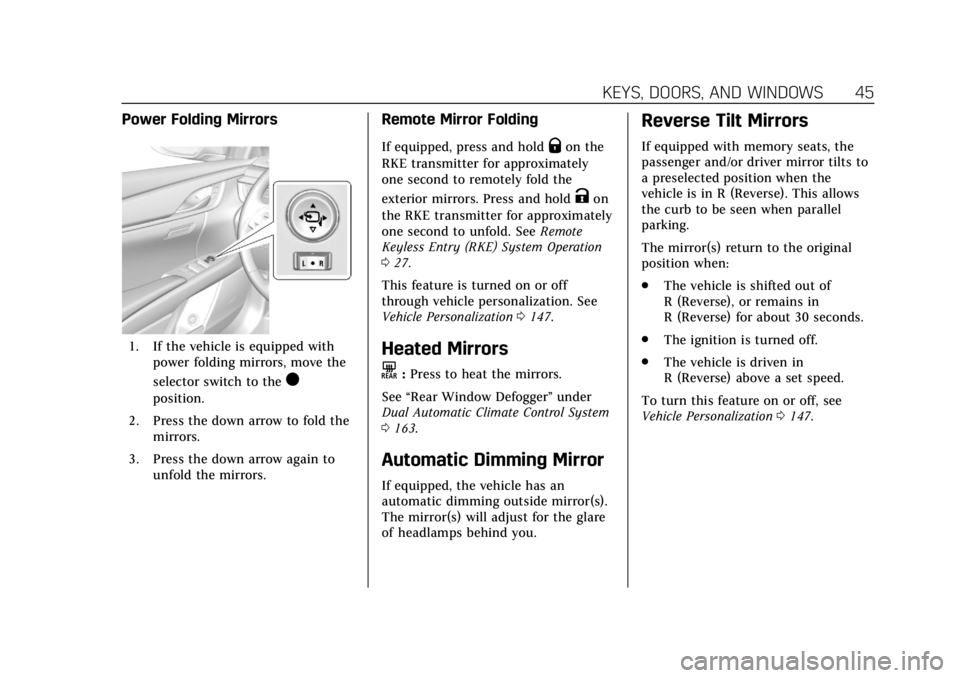
Power Folding Mirrors
1. If the vehicle is equipped withpower folding mirrors, move the
selector switch to the
)
position.
2. Press the down arrow to fold the mirrors.
3. Press the down arrow again to unfold the mirrors.
Remote Mirror Folding
If equipped, press and holdQon the
RKE transmitter for approximately
one second to remotely fold the
exterior mirrors. Press and hold
Kon
the RKE transmitter for approximately
one second to unfold. See Remote
Keyless Entry (RKE) System Operation
0 27.
This feature is turned on or off
through vehicle personalization. See
Vehicle Personalization 0147.
Heated Mirrors
K
:Press to heat the mirrors.
See “Rear Window Defogger” under
Dual Automatic Climate Control System
0 163.
Automatic Dimming Mirror
If equipped, the vehicle has an
automatic dimming outside mirror(s).
The mirror(s) will adjust for the glare
of headlamps behind you.
Reverse Tilt Mirrors
If equipped with memory seats, the
passenger and/or driver mirror tilts to
a preselected position when the
vehicle is in R (Reverse). This allows
the curb to be seen when parallel
parking.
The mirror(s) return to the original
position when:
.
The vehicle is shifted out of
R (Reverse), or remains in
R (Reverse) for about 30 seconds.
. The ignition is turned off.
. The vehicle is driven in
R (Reverse) above a set speed.
To turn this feature on or off, see
Vehicle Personalization 0147.
Page 64 of 376
Cadillac XTS Owner Manual (GMNA-Localizing-U.S./Canada-12032610) -
2019 - crc - 8/22/18
SEATS AND RESTRAINTS 63
.Power mirror, with the driver or
passenger side mirror selected
. Power steering wheel, if equipped
Obstructions
If something has blocked the driver
seat and/or power steering wheel
while recalling a memory position, the
recall may stop. Remove the
obstruction and try the recall again.
If the memory position still does not
recall, see your dealer for service.
Heated and Ventilated
Front Seats
{Warning
If temperature change or pain to
the skin cannot be felt, the seat
heater may cause burns. To reduce
the risk of burns, use care when
using the seat heater, especially for
long periods of time. Do not place
anything on the seat that insulates
against heat, such as a blanket,
cushion, cover, or similar item. This (Continued)
Warning (Continued)
may cause the seat heater to
overheat. An overheated seat heater
may cause a burn or may damage
the seat.
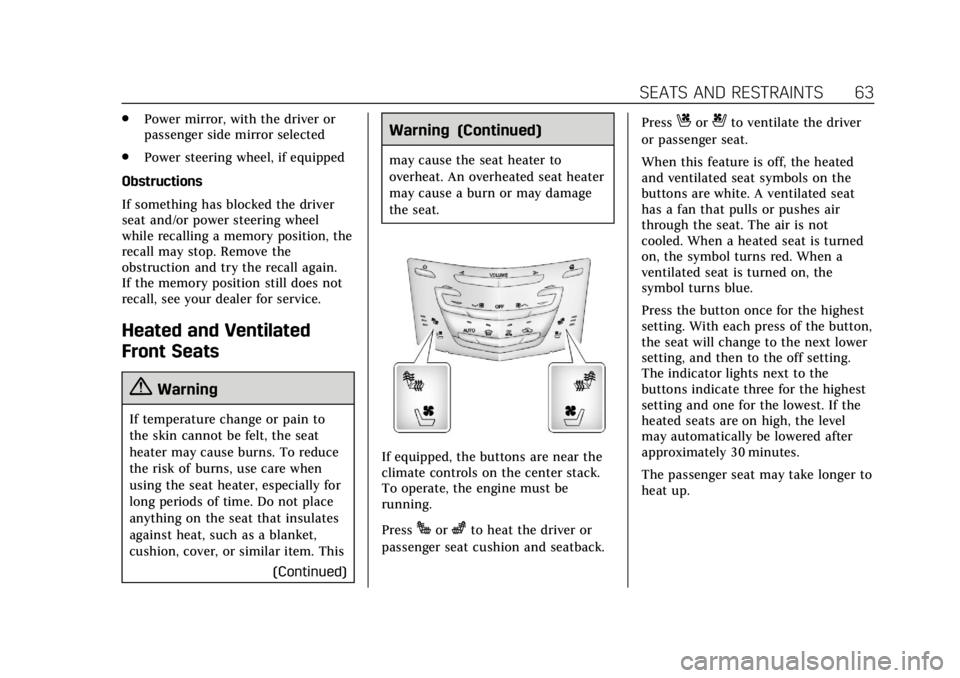
If equipped, the buttons are near the
climate controls on the center stack.
To operate, the engine must be
running.
Press
Jorzto heat the driver or
passenger seat cushion and seatback. Press
Cor{to ventilate the driver
or passenger seat.
When this feature is off, the heated
and ventilated seat symbols on the
buttons are white. A ventilated seat
has a fan that pulls or pushes air
through the seat. The air is not
cooled. When a heated seat is turned
on, the symbol turns red. When a
ventilated seat is turned on, the
symbol turns blue.
Press the button once for the highest
setting. With each press of the button,
the seat will change to the next lower
setting, and then to the off setting.
The indicator lights next to the
buttons indicate three for the highest
setting and one for the lowest. If the
heated seats are on high, the level
may automatically be lowered after
approximately 30 minutes.
The passenger seat may take longer to
heat up.
Page 68 of 376
Cadillac XTS Owner Manual (GMNA-Localizing-U.S./Canada-12032610) -
2019 - crc - 8/22/18
SEATS AND RESTRAINTS 67
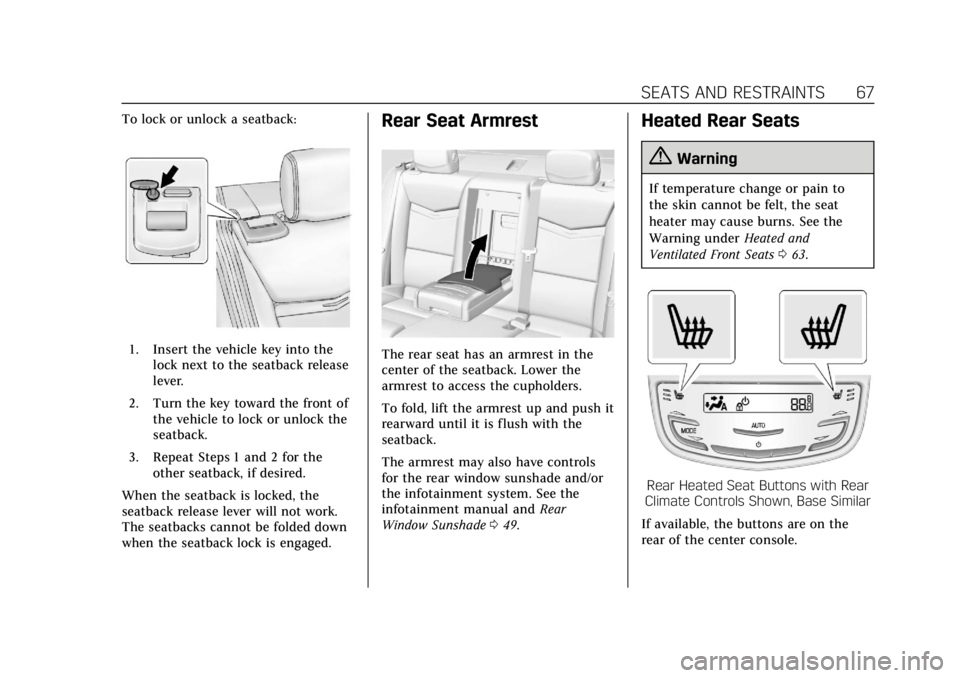
To lock or unlock a seatback:
1. Insert the vehicle key into thelock next to the seatback release
lever.
2. Turn the key toward the front of the vehicle to lock or unlock the
seatback.
3. Repeat Steps 1 and 2 for the other seatback, if desired.
When the seatback is locked, the
seatback release lever will not work.
The seatbacks cannot be folded down
when the seatback lock is engaged.
Rear Seat Armrest
The rear seat has an armrest in the
center of the seatback. Lower the
armrest to access the cupholders.
To fold, lift the armrest up and push it
rearward until it is flush with the
seatback.
The armrest may also have controls
for the rear window sunshade and/or
the infotainment system. See the
infotainment manual and Rear
Window Sunshade 049.
Heated Rear Seats
{Warning
If temperature change or pain to
the skin cannot be felt, the seat
heater may cause burns. See the
Warning under Heated and
Ventilated Front Seats 063.
Rear Heated Seat Buttons with Rear
Climate Controls Shown, Base Similar
If available, the buttons are on the
rear of the center console.
Page 69 of 376
Cadillac XTS Owner Manual (GMNA-Localizing-U.S./Canada-12032610) -
2019 - crc - 8/22/18
68 SEATS AND RESTRAINTS
With the vehicle started, pressMor
Lto heat the left or right outboard
seat cushion and seatback. On
vehicles without rear climate controls,
an indicator light on the button will
turn on when the heated seat is on.
On vehicles with rear climate controls,
an indicator on the climate control
display appears when this feature
is on.
On vehicles without rear climate
controls, press the button again to
turn this feature off. The light on the
button will turn off. On vehicles with
rear climate controls, this feature
turns on at the highest setting. With
each press of the button, the heated
seat changes to the next lower setting,
and then the off setting. Three lights
indicate the highest setting, and one
light indicates the lowest. If the
heated seats are on high, the level
may automatically be lowered after
approximately 30 minutes.
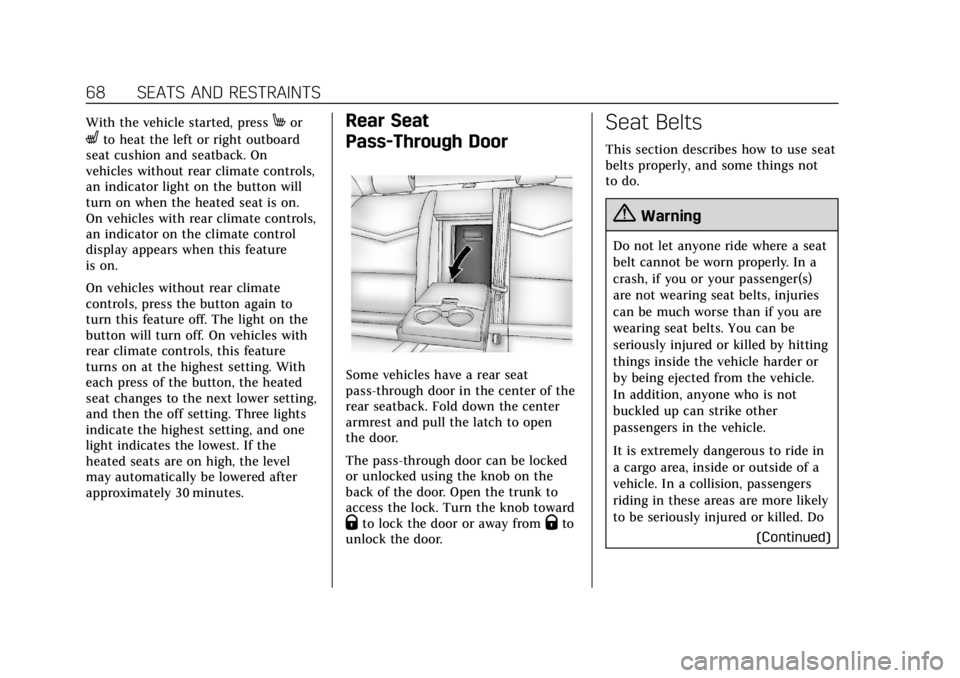
Rear Seat
Pass-Through Door
Some vehicles have a rear seat
pass-through door in the center of the
rear seatback. Fold down the center
armrest and pull the latch to open
the door.
The pass-through door can be locked
or unlocked using the knob on the
back of the door. Open the trunk to
access the lock. Turn the knob toward
Qto lock the door or away fromQto
unlock the door.
Seat Belts
This section describes how to use seat
belts properly, and some things not
to do.
{Warning
Do not let anyone ride where a seat
belt cannot be worn properly. In a
crash, if you or your passenger(s)
are not wearing seat belts, injuries
can be much worse than if you are
wearing seat belts. You can be
seriously injured or killed by hitting
things inside the vehicle harder or
by being ejected from the vehicle.
In addition, anyone who is not
buckled up can strike other
passengers in the vehicle.
It is extremely dangerous to ride in
a cargo area, inside or outside of a
vehicle. In a collision, passengers
riding in these areas are more likely
to be seriously injured or killed. Do
(Continued)
Page 109 of 376
Cadillac XTS Owner Manual (GMNA-Localizing-U.S./Canada-12032610) -
2019 - crc - 8/22/18
108 STORAGE
Storage
Storage Compartments
Storage Compartments . . . . . . . . . . 108
Instrument Panel Storage . . . . . . . . 108
Glove Box . . . . . . . . . . . . . . . . . . . . . . . . . 109
Armrest Storage . . . . . . . . . . . . . . . . . . 109
Center Console Storage . . . . . . . . . . 109
Additional Storage Features
Cargo Tie-Downs . . . . . . . . . . . . . . . . . 110
Cargo Management System . . . . . . 111
Convenience Net . . . . . . . . . . . . . . . . . 111
Storage Compartments
{Warning
Do not store heavy or sharp objects
in storage compartments. In a
crash, these objects may cause the
cover to open and could result in
injury.
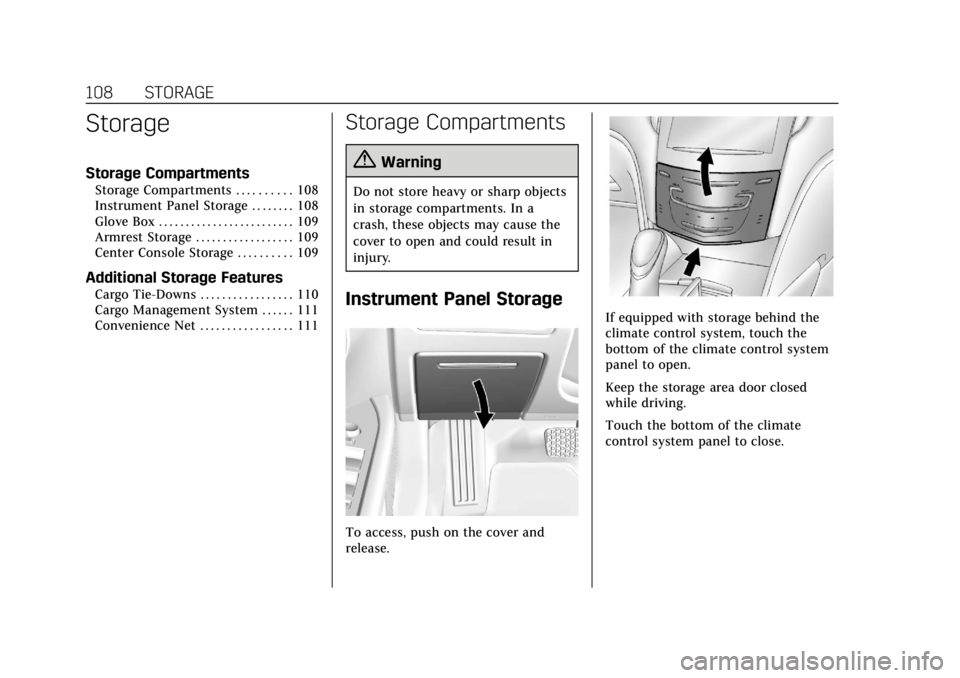
Instrument Panel Storage
To access, push on the cover and
release.
If equipped with storage behind the
climate control system, touch the
bottom of the climate control system
panel to open.
Keep the storage area door closed
while driving.
Touch the bottom of the climate
control system panel to close.
Page 116 of 376
Cadillac XTS Owner Manual (GMNA-Localizing-U.S./Canada-12032610) -
2019 - crc - 8/22/18
INSTRUMENTS AND CONTROLS 115
Wiper Arm Assembly Protection
When using an automatic car wash,
move the windshield wiper lever to
OFF. This disables the automatic
Rainsense windshield wipers.
With Rainsense, if the transmission is
in N (Neutral) and the vehicle speed is
very slow, the wipers will
automatically stop at the base of the
windshield.
The wiper operations return to normal
when the transmission is no longer in
N (Neutral) or the vehicle speed has
increased.
nL: Pull the windshield wiper lever
toward you to spray windshield
washer fluid and activate the wipers.
The wipers will continue until the
lever is released or the maximum
wash time is reached. When the
windshield wiper lever is released,
additional wipes may occur depending
on how long the windshield washer
had been activated. See Washer Fluid
0 256 for information on filling the
windshield washer fluid reservoir.
{Warning
In freezing weather, do not use the
washer until the windshield is
warmed. Otherwise the washer fluid
can form ice on the windshield,
blocking your vision.
Compass
The vehicle may have a compass
display on the Driver Information
Center (DIC). The compass receives its
heading and other information from
the Global Positioning System (GPS)
antenna, StabiliTrak/Electronic
Stability Control (ESC), and vehicle
speed information.
The compass system is designed to
operate for a certain number of miles
or degrees of turn before needing a
signal from the GPS satellites. When
the compass display shows CAL, drive
the vehicle for a short distance in an
open area where it can receive a GPS
signal. The compass system will
automatically determine when a GPS
signal is restored and provide a
heading again.
Clock
The time and date for the clock can be
set using the infotainment system. See
“Time/Date ”in “System ”under
“Settings ”in the infotainment manual.
Power Outlets
Power Outlets 12-Volt Direct
Current
The accessory power outlets can be
used to plug in electrical equipment,
such as a cell phone or MP3 player.
The vehicle has two accessory power
outlets:
.
Inside the front storage area below
the climate control system.
. Inside the center console.
Lift the cover to access the accessory
power outlet.
The vehicle has two charging only
USB ports on the rear of the center
storage console.
Page 118 of 376
Cadillac XTS Owner Manual (GMNA-Localizing-U.S./Canada-12032610) -
2019 - crc - 8/22/18
INSTRUMENTS AND CONTROLS 117
.Other equipment requiring an
extremely stable power supply,
such as microcomputer-controlled
electric blankets, touch sensor
lamps, etc.
. Medical equipment
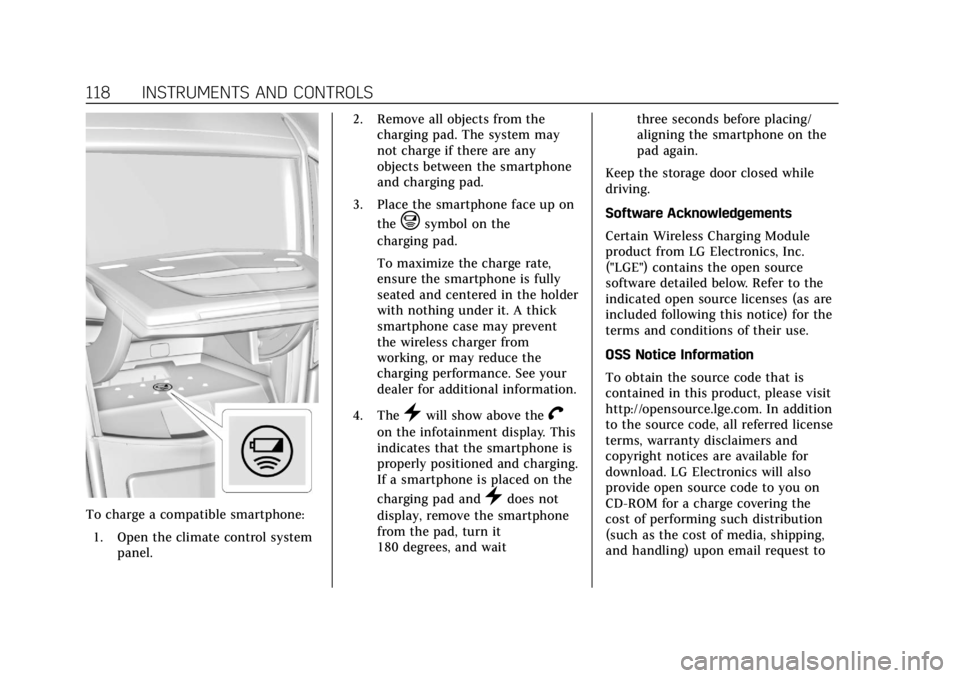
Wireless Charging
The vehicle may have wireless
charging in the storage behind the
climate control system. The system
operates at 145 kHz and wirelessly
charges one Qi compatible
smartphone. The power output of the
system is capable of charging at a rate
up to 3 amp (15W), as requested by
the compatible smartphone. See Radio
Frequency Statement 0349.
{Warning
Wireless charging can affect the
operation of an implanted
pacemaker or other medical devices.
If you have one, it is recommended
to consult with your doctor before
using the wireless charging system. The ignition must be on or in ACC/
ACCESSORY, or Retained Accessory
Power (RAP) must be active. The
wireless charging feature may not
correctly indicate charging when the
vehicle is in RAP. See
Retained
Accessory Power (RAP) 0188.
The operating temperature is −20 °C
(−4 °F) to 60 °C (140 °F) for the
charging system and 0 °C (32 °F) to
35 °C (95 °F) for the smartphone.
{Warning
Remove all objects from the
charging pad before charging your
compatible smartphone. Objects,
such as coins, keys, rings, paper
clips, or cards, between the
smartphone and charging pad will
become very hot. On the rare
occasion that the charging system
does not detect an object, and the
object gets wedged between the
smartphone and charger, remove
the smartphone and allow the
(Continued)
Warning (Continued)
object to cool before removing it
from the charging pad, to prevent
burns.
Page 119 of 376
Cadillac XTS Owner Manual (GMNA-Localizing-U.S./Canada-12032610) -
2019 - crc - 8/22/18
118 INSTRUMENTS AND CONTROLS
To charge a compatible smartphone:1. Open the climate control system panel. 2. Remove all objects from the
charging pad. The system may
not charge if there are any
objects between the smartphone
and charging pad.
3. Place the smartphone face up on the
@symbol on the
charging pad.
To maximize the charge rate,
ensure the smartphone is fully
seated and centered in the holder
with nothing under it. A thick
smartphone case may prevent
the wireless charger from
working, or may reduce the
charging performance. See your
dealer for additional information.
4. The
}will show above theV
on the infotainment display. This
indicates that the smartphone is
properly positioned and charging.
If a smartphone is placed on the
charging pad and
}does not
display, remove the smartphone
from the pad, turn it
180 degrees, and wait three seconds before placing/
aligning the smartphone on the
pad again.
Keep the storage door closed while
driving.
Software Acknowledgements
Certain Wireless Charging Module
product from LG Electronics, Inc.
("LGE") contains the open source
software detailed below. Refer to the
indicated open source licenses (as are
included following this notice) for the
terms and conditions of their use.
OSS Notice Information
To obtain the source code that is
contained in this product, please visit
http://opensource.lge.com. In addition
to the source code, all referred license
terms, warranty disclaimers and
copyright notices are available for
download. LG Electronics will also
provide open source code to you on
CD-ROM for a charge covering the
cost of performing such distribution
(such as the cost of media, shipping,
and handling) upon email request to
Page 120 of 376
Cadillac XTS Owner Manual (GMNA-Localizing-U.S./Canada-12032610) -
2019 - crc - 8/22/18
INSTRUMENTS AND CONTROLS 119
[email protected]. This offer is
valid for three (3) years from the date
on which you purchased the product.
Freescale-WCT library
Copyright (c) 2012-2014 Freescale
Semiconductor, Inc.. All rights
reserved.1. Redistributions of source code must retain the above copyright
notice, this list of conditions and
the following disclaimer.
2. Redistributions in binary form must reproduce the above
copyright notice, this list of
conditions and the following
disclaimer in the documentation
and/or other materials provided
with the distribution.
3. Neither the name of the copyright holder nor the names
of its contributors may be used
to endorse or promote products
derived from this software
without specific prior written
permission. THIS SOFTWARE IS PROVIDED BY
THE COPYRIGHT HOLDERS AND
CONTRIBUTORS "AS IS" AND ANY
EXPRESS OR IMPLIED WARRANTIES,
INCLUDING, BUT NOT LIMITED TO,
THE IMPLIED WARRANTIES OF
MERCHANTABILITY AND FITNESS
FOR A PARTICULAR PURPOSE ARE
DISCLAIMED. IN NO EVENT SHALL
THE COPYRIGHT HOLDER OR
CONTRIBUTORS BE LIABLE FOR ANY
DIRECT, INDIRECT, INCIDENTAL,
SPECIAL, EXEMPLARY, OR
CONSEQUENTIAL DAMAGES
(INCLUDING, BUT NOT LIMITED TO,
PROCUREMENT OF SUBSTITUTE
GOODS OR SERVICES; LOSS OF USE,
DATA, OR PROFITS; OR BUSINESS
INTERRUPTION) HOWEVER CAUSED
AND ON ANY THEORY OF LIABILITY,
WHETHER IN CONTRACT, STRICT
LIABILITY, OR TORT (INCLUDING
NEGLIGENCE OR OTHERWISE)
ARISING IN ANY WAY OUT OF THE
USE OF THIS SOFTWARE, EVEN IF
ADVISED OF THE POSSIBILITY OF
SUCH DAMAGE.Cigarette Lighter
If equipped with cigarette lighters,
they are under the climate control
system inside the storage area and on
the rear of the center console.
To activate the cigarette lighter, push
it into the heating element and let go.
The lighter pops out when it is ready
to be used.
Caution
Holding a cigarette lighter in while
it is heating does not let the lighter
back away from the heating
element when it is hot. Damage
from overheating can occur to the
lighter or heating element, or a fuse
could be blown. Do not hold a
cigarette lighter in while it is
heating.