settings CADILLAC XTS 2019 Owner's Manual
[x] Cancel search | Manufacturer: CADILLAC, Model Year: 2019, Model line: XTS, Model: CADILLAC XTS 2019Pages: 376, PDF Size: 6.71 MB
Page 9 of 376
Cadillac XTS Owner Manual (GMNA-Localizing-U.S./Canada-12032610) -
2019 - crc - 8/22/18
8 IN BRIEF
Initial Drive Information
This section provides a brief overview
about some of the important features
that may or may not be on your
specific vehicle.
For more detailed information, refer to
each of the features which can be
found later in this owner’s manual.
Remote Keyless Entry
(RKE) System
The Remote Keyless Entry (RKE)
transmitter may be used to lock and
unlock the doors from up to 60 m
(197 ft) away from the vehicle.
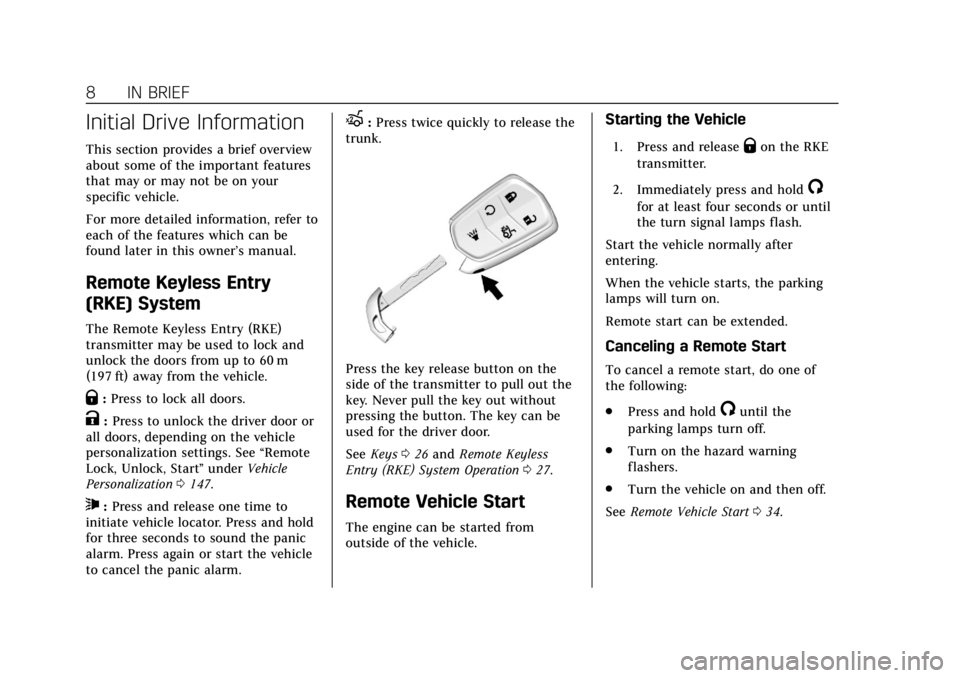
Q:Press to lock all doors.
K:Press to unlock the driver door or
all doors, depending on the vehicle
personalization settings. See “Remote
Lock, Unlock, Start ”under Vehicle
Personalization 0147.
7:Press and release one time to
initiate vehicle locator. Press and hold
for three seconds to sound the panic
alarm. Press again or start the vehicle
to cancel the panic alarm.
X: Press twice quickly to release the
trunk.
Press the key release button on the
side of the transmitter to pull out the
key. Never pull the key out without
pressing the button. The key can be
used for the driver door.
See Keys 026 and Remote Keyless
Entry (RKE) System Operation 027.
Remote Vehicle Start
The engine can be started from
outside of the vehicle.
Starting the Vehicle
1. Press and releaseQon the RKE
transmitter.
2. Immediately press and hold
/
for at least four seconds or until
the turn signal lamps flash.
Start the vehicle normally after
entering.
When the vehicle starts, the parking
lamps will turn on.
Remote start can be extended.
Canceling a Remote Start
To cancel a remote start, do one of
the following:
. Press and hold
/until the
parking lamps turn off.
. Turn on the hazard warning
flashers.
. Turn the vehicle on and then off.
See Remote Vehicle Start 034.
Page 15 of 376
Cadillac XTS Owner Manual (GMNA-Localizing-U.S./Canada-12032610) -
2019 - crc - 8/22/18
14 IN BRIEF
Steering Wheel Adjustment
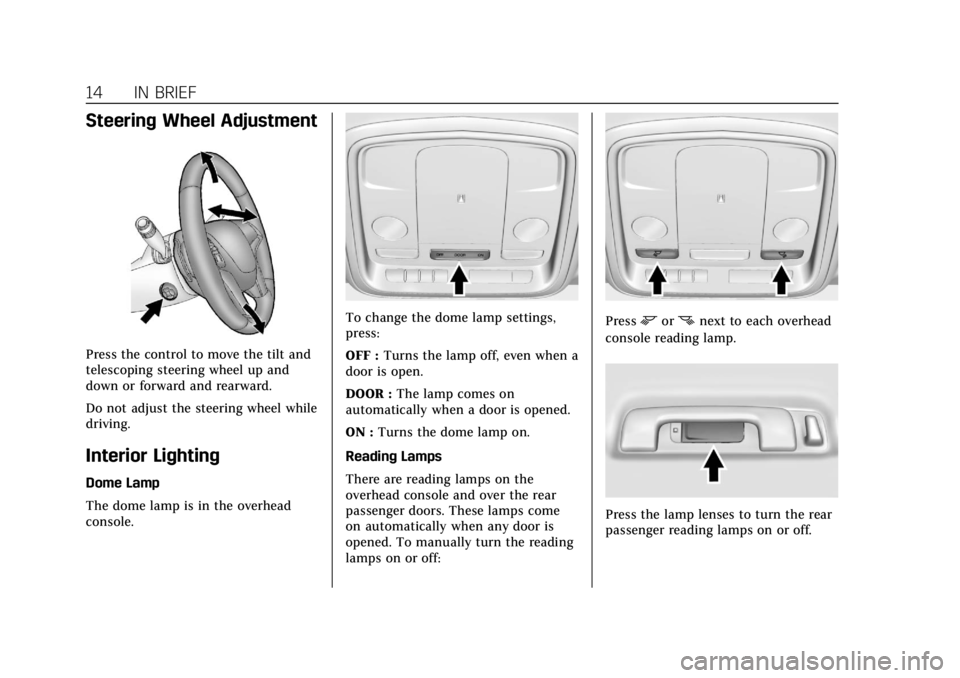
Press the control to move the tilt and
telescoping steering wheel up and
down or forward and rearward.
Do not adjust the steering wheel while
driving.
Interior Lighting
Dome Lamp
The dome lamp is in the overhead
console.
To change the dome lamp settings,
press:
OFF :Turns the lamp off, even when a
door is open.
DOOR : The lamp comes on
automatically when a door is opened.
ON : Turns the dome lamp on.
Reading Lamps
There are reading lamps on the
overhead console and over the rear
passenger doors. These lamps come
on automatically when any door is
opened. To manually turn the reading
lamps on or off:Pressmornnext to each overhead
console reading lamp.
Press the lamp lenses to turn the rear
passenger reading lamps on or off.
Page 19 of 376
Cadillac XTS Owner Manual (GMNA-Localizing-U.S./Canada-12032610) -
2019 - crc - 8/22/18
18 IN BRIEF
Vehicle Features
Infotainment System
See the infotainment manual for
information on the radio, audio
players, phone, navigation system, and
voice or speech recognition. It also
includes information on settings.
Steering Wheel Controls
The infotainment system can be
operated by using the steering wheel
controls. See“Steering Wheel
Controls ”in the infotainment manual.
Cruise Control
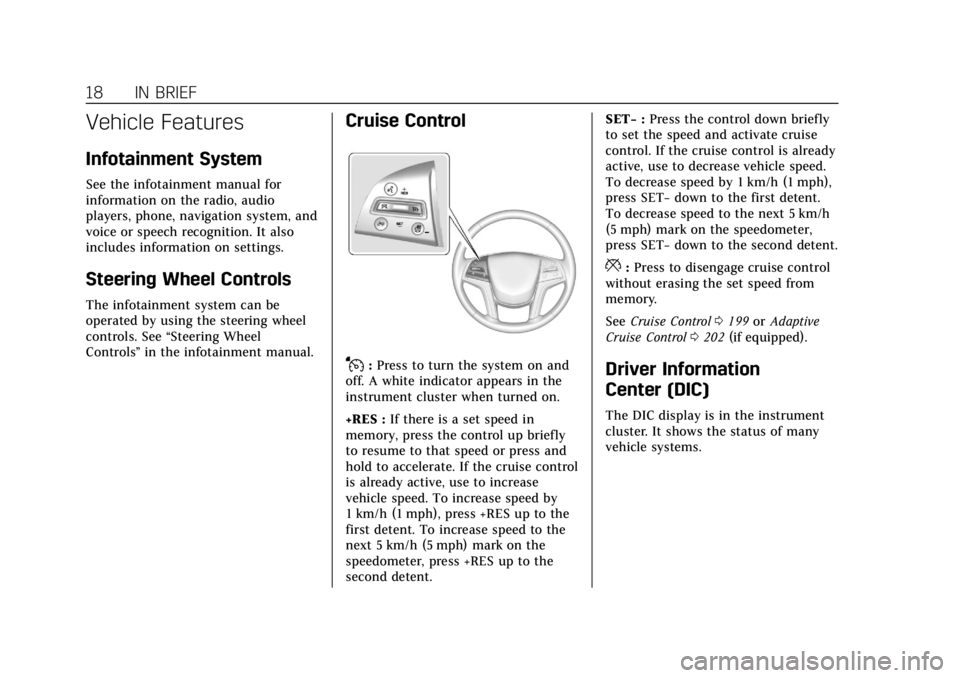
J:Press to turn the system on and
off. A white indicator appears in the
instrument cluster when turned on.
+RES : If there is a set speed in
memory, press the control up briefly
to resume to that speed or press and
hold to accelerate. If the cruise control
is already active, use to increase
vehicle speed. To increase speed by
1 km/h (1 mph), press +RES up to the
first detent. To increase speed to the
next 5 km/h (5 mph) mark on the
speedometer, press +RES up to the
second detent. SET−
:Press the control down briefly
to set the speed and activate cruise
control. If the cruise control is already
active, use to decrease vehicle speed.
To decrease speed by 1 km/h (1 mph),
press SET− down to the first detent.
To decrease speed to the next 5 km/h
(5 mph) mark on the speedometer,
press SET− down to the second detent.
*:Press to disengage cruise control
without erasing the set speed from
memory.
See Cruise Control 0199 orAdaptive
Cruise Control 0202 (if equipped).
Driver Information
Center (DIC)
The DIC display is in the instrument
cluster. It shows the status of many
vehicle systems.
Page 29 of 376
Cadillac XTS Owner Manual (GMNA-Localizing-U.S./Canada-12032610) -
2019 - crc - 8/22/18
28 KEYS, DOORS, AND WINDOWS
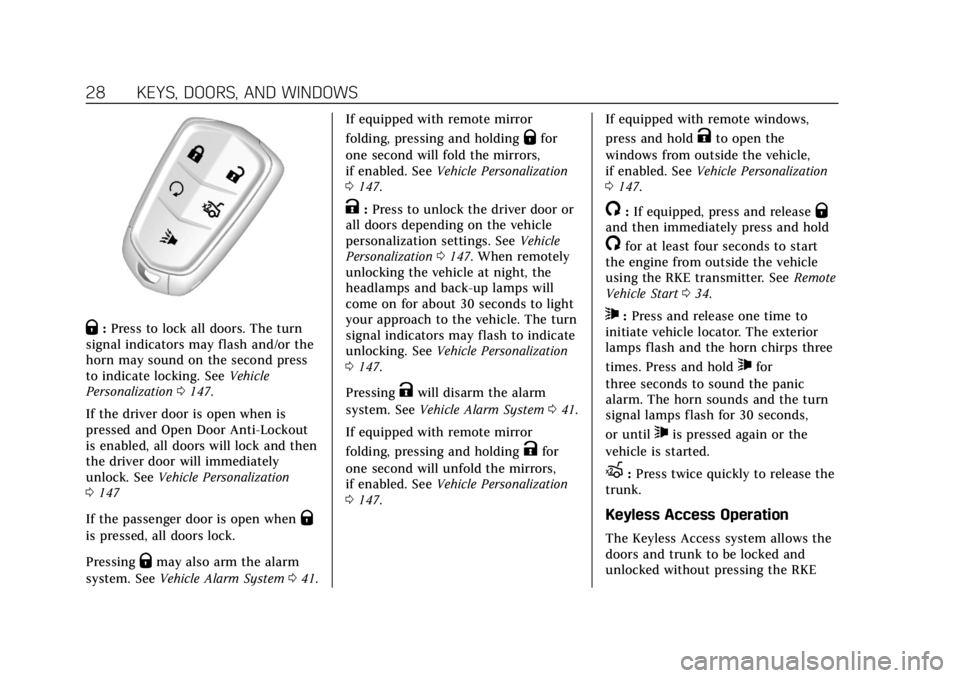
Q:Press to lock all doors. The turn
signal indicators may flash and/or the
horn may sound on the second press
to indicate locking. See Vehicle
Personalization 0147.
If the driver door is open when is
pressed and Open Door Anti-Lockout
is enabled, all doors will lock and then
the driver door will immediately
unlock. See Vehicle Personalization
0 147
If the passenger door is open when
Q
is pressed, all doors lock.
Pressing
Qmay also arm the alarm
system. See Vehicle Alarm System 041. If equipped with remote mirror
folding, pressing and holding
Qfor
one second will fold the mirrors,
if enabled. See Vehicle Personalization
0 147.
K:Press to unlock the driver door or
all doors depending on the vehicle
personalization settings. See Vehicle
Personalization 0147. When remotely
unlocking the vehicle at night, the
headlamps and back-up lamps will
come on for about 30 seconds to light
your approach to the vehicle. The turn
signal indicators may flash to indicate
unlocking. See Vehicle Personalization
0 147.
Pressing
Kwill disarm the alarm
system. See Vehicle Alarm System 041.
If equipped with remote mirror
folding, pressing and holding
Kfor
one second will unfold the mirrors,
if enabled. See Vehicle Personalization
0 147. If equipped with remote windows,
press and hold
Kto open the
windows from outside the vehicle,
if enabled. See Vehicle Personalization
0 147.
/:If equipped, press and releaseQand then immediately press and hold
/for at least four seconds to start
the engine from outside the vehicle
using the RKE transmitter. See Remote
Vehicle Start 034.
7:Press and release one time to
initiate vehicle locator. The exterior
lamps flash and the horn chirps three
times. Press and hold
7for
three seconds to sound the panic
alarm. The horn sounds and the turn
signal lamps flash for 30 seconds,
or until
7is pressed again or the
vehicle is started.
X: Press twice quickly to release the
trunk.
Keyless Access Operation
The Keyless Access system allows the
doors and trunk to be locked and
unlocked without pressing the RKE
Page 35 of 376
Cadillac XTS Owner Manual (GMNA-Localizing-U.S./Canada-12032610) -
2019 - crc - 8/22/18
34 KEYS, DOORS, AND WINDOWS
Remote Vehicle Start
This feature allows the engine to be
started from outside the vehicle.
/:This button will be on the RKE
transmitter if the vehicle has remote
start.
If equipped, heated and ventilated
front seats may also come on if
enabled in vehicle personalization.
See Heated and Ventilated Front Seats
0 63 and Vehicle Personalization 0147.
If equipped with a remote start heated
steering wheel, it may come on during
a remote start. See Heated Steering
Wheel 0113.
The climate control system will use
the previous settings during a remote
start. The rear window defogger may
come on during remote start based on
cold ambient conditions. The rear
defog indicator light does not come on
during remote start.
Laws in some local communities may
restrict the use of remote starters. For
example, some laws may require a person using remote start to have the
vehicle in view. Check local
regulations for any requirements.
If your vehicle is low on fuel, do not
use the remote start feature. The
vehicle may run out of fuel.
The RKE transmitter range may be
less while the vehicle is running.
Other conditions can affect the
performance of the transmitter. See
Remote Keyless Entry (RKE) System
0
27.
Starting the Engine Using Remote
Start
1. Press and release
Qon the RKE
transmitter.
2. Immediately press and hold
/
for at least four seconds or until
the turn signal lamps flash. The
flashing confirms the request to
remote start the vehicle has been
received.
During the remote start, the
doors will be locked and the
parking lamps will remain on as
long as the engine is running. The engine will shut off after
15 minutes unless a time
extension is done or the ignition
is on.
3. Press the brake pedal and turn the ignition on to drive the
vehicle.
Extending Engine Run Time
The engine run time can also be
extended by another 15 minutes,
if during the first 15 minutes
Steps 1 and 2 are repeated while the
engine is still running. An extension
can be requested 30 seconds after
starting. This provides a total of
30 minutes.
The remote start can only be
extended once.
A maximum of two remote starts, or a
remote start with an extension, are
allowed between ignition cycles.
The vehicle's ignition must be turned
on and then back to off before the
remote start procedure can be used
again.
Page 62 of 376
Cadillac XTS Owner Manual (GMNA-Localizing-U.S./Canada-12032610) -
2019 - crc - 8/22/18
SEATS AND RESTRAINTS 61
Vehicle Personalization Settings
.To have the Seat Entry Memory
movement begin when the vehicle
is started, select the Settings
menu, then Vehicle, then Seating
Position, and then Seat Entry
Memory. Select On or Off. See
“Seat Entry Memory” later in this
section.
. To begin Seat Exit Memory
movement when the ignition is
turned off and the driver door is
opened, or when the ignition is
turned off with the driver door
already opened, select the Settings
menu, then Vehicle, then Seating
Position, and then Seat Exit
Memory. Select On or Off. See
“Seat Exit Memory” later in this
section.
. See Vehicle Personalization 0147
for additional setting information.
Identifying Driver Number
To identify the driver number: 1. Start the vehicle with a different key or RKE transmitter. The DIC
should display the driver number; 1 or 2. Turn the ignition
off and remove the key or RKE
transmitter from the vehicle.
2. Start the vehicle with the initial key or RKE transmitter. The DIC
should display the other driver
number not shown in Step 1.
Saving Memory Positions
Read these instructions completely
before saving memory positions.
To save preferred driving positions
1 and 2: 1. Turn the ignition on or to ACC/ ACCESSORY.
A DIC welcome message may
indicate driver number 1 or 2.
2. Adjust all available memory features to the desired driving
position.
3. Press and release SET; a beep will sound.
4. Immediately press and hold the 1 or 2 memory button matching
the above DIC welcome message
until two beeps sound. If too much time passes between
releasing SET and pressing 1, the
memory position will not be
saved and two beeps will not
sound. Repeat Steps 3 and 4.
1 or 2 corresponds to the driver
number. See
“Identifying Driver
Number” previously in this
section.
5. Repeat Steps 1–4 for a second driver using 1 or 2.
To save the position for
Band Seat
Exit Memory, repeat Steps 1–4 using
B. This saves the position for getting
out of the vehicle.
Save preferred memory feature
positions to both 1 and 2 if you are
the only driver.
Manually Recalling Memory
Positions
Press and hold 1, 2, or
Bto recall
the previously saved memory
positions.
Page 63 of 376
Cadillac XTS Owner Manual (GMNA-Localizing-U.S./Canada-12032610) -
2019 - crc - 8/22/18
62 SEATS AND RESTRAINTS
To stop Manual Memory Recall
movement, release 1, 2, or
Bor press
any of the following controls:
. Power seat
. Memory SET, 1, 2, or
B
.Power mirror, with the driver or
passenger side mirror selected
. Power steering wheel
Seat Entry Memory
If equipped with a memory seat
switch on the passenger door, that
position must be recalled manually.
It will not be associated with an RKE
transmitter.
The vehicle identifies the number of
the current driver’s RKE transmitter
(1–8). See Remote Keyless Entry (RKE)
System Operation 027. If the RKE
transmitter is 1 or 2, and Seat Entry
Memory is programmed on in vehicle
personalization, the positions saved to
the same memory button number 1 or
2 are automatically recalled when the
ignition is turned on, or turned from off to ACC/ACCESSORY. RKE
transmitters 3–8 will not provide
automatic memory recalls.
To turn Seat Entry Memory on or off,
see "Vehicle Personalization Settings"
previously in this section and
Vehicle
Personalization 0147.
The shift lever must be in P (Park) to
start Seat Entry Memory. Seat Entry
Memory will complete if the vehicle is
shifted out of P (Park) prior to
reaching the saved memory position.
To stop Seat Entry Memory
movement, turn the ignition off or
press any of the following controls:
. Power seat
. Memory SET, 1, 2, or
B
.Power mirror, with the driver or
passenger side mirror selected
. Power steering wheel, if equipped
If the saved memory seat position
does not automatically recall or recalls
to the wrong positions, the driver’s
RKE transmitter number (1 or 2) may
not match the memory button
number that positions were saved to. Try saving the position to the other
memory button or try the other RKE
transmitter.
Seat Exit Memory
Seat Exit Memory is not linked to an
RKE transmitter. The position saved to
Bis used for all drivers. To turn Seat
Exit Memory on or off, see "Vehicle
Personalization Settings" previously in
this section and Vehicle Personalization
0 147.
If turned on, the position saved to
B
is automatically recalled when one of
the following occurs:
. The vehicle is turned off and the
driver door is opened within a
short time.
. The vehicle is turned off with the
driver door open.
To stop Seat Exit Memory movement,
press any of the following memory
controls:
. Power seat
. Memory SET, 1, 2, or
B
Page 66 of 376
Cadillac XTS Owner Manual (GMNA-Localizing-U.S./Canada-12032610) -
2019 - crc - 8/22/18
SEATS AND RESTRAINTS 65
4. Press forward or rearward tochange the intensity.
5. To activate massage at last massage type and intensity
settings or to turn massage off,
press the massage On/Off
control (2).Rear Seats
Rear Seat Reminder
If equipped, the message REAR SEAT
REMINDER LOOK IN REAR SEAT
displays under certain conditions
indicating there may be an item or
passenger in the rear seat. Check
before exiting the vehicle.
This feature will activate when a
second row door is opened while the
vehicle is on or up to 10 minutes
before the vehicle is turned on. There
will be an alert when the vehicle is
turned off. The alert does not directly
detect objects in the rear seat; instead,
under certain conditions, it detects
when a rear door is opened and
closed, indicating that there may be
something in the rear seat.
The feature is active only once each
time the vehicle is turned on and off,
and will require reactivation by
opening and closing the second row
doors. There may be an alert even
when there is nothing in the rear seat;
for example, if a child entered the vehicle through the rear door and left
the vehicle without the vehicle being
shut off.
The feature can be turned on or off.
See
Vehicle Personalization 0147.
Folding the Seatback
On some vehicles, either side of the
seatback can be folded for more cargo
space. Fold a seatback only when the
vehicle is not moving.
Caution
Folding a rear seat with the seat
belts still fastened may cause
damage to the seat or the seat
belts. Always unbuckle the seat
belts and return them to their
normal stowed position before
folding a rear seat.
Page 116 of 376
Cadillac XTS Owner Manual (GMNA-Localizing-U.S./Canada-12032610) -
2019 - crc - 8/22/18
INSTRUMENTS AND CONTROLS 115
Wiper Arm Assembly Protection
When using an automatic car wash,
move the windshield wiper lever to
OFF. This disables the automatic
Rainsense windshield wipers.
With Rainsense, if the transmission is
in N (Neutral) and the vehicle speed is
very slow, the wipers will
automatically stop at the base of the
windshield.
The wiper operations return to normal
when the transmission is no longer in
N (Neutral) or the vehicle speed has
increased.
nL: Pull the windshield wiper lever
toward you to spray windshield
washer fluid and activate the wipers.
The wipers will continue until the
lever is released or the maximum
wash time is reached. When the
windshield wiper lever is released,
additional wipes may occur depending
on how long the windshield washer
had been activated. See Washer Fluid
0 256 for information on filling the
windshield washer fluid reservoir.
{Warning
In freezing weather, do not use the
washer until the windshield is
warmed. Otherwise the washer fluid
can form ice on the windshield,
blocking your vision.
Compass
The vehicle may have a compass
display on the Driver Information
Center (DIC). The compass receives its
heading and other information from
the Global Positioning System (GPS)
antenna, StabiliTrak/Electronic
Stability Control (ESC), and vehicle
speed information.
The compass system is designed to
operate for a certain number of miles
or degrees of turn before needing a
signal from the GPS satellites. When
the compass display shows CAL, drive
the vehicle for a short distance in an
open area where it can receive a GPS
signal. The compass system will
automatically determine when a GPS
signal is restored and provide a
heading again.
Clock
The time and date for the clock can be
set using the infotainment system. See
“Time/Date ”in “System ”under
“Settings ”in the infotainment manual.
Power Outlets
Power Outlets 12-Volt Direct
Current
The accessory power outlets can be
used to plug in electrical equipment,
such as a cell phone or MP3 player.
The vehicle has two accessory power
outlets:
.
Inside the front storage area below
the climate control system.
. Inside the center console.
Lift the cover to access the accessory
power outlet.
The vehicle has two charging only
USB ports on the rear of the center
storage console.
Page 143 of 376
Cadillac XTS Owner Manual (GMNA-Localizing-U.S./Canada-12032610) -
2019 - crc - 8/22/18
142 INSTRUMENTS AND CONTROLS
Oil Life :Shows an estimate of the
oil's remaining useful life.
If REMAINING OIL LIFE 99% is
displayed, that means 99% of the
current oil life remains.
When the remaining oil life is low, the
CHANGE ENGINE OIL SOON message
will appear on the display. The oil
should be changed as soon as
possible. See Engine Oil0244. In
addition to the engine oil life system
monitoring the oil life, additional
maintenance is recommended. See
Maintenance Schedule 0322.
The Oil Life display must be reset
after each oil change. It will not reset
itself. Do not reset the Oil Life display
accidentally at any time other than
when the oil has just been changed.
It cannot be reset accurately until the
next oil change. To reset the engine
oil life system, press and hold SEL for
several seconds while the Oil Life
display is active. See Engine Oil Life
System 0246.
Tire Pressure : Shows the
approximate pressures of all four tires.
Tire pressure is displayed in either
kilopascal (kPa) or in pounds per square inch (psi). If the pressure is
low, the value for that tire is shown in
amber.
See
Tire Pressure Monitor System 0281
and Tire Pressure Monitor Operation
0 282.
Vehicle Odometer (Base Cluster) :
Shows the odometer.
Blank Page : Allows for no
information to be displayed in the
cluster info display areas.
Head-Up Display (HUD)
{Warning
If the HUD image is too bright or
too high in your field of view, it
may take you more time to see
things you need to see when it is
dark outside. Be sure to keep the
HUD image dim and placed low in
your field of view.
If equipped with HUD, some
information concerning the operation
of the vehicle is projected onto the
windshield. The image is projected through the HUD lens on top of the
instrument panel. The information
appears as an image focused out
toward the front of the vehicle.
Caution
If you try to use the HUD image as
a parking aid, you may misjudge
the distance and damage your
vehicle. Do not use the HUD image
as a parking aid.
The HUD information can be
displayed in various languages. The
speedometer reading and other
numerical values can be displayed in
either English or metric units.
The language selection is changed
through the radio and the units of
measurement is changed through the
instrument cluster. See “Settings”in
the Infotainment Manual and
“Options” underInstrument Cluster
0 121.