lock CHERY TIGGO 2009 Service Repair Manual
[x] Cancel search | Manufacturer: CHERY, Model Year: 2009, Model line: TIGGO, Model: CHERY TIGGO 2009Pages: 1903, PDF Size: 33.38 MB
Page 1805 of 1903
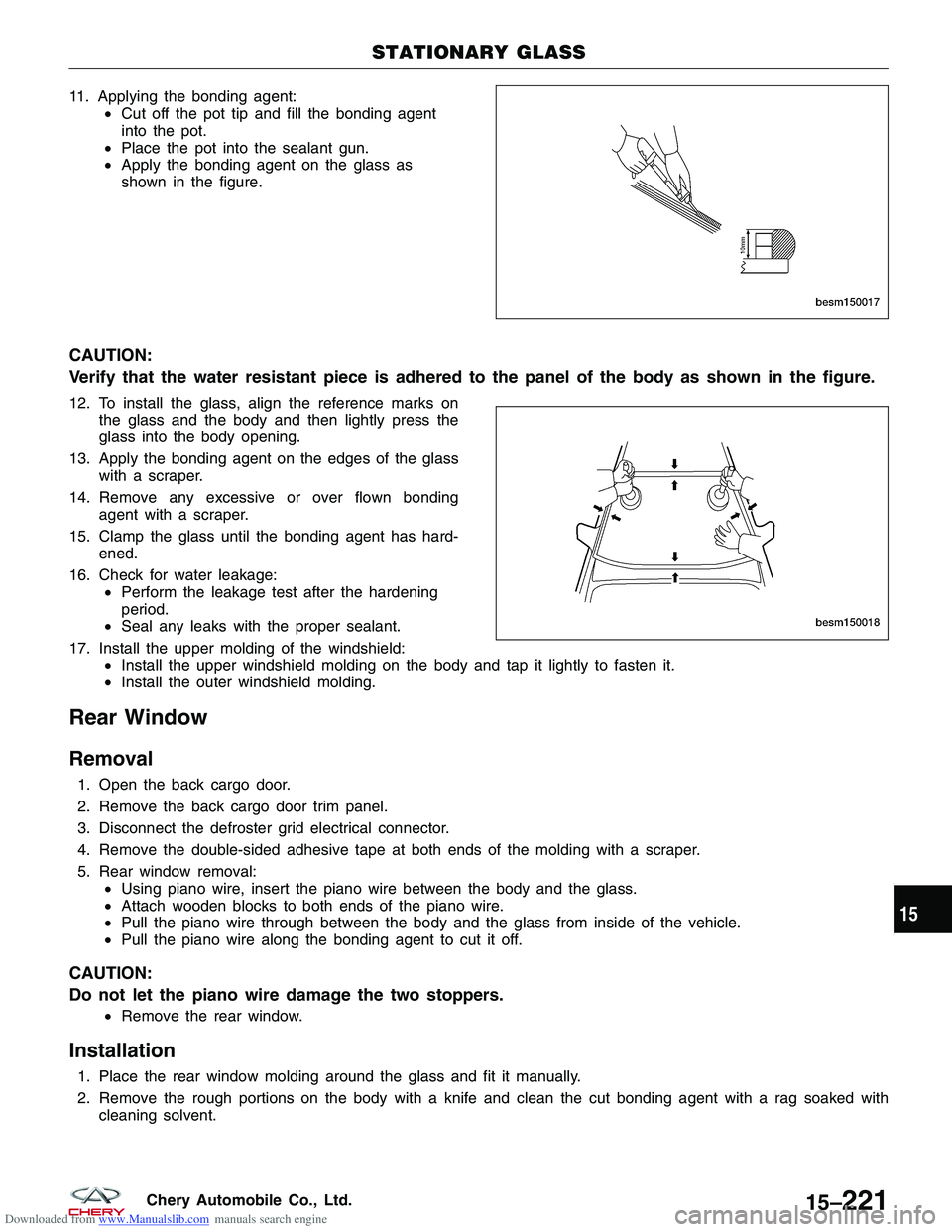
Downloaded from www.Manualslib.com manuals search engine 11. Applying the bonding agent:•Cut off the pot tip and fill the bonding agent
into the pot.
• Place the pot into the sealant gun.
• Apply the bonding agent on the glass as
shown in the figure.
CAUTION:
Verify that the water resistant piece is adhered to the panel of the body as shown in the figure.
12. To install the glass, align the reference marks on
the glass and the body and then lightly press the
glass into the body opening.
13. Apply the bonding agent on the edges of the glass with a scraper.
14. Remove any excessive or over flown bonding agent with a scraper.
15. Clamp the glass until the bonding agent has hard- ened.
16. Check for water leakage: •Perform the leakage test after the hardening
period.
• Seal any leaks with the proper sealant.
17. Install the upper molding of the windshield: •Install the upper windshield molding on the body and tap it lightly to fasten it.
• Install the outer windshield molding.
Rear Window
Removal
1. Open the back cargo door.
2. Remove the back cargo door trim panel.
3. Disconnect the defroster grid electrical connector.
4. Remove the double-sided adhesive tape at both ends of the molding with a scraper.
5. Rear window removal:
•Using piano wire, insert the piano wire between the body and the glass.
• Attach wooden blocks to both ends of the piano wire.
• Pull the piano wire through between the body and the glass from inside of the vehicle.
• Pull the piano wire along the bonding agent to cut it off.
CAUTION:
Do not let the piano wire damage the two stoppers.
•Remove the rear window.
Installation
1. Place the rear window molding around the glass and fit it manually.
2. Remove the rough portions on the body with a knife and clean the cut bonding agent with a rag soaked with
cleaning solvent.
STATIONARY GLASS
BESM150017
BESM150018
15
15–221Chery Automobile Co., Ltd.
Page 1815 of 1903
Downloaded from www.Manualslib.com manuals search engine WEATHERSTRIP
Front Door Weatherstrip
Removal & Installation
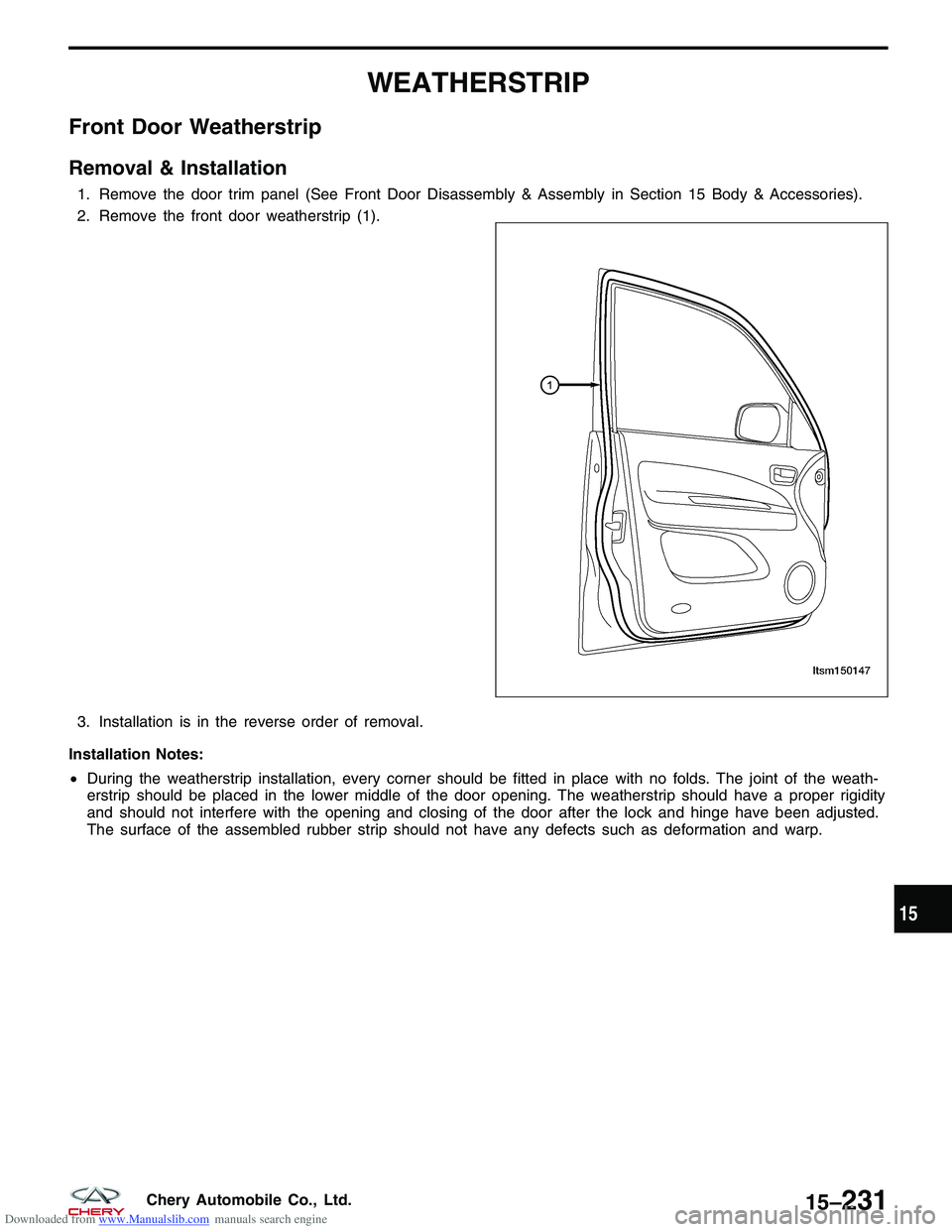
1. Remove the door trim panel (See Front Door Disassembly & Assembly in Section 15 Body & Accessories).
2. Remove the front door weatherstrip (1).
3. Installation is in the reverse order of removal.
Installation Notes:
• During the weatherstrip installation, every corner should be fitted in place with no folds. The joint of the weath-
erstrip should be placed in the lower middle of the door opening. The weatherstrip should have a proper rigidity
and should not interfere with the opening and closing of the door after the lock and hinge have been adjusted.
The surface of the assembled rubber strip should not have any defects such as deformation and warp.
LTSM150147
15
15–231Chery Automobile Co., Ltd.
Page 1816 of 1903
Downloaded from www.Manualslib.com manuals search engine Rear Door Weatherstrip
Removal & Installation
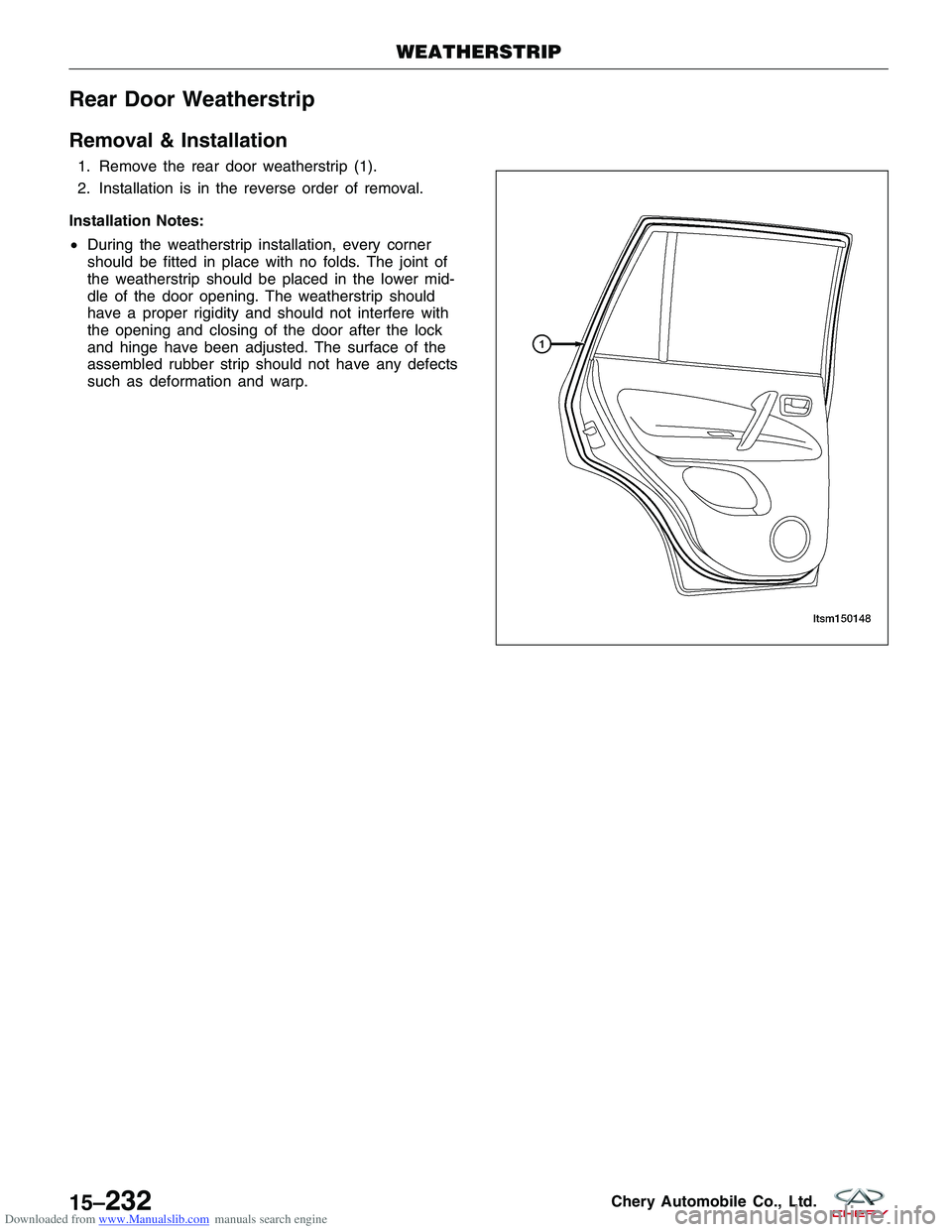
1. Remove the rear door weatherstrip (1).
2. Installation is in the reverse order of removal.
Installation Notes:
• During the weatherstrip installation, every corner
should be fitted in place with no folds. The joint of
the weatherstrip should be placed in the lower mid-
dle of the door opening. The weatherstrip should
have a proper rigidity and should not interfere with
the opening and closing of the door after the lock
and hinge have been adjusted. The surface of the
assembled rubber strip should not have any defects
such as deformation and warp.
WEATHERSTRIP
LTSM150148
15–232Chery Automobile Co., Ltd.
Page 1831 of 1903
Downloaded from www.Manualslib.com manuals search engine ELECTRICAL TROUBLESHOOTING
Troubleshooting Wiring Problems
When troubleshooting wiring problems there are six steps which can aid in the procedure. The steps are listed and
explained below. Always check for non-factory equipped components added to the vehicle before doing any diagno-
sis. If the vehicle is equipped with these items, disconnect them to verify these add-on items are not the cause of the
problem.
Perform the following when troubleshooting a wiring problem:1. Verify the problem.
2. Verify any related symptoms (do this by performing operational checks on components that are in the same circuit).
3. Analyze the symptoms (use the wiring diagrams to determine what the circuit is doing, where the problem most likely is occurring and where the diagnosis will continue).
4. Isolate the problem area.
5. Repair the problem area.
6. Verify the proper operation (for this step, check for proper operation of all items on the repaired circuit).
Testing For Voltage
1. Connect the ground lead of a voltmeter to a known good ground.
2. Connect the other lead of the voltmeter to the selected test point. The vehicle ignition may need to be turned ON to check voltage. Refer to the appropriate test procedure.
Testing For Continuity
1. Remove the fuse for the circuit being checked or, disconnect the battery.
2. Connect one lead of the ohmmeter to one side of the circuit being tested.
3. Connect the other lead to the other end of the circuit being tested (low or no resistance means good continuity).
Testing For A Short To Ground
1. Remove the fuse and disconnect all items involved with the fuse.
2. Connect a test light or a voltmeter across the terminals of the fuse.
3. Starting at the fuse block, wiggle the wiring harness about six to eight inches apart and watch the voltmeter/testlight.
4. If the voltmeter registers voltage or the test light glows, there is a short to ground in that general area of the wiring harness.
Intermittent and Poor Connections
Most intermittent electrical problems are caused by faulty electrical connections or wiring. It is also possible for a
sticking component or relay to cause a problem. Before condemning a component or wiring assembly, check the
following items:
1. Connectors are fully seated
2. Spread terminals, or terminal push out
3. Terminals in the wiring assembly are fully seated into the connector/component and locked into position
4. Dirt or corrosion on the terminals (any amount of corrosion or dirt could cause an intermittent problem)
5. Damaged connector/component casing exposing the item to dirt or moisture
6. Wire insulation that has rubbed through causing a short to ground
7. Some or all of the wiring strands broken inside of the insulation
8. Wiring broken inside of the insulation
16
16–5Chery Automobile Co., Ltd.
Page 1836 of 1903
Downloaded from www.Manualslib.com manuals search engine Connectors
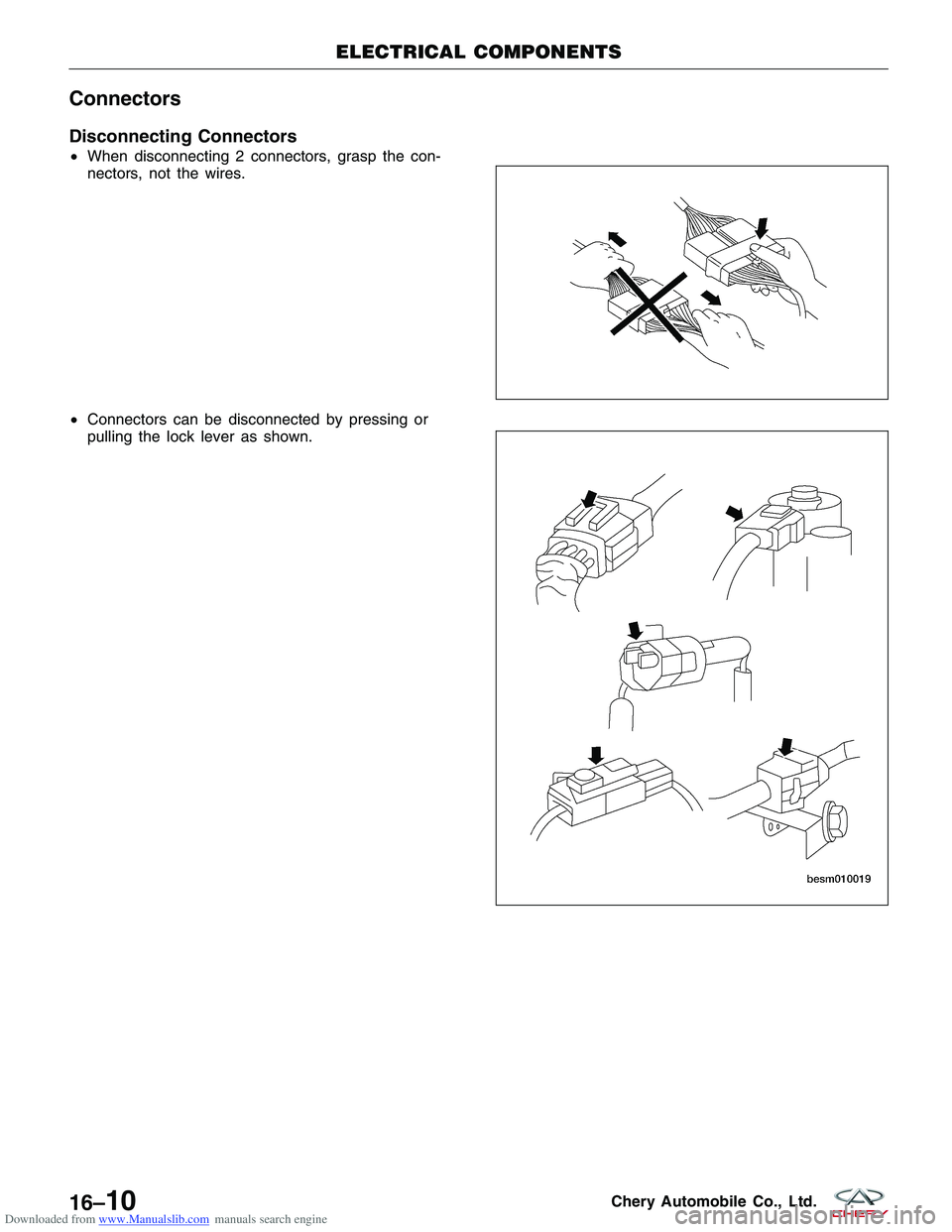
Disconnecting Connectors
•When disconnecting 2 connectors, grasp the con-
nectors, not the wires.
• Connectors can be disconnected by pressing or
pulling the lock lever as shown.
ELECTRICAL COMPONENTS
BESM010018
BESM010019
16–10Chery Automobile Co., Ltd.
Page 1837 of 1903
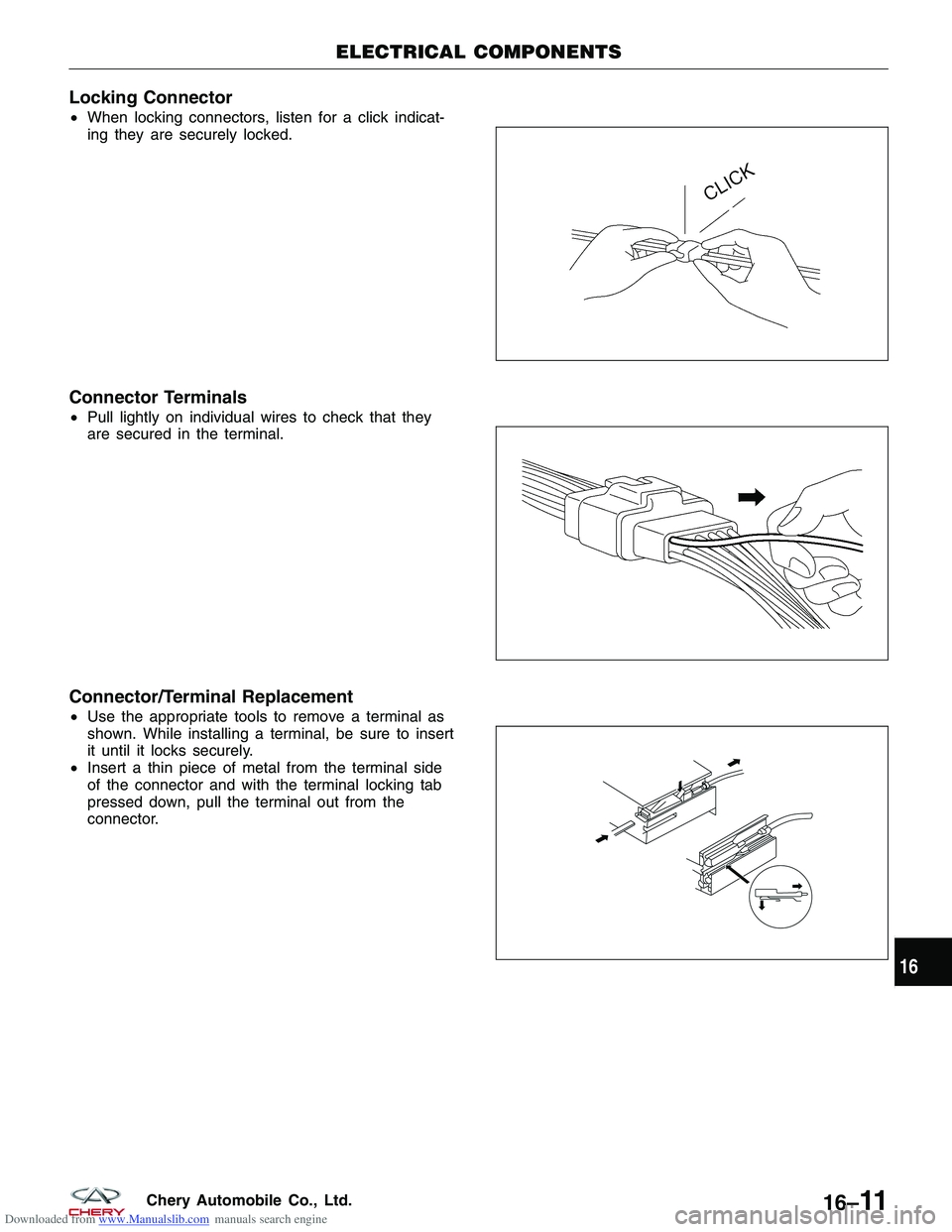
Downloaded from www.Manualslib.com manuals search engine Locking Connector
•When locking connectors, listen for a click indicat-
ing they are securely locked.
Connector Terminals
•Pull lightly on individual wires to check that they
are secured in the terminal.
Connector/Terminal Replacement
•Use the appropriate tools to remove a terminal as
shown. While installing a terminal, be sure to insert
it until it locks securely.
• Insert a thin piece of metal from the terminal side
of the connector and with the terminal locking tab
pressed down, pull the terminal out from the
connector.
ELECTRICAL COMPONENTS
BESM010020
BESM010023
BESM010029
16
16–11Chery Automobile Co., Ltd.
Page 1890 of 1903
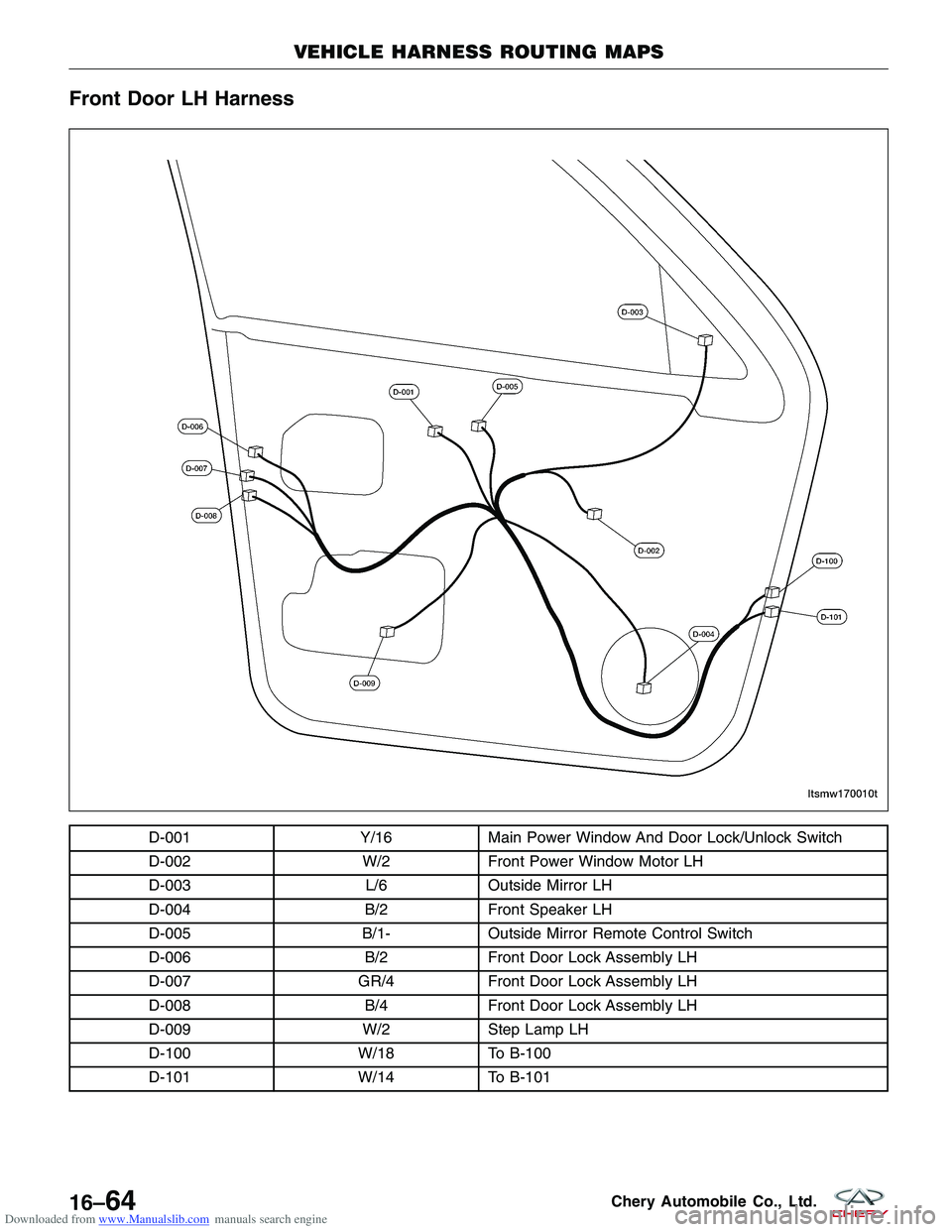
Downloaded from www.Manualslib.com manuals search engine Front Door LH Harness
D-001Y/16Main Power Window And Door Lock/Unlock Switch
D-002 W/2Front Power Window Motor LH
D-003 L/6Outside Mirror LH
D-004 B/2Front Speaker LH
D-005 B/1-Outside Mirror Remote Control Switch
D-006 B/2Front Door Lock Assembly LH
D-007 GR/4Front Door Lock Assembly LH
D-008 B/4Front Door Lock Assembly LH
D-009 W/2Step Lamp LH
D-100 W/18To B-100
D-101 W/14To B-101
VEHICLE HARNESS ROUTING MAPS
LTSMW170010T
16–64Chery Automobile Co., Ltd.
Page 1891 of 1903
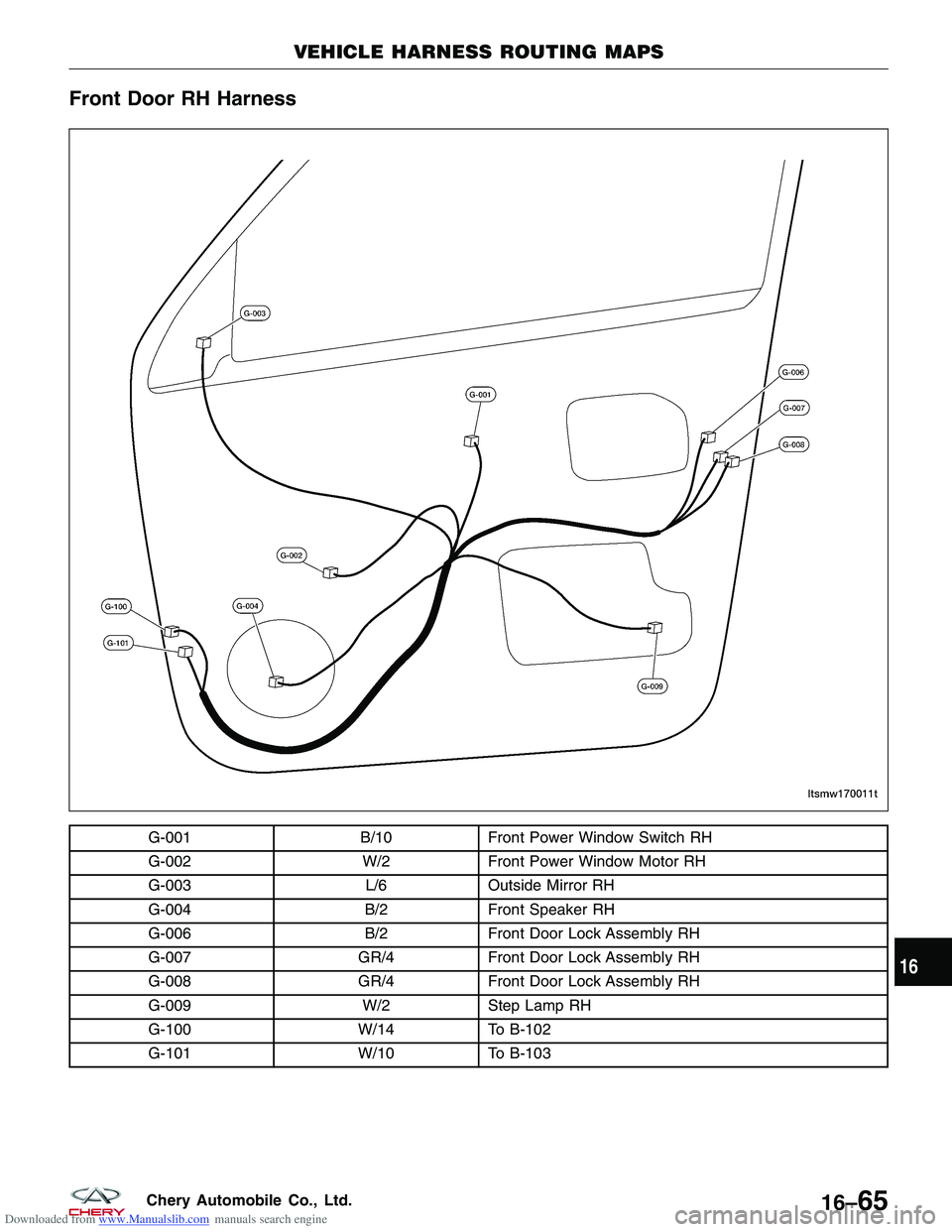
Downloaded from www.Manualslib.com manuals search engine Front Door RH Harness
G-001B/10Front Power Window Switch RH
G-002 W/2Front Power Window Motor RH
G-003 L/6Outside Mirror RH
G-004 B/2Front Speaker RH
G-006 B/2Front Door Lock Assembly RH
G-007 GR/4Front Door Lock Assembly RH
G-008 GR/4Front Door Lock Assembly RH
G-009 W/2Step Lamp RH
G-100 W/14To B-102
G-101 W/10To B-103
VEHICLE HARNESS ROUTING MAPS
LTSMW170011T
16
16–65Chery Automobile Co., Ltd.
Page 1892 of 1903
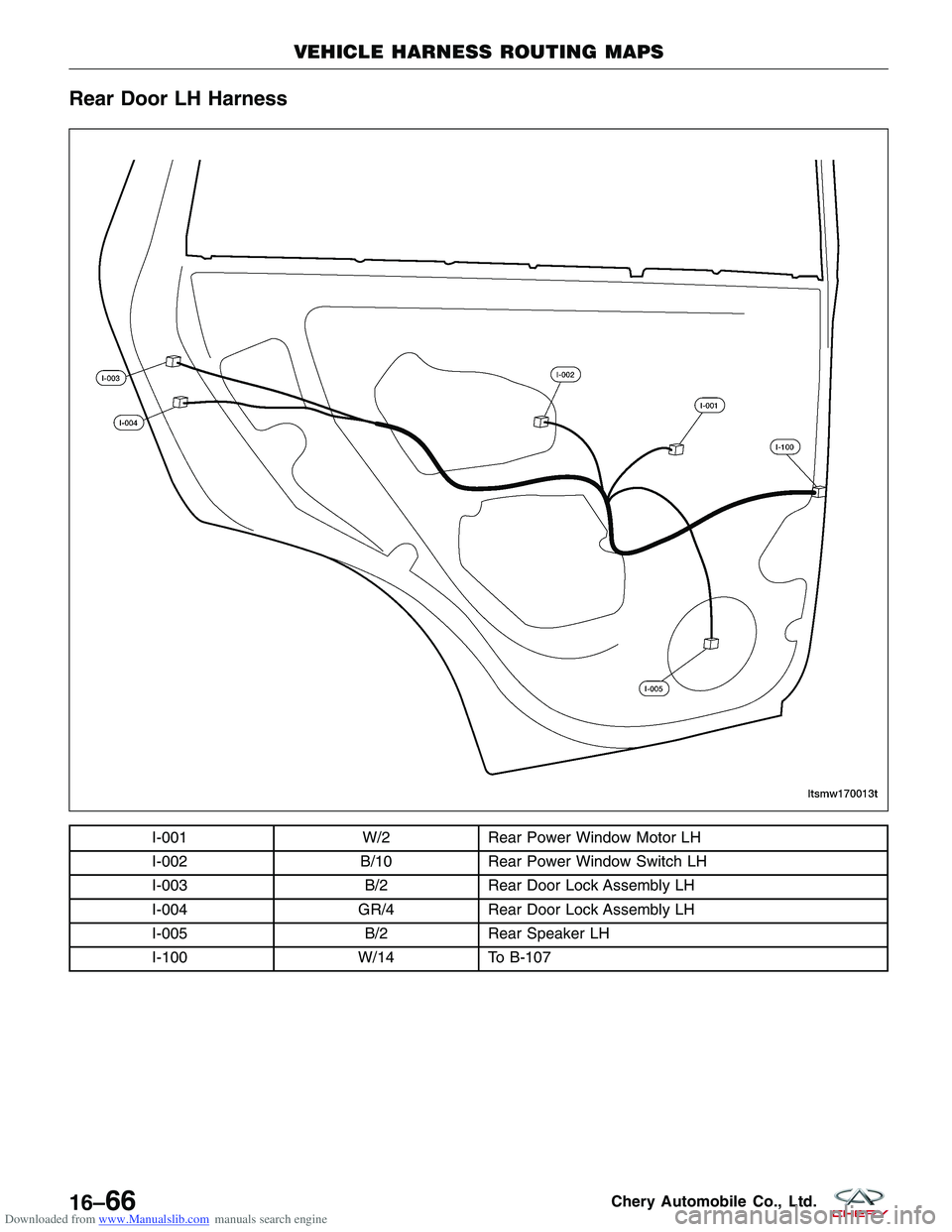
Downloaded from www.Manualslib.com manuals search engine Rear Door LH Harness
I-001W/2Rear Power Window Motor LH
I-002 B/10Rear Power Window Switch LH
I-003 B/2Rear Door Lock Assembly LH
I-004 GR/4Rear Door Lock Assembly LH
I-005 B/2Rear Speaker LH
I-100 W/14To B-107
VEHICLE HARNESS ROUTING MAPS
LTSMW170013T
16–66Chery Automobile Co., Ltd.
Page 1893 of 1903
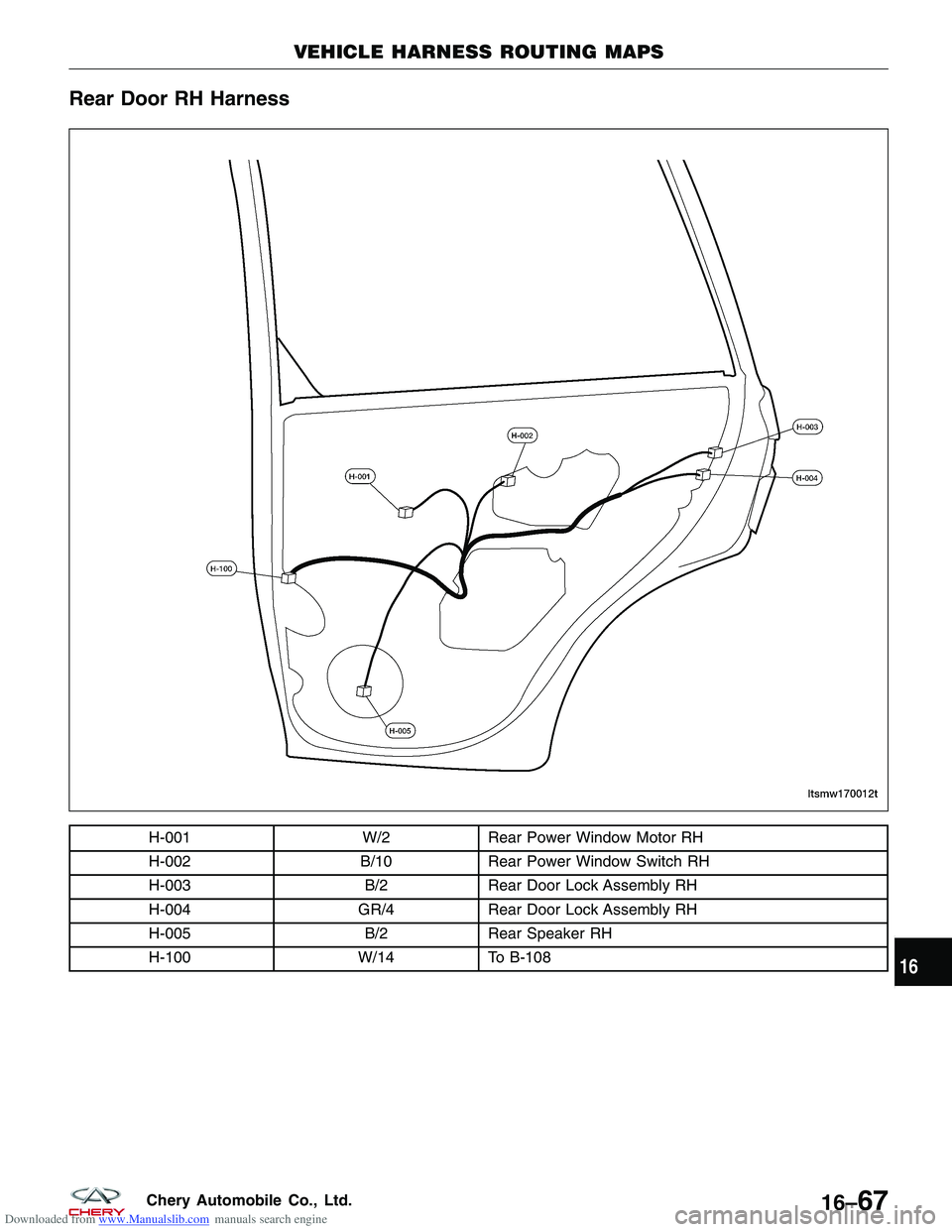
Downloaded from www.Manualslib.com manuals search engine Rear Door RH Harness
H-001W/2Rear Power Window Motor RH
H-002 B/10Rear Power Window Switch RH
H-003 B/2Rear Door Lock Assembly RH
H-004 GR/4Rear Door Lock Assembly RH
H-005 B/2Rear Speaker RH
H-100 W/14To B-108
VEHICLE HARNESS ROUTING MAPS
LTSMW170012T
16
16–67Chery Automobile Co., Ltd.