ECU CHEVROLET ASTRO 2004 Owner's Manual
[x] Cancel search | Manufacturer: CHEVROLET, Model Year: 2004, Model line: ASTRO, Model: CHEVROLET ASTRO 2004Pages: 382, PDF Size: 2.73 MB
Page 67 of 382
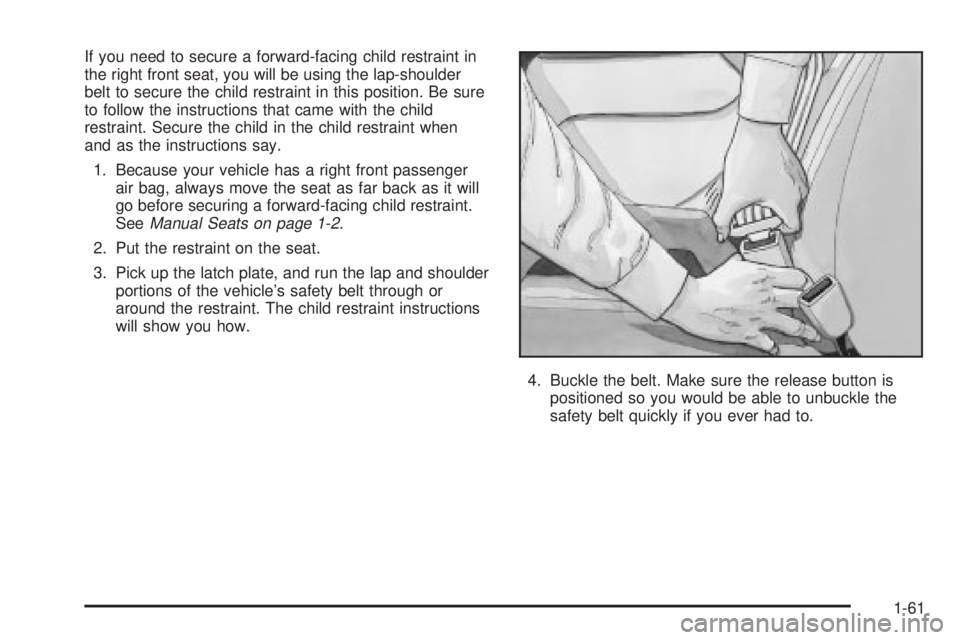
If you need to secure a forward-facing child restraint in
the right front seat, you will be using the lap-shoulder
belt to secure the child restraint in this position. Be sure
to follow the instructions that came with the child
restraint. Secure the child in the child restraint when
and as the instructions say.
1. Because your vehicle has a right front passenger
air bag, always move the seat as far back as it will
go before securing a forward-facing child restraint.
See
Manual Seats on page 1-2.
2. Put the restraint on the seat.
3. Pick up the latch plate, and run the lap and shoulder
portions of the vehicle's safety belt through or
around the restraint. The child restraint instructions
will show you how.
4. Buckle the belt. Make sure the release button is
positioned so you would be able to unbuckle the
safety belt quickly if you ever had to.
1-61
Page 68 of 382
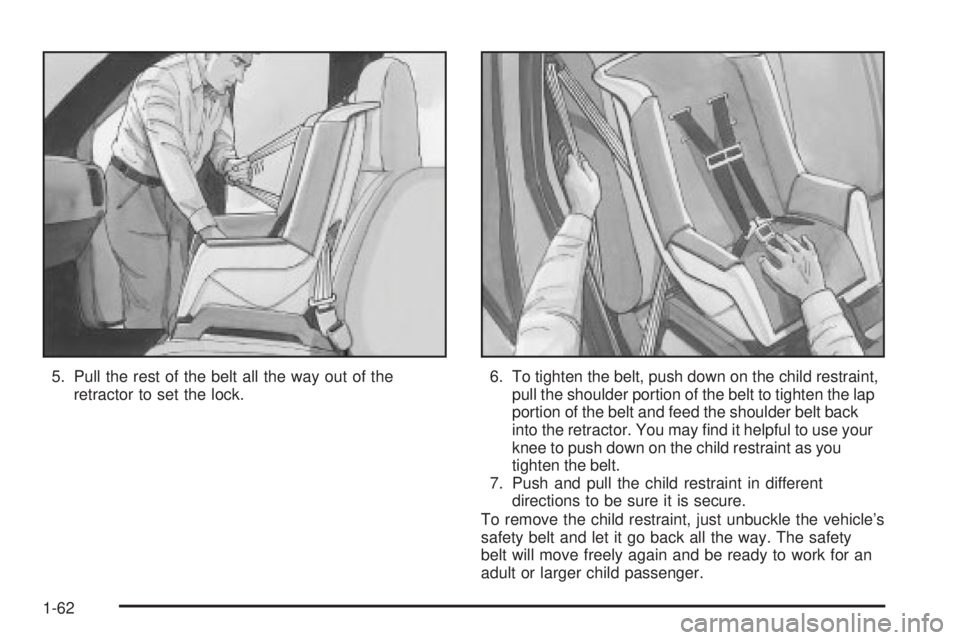
5. Pull the rest of the belt all the way out of the
retractor to set the lock.6. To tighten the belt, push down on the child restraint,
pull the shoulder portion of the belt to tighten the lap
portion of the belt and feed the shoulder belt back
into the retractor. You may ®nd it helpful to use your
knee to push down on the child restraint as you
tighten the belt.
7. Push and pull the child restraint in different
directions to be sure it is secure.
To remove the child restraint, just unbuckle the vehicle's
safety belt and let it go back all the way. The safety
belt will move freely again and be ready to work for an
adult or larger child passenger.
1-62
Page 70 of 382
{CAUTION:
Air bags in¯ate with great force, faster than the
blink of an eye. If you're too close to an
in¯ating air bag, as you would be if you were
leaning forward, it could seriously injure you.
Safety belts help keep you in position before
and during a crash. Always wear your safety
belt, even with air bags. The driver should sit
as far back as possible while still maintaining
control of the vehicle.
{CAUTION:
Anyone who is up against, or very close to,
any air bag when it in¯ates can be seriously
injured or killed. Air bags plus lap-shoulder
belts offer the best protection for adults, but
not for young children and infants. Neither the
vehicle's safety belt system nor its air bag
system is designed for them. Young children
and infants need the protection that a child
restraint system can provide. Always secure
children properly in your vehicle. To read how,
see
Older Children on page 1-35andInfants
and Young Children on page 1-38
.
1-64
Page 87 of 382
Sliding Side Door
To open the sliding side door, pull the handle toward
the back and slide the door to the rear until it rests in the
open position.
To close the sliding side door, pull the handle toward
the front and slide the door forward.
Sliding Door Security Lock
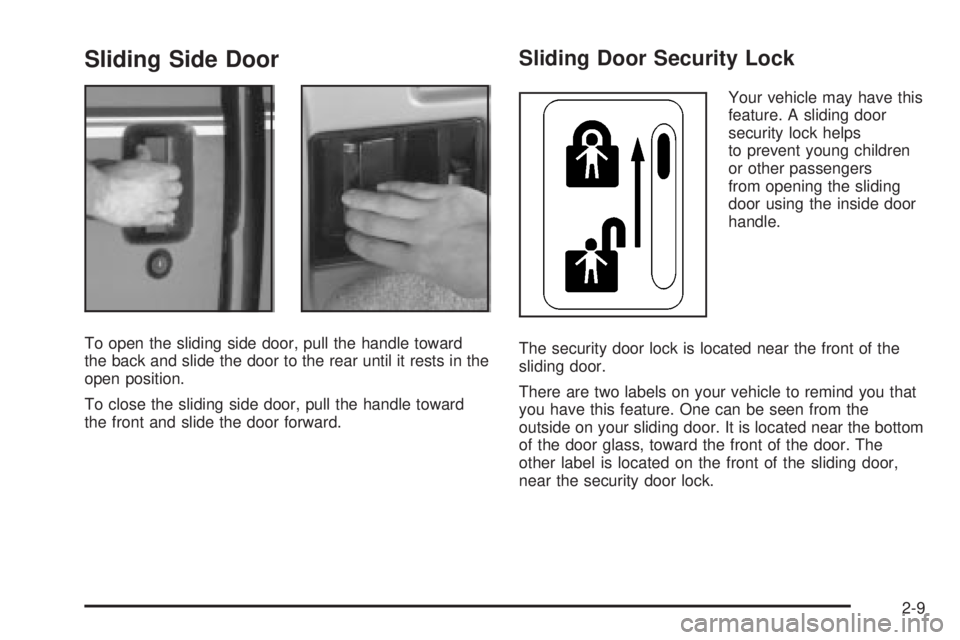
Your vehicle may have this
feature. A sliding door
security lock helps
to prevent young children
or other passengers
from opening the sliding
door using the inside door
handle.
The security door lock is located near the front of the
sliding door.
There are two labels on your vehicle to remind you that
you have this feature. One can be seen from the
outside on your sliding door. It is located near the bottom
of the door glass, toward the front of the door. The
other label is located on the front of the sliding door,
near the security door lock.
2-9
Page 88 of 382
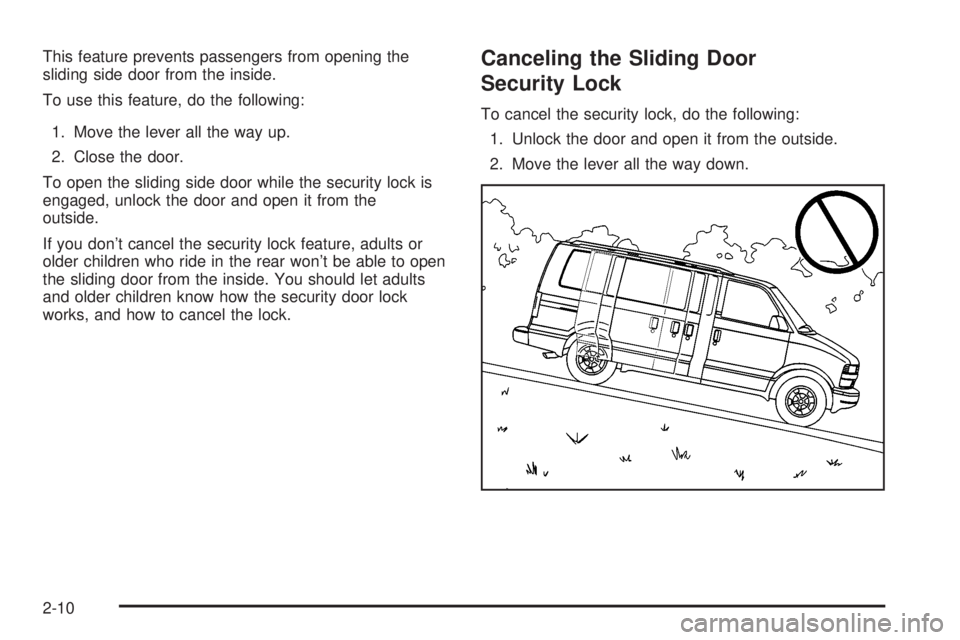
This feature prevents passengers from opening the
sliding side door from the inside.
To use this feature, do the following:
1. Move the lever all the way up.
2. Close the door.
To open the sliding side door while the security lock is
engaged, unlock the door and open it from the
outside.
If you don't cancel the security lock feature, adults or
older children who ride in the rear won't be able to open
the sliding door from the inside. You should let adults
and older children know how the security door lock
works, and how to cancel the lock.Canceling the Sliding Door
Security Lock
To cancel the security lock, do the following:
1. Unlock the door and open it from the outside.
2. Move the lever all the way down.
2-10
Page 94 of 382
Theft-Deterrent Systems
Vehicle theft is a big business, especially in some cities.
Although your vehicle has a number of theft-deterrent
features, we know that nothing we put on it can make it
impossible to steal. However, there are ways you
can help.
Passlockž
Your vehicle is equipped with the Passlockž
theft-deterrent system.
Passlock
žis a passive theft-deterrent system. Passlockž
enables fuel if the ignition lock cylinder is turned with
a valid key. If a correct key is not used or the ignition
lock cylinder is tampered with, fuel is disabled.During normal operation, the SECURITY light will go
off approximately ®ve seconds after the key is turned
to RUN.
If the engine stalls and the SECURITY light ¯ashes,
wait until the light stops ¯ashing before trying to restart
the engine. Remember to release the key from
START as soon as the engine starts.
If the engine is running and the SECURITY light comes
on, you will be able to restart the engine if you turn
the engine off. However, your Passlock
žsystem is not
working properly and must be serviced by your
dealer. Your vehicle is not protected by Passlock
žat
this time. You may also want to check the fuse.
See
Fuses and Circuit Breakers on page 5-89. See your
dealer for service.
2-16
Page 109 of 382
Outside Convex Mirror
Your passenger's side mirror is convex. A convex
mirror's surface is curved so you can see more from the
driver's seat.
{CAUTION:
A convex mirror can make things (like other
vehicles) look farther away than they really are.
If you cut too sharply into the right lane, you
could hit a vehicle on your right. Check your
inside mirror or glance over your shoulder
before changing lanes.
HomeLinkžTransmitter
HomeLink, a combined universal transmitter and
receiver, provides a way to replace up to three
hand-held transmitters used to activate devices such as
gate operators, garage door openers, entry door
locks, security systems and home lighting. Additional
HomeLink information can be found on the internet
at www.homelink.com or by calling 1-800-355-3515.
If your vehicle is equipped with the Homelink
ž
transmitter, it complies with Part 15 of the FCC Rules.Operation is subject to the following two conditions:
(1) this device may not cause harmful interference, and
(2) this device must accept any interference received,
including interference that may cause undesired
operation.
This device complies with RSS-210 of Industry Canada.
Operation is subject to the following two conditions: (1)
this device may not cause interference, and (2) this
device must accept any interference, including
interference that may cause undesired operation of the
device.
Changes and modi®cations to this system by other than
an authorized service facility could void authorization
to use this equipment.
Programming the HomeLinkž
Transmitter
Do not use the HomeLinkžTransmitter with any garage
door opener that does not have the ªstop and reverseº
feature. This includes any garage door opener model
manufactured before April 1, 1982. If you have a newer
garage door opener with rolling codes, please be
sure to follow steps 6 through 8 to complete the
programming of your HomeLink
žTransmitter.
Read the instructions completely before attempting to
program the HomeLink
žTransmitter. Because of the
steps involved, it may be helpful to have another person
available to assist you in programming the transmitter.
2-31
Page 110 of 382
Keep the original transmitter for use in other vehicles as
well as for future HomeLinkžprogramming. It is also
recommended that upon the sale of the vehicle,
the programmed HomeLink
žbuttons should be erased
for security purposes. Refer to ªErasing HomeLinkž
Buttonsº or, for assistance, contact HomeLinkžon the
internet at: www.homelink.com or by calling
1-800-355-3515.
Be sure that people and objects are clear of the garage
door or gate operator you are programming. When
programming a garage door, it is advised to park outside
of the garage.
It is recommended that a new battery be installed in
your hand-held transmitter for quicker and more
accurate transmission of the radio frequency.
Your vehicle's engine should be turned off while
programming the transmitter. Follow these steps to
program up to three channels:
1. Press and hold down the two outside buttons,
releasing only when the indicator light begins to
¯ash, after 20 seconds. Do not hold down the
buttons for longer than 30 seconds and do not
repeat this step to program a second and/or third
transmitter to the remaining two HomeLink
žbuttons.
2. Position the end of your hand-held transmitter about
1 to 3 inches (3 to 8 cm) away from the HomeLink
ž
buttons while keeping the indicator light in view.3. Simultaneously press and hold both the desired
button on HomeLink
žand the hand-held transmitter
button. Do not release the buttons until Step 4
has been completed.
Some entry gates and garage door openers may
require you to substitute Step 3 with the procedure
noted in ªGate Operator and Canadian
Programmingº later in this section.
4. The indicator light will ¯ash slowly at ®rst and then
rapidly after HomeLink
žsuccessfully receives the
frequency signal from the hand-held transmitter.
Release both buttons.
5. Press and hold the newly-trained HomeLink
žbutton
and observe the indicator light.
If the indicator light stays on constantly,
programming is complete and your device should
activate when the HomeLink
žbutton is pressed and
released.
To program the remaining two HomeLink
žbuttons,
begin with Step 2 under ªProgramming HomeLinkž.º
Do not repeat Step 1 as this will erase all of the
programmed channels.
If the indicator light blinks rapidly for two seconds
and then turns to a constant light, continue with
Steps 6 through 8 following to complete the
programming of a rolling-code equipped device
(most commonly, a garage door opener).
2-32
Page 119 of 382
Luggage Carrier
If you have a luggage carrier, you can load things on
top of your vehicle.
The luggage carrier has side rails and crossrails
attached to the roof to secure cargo.
Be sure the cargo is properly loaded. Follow these
guidelines:
·Carrying small, heavy loads on the roof is not
recommended.
·Tie the load to the side rails. Use the crossrails only
to keep the load from sliding.
·If you need to carry long items, tie the load to the
side rails. Also tie the load to the bumpers. Do
not tie the load so tightly that the crossrails or side
rails are damaged.
·After moving the crossrails, be sure to tighten all
the slider screws.
·For the purpose of wind noise reduction, locate the
front and rear crossrails in line with the two center
supports.
Notice:Loading cargo on the luggage carrier that
weighs more than 200 lbs. (918 kg) or hangs
over the rear or sides of the vehicle may damage
your vehicle. Load cargo so that it rests on the slats
as far forward as possible and against the side
rails, making sure to fasten it securely.
Don't exceed the maximum vehicle capacity when
loading your vehicle. For more information on vehicle
capacity and loading, see
Loading Your Vehicle on
page 4-30.
To prevent damage or loss of cargo as you're driving,
check now and then to make sure the luggage
carrier and cargo are still securely fastened.
Convenience Net
You may have a convenience net in the rear of your
vehicle to help keep small items in place during sharp
turns or quick stops and starts.
The net is not designed for larger, heavier items.
You can unhook the net so that it will lie ¯at when you're
not using it.
2-41
Page 121 of 382
Instrument Panel Overview...............................3-2
Hazard Warning Flashers................................3-4
Other Warning Devices...................................3-5
Horn.............................................................3-5
Tilt Wheel.....................................................3-5
Turn Signal/Multifunction Lever.........................3-6
Exterior Lamps.............................................3-12
Interior Lamps..............................................3-15
Accessory Power Outlets...............................3-16
Ashtrays and Cigarette Lighter........................3-17
Climate Controls............................................3-18
Climate Control System.................................3-18
Outlet Adjustment.........................................3-20
Rear Heating System....................................3-21
Rear Air Conditioning System.........................3-21
Warning Lights, Gages and Indicators.............3-23
Warning Lights, Gages, and Indicators.............3-23
Instrument Panel Cluster................................3-24
Speedometer and Odometer...........................3-25
Safety Belt Reminder Light.............................3-26
Air Bag Readiness Light................................3-26
Charging System Light..................................3-27
Voltmeter Gage............................................3-28
Brake System Warning Light..........................3-28Anti-Lock Brake System Warning Light.............3-29
Engine Coolant Temperature Gage..................3-30
Malfunction Indicator Lamp.............................3-30
Oil Pressure Gage........................................3-34
Security Light...............................................3-35
Service All-Wheel Drive Light.........................3-35
Tow/Haul Mode Light....................................3-36
Check Gages Warning Light...........................3-36
Fuel Gage...................................................3-36
Low Fuel Warning Light.................................3-37
Audio System(s).............................................3-38
Setting the Time for Radios with the
Set Button................................................3-38
Setting the Time for Radios with HR
and MN Buttons........................................3-38
AM-FM Radio...............................................3-39
Radio with CD..............................................3-41
Rear Seat Audio (RSA).................................3-46
Theft-Deterrent Feature..................................3-47
Radio Reception...........................................3-50
Care of Your CDs.........................................3-50
Care of Your CD Player................................3-50
Fixed Mast Antenna......................................3-50
Section 3 Instrument Panel
3-1