ECU CHEVROLET ASTRO 2004 Service Manual
[x] Cancel search | Manufacturer: CHEVROLET, Model Year: 2004, Model line: ASTRO, Model: CHEVROLET ASTRO 2004Pages: 382, PDF Size: 2.73 MB
Page 282 of 382
Tire Inspection and Rotation
Tires should be rotated every 5,000 to 8,000 miles
(8 000 to 13 000 km).
Any time you notice unusual wear, rotate your tires as
soon as possible and check wheel alignment. Also
check for damaged tires or wheels. See
When It Is Time
for New Tires on page 5-69andWheel Replacement
on page 5-72for more information.
Make sure the spare tire is stored securely. Push, pull,
and then try to rotate or turn the tire. If it moves,
use the ratchet/wheel wrench to tighten the cable. See
Changing a Flat Tire on page 5-75.
The purpose of regular rotation is to achieve more
uniform wear for all tires on the vehicle. The ®rst rotation
is the most important. See
Part A: Scheduled
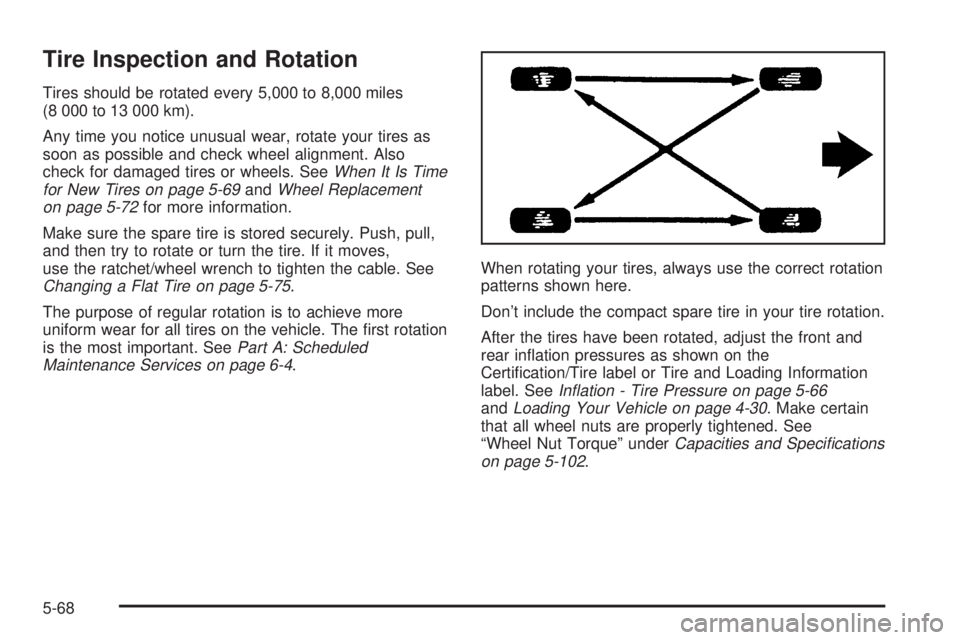
Maintenance Services on page 6-4.When rotating your tires, always use the correct rotation
patterns shown here.
Don't include the compact spare tire in your tire rotation.
After the tires have been rotated, adjust the front and
rear in¯ation pressures as shown on the
Certi®cation/Tire label or Tire and Loading Information
label. See
In¯ation - Tire Pressure on page 5-66andLoading Your Vehicle on page 4-30. Make certain
that all wheel nuts are properly tightened. See
ªWheel Nut Torqueº under
Capacities and Speci®cations
on page 5-102.
5-68
Page 288 of 382
Tire Chains
Notice:Use tire chains only where legal and only
when you must. Use only SAE Class²S²type chains
that are the proper size for your tires. Install them
on the rear axle tires and tighten them as tightly as
possible with the ends securely fastened. Drive
slowly and follow the chain manufacturer's
instructions. If you can hear the chains contacting
your vehicle, stop and retighten them. If the contact
continues, slow down until it stops. Driving too
fast or spinning the wheels with chains on will
damage your vehicle.
If a Tire Goes Flat
It's unusual for a tire to ªblowoutº while you're driving,
especially if you maintain your tires properly. If air goes
out of a tire, it's much more likely to leak out slowly.
But if you should ever have a ªblowout,º here are a few
tips about what to expect and what to do:
If a front tire fails, the ¯at tire will create a drag that
pulls the vehicle toward that side. Take your foot off the
accelerator pedal and grip the steering wheel ®rmly.
Steer to maintain lane position, and then gently brake to
a stop well out of the traffic lane.A rear blowout, particularly on a curve, acts much like a
skid and may require the same correction you'd use
in a skid. In any rear blowout, remove your foot from the
accelerator pedal. Get the vehicle under control by
steering the way you want the vehicle to go. It may be
very bumpy and noisy, but you can still steer. Gently
brake to a stop, well off the road if possible.
{CAUTION:
Lifting a vehicle and getting under it to do
maintenance or repairs is dangerous without
the appropriate safety equipment and training.
The jack provided with your vehicle is
designed only for changing a ¯at tire. If it is
used for anything else, you or others could be
badly injured or killed if the vehicle slips off
the jack. Use the jack provided with your
vehicle only for changing a ¯at tire.
If a tire goes ¯at, the next part shows how to use your
jacking equipment to change a ¯at tire safely.
5-74
Page 290 of 382
Removing the Spare Tire and Tools
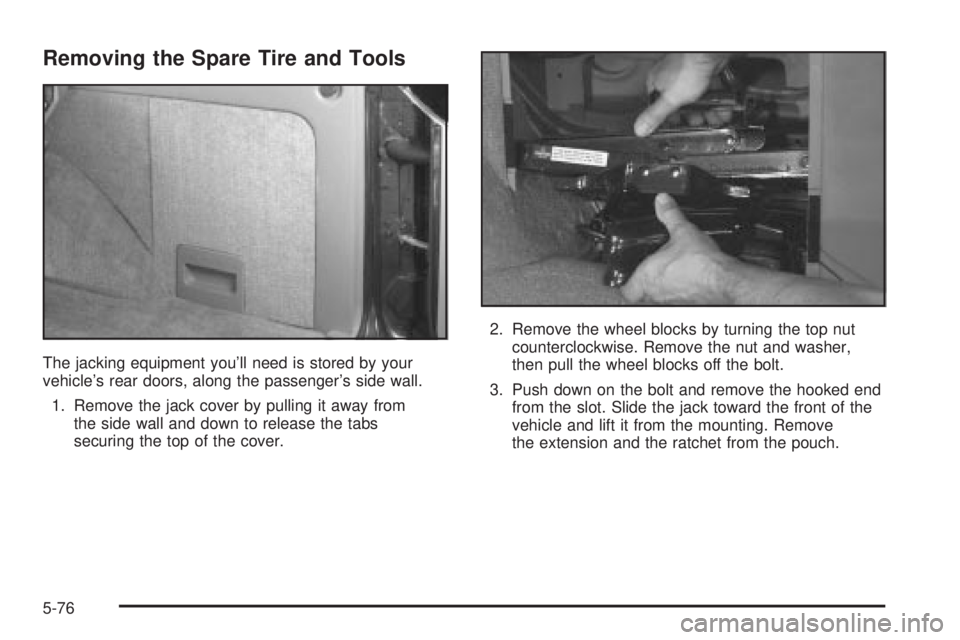
The jacking equipment you'll need is stored by your
vehicle's rear doors, along the passenger's side wall.
1. Remove the jack cover by pulling it away from
the side wall and down to release the tabs
securing the top of the cover.2. Remove the wheel blocks by turning the top nut
counterclockwise. Remove the nut and washer,
then pull the wheel blocks off the bolt.
3. Push down on the bolt and remove the hooked end
from the slot. Slide the jack toward the front of the
vehicle and lift it from the mounting. Remove
the extension and the ratchet from the pouch.
5-76
Page 299 of 382
Storing a Flat or Spare Tire and Tools
{CAUTION:
Storing a jack, a tire, or other equipment in the
passenger compartment of the vehicle could
cause injury. In a sudden stop or collision,
loose equipment could strike someone. Store
all these in the proper place.
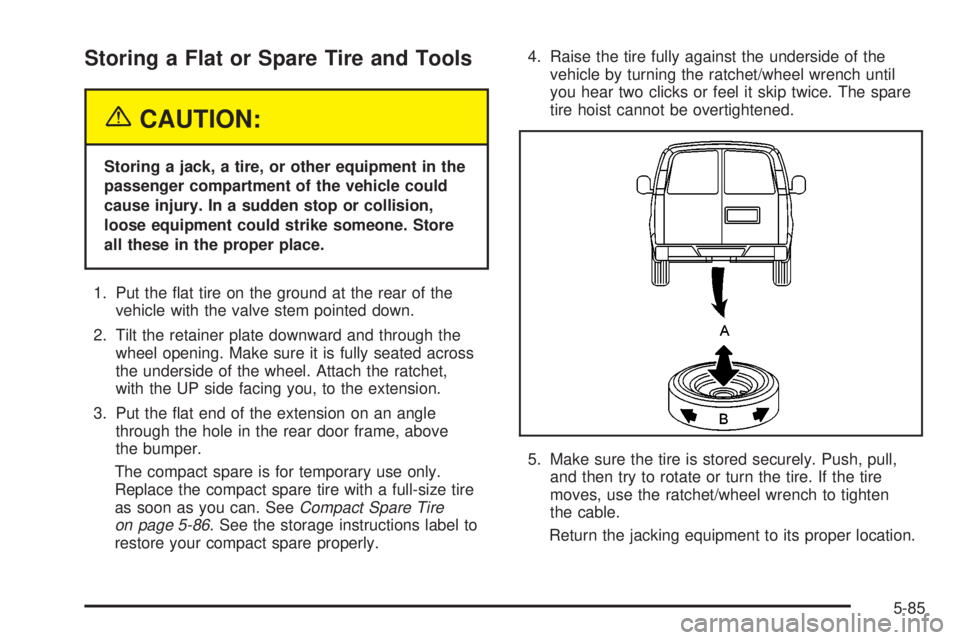
1. Put the ¯at tire on the ground at the rear of the
vehicle with the valve stem pointed down.
2. Tilt the retainer plate downward and through the
wheel opening. Make sure it is fully seated across
the underside of the wheel. Attach the ratchet,
with the UP side facing you, to the extension.
3. Put the ¯at end of the extension on an angle
through the hole in the rear door frame, above
the bumper.
The compact spare is for temporary use only.
Replace the compact spare tire with a full-size tire
as soon as you can. See
Compact Spare Tire
on page 5-86. See the storage instructions label to
restore your compact spare properly.4. Raise the tire fully against the underside of the
vehicle by turning the ratchet/wheel wrench until
you hear two clicks or feel it skip twice. The spare
tire hoist cannot be overtightened.
5. Make sure the tire is stored securely. Push, pull,
and then try to rotate or turn the tire. If the tire
moves, use the ratchet/wheel wrench to tighten
the cable.
Return the jacking equipment to its proper location.
5-85
Page 345 of 382
Wiper Blade Check
Inspect wiper blades for wear or cracking. Replace
blade inserts that appear worn or damaged or that
streak or miss areas of the windshield. Also see
Cleaning the Outside of Your Vehicle on page 5-83.
Spare Tire Check
At least twice a year, after the monthly in¯ation check of
the spare tire determines that the spare is in¯ated to
the correct tire in¯ation pressure, make sure that
the spare tire is stored securely. Push, pull, and then try
to rotate or turn the tire. If it moves, use the wheel
wrench to tighten the cable. See
Changing a Flat Tire
on page 5-68.
Weatherstrip Lubrication
Silicone grease on weatherstrips will make them last
longer, seal better, and not stick or squeak. Apply
silicone grease with a clean cloth. During very cold,
damp weather more frequent application may be
required. See
Part D: Recommended Fluids and
Lubricants on page 6-30.
Automatic Transmission Check
Check the transmission ¯uid level; add if needed. SeeAutomatic Transmission Fluid on page 5-21. A ¯uid loss
may indicate a problem. Check the system and repair
if needed.
At Least Once a Year
Key Lock Cylinders Service
Lubricate the key lock cylinders with the lubricant
speci®ed in Part D.
Body Lubrication Service
Lubricate all body door hinges, the body hood, fuel door
and rear compartment hinges, latches and locks
including interior glove box and console doors, hood
latch assembly, secondary latch, pivots, spring anchor,
release pawl and any moving seat hardware. Lubricate
the hood safety lever pivot and prop rod pivot. Part D
tells you what to use. More frequent lubrication may be
required when exposed to a corrosive environment.
6-25
Page 360 of 382
Roadside Assistance Program
Security While You Travel
1-800-CHEV-USA (243-8872)
As the proud owner of a new Chevrolet vehicle, you are
automatically enrolled in the Chevrolet Roadside
Assistance program. This value-added service is
intended to provide you with peace of mind as you drive
in the city or travel the open road. Chevrolet's Roadside
Assistance toll-free number is staffed by courteous
and capable Roadside Assistance Representatives who
are available 24 hours a day, 365 days a year.
We will provide the following services during the
Bumper-to-Bumper warranty period, at no expense
to you:
·Fuel Delivery:Delivery of enough fuel
($5 maximum) for the customer to get to the
nearest service station.
·Lock-out Service (identi®cation required):
Replacement keys or locksmith service will
be covered at no charge if you are unable to gain
entry into your vehicle. Delivery of the replacement
key will be covered within 10 miles.
·Emergency Tow:Tow to the nearest dealership for
warranty service or in the event of a
vehicle-disabling accident. Assistance when the
vehicle is mired in sand, mud or snow.
·Flat Tire Change:Installation of a spare tire will be
covered at no charge. (The customer is responsible
for the repair or replacement of the tire if not
covered by a warrantable failure.)
·Jump Start:No-start occurrences which require a
battery jump start will be covered at no charge.
·Dealer Locator Service
In many instances, mechanical failures are covered
under Chevrolet's Bumper-to-Bumper warranty.
However, when other services are utilized, our Roadside
Assistance Representatives will explain any payment
obligations you might incur.
For prompt and efficient assistance when calling, please
provide the following to the Roadside Assistance
Representative:
·Your name, home address, and home telephone
number
·Telephone number of your location
·Location of the vehicle
·Model, year, color, and license plate number
·Mileage, Vehicle Identi®cation Number and delivery
date of the vehicle
·Description of the problem
7-6
Page 361 of 382
While we hope you never have the occasion to use our
service, it is added security while traveling for you
and your family. Remember, we are only a phone call
away. Chevrolet Roadside Assistance:
1-800-CHEV-USA (1-800-234-8872), text telephone
(TTY) users, call 1-888-889-2438.
Chevrolet reserves the right to limit services or
reimbursement to an owner or driver when, in
Chevrolet's judgement, the claims become excessive in
frequency or type of occurrence.
Roadside Assistance is not part of or included in the
coverage provided by the New Vehicle Limited Warranty.
Buick reserves the right to make any changes or
discontinue the Roadside Assistance program at any
time without noti®cation.
Canadian Roadside Assistance
Vehicles purchased in Canada have an extensive
roadside assistance program accessible from anywhere
in Canada or the United States. Please refer to the
Warranty and Owner Assistance Information book.
Courtesy Transportation
Chevrolet has always exempli®ed quality and value in
its offering of motor vehicles. To enhance your
ownership experience, we and our participating dealers
are proud to offer Courtesy Transportation, a customer
support program for new vehicles.
The Courtesy Transportation program is offered to retail
purchase/lease customers in conjunction with the
Bumper-to-Bumper coverage provided by the New
Vehicle Limited Warranty. Several transportation options
are available when warranty repairs are required. This will
reduce your inconvenience during warranty repairs.
Plan Ahead When Possible
When your vehicle requires warranty service, you
should contact your dealer and request an appointment.
By scheduling a service appointment and advising
your service consultant of your transportation needs,
your dealer can help minimize your inconvenience.
If your vehicle cannot be scheduled into the service
department immediately, keep driving it until it can be
scheduled for service, unless, of course, the problem is
safety-related. If it is, please call your dealership, let
them know this, and ask for instructions.
If the dealer requests that you simply drop the vehicle
off for service, you are urged to do so as early in
the work day as possible to allow for same day repair.
7-7
Page 369 of 382
Canceling the Sliding Door
Security Lock..............................................2-10
Capacities and Speci®cations..........................5-102
Carbon Monoxide...........................4-24, 4-35, 2-28
Care of
Safety Belts................................................5-89
Your CD Player...........................................3-50
Your CDs ...................................................3-50
Cargo Van Models..........................................1-50
Cargo Vans...........................................1-41, 1-48
CD Messages................................................3-45
Center Passenger Position, Safety Belts.............1-27
Chains, Tires..................................................5-74
Charging System Light....................................3-27
Check
Engine Light...............................................3-30
Gages Warning Light...................................3-36
Checking Brake Fluid......................................5-40
Checking Coolant............................................5-26
Checking Engine Oil........................................5-13
Checking Things Under the Hood....................... 5-9
Checking Your Restraint Systems......................1-70
Chemical Paint Spotting...................................5-93
Child Restraints
Child Restraint Systems...............................1-44
Infants and Young Children...........................1-38Child Restraints (cont.)
Lower Anchorages and Top Tethers for
Children (LATCH System)..........................1-52
Older Children.............................................1-35
Securing a Child Restraint Designed for
the LATCH System...................................1-55
Securing a Child Restraint in a Center
Seat Position...........................................1-58
Securing a Child Restraint in a Rear
Outside Seat Position...............................1-55
Securing a Child Restraint in the Right
Front Seat Position...................................1-60
Top Strap...................................................1-48
Top Strap Anchor Location............................1-50
Where to Put the Restraint...........................1-47
Cigarette Lighter.............................................3-17
Cleaning
Inside of Your Vehicle..................................5-87
Outside of Your Vehicle................................5-90
Underbody Maintenance...............................5-93
Weatherstrips..............................................5-89
Cleaning Aluminum Wheels..............................5-92
Cleaning Exterior Lamps/Lenses.......................5-90
Cleaning Fabric/Carpet....................................5-87
Cleaning Glass Surfaces..................................5-89
Cleaning Interior Plastic Components.................5-89
3
Page 374 of 382
Inspection (cont.)
Throttle System...........................................6-29
Transfer Case and Front Axle
(All-Wheel Drive)......................................6-29
Installing a Garage Door Opener.......................2-37
Instrument Panel
Cluster.......................................................3-24
Overview..................................................... 3-2
Instrument Panel Brightness Control..................3-15
Instrument Panel Fuse Block............................5-97
Interior Lamps................................................3-15
J
Jump Starting.................................................5-43
K
Key Lock Cylinders Service..............................6-25
Keys............................................................... 2-2
L
Lamps
Exterior......................................................3-12
Interior.......................................................3-15Lamps On Reminder.......................................3-14
Lap Belt........................................................1-27
Lap-Shoulder Belt...................................1-18, 1-29
LATCH System
Child Restraints...........................................1-52
Securing a Child Restraint Designed for the
LATCH System........................................1-55
Latches, Seatback............................................ 1-6
Leaving Your Vehicle......................................... 2-8
Leaving Your Vehicle With the Engine Running . . . 2-26
Light
Air Bag Readiness.......................................3-26
Anti-Lock Brake System Warning...................3-29
Brake System Warning.................................3-28
Charging System.........................................3-27
Check Gages Warning.................................3-36
Low Fuel Warning.......................................3-37
Malfunction Indicator....................................3-30
Safety Belt Reminder...................................3-26
Security.....................................................3-35
Service All-Wheel-Drive................................3-35
Tow/Haul Mode...........................................3-36
Loading Your Vehicle.......................................4-30
Locking Rear Axle............................................ 4-9
8
Page 379 of 382
Seatback Latches............................................. 1-6
Seats
Bench Seat................................................1-11
Bucket Seats, Rear......................................1-12
Head Restraints............................................ 1-5
Manual........................................................ 1-2
Manual Lumbar............................................. 1-3
Power Seat.................................................. 1-3
Rear Seat Operation...................................... 1-7
Reclining Seatbacks...................................... 1-4
Seatback Latches.......................................... 1-6
Securing a Child Restraint
Center Seat Position....................................1-58
Designed for the LATCH System...................1-55
Rear Outside Seat Position...........................1-55
Right Front Seat Position..............................1-60
Security Light.................................................3-35
Security While You Travel.................................. 7-6
Selecting the Fan Speed..................................3-22
Selecting the Right Schedule, Maintenance.......... 6-5
Service........................................................... 5-3
Adding Equipment to the Outside of Your
Vehicle..................................................... 5-4
All-Wheel-Drive Light....................................3-35
Doing Your Own Work................................... 5-3
Engine Soon Light.......................................3-30
Publications Ordering Information...................7-11Service Bulletins.............................................7-12
Service Engine Soon Light in the United States
or Check Engine Light in Canada..................3-30
Service Manuals.............................................7-11
Servicing Your Air Bag-Equipped Vehicle............1-69
Setting Preset Stations............................3-39, 3-42
Setting the Temperature...................................3-22
Setting the Time
Radios with HR and MN Buttons...................3-38
Radios with the Set Button...........................3-38
Setting the Tone (Bass/Treble)..................3-40, 3-43
Sheet Metal Damage.......................................5-92
Shifting Into Park (P).......................................2-25
Shifting Out of Park (P)...................................2-27
Short Trip/City De®nition.................................... 6-5
Short Trip/City Intervals..................................... 6-5
Short Trip/City Scheduled Maintenance................ 6-6
Shoulder Belt Height Adjuster...........................1-20
Skidding........................................................4-13
Sliding Door Security Lock................................. 2-9
Sliding Side Door............................................. 2-9
Some Other Rainy Weather Tips.......................4-18
Spare Tire Check............................................6-25
Special Fabric Cleaning Problems.....................5-88
Speci®cations, Capacities...............................5-102
Speedometer..................................................3-25
Starter Switch Check.......................................6-26
13