audio CHEVROLET AVALANCHE 2003 1.G Owner's Manual
[x] Cancel search | Manufacturer: CHEVROLET, Model Year: 2003, Model line: AVALANCHE, Model: CHEVROLET AVALANCHE 2003 1.GPages: 492, PDF Size: 3.53 MB
Page 258 of 492

Problem Recommended Action
No power. The ignition might not be
in on or accessory.
The parental control
button might have been
pressed. (The power
indicator light will ¯ash.)
Disc will not play. The system might be off.
The parental control
button might have been
pressed. (The power
indicator light will ¯ash.)
The system might be in
auxiliary source mode.
Press the SRCE button
to toggle between the
DVD player and the
auxiliary source.
The disc is upside down
or is not compatible.
The picture does not ®ll
the screen. There are
black borders on the top
and bottom or on both
sides or it looks stretched
out.Press the Display button
on the DVD player or on
the remote control.
Change the display
mode.
The disc was ejected, but
it was pulled back into
the DVD player.The disc is being stored
in the DVD player. Press
the eject button again to
eject the disc.Problem Recommended Action
In auxiliary mode, the
picture moves or scrolls.Check the signal coming
from the auxiliary device
and make sure that the
connection and the signal
is good.
Change the Video
Format to PAL or NTSC.
See ªStereo RCA Jacksº
previously for how to
change the video format.
The language in the
audio or on the screen is
wrong.Press the Menu button
on the DVD player or on
the remote control and
change the audio or
language selection on the
DVD menu.
The remote control does
not work.Point the remote control
directly at the infrared
window below the video
screen while using.
Check that the batteries
are not dead or put in
wrong.
The parental control
button might have been
pressed. (The power
indicator light will ¯ash.)
3-98
Page 259 of 492
Problem Recommended Action
After stopping the player, I
push Play but sometimes
the DVD starts where I
left off and sometimes at
the beginning.If the stop button was
pressed one time, the
DVD player will resume
playing where the DVD
was stopped. If the stop
button was pressed two
times the DVD player will
begin to play from the
beginning of the DVD.
The auxiliary source is
running but there is no
picture or sound.Press the SRCE button to
change from the DVD
player mode to the
auxiliary source mode.
Check to make sure that
the auxiliary source is
connected to the inputs
properly.
My disc is stuck in the
player. The Load/Eject
button does not work.Press the Load/Eject
button on the DVD
player.
Turn the power off, then
on again, then press the
Load/Eject button on the
DVD player.
Do not attempt to forcibly
remove the disc from the
DVD player. This could
permanently damage the
DVD player.Problem Recommended Action
Sometimes the wireless
headphone audio cuts out
or buzzes.This could be caused by
interference from cellular
telephone towers or by
using your cellular
telephone in the vehicle.
I lost the remote and/or
the headphones.See your dealer for
assistance.
What is the best way to
clean the video screen?Wipe the video screen
with a soft cloth that is
damp with water.
Rear Seat Audio (RSA)
This feature allows rear seat passengers to listen to any
of the audio sources: radio, cassette tapes, CDs,
DVDs, XMŸ (USA only, if equipped) depending on your
vehicles options. However, the rear seat passengers
can only control the music sources that the front
seat passengers are not listening to. For example, rear
seat passengers may listen to a cassette tape through
headphones while the driver listens to the radio through
the front speakers. The rear seat passengers have
control of the volume for each set of headphones. The
front seat audio controls always override the RSA
controls.
3-99
Page 260 of 492
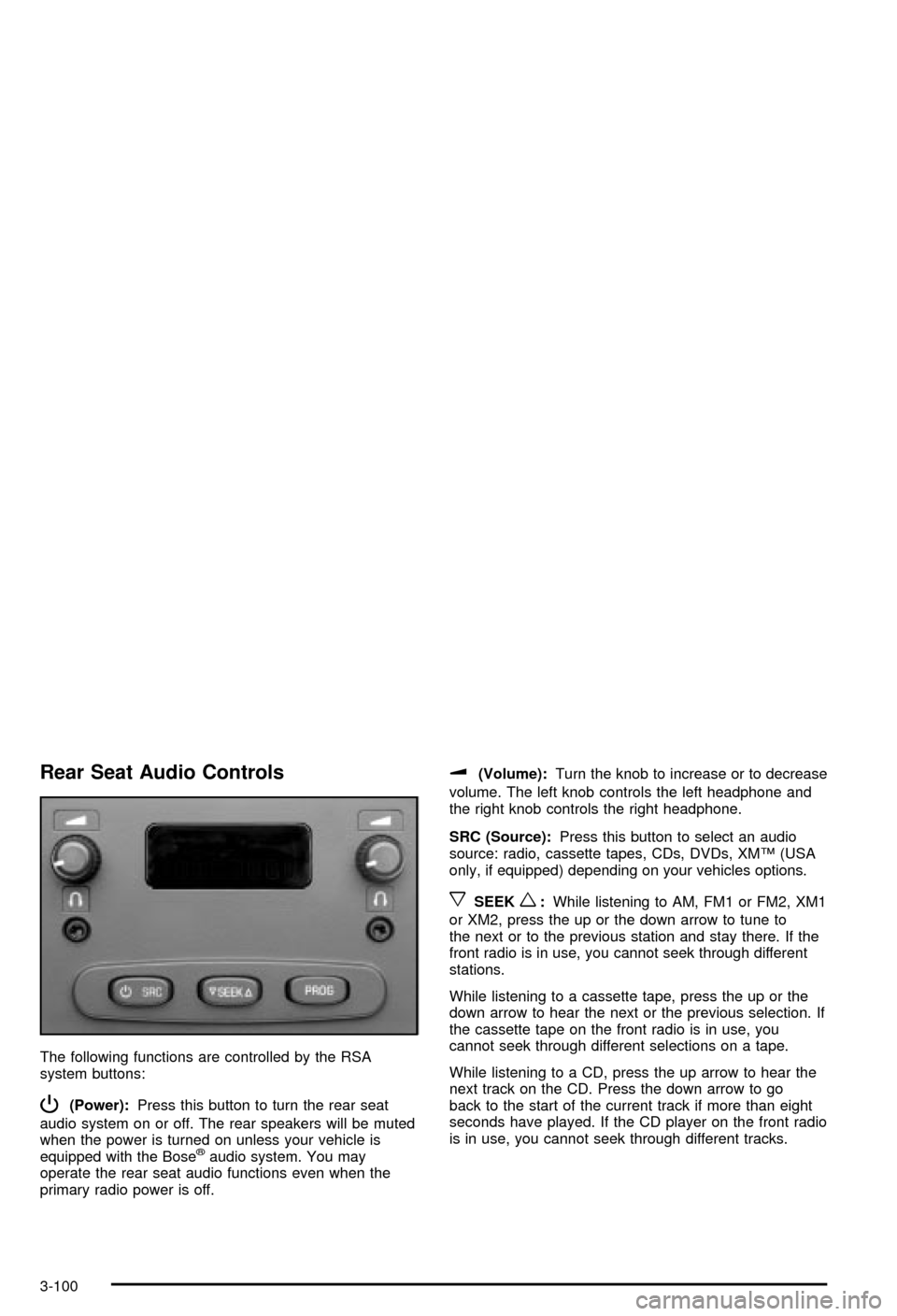
Rear Seat Audio Controls
The following functions are controlled by the RSA
system buttons:
P(Power):Press this button to turn the rear seat
audio system on or off. The rear speakers will be muted
when the power is turned on unless your vehicle is
equipped with the Bose
žaudio system. You may
operate the rear seat audio functions even when the
primary radio power is off.
u(Volume):Turn the knob to increase or to decrease
volume. The left knob controls the left headphone and
the right knob controls the right headphone.
SRC (Source):Press this button to select an audio
source: radio, cassette tapes, CDs, DVDs, XMŸ (USA
only, if equipped) depending on your vehicles options.
xSEEKw:While listening to AM, FM1 or FM2, XM1
or XM2, press the up or the down arrow to tune to
the next or to the previous station and stay there. If the
front radio is in use, you cannot seek through different
stations.
While listening to a cassette tape, press the up or the
down arrow to hear the next or the previous selection. If
the cassette tape on the front radio is in use, you
cannot seek through different selections on a tape.
While listening to a CD, press the up arrow to hear the
next track on the CD. Press the down arrow to go
back to the start of the current track if more than eight
seconds have played. If the CD player on the front radio
is in use, you cannot seek through different tracks.
3-100
Page 261 of 492

PROG (Program):The front passengers must be
listening to something different for each of these
functions to work:
·Press this button to go to the preset radio stations
set on the pushbuttons on the main radio.
·When a cassette tape is playing, press this button
to go to the other side of the tape.
·When a CD is playing in the radio, press this button
to go back to the beginning of the CD.
·When a CD is playing in the CD changer, press this
button to select a disc.
Theft-Deterrent Feature
THEFTLOCKžis designed to discourage theft of your
radio. The feature works automatically by learning
a portion of the Vehicle Identi®cation Number (VIN). If
the radio is moved to a different vehicle, it will not
operate and LOCKED will be displayed.
When the radio and vehicle are turned off, the blinking
red light indicates that THEFTLOCK
žis armed.
With THEFTLOCK
žactivated, your radio will not operate
if stolen.
Audio Steering Wheel Controls
You can control certain radio functions using the buttons
on your steering wheel.
g(OnStar/Voice Recognition):You can press this
button to interact with the OnStaržsystem. See the
OnStaržmanual provided with your vehicle for more
information.
PROG (Program):Press this button to play a station
you have programmed on the radio preset buttons
on the selected band. If a cassette tape is playing, press
this button to play the other side of the tape. If a
compact disc is playing in the CD changer, press this
button to go to the next available CD.
3-101
Page 262 of 492

QSOURCER:Press this button to select AM, FM1
or FM2, XM1 or XM2 (USA only, if equipped), or a
cassette tape or CD. The cassette or CD must be loaded
to play. Available loaded sources are shown on the
display as a tape or a CD symbol.
QSEEKR:Press the up or the down arrow to seek
to the next or to the previous radio station and stay
there.
If a cassette tape or compact disc is playing, the player
will advance with the up arrow and reverse with the
down arrow.
QVOLR:Press the up or the down arrow to increase
or to decrease volume.
DVD Distortion
You may experience audio distortion in the
IR headphones when operating cellular phones,
scanners, CB radios, Global Positioning Systems
(GPS)*, two-way radios, mobile fax, or walkie talkies.
It may be necessary to turn off the DVD player
when operating one of these devices in or near the
vehicle.
* Excludes the OnStar
žSystem.
Understanding Radio Reception
AM
The range for most AM stations is greater than for FM,
especially at night. The longer range, however, can
cause stations to interfere with each other. AM can pick
up noise from things like storms and power lines. Try
reducing the treble to reduce this noise if you ever get it.
FM Stereo
FM stereo will give you the best sound, but FM signals
will reach only about 10 to 40 miles (16 to 65 km).
Tall buildings or hills can interfere with FM signals,
causing the sound to come and go.
XMŸ Satellite Radio Service (USA
Only)
XMŸ Satellite Radio gives you digital radio reception
from coast to coast. Just as with FM, tall buildings
or hills can interfere with satellite radio signals, causing
the sound to come and go. Your radio may display
NO SIGNAL to indicate interference.
3-102
Page 376 of 492
{CAUTION:
Batteries have acid that can burn you and gas
that can explode. You can be badly hurt if you
aren't careful. See ªJump Startingº next for
tips on working around a battery without
getting hurt.
Contact your dealer to learn how to prepare your
vehicle for longer storage periods.
Also, for your audio system, see
Theft-Deterrent
Feature on page 3-101.
Jump Starting
If your battery has run down, you may want to use
another vehicle and some jumper cables to start your
vehicle. But please use the following steps to do it
safely.
{CAUTION:
Batteries can hurt you. They can be dangerous
because:
·They contain acid that can burn you.
·They contain gas that can explode or
ignite.
·They contain enough electricity to burn
you.
If you don't follow these steps exactly, some
or all of these things can hurt you.
Notice:Ignoring these steps could result in costly
damage to your vehicle that wouldn't be covered
by your warranty.
Trying to start your vehicle by pushing or pulling it
won't work, and it could damage your vehicle.
1. Check the other vehicle. It must have a 12-volt
battery with a negative ground system.
Notice:If the other system isn't a 12-volt system
with a negative ground, both vehicles can be
damaged.
5-43
Page 438 of 492
Fuses Usage
RR WPR Rear Wiper/Washer
RADIO Audio System
SEO B1Mid Bussed Electrical Center,
HomeLink, Rear Heated
Seats
LO HDLP-LT Headlamp Low Beam-Left
BTSIBrake Transmission Shift
Interlock System
CRANK Starting System
LO HDLP-RT Headlamp Low Beam-Right
FOG LP Fog Lamp Relay
FOG LP Fog Lamps
HORN Horn RelayFuses Usage
W/S WASHWindshield and Rear Window
Washer Pump Relay
W/S WASHWindshield and Rear Window
Washer Pump
INFOOnStar/Rear Seat
Entertainment
RADIO AMP Radio Ampli®er
RH HID Not Used
HORN Horn
EAP Electric Adjustable Pedals
TREC All-Wheel Drive Module
SBA Supplemental Brake Assist
5-105
Page 452 of 492

Windshield Washer Fluid Level Check
Check the windshield washer ¯uid level in the windshield
washer tank and add the proper ¯uid if necessary.
See
Windshield Washer Fluid on page 5-38for further
details.
At Least Once a Month
Tire In¯ation Check
Make sure tires are in¯ated to the correct pressures.
Don't forget to check your spare tire. SeeTires on
page 5-61for further details.
Cassette Tape Player Service
Clean cassette tape player. Cleaning should be done
every 50 hours of tape play. SeeAudio System(s)
on page 3-64for further details.
At Least Twice a Year
Restraint System Check
Make sure the safety belt reminder light and all your
belts, buckles, latch plates, retractors and anchorages
are working properly. Look for any other loose or
damaged safety belt system parts. If you see anythingthat might keep a safety belt system from doing its job,
have it repaired. Have any torn or frayed safety belts
replaced.
Also look for any opened or broken air bag coverings,
and have them repaired or replaced. (The air bag
system does not need regular maintenance.)
Wiper Blade Check
Inspect wiper blades for wear or cracking. Replace
blade inserts that appear worn or damaged or that
streak or miss areas of the windshield. Also see
Cleaning the Outside of Your Vehicle on page 5-91.
Spare Tire Check
At least twice a year, after the monthly in¯ation check of
the spare tire determines that the spare is in¯ated to
the correct tire in¯ation pressure, make sure that
the spare tire is stored securely. Push, pull, and then try
to rotate or turn the tire. If it moves, use the wheel
wrench/ratchet to tighten the cable. See
Changing a Flat
Tire on page 5-70.
6-11
Page 476 of 492

A
Accessory Power Outlets.................................3-19
Adding a Snow Plow or Similar Equipment.........4-54
Adding Washer Fluid.......................................5-38
Additional Program Information........................... 7-9
Additives, Fuel................................................. 5-6
Add-On Equipment..........................................4-53
Adjustable Throttle and Brake Pedal..................2-29
Adjusting the Speakers (Balance/Fade)......3-69, 3-80
After Off-Road Driving.....................................4-31
Air Bag Systems.....................................1-52, 1-58
Adding Equipment to Your Air Bag-Equipped
Vehicle...................................................1-66
How Does an Air Bag Restrain?....................1-59
Passenger Sensing System...........................1-62
Servicing Your Air Bag-Equipped Vehicle.........1-66
What Makes an Air Bag In¯ate?....................1-59
What Will You See After an Air Bag In¯ates?......1-60
When Should an Air Bag In¯ate?...................1-57
Where Are the Air Bags?..............................1-55
Air Bag .........................................................3-34
Passenger Status Indicator...........................3-34
Readiness Light..........................................3-33
Air Cleaner/Filter, Engine.................................5-20
Air Conditioning..............................................3-24
Aluminum or Chrome-Plated Wheels..................5-93
AM .............................................................3-102
Antenna, Fixed Mast......................................3-103
Antenna, XMŸ Satellite Radio Antenna System . . . 3-103Anti-Lock Brake, System Warning Light..............3-38
Anti-lock Brake System..................................... 4-7
Appearance Care............................................5-88
Care of Safety Belts....................................5-91
Chemical Paint Spotting...............................5-94
Cleaning the Inside of Your Vehicle................5-88
Cleaning the Outside of Your Vehicle..............5-91
Finish Damage............................................5-93
Sheet Metal Damage...................................5-93
Underbody Maintenance...............................5-94
Vehicle Care/Appearance Materials................5-94
Weatherstrips..............................................5-91
Approaching a Hill..........................................4-24
Ashtrays........................................................3-19
Audio Output..................................................3-97
Audio System(s).............................................3-64
Audio Steering Wheel Controls....................3-101
Care of Your CD and DVD Player................3-103
Care of Your CDs and DVDs.......................3-103
Fixed Mast Antenna...................................3-103
Radio with CD............................................3-65
Radio with Six-Disc CD................................3-76
Rear Seat Audio (RSA)................................3-99
Setting the Time..........................................3-64
Theft-Deterrent Feature...............................3-101
Understanding Radio Reception...................3-102
XMŸ Satellite Radio Antenna System...........3-103
Automatic Climate Control System.....................3-20
Automatic Headlamp System............................3-14
Automatic Transfer Case..................................2-34
1
Page 486 of 492

P
Park (P)........................................................2-40
Shifting Into................................................2-40
Shifting Out of............................................2-42
Parking Brake and Automatic Transmission
Park (P) Mechanism Check...........................6-14
Parking on Hills..............................................4-66
Parking.........................................................2-39
Brake........................................................2-39
Over Things That Burn.................................2-43
Part A - Scheduled Maintenance Services............ 6-4
Part B - Owner Checks and Services................6-10
Part C - Periodic MaintenanceInspections..........6-15
Part D - Recommended Fluids and Lubricants....6-17
Part E - Maintenance Record...........................6-19
Passenger Air Bag Indicator.....................2-48, 2-51
Passenger Air Bag Status Indicator...................3-34
PASSENGER DOOR AJAR..............................3-62
Passenger Sensing System..............................1-62
Passing.................................................4-16, 4-65
Passlock
ž......................................................2-26
Personalization Button.....................................3-50
Personalization, Climate Controls......................3-29
Plan Ahead When Possible................................ 7-8
Playing a Compact Disc..........................3-74, 3-85
Playing a Speci®c Loaded Compact Disc............3-86
Playing the Radio...................................3-66, 3-77
Power Steering...............................................4-14
Power...........................................................3-19Accessory Outlets........................................3-19
Door Locks.................................................. 2-8
Electrical System.........................................5-97
Lumbar Controls........................................... 1-3
Seat............................................................ 1-2
Steering Fluid.............................................5-36
Windows....................................................2-24
Programmable Automatic Door Locks.................. 2-8
Programming the HomeLink
žTransmitter...........2-56
Puddle Lamps................................................3-15
Q
Questions and Answers About Safety Belts.........1-14
R
Radio Data System (RDS).......................3-65, 3-76
Radio Messages.............................................3-71
Radios..........................................................3-64
Care of Your CD and DVD Player................3-103
Care of Your CDs and DVDs.......................3-103
Radio with CD............................................3-65
Radio with Six-Disc CD................................3-76
Rear Seat Audio..........................................3-99
Setting the Time..........................................3-64
Theft-Deterrent..........................................3-101
Understanding Reception............................3-102
RDS Messages......................................3-70, 3-82
11