buttons CHEVROLET AVALANCHE 2004 1.G User Guide
[x] Cancel search | Manufacturer: CHEVROLET, Model Year: 2004, Model line: AVALANCHE, Model: CHEVROLET AVALANCHE 2004 1.GPages: 548, PDF Size: 3.49 MB
Page 138 of 548
Gate Operator and Canadian
Programming
Canadian radio-frequency laws require transmitter
signals to “time out” or quit after several seconds of
transmission. This may not be long enough for
HomeLink
®to pick up the signal during programming.
Similarly, some U.S. gate operators are manufactured to
“time out” in the same manner.
If you live in Canada, or you are having difficulty
programming a gate operator by using the
“Programming HomeLink
®” procedures (regardless of
where you live), replace Step 3 under “Programming
HomeLink
®” with the following:
Continue to press and hold the HomeLink
®button while
you press and release every two seconds (cycle)
your hand-held transmitter until the frequency signal has
been successfully accepted by HomeLink
®. The
indicator light will ash slowly at rst and then rapidly.
Proceed with Step 4 under “Programming HomeLink
®”
to complete.
Using HomeLink®
Press and hold the appropriate HomeLink®button for at
least half of a second. The indicator light will come
on while the signal is being transmitted.
Erasing HomeLink®Buttons
To erase programming from the three buttons do the
following:
1. Press and hold down the two outside buttons until
the indicator light begins to ash, after 20 seconds.
2. Release both buttons. Do not hold for longer than
30 seconds.
HomeLink
®is now in the train (learning) mode and can
be programmed at any time beginning with Step 2
under “Programming HomeLink
®.”
Individual buttons can not be erased, but they can be
reprogrammed. See “Reprogramming a Single
HomeLink
®Button” next.
2-64
Page 139 of 548
Reprogramming a Single HomeLink®
Button
To program a device to HomeLink®using a HomeLink®
button previously trained, follow these steps:
1. Press and hold the desired HomeLink
®button. Do
not release the button.
2. The indicator light will begin to ash after
20 seconds. While still holding the HomeLink
®
button, proceed with Step 2 under “Programming
HomeLink®.”
Resetting Defaults
To reset HomeLink®to default settings do the following:
1. Hold down the two outside buttons for about
20 seconds until the indicator light begins to ash.
2. Continue to hold both buttons until the HomeLink
®
indicator light turns off.
3. Release both buttons.
For questions or comments, contact HomeLink
®at
1-800-355-3515, or on the internet at
www.homelink.com.
Storage Areas
Glove Box
To open your glove box, pull the lever upward and pull
the door downward.
Center Overhead Console
Your vehicle may have an overhead console equipped
with reading lights and a small storage area.
Press the button next to the light to turn it on. Press it
again to turn it off.
Front Armrest Storage Area
Your vehicle may have a center armrest storage
compartment in the front bench seat.
To open it, fold down the armrest and press the latch
handle located at the front of the armrest. Then, let the
lid pop up and swing open.
2-65
Page 164 of 548
If a hand, arm, or other object is blocking the sunroof
glass panel as it is closing, the glass panel will stop
at the obstruction. After the obstruction is removed, the
glass panel can be closed or opened.
Use care not to leave the sunroof open for long periods
of time as debris may collect in the tracks.
If the battery has been recharged, disconnected or is
not working, you may need to reprogram the sunroof. To
do this, start the vehicle and press the forward side of
the sunroof button until the glass panel moves to a fully
closed position. Release, and press again to move to
the vent position which occurs when the sunroof is fully
tilted rearward. This will reset the memory and enable
the sunroof to function properly.Vehicle Personalization
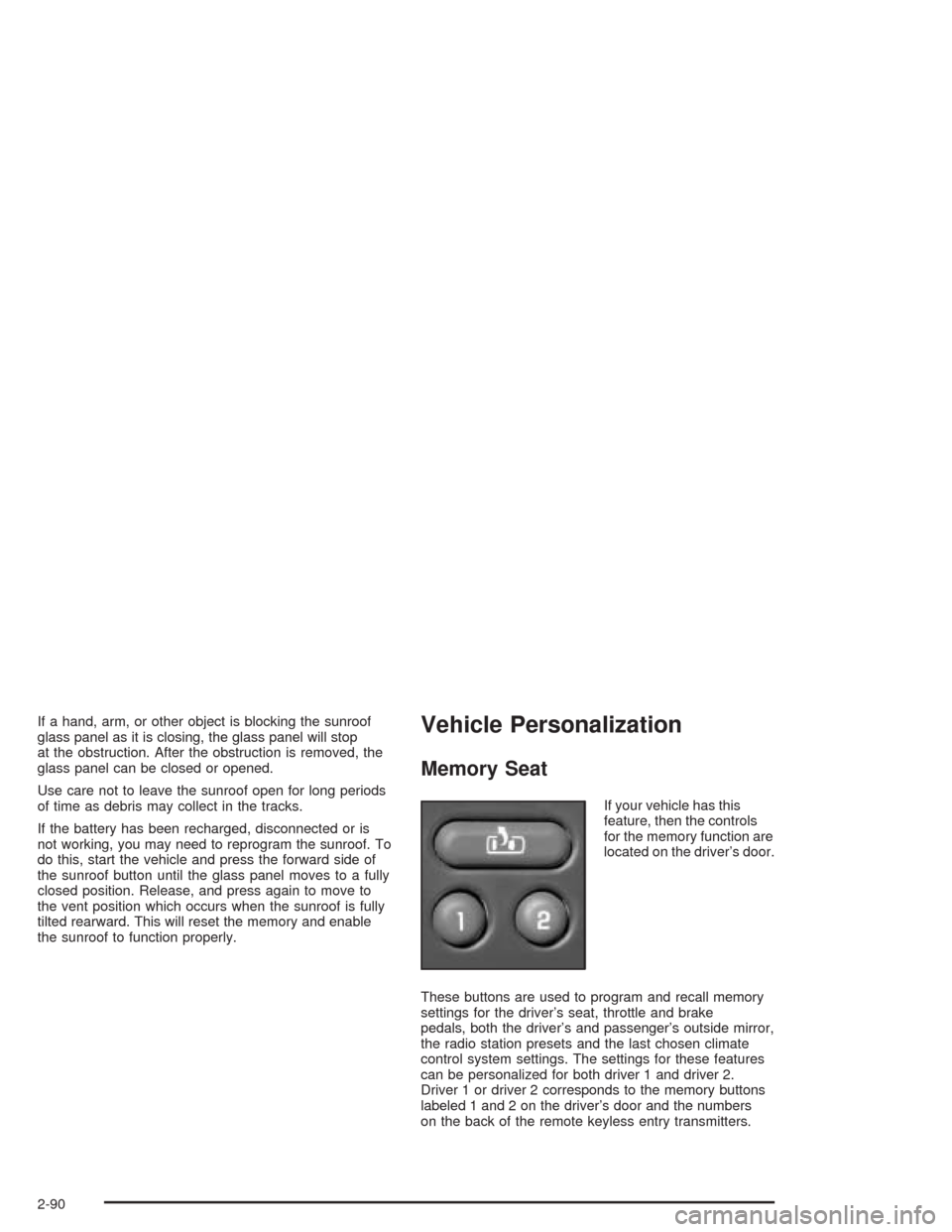
Memory Seat
If your vehicle has this
feature, then the controls
for the memory function are
located on the driver’s door.
These buttons are used to program and recall memory
settings for the driver’s seat, throttle and brake
pedals, both the driver’s and passenger’s outside mirror,
the radio station presets and the last chosen climate
control system settings. The settings for these features
can be personalized for both driver 1 and driver 2.
Driver 1 or driver 2 corresponds to the memory buttons
labeled 1 and 2 on the driver’s door and the numbers
on the back of the remote keyless entry transmitters.
2-90
Page 165 of 548
To store the memory settings, do the following:
1. Adjust the driver’s seat (including the seatback
recliner, lumbar, and side wing area), throttle
and brake pedals, both of the outside mirrors, and
the radio station presets to your preference.
2. Press and hold the 1 or 2 (for driver 1 or 2) button
of the memory control for three seconds. A double
chime will sound to let you know that the position
has been stored.
To repeat the procedure for a second driver, follow the
preceding steps, but press the other numbered
memory control button.
Each time button 1 or 2 is pressed and released while
the vehicle is in PARK (P), a single chime will sound and
the memory position will be recalled.If you use the unlock button on the remote keyless entry
transmitter to enter your vehicle, the preset driver’s
seat, throttle and brake pedal, mirror positions, radio
station presets and the last choosen climate control
settings will be recalled if programmed to do so through
the Driver Information Center (DIC). SeeDIC Operation
and Displays on page 3-54. The numbers on the
back of the transmitters, 1 or 2, correspond to the
numbers on the memory controls.
The seat, throttle and brake pedals and mirror positions
can also be recalled when placing the key in the
ignition if programmed to do so through the Driver
Information Center (DIC). SeeDIC Operation and
Displays on page 3-54.
To stop recall movement of the memory seat feature at
any time, press one of the memory buttons or power
seat controls.
2-91
Page 171 of 548
The main components of your instrument panel are the
following:
A. Air Outlets. SeeOutlet Adjustment on page 3-32.
B. Exterior Lamps Control. SeeExterior Lamps
on page 3-14.
C. Cargo/Top-Box Lamps Button. SeeExterior Lamps
on page 3-14.
D. Automatic Transfer Case Buttons (If Equipped). See
Four-Wheel Drive on page 2-38. Traction Assist
System (If Equipped). SeeTraction Assist System
(TAS) on page 4-9. Stabilitrak
®Button (If Equipped).
SeeStabilitrak®System on page 4-11.
E. OnStar®and Radio Steering Wheel Buttons (If
Equipped). SeeOnStar®System on page 2-59and
Audio Steering Wheel Controls on page 3-114.
F. Instrument Panel Cluster. SeeInstrument Panel
Cluster on page 3-34.
G. Shift Lever/Tow/Haul Selector Button. SeeAutomatic
Transmission Operation on page 2-34.
H. Audio System. SeeAudio System(s) on page 3-72.
I. Dome Override Button. SeeInterior Lamps on
page 3-20.J. Fog Lamps Button. SeeExterior Lamps on
page 3-14.
K. Turn Signal/Multifunction Lever. SeeTurn
Signal/Multifunction Lever on page 3-8.
L. Hood Release. SeeHood Release on page 5-10.
M. Tilt Lever. SeeTilt Wheel on page 3-7.
N. Driver Information Center (DIC) Buttons. SeeDriver
Information Center (DIC) on page 3-53.
O. Parking Brake Release. SeeParking Brake on
page 2-42.
P. Comfort Control Systems. SeeAutomatic Climate
Control System on page 3-22andDual Climate
Control System on page 3-29.
Q. Lighter (If Equipped) or Accessory Power Outlet
(If Equipped). SeeAshtrays and Cigarette Lighter on
page 3-22andAccessory Power Outlets on
page 3-21.
R. Accessory Power Outlet (If Equipped). See
Accessory Power Outlets on page 3-21.
S. Glove Box. SeeGlove Box on page 2-65.
3-5
Page 198 of 548
Outlet Adjustment
Your vehicle has air outlets located in the center and on
the side of your instrument panel that allow you to adjust
the direction and amount of airow inside the vehicle.
Move the louvers up or down. Use the thumbwheel next
to or underneath the outlet to close the louvers. For the
most efficient airow and temperature control, keep the
outlet in the fully opened position.
Operation Tips
Keep the hood and front air inlets free of ice, snow,
or any other obstruction (such as leaves). The
heater and defroster will work far better, reducing
the chance of fogging the inside of your windows.
Keep the air path under the front seats clear
of objects. This helps air to circulate throughout your
vehicle.
Adding outside equipment to the front of your
vehicle, such as hood-air deectors, etc., may affect
the performance of the heating and air conditioning
system. Check with your dealer before adding
equipment to the outside of your vehicle.
Climate Controls Personalization
If your vehicle is equipped with the electronic climate
control system, you can store and recall the climate
control settings for temperature, air delivery mode and
fan speed for two different drivers. The personal
choice settings recalled are determined by the
transmitter used to enter the vehicle.
After the button with the unlock symbol on a remote
keyless entry transmitter is pressed, the climate control
will adjust to the last settings of the identied driver.
The settings can also be changed by pressing one of the
memory buttons (1 or 2) located on the driver’s door.
When adjustments are made, the new settings are
automatically saved for that driver.
3-32
Page 219 of 548
Driver Information Center (DIC)
The DIC display is located on the instrument panel cluster
above the steering wheel. The DIC can display
information such as the trip odometer, fuel economy and
personalization features. If your vehicle is not equipped
with the DIC steering wheel buttons, you will not have all
the features listed, and you will turn off, or acknowledge,
DIC messages by using the trip odometer reset stem
located on the instrument panel cluster. See
Speedometer and Odometer on page 3-35for information
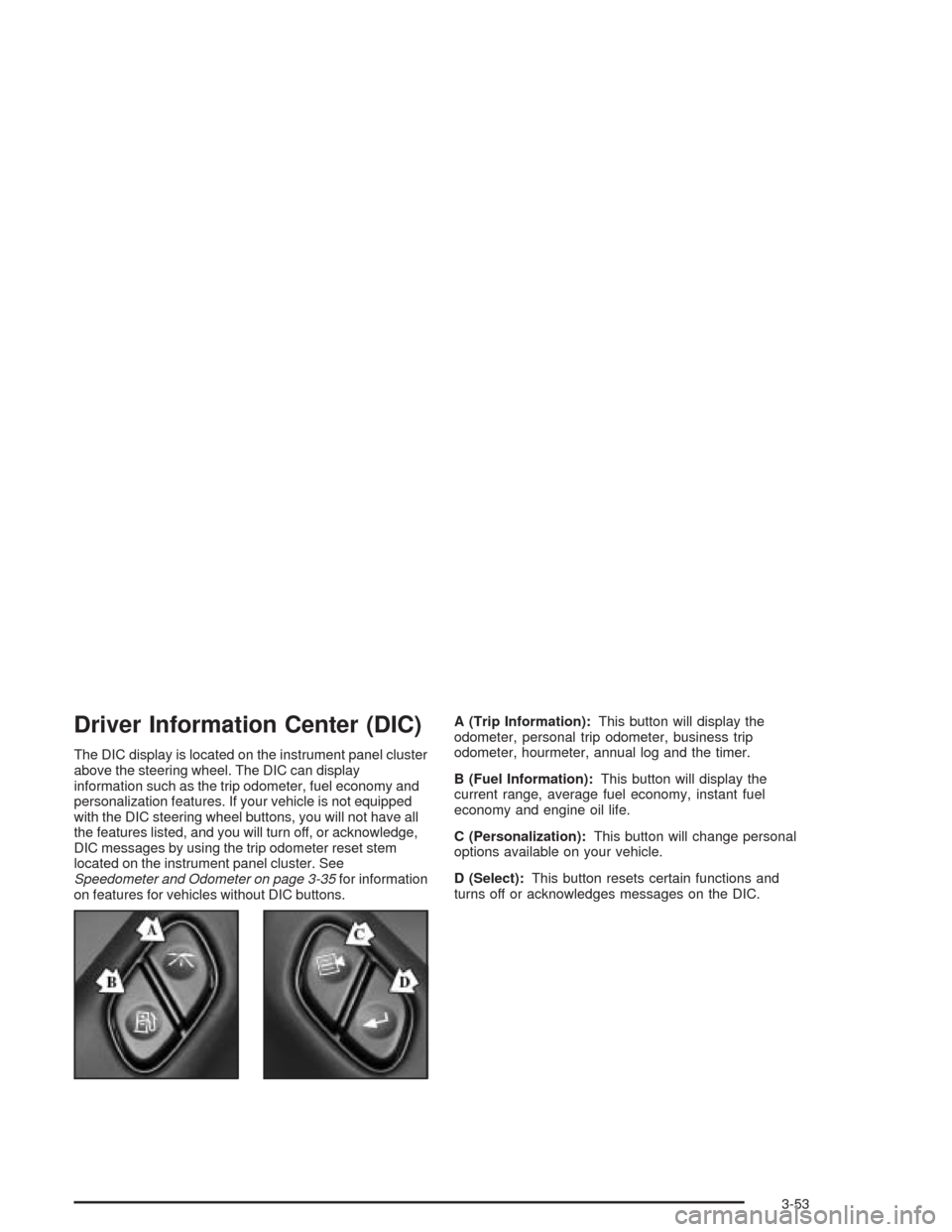
on features for vehicles without DIC buttons.A (Trip Information):This button will display the
odometer, personal trip odometer, business trip
odometer, hourmeter, annual log and the timer.
B (Fuel Information):This button will display the
current range, average fuel economy, instant fuel
economy and engine oil life.
C (Personalization):This button will change personal
options available on your vehicle.
D (Select):This button resets certain functions and
turns off or acknowledges messages on the DIC.
3-53
Page 220 of 548
DIC Operation and Displays
The DIC comes on when the ignition is on. After a short
delay the DIC will display the current driver (1 or 2)
and the information that was last displayed before the
engine was turned off.
If a problem is detected, a warning message will appear
on the display. Pressing any of the four buttons will
acknowledge (clear) most current warnings or service
messages. Some warnings that cannot be
acknowledged (cleared) are: ENGINE OVERHEATED,
OIL PRESSURE LOW, REDUCED ENGINE POWER,
TRANS HOT IDLE ENGINE, STABILITY SYS ACTIVE,
TRACTION SYS LIMITED and TRACTION ACTIVE.
These warnings must be dealt with immediately
and therefore cannot be cleared until the problem has
been corrected.The DIC has different modes which can be accessed by
pressing the four buttons on the DIC. These buttons are
trip information, fuel information, personalization and
select. The button functions are detailed in the following.
Trip Information Button
Press the trip information button to scroll through the
ODOMETER, PERSONAL TRIP ON/OFF, BUSINESS
TRIP ON/OFF, HOURMETER, ANNUAL LOG and
TIMER. If the personal trip and/or the business trip are
set to ON, you will also be able to scroll through
more messages. See “Personal Trip” and “Business
Trip” next for more information.
3-54
Page 230 of 548
Display Units (ENG/MET)
Press the personalization button until DISPLAY UNITS
appears in the display. To select English or metric,
press the select button while DISPLAY UNITS is
displayed on the DIC. Pressing the select button will
scroll through the following choices:
UNITS: ENGLISH
UNITS: METRIC
If you choose English, all information will be displayed
in English units. For example, distance in miles and fuel
economy in miles per gallon.
Choose one of the two options and press the
personalization button while it is displayed on the DIC to
select it and end out of the personalization options.
Display Language
To select your personalization for display language,
press the select button while DISPLAY LANGUAGE is
displayed on the DIC. Pressing the select button
will scroll through the following languages:
English
French
Spanish
Choose one of the three options and press the
personalization button while it is displayed on the
DIC to select it.
If you accidentally choose a language that you don’t
want or understand, press and hold the personalization
button and the trip information button at the same
time. The DIC will begin scrolling through the languages
in their particular language. English will be in English,
French will be in French and so on. When you see
the language that you would like, release both buttons.
The DIC will then display the information in the
language you chose.
You can also scroll through the different languages by
pressing and holding the trip reset stem for four
seconds, as long as you are in the odometer mode.
3-64
Page 239 of 548
Setting the Time
The radio may have a button marked with an H or HR to
represent hours and an M or MN to represent minutes.
Press and hold the hour button until the correct hour
appears on the display. Press and hold the minute
button until the correct minute appears on the display.
The time can be set with the ignition on or off.
To synchronize the time with an FM station broadcasting
Radio Data System (RDS) information, press and hold
the hour and minute buttons at the same time until RDS
TIME appears on the display. To accept this time, press
and hold the hour and minute buttons, at the same time,
for another two seconds. If the time is not available from
the station, NO UPDAT will appear on the display.
RDS time is broadcast once a minute. After tuning to an
RDS broadcast station, it may take a few minutes for
the time to update.
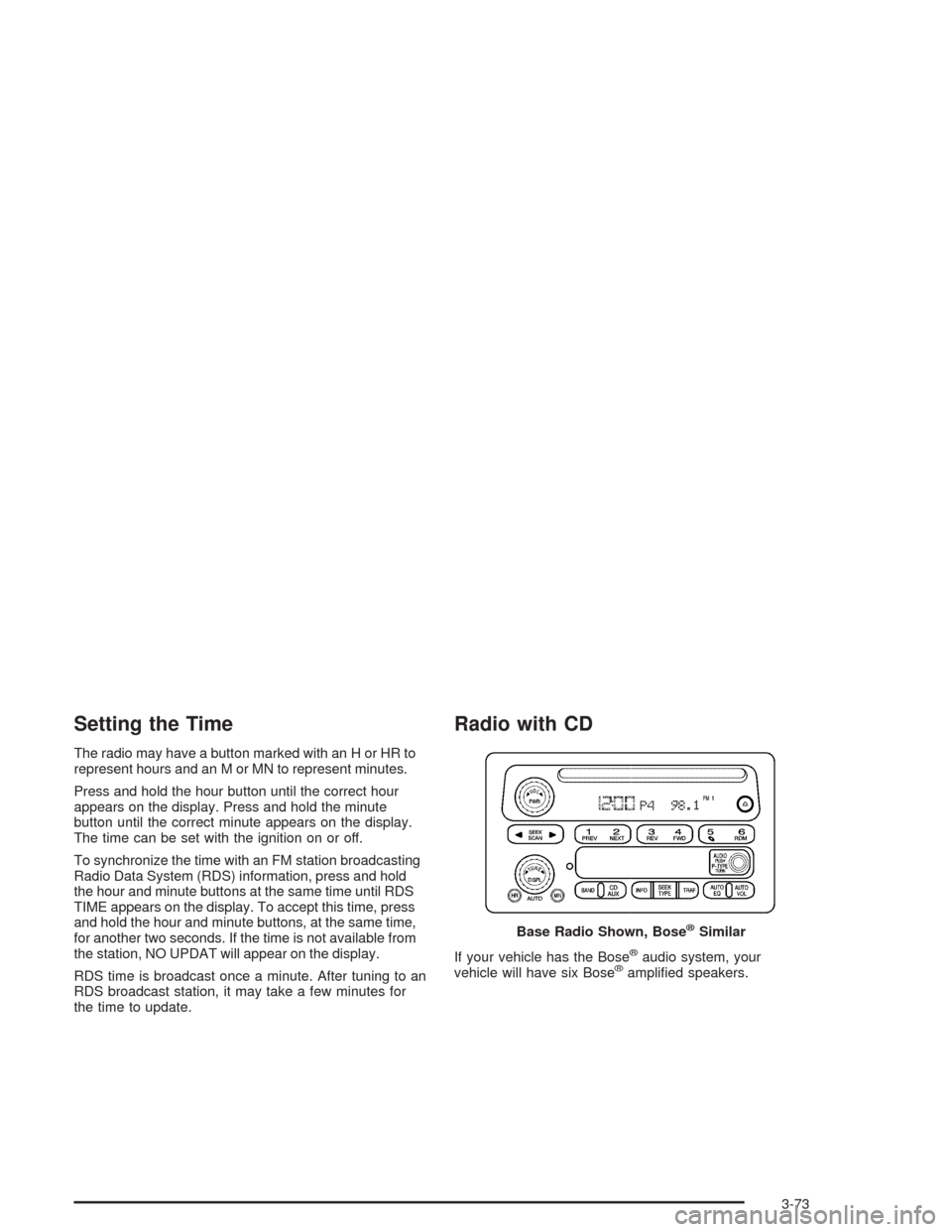
Radio with CD
If your vehicle has the Bose®audio system, your
vehicle will have six Bose®amplied speakers. Base Radio Shown, Bose
®Similar
3-73