buttons CHEVROLET AVALANCHE 2004 1.G Owner's Guide
[x] Cancel search | Manufacturer: CHEVROLET, Model Year: 2004, Model line: AVALANCHE, Model: CHEVROLET AVALANCHE 2004 1.GPages: 548, PDF Size: 3.49 MB
Page 277 of 548
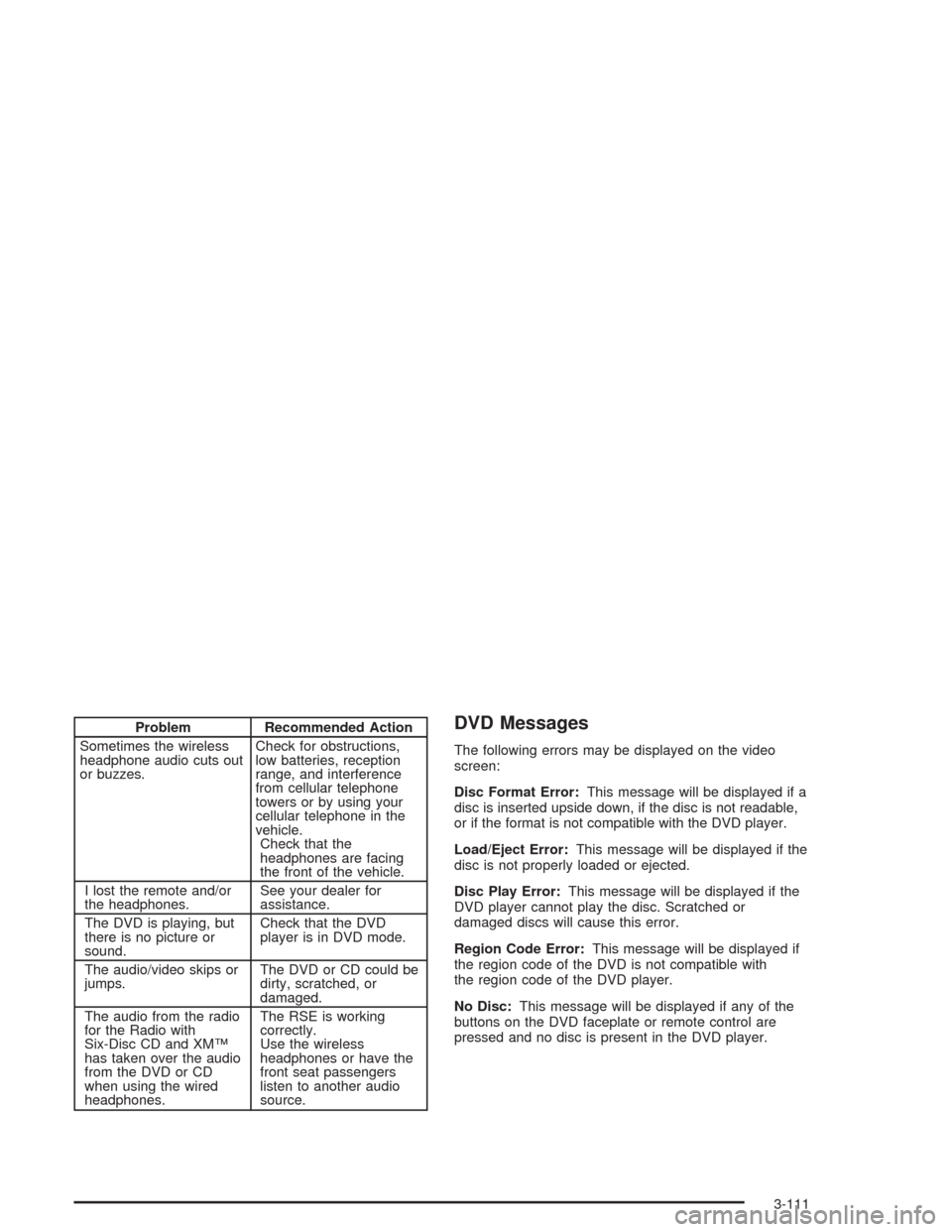
Problem Recommended Action
Sometimes the wireless
headphone audio cuts out
or buzzes.Check for obstructions,
low batteries, reception
range, and interference
from cellular telephone
towers or by using your
cellular telephone in the
vehicle.
Check that the
headphones are facing
the front of the vehicle.
I lost the remote and/or
the headphones.See your dealer for
assistance.
The DVD is playing, but
there is no picture or
sound.Check that the DVD
player is in DVD mode.
The audio/video skips or
jumps.The DVD or CD could be
dirty, scratched, or
damaged.
The audio from the radio
for the Radio with
Six-Disc CD and XM™
has taken over the audio
from the DVD or CD
when using the wired
headphones.The RSE is working
correctly.
Use the wireless
headphones or have the
front seat passengers
listen to another audio
source.DVD Messages
The following errors may be displayed on the video
screen:
Disc Format Error:This message will be displayed if a
disc is inserted upside down, if the disc is not readable,
or if the format is not compatible with the DVD player.
Load/Eject Error:This message will be displayed if the
disc is not properly loaded or ejected.
Disc Play Error:This message will be displayed if the
DVD player cannot play the disc. Scratched or
damaged discs will cause this error.
Region Code Error:This message will be displayed if
the region code of the DVD is not compatible with
the region code of the DVD player.
No Disc:This message will be displayed if any of the
buttons on the DVD faceplate or remote control are
pressed and no disc is present in the DVD player.
3-111
Page 279 of 548
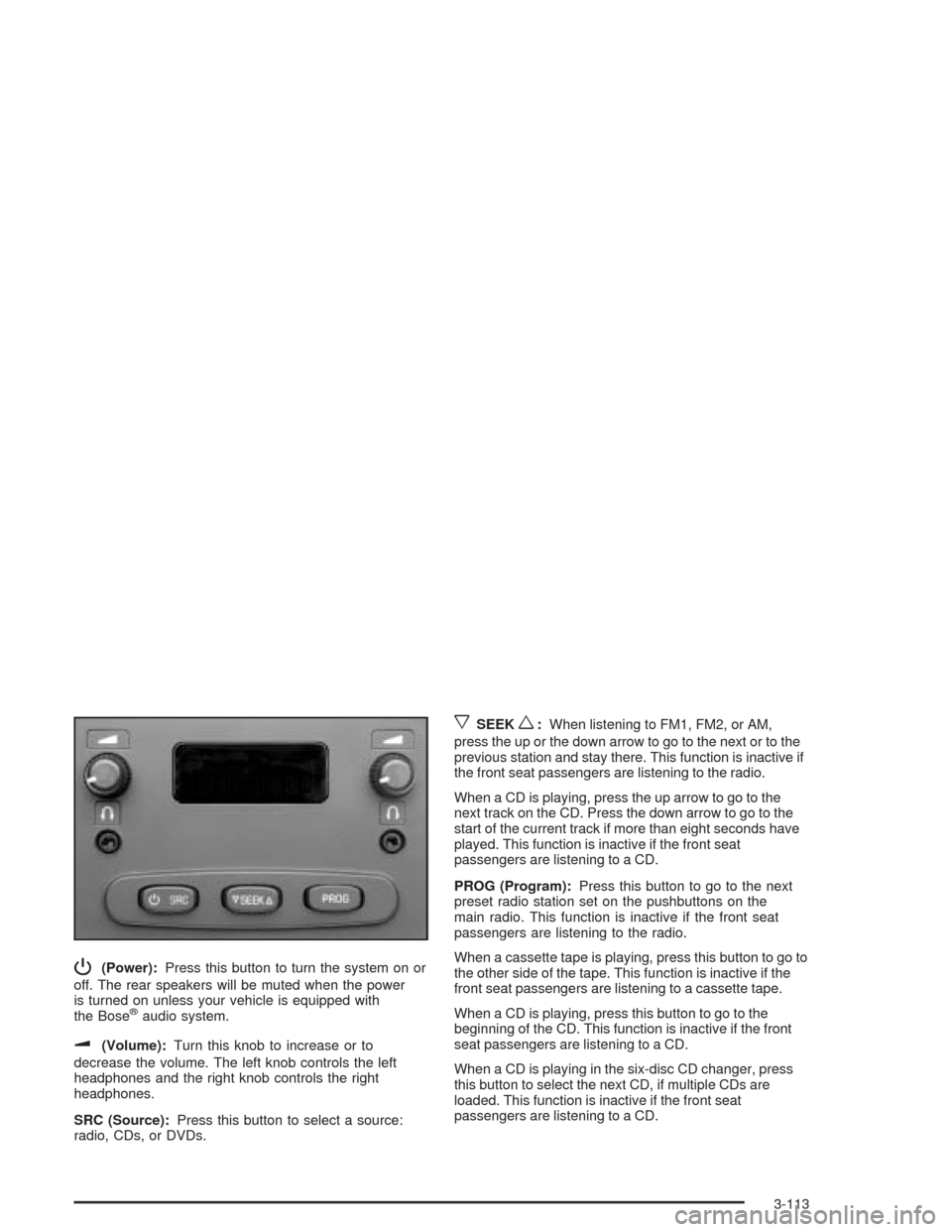
P(Power):Press this button to turn the system on or
off. The rear speakers will be muted when the power
is turned on unless your vehicle is equipped with
the Bose
®audio system.
u(Volume):Turn this knob to increase or to
decrease the volume. The left knob controls the left
headphones and the right knob controls the right
headphones.
SRC (Source):Press this button to select a source:
radio, CDs, or DVDs.
xSEEKw:When listening to FM1, FM2, or AM,
press the up or the down arrow to go to the next or to the
previous station and stay there. This function is inactive if
the front seat passengers are listening to the radio.
When a CD is playing, press the up arrow to go to the
next track on the CD. Press the down arrow to go to the
start of the current track if more than eight seconds have
played. This function is inactive if the front seat
passengers are listening to a CD.
PROG (Program):Press this button to go to the next
preset radio station set on the pushbuttons on the
main radio. This function is inactive if the front seat
passengers are listening to the radio.
When a cassette tape is playing, press this button to go to
the other side of the tape. This function is inactive if the
front seat passengers are listening to a cassette tape.
When a CD is playing, press this button to go to the
beginning of the CD. This function is inactive if the front
seat passengers are listening to a CD.
When a CD is playing in the six-disc CD changer, press
this button to select the next CD, if multiple CDs are
loaded. This function is inactive if the front seat
passengers are listening to a CD.
3-113
Page 281 of 548
PROG (Program):Press this button to play a station
you have programmed on the radio preset pushbuttons.
The radio will only seek preset stations with a strong
signal that are in the selected band.
When a CD is playing in the CD changer, press this
button to go to the next available CD, if multiple CDs are
loaded.
QSOURCER:Press this button to switch between
FM1, FM2, AM, or XM1 or XM2 (if equipped), or a
CD. If a CD is loaded the CD symbol will appear on the
display.
QSEEKR:Press the up or the down arrow to go to
the next or to the previous radio station and stay
there. The radio will only seek stations with a strong
signal that are in the selected band.
When a CD is playing, press the up or the down arrow
to fast forward or reverse.
QVOLR(Volume):Press the up or the down arrow
to increase or to decrease the volume.
Radio Reception
AM
The range for most AM stations is greater than for FM,
especially at night. The longer range can cause
station frequencies to interfere with each other. Static
can occur on AM stations caused by things like
storms and power lines. Try reducing the treble to
reduce this noise.
FM Stereo
FM stereo will give the best sound, but FM signals will
reach only about 10 to 40 miles (16 to 65 km). Tall
buildings or hills can interfere with FM signals, causing
the sound to fade in and out.
XM™ Satellite Radio Service
XM™ Satellite Radio Service gives digital radio
reception from coast to coast. Just as with FM, tall
buildings or hills can interfere with satellite radio signals,
causing the sound to fade in and out. The radio may
display NO SIGNAL to indicate interference.
3-115
Page 536 of 548
E
Easy Exit Seat...............................................2-92
Electrical System...........................................5-119
Fuses and Circuit Breakers.........................5-120
Power Windows and Other Power Options....5-120
Windshield Wiper Fuses.............................5-120
Emissions Inspection and Maintenance
Programs...................................................3-49
Engine
Air Cleaner/Filter.........................................5-21
Battery.......................................................5-47
Check and Service Engine Soon Light............3-47
Coolant......................................................5-26
Coolant Heater............................................2-33
Coolant Temperature Gage...........................3-45
Drive Belt Routing.......................................6-16
Engine Compartment Overview......................5-12
Exhaust.....................................................2-47
Fan Noise..................................................5-40
Oil .............................................................5-16
Overheating................................................5-29
Starting......................................................2-32
ENGINE COOLANT HOT.................................3-66
Engine Oil Additives........................................5-19
ENGINE OVERHEATED..................................3-66
Entry Lighting and Exit Lighting.........................3-20Environmental Concerns..................................4-21
Erasing HomeLink
®Buttons..............................2-64
Event Data Recorders (EDR)............................7-10
Extender, Safety Belt.......................................1-29
Exterior Lamps...............................................3-14
F
Filter
Engine Air Cleaner......................................5-21
Finding a Program Type (PTY) Station
(RDS and XM™).................................3-77, 3-89
Finding a Station....................................3-75, 3-87
Finish Care..................................................5-115
Finish Damage.............................................5-117
Fixed Mast Antenna.......................................3-116
Flash-to-Pass................................................... 3-9
Flat Tire........................................................5-89
Flat Tire, Changing.........................................5-90
Fluid
Automatic Transmission................................5-23
Power Steering...........................................5-41
Windshield Washer......................................5-42
FM Stereo....................................................3-115
Fog Lamps....................................................3-18
Following Distance..........................................4-76
6