roof CHEVROLET AVALANCHE 2005 1.G Owners Manual
[x] Cancel search | Manufacturer: CHEVROLET, Model Year: 2005, Model line: AVALANCHE, Model: CHEVROLET AVALANCHE 2005 1.GPages: 496, PDF Size: 3.25 MB
Page 1 of 496
Seats and Restraint Systems........................... 1-1
Front Seats
............................................... 1-2
Rear Seats
............................................... 1-7
Safety Belts
.............................................. 1-9
Child Restraints
.......................................1-29
Airbag System
.........................................1-50
Restraint System Check
............................1-65
Features and Controls..................................... 2-1
Keys
........................................................ 2-3
Doors and Locks
....................................... 2-8
Windows
.................................................2-22
Theft-Deterrent Systems
............................2-24
Starting and Operating Your Vehicle
...........2-26
Mirrors
....................................................2-43
OnStar
®System
......................................2-51
HomeLink®Wireless Control System
...........2-53
Storage Areas
.........................................2-57
Sunroof
..................................................2-81
Vehicle Personalization
.............................2-82
Instrument Panel............................................. 3-1
Instrument Panel Overview
.......................... 3-4
Climate Controls
......................................3-20
Warning Lights, Gages, and Indicators
........3-29
Driver Information Center (DIC)
..................3-45
Audio System(s)
.......................................3-64Driving Your Vehicle....................................... 4-1
Your Driving, the Road, and Your Vehicle
..... 4-2
Towing
...................................................4-58
Service and Appearance Care.......................... 5-1
Service
..................................................... 5-3
Fuel
......................................................... 5-5
Checking Things Under the Hood
...............5-10
Rear Axle
...............................................5-47
Four-Wheel Drive
.....................................5-48
Front Axle
...............................................5-49
Bulb Replacement
....................................5-50
Windshield Wiper Blade Replacement
.........5-58
Tires
......................................................5-59
Appearance Care
.....................................5-94
Vehicle Identication
...............................5-103
Electrical System
....................................5-103
Capacities and Specications
...................5-112
Maintenance Schedule..................................... 6-1
Maintenance Schedule
................................ 6-2
Customer Assistance and Information.............. 7-1
Customer Assistance and Information
........... 7-2
Reporting Safety Defects
...........................7-10
Index................................................................ 1
2005 Chevrolet Avalanche Owner ManualM
Page 74 of 496
HomeLink®Wireless Control System...............2-53
HomeLink®Wireless Control System
Operation.................................................2-54
Storage Areas................................................2-57
Glove Box...................................................2-57
Center Overhead Console..............................2-57
Front Armrest Storage Area...........................2-57
Center Console Storage Area.........................2-58
Luggage Carrier...........................................2-58Rear Storage Area........................................2-59
Cargo Cover Panels......................................2-59
All-Weather Cargo Area.................................2-70
Top-Box Storage..........................................2-74
Tonneau Cover............................................2-75
Sunroof.........................................................2-81
Vehicle Personalization...................................2-82
Memory Seat...............................................2-82
Section 2 Features and Controls
2-2
Page 130 of 496
Center Console Storage Area
Your vehicle may have a console compartment with
cupholders between the bucket seats.
To open it, press the button and swing the console
lid open.
The rear of the console has a cupholder that swings
down for the rear seat passenger to use.
Luggage Carrier
You can load things on top of your vehicle if it has this
feature.
The luggage carrier has slats and siderails attached to
the roof and may have crossrails which can be moved
back and forth to help secure cargo. Tie the load to the
siderails or siderail supports.
Notice:Loading cargo on the luggage carrier that
weighs more than 200 lbs (91 kg) or hangs over
the rear or sides of the vehicle may damage your
vehicle. Load cargo so that it rests on the slats
as far forward as possible and against the side rails,
making sure to fasten it securely.Don’t exceed the maximum vehicle capacity when
loading your vehicle. For more information on vehicle
capacity and loading, seeLoading Your Vehicle on
page 4-47.
To prevent damage or loss of cargo as you’re leaving,
check now and then to make sure the luggage and
cargo are still securely fastened.
Be sure the cargo is properly loaded.
If small heavy objects are placed on the roof cut a
piece of 3/8 inch plywood to t inside the crossrails
and siderails to spread the load. If plywood is
used, tie it to the siderail supports.
Tie the load to the crossrails or the siderail supports.
Use the crossrails only to keep the load from
sliding. To move the crossrails, pull out on the latch
release handle at each end. Slide the crossrail to
the desired position balancing the force side to side.
Push the release handle back into the latched
position and slide the crossrail back and forth
slightly to be sure the latch snaps securely into
place.
2-58
Page 131 of 496
If you need to carry long items, move the crossrails
as far apart as they will go. Tie the load to the
crossrails and the siderails or siderail supports. Also
tie the load to the bumpers. Do not tie the load
so tightly that the crossrails or siderails are
damaged.
After moving a crossrail, be sure it is securely
locked into the siderail.
Your vehicle has a Center High-Mounted Stoplamp
(CHMSL) located above the rear glass.
If items are loaded on the roof of the vehicle, care
should be taken not to block or damage the CHMSL unit.
Rear Storage Area
Your vehicle is equipped with a rear armrest/cupholder
for the rear seat passengers.
To open it, pull up and then out on the tab, located at
the top center of the armrest, and pull the armrest down.
Cargo Cover Panels
{CAUTION:
Improperly stored cargo cover panels could be
thrown about the vehicle during a collision or
sudden maneuver. You or others could be
injured. If you remove a panel, always store it
in the proper storage location. When you put it
back, always be sure that is securely
reattached.
Notice:Exceeding the weight limit of 250 lbs
(113 kg) can damage the cargo covers, and the
repairs would not be covered by your warranty. Do
not put anything on top of the cargo covers over
the weight limit.
Your vehicle may be equipped with a three-piece cargo
cover system. The cargo panels can be removed
and stored in the cargo area of the vehicle with the
cargo panel storage bag.
2-59
Page 153 of 496
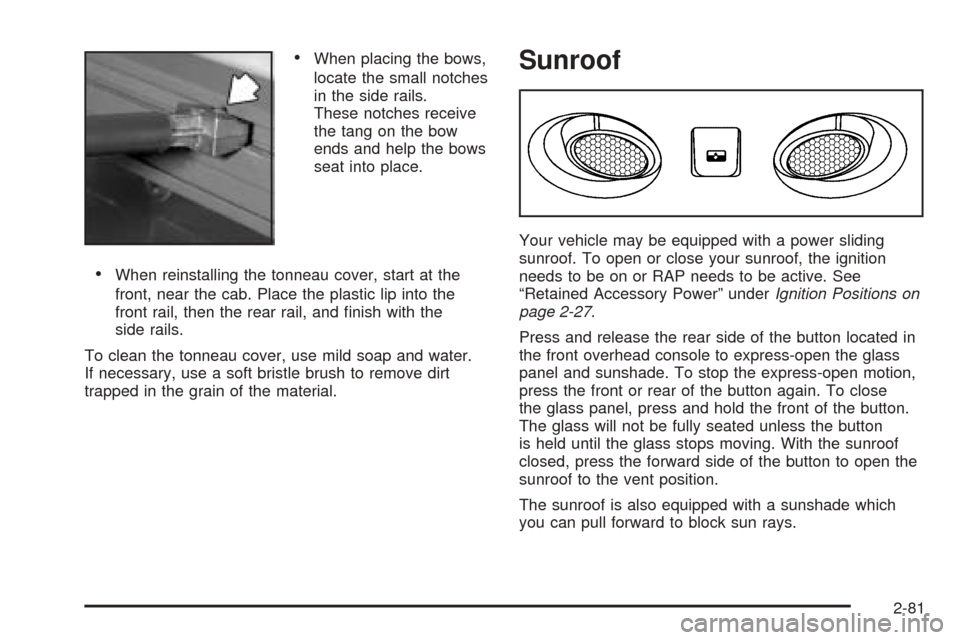
When placing the bows,
locate the small notches
in the side rails.
These notches receive
the tang on the bow
ends and help the bows
seat into place.
When reinstalling the tonneau cover, start at the
front, near the cab. Place the plastic lip into the
front rail, then the rear rail, and nish with the
side rails.
To clean the tonneau cover, use mild soap and water.
If necessary, use a soft bristle brush to remove dirt
trapped in the grain of the material.
Sunroof
Your vehicle may be equipped with a power sliding
sunroof. To open or close your sunroof, the ignition
needs to be on or RAP needs to be active. See
“Retained Accessory Power” underIgnition Positions on
page 2-27.
Press and release the rear side of the button located in
the front overhead console to express-open the glass
panel and sunshade. To stop the express-open motion,
press the front or rear of the button again. To close
the glass panel, press and hold the front of the button.
The glass will not be fully seated unless the button
is held until the glass stops moving. With the sunroof
closed, press the forward side of the button to open the
sunroof to the vent position.
The sunroof is also equipped with a sunshade which
you can pull forward to block sun rays.
2-81
Page 154 of 496
If a hand, arm, or other object is blocking the sunroof
glass panel as it is closing, the glass panel will stop
at the obstruction. After the obstruction is removed, the
glass panel can be closed or opened.
Use care not to leave the sunroof open for long periods
of time as debris may collect in the tracks.
If the battery has been recharged, disconnected or is
not working, you may need to reprogram the sunroof. To
do this, start the vehicle and press the forward side of
the sunroof button until the glass panel moves to a fully
closed position. Release, and press again to move to
the vent position, which occurs when the sunroof is fully
tilted upward and the button is held for an additional
twenty seconds. This will reset the memory and enable
the sunroof to function properly.Vehicle Personalization
Memory Seat
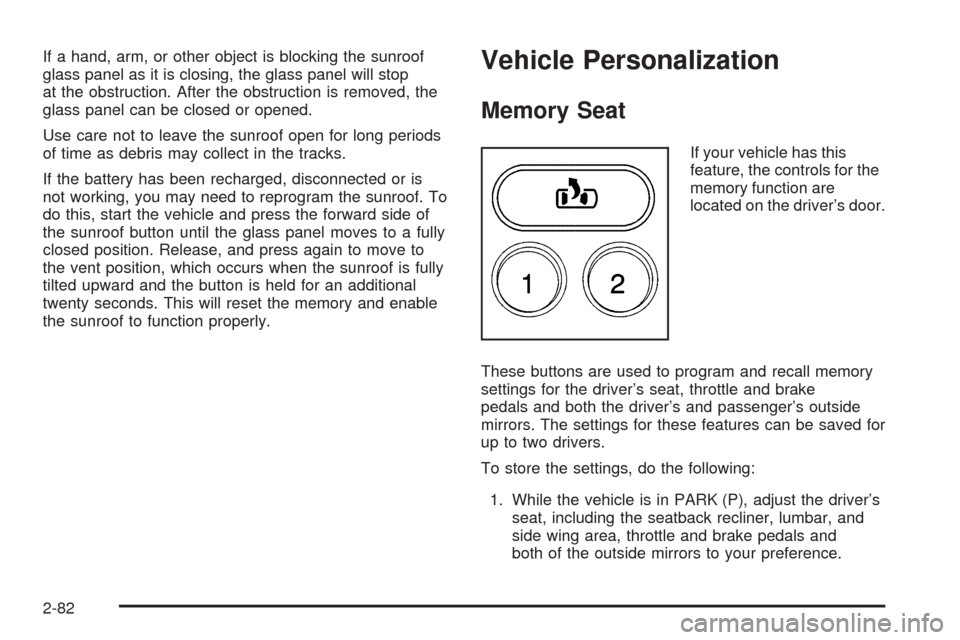
If your vehicle has this
feature, the controls for the
memory function are
located on the driver’s door.
These buttons are used to program and recall memory
settings for the driver’s seat, throttle and brake
pedals and both the driver’s and passenger’s outside
mirrors. The settings for these features can be saved for
up to two drivers.
To store the settings, do the following:
1. While the vehicle is in PARK (P), adjust the driver’s
seat, including the seatback recliner, lumbar, and
side wing area, throttle and brake pedals and
both of the outside mirrors to your preference.
2-82
Page 157 of 496
Instrument Panel Overview...............................3-4
Hazard Warning Flashers................................3-6
Other Warning Devices...................................3-6
Horn.............................................................3-6
Tilt Wheel.....................................................3-6
Turn Signal/Multifunction Lever.........................3-7
Turn and Lane-Change Signals........................3-7
Headlamp High/Low-Beam Changer..................3-8
Flash-to-Pass.................................................3-9
Windshield Wipers..........................................3-9
Windshield Washer.......................................3-10
Cruise Control..............................................3-10
Exterior Lamps.............................................3-14
Headlamps on Reminder................................3-15
Daytime Running Lamps (DRL).......................3-15
Automatic Headlamp System..........................3-15
Fog Lamps..................................................3-16
Auxiliary Roof Mounted Lamp.........................3-17
Exterior Cargo Lamps....................................3-17
Instrument Panel Brightness...........................3-18
Dome Lamps...............................................3-18
Entry/Exit Lighting.........................................3-18
Reading Lamps............................................3-18
Battery Run-Down Protection..........................3-19
Accessory Power Outlets...............................3-19
Ashtrays and Cigarette Lighter........................3-20Climate Controls............................................3-20
Dual Climate Control System..........................3-20
Dual Automatic Climate Control System...........3-23
Outlet Adjustment.........................................3-28
Warning Lights, Gages, and Indicators............3-29
Instrument Panel Cluster................................3-30
Speedometer and Odometer...........................3-31
Tachometer.................................................3-31
Safety Belt Reminder Light.............................3-31
Airbag Readiness Light..................................3-31
Passenger Airbag Status Indicator...................3-32
Charging System Light..................................3-34
Voltmeter Gage............................................3-35
Brake System Warning Light..........................3-35
Anti-Lock Brake System Warning Light.............3-36
Traction Off Light..........................................3-37
Engine Coolant Temperature Gage..................3-38
Transmission Temperature Gage.....................3-38
Malfunction Indicator Lamp.............................3-40
Oil Pressure Gage........................................3-42
Security Light...............................................3-43
Cruise Control Light......................................3-43
Highbeam On Light.......................................3-44
Tow/Haul Mode Light....................................3-44
Fuel Gage...................................................3-44
Low Fuel Warning Light.................................3-45
Section 3 Instrument Panel
3-1
Page 171 of 496
Headlamps on Reminder
If a door is open, a reminder chime will sound when your
headlamps or parking lamps are manually turned on and
your key is out of the ignition. To turn off the chime, turn
the headlamp switch to off or AUTO and then back on. In
the AUTO mode, the headlamps turn off once the ignition
is in LOCK or may remain on until the headlamp delay
ends (if enabled in the DIC).
Daytime Running Lamps (DRL)
Daytime Running Lamps (DRL) can make it easier for
others to see the front of your vehicle during the
day. DRL can be helpful in many different driving
conditions, but they can be especially helpful in the short
periods after dawn and before sunset. Fully functional
daytime running lamps are required on all vehicles
rst sold in Canada.
The DRL system will come on when the following
conditions are met:
The ignition is on,
the exterior lamps control is in AUTO,
the transmission is not in PARK (P), and
the light sensor determines it is daytime.When the DRL are on, only your DRL lamps will be on.
The taillamps, sidemarker and other lamps won’t be
on. The instrument panel won’t be lit up either.
When it begins to get dark, the automatic headlamp
system will switch from DRL to the headlamps.
As with any vehicle, you should turn on the regular
headlamp system when you need it.
Automatic Headlamp System
When it is dark enough outside and the headlamp
switch is in AUTO, your automatic headlamp system will
turn on your headlamps at the normal brightness
along with other lamps such as the taillamps,
sidemarker, parking lamps, roof marker lamps and the
instrument panel lights. The radio lights will also be dim.
To turn off the automatic headlamp system, turn the
exterior lamps switch to the off position and then release.
Turning off the automatic headlamp system with the
headlamp switch is not available for vehicles rst sold in
Canada. For vehicles rst sold in Canada, you can turn
off the automatic headlamp system when parked at night
by applying the parking brake before starting your
vehicle. The headlamps will remain off once the vehicle is
started for as long as you are parked. If you release the
parking brake, the lights will turn on. If the parking brake
is not released before you begin to drive, the exterior
lamps will turn on above 2 mph (3.2 km/h).
3-15
Page 173 of 496
The fog lamps will be cancelled after the ignition is
turned off. If you still want to use the fog lamps after you
restart the vehicle, you will need to press the fog
lamp button again.
Some localities have laws that require the headlamps to
be on along with the fog lamps.
Auxiliary Roof Mounted Lamp
If your vehicle has this feature, this button includes
wiring provisions for a dealer or a qualied service
center to install an auxiliary roof lamp.
This button is located on
the center of the
instrument panel near the
climate controls.
When the wiring is connected to an auxiliary roof
mounted lamp, pressing the button will activate the lamp
and illuminate an indicator light near the button. Pressing
the button again will turn off the roof mounted lamp.If your vehicle has this button, your vehicle may have
the snow plow prep package. For further information see
Adding a Snow Plow or Similar Equipment on
page 4-54.
Exterior Cargo Lamps
You can use the cargo lamps if you need more light in
the cargo area of your vehicle or in the top-box
storage units. Some vehicles will only have a cargo
lamp in the passenger side top box.
Press the button, with this
symbol to turn the cargo
lamps on or off.
The cargo lamps symbol light will come on in the
instrument panel cluster when the cargo lamps are on
and the ignition key is turned to run.
3-17
Page 260 of 496
Care of Your CDs and DVDs
Handle discs carefully. Store them in their original cases
or other protective cases and away from direct sunlight
and dust. If the surface of a disc is soiled, dampen
a clean, soft cloth in a mild, neutral detergent solution
and clean it, wiping from the center to the edge.
Be sure never to touch the side without writing when
handling discs. Pick up discs by grasping the outer
edges or the edge of the hole and the outer edge.
Care of the CD and DVD Player
The use of CD lens cleaners for CDs is not advised,
due to the risk of contaminating the lens of the CD optics
with lubricants internal to the CD mechanism.
Fixed Mast Antenna
The xed mast antenna can withstand most car washes
without being damaged. If the mast should ever become
slightly bent, straighten it out by hand. If the mast is badly
bent, replace it.
Check occasionally to make sure the mast is still
tightened to the cowl. If tightening is required, tighten by
hand, then with a wrench one quarter turn.
XM™ Satellite Radio Antenna
System
The XM™ Satellite Radio antenna is located on the roof
of your vehicle. Keep this antenna clear of snow and
ice build up for clear radio reception.
The performance of the XM™ system may be affected if
the sunroof is open.
Loading items onto the roof of your vehicle can interfere
with the performance of the XM™ system. Make sure
that the XM™ satellite antenna is not obstructed.
Chime Level Adjustment
The radio is the vehicle chime producer. To change the
volume level, press and hold pushbutton 6 with the
ignition on and the radio power off. The chime volume
level will change from the normal level to loud, and
LOUD will appear on the radio display. To change back
to the default or normal setting, press and hold
pushbutton 6 again. The chime level will change from
the loud level to normal, and NORMAL will appear
on the radio display. Each time the chime volume is
changed, three chimes will sound as an example of the
new volume selected. Removing the radio and not
replacing it with a factory radio or chime module will
disable vehicle chimes.
3-104