keyless CHEVROLET AVALANCHE 2007 2.G Owner's Manual
[x] Cancel search | Manufacturer: CHEVROLET, Model Year: 2007, Model line: AVALANCHE, Model: CHEVROLET AVALANCHE 2007 2.GPages: 618, PDF Size: 3.25 MB
Page 285 of 618
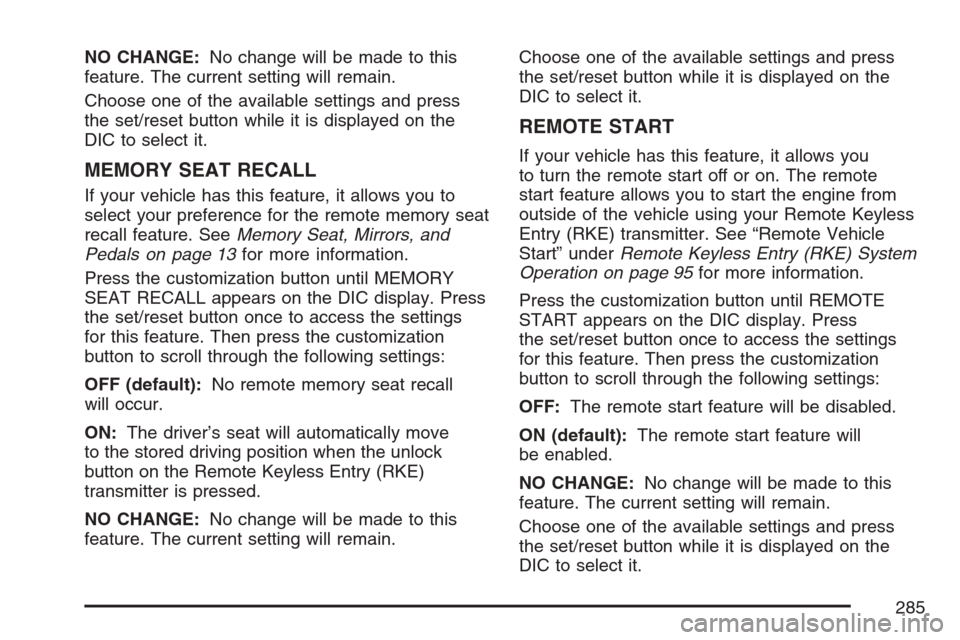
NO CHANGE:No change will be made to this
feature. The current setting will remain.
Choose one of the available settings and press
the set/reset button while it is displayed on the
DIC to select it.
MEMORY SEAT RECALL
If your vehicle has this feature, it allows you to
select your preference for the remote memory seat
recall feature. SeeMemory Seat, Mirrors, and
Pedals on page 13for more information.
Press the customization button until MEMORY
SEAT RECALL appears on the DIC display. Press
the set/reset button once to access the settings
for this feature. Then press the customization
button to scroll through the following settings:
OFF (default):No remote memory seat recall
will occur.
ON:The driver’s seat will automatically move
to the stored driving position when the unlock
button on the Remote Keyless Entry (RKE)
transmitter is pressed.
NO CHANGE:No change will be made to this
feature. The current setting will remain.Choose one of the available settings and press
the set/reset button while it is displayed on the
DIC to select it.
REMOTE START
If your vehicle has this feature, it allows you
to turn the remote start off or on. The remote
start feature allows you to start the engine from
outside of the vehicle using your Remote Keyless
Entry (RKE) transmitter. See “Remote Vehicle
Start” underRemote Keyless Entry (RKE) System
Operation on page 95for more information.
Press the customization button until REMOTE
START appears on the DIC display. Press
the set/reset button once to access the settings
for this feature. Then press the customization
button to scroll through the following settings:
OFF:The remote start feature will be disabled.
ON (default):The remote start feature will
be enabled.
NO CHANGE:No change will be made to this
feature. The current setting will remain.
Choose one of the available settings and press
the set/reset button while it is displayed on the
DIC to select it.
285
Page 549 of 618
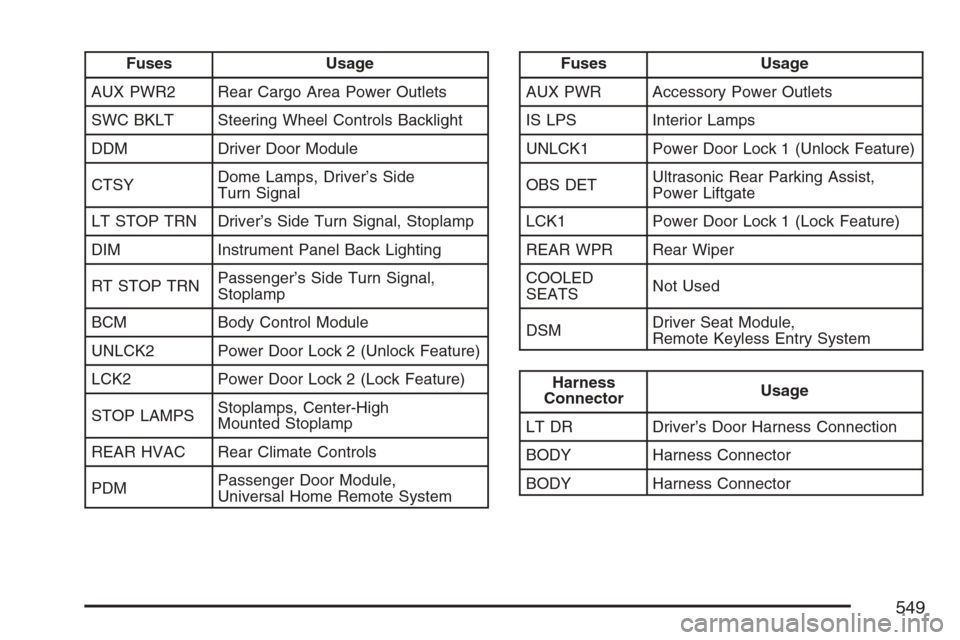
Fuses Usage
AUX PWR2 Rear Cargo Area Power Outlets
SWC BKLT Steering Wheel Controls Backlight
DDM Driver Door Module
CTSYDome Lamps, Driver’s Side
Turn Signal
LT STOP TRN Driver’s Side Turn Signal, Stoplamp
DIM Instrument Panel Back Lighting
RT STOP TRNPassenger’s Side Turn Signal,
Stoplamp
BCM Body Control Module
UNLCK2 Power Door Lock 2 (Unlock Feature)
LCK2 Power Door Lock 2 (Lock Feature)
STOP LAMPSStoplamps, Center-High
Mounted Stoplamp
REAR HVAC Rear Climate Controls
PDMPassenger Door Module,
Universal Home Remote SystemFuses Usage
AUX PWR Accessory Power Outlets
IS LPS Interior Lamps
UNLCK1 Power Door Lock 1 (Unlock Feature)
OBS DETUltrasonic Rear Parking Assist,
Power Liftgate
LCK1 Power Door Lock 1 (Lock Feature)
REAR WPR Rear Wiper
COOLED
SEATSNot Used
DSMDriver Seat Module,
Remote Keyless Entry System
Harness
ConnectorUsage
LT DR Driver’s Door Harness Connection
BODY Harness Connector
BODY Harness Connector
549
Page 609 of 618
H
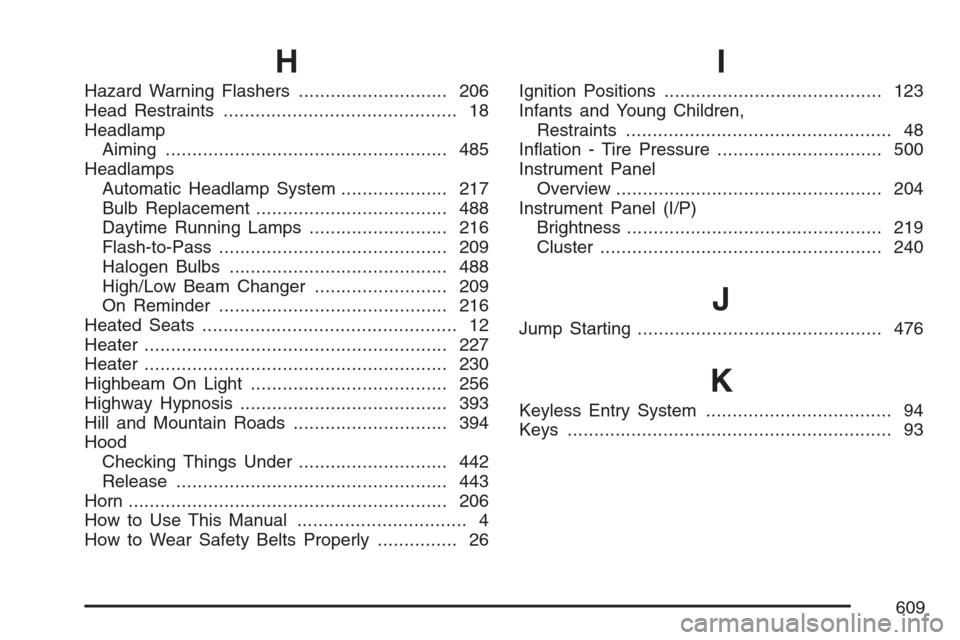
Hazard Warning Flashers............................ 206
Head Restraints............................................ 18
Headlamp
Aiming..................................................... 485
Headlamps
Automatic Headlamp System.................... 217
Bulb Replacement.................................... 488
Daytime Running Lamps.......................... 216
Flash-to-Pass........................................... 209
Halogen Bulbs......................................... 488
High/Low Beam Changer......................... 209
On Reminder........................................... 216
Heated Seats................................................ 12
Heater......................................................... 227
Heater......................................................... 230
Highbeam On Light..................................... 256
Highway Hypnosis....................................... 393
Hill and Mountain Roads............................. 394
Hood
Checking Things Under............................ 442
Release................................................... 443
Horn............................................................ 206
How to Use This Manual................................ 4
How to Wear Safety Belts Properly............... 26
I
Ignition Positions......................................... 123
Infants and Young Children,
Restraints.................................................. 48
Ination - Tire Pressure............................... 500
Instrument Panel
Overview.................................................. 204
Instrument Panel (I/P)
Brightness................................................ 219
Cluster..................................................... 240
J
Jump Starting.............................................. 476
K
Keyless Entry System................................... 94
Keys............................................................. 93
609
Page 613 of 618
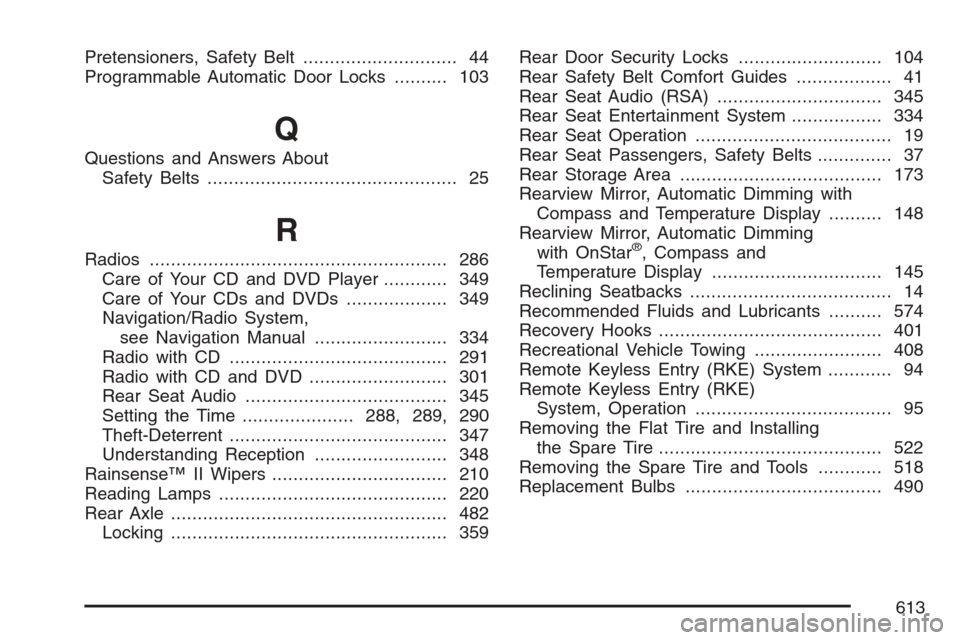
Pretensioners, Safety Belt............................. 44
Programmable Automatic Door Locks.......... 103
Q
Questions and Answers About
Safety Belts............................................... 25
R
Radios........................................................ 286
Care of Your CD and DVD Player............ 349
Care of Your CDs and DVDs................... 349
Navigation/Radio System,
see Navigation Manual......................... 334
Radio with CD......................................... 291
Radio with CD and DVD.......................... 301
Rear Seat Audio...................................... 345
Setting the Time.....................288, 289, 290
Theft-Deterrent......................................... 347
Understanding Reception......................... 348
Rainsense™ II Wipers................................. 210
Reading Lamps........................................... 220
Rear Axle.................................................... 482
Locking.................................................... 359Rear Door Security Locks........................... 104
Rear Safety Belt Comfort Guides.................. 41
Rear Seat Audio (RSA)............................... 345
Rear Seat Entertainment System................. 334
Rear Seat Operation..................................... 19
Rear Seat Passengers, Safety Belts.............. 37
Rear Storage Area...................................... 173
Rearview Mirror, Automatic Dimming with
Compass and Temperature Display.......... 148
Rearview Mirror, Automatic Dimming
with OnStar®, Compass and
Temperature Display................................ 145
Reclining Seatbacks...................................... 14
Recommended Fluids and Lubricants.......... 574
Recovery Hooks.......................................... 401
Recreational Vehicle Towing........................ 408
Remote Keyless Entry (RKE) System............ 94
Remote Keyless Entry (RKE)
System, Operation..................................... 95
Removing the Flat Tire and Installing
the Spare Tire.......................................... 522
Removing the Spare Tire and Tools............ 518
Replacement Bulbs..................................... 490
613