lock CHEVROLET AVALANCHE 2007 2.G Workshop Manual
[x] Cancel search | Manufacturer: CHEVROLET, Model Year: 2007, Model line: AVALANCHE, Model: CHEVROLET AVALANCHE 2007 2.GPages: 618, PDF Size: 3.25 MB
Page 141 of 618
Torque Lock
If you are parking on a hill and you do not shift your
transmission into PARK (P) properly, the weight of
the vehicle may put too much force on the parking
pawl in the transmission. You may nd it difficult to
pull the shift lever out of PARK (P). This is called
torque lock. To prevent torque lock, set the parking
brake and then shift into PARK (P) properly before
you leave the driver’s seat. To nd out how, see
Shifting Into Park (P) on page 139.
When you are ready to drive, move the shift
lever out of PARK (P) before you release the
parking brake.
If torque lock does occur, you may need to have
another vehicle push yours a little uphill to
take some of the pressure from the parking pawl
in the transmission, then you will be able to
pull the shift lever out of PARK (P).
Shifting Out of Park (P)
Your vehicle has an automatic transmission shift
lock control system which locks the shift lever
in PARK (P) when the ignition is in the LOCK.
You have to fully apply your regular brakes
rst and then press the shifter lever button before
you can shift from PARK (P) when the ignition
is in RUN. SeeAutomatic Transmission Operation
on page 128.
If you cannot shift out of PARK (P), ease pressure
on the shift lever and push the shift lever all the
way up into PARK (P) as you maintain brake
application. Then press the shift lever button and
move the shift lever into another gear.
141
Page 146 of 618
Temperature and Compass Display
Press the on/off button, located on the far left of
the mirror face, to turn the compass/temperature
display on or off.
If the display reads CAL, the compass needs
to be calibrated. For more information, see
“Compass Calibration” following.
To adjust between Fahrenheit and Celsius, do the
following:
1. Press and hold the on/off button until either a
ashing F or C appears.
2. Press the button again to change the display
to the desired unit of measurement. After
approximately four seconds of inactivity,
the new unit will be locked in and the
compass/temperature display will return.
If an abnormal temperature reading is displayed
for an extended period of time, please see
your GM dealer. Under certain circumstances,
a delay in updating the temperature is normal.
Automatic Dimming Mirror Operation
The automatic dimming mirror function is turned
on automatically each time the ignition is started.
To operate the automatic dimming mirror, do
the following:
1. Make sure the green indicator light, located to
the left of the on/off button, is lit. If it is not,
press and hold the on/off button until the
green light comes on, indicating that the mirror
is in automatic dimming mode.
2. Turn off the automatic dimming mirror function
by pressing and holding the on/off button until
the green indicator light turns off.
146
Page 147 of 618
Compass Variance
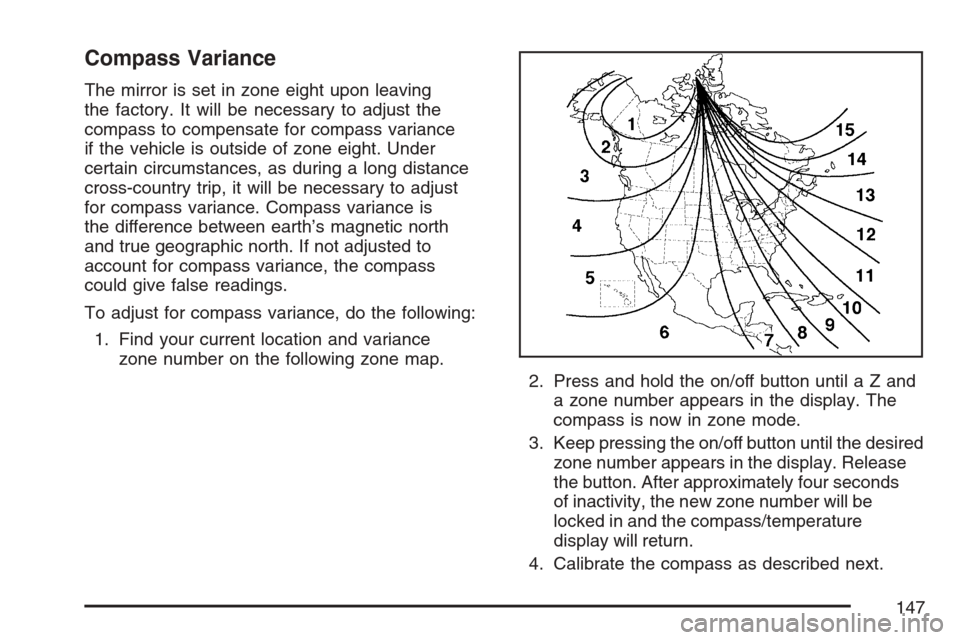
The mirror is set in zone eight upon leaving
the factory. It will be necessary to adjust the
compass to compensate for compass variance
if the vehicle is outside of zone eight. Under
certain circumstances, as during a long distance
cross-country trip, it will be necessary to adjust
for compass variance. Compass variance is
the difference between earth’s magnetic north
and true geographic north. If not adjusted to
account for compass variance, the compass
could give false readings.
To adjust for compass variance, do the following:
1. Find your current location and variance
zone number on the following zone map.
2. Press and hold the on/off button untilaZand
a zone number appears in the display. The
compass is now in zone mode.
3. Keep pressing the on/off button until the desired
zone number appears in the display. Release
the button. After approximately four seconds
of inactivity, the new zone number will be
locked in and the compass/temperature
display will return.
4. Calibrate the compass as described next.
147
Page 154 of 618
If the mirrors are accidentally folded/unfolded
manually, they may shake or utter at normal
driving speeds and may not stay in the unfolded
position. If this happens, you will need to reset the
mirrors. See “Resetting the Power Foldaway
Mirrors” next.
Resetting the Power Foldaway Mirrors
You will need to reset the power foldaway mirrors
if the following occurs:
The mirrors are accidentally obstructed while
folding.
They are accidentally manually
folded/unfolded.
The mirrors will not stay in the unfolded
position.
The mirrors shake and utter at normal
driving speeds.
To reset the power foldaway mirrors, fold and
unfold them one time using the mirror controls.
This will reset them to their normal position.
This mirror has the following features.
Automatic Dimming
The driver’s outside mirror will adjust for the glare
of the headlamps behind you. SeeAutomatic
Dimming Rearview Mirror with OnStar
®, Compass
and Temperature Display on page 145.
Curb View Assist
If your vehicle has the memory package, the
outside mirrors are able to perform the curb
view assist mirror function. This feature may be
useful in allowing the driver to view the curb
when parallel parking. This feature will cause
the passenger’s and/or driver’s mirror to tilt to
a preselected position when the vehicle is
in REVERSE (R).
The passenger’s and/or driver’s mirror will
return to its original position when the vehicle
is shifted out of REVERSE (R), or the ignition
is turned off or to LOCK.
This feature can be turned on or off through
the Driver Information Center (DIC). SeeDriver
Information Center (DIC) on page 257.
154
Page 156 of 618
OnStar®System
OnStar®uses several innovative technologies and
live advisors to provide you with a wide range
of safety, security, information, and convenience
services. If your airbags deploy, the system is
designed to make an automatic call to OnStar
®
Emergency advisors who can request emergency
services be sent to your location. If you lock
your keys in the vehicle, call OnStar
®at
1-888-4-ONSTAR and they can send a signal
to unlock your doors. If you need roadside
assistance, press the OnStar
®button and they
can contact Roadside Service for you.OnStar
®service is provided to you subject to the
OnStar®Terms and Conditions. You may cancel
your OnStar®service at any time by contacting
OnStar®as provided below. A complete OnStar®
Owners Guide and the OnStar®Terms and
Conditions are included in the vehicle’s OnStar®
Subscriber glove box literature. For more
information, visit onstar.com or onstar.ca, contact
OnStar
®at 1-888-4-ONSTAR (1-888-466-7827) or
TTY 1-877-248-2080, or press the OnStar®button
to speak with an OnStar®advisor 24 hours a day,
7 days a week.
Not all OnStar
®features are available on all
vehicles. To check if your vehicle is equipped to
provide the services described below, or for a
full description of OnStar
®services and system
limitations, see the OnStar®Owner’s Guide in your
glove box or visit onstar.com.
156
Page 157 of 618
OnStar®Services
For new vehicles with OnStar®, the Safe & Sound
Plan, or the Directions & Connections®Plan is
included for one year from the date of purchase.
You can extend this plan beyond the rst year,
or upgrade to the Directions & Connections
®Plan.
For more information, press the OnStar®button
to speak with an advisor. Some OnStar®services
(such as Remote Door Unlock or Stolen Vehicle
Location Assistance) may not be available
until you register with OnStar
®.
Available Services with Safe & Sound®Plan
Automatic Notication of Airbag Deployment
Advanced Automatic Crash Notication (AACN)
(If equipped)
Link to Emergency Services
Roadside Assistance
Stolen Vehicle Location Assistance
AccidentAssist
Remote Door Unlock/Vehicle Alert
OnStar®Vehicle Diagnostics
GM Goodwrench®On Demand Diagnostics
OnStar®Hands-Free Calling with
30 complimentary minutes
OnStar®Virtual Advisor (U.S. Only)
Available Services included with Directions
& Connections®Plan
All Safe and Sound Plan Services
Driving Directions - Advisor delivered or
OnStar®Turn-by-Turn Navigation (If equipped)
RideAssist
Information and Convenience Services
OnStar®Hands-Free Calling
OnStar®Hands-Free Calling allows eligible
OnStar®subscribers to make and receive calls
using voice commands. Hands-Free Calling is fully
integrated into the vehicle, and can be used with
OnStar
®Pre-Paid Minute Packages. Hands-Free
Calling may also be linked to a Verizon Wireless
service plan in the U.S. or a Bell Mobility service
plan in Canada, depending on eligibility. To nd out
more, refer to the OnStar
®Owners Guide in the
vehicle’s glove box, visit www.onstar.com or
www.onstar.ca, or speak with an OnStar
®advisor
by pressing the OnStar®button or calling
1-888-4-ONSTAR (1-888-466-7827).
157
Page 172 of 618
To prevent damage or loss of cargo while you are
driving, check now and then to make sure the
luggage and cargo are still securely fastened.
Be sure the cargo is properly loaded.
If small heavy objects are placed on the roof,
cut a piece of 3/8 inch plywood to t inside
the crossrails and siderails to spread the load.
Tie the plywood to the siderail supports.
Tie the load to the crossrails or the siderail
supports. Use the crossrails only to keep
the load from sliding. To move a crossrail, turn
the release knobs, on both sides of the rail,
counterclockwise to loosen it. Slide the
crossrail to the desired position balancing the
force side to side. Turn the release knobs,
on both sides of the rail, clockwise to tighten
it. Try to slide the crossrail back and forth
slightly to be sure it is tight.
If you need to carry long items, move the
crossrails as far apart as they will go. Tie
the load to the crossrails and the siderails
or siderail supports. Also tie the load to
the bumpers. Do not tie the load so tightly
that the crossrails or siderails are damaged.
After moving a crossrail, be sure it is securely
locked into the siderail.
Your vehicle has a Center High-Mounted
Stoplamp (CHMSL) located above the rear glass.
If items are loaded on the roof of the vehicle,
care should be taken not to block or damage
the CHMSL unit.
172
Page 174 of 618
To remove a cargo panel(s), do the following:
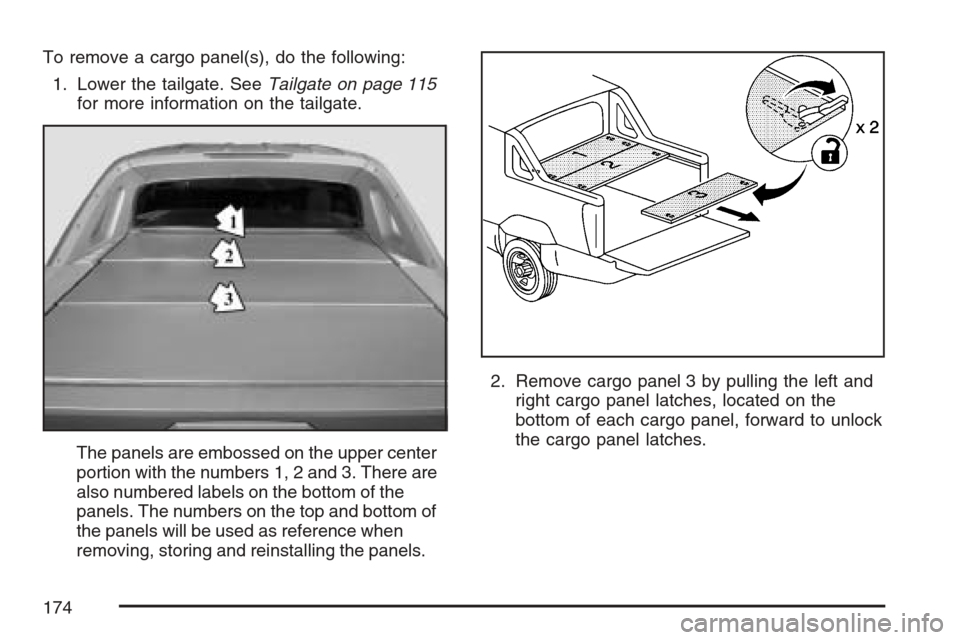
1. Lower the tailgate. SeeTailgate on page 115
for more information on the tailgate.
The panels are embossed on the upper center
portion with the numbers 1, 2 and 3. There are
also numbered labels on the bottom of the
panels. The numbers on the top and bottom of
the panels will be used as reference when
removing, storing and reinstalling the panels.2. Remove cargo panel 3 by pulling the left and
right cargo panel latches, located on the
bottom of each cargo panel, forward to unlock
the cargo panel latches.
174
Page 176 of 618
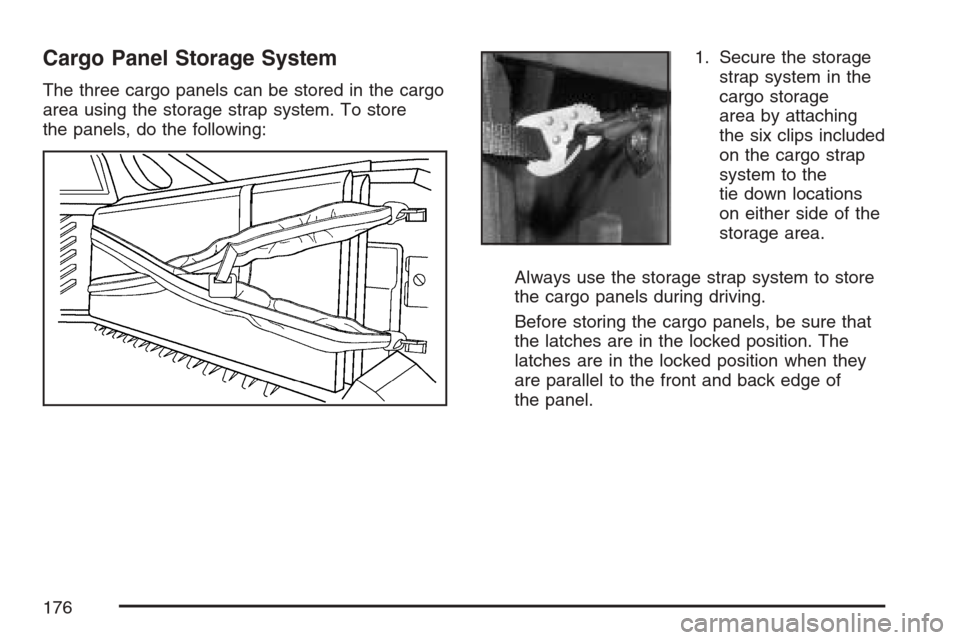
Cargo Panel Storage System
The three cargo panels can be stored in the cargo
area using the storage strap system. To store
the panels, do the following:1. Secure the storage
strap system in the
cargo storage
area by attaching
the six clips included
on the cargo strap
system to the
tie down locations
on either side of the
storage area.
Always use the storage strap system to store
the cargo panels during driving.
Before storing the cargo panels, be sure that
the latches are in the locked position. The
latches are in the locked position when they
are parallel to the front and back edge of
the panel.
176
Page 180 of 618

7. Close both cross locks at the center of the
strap system to secure tightly.
Panels 3, 2, 1 Loaded
180