instrument panel CHEVROLET AVALANCHE 2008 2.G Service Manual
[x] Cancel search | Manufacturer: CHEVROLET, Model Year: 2008, Model line: AVALANCHE, Model: CHEVROLET AVALANCHE 2008 2.GPages: 528, PDF Size: 3.05 MB
Page 240 of 528
DRIVER DOOR OPEN
This message displays and a chime sounds if the driver
door is not fully closed and the vehicle is in a drive
gear. Stop and turn off the vehicle, check the door
for obstructions, and close the door again. Check
to see if the message still appears on the DIC.
ENGINE HOT A/C (Air Conditioning)
TURNED OFF
This message displays when the engine coolant
becomes hotter than the normal operating temperature.
SeeEngine Coolant Temperature Gage on page 3-42.
To avoid added strain on a hot engine, the air
conditioning compressor automatically turns off.
When the coolant temperature returns to normal,
the air conditioning compressor turns back on.
You can continue to drive your vehicle.
If this message continues to appear, have the system
repaired by your dealer/retailer as soon as possible
to avoid damage to the engine.
ENGINE OVERHEATED IDLE ENGINE
Notice:If you drive your vehicle while the engine
is overheating, severe engine damage may occur.
If an overheat warning appears on the instrument
panel cluster and/or DIC, stop the vehicle as soon
as possible. SeeEngine Overheating on page 5-28
for more information.
This message displays when the engine coolant
temperature is too hot. Stop and allow the vehicle to idle
until it cools down. SeeEngine Coolant Temperature
Gage on page 3-42.
SeeOverheated Engine Protection Operating Mode on
page 5-30for information on driving to a safe place
in an emergency.
ENGINE OVERHEATED STOP ENGINE
Notice:If you drive your vehicle while the engine
is overheating, severe engine damage may occur.
If an overheat warning appears on the instrument
panel cluster and/or DIC, stop the vehicle as soon as
possible. SeeEngine Overheating on page 5-28
for more information.
This message displays and a chime sounds if the
engine cooling system reaches unsafe temperatures for
operation. Stop and turn off the vehicle as soon as it
is safe to do so to avoid severe damage. This message
clears when the engine has cooled to a safe operating
temperature.
3-60
Page 243 of 528
SERVICE AIR BAG
This message displays if there is a problem with
the airbag system. Have your dealer/retailer inspect
the system for problems. SeeAirbag Readiness Light
on page 3-35andAirbag System on page 1-60for more
information.
SERVICE BATTERY CHARGING
SYSTEM
On some vehicles, this message displays if there is a
problem with the battery charging system. Under certain
conditions, the charging system light may also turn on in
the instrument panel cluster. SeeCharging System Light
on page 3-38. Driving with this problem could drain the
battery. Turn off all unnecessary accessories. Have the
electrical system checked as soon as possible. See your
dealer/retailer.
SERVICE BRAKE SYSTEM
This message displays along with the brake system
warning light if there is a problem with the brake system.
SeeBrake System Warning Light on page 3-39. If this
message appears, stop as soon as possible and turn
off the vehicle. Restart the vehicle and check for
the message on the DIC display. If the message is still
displayed or appears again when you begin driving,
the brake system needs service as soon as possible.
See your dealer/retailer.
SERVICE BRAKES SOON
This message displays if there is a problem with the
brake system. If this message appears, stop as soon as
possible and turn off the vehicle. Restart the vehicle
and check for the message on the DIC display. If
the message is still displayed or appears again when
you begin driving, the brake system needs service.
See your dealer/retailer.
SERVICE PARK ASSIST
If your vehicle has the Ultrasonic Rear Parking Assist
(URPA) system, this message displays if there is a
problem with the URPA system. Do not use this system
to help you park. SeeUltrasonic Rear Parking Assist
(URPA) on page 2-58for more information.
See your dealer/retailer for service.
SERVICE STABILITRAK
If your vehicle has StabiliTrak®and this message
displays, it means there may be a problem with the
StabiliTrak
®system. If you see this message, try to
reset the system. Stop; turn off the engine for at least
15 seconds; then start the engine again. If this message
still comes on, it means there is a problem. You should
see your dealer/retailer for service. The vehicle is
safe to drive, however, you do not have the benet of
StabiliTrak
®, so reduce your speed and drive accordingly.
3-63
Page 245 of 528
There are several conditions that can cause this
message to appear.
One condition is overheating, which could occur if
StabiliTrak®activates continuously for an extended
period of time.
The message also displays if the brake system
warning light is on. SeeBrake System Warning
Light on page 3-39.
The message could display if the stability system
takes longer than usual to complete its diagnostic
checks due to driving conditions.
The message displays if an engine or vehicle
related problem has been detected and the vehicle
needs service. See your dealer/retailer.
The message also displays if the vehicle is shifted
into 4LO.
The message turns off as soon as the conditions that
caused the message to be displayed are no longer
present.
TIGHTEN GAS CAP
This message may display along with the check engine
light on the instrument panel cluster if the vehicle’s fuel
cap is not tightened properly. SeeMalfunction Indicator
Lamp on page 3-43. Reinstall the fuel cap fully. See
Filling the Tank on page 5-9. The diagnostic system can
determine if the fuel cap has been left off or improperly
installed. A loose or missing fuel cap allows fuel to
evaporate into the atmosphere. A few driving trips with
the cap properly installed should turn this light and
message off.
TIRE LEARNING ACTIVE
This message displays when the Tire Pressure Monitor
System (TPMS) is re-learning the tire positions on
your vehicle. The tire positions must be re-learned after
rotating the tires or after replacing a tire or sensor.
SeeTire Inspection and Rotation on page 5-70,
Tire Pressure Monitor System on page 5-65, and
Ination - Tire Pressure on page 5-64for more
information.
3-65
Page 246 of 528
TRACTION CONTROL OFF
If your vehicle has StabiliTrak®, this message displays
when the Traction Control System (TCS) is turned
off. Adjust your driving accordingly. SeeStabiliTrak
®
System on page 4-6for more information.
TRANSMISSION HOT IDLE ENGINE
Notice:If you drive your vehicle while the
transmission uid is overheating and the
transmission temperature warning is displayed
on the instrument panel cluster and/or DIC, you
can damage the transmission. This could lead
to costly repairs that would not be covered by
your warranty. Do not drive your vehicle with
overheated transmission uid or while the
transmission temperature warning is displayed.
This message displays along with a continuous chime
if the transmission uid in the vehicle gets hot. Driving
with the transmission uid temperature high can cause
damage to the vehicle. Stop the vehicle and let it idle to
allow the transmission to cool. This message clears and
the chime stops when the uid temperature reaches a
safe level.
TURN SIGNAL ON
This message displays and a chime sounds if a turn
signal is left on for 3/4 of a mile (1.2 km). Move the turn
signal/multifunction lever to the off position.
WASHER FLUID LOW ADD FLUID
This message displays when the windshield washer
uid is low. Fill the windshield washer uid reservoir
as soon as possible. SeeEngine Compartment
Overview on page 5-14for the location of the windshield
washer uid reservoir. Also, seeWindshield Washer
Fluid on page 5-37for more information.
DIC Vehicle Customization
(With DIC Buttons)
Your vehicle may have customization capabilities that
allow you to program certain features to one preferred
setting. Customization features can only be programmed
to one setting on the vehicle and cannot be programmed
to a preferred setting for two different drivers.
All of the customization options may not be available
on your vehicle. Only the options available will be
displayed on the DIC.
The default settings for the customization features were
set when your vehicle left the factory, but may have
been changed from their default state since then.
The customization preferences are automatically
recalled.
To change customization preferences, use the following
procedure.
3-66
Page 306 of 528
StabiliTrak®System
Your vehicle may have the StabiliTrak®system which
combines antilock brake, traction and stability control
systems and helps the driver maintain directional control
of the vehicle in most driving conditions.
When you rst start your vehicle and begin to drive
away, the system performs several diagnostic checks to
ensure there are no problems. You may hear or feel the
system working. This is normal and does not mean there
is a problem with your vehicle. The system should
initialize before the vehicle reaches 20 mph (32 km/h).
In some cases, it may take approximately two miles of
driving before the system initializes.
If the system fails to turn on or activate, the StabiliTrak
®
light along with one of the following messages will be
displayed on the Driver Information Center (DIC):
TRACTION CONTROL OFF, SERVICE TRACTION
CONTROL, STABILITRAK OFF, SERVICE
STABILITRAK. If these DIC messages appear, make
sure the StabiliTrak
®system has not been turned offusing the StabiliTrak
®on/off button. Then turn the
steering wheel clockwise from the nine o’clock position to
the three o’clock position. If this clears the message(s),
your vehicle does not need servicing. If this does not
clear the message(s), then turn the vehicle off, wait
15 seconds, and then turn it back on again to reset the
system. If any of these messages still appear on the
Driver Information Center (DIC), your vehicle should be
taken in for service. For more information on the DIC
messages, seeDriver Information Center (DIC) on
page 3-50.
The StabiliTrak
®light will
ash on the instrument
panel cluster when the
system is both on and
activated.
You may also feel or hear the system working; this is
normal.
4-6
Page 307 of 528
The traction control disable
button is located on the
instrument panel below
the climate controls.
The traction control part of StabiliTrak
®can be turned
off by pressing and releasing the StabiliTrak®button
if both systems (traction control and StabiliTrak®) were
previously on. To disable both traction control and
StabiliTrak
®, press and hold the button for ve seconds.
Traction control and StabiliTrak
®can be turned on by
pressing and releasing the StabiliTrak®button if
not automatically shut off for any other reason.
When the TCS or StabiliTrak
®system is turned off,
the StabiliTrak®light and the appropriate TCS off or
StabiliTrak®off message will be displayed on the DIC to
warn the driver. Your vehicle will still have brake-traction
control when traction control is off, but will not be able
to use the engine speed management system. See
“Traction Control Operation” next for more information.
When the traction control system has been turned off,
you may still hear system noises as a result of the
brake-traction control coming on.It is recommended to leave the system on for normal
driving conditions, but it may be necessary to turn the
system off if your vehicle is stuck in sand, mud, ice or
snow, and you want to “rock” your vehicle to attempt to
free it. It may also be necessary to turn off the system
when driving in extreme off-road conditions where high
wheel spin is required. SeeIf Your Vehicle is Stuck in
Sand, Mud, Ice, or Snow on page 4-34.
When the transfer case is in 4LO, the stability system is
automatically disabled, the StabiliTrak
®light will come
on and the STABILITRAK OFF message will appear
on the DIC. Both traction control and StabiliTrak
®
are automatically disabled in this condition.
Traction Control Operation
The traction control system is part of the StabiliTrak®
system. Traction control limits wheel spin by reducing
engine power to the wheels (engine speed management)
and by applying brakes to each individual wheel
(brake-traction control) as necessary.
The traction control system is enabled automatically
when you start your vehicle. It will activate and the
StabiliTrak
®light will ash if it senses that any of
the wheels are spinning or beginning to lose traction
while driving. If you turn off traction control, only
the brake-traction control portion of traction control will
work. The engine speed management will be disabled.
4-7
Page 349 of 528
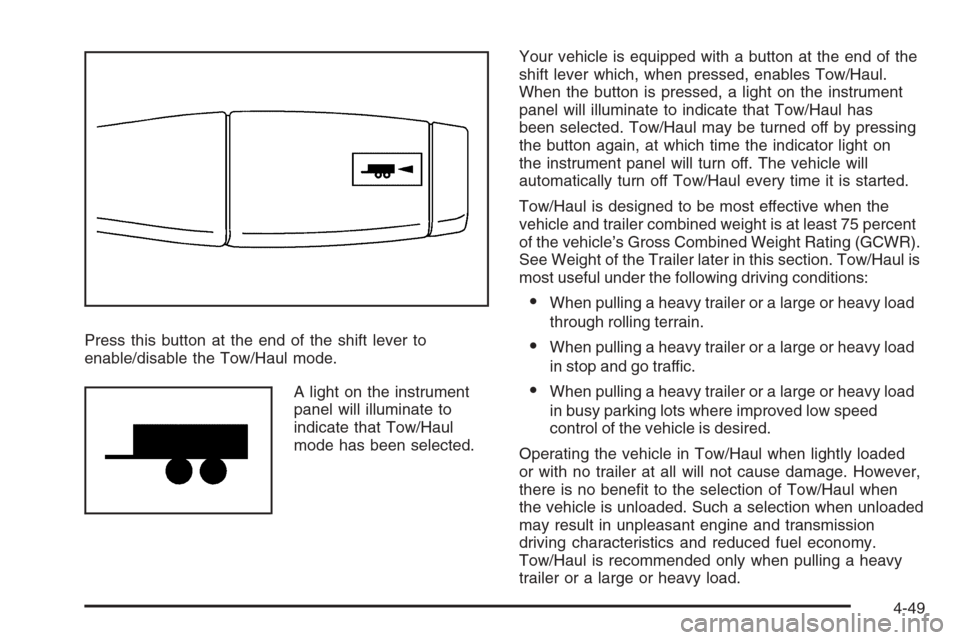
Press this button at the end of the shift lever to
enable/disable the Tow/Haul mode.
A light on the instrument
panel will illuminate to
indicate that Tow/Haul
mode has been selected.Your vehicle is equipped with a button at the end of the
shift lever which, when pressed, enables Tow/Haul.
When the button is pressed, a light on the instrument
panel will illuminate to indicate that Tow/Haul has
been selected. Tow/Haul may be turned off by pressing
the button again, at which time the indicator light on
the instrument panel will turn off. The vehicle will
automatically turn off Tow/Haul every time it is started.
Tow/Haul is designed to be most effective when the
vehicle and trailer combined weight is at least 75 percent
of the vehicle’s Gross Combined Weight Rating (GCWR).
See Weight of the Trailer later in this section. Tow/Haul is
most useful under the following driving conditions:
When pulling a heavy trailer or a large or heavy load
through rolling terrain.
When pulling a heavy trailer or a large or heavy load
in stop and go traffic.
When pulling a heavy trailer or a large or heavy load
in busy parking lots where improved low speed
control of the vehicle is desired.
Operating the vehicle in Tow/Haul when lightly loaded
or with no trailer at all will not cause damage. However,
there is no benet to the selection of Tow/Haul when
the vehicle is unloaded. Such a selection when unloaded
may result in unpleasant engine and transmission
driving characteristics and reduced fuel economy.
Tow/Haul is recommended only when pulling a heavy
trailer or a large or heavy load.
4-49
Page 356 of 528
Turn Signals When Towing a Trailer
The arrows on your instrument panel will ash whenever
you signal a turn or lane change. Properly hooked up,
the trailer lamps will also ash, telling other drivers
you’re about to turn, change lanes or stop.
When towing a trailer, the arrows on your instrument
panel will ash for turns even if the bulbs on the trailer
are burned out. Thus, you may think drivers behind
you are seeing your signal when they are not. It’s
important to check occasionally to be sure the trailer
bulbs are still working.
Driving On Grades
Reduce speed and shift to a lower gearbeforeyou start
down a long or steep downgrade. If you don’t shift
down, you might have to use your brakes so much
that they would get hot and no longer work well.You can tow in DRIVE (D). If the transmission shifts too
often (e.g., under heavy loads and/or hilly conditions)
you may want to shift the transmission to a lower
gear selection or enable the Tow/Haul mode.
See “Tow/Haul Mode” earlier in this section.
When towing at high altitude on steep uphill grades,
consider the following: Engine coolant at higher altitudes
will boil at a lower temperature than at or near sea level.
If you turn your engine off immediately after towing at
high altitude on steep uphill grades, your vehicle may
show signs similar to engine overheating. To avoid this,
let the engine run while parked (preferably on level
ground) with the automatic transmission in PARK (P) for
a few minutes before turning the engine off. If you do
get the overheat warning, seeEngine Overheating on
page 5-28.
4-56
Page 360 of 528
Electric Brake Control Wiring
Provisions
These wiring provisions are included with your vehicle
as part of the heavy-duty trailer wiring package.
These provisions are for an electric brake controller.
The instrument panel contains blunt cut wires near
the data link connector for the trailer brake controller.
The harness contains the following wires:
Dark Blue: Auxiliary
Red/Black: Battery
Light Blue: Brake Switch
White: Ground
The trailer brake controller should be installed by your
dealer/retailer or a qualied service center.
Trailer Recommendations
You must subtract your hitch loads from the Cargo
Weight Rating (CWR). CWR is the maximum weight
of the load your vehicle can carry. It doesn’t include the
weight of the people inside, but you can gure about
150 lbs. (68 kg) for each seat. The total cargo load
must not be more than your vehicles CWR.
Weigh your vehicle with your trailer attached, so that
you won’t go over the GVWR or GAWR. If you are using
a weight-distributing hitch, weigh the vehicle without
the spring bars in place.
You’ll get the best performance if you spread out the
weight of your load the right way, and if you choose the
correct hitch and trailer brakes.
For more information seeTowing a Trailer on page 4-47.
4-60
Page 362 of 528
Tire Pressure Monitor System.........................5-65
Tire Pressure Monitor Operation.....................5-67
Tire Inspection and Rotation...........................5-70
When It Is Time for New Tires.......................5-71
Buying New Tires.........................................5-72
Different Size Tires and Wheels......................5-74
Uniform Tire Quality Grading..........................5-74
Wheel Alignment and Tire Balance..................5-76
Wheel Replacement......................................5-76
Tire Chains..................................................5-78
If a Tire Goes Flat........................................5-79
Changing a Flat Tire.....................................5-80
Removing the Spare Tire and Tools................5-81
Removing the Flat Tire and Installing the
Spare Tire................................................5-85
Secondary Latch System...............................5-91
Storing a Flat or Spare Tire and Tools............5-94
Spare Tire...................................................5-98
Appearance Care............................................5-99
Interior Cleaning...........................................5-99
Fabric/Carpet..............................................5-100
Leather......................................................5-101
Instrument Panel, Vinyl, and Other Plastic
Surfaces.................................................5-101
Care of Safety Belts....................................5-102Weatherstrips.............................................5-102
Washing Your Vehicle..................................5-102
Cleaning Exterior Lamps/Lenses....................5-103
Finish Care................................................5-103
Windshield and Wiper Blades.......................5-104
Aluminum or Chrome-Plated Wheels
and Trim................................................5-104
Tires.........................................................5-105
Sheet Metal Damage...................................5-105
Finish Damage...........................................5-105
Underbody Maintenance...............................5-105
Chemical Paint Spotting...............................5-106
Vehicle Care/Appearance Materials................5-106
Vehicle Identication.....................................5-107
Vehicle Identication Number (VIN)................5-107
Service Parts Identication Label...................5-107
Electrical System..........................................5-108
Add-On Electrical Equipment.........................5-108
Windshield Wiper Fuses...............................5-108
Power Windows and Other Power Options......5-108
Fuses and Circuit Breakers..........................5-108
Instrument Panel Fuse Block........................5-109
Center Instrument Panel Fuse Block..............5-110
Underhood Fuse Block................................5-111
Capacities and Specications........................5-115
Section 5 Service and Appearance Care
5-2