display CHEVROLET AVALANCHE 2009 2.G User Guide
[x] Cancel search | Manufacturer: CHEVROLET, Model Year: 2009, Model line: AVALANCHE, Model: CHEVROLET AVALANCHE 2009 2.GPages: 550, PDF Size: 3.06 MB
Page 150 of 550
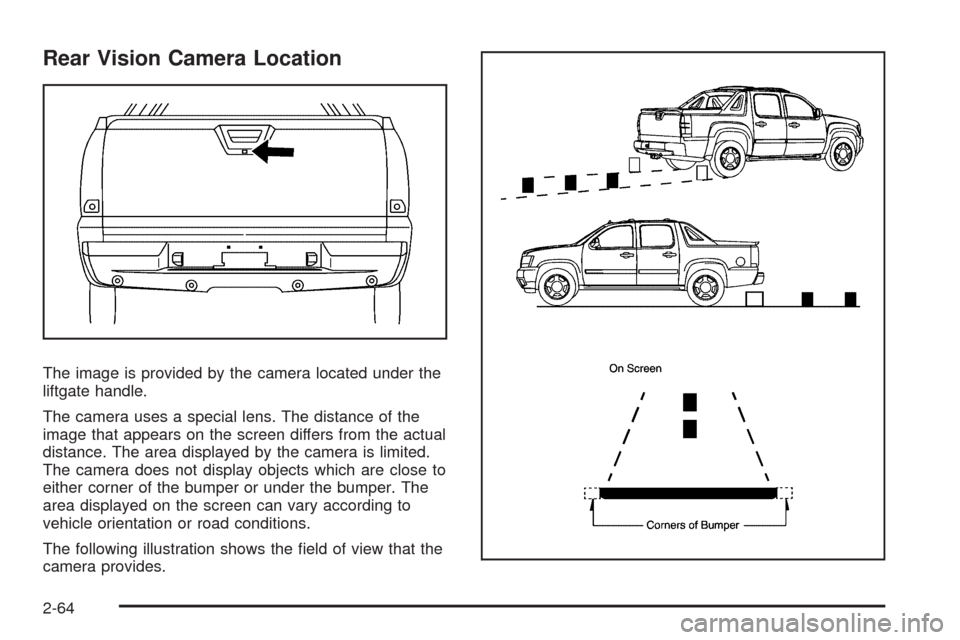
Rear Vision Camera Location
The image is provided by the camera located under the
liftgate handle.
The camera uses a special lens. The distance of the
image that appears on the screen differs from the actual
distance. The area displayed by the camera is limited.
The camera does not display objects which are close to
either corner of the bumper or under the bumper. The
area displayed on the screen can vary according to
vehicle orientation or road conditions.
The following illustration shows the eld of view that the
camera provides.
2-64
Page 151 of 550
When the System Does Not Seem To
Work Properly
The rear vision camera system might not work properly
or display a clear image if:
The RVC is turned off. See “Turning the Rear
Camera System On or Off” earlier in this section.
It is dark.
The sun or the beam of headlights is shining
directly into the camera lens.
Ice, snow, mud, or anything else builds up on the
camera lens. Clean the lens, rinse it with water,
and wipe it with a soft cloth.
The back of the vehicle is in an accident, the
position and mounting angle of the camera
can change or the camera can be affected. Be sure
to have the camera and its position and mounting
angle checked at your dealer/retailer.
There are extreme temperature changes.The rear vision camera system display in the rearview
mirror may turn off or not appear as expected due to one
of the following conditions. If this occurs the left
indicator light on the mirror will ash.
A slow ash may indicate a loss of video signal, or
no video signal present during the reverse cycle.
A fast ash may indicate that the display has been
on for the maximum allowable time during a
reverse cycle, or the display has reached an Over
Temperature limit.
The fast ash conditions are used to protect the
video device from high temperature conditions. Once
conditions return to normal the device will reset
and the green indicator will stop ashing.
During any of these fault conditions, the display will be
blank and the indicator will continue to ash as long
as the vehicle is in R (Reverse) or until the conditions
return to normal.
Pressing and holding
zwhen the left indicator light is
ashing will turn off the video display along with the
left indicator light.
2-65
Page 182 of 550
Fuel Gage...................................................3-44
Low Fuel Warning Light.................................3-45
Driver Information Center (DIC).......................3-46
DIC Operation and Displays
(With DIC Buttons)....................................3-46
DIC Operation and Displays
(Without DIC Buttons)................................3-52
DIC Compass..............................................3-55
DIC Warnings and Messages.........................3-58
DIC Vehicle Customization
(With DIC Buttons)....................................3-67
Audio System(s).............................................3-76
Setting the Clock..........................................3-77
Radio(s)......................................................3-79Using an MP3 (Radio with CD or
Six-Disc CD Player)...................................3-96
Using an MP3 (Radio with CD and
DVD Player)...........................................3-101
XM Radio Messages...................................3-106
Navigation/Radio System..............................3-108
Bluetooth
®.................................................3-108
Rear Seat Entertainment (RSE) System.........3-119
Rear Seat Audio (RSA)................................3-128
Theft-Deterrent Feature................................3-130
Audio Steering Wheel Controls......................3-130
Radio Reception.........................................3-131
Fixed Mast Antenna....................................3-132
XM™ Satellite Radio Antenna System............3-132
Section 3 Instrument Panel
3-2
Page 190 of 550
When Rainsense is active, the headlamps will turn on
automatically if the exterior lamp control is in the AUTO
position and the wipers are active.
Notice:Going through an automatic car wash with
the wipers on can damage them. Turn the wipers
off when going through an automatic car wash.
Windshield Washer
{CAUTION:
In freezing weather, do not use your washer until
the windshield is warmed. Otherwise the washer
uid can form ice on the windshield, blocking your
vision.
L(Washer Fluid):Push the paddle marked with the
windshield washer symbol at the top of the multifunction
lever, to spray washer uid on the windshield. The
wipers clear the window and then either stop or return
to the preset speed.
Heated Windshield Washer
For vehicles with the heated windshield washer uid
system it can be used to help clear ice, snow, tree sap,
or bugs from the windshield.
_(Heated Washer Fluid):Press the heated washer
uid button to activate the heated windshield washer
uid system. This activation initiates four heated
wash/wipe cycles. The rst heated wash/wipe cycle may
take up to 40 seconds to occur, depending on outside
temperature. After the rst wash/wipe cycle, it may take
up to 20 seconds for each of the remaining cycles to
begin. Press the button again to turn off the heated
windshield washer uid system or it will automatically
turn off after four wipe cycles have been completed.
When the heated windshield washer uid system
is activated under certain outside temperature
conditions, steam may ow out of the washer nozzles
for a short period of time before washer uid is sprayed.
This is a normal condition.
HEATING WASH FLUID WASH WIPES PENDING is
displayed on the DIC when the washer system is heating
the uid. WASHER FLUID LOW ADD FLUID is
displayed when the washer uid is low. SeeDIC
Warnings and Messages on page 3-58.
3-10
Page 197 of 550
The fog lamps will go off whenever your high-beam
headlamps come on. When the high beams go off, the
fog lamps will come on again.
The fog lamps will be cancelled after the ignition is
turned off. If you still want to use the fog lamps after you
restart the vehicle, you will need to press the fog
lamp button again.
Some localities have laws that require the headlamps to
be on along with the fog lamps.
Exterior Cargo Lamps
The cargo lamp can be used if more light is needed in
the cargo area of the vehicle or in the top-box
storage units. Some vehicles will only have a cargo
lamp in the driver side top box.
The cargo lamps come on by turning on the interior
dome lamps.
Instrument Panel Brightness
The knob for this feature is located next to the exterior
lamps control.
D(Instrument Panel Lights):Push the knob to
extend and then turn clockwise or counterclockwise to
brighten or dim the instrument panel lights and the radio
display. This only works if the headlamps or parking
lamps are on.
To turn on the dome lamps, with the vehicle doors
closed, turn the knob all the way clockwise.
Dome Lamps
The dome lamps come on when any door is opened.
They turn off after all the doors are closed.
The dome lamps can also be turned on by turning the
instrument panel brightness knob, located on the
instrument panel to the left of the steering column,
clockwise to the farthest position. In this position, the
dome lamps remain on whether a door is opened
or closed.
3-17
Page 198 of 550
Dome Lamp Override
The dome lamp override button is located next to the
exterior lamps control.
k(Dome Off):Press the button in and the dome
lamps remain off when a door is opened. Press the
button again to return it to the extended position so that
the dome lamps come on when a door is opened.
Entry/Exit Lighting
The vehicle has an illuminated entry/exit feature.
The dome lamps come on if the dome override button is
in the out position, when a door is opened or the key
is removed from the ignition.
Reading Lamps
If the vehicle has reading lamps, press the button
located next to the lamp to turn it on or off.
The vehicle may also have reading lamps in other
locations. The lamps cannot be adjusted.
Electric Power Management
The vehicle has Electric Power Management (EPM)
that estimates the battery’s temperature and state
of charge. It then adjusts the voltage for best
performance and extended life of the battery.
When the battery’s state of charge is low, the voltage is
raised slightly to quickly bring the charge back up.
When the state of charge is high, the voltage is lowered
slightly to prevent overcharging. If the vehicle has a
voltmeter gage or a voltage display on the Driver
Information Center (DIC), you may see the voltage move
up or down. This is normal. If there is a problem, an
alert will be displayed.
The battery can be discharged at idle if the electrical
loads are very high. This is true for all vehicles. This is
because the generator (alternator) may not be spinning
fast enough at idle to produce all the power that is
needed for very high electrical loads.
A high electrical load occurs when several of the
following are on, such as: headlamps, high beams, fog
lamps, rear window defogger, climate control fan at
high speed, heated seats, engine cooling fans, trailer
loads, and loads plugged into accessory power outlets.
3-18
Page 199 of 550
EPM works to prevent excessive discharge of the
battery. It does this by balancing the generator’s output
and the vehicle’s electrical needs. It can increase
engine idle speed to generate more power, whenever
needed. It can temporarily reduce the power demands of
some accessories.
Normally, these actions occur in steps or levels, without
being noticeable. In rare cases at the highest levels of
corrective action, this action may be noticeable to the
driver. If so, a Driver Information Center (DIC) message
might be displayed, such as BATTERY SAVER ACTIVE,
BATTERY VOLTAGE LOW, or LOW BATTERY. If this
message is displayed, it is recommended that the driver
reduce the electrical loads as much as possible. SeeDIC
Warnings and Messages on page 3-58.
Battery Run-Down Protection
This feature shuts off the dome lamps if they are left on
for more than 10 minutes when the ignition is in
LOCK/OFF. This helps to prevent the battery from
running down.
Accessory Power Outlet(s)
Your vehicle may have two accessory power outlets
located on the instrument panel and one inside
the center oor console.
Your vehicle may also have an outlet on the rear of the
center oor console above the cupholder door.
To use an outlet, remove the protective cap. When not in
use, always cover the outlet with the protective cap. The
accessory power outlet is operational at all times.
Notice:Adding any electrical equipment to the
vehicle can damage it or keep other components
from working as they should. The repairs would not
be covered by the vehicle warranty. Do not use
equipment exceeding maximum amperage rating of
20 amperes. Check with your dealer/retailer before
adding electrical equipment.
Certain power accessory plugs may not be compatible
to the accessory power outlets and could result in
blown vehicle or adapter fuses. If you experience a
problem, see your dealer/retailer for additional
information on the accessory power plugs.
Notice:Improper use of the power outlet can cause
damage not covered by the warranty. Do not hang
any type of accessory or accessory bracket from the
plug because the power outlets are designed for
accessory power plugs only.
3-19
Page 203 of 550
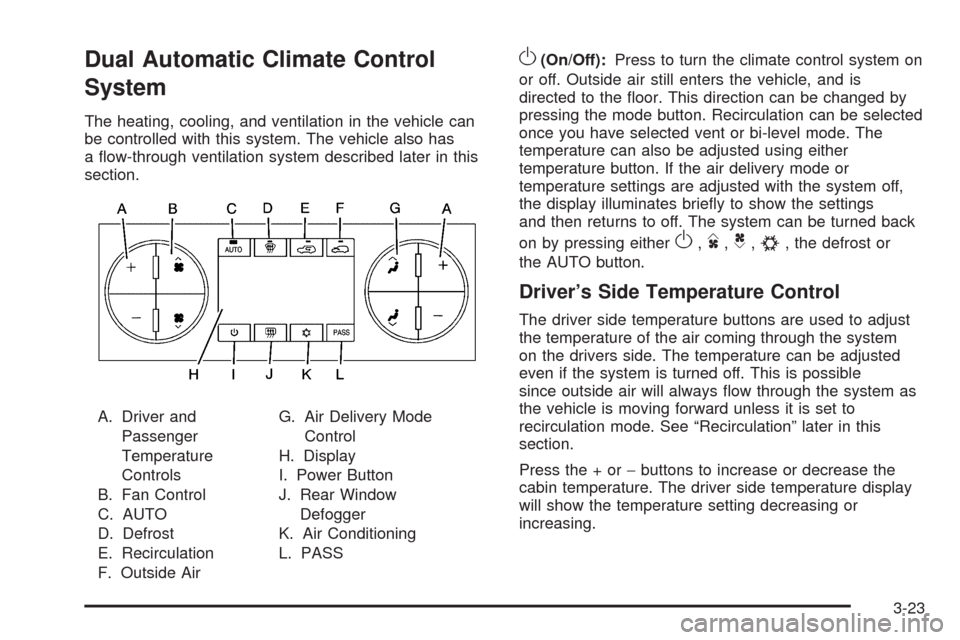
Dual Automatic Climate Control
System
The heating, cooling, and ventilation in the vehicle can
be controlled with this system. The vehicle also has
a ow-through ventilation system described later in this
section.
A. Driver and
Passenger
Temperature
Controls
B. Fan Control
C. AUTO
D. Defrost
E. Recirculation
F. Outside AirG. Air Delivery Mode
Control
H. Display
I. Power Button
J. Rear Window
Defogger
K. Air Conditioning
L. PASS
O(On/Off):Press to turn the climate control system on
or off. Outside air still enters the vehicle, and is
directed to the oor. This direction can be changed by
pressing the mode button. Recirculation can be selected
once you have selected vent or bi-level mode. The
temperature can also be adjusted using either
temperature button. If the air delivery mode or
temperature settings are adjusted with the system off,
the display illuminates briey to show the settings
and then returns to off. The system can be turned back
on by pressing either
O,D,C,#, the defrost or
the AUTO button.
Driver’s Side Temperature Control
The driver side temperature buttons are used to adjust
the temperature of the air coming through the system
on the drivers side. The temperature can be adjusted
even if the system is turned off. This is possible
since outside air will always ow through the system as
the vehicle is moving forward unless it is set to
recirculation mode. See “Recirculation” later in this
section.
Press the + or−buttons to increase or decrease the
cabin temperature. The driver side temperature display
will show the temperature setting decreasing or
increasing.
3-23
Page 204 of 550
Driver and Passenger Side Temperature
Controls
The driver and passenger side temperature buttons are
used to adjust the temperature of the air coming
through the system on the driver or passenger’s side of
the vehicle. The temperature can be adjusted even if
the system is turned off. This is possible since outside
air always ows through the system as the vehicle
is moving forward unless it is set to recirculation mode.
See “Recirculation” later in this section.
Press the + or−buttons to increase or decrease the
cabin temperature. The driver side or passenger
side temperature display shows the temperature setting
decreasing or increasing.
The passenger side temperature setting can be set to
match the driver side temperature setting by pressing
the PASS button and turning off the PASS indicator.
When the passenger side temperature setting is
set different than the driver side setting, the indicator on
the PASS button illuminates and both the driver side
and passenger side temperature displays are shown.
Automatic Operation
AUTO (Automatic):When automatic operation is
active the system will control the inside temperature, the
air delivery, and the fan speed.
Use the steps below to place the entire system in
automatic mode:
1. Press the AUTO button.
When AUTO is selected, the display will change to
show the current temperature(s) and AUTO will
be lit on the display. The current delivery mode and
fan speed will also be displayed for approximately
5 seconds.
When AUTO is selected, the air conditioning
operation and air inlet will be automatically
controlled. The air conditioning compressor will run
when the outside temperature is over about
40°F (4°C). The air inlet will normally be set to
outside air. If it is hot outside, the air inlet may
automatically switch to recirculate inside air to help
quickly cool down the vehicle. The light on the
button comes on in recirculation.
3-24
Page 205 of 550
2. Set the driver and passenger temperature.
To nd your comfort setting, start with a 74°F (23°C)
temperature setting and allow about 20 minutes
for the system to regulate. Use the driver or
passenger temperature buttons to adjust the
temperature setting as necessary. If a temperature
setting of 60°F (15°C) is chosen, the system
remains at the maximum cooling setting. If a
temperature setting of 90°F (32°C) is chosen, the
system remains at the maximum heat setting.
Choosing either maximum setting will not cause the
vehicle to heat or cool any faster.
Do not cover the solar sensor located on the top of the
instrument panel near the windshield. This sensor
regulates air temperature based on sun load and also
turns on the headlamps. For more information on
the solar sensor, see “Sensors” later in this section.
To avoid blowing cold air in cold weather, the system will
delay turning on the fan until warm air is available.
The length of delay depends on the engine coolant
temperature. Pressing the fan switch will override this
delay and change the fan to a selected speed.Manual Operation
DC(Fan Control):Press these buttons to increase or
decrease the fan speed.
Pressing either fan button while in automatic control
places the fan under manual control. The fan setting
remains displayed and the AUTO light turns off. The air
delivery mode remains under automatic control.
HG(Air Delivery Mode Control):Press these buttons
to change the direction of the airow in the vehicle.
Repeatedly press either button until the desired mode
appears on the display. Pressing either mode button
while the system is off changes the air delivery mode
without turning the system on. Pressing either mode
button while in automatic control places the mode under
manual control.
The air delivery mode setting will be displayed and the
AUTO light turns off. The fan remains under automatic
control.
H(Vent):Air is directed to the instrument panel
outlets.
)(Bi-Level):Air is divided between the instrument
panel and oor outlets. Some air is directed towards the
windshield and side window outlets.
3-25