clock CHEVROLET AVALANCHE 2011 2.G Owner's Manual
[x] Cancel search | Manufacturer: CHEVROLET, Model Year: 2011, Model line: AVALANCHE, Model: CHEVROLET AVALANCHE 2011 2.GPages: 528, PDF Size: 7.65 MB
Page 409 of 528
Black plate (37,1)Chevrolet Avalanche Owner Manual - 2011
Vehicle Care 10-37
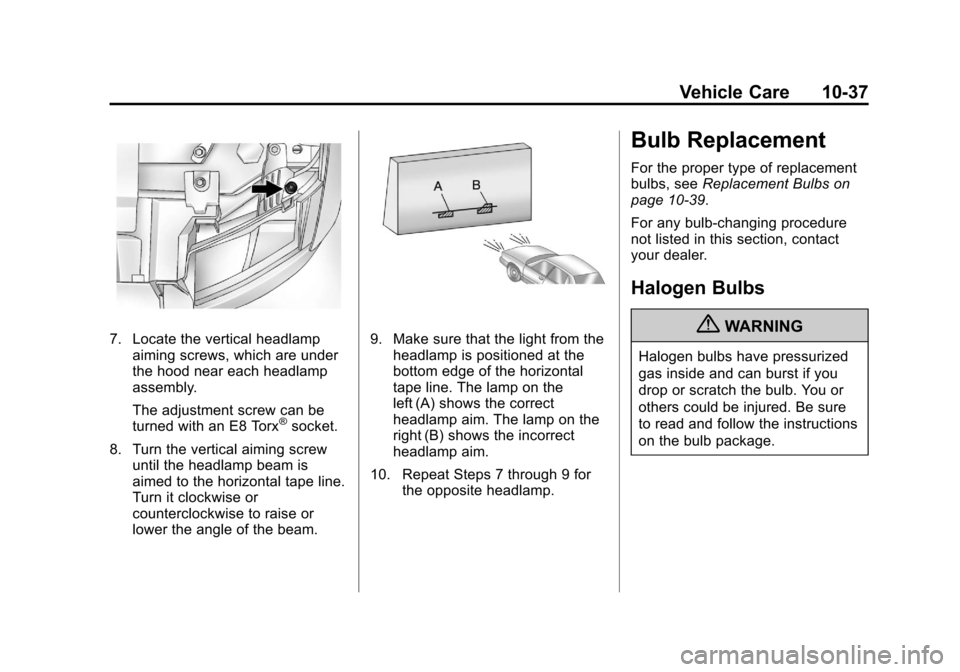
7. Locate the vertical headlampaiming screws, which are under
the hood near each headlamp
assembly.
The adjustment screw can be
turned with an E8 Torx
®socket.
8. Turn the vertical aiming screw until the headlamp beam is
aimed to the horizontal tape line.
Turn it clockwise or
counterclockwise to raise or
lower the angle of the beam.
9. Make sure that the light from theheadlamp is positioned at the
bottom edge of the horizontal
tape line. The lamp on the
left (A) shows the correct
headlamp aim. The lamp on the
right (B) shows the incorrect
headlamp aim.
10. Repeat Steps 7 through 9 for the opposite headlamp.
Bulb Replacement
For the proper type of replacement
bulbs, see Replacement Bulbs on
page 10‑39.
For any bulb‐changing procedure
not listed in this section, contact
your dealer.
Halogen Bulbs
{WARNING
Halogen bulbs have pressurized
gas inside and can burst if you
drop or scratch the bulb. You or
others could be injured. Be sure
to read and follow the instructions
on the bulb package.
Page 410 of 528
Black plate (38,1)Chevrolet Avalanche Owner Manual - 2011
10-38 Vehicle Care
Taillamps, Turn Signal,
Sidemarker, Stoplamps,
and Back-Up Lamps
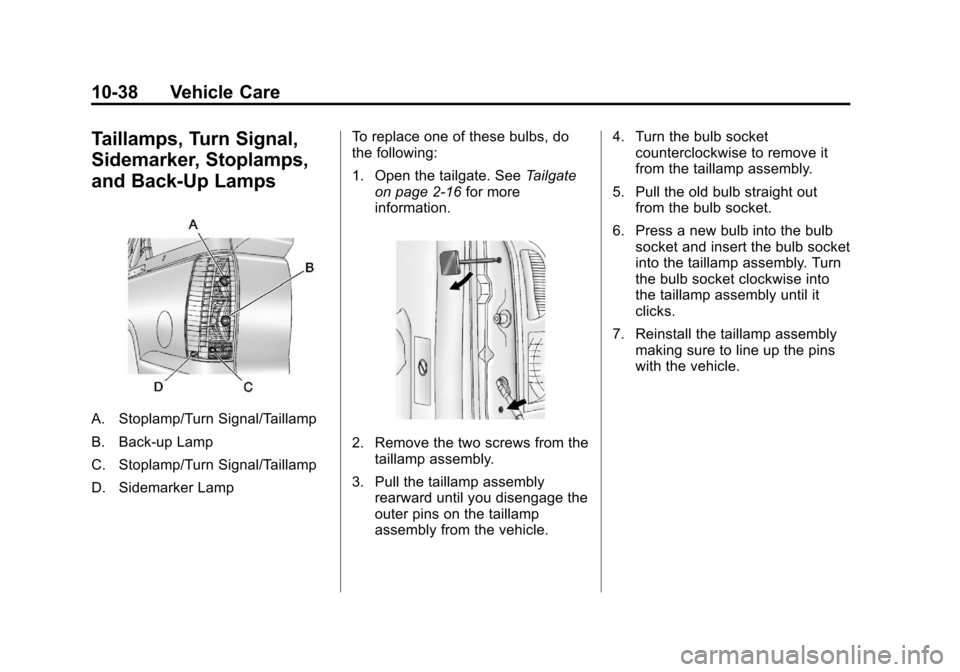
A. Stoplamp/Turn Signal/Taillamp
B. Back-up Lamp
C. Stoplamp/Turn Signal/Taillamp
D. Sidemarker LampTo replace one of these bulbs, do
the following:
1. Open the tailgate. See
Tailgate
on page 2‑16 for more
information.
2. Remove the two screws from the taillamp assembly.
3. Pull the taillamp assembly rearward until you disengage the
outer pins on the taillamp
assembly from the vehicle. 4. Turn the bulb socket
counterclockwise to remove it
from the taillamp assembly.
5. Pull the old bulb straight out from the bulb socket.
6. Press a new bulb into the bulb socket and insert the bulb socket
into the taillamp assembly. Turn
the bulb socket clockwise into
the taillamp assembly until it
clicks.
7. Reinstall the taillamp assembly making sure to line up the pins
with the vehicle.
Page 411 of 528
Black plate (39,1)Chevrolet Avalanche Owner Manual - 2011
Vehicle Care 10-39
License Plate Lamp
To replace one of these bulbs:
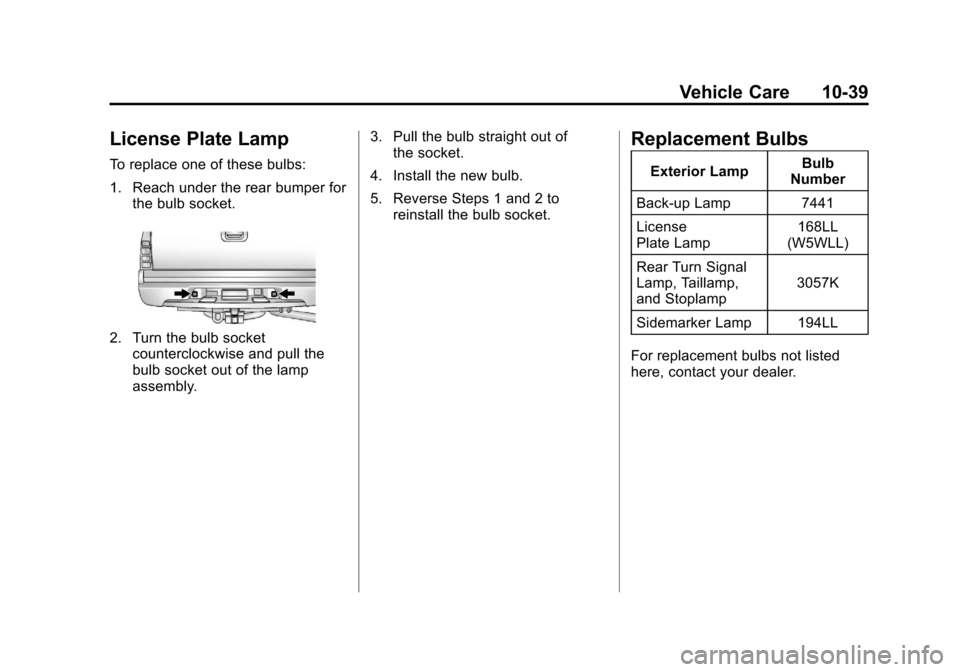
1. Reach under the rear bumper forthe bulb socket.
2. Turn the bulb socketcounterclockwise and pull the
bulb socket out of the lamp
assembly. 3. Pull the bulb straight out of
the socket.
4. Install the new bulb.
5. Reverse Steps 1 and 2 to reinstall the bulb socket.
Replacement Bulbs
Exterior Lamp Bulb
Number
Back-up Lamp 7441
License
Plate Lamp 168LL
(W5WLL)
Rear Turn Signal
Lamp, Taillamp,
and Stoplamp 3057K
Sidemarker Lamp 194LL
For replacement bulbs not listed
here, contact your dealer.
Page 447 of 528
Black plate (75,1)Chevrolet Avalanche Owner Manual - 2011
Vehicle Care 10-75
Tire Changing
Removing the Spare Tire
and Tools
The jack and the wheel blocks are
located under a cover near the
passenger side rear seat.
Rear Seat (Passenger Side) JackCover
1. Remove the jack cover by turning the two wing nuts
one-quarter turn
counterclockwise and
pulling the jack cover off.
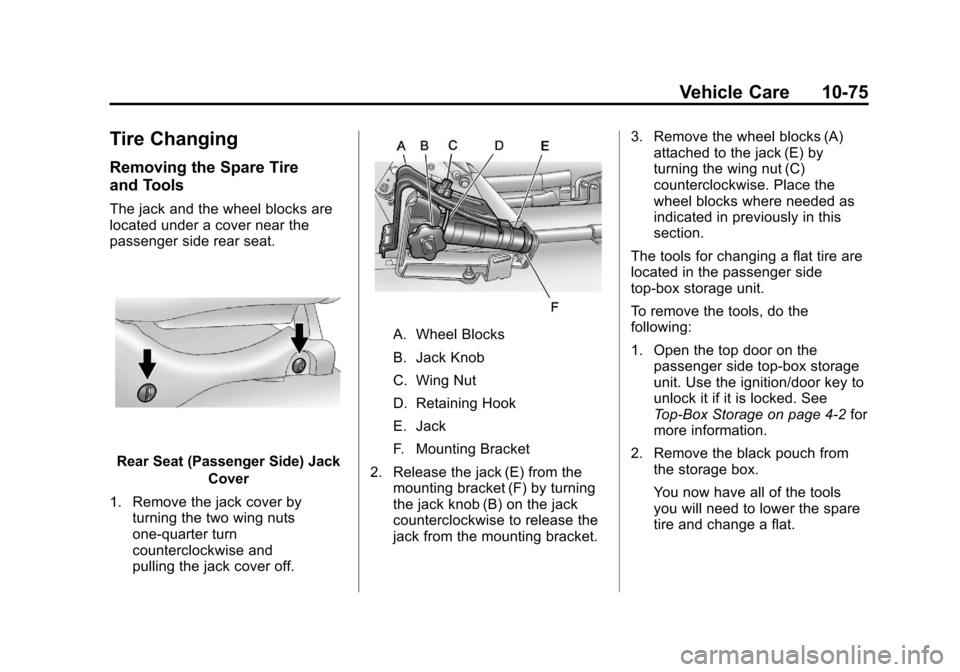
A. Wheel Blocks
B. Jack Knob
C. Wing Nut
D. Retaining Hook
E. Jack
F. Mounting Bracket
2. Release the jack (E) from the mounting bracket (F) by turning
the jack knob (B) on the jack
counterclockwise to release the
jack from the mounting bracket. 3. Remove the wheel blocks (A)
attached to the jack (E) by
turning the wing nut (C)
counterclockwise. Place the
wheel blocks where needed as
indicated in previously in this
section.
The tools for changing a flat tire are
located in the passenger side
top-box storage unit.
To remove the tools, do the
following:
1. Open the top door on the passenger side top-box storage
unit. Use the ignition/door key to
unlock it if it is locked. See
Top-Box Storage on page 4‑2 for
more information.
2. Remove the black pouch from the storage box.
You now have all of the tools
you will need to lower the spare
tire and change a flat.
Page 448 of 528
Black plate (76,1)Chevrolet Avalanche Owner Manual - 2011
10-76 Vehicle Care
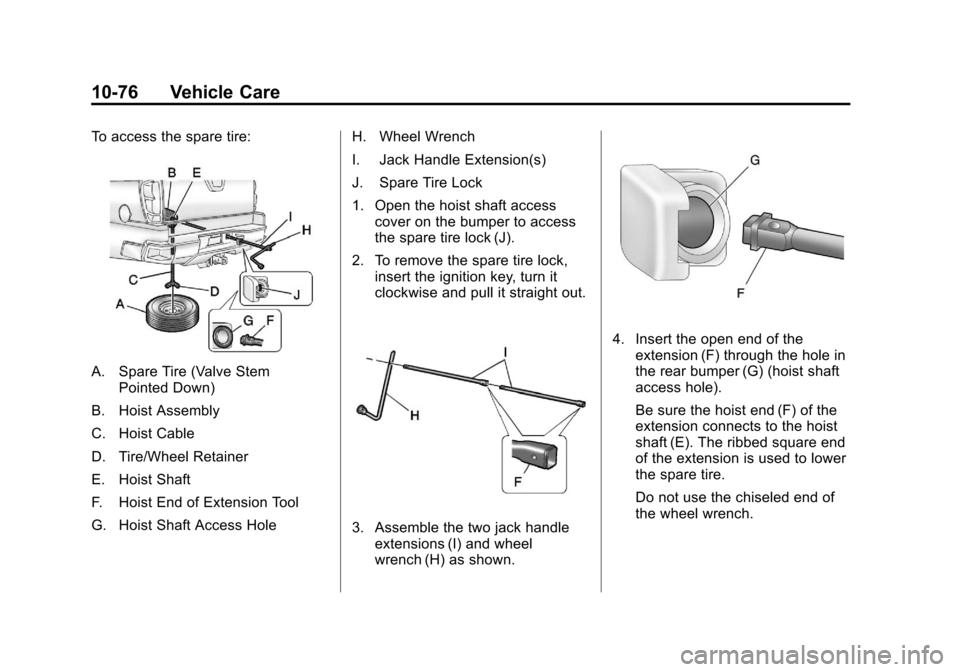
To access the spare tire:
A. Spare Tire (Valve StemPointed Down)
B. Hoist Assembly
C. Hoist Cable
D. Tire/Wheel Retainer
E. Hoist Shaft
F. Hoist End of Extension Tool
G. Hoist Shaft Access Hole H. Wheel Wrench
I. Jack Handle Extension(s)
J. Spare Tire Lock
1. Open the hoist shaft access
cover on the bumper to access
the spare tire lock (J).
2. To remove the spare tire lock, insert the ignition key, turn it
clockwise and pull it straight out.
3. Assemble the two jack handleextensions (I) and wheel
wrench (H) as shown.
4. Insert the open end of theextension (F) through the hole in
the rear bumper (G) (hoist shaft
access hole).
Be sure the hoist end (F) of the
extension connects to the hoist
shaft (E). The ribbed square end
of the extension is used to lower
the spare tire.
Do not use the chiseled end of
the wheel wrench.
Page 449 of 528
Black plate (77,1)Chevrolet Avalanche Owner Manual - 2011
Vehicle Care 10-77
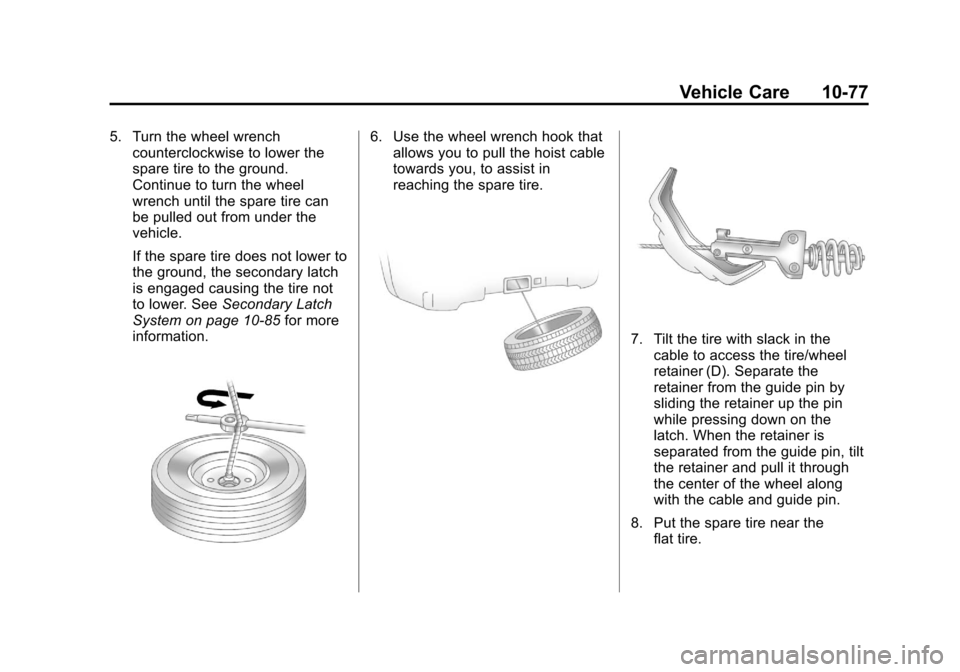
5. Turn the wheel wrenchcounterclockwise to lower the
spare tire to the ground.
Continue to turn the wheel
wrench until the spare tire can
be pulled out from under the
vehicle.
If the spare tire does not lower to
the ground, the secondary latch
is engaged causing the tire not
to lower. See Secondary Latch
System on page 10‑85 for more
information.6. Use the wheel wrench hook that allows you to pull the hoist cable
towards you, to assist in
reaching the spare tire.
7. Tilt the tire with slack in the
cable to access the tire/wheel
retainer (D). Separate the
retainer from the guide pin by
sliding the retainer up the pin
while pressing down on the
latch. When the retainer is
separated from the guide pin, tilt
the retainer and pull it through
the center of the wheel along
with the cable and guide pin.
8. Put the spare tire near the flat tire.
Page 450 of 528
Black plate (78,1)Chevrolet Avalanche Owner Manual - 2011
10-78 Vehicle Care
Removing the Flat Tire and
Installing the Spare Tire
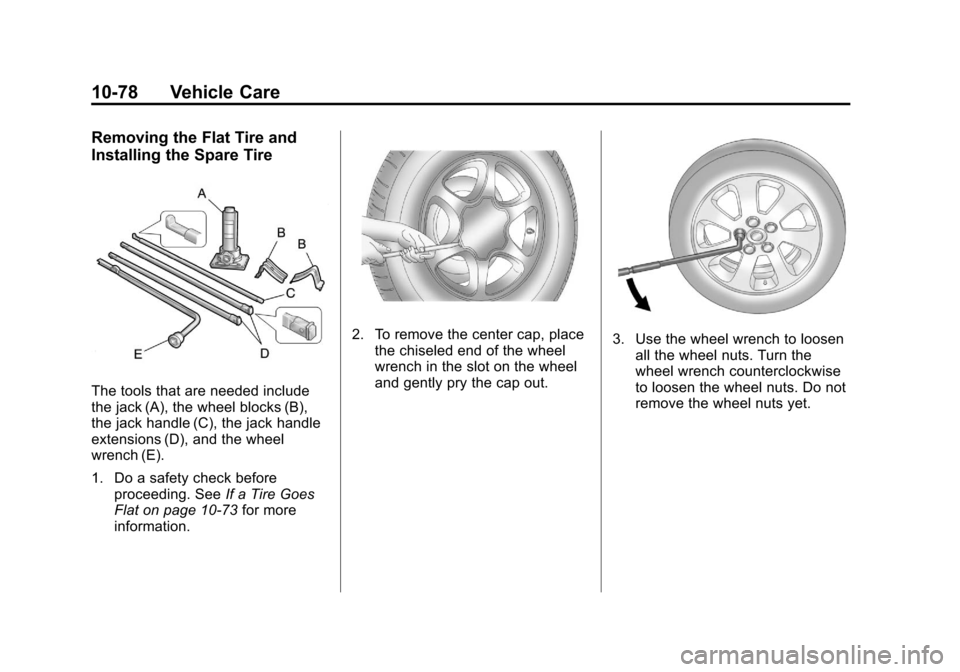
The tools that are needed include
the jack (A), the wheel blocks (B),
the jack handle (C), the jack handle
extensions (D), and the wheel
wrench (E).
1. Do a safety check beforeproceeding. See If a Tire Goes
Flat on page 10‑73 for more
information.
2. To remove the center cap, place the chiseled end of the wheel
wrench in the slot on the wheel
and gently pry the cap out.3. Use the wheel wrench to loosenall the wheel nuts. Turn the
wheel wrench counterclockwise
to loosen the wheel nuts. Do not
remove the wheel nuts yet.
Page 451 of 528
Black plate (79,1)Chevrolet Avalanche Owner Manual - 2011
Vehicle Care 10-79
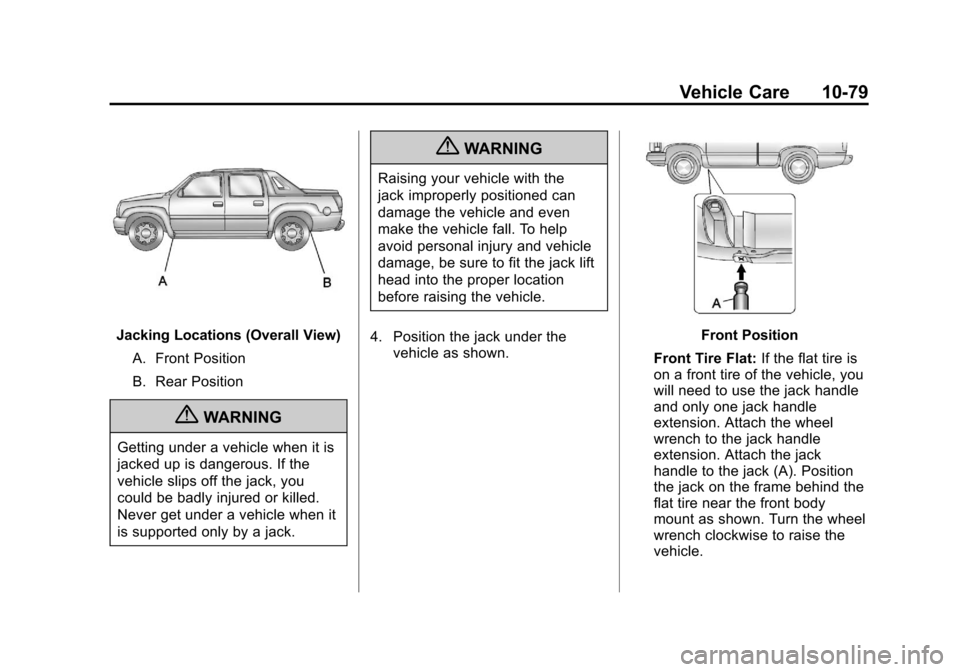
Jacking Locations (Overall View)A. Front Position
B. Rear Position
{WARNING
Getting under a vehicle when it is
jacked up is dangerous. If the
vehicle slips off the jack, you
could be badly injured or killed.
Never get under a vehicle when it
is supported only by a jack.
{WARNING
Raising your vehicle with the
jack improperly positioned can
damage the vehicle and even
make the vehicle fall. To help
avoid personal injury and vehicle
damage, be sure to fit the jack lift
head into the proper location
before raising the vehicle.
4. Position the jack under the vehicle as shown.
Front Position
Front Tire Flat: If the flat tire is
on a front tire of the vehicle, you
will need to use the jack handle
and only one jack handle
extension. Attach the wheel
wrench to the jack handle
extension. Attach the jack
handle to the jack (A). Position
the jack on the frame behind the
flat tire near the front body
mount as shown. Turn the wheel
wrench clockwise to raise the
vehicle.
Page 452 of 528
Black plate (80,1)Chevrolet Avalanche Owner Manual - 2011
10-80 Vehicle Care
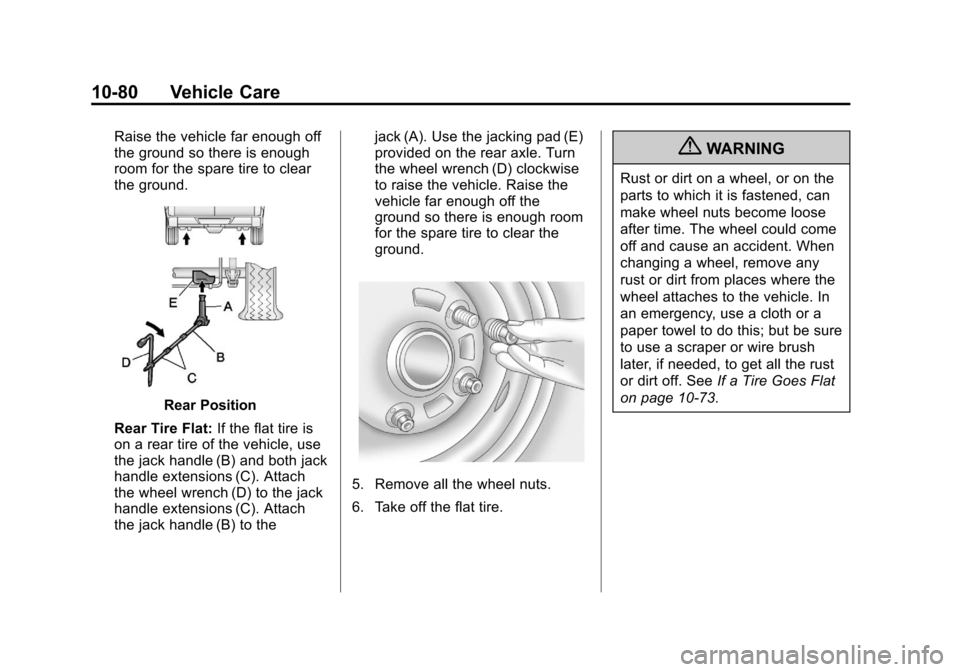
Raise the vehicle far enough off
the ground so there is enough
room for the spare tire to clear
the ground.
Rear Position
Rear Tire Flat: If the flat tire is
on a rear tire of the vehicle, use
the jack handle (B) and both jack
handle extensions (C). Attach
the wheel wrench (D) to the jack
handle extensions (C). Attach
the jack handle (B) to the jack (A). Use the jacking pad (E)
provided on the rear axle. Turn
the wheel wrench (D) clockwise
to raise the vehicle. Raise the
vehicle far enough off the
ground so there is enough room
for the spare tire to clear the
ground.
5. Remove all the wheel nuts.
6. Take off the flat tire.
{WARNING
Rust or dirt on a wheel, or on the
parts to which it is fastened, can
make wheel nuts become loose
after time. The wheel could come
off and cause an accident. When
changing a wheel, remove any
rust or dirt from places where the
wheel attaches to the vehicle. In
an emergency, use a cloth or a
paper towel to do this; but be sure
to use a scraper or wire brush
later, if needed, to get all the rust
or dirt off. See
If a Tire Goes Flat
on page 10‑73.
Page 453 of 528
Black plate (81,1)Chevrolet Avalanche Owner Manual - 2011
Vehicle Care 10-81
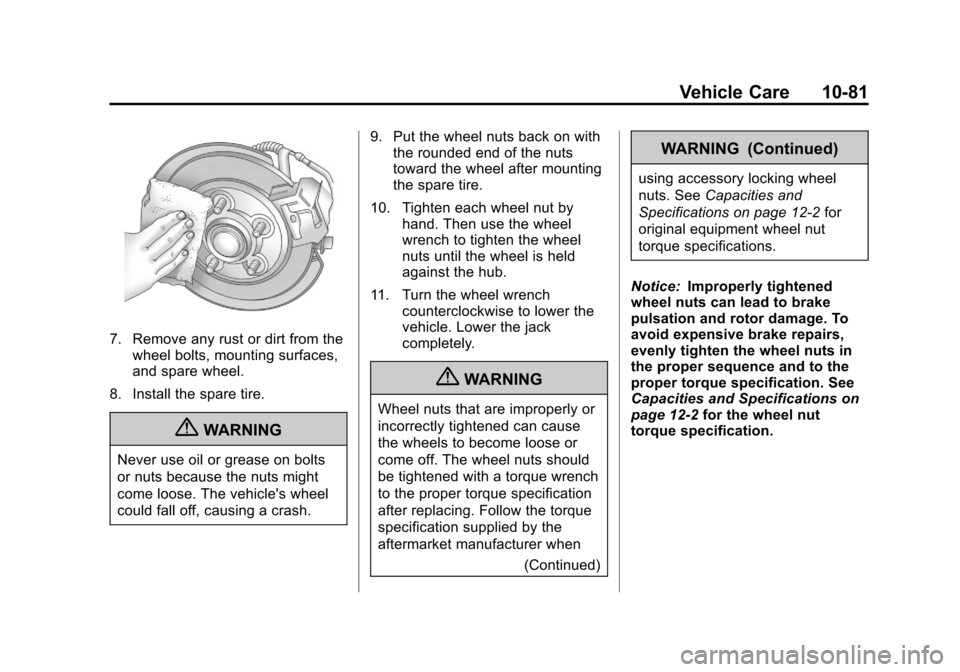
7. Remove any rust or dirt from thewheel bolts, mounting surfaces,
and spare wheel.
8. Install the spare tire.
{WARNING
Never use oil or grease on bolts
or nuts because the nuts might
come loose. The vehicle's wheel
could fall off, causing a crash. 9. Put the wheel nuts back on with
the rounded end of the nuts
toward the wheel after mounting
the spare tire.
10. Tighten each wheel nut by hand. Then use the wheel
wrench to tighten the wheel
nuts until the wheel is held
against the hub.
11. Turn the wheel wrench counterclockwise to lower the
vehicle. Lower the jack
completely.
{WARNING
Wheel nuts that are improperly or
incorrectly tightened can cause
the wheels to become loose or
come off. The wheel nuts should
be tightened with a torque wrench
to the proper torque specification
after replacing. Follow the torque
specification supplied by the
aftermarket manufacturer when
(Continued)
WARNING (Continued)
using accessory locking wheel
nuts. SeeCapacities and
Specifications on page 12‑2 for
original equipment wheel nut
torque specifications.
Notice: Improperly tightened
wheel nuts can lead to brake
pulsation and rotor damage. To
avoid expensive brake repairs,
evenly tighten the wheel nuts in
the proper sequence and to the
proper torque specification. See
Capacities and Specifications on
page 12‑2 for the wheel nut
torque specification.