audio CHEVROLET AVALANCHE 2011 2.G Service Manual
[x] Cancel search | Manufacturer: CHEVROLET, Model Year: 2011, Model line: AVALANCHE, Model: CHEVROLET AVALANCHE 2011 2.GPages: 528, PDF Size: 7.65 MB
Page 262 of 528
Black plate (46,1)Chevrolet Avalanche Owner Manual - 2011
7-46 Infotainment System
PROG (Program):Press this
button to go to the next preset radio
station or channel set on the main
radio. This function is inactive, with
some radios, if the front seat
passengers are listening to
the radio.
When a CD or DVD audio disc is
playing, press this button to go to
the beginning of the CD or DVD
audio. This function is inactive, with
some radios, if the front seat
passengers are listening to the disc.
When a disc is playing in the CD or
DVD changer, press this button to
select the next disc, if multiple discs
are loaded. This function is inactive,
with some radios, if the front seat
passengers are listening to the disc.
When a DVD video menu is being
displayed, press the PROG button
to perform the menu function, Enter.Phone
Bluetooth
Vehicles with a Bluetooth system
can use a Bluetooth‐capable cell
phone with a Hands‐Free Profile to
make and receive phone calls.
The system can be used while the
key is in the ON/RUN or ACC/
ACCESSORY position. The range of
the Bluetooth system can be up to
9.1 m (30 ft). Not all phones support
all functions, and not all phones are
guaranteed to work with the
in-vehicle Bluetooth system. See
www.gm.com/bluetooth for more
information on compatible phones.
Voice Recognition
The Bluetooth system uses voice
recognition to interpret voice
commands to dial phone numbers
and name tags.
For additional information, say
“Help” while you are in a voice
recognition menu. Noise:
Keep interior noise levels to
a minimum. The system may not
recognize voice commands if there
is too much background noise.
When to Speak: A short tone
sounds after the system responds
indicating when it is waiting for a
voice command. Wait until the tone
and then speak.
How to Speak: Speak clearly in a
calm and natural voice.
Audio System
When using the in‐vehicle Bluetooth
system, sound comes through the
vehicle's front audio system
speakers and overrides the audio
system. Use the audio system
volume knob, during a call, to
change the volume level. The
adjusted volume level remains in
memory for later calls. To prevent
missed calls, a minimum volume
level is used if the volume is turned
down too low.
Page 266 of 528
Black plate (50,1)Chevrolet Avalanche Owner Manual - 2011
7-50 Infotainment System
Using the“Dial”or“Call”
Command
1. Press and hold
b gfor
two seconds.
2. Say “Dial”or“Call.”
3. Say the entire number without pausing, or say the name tag.
Once connected, the person called
will be heard through the audio
speakers.
Using the “Digit Dial” Command
The digit dial command allows a
phone number to be dialed by
entering the digits one at a time.
After each digit is entered, the
system repeats back the digit it
heard followed by a tone.
If an unwanted number is
recognized by the system, say
“Clear” at any time to clear the
last number. To hear all of the numbers
recognized by the system, say
“Verify”
at any time.
1. Press and hold
b gfor
two seconds.
2. Say “Digit Dial.”
3. Say each digit, one at a time, that you want to dial. After each
digit is entered, the system
repeats back the digit it heard
followed by a tone. After the last
digit has been entered,
say “Dial.”
Once connected, the person called
will be heard through the audio
speakers.
Using the “Re‐dial”Command
1. Press and hold
b gfor
two seconds.
2. After the tone, say “Re‐dial.”
Once connected, the person called
will be heard through the audio
speakers.
Receiving a Call
When an incoming call is received,
the audio system mutes and a ring
tone is heard in the vehicle.
.Pressb gto answer the call.
.Pressc xto ignore a call.
Call Waiting
Call waiting must be supported on
the cell phone and enabled by the
wireless service carrier.
.Pressbgto answer an
incoming call when another call
is active. The original call is
placed on hold.
.Pressb gagain to return to the
original call.
.To ignore the incoming call, no
action is required.
.Pressc xto disconnect the
current call and switch to the call
on hold.
Page 267 of 528
Black plate (51,1)Chevrolet Avalanche Owner Manual - 2011
Infotainment System 7-51
Three‐Way Calling
Three‐way calling must be
supported on the cell phone and
enabled by the wireless service
carrier.
1. While on a call, press
bg.
2. Say “Three‐way call.”
3. Use the dial or call command to dial the number of the third party
to be called.
4. Once the call is connected, press
bgto link all callers
together.
Ending a Call
Pressc xto end a call.
Muting a Call
During a call, all sounds from inside
the vehicle can be muted so that the
person on the other end of the call
cannot hear them.
.To mute a call, pressbg, and
then say “Mute call.”
.To cancel mute, pressbg, and
then say “Un‐mute call.”
Transferring a Call
Audio can be transferred between
the Bluetooth system and the cell
phone.
The cell phone must be paired and
connected with the Bluetooth
system before a call can be
transferred. The connection process
can take up to two minutes after the
ignition is turned to ON/RUN. Transferring Audio from the
Bluetooth System to a Cell Phone
During a call with the audio in the
vehicle:
1. Press
b
g.
2. Say “Transfer Call.”
Transferring Audio to the
Bluetooth System from a
Cell Phone
During a call with the audio on the
cell phone, press
b g. The audio
transfers to the vehicle. If the audio
does not transfer to the vehicle,
use the audio transfer feature on the
cell phone. See your cell phone
manufacturer's user guide for
more information.
Page 312 of 528
Black plate (34,1)Chevrolet Avalanche Owner Manual - 2011
9-34 Driving and Operating
To Use the Engine Coolant
Heater
1. Turn off the engine.
2. Open the hood and unwrap theelectrical cord. The cord is
secured to the Engine
Compartment Fuse Block with a
clip. Carefully remove the wire
tie which secures the electrical
cord. Do not cut the
electrical cord.
3. Plug the cord into a normal, grounded 110-volt AC outlet.
{WARNING
Plugging the cord into an
ungrounded outlet could cause an
electrical shock. Also, the wrong
kind of extension cord could
overheat and cause a fire.
You could be seriously injured.
(Continued)
WARNING (Continued)
Plug the cord into a properly
grounded three-prong 110-volt AC
outlet. If the cord will not reach,
use a heavy-duty three-prong
extension cord rated for at least
15 amps.
4. Before starting the engine, be sure to unplug and store the
cord as it was before to keep it
away from moving engine parts.
If you do not, it could be
damaged.
The length of time the heater should
remain plugged in depends on
several factors. Ask a dealer in the
area where you will be parking the
vehicle for the best advice on this.
Retained Accessory
Power (RAP)
The following vehicle accessories
can be used for up to 10 minutes
after the engine is turned off:
.Audio System
.Power Windows
.OnStar System (if equipped)
.Sunroof (if equipped)
These features work when the key
is in ON/RUN or ACC/
ACCESSORY. Once the key is
turned from ON/RUN to LOCK/OFF,
the windows and sunroof continue
to work up to 10 minutes until any
door is opened. The radio continues
to work for up to 10 minutes or until
the driver door is opened.
Page 416 of 528
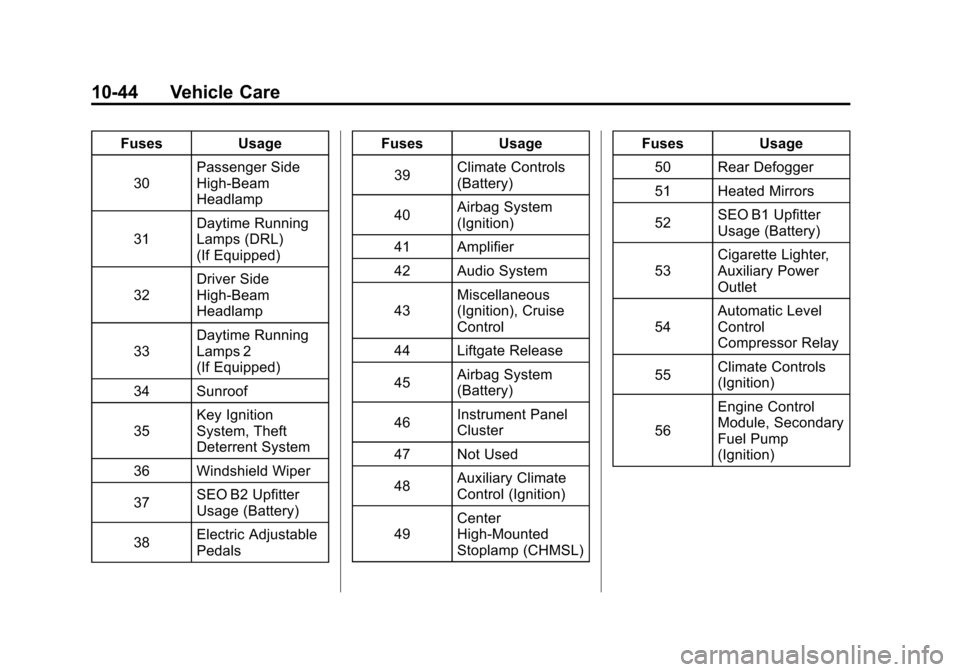
Black plate (44,1)Chevrolet Avalanche Owner Manual - 2011
10-44 Vehicle Care
FusesUsage
30 Passenger Side
High-Beam
Headlamp
31 Daytime Running
Lamps (DRL)
(If Equipped)
32 Driver Side
High-Beam
Headlamp
33 Daytime Running
Lamps 2
(If Equipped)
34 Sunroof
35 Key Ignition
System, Theft
Deterrent System
36 Windshield Wiper
37 SEO B2 Upfitter
Usage (Battery)
38 Electric Adjustable
Pedals Fuses
Usage
39 Climate Controls
(Battery)
40 Airbag System
(Ignition)
41 Amplifier
42 Audio System
43 Miscellaneous
(Ignition), Cruise
Control
44 Liftgate Release
45 Airbag System
(Battery)
46 Instrument Panel
Cluster
47 Not Used
48 Auxiliary Climate
Control (Ignition)
49 Center
High-Mounted
Stoplamp (CHMSL) Fuses
Usage
50 Rear Defogger
51 Heated Mirrors
52 SEO B1 Upfitter
Usage (Battery)
53 Cigarette Lighter,
Auxiliary Power
Outlet
54 Automatic Level
Control
Compressor Relay
55 Climate Controls
(Ignition)
56 Engine Control
Module, Secondary
Fuel Pump
(Ignition)
Page 515 of 528

Black plate (1,1)Chevrolet Avalanche Owner Manual - 2011
INDEX i-1
A
Accessories andModifications . . . . . . . . . . . . . . . . . 10-3
Accessory Power . . . . . . . . . . . . . . 9-34
Active Fuel Management™ . . . . 9-37
Add-On Electrical Equipment . . . . . . . . . . . . . . . . . . . 9-93
Adding Equipment to the Airbag-Equipped Vehicle . . . . . 3-44
Adjustable Throttle and Brake Pedal . . . . . . . . . . . . . . . . . . 9-30
Adjustments Lumbar, Front Seats . . . . . . . . . . . 3-6
Air Cleaner/Filter, Engine . . . . . 10-16
Air Vents . . . . . . . . . . . . . . . . . . . . . . 8-10
Airbag System Check . . . . . . . . . . . . . . . . . . . . . . . . 3-45
How Does an AirbagRestrain? . . . . . . . . . . . . . . . . . . . 3-35
Passenger Sensing
System . . . . . . . . . . . . . . . . . . . . . . 3-38
What Makes an Airbag Inflate? . . . . . . . . . . . . . . . . . . . . . . 3-35 What Will You See After
an Airbag Inflates? . . . . . . . . . . 3-36
When Should an Airbag Inflate? . . . . . . . . . . . . . . . . . . . . . . 3-33
Where Are the Airbags? . . . . . . 3-31
Airbags Adding Equipment to the
Vehicle . . . . . . . . . . . . . . . . . . . . . . 3-44
Passenger Status Indicator . . . 5-18
Readiness Light . . . . . . . . . . . . . . 5-18
Servicing Airbag-Equipped Vehicles . . . . . . . . . . . . . . . . . . . . . 3-43
System Check . . . . . . . . . . . . . . . . 3-28
Alarm System Anti-Theft . . . . . . . . . . . . . . . . . . . . . 2-17
AM-FM Radio . . . . . . . . . . . . . . . . . . . 7-8
Antenna
Satellite Radio . . . . . . . . . . . . . . . . 7-13
Anti-Theft Alarm System . . . . . . . . . . . . . . . . 2-17
Alarm System Messages . . . . . 5-43 Antilock Brake
System (ABS) . . . . . . . . . . . . . . . . 9-52
Warning Light . . . . . . . . . . . . . . . . . 5-24
Appearance Care Exterior . . . . . . . . . . . . . . . . . . . . . 10-98
Interior . . . . . . . . . . . . . . . . . . . . . 10-102
Armrest Storage . . . . . . . . . . . . . . . . 4-2
Ashtrays . . . . . . . . . . . . . . . . . . . . . . . 5-10
Assistance Program,
Roadside . . . . . . . . . . . . . . 13-8, 13-10
Audio Players . . . . . . . . . . . . . . . . . 7-14
CD . . . . . . . . . . . . . . . . . . . . . . . . . . . 7-14
CD/DVD . . . . . . . . . . . . . . . . . . . . . . 7-19
Audio System Fixed Mast Antenna . . . . . . . . . . 7-13
Radio Reception . . . . . . . . . . . . . . 7-12
Rear Seat (RSA) . . . . . . . . . . . . . 7-44
Theft-Deterrent Feature . . . . . . . . 7-2
Automatic Door Locks . . . . . . . . . . . . . . . . . . . . 2-9
Headlamp System . . . . . . . . . . . . . 6-4
Level Control . . . . . . . . . . . . . . . . . 9-57
Page 524 of 528

Black plate (10,1)Chevrolet Avalanche Owner Manual - 2011
i-10 INDEX
R
Radio FrequencyIdentification (RFID) . . . . . . . . 13-19
Statement . . . . . . . . . . . . . . . . . . 13-19
Radios AM-FM Radio . . . . . . . . . . . . . . . . . . 7-8
CD/DVD Player . . . . . . . . . . . . . . . 7-19
Reception . . . . . . . . . . . . . . . . . . . . 7-12
Satellite . . . . . . . . . . . . . . . . . . . . . . . . 7-9
Reading Lamps . . . . . . . . . . . . . . . . . 6-7
Rear Axle . . . . . . . . . . . . . . . . . . . . . 10-32 Locking . . . . . . . . . . . . . . . . . . . . . . . 9-56
Rear Seat Audio (RSA) System . . . . . . . . . . . . . . . . . . . . . . . 7-44
Rear Seat Entertainment System . . . . . . . . . . . . . . . . . . . . . . . 7-34
Rear Seat Audio (RSA) . . . . . . . 7-44
Rear Seats . . . . . . . . . . . . . . . . . . . . 3-10
Rear Vision Camera (RVC) . . . . 9-62
Rearview Mirrors . . . . . . . . . . . . . . 2-22 Automatic Dimming . . . . . . . . . . . 2-23
Reclining Seatbacks . . . . . . . . . . . . 3-7 Recommended Fluids and
Lubricants . . . . . . . . . . . . . . . . . . . . 11-6
Recommended Fuel . . . . . . . . . . . 9-68
Records Maintenance . . . . . . . . . . . . . . . . . . 11-9
Recreational Vehicle Towing . . . . . . . . . . . . . . . . . . . . . . 10-93
Reimbursement Program, GM Mobility . . . . . . . . . . . . . . . . . . 13-7
Remote Keyless Entry (RKE) System . . . . . . . . . . . . . 2-2, 2-3
Remote Vehicle Start . . . . . . . . . . . 2-5
Replacement Glass . . . . . . . . . . . . . . . . . . . . . . . 10-35
Replacement Bulbs . . . . . . . . . . . 10-39
Replacement Parts Airbags . . . . . . . . . . . . . . . . . . . . . . . 3-45
Maintenance . . . . . . . . . . . . . . . . . . 11-8
Replacing Airbag System . . . . . . 3-45
Replacing LATCH System Parts After a Crash . . . . . . . . . . . 3-61 Replacing Safety Belt
System Parts After a
Crash . . . . . . . . . . . . . . . . . . . . . . . . 3-28
Reporting Safety Defects Canadian Government . . . . . . 13-16
General Motors . . . . . . . . . . . . . 13-17
U.S. Government . . . . . . . . . . . 13-16
Restraints Where to Put . . . . . . . . . . . . . . . . . 3-53
Retained Accessory Power (RAP) . . . . . . . . . . . . . . . . . 9-34
Ride Control Systems Messages . . . . . . . . . . . . . . . . . . . . 5-42
Roadside Assistance Program . . . . . . . . . . . . . . . 13-8, 13-10
Roof
Sunroof . . . . . . . . . . . . . . . . . . . . . . . 2-26
Roof Rack System . . . . . . . . . . . . . 4-13
Rotation, Tires . . . . . . . . . . . . . . . . 10-64
Routing, Engine Drive Belt . . . . . 12-3
Running the Vehicle While Parked . . . . . . . . . . . . . . . . . . . . . . . 9-38