key CHEVROLET AVALANCHE 2011 2.G Service Manual
[x] Cancel search | Manufacturer: CHEVROLET, Model Year: 2011, Model line: AVALANCHE, Model: CHEVROLET AVALANCHE 2011 2.GPages: 528, PDF Size: 7.65 MB
Page 187 of 528
Black plate (41,1)Chevrolet Avalanche Owner Manual - 2011
Instruments and Controls 5-41
accelerate. If this message is on,
but there is no reduction in
performance, proceed to your
destination. The performance may
be reduced the next time the vehicle
is driven. The vehicle may be driven
at a reduced speed while this
message is on, but acceleration and
speed may be reduced. Anytime
this message stays on, the vehicle
should be taken to your dealer for
service as soon as possible.
Fuel System Messages
FUEL LEVEL LOW
This message displays and a chime
sounds if the fuel level is low. Refuel
as soon as possible. SeeFuel
Gauge on page 5‑13 andFuel on
page 9‑68 for more information.
TIGHTEN GAS CAP
This message may display along
with the check engine light on the
instrument panel cluster if the
vehicle's fuel cap is not tightened
properly. See
Malfunction Indicator Lamp on
page 5‑20. Reinstall the fuel cap
fully. See Filling the Tank on
page 9‑72. The diagnostic system
can determine if the fuel cap has
been left off or improperly installed.
A loose or missing fuel cap allows
fuel to evaporate into the
atmosphere. A few driving trips with
the cap properly installed should
turn this light and message off.
Key and Lock Messages
REPLACE BATTERY IN
REMOTE KEY
This message displays if a Remote
Keyless Entry (RKE) transmitter
battery is low. The battery needs to
be replaced in the transmitter.
See “Battery Replacement” under
Remote Keyless Entry (RKE)
System Operation on page 2‑3.
Lamp Messages
TURN SIGNAL ON
This message displays and a chime
sounds if a turn signal is left on for
1.2 km (0.75 mile). Move the turn
signal/multifunction lever to the off
position.
Object Detection System
Messages
PARK ASST BLOCKED SEE
OWNERS MANUAL
If your vehicle has the Ultrasonic
Rear Parking Assist (URPA) system,
this message displays if there is
something interfering with the park
assist system. See Ultrasonic
Parking Assist on page 9‑60 for
more information.
Page 191 of 528
Black plate (45,1)Chevrolet Avalanche Owner Manual - 2011
Instruments and Controls 5-45
Transmission Messages
SERVICE 4 WHEEL DRIVE
This message displays if a problem
occurs with the four-wheel-drive
system. If this message appears,
stop as soon as possible and turn
off the vehicle. Make sure the key is
in the LOCK/OFF position for at
least one minute and then restart
the vehicle and check for the
message on the DIC display.
If the message is still displayed or
appears again when you begin
driving, the four-wheel-drive system
needs service. See your dealer.
TRANSMISSION HOT IDLE
ENGINE
Notice:If you drive the vehicle
while the transmission fluid is
overheating and the transmission
temperature warning is displayed
on the instrument panel cluster
and/or DIC, you can damage the
transmission. This could lead to
costly repairs that would not
be covered by the warranty.
Do not drive your vehicle with
overheated transmission fluid or
while the transmission
temperature warning is displayed.
This message displays along with a
sound if the transmission fluid in the
vehicle gets hot. Driving with the
transmission fluid temperature high
can cause damage to the vehicle.
Stop the vehicle and let it idle to
allow the transmission to cool.
This message clears and the chime
stops when the fluid temperature
reaches a safe level.
Vehicle Reminder
Messages
CHECK TRAILER WIRING
On vehicles with the Integrated
Trailer Brake Control (ITBC) system,
this message may display and a
chime may sound when one of the
following conditions exists:
.A trailer with electric brakes
becomes disconnected from the
vehicle.
‐ If the disconnect occurs while
the vehicle is stopped, this
message clears itself after a
short time.
‐ If the disconnect occurs while
the vehicle is moving, this
message stays on until the
ignition is turned off.
.There is a short in the wiring to
the electric trailer brakes.
When this message displays, power
is no longer available to the trailer
brakes.
Page 195 of 528
Black plate (49,1)Chevrolet Avalanche Owner Manual - 2011
Instruments and Controls 5-49
AUTO DOOR UNLOCK
This feature allows you to select
whether or not to turn off the
automatic door unlocking feature.
It also allows you to select which
doors and when the doors will
automatically unlock. SeeAutomatic
Door Locks on page 2‑9 for more
information.
Press the customization button until
AUTO DOOR UNLOCK appears on
the DIC display. Press the set/reset
button once to access the settings
for this feature. Then press the
customization button to scroll
through the following settings:
OFF: None of the doors will
automatically unlock.
DRIVER AT KEY OUT: Only the
driver door will unlock when the key
is taken out of the ignition.
DRIVER IN PARK: Only the driver
door will unlock when the vehicle is
shifted into P (Park). ALL AT KEY OUT:
All of the doors,
including the tailgate, will unlock
when the key is taken out of the
ignition.
ALL IN PARK (default): All of the
doors, including the tailgate, will
unlock when the vehicle is shifted
into P (Park).
NO CHANGE: No change will be
made to this feature. The current
setting will remain.
To select a setting, press the
set/reset button while the desired
setting is displayed on the DIC.
REMOTE DOOR LOCK
This feature allows you to select the
type of feedback you will receive
when locking the vehicle with the
Remote Keyless Entry (RKE)
transmitter. You will not receive
feedback when locking the vehicle
with the RKE transmitter if the doors
are open. See Remote Keyless
Entry (RKE) System Operation on
page 2‑3 for more information. Press the customization button until
REMOTE DOOR LOCK appears on
the DIC display. Press the set/reset
button once to access the settings
for this feature. Then press the
customization button to scroll
through the following settings:
OFF:
There will be no feedback
when you press the lock button on
the RKE transmitter.
LIGHTS ONLY: The exterior lamps
will flash when you press the lock
button on the RKE transmitter.
HORN ONLY: The horn will sound
on the second press of the lock
button on the RKE transmitter.
HORN & LIGHTS (default): The
exterior lamps will flash when you
press the lock button on the RKE
transmitter, and the horn will sound
when the lock button is pressed
again within five seconds of the
previous command.
Page 196 of 528
Black plate (50,1)Chevrolet Avalanche Owner Manual - 2011
5-50 Instruments and Controls
NO CHANGE:No change will be
made to this feature. The current
setting will remain.
To select a setting, press the
set/reset button while the desired
setting is displayed on the DIC.
REMOTE DOOR UNLOCK
This feature allows you to select the
type of feedback you will receive
when unlocking the vehicle with the
Remote Keyless Entry (RKE)
transmitter. You will not receive
feedback when unlocking the
vehicle with the RKE transmitter if
the doors are open. See Remote
Keyless Entry (RKE) System
Operation on page 2‑3 for more
information. Press the customization button until
REMOTE DOOR UNLOCK appears
on the DIC display. Press the
set/reset button once to access the
settings for this feature. Then press
the customization button to scroll
through the following settings:
LIGHTS OFF:
The exterior lamps
will not flash when you press the
unlock button on the RKE
transmitter.
LIGHTS ON (default): The exterior
lamps will flash when you press the
unlock button on the RKE
transmitter.
NO CHANGE: No change will be
made to this feature. The current
setting will remain.
To select a setting, press the
set/reset button while the desired
setting is displayed on the DIC. DELAY DOOR LOCK
This feature allows you to select
whether or not the locking of the
vehicle's doors and tailgate will be
delayed. When locking the doors
and tailgate with the power door
lock switch and a door or the
tailgate is open, this feature will
delay locking the doors and tailgate
until five seconds after the last door
is closed. You will hear three chimes
to signal that the delayed locking
feature is in use. The key must be
out of the ignition for this feature to
work. You can temporarily override
delayed locking by pressing the
power door lock switch twice. See
Delayed Locking on page 2‑8
for
more information.
Page 197 of 528
Black plate (51,1)Chevrolet Avalanche Owner Manual - 2011
Instruments and Controls 5-51
Press the customization button until
DELAY DOOR LOCK appears on
the DIC display. Press the set/reset
button once to access the settings
for this feature. Then press the
customization button to scroll
through the following settings:
OFF:There will be no delayed
locking of the vehicle's doors.
ON (default): The doors will not
lock until five seconds after the last
door or the tailgate is closed.
NO CHANGE: No change will be
made to this feature. The current
setting will remain.
To select a setting, press the
set/reset button while the desired
setting is displayed on the DIC. EXIT LIGHTING
This feature allows you to select
the amount of time you want the
exterior lamps to remain on when
it is dark enough outside. This
happens after the key is turned
from ON/RUN to LOCK/OFF.
Press the customization button
until EXIT LIGHTING appears on
the DIC display. Press the set/reset
button once to access the settings
for this feature. Then press the
customization button to scroll
through the following settings:
OFF:
The exterior lamps will not
turn on.
30 SECONDS (default): The
exterior lamps will stay on for
30 seconds. 1 MINUTE:
The exterior lamps will
stay on for one minute.
2 MINUTES: The exterior lamps will
stay on for two minutes.
NO CHANGE: No change will be
made to this feature. The current
setting will remain.
To select a setting, press the
set/reset button while the desired
setting is displayed on the DIC.
Page 198 of 528
Black plate (52,1)Chevrolet Avalanche Owner Manual - 2011
5-52 Instruments and Controls
APPROACH LIGHTING
This feature allows you to select
whether or not to have the exterior
lights turn on briefly during low light
periods after unlocking the vehicle
using the Remote Keyless
Entry (RKE) transmitter.
Press the customization button until
APPROACH LIGHTING appears on
the DIC display. Press the set/reset
button once to access the settings
for this feature. Then press the
customization button to scroll
through the following settings:
OFF:The exterior lights will not
turn on when you unlock the vehicle
with the RKE transmitter.
ON (default): If it is dark enough
outside, the exterior lights will turn
on briefly when you unlock the
vehicle with the RKE transmitter. The lights will remain on for
20 seconds or until the lock button
on the RKE transmitter is pressed,
or the vehicle is no longer off.
See
Remote Keyless Entry (RKE)
System Operation on page 2‑3 for
more information.
NO CHANGE : No change will be
made to this feature. The current
setting will remain.
To select a setting, press the
set/reset button while the desired
setting is displayed on the DIC.
CHIME VOLUME
This feature allows you to select the
volume level of the chime.
Press the customization button until
CHIME VOLUME appears on the
DIC display. Press the set/reset
button once to access the settings
for this feature. Then press the
customization button to scroll
through the following settings: NORMAL:
The chime volume will
be set to a normal level.
LOUD: The chime volume will be
set to a loud level.
NO CHANGE: No change will be
made to this feature. The current
setting will remain.
There is no default for chime
volume. The volume will stay at the
last known setting.
To select a setting, press the
set/reset button while the desired
setting is displayed on the DIC.
Page 200 of 528
Black plate (54,1)Chevrolet Avalanche Owner Manual - 2011
5-54 Instruments and Controls
BUTTON & KEY OUT (default):If
the features are enabled through the
EASY EXIT SETUP menu, the
driver seat will move back when
the key is removed from the ignition
or after pressing the easy exit
seat button.
The automatic easy exit seat
movement will only occur one time
after the key is removed from the
ignition. If the automatic movement
has already occurred, and you put
the key back in the ignition and
remove it again, the seat will stay in
the original exit position, unless a
memory recall took place prior to
removing the key again.
NO CHANGE: No change will be
made to this feature. The current
setting will remain.
To select a setting, press the
set/reset button while the desired
setting is displayed on the DIC. EASY EXIT SETUP
If your vehicle has this feature, it
allows you to select which areas will
recall with the automatic easy exit
seat feature. It also allows you to
turn off the automatic easy exit
feature. See
“Memory Seat,
Mirrors, and Pedals” inPower Seat
Adjustment on page 3‑4 and“EASY
EXIT RECALL” earlier for more
information.
Press the customization button until
EASY EXIT SETUP appears on the
DIC display. Press the set/reset
button once to access the settings
for this feature. Then press the
menu up/down button to scroll
through the following settings:
OFF: No automatic seat exit will
recall.
SEAT ONLY (Default): The driver
seat will recall.
NO CHANGE: No change will be
made to this feature. The current
setting will remain. To select a setting, press the
set/reset button while the desired
setting is displayed on the DIC.
MEMORY SEAT RECALL
If your vehicle has this feature, it
allows you to select your preference
for the remote memory seat recall
feature. See
“Memory Seat,
Mirrors, and Pedals” inPower Seat
Adjustment on page 3‑4 for more
information.
Press the customization button until
MEMORY SEAT RECALL appears
on the DIC display. Press the set/
reset button once to access the
settings for this feature. Then press
the customization button to scroll
through the following settings:
OFF (default): No remote memory
seat recall will occur.
ON: The driver seat and, on some
vehicles, the outside mirrors will
automatically move to the stored
driving position when the unlock
button on the Remote Keyless Entry
(RKE) transmitter is pressed.
Page 201 of 528
Black plate (55,1)Chevrolet Avalanche Owner Manual - 2011
Instruments and Controls 5-55
On some vehicles with the
adjustable throttle and brake pedal
feature, the pedals will also
automatically move.
NO CHANGE:No change will be
made to this feature. The current
setting will remain.
To select a setting, press the
set/reset button while the desired
setting is displayed on the DIC.
REMOTE START
If your vehicle has this feature, it
allows you to turn the remote start
off or on. The remote start feature
allows you to start the engine from
outside of the vehicle using the
Remote Keyless Entry (RKE)
transmitter. See Remote Vehicle
Start on page 2‑5 for more
information. Press the customization button until
REMOTE START appears on the
DIC display. Press the set/reset
button once to access the settings
for this feature. Then press the
customization button to scroll
through the following settings:
OFF :
The remote start feature will
be disabled.
ON (default): The remote start
feature will be enabled.
NO CHANGE: No change will be
made to this feature. The current
setting will remain.
To select a setting, press the
set/reset button while the desired
setting is displayed on the DIC. FACTORY SETTINGS
This feature allows you to set all of
the customization features back to
their factory default settings.
Press the customization button until
FACTORY SETTINGS appears on
the DIC display. Press the set/reset
button once to access the settings
for this feature. Then press the
customization button to scroll
through the following settings:
RESTORE ALL (default):
The
customization features will be set to
their factory default settings.
DO NOT RESTORE: The
customization features will not be
set to their factory default settings.
To select a setting, press the
set/reset button while the desired
setting is displayed on the DIC.
Page 210 of 528
Black plate (2,1)Chevrolet Avalanche Owner Manual - 2011
6-2 Lighting
The exterior lamps control has
four positions:
P(Off):Turns off the automatic
headlamps and daytime running
lamps (DRL). Turn the headlamp
control to the off position again to
turn the automatic headlamps or
DRL back on.
For vehicles first sold in Canada,
the off position will only work when
the vehicle is shifted into P (Park).
AUTO (Automatic): Automatically
turns on the headlamps at normal
brightness, together with the
following:
.Parking Lamps
.Instrument Panel Lights
.Taillamps
.License Plate Lamps
When the vehicle is turned off and
the headlamps are in AUTO, the
headlamps may automatically
remain on for a set time. The time of the delay can be changed using the
DIC. See
Driver Information Center
(DIC) on page 5‑28.
;(Parking Lamps): Turns on the
parking lamps together with the
following:
.Instrument Panel Lights
.Taillamps
.License Plate Lamps
2(Headlamps): Turns on the
headlamps together with the
following:
.Parking Lamps
.Instrument Panel Lights
.Taillamps
.License Plate Lamps
When the headlamps are turned on
while the vehicle is on, the
headlamps turn off automatically
10 minutes after the ignition is
turned off. When the headlamps are
turned on while the vehicle is off,
the headlamps will stay on for
10 minutes before automatically turning off to prevent the battery
from being drained. Turn the
headlamp control to off and then
back to the headlamp on position to
make the headlamps stay on for an
additional 10 minutes.
Push the turn signal/multifunction
lever toward the instrument panel to
change the headlamps from low
beam to high beam.
Exterior Lamps Off
Reminder
If a door is open, a reminder chime
sounds when the headlamps or
parking lamps are manually turned
on and the key is out of the ignition.
To turn off the chime, turn the
headlamp switch to off or AUTO and
then back on, or close and re-open
the door. In the AUTO mode, the
headlamps turn off once the ignition
is in LOCK/OFF or remains on until
the headlamp delay ends (if enabled
in the DIC). See
“Exit Lighting”
under Vehicle Personalization
(With DIC Buttons) on page 5‑47.
Page 215 of 528
Black plate (7,1)Chevrolet Avalanche Owner Manual - 2011
Lighting 6-7
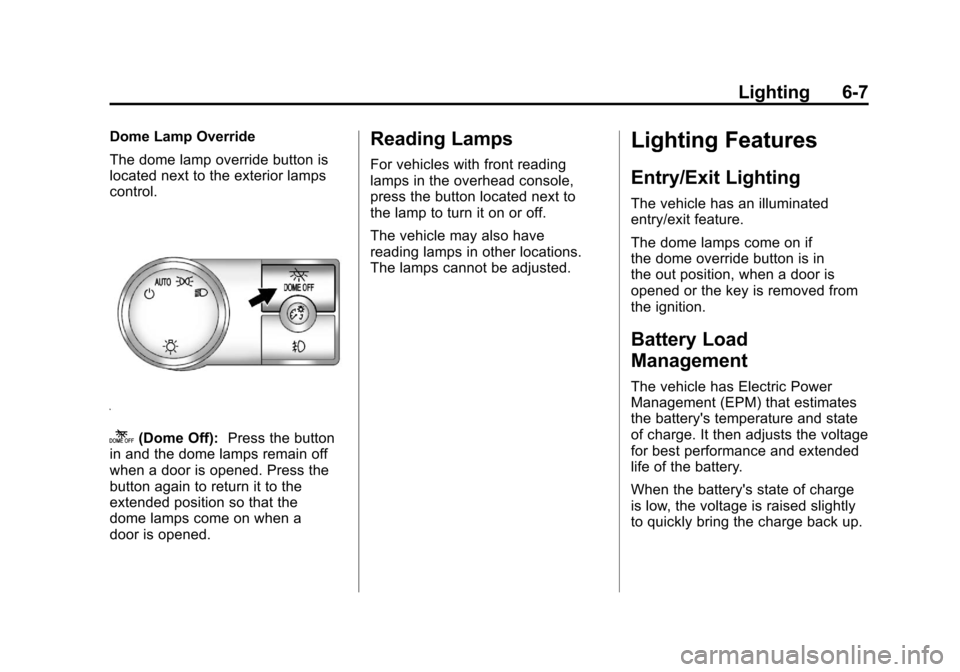
Dome Lamp Override
The dome lamp override button is
located next to the exterior lamps
control.
k(Dome Off):Press the button
in and the dome lamps remain off
when a door is opened. Press the
button again to return it to the
extended position so that the
dome lamps come on when a
door is opened.
Reading Lamps
For vehicles with front reading
lamps in the overhead console,
press the button located next to
the lamp to turn it on or off.
The vehicle may also have
reading lamps in other locations.
The lamps cannot be adjusted.
Lighting Features
Entry/Exit Lighting
The vehicle has an illuminated
entry/exit feature.
The dome lamps come on if
the dome override button is in
the out position, when a door is
opened or the key is removed from
the ignition.
Battery Load
Management
The vehicle has Electric Power
Management (EPM) that estimates
the battery's temperature and state
of charge. It then adjusts the voltage
for best performance and extended
life of the battery.
When the battery's state of charge
is low, the voltage is raised slightly
to quickly bring the charge back up.