lock CHEVROLET AVALANCHE 2011 2.G Workshop Manual
[x] Cancel search | Manufacturer: CHEVROLET, Model Year: 2011, Model line: AVALANCHE, Model: CHEVROLET AVALANCHE 2011 2.GPages: 528, PDF Size: 7.65 MB
Page 139 of 528
Black plate (7,1)Chevrolet Avalanche Owner Manual - 2011
Storage 4-7
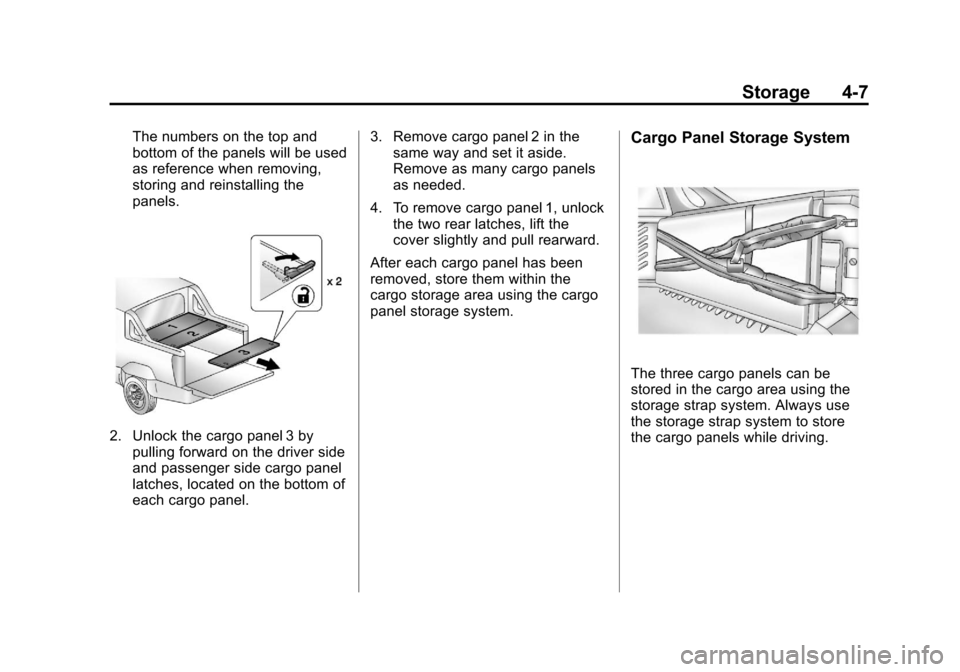
The numbers on the top and
bottom of the panels will be used
as reference when removing,
storing and reinstalling the
panels.
2. Unlock the cargo panel 3 bypulling forward on the driver side
and passenger side cargo panel
latches, located on the bottom of
each cargo panel. 3. Remove cargo panel 2 in the
same way and set it aside.
Remove as many cargo panels
as needed.
4. To remove cargo panel 1, unlock the two rear latches, lift the
cover slightly and pull rearward.
After each cargo panel has been
removed, store them within the
cargo storage area using the cargo
panel storage system.
Cargo Panel Storage System
The three cargo panels can be
stored in the cargo area using the
storage strap system. Always use
the storage strap system to store
the cargo panels while driving.
Page 140 of 528
Black plate (8,1)Chevrolet Avalanche Owner Manual - 2011
4-8 Storage
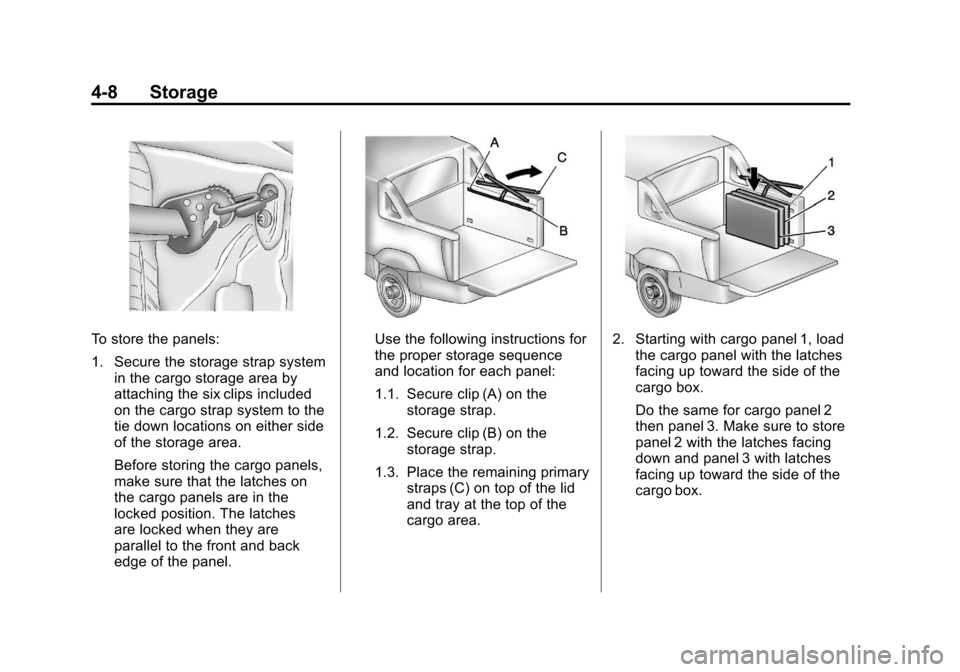
To store the panels:
1. Secure the storage strap systemin the cargo storage area by
attaching the six clips included
on the cargo strap system to the
tie down locations on either side
of the storage area.
Before storing the cargo panels,
make sure that the latches on
the cargo panels are in the
locked position. The latches
are locked when they are
parallel to the front and back
edge of the panel.Use the following instructions for
the proper storage sequence
and location for each panel:
1.1. Secure clip (A) on the
storage strap.
1.2. Secure clip (B) on the storage strap.
1.3. Place the remaining primary straps (C) on top of the lid
and tray at the top of the
cargo area.2. Starting with cargo panel 1, loadthe cargo panel with the latches
facing up toward the side of the
cargo box.
Do the same for cargo panel 2
then panel 3. Make sure to store
panel 2 with the latches facing
down and panel 3 with latches
facing up toward the side of the
cargo box.
Page 141 of 528
Black plate (9,1)Chevrolet Avalanche Owner Manual - 2011
Storage 4-9
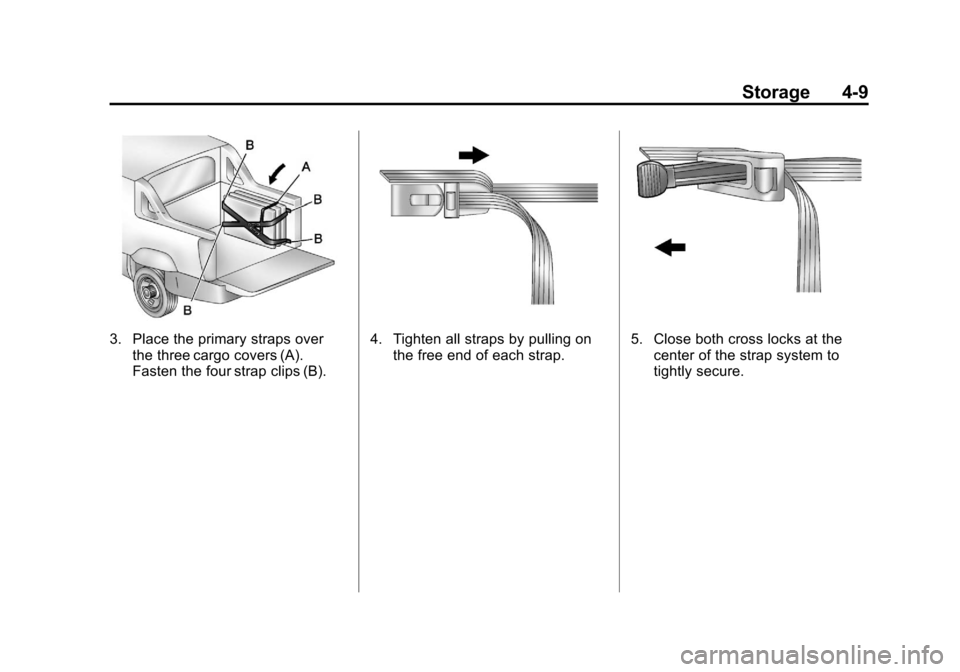
3. Place the primary straps overthe three cargo covers (A).
Fasten the four strap clips (B).4. Tighten all straps by pulling onthe free end of each strap.5. Close both cross locks at thecenter of the strap system to
tightly secure.
Page 142 of 528
Black plate (10,1)Chevrolet Avalanche Owner Manual - 2011
4-10 Storage
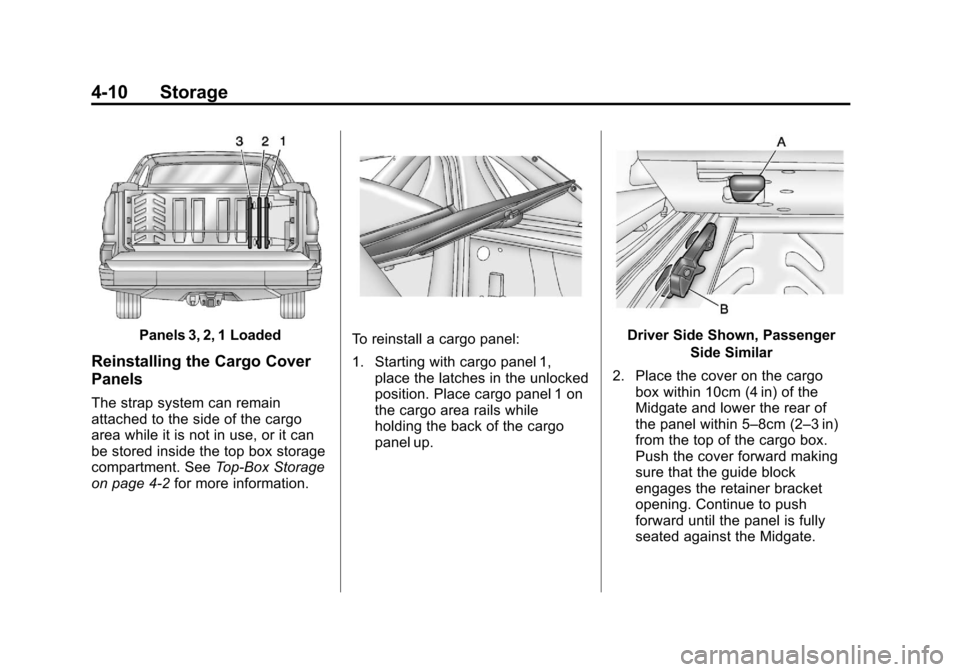
Panels 3, 2, 1 Loaded
Reinstalling the Cargo Cover
Panels
The strap system can remain
attached to the side of the cargo
area while it is not in use, or it can
be stored inside the top box storage
compartment. SeeTop-Box Storage
on page 4‑2 for more information.
To reinstall a cargo panel:
1. Starting with cargo panel 1,
place the latches in the unlocked
position. Place cargo panel 1 on
the cargo area rails while
holding the back of the cargo
panel up.Driver Side Shown, Passenger
Side Similar
2. Place the cover on the cargo box within 10cm (4 in) of the
Midgate and lower the rear of
the panel within 5–8cm (2–3 in)
from the top of the cargo box.
Push the cover forward making
sure that the guide block
engages the retainer bracket
opening. Continue to push
forward until the panel is fully
seated against the Midgate.
Page 143 of 528
Black plate (11,1)Chevrolet Avalanche Owner Manual - 2011
Storage 4-11
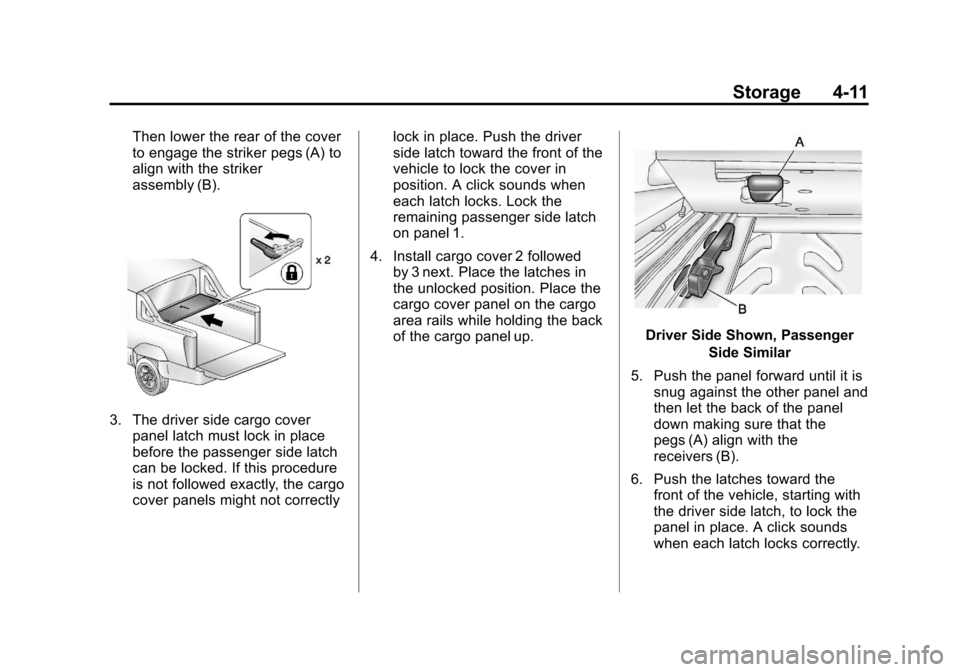
Then lower the rear of the cover
to engage the striker pegs (A) to
align with the striker
assembly (B).
3. The driver side cargo coverpanel latch must lock in place
before the passenger side latch
can be locked. If this procedure
is not followed exactly, the cargo
cover panels might not correctly lock in place. Push the driver
side latch toward the front of the
vehicle to lock the cover in
position. A click sounds when
each latch locks. Lock the
remaining passenger side latch
on panel 1.
4. Install cargo cover 2 followed by 3 next. Place the latches in
the unlocked position. Place the
cargo cover panel on the cargo
area rails while holding the back
of the cargo panel up.
Driver Side Shown, Passenger
Side Similar
5. Push the panel forward until it is snug against the other panel and
then let the back of the panel
down making sure that the
pegs (A) align with the
receivers (B).
6. Push the latches toward the front of the vehicle, starting with
the driver side latch, to lock the
panel in place. A click sounds
when each latch locks correctly.
Page 146 of 528
Black plate (14,1)Chevrolet Avalanche Owner Manual - 2011
4-14 Storage
Do not exceed the maximum vehicle
capacity when loading the vehicle.
For more information on vehicle
capacity and loading, seeVehicle
Load Limits on page 9‑24.
.If small heavy objects are
placed on the roof, cut a piece of
3/8 inch plywood to fit inside the
crossrails and siderails to spread
the load. Tie the plywood to the
siderail supports.
.Tie the load and secure it
to the crossrails or the siderail
supports. Use the crossrails only
to keep the load from sliding.
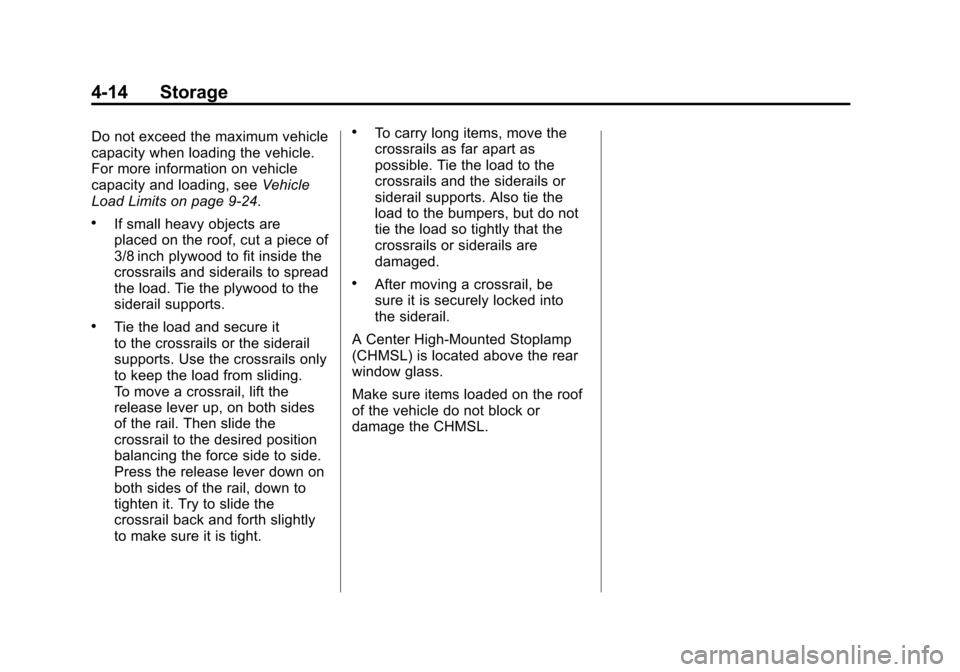
To move a crossrail, lift the
release lever up, on both sides
of the rail. Then slide the
crossrail to the desired position
balancing the force side to side.
Press the release lever down on
both sides of the rail, down to
tighten it. Try to slide the
crossrail back and forth slightly
to make sure it is tight.
.To carry long items, move the
crossrails as far apart as
possible. Tie the load to the
crossrails and the siderails or
siderail supports. Also tie the
load to the bumpers, but do not
tie the load so tightly that the
crossrails or siderails are
damaged.
.After moving a crossrail, be
sure it is securely locked into
the siderail.
A Center High-Mounted Stoplamp
(CHMSL) is located above the rear
window glass.
Make sure items loaded on the roof
of the vehicle do not block or
damage the CHMSL.
Page 147 of 528
Black plate (1,1)Chevrolet Avalanche Owner Manual - 2011
Instruments and Controls 5-1
Instruments and
Controls
Controls
Steering Wheel Adjustment . . . 5-2
Steering Wheel Controls . . . . . . 5-3
Horn . . . . . . . . . . . . . . . . . . . . . . . . . . 5-5
Windshield Wiper/Washer . . . . . 5-5
Compass . . . . . . . . . . . . . . . . . . . . . 5-6
Clock . . . . . . . . . . . . . . . . . . . . . . . . . 5-8
Power Outlets . . . . . . . . . . . . . . . . . 5-9
Cigarette Lighter . . . . . . . . . . . . . . 5-9
Ashtrays . . . . . . . . . . . . . . . . . . . . . 5-10
Warning Lights, Gauges, and
Indicators
Warning Lights, Gauges, andIndicators . . . . . . . . . . . . . . . . . . 5-10
Instrument Cluster . . . . . . . . . . . 5-11
Speedometer . . . . . . . . . . . . . . . . 5-12
Odometer . . . . . . . . . . . . . . . . . . . . 5-12
Trip Odometer . . . . . . . . . . . . . . . 5-12
Tachometer . . . . . . . . . . . . . . . . . . 5-12
Fuel Gauge . . . . . . . . . . . . . . . . . . 5-13 Engine Oil Pressure
Gauge . . . . . . . . . . . . . . . . . . . . . . 5-14
Engine Coolant Temperature Gauge . . . . . . . . . . . . . . . . . . . . . . 5-15
Voltmeter Gauge . . . . . . . . . . . . . 5-16
Safety Belt Reminders . . . . . . . 5-16
Airbag Readiness Light . . . . . . 5-18
Passenger Airbag Status
Indicator . . . . . . . . . . . . . . . . . . . . 5-18
Charging System Light . . . . . . 5-20
Malfunction Indicator Lamp . . . . . . . . . . . . . 5-20
Brake System Warning Light . . . . . . . . . . . . . . . . . . . . . . . 5-23
Antilock Brake System (ABS) Warning Light . . . . . . . . . . . . . . 5-24
Tow/Haul Mode Light . . . . . . . . 5-24
StabiliTrak
®Indicator Light . . . 5-24
Tire Pressure Light . . . . . . . . . . 5-25
Engine Oil Pressure Light . . . . 5-26
Low Fuel Warning Light . . . . . . 5-26
Security Light . . . . . . . . . . . . . . . . 5-26
High-Beam on Light . . . . . . . . . 5-27
Front Fog Lamp Light . . . . . . . . 5-27
Cruise Control Light . . . . . . . . . 5-27
Information Displays
Driver Information Center (DIC) . . . . . . . . . . . . . . . 5-28
Vehicle Messages
Vehicle Messages . . . . . . . . . . . 5-37
Battery Voltage and ChargingMessages . . . . . . . . . . . . . . . . . . 5-37
Brake System Messages . . . . 5-37
Door Ajar Messages . . . . . . . . . 5-38
Engine Cooling System Messages . . . . . . . . . . . . . . . . . . 5-39
Engine Oil Messages . . . . . . . . 5-40
Engine Power Messages . . . . 5-40
Fuel System Messages . . . . . . 5-41
Key and Lock Messages . . . . . 5-41
Lamp Messages . . . . . . . . . . . . . 5-41
Object Detection System Messages . . . . . . . . . . . . . . . . . . 5-41
Ride Control System Messages . . . . . . . . . . . . . . . . . . 5-42
Airbag System Messages . . . . 5-43
Anti-Theft Alarm System Messages . . . . . . . . . . . . . . . . . . 5-43
Tire Messages . . . . . . . . . . . . . . . 5-44
Transmission Messages . . . . . 5-45
Vehicle Reminder Messages . . . . . . . . . . . . . . . . . . 5-45
Washer Fluid Messages . . . . . 5-46
Page 148 of 528
Black plate (2,1)Chevrolet Avalanche Owner Manual - 2011
5-2 Instruments and Controls
Vehicle Personalization
Vehicle Personalization(With DIC Buttons) . . . . . . . . . 5-47
Universal Remote System
Universal Remote System . . . 5-56
Universal Remote SystemProgramming . . . . . . . . . . . . . . . 5-56
Universal Remote System Operation . . . . . . . . . . . . . . . . . . 5-62
Controls
Steering Wheel
Adjustment
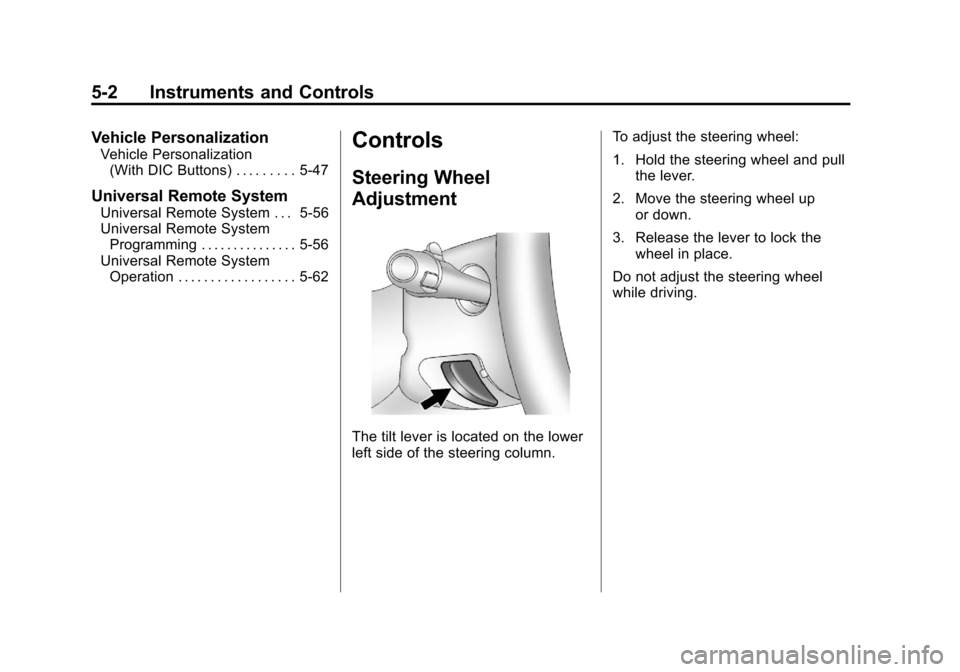
The tilt lever is located on the lower
left side of the steering column. To adjust the steering wheel:
1. Hold the steering wheel and pull
the lever.
2. Move the steering wheel up or down.
3. Release the lever to lock the wheel in place.
Do not adjust the steering wheel
while driving.
Page 151 of 528
Black plate (5,1)Chevrolet Avalanche Owner Manual - 2011
Instruments and Controls 5-5
For vehicles with a navigation
system:
1. Press and hold
¨until a beep is
heard, to place the radio into
SCAN mode. A station will play
for five seconds before moving
to the next station.
2. To stop the SCAN function, press
¨again.
While listening to a CD/DVD, press
and hold
¨to quickly move forward
through the tracks. Release to stop
on the desired track.
+
e−e(Volume): Press to
increase or to decrease the volume.
Horn
To sound the horn, press the center
pad on the steering wheel.
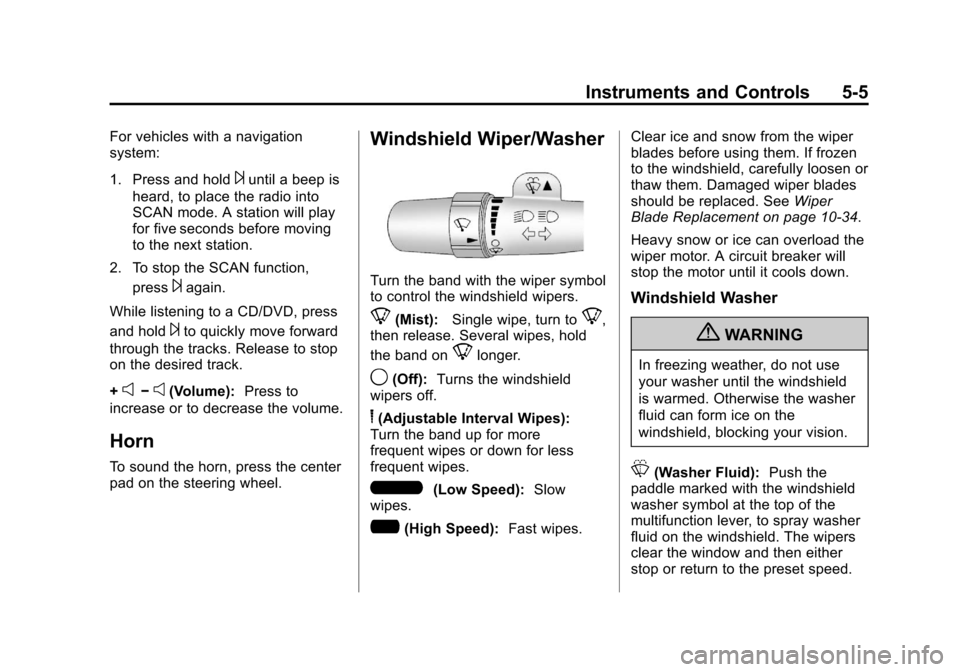
Windshield Wiper/Washer
Turn the band with the wiper symbol
to control the windshield wipers.
8(Mist): Single wipe, turn to8,
then release. Several wipes, hold
the band on
8longer.
9(Off): Turns the windshield
wipers off.
6(Adjustable Interval Wipes):
Turn the band up for more
frequent wipes or down for less
frequent wipes.
6(Low Speed): Slow
wipes.
?(High Speed): Fast wipes. Clear ice and snow from the wiper
blades before using them. If frozen
to the windshield, carefully loosen or
thaw them. Damaged wiper blades
should be replaced. See
Wiper
Blade Replacement on page 10‑34.
Heavy snow or ice can overload the
wiper motor. A circuit breaker will
stop the motor until it cools down.
Windshield Washer
{WARNING
In freezing weather, do not use
your washer until the windshield
is warmed. Otherwise the washer
fluid can form ice on the
windshield, blocking your vision.
L(Washer Fluid): Push the
paddle marked with the windshield
washer symbol at the top of the
multifunction lever, to spray washer
fluid on the windshield. The wipers
clear the window and then either
stop or return to the preset speed.
Page 154 of 528
Black plate (8,1)Chevrolet Avalanche Owner Manual - 2011
5-8 Instruments and Controls
3. Press the set/reset button tostart the compass calibration.
Or, if the vehicle does not have
DIC buttons, press and hold the
trip odometer reset stem for
two seconds to start the
compass calibration.
4. The DIC will display CALIBRATING: DRIVE IN
CIRCLES. Drive the vehicle in
tight circles at less than
8 km/h (5 mph) to complete the
calibration. The DIC will display
CALIBRATION COMPLETE for
a few seconds when the
calibration is complete.
The DIC display will then
return to the previous menu.Clock
To set the time and date:
1. Turn the ignition key to ACC/ACCESSORY or ON/RUN, then
press the
Obutton to turn the
radio on.
2. Press the
Hbutton to display
HR, MIN, MM, DD, YYYY (hour,
minute, month, day, and year).
3. Press the softkey located under any one of the tabs to change
that setting.
4. To increase the time or date, do one of the following:
.Press the softkey below the
selected tab.
.Press the¨SEEK button.
.Press the\FWD button.
.Turn thefknob clockwise. 5. To decrease the time or date, do
one of the following:
.Press the©SEEK button.
.Press thesREV button.
.Turn thefknob
counterclockwise.
To change the time default setting
from 12 hour to 24 hour or to change
the date default setting from
month/day/year to day/month/year:
1. Press the
Hbutton and then
the softkey located below the
forward arrow tab. 12H, 24H, the
date MM/DD (month and day),
and DD/MM/ (day and month)
displays.
2. Press the softkey located below the desired option.
3. Press the
Hbutton again to
apply the desired option, or let
the screen time out.