service CHEVROLET AVALANCHE 2011 2.G Workshop Manual
[x] Cancel search | Manufacturer: CHEVROLET, Model Year: 2011, Model line: AVALANCHE, Model: CHEVROLET AVALANCHE 2011 2.GPages: 528, PDF Size: 7.65 MB
Page 329 of 528
Black plate (51,1)Chevrolet Avalanche Owner Manual - 2011
Driving and Operating 9-51
AUTO (Automatic Four-Wheel
Drive):This setting is ideal for use
when road surface traction
conditions are variable. When
driving the vehicle in AUTO, the
front axle is engaged, and the
vehicle's power is sent to the front
and rear wheels automatically
based on driving conditions. Driving
in this mode results in slightly lower
fuel economy than Two-Wheel
Drive High.
4
m(Four-Wheel Drive High): Use
the Four-Wheel Drive High position
when you need extra traction, such
as on snowy or icy roads or in most
off-road situations. This setting also
engages the front axle to help drive
the vehicle. This is the best setting
to use when plowing snow. Service Four‐Wheel Drive
If the SERVICE 4 WHEEL DRIVE
message stays on, you should take
the vehicle to your dealer for
service. See
“SERVICE 4 WHEEL
DRIVE” message under
Transmission Messages on
page 5‑45.
Shifting Into Four-Wheel Drive
High or AUTO (Automatic
Four-Wheel Drive)
Turn the knob to the Four-Wheel
Drive High or AUTO position.
This can be done at any speed.
The indicator light will flash while
shifting. It will remain on when the
shift is completed. Shifting Into Two-Wheel
Drive High
Turn the knob to the Two-Wheel
Drive High position. This can be
done at any speed. The indicator
light will flash while shifting. It will
remain on when the shift is
completed.
Excessively shifting the transfer
case into or out of the different
modes may cause the transfer case
to enter the shift protection mode.
This will protect the transfer case
from possible damage and will only
allow the transfer case to respond to
one shift per 10 seconds. The
transfer case may stay in this mode
for up to three minutes.
Page 332 of 528
Black plate (54,1)Chevrolet Avalanche Owner Manual - 2011
9-54 Driving and Operating
Ride Control Systems
StabiliTrak®System
The vehicle has a vehicle stability
enhancement system called
StabiliTrak. It is an advanced
computer-controlled system that
assists the driver with directional
control of the vehicle in difficult
driving conditions.
StabiliTrak activates when the
computer senses a discrepancy
between the intended path and the
direction the vehicle is actually
traveling. StabiliTrak selectively
applies braking pressure at any one
of the vehicle's brakes to assist the
driver with keeping the vehicle on
the intended path.
When the vehicle is started and
begins to move, the system
performs several diagnostic checks
to insure there are no problems.The system may be heard or felt
while it is working. This is normal
and does not mean there is a
problem with the vehicle. The
system should initialize before the
vehicle reaches 32 km/h (20 mph).
In some cases, it may take
approximately 3.2 km (2 miles) of
driving before the system initializes.
If cruise control is being used when
StabiliTrak activates, the cruise
control automatically disengages.
The cruise control can be
re-engaged when road conditions
allow. See
Cruise Control on
page 9‑58.
If the system fails to turn on or
activate, the StabiliTrak light along
with one of the following messages
will be displayed on the Driver
Information Center (DIC):
TRACTION CONTROL OFF,
SERVICE TRACTION CONTROL, STABILITRAK OFF, SERVICE
STABILITRAK. If these DIC
messages appear, make sure the
StabiliTrak system has not been
turned off using the StabiliTrak
on/off button. Then turn the vehicle
off, wait 15 seconds, and then turn it
back on again to reset the system.
If any of these messages still
appear on the Driver Information
Center (DIC), the vehicle should be
taken in for service. For more
information on the DIC messages,
see
Driver Information Center (DIC)
on page 5‑28.
The StabiliTrak light will flash on the
instrument panel cluster when the
system is both on and activated.
The system may be heard or felt
while it is working; this is normal.
Page 334 of 528
Black plate (56,1)Chevrolet Avalanche Owner Manual - 2011
9-56 Driving and Operating
If traction control is turned off, only
the brake-traction control portion of
traction control will work. The
engine speed management will be
disabled. In this mode, engine
power is not reduced automatically
and the driven wheels can spin
more freely. This can cause the
brake-traction control to activate
constantly.
Notice:If the wheel(s) of one axle
is allowed to spin excessively
while the StabiliTrak
®, ABS, brake
warning lights, and any relevant
DIC messages are displayed, the
transfer case could be damaged.
The repairs would not be covered
by the vehicle warranty. Reduce
engine power and do not spin the
wheel(s) excessively while these
lights and messages are
displayed. The traction control system may
activate on dry or rough roads or
under conditions such as heavy
acceleration while turning or
abrupt upshifts/downshifts of the
transmission.
When this happens, a reduction in
acceleration may be noticed, or a
noise or vibration may be heard.
This is normal.
If cruise control is being used when
the system activates, the StabiliTrak
light will flash and cruise control will
automatically disengage. Cruise
control may be reengaged when
road conditions allow. See
Cruise
Control on page 9‑58. StabiliTrak may also turn off
automatically if it determines that a
problem exists with the system.
If the problem does not clear itself
after restarting the vehicle, see your
dealer for service.
Locking Rear Axle
Vehicles with a locking rear axle can
give more traction on snow, mud,
ice, sand, or gravel. It works like a
standard axle most of the time, but
when traction is low, this feature will
allow the rear wheel with the most
traction to move the vehicle.
Page 339 of 528
Black plate (61,1)Chevrolet Avalanche Owner Manual - 2011
Driving and Operating 9-61
How the System Works
URPA comes on automatically when
the shift lever is moved into
R (Reverse). A single tone sounds
to indicate the system is working.
URPA operates only at speeds less
than 8 km/h (5 mph).
An obstacle is indicated by audible
beeps. The interval between the
beeps becomes shorter as the
vehicle gets closer to the obstacle.
When the distance is less than
30 cm (12 in) the beeps are
continuous.
To be detected, objects must be at
least 25.4 cm (10 in) off the ground
and below tailgate level. Objects
must also be within 2.5 m (8 ft) from
the rear bumper. This distance may
be less during warmer or humid
weather.
The system can be disabled by
pressing the rear park aid disable
button located next to the radio.
The indicator light comes on and
PARK ASSIST OFF displays on the
Driver Information Center (DIC) to
indicate that URPA is off; seeObject
Detection System Messages on
page 5‑41.
Notice: If you use URPA while the
tailgate is lowered, it may not
detect an object behind your
vehicle, and you might back into
the object and damage your
vehicle. Always verify the tailgate
is closed when using URPA or
turn off URPA when driving with
the tailgate lowered.
When the System Does Not
Seem to Work Properly
The following messages may be
displayed on the DIC:
SERVICE PARK ASSIST: If this
message occurs, take the vehicle to
your dealer to repair the system.
PARK ASSIST OFF: This message
occurs if the driver disables the
system.
Page 344 of 528
Black plate (66,1)Chevrolet Avalanche Owner Manual - 2011
9-66 Driving and Operating
Rear Vision Camera Error
Messages
Service Rear Vision Camera
System:This message can display
when the system is not receiving
information it requires from other
vehicle systems.
If any other problem occurs or if a
problem persists, see your dealer.
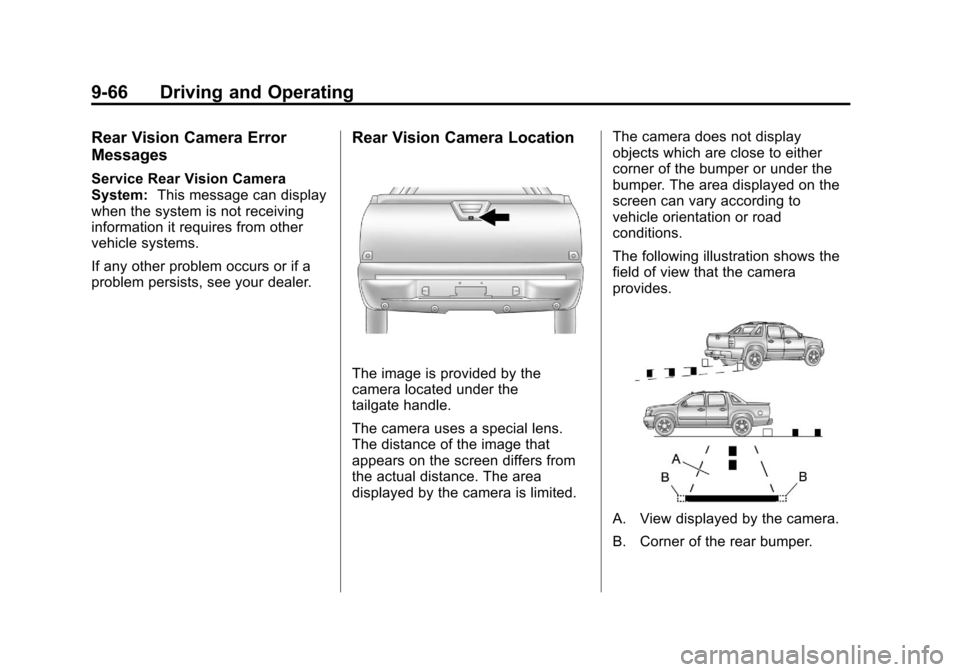
Rear Vision Camera Location
The image is provided by the
camera located under the
tailgate handle.
The camera uses a special lens.
The distance of the image that
appears on the screen differs from
the actual distance. The area
displayed by the camera is limited. The camera does not display
objects which are close to either
corner of the bumper or under the
bumper. The area displayed on the
screen can vary according to
vehicle orientation or road
conditions.
The following illustration shows the
field of view that the camera
provides.
A. View displayed by the camera.
B. Corner of the rear bumper.
Page 346 of 528
Black plate (68,1)Chevrolet Avalanche Owner Manual - 2011
9-68 Driving and Operating
Fuel
Use of the recommended fuel is an
important part of the proper
maintenance of this vehicle. To help
keep the engine clean and maintain
optimum vehicle performance, we
recommend the use of gasoline
advertised as TOP TIER Detergent
Gasoline.
Look for the TOP TIER label on the
fuel pump to ensure gasoline meets
enhanced detergency standards
developed by auto companies. A list
of marketers providing TOP TIER
Detergent Gasoline can be found at
www.toptiergas.com.
Vehicles that have a FlexFuel badge
and a yellow fuel cap can use either
unleaded gasoline or ethanol fuel
containing up to 85% ethanol (E85).
SeeFuel E85 (85% Ethanol) on
page 9‑70. For all other vehicles,
use only the unleaded gasoline
described under Recommended
Fuel on page 9‑68.
Recommended Fuel
Use regular unleaded gasoline with
a posted octane rating of 87 or
higher. If the octane rating is less
than 87, an audible knocking noise,
commonly referred to as spark
knock, might be heard when driving.
If this occurs, use a gasoline rated
at 87 octane or higher as soon as
possible. If heavy knocking is heard
when using gasoline rated at
87 octane or higher, the engine
needs service.
Page 348 of 528
Black plate (70,1)Chevrolet Avalanche Owner Manual - 2011
9-70 Driving and Operating
For customers who do not use TOP
TIER Detergent Gasoline regularly,
one bottle of GM Fuel System
Treatment PLUS, added to the fuel
tank at every engine oil change, can
help clean deposits from fuel
injectors and intake valves. GM Fuel
System Treatment PLUS is the only
gasoline additive recommended by
General Motors. It is available at
your dealer.
Gasolines containing oxygenates,
such as ethers and ethanol, and
reformulated gasolines might be
available in your area. We
recommend that you use these
gasolines, if they comply with the
specifications described earlier.
However, E85 (85% ethanol) and
other fuels containing more than
10% ethanol must not be used in
vehicles that were not designed for
those fuels.Notice:
This vehicle was not
designed for fuel that contains
methanol. Do not use fuel
containing methanol. It can
corrode metal parts in the fuel
system and also damage plastic
and rubber parts. That damage
would not be covered under the
vehicle warranty.
Some gasolines that are not
reformulated for low emissions can
contain an octane-enhancing
additive called
methylcyclopentadienyl
manganese tricarbonyl (MMT);
ask the attendant where you buy
gasoline whether the fuel contains
MMT. We recommend against the
use of such gasolines. Fuels
containing MMT can reduce the life
of spark plugs and the performance
of the emission control system could
be affected. The malfunction
indicator lamp might turn on. If this
occurs, return to your dealer for
service.Fuel E85 (85% Ethanol)
Vehicles that have a FlexFuel badge
and a yellow fuel cap can use either
unleaded gasoline or ethanol fuel
containing up to 85% ethanol (E85).
For all other vehicles, use only the
unleaded gasoline described under
Recommended Fuel on page 9‑68.
We encourage the use of E85 in
vehicles that are designed to use it.
The ethanol in E85 is a “renewable”
fuel, meaning it is made from
renewable sources such as corn
and other crops.
Many service stations will not have
an 85% ethanol fuel (E85) pump
available. The U.S. Department of
Energy has an alternative fuels
website (www.afdc.energy.gov/afdc/
locator/stations/) that can help you
find E85 fuel. Those stations that do
have E85 should have a label
indicating ethanol content. Do not
use the fuel if the ethanol content is
greater than 85%.
Page 357 of 528
Black plate (79,1)Chevrolet Avalanche Owner Manual - 2011
Driving and Operating 9-79
Leaving After Parking on a Hill
1. Apply and hold the brake pedal.
2. Start the engine.
3. Shift into a gear.
4. Release the parking brake.
5. Let up on the brake pedal.
6. Drive slowly until the trailer isclear of the chocks.
7. Stop and have someone pick up and store the chocks.
Maintenance When Trailer
Towing
The vehicle needs service more
often when pulling a trailer. See this
manual's Maintenance Schedule or
Index for more information. Things
that are especially important in
trailer operation are automatic
transmission fluid, engine oil, axle
lubricant, belts, cooling system and
brake system. It is a good idea to
inspect these before and during
the trip. Check periodically to see that all
hitch nuts and bolts are tight.
Trailer Towing
Do not tow a trailer during break‐in.
See
New Vehicle Break-In on
page 9‑30 for more information.
{WARNING
The driver can lose control when
pulling a trailer if the correct
equipment is not used or the
vehicle is not driven properly.
For example, if the trailer is too
heavy, the brakes may not work
well—or even at all. The driver
and passengers could be
seriously injured. The vehicle may
also be damaged; the resulting
repairs would not be covered by
the vehicle warranty. Pull a trailer
only if all the steps in this section
have been followed.
(Continued)
WARNING (Continued)
Ask your dealer for advice and
information about towing a trailer
with the vehicle.
Notice: Pulling a trailer
improperly can damage the
vehicle and result in costly
repairs not covered by the
vehicle warranty. To pull a trailer
correctly, follow the advice in this
section and see your dealer for
important information about
towing a trailer with the vehicle.
To identify the trailering capacity of
the vehicle, read the information in
“Weight of the Trailer” that appears
later in this section.
Page 363 of 528
Black plate (85,1)Chevrolet Avalanche Owner Manual - 2011
Driving and Operating 9-85
Trailer Brakes
A loaded trailer that weighs more
than 900 kg (2,000 lbs) needs to
have its own brake system that is
adequate for the weight of the
trailer. Be sure to read and follow
the instructions for the trailer brakes
so they are installed, adjusted and
maintained properly.
Since the vehicle is equipped with
StabiliTrak, the trailer brakes cannot
tap into the vehicle's hydraulic
system.
Trailer Wiring Harness
Heavy-Duty Trailer Wiring Harness
Package
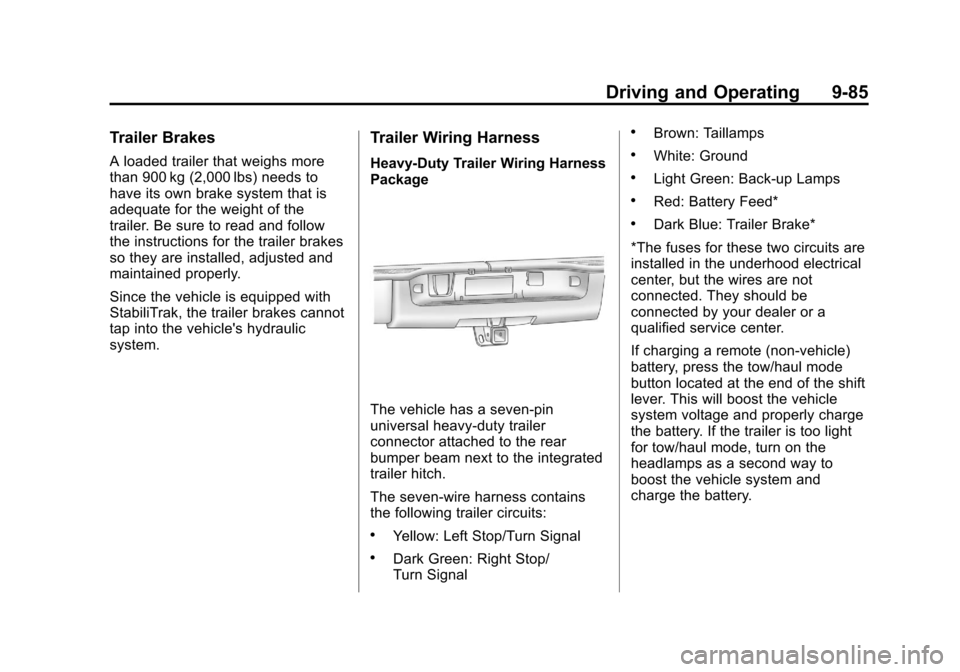
The vehicle has a seven-pin
universal heavy-duty trailer
connector attached to the rear
bumper beam next to the integrated
trailer hitch.
The seven-wire harness contains
the following trailer circuits:
.Yellow: Left Stop/Turn Signal
.Dark Green: Right Stop/
Turn Signal
.Brown: Taillamps
.White: Ground
.Light Green: Back-up Lamps
.Red: Battery Feed*
.Dark Blue: Trailer Brake*
*The fuses for these two circuits are
installed in the underhood electrical
center, but the wires are not
connected. They should be
connected by your dealer or a
qualified service center.
If charging a remote (non-vehicle)
battery, press the tow/haul mode
button located at the end of the shift
lever. This will boost the vehicle
system voltage and properly charge
the battery. If the trailer is too light
for tow/haul mode, turn on the
headlamps as a second way to
boost the vehicle system and
charge the battery.
Page 364 of 528
Black plate (86,1)Chevrolet Avalanche Owner Manual - 2011
9-86 Driving and Operating
Electric Brake Control Wiring
Provisions
These wiring provisions are
included with the vehicle as part of
the trailer wiring package. These
provisions are for an electric brake
controller. The instrument panel
contains blunt cut wires near the
data link connector for the trailer
brake controller. The harness
contains the following wires:
.Dark Blue: Brake Signal to
Trailer Connector
.Red/Black: Battery
.Light Blue/White: Brake Switch
.White: Ground
It should be installed by your dealer
or a qualified service center.
If the vehicle is equipped with an
ITBC, the blunt cuts exist, but are
not connected further in the
harness. If an aftermarket trailer
brake controller is installed, the
ITBC must be disconnected. Do not power both ITBC and
aftermarket controllers to control the
trailer brakes at the same time.
Tow/Haul Mode
Pressing this button at the end of
the shift lever turns on and off the
tow/haul mode.
This indicator light on the instrument
panel cluster comes on when the
tow/haul mode is on.
Tow/Haul is a feature that assists
when pulling a heavy trailer or a
large or heavy load. See
Tow/Haul
Mode on page 9‑43 for more
information.
Tow/Haul is designed to be most
effective when the vehicle and
trailer combined weight is at least
75 percent of the vehicle's Gross
Combined Weight Rating (GCWR).
See “Weight of the Trailer” inTrailer
Towing on page 9‑79. Tow/Haul is
most useful under the following
driving conditions:
.When pulling a heavy trailer or a
large or heavy load through
rolling terrain.
.When pulling a heavy trailer or a
large or heavy load in stop and
go traffic.
.When pulling a heavy trailer or a
large or heavy load in busy
parking lots where improved low
speed control of the vehicle is
desired.