air conditioning CHEVROLET AVALANCHE 2012 2.G User Guide
[x] Cancel search | Manufacturer: CHEVROLET, Model Year: 2012, Model line: AVALANCHE, Model: CHEVROLET AVALANCHE 2012 2.GPages: 508, PDF Size: 7.78 MB
Page 257 of 508

Black plate (7,1)Chevrolet Avalanche Owner Manual - 2012
Climate Controls 8-7
The air delivery mode setting will be
displayed and the AUTO light turns
off. The fan remains under
automatic control.
H(Vent):Air is directed to the
instrument panel outlets.
)(Bi-Level): Air is divided
between the instrument panel and
floor outlets. Some air is directed
towards the windshield and side
window outlets.
6(Floor): Air is directed to the
floor outlets, with some to the
windshield, side window outlets, and
second row floor outlets. In this
mode, the system automatically
selects outside air.
-(Defog): This mode clears the
windows of fog or moisture. Air is
directed to the windshield, floor
outlets, and side window vents. In
this mode, the system turns off
recirculation and runs the air
conditioning compressor unless the
outside temperature is close to freezing. The recirculation mode
cannot be selected while in the
defrost mode.
0(Defrost):
This mode removes
fog or frost from the windshield
more quickly. Air is directed to the
windshield and side window vents,
with some directed to the floor
vents. In this mode, the system
automatically forces outside air into
the vehicle and runs the air
conditioning compressor unless the
outside temperature is close to
freezing. The recirculation mode
cannot be selected while in the
defrost mode.
The passenger temperature control
cannot be activated while in defrost
mode. If the PASS button is
pressed, the button indicator flashes
three times and will not work. If the
passenger temperature buttons are
adjusted, the driver temperature
indicator changes. The passenger
temperature will not be displayed. If vent, bi-level, or floor mode is
selected again, the climate control
system displays the previous
temperature settings.
Do not drive the vehicle until all the
windows are clear.
#(Air Conditioning):
Press to
turn the air conditioning (A/C)
compressor on and off. An indicator
light comes on to show that the air
conditioning is on.
If this button is pressed when the air
conditioning compressor is
unavailable, the indicator flashes
three times and then turns off. If the
air conditioning is on and the
outside temperature drops below a
temperature which is too cool for air
conditioning to be effective, the air
conditioning light turns off to show
that the air conditioning mode has
been canceled.
Page 258 of 508
Black plate (8,1)Chevrolet Avalanche Owner Manual - 2012
8-8 Climate Controls
On hot days, open the windows long
enough to let hot inside air escape.
This helps to reduce the time it
takes for the vehicle to cool down.
It also helps the system to operate
more efficiently.
The air conditioning system
removes moisture from the air, so a
small amount of water might drip
under the vehicle while idling or
after turning off the engine. This is
normal.
@(Recirculation):Press to turn
the recirculation mode on. An
indicator light comes on to show
that the recirculation is on.
This mode recirculates and helps
to quickly cool the air inside the
vehicle. It can be used to help
prevent outside air and odors from
entering the vehicle.
The recirculation mode cannot be
used with floor, defog, or defrost
modes. If recirculation is selected
with one of those modes, the indicator light flashes three
times and then turns off. The air
conditioning compressor also comes
on when this mode is activated.
While in recirculation mode the
windows may fog when the weather
is cold and damp. To clear the fog,
select either the defog or defrost
mode and increase the fan speed.
The recirculation mode can be
turned off by pressing the outside
air button, or by turning off the
ignition.;(Outside Air):
Press to turn the
outside air mode on. An indicator
light on the button comes on to
show that outside is on. Air from
outside the vehicle is circulated
throughout the vehicle. The outside
air mode can be used with all
modes, but it cannot be used with
the recirculation mode.
Pressing this button again will
cancel the recirculation mode.
Rear Window Defogger
The rear window defogger uses a
warming grid to remove fog from the
rear window.
1(Rear Window Defogger):
Press to turn the rear window
defogger on or off. It automatically
turns off several minutes after it has
been activated. The defogger can
also be turned off by turning off the
engine. Do not drive the vehicle until
all the windows are clear.
Notice: Do not use a razor blade
or sharp object to clear the inside
rear window. Do not adhere
anything to the defogger grid
lines in the rear glass. These
actions may damage the rear
defogger. Repairs would not be
covered by your warranty.
Heated Mirrors: For vehicles with
heated outside rearview mirrors, the
mirrors heat to help clear fog or frost
from the surface of the mirror when
the rear window defog button is
pressed. See Power Mirrors on
page 2‑20.
Page 260 of 508
Black plate (10,1)Chevrolet Avalanche Owner Manual - 2012
8-10 Climate Controls
Air Vents
Use the air outlets located in the
center and on the side of the
instrument panel to adjust the
direction and amount of airflow
inside the vehicle.
Move the louvers up or down to
adjust the direction of the airflow.
Use the thumbwheel next to or
underneath the outlet to adjust the
amount of airflow from the louvers.
Operation Tips
.Keep the hood and front air
inlets free of ice, snow, or any
other obstruction, such as
leaves. The heater and defroster
will work far better, reducing the
chance of fogging the inside of
your windows.
.Keep the air path under the front
seats clear of objects. This helps
air to circulate throughout your
vehicle.
.Adding outside equipment to the
front of your vehicle, such as
hood-air deflectors, etc., may
affect the performance of the
heating and air conditioning
system. Check with your dealer
before adding equipment to the
outside of your vehicle.
Page 368 of 508
Black plate (24,1)Chevrolet Avalanche Owner Manual - 2012
10-24 Vehicle Care
If No Steam Is Coming from
the Engine Compartment
The ENGINE OVERHEATED
STOP ENGINE or the ENGINE
OVERHEATED IDLE ENGINE
message, along with a low coolant
condition, can indicate a serious
problem.
If an engine overheat warning is
displayed but no steam can be seen
or heard, the problem may not be
too serious. Sometimes the engine
can get a little too hot when the
vehicle:
.Climbs a long hill on a hot day.
.Stops after high-speed driving.
.Idles for long periods in traffic.
.Tows a trailer. SeeTrailer
Towing on page 9‑71. If the overheat warning is displayed
with no sign of steam:
1. Turn the air conditioning off.
2. Turn the heater on to the highest
temperature and to the highest
fan speed. Open the windows as
necessary.
3. In heavy traffic, let the engine idle in N (Neutral) while stopped.
If it is safe to do so, pull off
the road, shift to P (Park) or
N (Neutral) and let the
engine idle.
If the temperature overheat gauge
is no longer in the overheat zone or
an overheat warning no longer
displays, the vehicle can be driven.
Continue to drive the vehicle slowly
for about 10 minutes. Keep a safe
vehicle distance from the vehicle in
front. If the warning does not come
back on, continue to drive normally.
If the warning continues, pull over,
stop, and park the vehicle
right away. If there is no sign of steam, idle the
engine for three minutes while
parked. If the warning is still
displayed, turn off the engine until it
cools down. Also, see
“Overheated
Engine Protection Operating Mode”
later in this section.
Overheated Engine
Protection
Operating Mode
If an overheated engine condition
exists and the ENGINE POWER IS
REDUCED message is displayed,
an overheat protection mode which
alternates firing groups of cylinders
helps prevent engine damage. In
this mode, a loss in power and
engine performance will be noticed.
This operating mode allows the
vehicle to be driven to a safe place
in an emergency. Driving extended
distances and/or towing a trailer in
the overheat protection mode
should be avoided.
Page 369 of 508
Black plate (25,1)Chevrolet Avalanche Owner Manual - 2012
Vehicle Care 10-25
Notice:After driving in the
overheated engine protection
operating mode, to avoid engine
damage, allow the engine to cool
before attempting any repair. The
engine oil will be severely
degraded. Repair the cause of
coolant loss, change the oil and
reset the oil life system. See
Engine Oil on page 10‑8.
Engine Fan
The vehicle has electric cooling
fans. The fans spinning at low
speed during most everyday driving
might be heard. The fans can turn
off if no cooling is required. Under
heavy vehicle loading, trailer towing,
and/or high outside temperatures,
or if operating the air conditioning
system, the fans can change to high
speed and an increase in fan noise
might be heard. This is normal and
indicates that the cooling system is
functioning properly. The fans
change to low speed when
additional cooling is no longer
required.
Power Steering Fluid
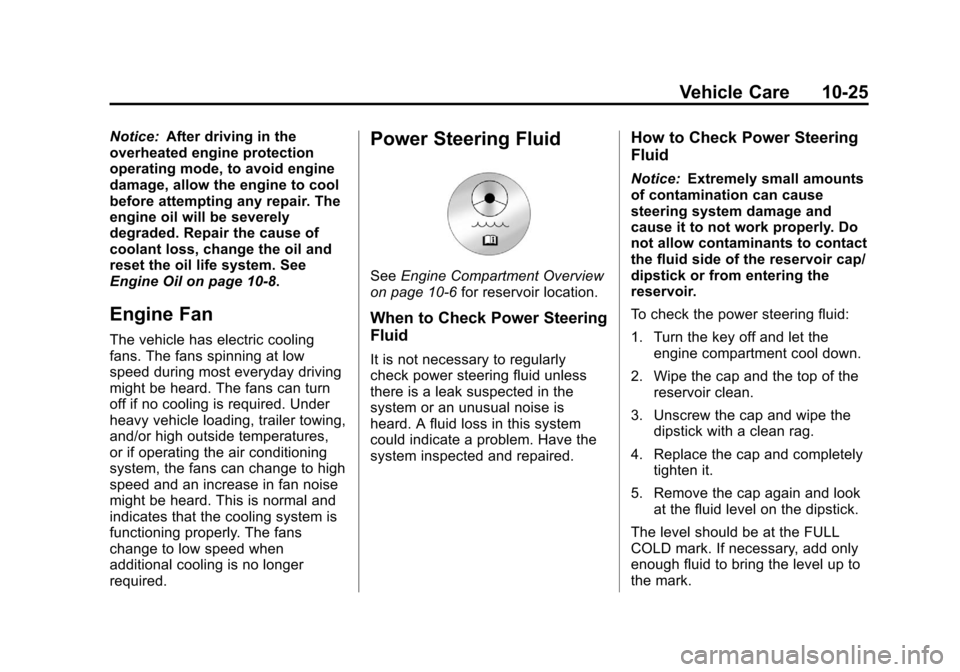
See Engine Compartment Overview
on page 10‑6 for reservoir location.
When to Check Power Steering
Fluid
It is not necessary to regularly
check power steering fluid unless
there is a leak suspected in the
system or an unusual noise is
heard. A fluid loss in this system
could indicate a problem. Have the
system inspected and repaired.
How to Check Power Steering
Fluid
Notice:Extremely small amounts
of contamination can cause
steering system damage and
cause it to not work properly. Do
not allow contaminants to contact
the fluid side of the reservoir cap/
dipstick or from entering the
reservoir.
To check the power steering fluid:
1. Turn the key off and let the engine compartment cool down.
2. Wipe the cap and the top of the reservoir clean.
3. Unscrew the cap and wipe the dipstick with a clean rag.
4. Replace the cap and completely tighten it.
5. Remove the cap again and look at the fluid level on the dipstick.
The level should be at the FULL
COLD mark. If necessary, add only
enough fluid to bring the level up to
the mark.
Page 387 of 508
Black plate (43,1)Chevrolet Avalanche Owner Manual - 2012
Vehicle Care 10-43
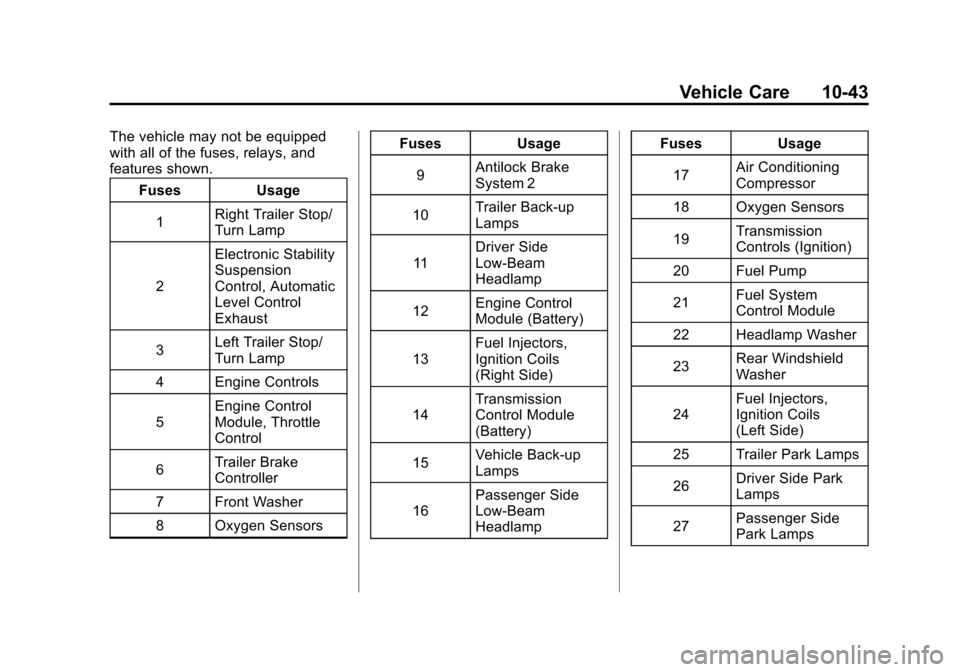
The vehicle may not be equipped
with all of the fuses, relays, and
features shown.Fuses Usage
1 Right Trailer Stop/
Turn Lamp
2 Electronic Stability
Suspension
Control, Automatic
Level Control
Exhaust
3 Left Trailer Stop/
Turn Lamp
4 Engine Controls
5 Engine Control
Module, Throttle
Control
6 Trailer Brake
Controller
7 Front Washer
8 Oxygen Sensors Fuses Usage
9 Antilock Brake
System 2
10 Trailer Back-up
Lamps
11 Driver Side
Low-Beam
Headlamp
12 Engine Control
Module (Battery)
13 Fuel Injectors,
Ignition Coils
(Right Side)
14 Transmission
Control Module
(Battery)
15 Vehicle Back-up
Lamps
16 Passenger Side
Low-Beam
Headlamp Fuses Usage
17 Air Conditioning
Compressor
18 Oxygen Sensors
19 Transmission
Controls (Ignition)
20 Fuel Pump
21 Fuel System
Control Module
22 Headlamp Washer
23 Rear Windshield
Washer
24 Fuel Injectors,
Ignition Coils
(Left Side)
25 Trailer Park Lamps
26 Driver Side Park
Lamps
27 Passenger Side
Park Lamps
Page 389 of 508
Black plate (45,1)Chevrolet Avalanche Owner Manual - 2012
Vehicle Care 10-45
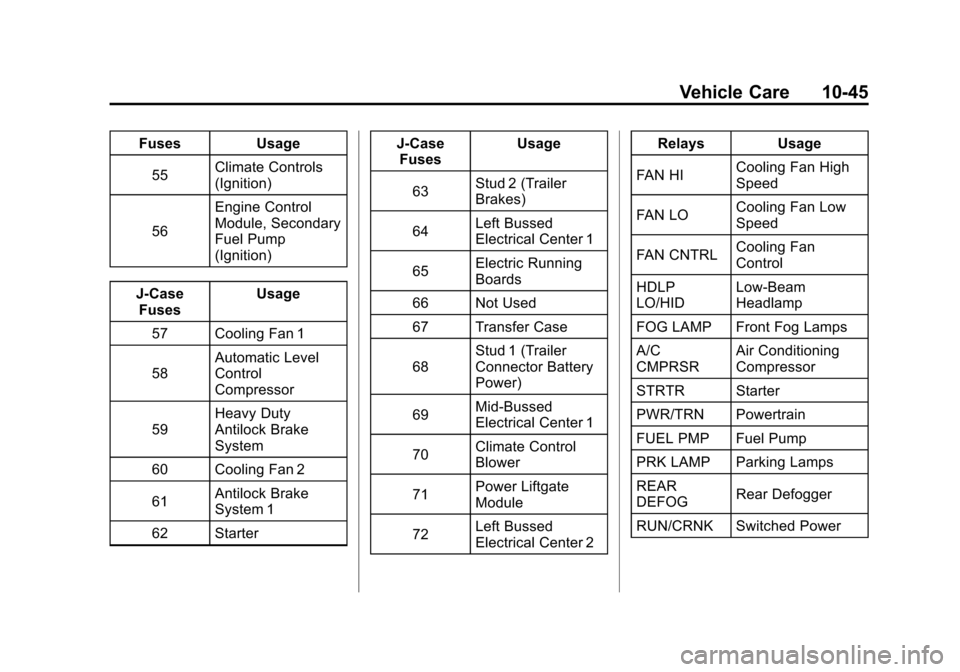
FusesUsage
55 Climate Controls
(Ignition)
56 Engine Control
Module, Secondary
Fuel Pump
(Ignition)
J-Case Fuses Usage
57 Cooling Fan 1
58 Automatic Level
Control
Compressor
59 Heavy Duty
Antilock Brake
System
60 Cooling Fan 2
61 Antilock Brake
System 1
62 Starter J-Case
Fuses Usage
63 Stud 2 (Trailer
Brakes)
64 Left Bussed
Electrical Center 1
65 Electric Running
Boards
66 Not Used
67 Transfer Case
68 Stud 1 (Trailer
Connector Battery
Power)
69 Mid-Bussed
Electrical Center 1
70 Climate Control
Blower
71 Power Liftgate
Module
72 Left Bussed
Electrical Center 2 Relays
Usage
FAN HI Cooling Fan High
Speed
FAN LO Cooling Fan Low
Speed
FAN CNTRL Cooling Fan
Control
HDLP
LO/HID Low-Beam
Headlamp
FOG LAMP Front Fog Lamps
A/C
CMPRSR Air Conditioning
Compressor
STRTR Starter
PWR/TRN Powertrain
FUEL PMP Fuel Pump
PRK LAMP Parking Lamps
REAR
DEFOG Rear Defogger
RUN/CRNK Switched Power
Page 398 of 508

Black plate (54,1)Chevrolet Avalanche Owner Manual - 2012
10-54 Vehicle Care
Accessory Weight:The
combined weight of optional
accessories. Some examples
of optional accessories are
automatic transmission, power
steering, power brakes, power
windows, power seats, and air
conditioning.
Aspect Ratio
:The relationship
of a tire's height to its width.
Belt
:A rubber coated layer of
cords that is located between
the plies and the tread. Cords
may be made from steel or other
reinforcing materials.
Bead
:The tire bead contains
steel wires wrapped by steel
cords that hold the tire onto
the rim.
Bias Ply Tire
:A pneumatic tire
in which the plies are laid at
alternate angles less than
90 degrees to the centerline of
the tread. Cold Tire Pressure
:The
amount of air pressure in a tire,
measured in kPa (kilopascal)
or psi (pounds per square inch)
before a tire has built up heat
from driving. See Tire Pressure
on page 10‑56.
Curb Weight
:The weight of a
motor vehicle with standard and
optional equipment including the
maximum capacity of fuel, oil,
and coolant, but without
passengers and cargo.
DOT Markings
:A code molded
into the sidewall of a tire
signifying that the tire is in
compliance with the U.S.
Department of Transportation
(DOT) Motor Vehicle Safety
Standards. The DOT code
includes the Tire Identification
Number (TIN), an alphanumeric
designator which can also identify the tire manufacturer,
production plant, brand, and
date of production.
GVWR
:Gross Vehicle Weight
Rating. See Vehicle Load Limits
on page 9‑16.
GAWR FRT
:Gross Axle Weight
Rating for the front axle. See
Vehicle Load Limits on
page 9‑16.
GAWR RR
:Gross Axle Weight
Rating for the rear axle. See
Vehicle Load Limits on
page 9‑16.
Intended Outboard Sidewall
:
The side of an asymmetrical tire,
that must always face outward
when mounted on a vehicle.
Kilopascal (kPa)
:The metric
unit for air pressure.
Light Truck (LT‐Metric) Tire
:A
tire used on light duty trucks and
some multipurpose passenger
vehicles.
Page 466 of 508
Black plate (2,1)Chevrolet Avalanche Owner Manual - 2012
12-2 Technical Data
Vehicle Data
Capacities and Specifications
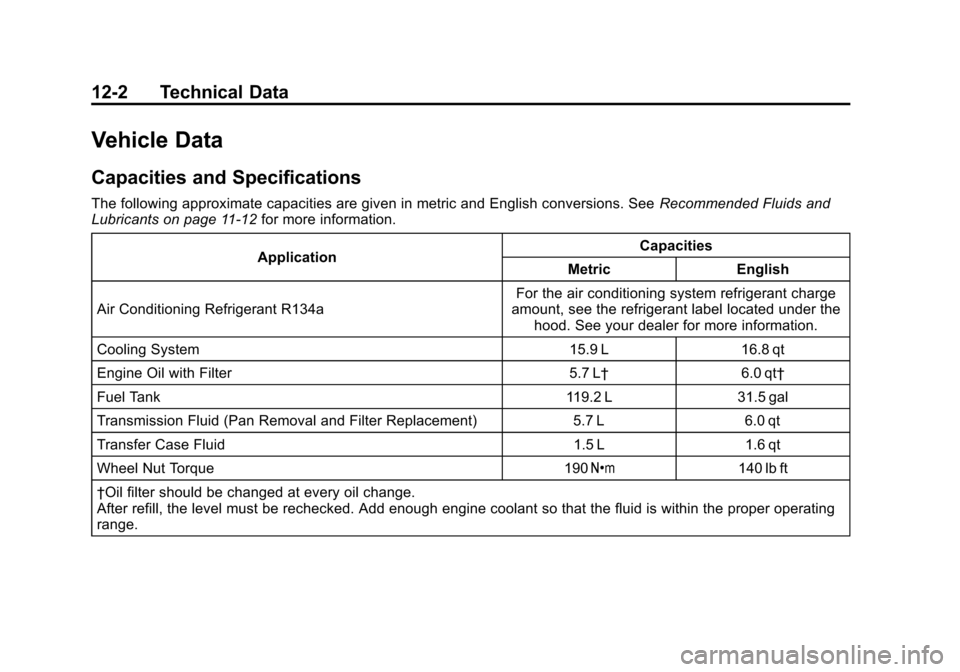
The following approximate capacities are given in metric and English conversions. SeeRecommended Fluids and
Lubricants on page 11‑12 for more information.
Application Capacities
Metric English
Air Conditioning Refrigerant R134a For the air conditioning system refrigerant charge
amount, see the refrigerant label located under the hood. See your dealer for more information.
Cooling System 15.9 L 16.8 qt
Engine Oil with Filter 5.7 L† 6.0 qt†
Fuel Tank 119.2 L 31.5 gal
Transmission Fluid (Pan Removal and Filter Replacement) 5.7 L 6.0 qt
Transfer Case Fluid 1.5 L 1.6 qt
Wheel Nut Torque 190 Y140 lb ft
†Oil filter should be changed at every oil change.
After refill, the level must be rechecked. Add enough engine coolant so that the fluid is within the proper operating
range.
Page 499 of 508

Black plate (3,1)Chevrolet Avalanche Owner Manual - 2012
INDEX i-3
CleaningExterior Care . . . . . . . . . . . . . . . 10-96
Interior Care . . . . . . . . . . . . . . . . 10-99
Climate Control Systems . . . . . . . 8-1 Air Conditioning . . . . . . . . . . . . . . . 8-1
Dual Automatic . . . . . . . . . . . . . . . . 8-4
Heating . . . . . . . . . . . . . . . . . . . . . . . . 8-1
Clock . . . . . . . . . . . . . . . . . . . . . . . . . . . 5-8
Cluster, Instrument . . . . . . . . . . . . 5-11
Collision Damage Repair . . . . . 13-14
Compass . . . . . . . . . . . . . . . . . . . . . . . 5-6
Connections, OnStar
®. . . . . . . . . 14-4
Continuous Damping Control (CDC) . . . . . . . . . . . . . . . . 9-50
Control of a Vehicle . . . . . . . . . . . . . 9-4
Convex Mirrors . . . . . . . . . . . . . . . . 2-20
Coolant Engine . . . . . . . . . . . . . . . . . . . . . . 10-18
Engine TemperatureGauge . . . . . . . . . . . . . . . . . . . . . . 5-14
Cooling System . . . . . . . . . . . . . . . 10-18
Engine Messages . . . . . . . . . . . . 5-37
Courtesy Transportation Program . . . . . . . . . . . . . . . . . . . . . 13-13
Cover
Cargo Panels . . . . . . . . . . . . . . . . . . 4-6 Cruise Control . . . . . . . . . . . . . . . . . 9-51
Light . . . . . . . . . . . . . . . . . . . . . . . . . . 5-26
Cupholders . . . . . . . . . . . . . . . . . . . . . 4-1
Customer Assistance . . . . . . . . . . 13-6 Offices . . . . . . . . . . . . . . . . . . 13-4, 13-5
Text Telephone (TTY)Users . . . . . . . . . . . . . . . . . . . . . . . 13-6
Customer Information Service PublicationsOrdering Information . . . . . . 13-16
Customer Satisfaction
Procedure . . . . . . . . . . . . . . 13-1, 13-3
D
Damage Repair, Collision . . . . . 13-14
Danger, Warnings, andCautions . . . . . . . . . . . . . . . . . . . . . . . . iv
Data Recorders, Event . . . . . . . 13-19
Daytime Running
Lamps (DRL) . . . . . . . . . . . . . . . . . . 6-3
Defensive Driving . . . . . . . . . . . . . . . 9-3
Delayed Locking . . . . . . . . . . . . . . . . 2-8
Devices, Auxiliary . . . . . . . . . . . . . 7-30
Diagnostics, OnStar
®. . . . . . . . . . 14-5
Distracted Driving . . . . . . . . . . . . . . . 9-2
Dome Lamps . . . . . . . . . . . . . . . . . . . 6-7 Door
Ajar Messages . . . . . . . . . . . . . . . 5-37
Delayed Locking . . . . . . . . . . . . . . . 2-8
Locks . . . . . . . . . . . . . . . . . . . . . . . . . . 2-7
Power Locks . . . . . . . . . . . . . . . . . . . 2-8
Drive Belt Routing, Engine . . . . . 12-3
Driver Information Center (DIC) . . . . . . . . . . . . . . . . . 5-26
Driving Characteristics andTowing Tips . . . . . . . . . . . . . . . . . 9-67
Defensive . . . . . . . . . . . . . . . . . . . . . . 9-3
Drunk . . . . . . . . . . . . . . . . . . . . . . . . . . 9-3
For Better Fuel Economy . . . . . 1-26
Highway Hypnosis . . . . . . . . . . . . 9-12
Hill and Mountain Roads . . . . . . 9-12
If the Vehicle is Stuck . . . . . . . . . 9-15
Loss of Control . . . . . . . . . . . . . . . . 9-5
Off-Road . . . . . . . . . . . . . . . . . . . . . . 9-6
Off-Road Recovery . . . . . . . . . . . . 9-5
Vehicle Load Limits . . . . . . . . . . . 9-16
Wet Roads . . . . . . . . . . . . . . . . . . . 9-11
Winter . . . . . . . . . . . . . . . . . . . . . . . . 9-13
Dual Automatic Climate Control System . . . . . . . . . . . . . . . . 8-4